

idoblu
Boss, I scan the QR and ask me DL the chinese apps for ios. It is the only 1 and english right ?
Guide Review & Setup - Xiaomi DaFang IP Cam
Guide Review & Setup - Xiaomi DaFang IP Cam
|
|
 Jun 5 2018, 12:23 PM Jun 5 2018, 12:23 PM
Return to original view | Post
#1
|
 
All Stars
17,018 posts Joined: Jan 2005  
|
idoblu
Boss, I scan the QR and ask me DL the chinese apps for ios. It is the only 1 and english right ? |
|
|
|
|
|
Jun 5 2018, 01:28 PM
Return to original view | Post
#2
|
|
All Stars
17,018 posts Joined: Jan 2005
|
QUOTE(idoblu @ Jun 5 2018, 12:40 PM) Ya mi Home app. Select China server and English Ok boss. Already DL. Go back try the new cam. You can also try Singapore server but not sure if that can work   |
|
|
Jun 6 2018, 12:33 AM
Return to original view | IPv6 | Post
#3
|
|
All Stars
17,018 posts Joined: Jan 2005
|
Have you guys encounter such problem.
Just got the cam yesterday. Time setup, plug in the usb, I hear a click inside. Orange led light up in front the cam. Wait and wait but nothing happen. The light suppose to change to green and will swing left/right ? I check it from youtube. But my unit remain in orange light with stand still for more than an hr. USB plug in/out dozen time. Remain the same. Press the setup button dozen time, no sexy voice.  Wonder the unit have problem out of the box.   |
|
|
Jun 6 2018, 07:49 AM
Return to original view | Post
#4
|
|
All Stars
17,018 posts Joined: Jan 2005
|
QUOTE(idoblu @ Jun 6 2018, 05:07 AM) Is this the setting up stage?or after that? It is setting up stage. Which server did you use? Using mainland China server. iPhone setup side have no problem and everything when smooth. Already at the add in device page where ask to connect cam, wait 15 Sec, press setup bla bla bla. |
|
|
Jun 6 2018, 10:01 AM
Return to original view | Post
#5
|
|
All Stars
17,018 posts Joined: Jan 2005
|
QUOTE(idoblu @ Jun 6 2018, 08:19 AM) is your wifi 2.4ghz or 5ghz? it can only connect to 2.4ghz QUOTE(idoblu @ Jun 6 2018, 08:25 AM) not sure where you are stop but it is suppose to be like this - 2.4ghz. It is maxis broadband and maxis original router. 1. open mi home app and select dafang from the picture list and add it 2. press the reset button at the bottom 3. once you hear the voice, check the circle and press Next 4. it will then ask you to key in the password of your wifi 5. the QR code will appear and you scan it with the dafang. 6. if it is successful - it will ask you select the Location and Name of your device If it is not successful, you will need to redo all the above again. It may take several tries please screenshot the page where you are having trouble Just now try in office. Same problem. Cam orange led light up and nothing happen. Won't change to green and dance around. Office have 2 router. Both in 2.4ghz. Will it auto connect either 1 ?  Here the video I setup at home. Is it same respond condition as the rest unit ? Here setup in office. Same condition as setup at home. Setup procedure follow exactly. I can't even pass the "no.2. Press the reset button at the button". Or probably can't pass before no.1. Confirm choose mainland China  Choose this Dafang . 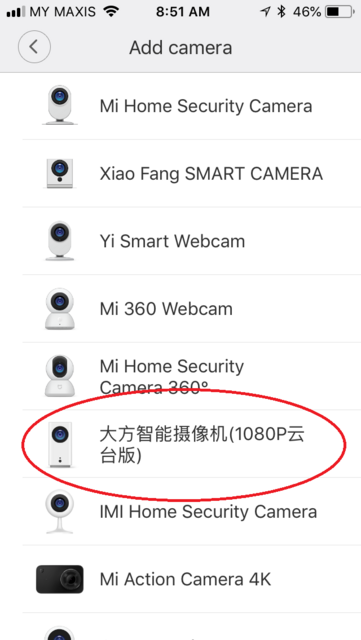 And stuck at here 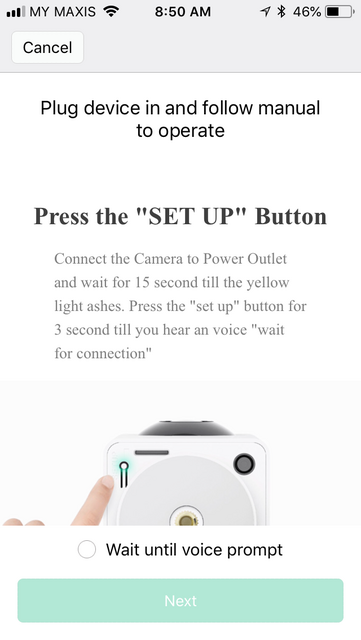 |
|
|
Jun 6 2018, 10:02 AM
Return to original view | Post
#6
|
|
All Stars
17,018 posts Joined: Jan 2005
|
QUOTE(jctasoga @ Jun 6 2018, 08:11 AM) u may want to reset and unplug the unit. let it rest for a few hours or try reinstalling from step 1 the next day. The setup in office is the next day. Same condition.cheers. |
|
|
|
|
|
Jun 6 2018, 10:21 AM
Return to original view | Post
#7
|
|
All Stars
17,018 posts Joined: Jan 2005
|
QUOTE(idoblu @ Jun 6 2018, 10:19 AM) so after you press Reset, there is no voice prompt at all and this is where you cannot continue? Yup. till that level only. Can't move further without the respond from the cam.sounds like you got a bad unit  I suspect the unit is faulty out of the box. |
|
|
Jun 6 2018, 10:33 AM
Return to original view | Post
#8
|
|
All Stars
17,018 posts Joined: Jan 2005
|
QUOTE(idoblu @ Jun 6 2018, 10:22 AM) sorry to hear that. time to call the dealer Damn. 1st time buy Xiaomi gadget, give me bad impression.   Contact the dealer. Ask him come down to exchange another unit for me tomorrow. |
|
|
Jun 6 2018, 10:37 AM
Return to original view | Post
#9
|
|
All Stars
17,018 posts Joined: Jan 2005
|
QUOTE(idoblu @ Jun 6 2018, 10:29 AM) your dafang didnt even turn around when you first plug in the USB power? Already watch few youtube yesterday. should be like this - It should turn green the light and dance. My 1 sitting duck. |
|
|
Jun 7 2018, 10:54 AM
Return to original view | Post
#10
|
|
All Stars
17,018 posts Joined: Jan 2005
|
QUOTE(idoblu @ Jun 6 2018, 11:12 AM) ya i know the feeling. Xiaofang was my first Xiaomi device and I got bad impression too. Boss, can the cam operate or view from PC ?i was skeptical to buy more but here I am with 71 xiaomi IoT devices all working good you just happened to get a bad unit thats all. Not to worry  |
|
|
Jun 7 2018, 11:10 AM
Return to original view | Post
#11
|
|
All Stars
17,018 posts Joined: Jan 2005
|
QUOTE(idoblu @ Jun 7 2018, 10:57 AM) no, only from the Mi Home app Oh, Thought the cam got PC UI which just type the ip from pc can see.but there might be hacks available that will enable you to do this - https://paenatwilai.com/2015/06/07/s/ you got a replacement already? Dealer said stock only arrive today. Tomorrow send to me. See I can post the video here for the 1st setup.  |
|
|
Jul 21 2018, 08:56 PM
Return to original view | IPv6 | Post
#12
|
|
All Stars
17,018 posts Joined: Jan 2005
|
Me too. Haven't update yet. Worry some bug.
|
|
|
Jul 23 2018, 11:54 AM
Return to original view | Post
#13
|
|
All Stars
17,018 posts Joined: Jan 2005
|
Alright. Skip the update.
|
|
|
|
|
|
Aug 9 2018, 04:43 PM
Return to original view | Post
#14
|
|
All Stars
17,018 posts Joined: Jan 2005
|
QUOTE(alucard89 @ Aug 9 2018, 04:28 PM) Anyone know if you can use the camera in ap mode? Basically it doesn't need to connect to the internet/wifi to continuously recording Normally I setup the recording by time or day, than click start from the phone. Let it record itself. |
|
|
Aug 20 2018, 10:01 AM
Return to original view | Post
#15
|
|
All Stars
17,018 posts Joined: Jan 2005
|
QUOTE(idoblu @ Aug 19 2018, 08:38 AM) Decided to update to the latest 5.5.1.353 and it seems to be able to send me notifications and I can view the motion detected video. I still holding back. I have two Dafang but only updated one but dunno why it shows both Dafangs now updated to latest firmware So far no problem with online and timelapse using. Mostly use for monitor my solar charge battery and 3D print (long print). Lazy to discover others function till when want to use it. |
|
|
Mar 9 2020, 09:40 AM
Return to original view | Post
#16
|
|
All Stars
17,018 posts Joined: Jan 2005
|
QUOTE(HMMaster @ Mar 8 2020, 11:32 PM) Just wondering, if my location already set to mainland china, can I still add cameras that are global version? Because currently I'm using a china set, planning to add a global set. When you change to global, if that set is not available in globally, it will grey out. |
| Change to: |  0.0195sec 0.0195sec
 0.38 0.38
 7 queries 7 queries
 GZIP Disabled GZIP Disabled
Time is now: 7th December 2025 - 08:05 AM |
 Quote
Quote