

this is good promotion , i will buy it due lock down issues , for safety use to my home rclxms.gif
D-Link Malaysia Official Thread
D-Link Malaysia Official Thread
|
|
 Mar 26 2020, 05:35 PM Mar 26 2020, 05:35 PM
|
 
Probation
4 posts Joined: Mar 2020 
|
this is good promotion , i will buy it due lock down issues , for safety use to my home rclxms.gif
|
|
|
|
|
|
Mar 30 2020, 02:38 PM
|

Junior Member
67 posts Joined: Oct 2017
|
D-Link Malaysia: Working from Home Essentials - Stay Connected, Productive & Secure
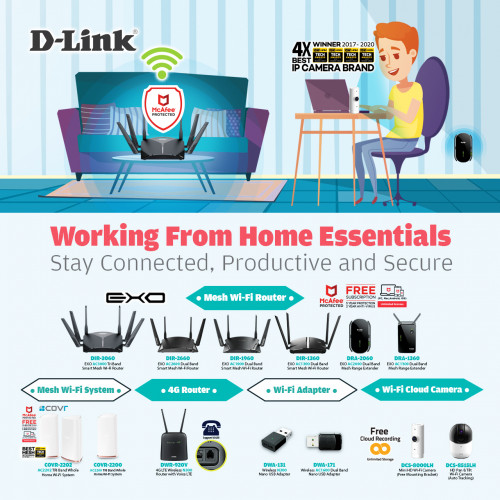 Working from home? D-Link ensure that you are able to stay connected and keep an eye on your loved ones while you stay focused on your work at the same time 📡👁 Smart Mesh Router 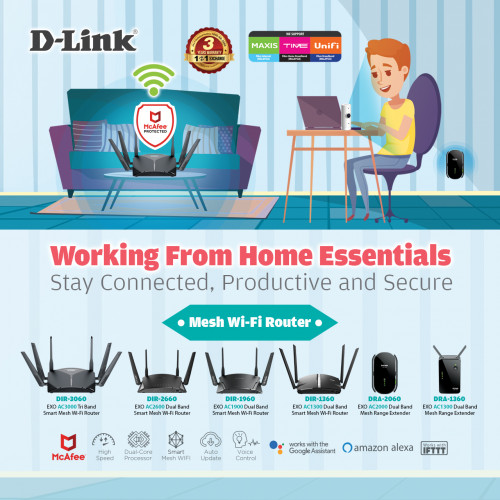 Upgrade to D-Link EXO Smart Mesh Router to enjoy a high speed mesh Wi-Fi and stay protected from viruses with the built-in McAfee antivirus protection. Features: ✅ Smart Mesh Wi-Fi: lets you mix-and match compatible D-Link Wi-Fi Mesh routers and extenders to scale up your mesh Wi-Fi according to your needs. ✅ Free 5-Year + 2 Years McAfee Antivirus Protection for every device connected ✅ Works with Google Assistant or Alexa ✅ Comprehensive Parental Controls Wi-Fi Mesh System 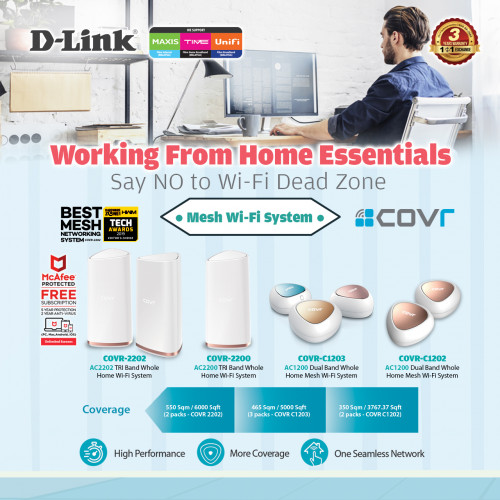 Stay connected with D-Link COVR Mesh Wi-Fi System for a stable, consistent, and truly seamless Wi-Fi. Features: ✅ Wi-Fi Mesh: the powerful mesh solution that gives you perfect Wi-Fi coverage in every corner of your home. ✅ More Coverage: with coverage options up to 6000 sq. ft. ✅ One Seamless Network: there's just one wireless network name (SSID) for your entire home, no matter where you are. 4G Router 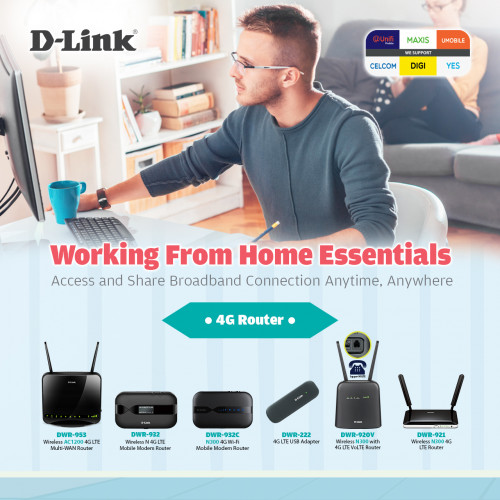 Delivering a fast and reliable network is what we do. Access and share broadband connection anytime, anywhere with D-Link 4G routers. Wi-Fi Adapter 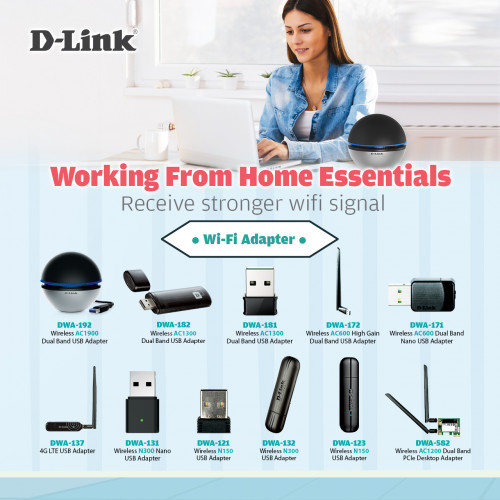 Get a better and stronger Wi-Fi signal with D-Link Wi-Fi Adapters. Wi-Fi Cloud Camera 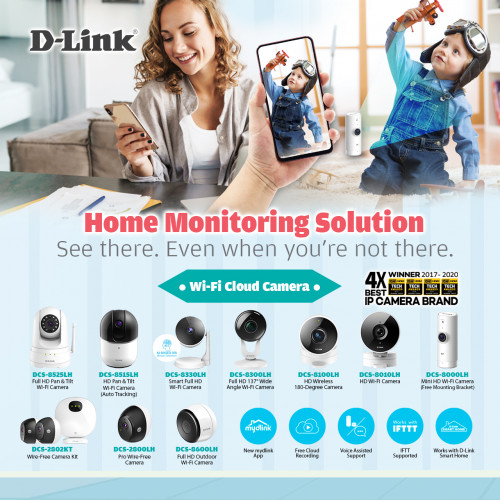 Keep an eye on your loved ones while you stay focused on your work at the same time with D-Link Wi-Fi Cloud Cameras! 📡👁 Features: ✅ Day & night vision ✅ Motion & Sound detection ✅ View and manage your camera remotely using the mydlink app ✅ Free cloud recording ✅ Easy setup 🛒 Shop now: ➡️ Lazada: https://www.lazada.com.my/shop/d-link-official-store/ ➡️ Shopee: https://shopee.com.my/dlink.os For more information: D-Link Malaysia Official Facebook D-Link Malaysia Official Website |
|
|
Mar 30 2020, 02:50 PM
Show posts by this member only | IPv6 | Post
#463
|
|
Probation
3 posts Joined: Mar 2020
|
Used the D-Link EXO Mesh Router before, has POWERFULL PROCESSOR AND CAN ADD ON MESH EXTENDER FOR EXTEND COVERAGE
And their IP cam is EASY SETTING AND CAN USE APP SEE THE CLOUD RECORD👍👍 |
|
|
Mar 30 2020, 02:57 PM
Show posts by this member only | IPv6 | Post
#464
|
|
Probation
4 posts Joined: Mar 2020
|
one of my best solution because , it save the cost and giving a best performance aswell . worth every bucks .👍🏽👍🏽👍🏽
|
|
|
Mar 31 2020, 09:13 PM
|
|
Junior Member
9 posts Joined: Feb 2010
|
QUOTE(D-Link @ Mar 30 2020, 02:38 PM) D-Link Malaysia: Working from Home Essentials - Stay Connected, Productive & Secure Hi. I spoilt my power adapter for my routher D-Link DiR842 C2. Can i know the power pin to connect to the router is how many mm ? 2.1mm / 1.35mm or something else. Thanx for reply. TqWorking from home? D-Link ensure that you are able to stay connected and keep an eye on your loved ones while you stay focused on your work at the same time 📡👁 Smart Mesh Router Upgrade to D-Link EXO Smart Mesh Router to enjoy a high speed mesh Wi-Fi and stay protected from viruses with the built-in McAfee antivirus protection. Features: ✅ Smart Mesh Wi-Fi: lets you mix-and match compatible D-Link Wi-Fi Mesh routers and extenders to scale up your mesh Wi-Fi according to your needs. ✅ Free 5-Year + 2 Years McAfee Antivirus Protection for every device connected ✅ Works with Google Assistant or Alexa ✅ Comprehensive Parental Controls Wi-Fi Mesh System Stay connected with D-Link COVR Mesh Wi-Fi System for a stable, consistent, and truly seamless Wi-Fi. Features: ✅ Wi-Fi Mesh: the powerful mesh solution that gives you perfect Wi-Fi coverage in every corner of your home. ✅ More Coverage: with coverage options up to 6000 sq. ft. ✅ One Seamless Network: there's just one wireless network name (SSID) for your entire home, no matter where you are. 4G Router Delivering a fast and reliable network is what we do. Access and share broadband connection anytime, anywhere with D-Link 4G routers. Wi-Fi Adapter Get a better and stronger Wi-Fi signal with D-Link Wi-Fi Adapters. Wi-Fi Cloud Camera Keep an eye on your loved ones while you stay focused on your work at the same time with D-Link Wi-Fi Cloud Cameras! 📡👁 Features: ✅ Day & night vision ✅ Motion & Sound detection ✅ View and manage your camera remotely using the mydlink app ✅ Free cloud recording ✅ Easy setup 🛒 Shop now: ➡️ Lazada: https://www.lazada.com.my/shop/d-link-official-store/ ➡️ Shopee: https://shopee.com.my/dlink.os For more information: D-Link Malaysia Official Facebook D-Link Malaysia Official Website  |
|
|
Apr 2 2020, 01:19 AM
|

Senior Member
640 posts Joined: Mar 2006 From: S.Jaya, Selangor
|
Does any one here use The DIR-1360 or DIR-2660 Router facing google / YouTube / gmail unable to access and bad WiFi signal
|
|
|
|
|
|
Apr 3 2020, 07:12 PM
|

Senior Member
1,725 posts Joined: Jan 2003
|
DIR-842 Firmware Release Notes
Firmware: 3.13B09 Hotfix Hardware: Cx Date: December 23, 2019 Problems Resolved: - CVE-2019-18852 - Hard-coded telnet credentials 3rd Party Report Information:- https://nvd.nist.gov/vuln/detail/CVE-2019-18852 DISCLAIMER: Please note that this is a device beta software, beta firmware, or hot-fix release which is still undergoing final testing before its official release. The beta software, beta firmware, or hot-fix is provided on an “as is” and “as available” basis and the user assumes all risk and liability for use thereof. D-Link does not provide any warranties, whether express or implied, as to the suitability or usability of the beta firmware. D-Link will not be liable for any loss, whether such loss is direct, indirect, special or consequential, suffered by any party as a result of their use of the beta firmware. ftp://ftp2.dlink.com/SECURITY_ADVISEMENTS...3B09_HOTFIX.pdf ftp://ftp2.dlink.com/SECURITY_ADVISEMENTS...3B09_HOTFIX.zip https://support.dlink.com/ProductInfo.aspx?m=DIR-842 D-Link Corporation confidential DIR-842 Firmware Release Notes Firmware: FW v3.13 Hardware: Rev. C x Data:2019/11/1 Note: • The firmware version is advanced to v3.1 3 • The firmware v3.1 3 must be upgraded from the transitional version of firmware v3.02 b03 _middle Problem Resolved: • Fix ipv6 issue in special environment Enhancements: • Support WPA3/ SAE • Force user to setup admin password during wizard flow. • Support tftpd64. ---------------------- END ---------------------- http://pmdap.dlink.com.tw/PMD/GetAgileFile...0724E7;27239.0; http://pmdap.dlink.com.tw/PMD/GetAgileFile...0724E7;27239.0; D-Link Corporation confidential DIR-842 Firmware Release Notes Firmware: FW v3.02 Hardware: Rev. C x Data:2018/07/20 Note: The firmware v3.02 is the transitiona l version for upgrading to v3.10b005 or later version. ---------------------- END ---------------------- http://pmdap.dlink.com.tw/PMD/GetAgileFile...7575E7;13898.0; http://pmdap.dlink.com.tw/PMD/GetAgileFile...7575E7;13898.0; https://tsd.dlink.com.tw/ should be compatible with unifi D-Link DIR-842, same firmware as from D-Link malaysia website. https://www.dlink.com.my/DIR-842/ https://www.dlink.com.sg/wp-content/uploads...1_FW310b051.zip https://www.dlink.com.my/DIR-842/ Certification ID: WFA70905 Date of Last Certification July 25, 2019 Model Number DIR-842 Product Identifier(s) DIR-843 A1 (SKU) Hardware Version Product: C1, Wi-Fi Component: C1 Firmware Version Product: 3.13, Wi-Fi Component: 3.13 Summary of Certifications PROGRAM Wi-Fi CERTIFIED™ a, b, g, n, ac WPA™ - Personal WPA2™ - Personal WPA3™ - Personal http://certifications.prod.wi-fi.org/pdf/c...ad?cid=WFA70905 This post has been edited by Alpha_Tay: Apr 3 2020, 07:41 PM |
|
|
Apr 6 2020, 03:34 AM
|

Senior Member
4,043 posts Joined: Jul 2010 
|
D-Link 920v, does it able to force lock LTE band?
Using for unifi air. |
|
|
Apr 6 2020, 10:45 AM
|

Newbie
24 posts Joined: Oct 2018
|
Hi guys,
Recently bought a COVR-2202 for my house. I've turned off DNS Relay due to bad experiences in the first few days, however recently my devices will suddenly lose connection to internet (all at the same time). Checking ipconfig shows me that the DNS server has changed to fec0:0:0:ffff::1%1 fec0:0:0:ffff::2%1 fec0:0:0:ffff::3%1 instead of the expected 192168.1.1 What could be the issue? |
|
|
Apr 6 2020, 10:44 PM
|
|
Junior Member
483 posts Joined: Jan 2003 From: some where..some place 
|
hi, bought AC1750, aka DIR842. saw previous post, suggested to factory reset but still no success. anyway to enter the router admin??
first time use, enter blank, not working. tried "admin", tried "password" also not working. factory reset, tried again also not working. i cant setup to change my wifi password. any suggestion to resolve this?? thanks in advance! also. on the packaging, it says its DIR-868L, but the router admin login page says its DIR-842. so in actual, its 842 or 868?? This post has been edited by devil_x: Apr 6 2020, 10:50 PM |
|
|
Apr 7 2020, 03:41 PM
Show posts by this member only | IPv6 | Post
#471
|

Junior Member
67 posts Joined: Jun 2015 
|
QUOTE(devil_x @ Apr 6 2020, 10:44 PM) hi, bought AC1750, aka DIR842. saw previous post, suggested to factory reset but still no success. anyway to enter the router admin?? Check the stickers below the router to confirm which model u havefirst time use, enter blank, not working. tried "admin", tried "password" also not working. factory reset, tried again also not working. i cant setup to change my wifi password. any suggestion to resolve this?? thanks in advance! also. on the packaging, it says its DIR-868L, but the router admin login page says its DIR-842. so in actual, its 842 or 868?? |
|
|
Apr 8 2020, 12:03 AM
|

Junior Member
12 posts Joined: May 2013
|
Hi, I have the DIR-842. 5Ghz sometimes disconnect all devices for like 20 seconds every 1 or 2 hours. 2.4Ghz is okay.
Also when using Plex on my Samsung TV, my connection sometimes drops. Anyone know why? |
|
|
Apr 8 2020, 11:16 AM
|

Senior Member
5,714 posts Joined: Mar 2007
|
QUOTE(Aqils @ Apr 8 2020, 12:03 AM) Hi, I have the DIR-842. 5Ghz sometimes disconnect all devices for like 20 seconds every 1 or 2 hours. 2.4Ghz is okay. Yes, the router is crap unfortunately. Time to change.Also when using Plex on my Samsung TV, my connection sometimes drops. Anyone know why? |
|
|
|
|
|
Apr 8 2020, 01:28 PM
|
|
Newbie
7 posts Joined: May 2008
|
Anybody know how to set up VPN using DIR-868? Would appreciate if you can share.
|
|
|
Apr 11 2020, 06:37 AM
|

Senior Member
1,848 posts Joined: Jan 2003 From: Boleh Land
|
im interested to upgrade my aging router , may i know can DIR-825+ wan support PPPoE mode over my dlink dsl modem for streamyx? currently using tplink 3600 to PPPoE over the dlink modem.
|
|
|
Apr 12 2020, 03:54 AM
|
|
Senior Member
1,848 posts Joined: Jan 2003 From: Boleh Land
|
does @d-link rep reply here anymore ?
|
|
|
Apr 12 2020, 12:24 PM
Show posts by this member only | IPv6 | Post
#477
|
|
Senior Member
1,725 posts Joined: Jan 2003
|
|
|
|
Apr 12 2020, 02:45 PM
|
|
Senior Member
1,848 posts Joined: Jan 2003 From: Boleh Land
|
nvm thx
This post has been edited by Hwoarang45: Apr 13 2020, 01:10 AM |
|
|
Apr 25 2020, 08:36 PM
Show posts by this member only | IPv6 | Post
#479
|
|
Junior Member
138 posts Joined: May 2008
|
Hi. Im using DWR-920v wireless 4g router with digi Infinite 150. The signal here ranging 2-3. Just wonder, if I use this antenna(MIMO 4g antenna), can the signal will be better? (reach 4 bar maybe)
antenna: https://www.youtube.com/watch?v=jSAlruMXq-w |
|
|
May 4 2020, 12:59 PM
|
|
Senior Member
6,447 posts Joined: Jan 2006
|
is DIR868L @ RM85 , Shopee a good buy ?
just need a normal router for normal daily usage..... 1200sf condo with 3 rooms ... current DIR850L cant cover the 3rd room .... hope to use DIR850L as bridging mode .... |
| Change to: |  0.0299sec 0.0299sec
 0.49 0.49
 6 queries 6 queries
 GZIP Disabled GZIP Disabled
Time is now: 5th December 2025 - 11:29 PM |
 Quote
Quote