Welcome Guest ( Log In | Register )

26 Pages « < 23 24 25 26 >Bottom

Outline · [ Standard ] · Linear+

 D-Link Malaysia Official Thread

views
     
Alpha_Tay
post Jun 15 2020, 04:57 PM

Beware The Spammer Star!
******
Senior Member
1,725 posts

Joined: Jan 2003
it seem there is some bug at the unifi D-Link DIR-850L router 2.12TM firmware release at 2019, Dahua imou Ip Camera Cloud Live Stream would Disconnect 99% of time, While LAN and Wifi Live Stream still working 100% of time, but 6 Models, 4 Brands of newer and older generation Ip Camera Cloud Live Stream would still working well 100% of time.

tried to reset and reconfig/setting manually without config backup and upload unifi D-Link DIR-850L router, bug issue still happen.

tried to Enable UPnP: ; IPv4 Multicast Streams: ; IPv6 Multicast Streams: ; Application Level Gateway (ALG) Configuration ; PPTP: ; IPSec (VPN): ; RTSP: ; SIP: ; and Multiple Port Forwarding, work a while and Cloud Disconnect again.

Enable DMZ: work but didn't spend the times to test it for how long, but DMZ work for only single device/IP.

Tested Dahua imou Ip Camera Cloud Live Stream with TP-Link Deco M4 v2 Latest Firmware 190917 , working 100% of time.

more Detail Report here : https://forum.lowyat.net/index.php?showtopi...&#entry97021190

subscribe and install unifi fibre 30mbps at December 2017, the unifi D-Link DIR-850L router came with newer Default Firmware 2.09TM , the Sticker at the plastic router casing and package box bottom has Firmware 2.09TM written, the big multiple Realtek Chipset security issue was fixed with this Default Firmware. never tried to play with different Region firmware upload & install manually with this router, the only firmware upgrade done was 2.10TM and 2.12TM , at router web interface Check for New Firmware.

tried to Flash unifi D-Link DIR-850L with newest international Firmware 2.23 with lastest fixes, 1st Boot to D-Link Router Recovery Mode and flash Middle Firmware DIR850LB1_FW210WWb03.bin , then router web interface Upgrade Manually DIR850LB1_FW220WWb03.bin , then DIR850LB1_FW223WWb01.bin , after that Restore To Factory Default Settings and reconfig/setting manually without config backup and upload.

https://forum.lowyat.net/index.php?showtopi...&#entry86448823

http://forums.dlink.com/index.php?topic=44909.0

ftp://ftp2.dlink.com/SECURITY_ADVISEMENTS...CH_v2.20B03.zip

http://pmdap.dlink.com.tw/PMD/GetAgileFile...3494E7;19623.0;

http://pmdap.dlink.com.tw/PMD/GetAgileFile...0064E7;15877.0;

ftp://ftp2.dlink.com/PRODUCTS/DIR-850L/RE...BM8_WW_BETA.zip

with Latest international Firmware 2.23 , all [Dahua imou Ip Camera Cloud Live Stream would Disconnect 99% of time] issue was gone, now Dahua imou Ip Camera Cloud Cloud Live Stream was working 100% of time, same as all other [6 Models, 4 Brands of newer and older generation Ip Camera Cloud Live Stream would still working well 100% of time.] with all setting turned off [UPnP: ; IPv4 Multicast Streams: ; IPv6 Multicast Streams: ; Application Level Gateway (ALG) Configuration ; PPTP: ; IPSec (VPN): ; RTSP: ; SIP: ; Multiple Port Forwarding ; DMZ]

another issue happen since 2.12TM firmware also gone, System Log E-Mail, now it's also working 100% of time. this issue doesn't happen at 2.10TM firmware.

https://forum.lowyat.net/index.php?showtopi...&#entry92708171

https://forum.lowyat.net/index.php?showtopi...&#entry92708161

https://forum.lowyat.net/index.php?showtopi...&#entry92708142

the D-Link DIR-850L international firmware doesn't have TM TR-069 and other customization, router web interface is much smoother.
stanum
post Jun 16 2020, 12:40 AM

SharePoint enthusiast
*****
Senior Member
706 posts

Joined: Jan 2005


Hi all.
Need help. Just bought COVR-1100 to extend my wifi network with COVR-2202 unfortunately. I cannot extend it. Seems like COVR-1100 are not compatible with COVR-2202. Other way is to create separate network, but i dont want that. All i want is to have all 4 dlink mesh wifi (2x covr-2202 & 2x covr-1100) to work together as unified AP. I am bit frustrated now. Spending a lot of money but didnt get any result that i want. What should i do? Any helpers or guidance to point me to the correct resolution? Tq
DemonKnight
post Aug 23 2020, 03:19 PM

Getting Started
**
Junior Member
238 posts

Joined: Jun 2008
Dlink such a rubbish pruducer should be vanish from earth

This post has been edited by DemonKnight: Aug 23 2020, 03:19 PM
Alpha_Tay
post Aug 25 2020, 01:28 PM

Beware The Spammer Star!
******
Senior Member
1,725 posts

Joined: Jan 2003
QUOTE(Alpha_Tay @ Aug 16 2020, 04:30 AM)
unifi D-Link DIR-850L B1 international firmware 2.23 can reach 800mbps speedtest smoothly without issue, while unifi TP-Link C1200 v1 couldnt do it.

is it due to architecture different even though C1200 has around 36% better CPU?

RTL8197D Lexra RLX5281 500 / 660 MHz

https://forum.openwrt.org/t/support-for-dli...r-850l-b1/68569

https://wikidevi.wi-cat.ru/Realtek/SoC

Broadcom BCM47189B0 900 MHz

http://en.techinfodepot.shoutwiki.com/wiki...cher_C1200_v1.x

https://www.speedtest.net/result/c/7f65af1d...a2-4aa849c7d47d

Test Description DIR-850L
WAN - LAN 910 Mbps
LAN - WAN 907 Mbps
Total Simultaneous 312 Mbps
Maximum Simultaneous Connections 19,705
Firmware Version 1.0.7

https://www.smallnetbuilder.com/wireless/wi...eviewed?start=2
*
miyakochan89
post Sep 23 2020, 08:28 AM

Wut?
*******
Senior Member
6,724 posts

Joined: Aug 2008


Im using Dlink AC2600. Lately i have been having intermittent connection issues with its Wifi, happens on my phone and PC.

PC - streaming stops every 10 minutes until i refresh, gaming keeps getting disconnected, can't connect back until i flush dns.

Phone - video call/call via wifi keeps getting disconnected half way.

What is going on ya?
I am using TIME.

I checked the firmware, there's no further update.

This post has been edited by miyakochan89: Sep 23 2020, 08:29 AM
island
post Oct 6 2020, 02:28 PM

Regular
******
Senior Member
1,731 posts

Joined: Jan 2007


How can I configure the dsl 2750e-v1 work like a repeater? Or bridge with differ dlink model router? I found out dlink website says bridge mode, just not sure what's and how it work?
hengcw
post Jan 18 2021, 08:38 AM

New Member
*
Newbie
4 posts

Joined: Nov 2009
Hi D-Link support
Recently bought D-link DIR1360 to replace old Unifi Router.
Everything run good with easy setup.
Before replace to D-link DIR1360. I'm connect my hypptv box with through WIFI from old Unifi router.
I'm try to setup WIFI connectivity hypptv. But there is no setting for me to do that.
Can you guys add this setting in new firmware? Some D-link router can be done.
taqu
post Jan 18 2021, 01:04 PM

Enthusiast
*****
Junior Member
864 posts

Joined: May 2005
QUOTE(Alpha_Tay @ Jun 15 2020, 04:57 PM)
it seem there is some bug at the unifi D-Link DIR-850L router 2.12TM firmware release at 2019, Dahua imou Ip Camera Cloud Live Stream would Disconnect 99% of time, While LAN and Wifi Live Stream still working 100% of time, but 6 Models, 4 Brands of newer and older generation Ip Camera Cloud Live Stream would still working well 100% of time.

tried to reset and reconfig/setting manually without config backup and upload unifi D-Link DIR-850L router, bug issue still happen.

tried to Enable UPnP: ; IPv4 Multicast Streams: ; IPv6 Multicast Streams: ; Application Level Gateway (ALG) Configuration ; PPTP: ; IPSec (VPN): ; RTSP: ; SIP: ; and Multiple Port Forwarding, work a while and Cloud Disconnect again.

Enable DMZ: work but didn't spend the times to test it for how long, but DMZ work for only single device/IP.

Tested Dahua imou Ip Camera Cloud Live Stream with TP-Link Deco M4 v2 Latest Firmware 190917 , working 100% of time.

more Detail Report here : https://forum.lowyat.net/index.php?showtopi...&#entry97021190

subscribe and install unifi fibre 30mbps at December 2017, the unifi D-Link DIR-850L router came with newer Default Firmware 2.09TM , the Sticker at the plastic router casing and package box bottom has Firmware 2.09TM written, the big multiple Realtek Chipset security issue was fixed with this Default Firmware. never tried to play with different Region firmware upload & install manually with this router, the only firmware upgrade done was 2.10TM and 2.12TM , at router web interface Check for New Firmware.

tried to Flash unifi D-Link DIR-850L with newest international Firmware 2.23 with lastest fixes, 1st Boot to D-Link Router Recovery Mode and flash Middle Firmware DIR850LB1_FW210WWb03.bin , then router web interface Upgrade Manually DIR850LB1_FW220WWb03.bin , then DIR850LB1_FW223WWb01.bin , after that Restore To Factory Default Settings and reconfig/setting manually without config backup and upload.

https://forum.lowyat.net/index.php?showtopi...&#entry86448823

http://forums.dlink.com/index.php?topic=44909.0

ftp://ftp2.dlink.com/SECURITY_ADVISEMENTS...CH_v2.20B03.zip

http://pmdap.dlink.com.tw/PMD/GetAgileFile...3494E7;19623.0;

http://pmdap.dlink.com.tw/PMD/GetAgileFile...0064E7;15877.0;

ftp://ftp2.dlink.com/PRODUCTS/DIR-850L/RE...BM8_WW_BETA.zip

with Latest international Firmware 2.23 , all [Dahua imou Ip Camera Cloud Live Stream would Disconnect 99% of time] issue was gone, now Dahua imou Ip Camera Cloud Cloud Live Stream was working 100% of time, same as all other [6 Models, 4 Brands of newer and older generation Ip Camera Cloud Live Stream would still working well 100% of time.] with all setting turned off [UPnP: ; IPv4 Multicast Streams: ; IPv6 Multicast Streams: ; Application Level Gateway (ALG) Configuration ; PPTP: ; IPSec (VPN): ; RTSP: ; SIP: ; Multiple Port Forwarding ; DMZ]

another issue happen since 2.12TM firmware also gone, System Log E-Mail, now it's also working 100% of time. this issue doesn't happen at 2.10TM firmware.

https://forum.lowyat.net/index.php?showtopi...&#entry92708171

https://forum.lowyat.net/index.php?showtopi...&#entry92708161

https://forum.lowyat.net/index.php?showtopi...&#entry92708142

the D-Link DIR-850L international firmware doesn't have TM TR-069 and other customization, router web interface is much smoother.
*
Dahua have cloud service & app to view your stream outside? My D-Link IP cameras have no issue with port forwarding the last time I use DIR-850L with 2.12 TM firmware. Otherwise I think both are not compatible.
taqu
post Jan 18 2021, 01:08 PM

Enthusiast
*****
Junior Member
864 posts

Joined: May 2005
QUOTE(DemonKnight @ Aug 23 2020, 03:19 PM)
Dlink such a rubbish pruducer should be vanish from earth
*
Agree to some extent. I use their IP cameras without any problem. D-Link DIR-868L default firmware is nothing great until I flashed third-party Tomato firmware biggrin.gif
Alpha_Tay
post Jan 18 2021, 04:01 PM

Beware The Spammer Star!
******
Senior Member
1,725 posts

Joined: Jan 2003
QUOTE(taqu @ Jan 18 2021, 01:04 PM)
Dahua have cloud service & app to view your stream outside? My D-Link IP cameras have no issue with port forwarding the last time I use DIR-850L with 2.12 TM firmware. Otherwise I think both are not compatible.
*
QUOTE(Alpha_Tay @ Jun 15 2020, 04:57 PM)
it seem there is some bug at the unifi D-Link DIR-850L router 2.12TM firmware release at 2019, Dahua imou Ip Camera Cloud Live Stream would Disconnect 99% of time, While LAN and Wifi Live Stream still working 100% of time, but 6 Models, 4 Brands of newer and older generation Ip Camera Cloud Live Stream would still working well 100% of time.
*
rkwan67
post Feb 4 2021, 08:31 PM

Look at all my stars!!
*******
Senior Member
2,455 posts

Joined: Feb 2005
From: --Hidden--


Hi D-Link,

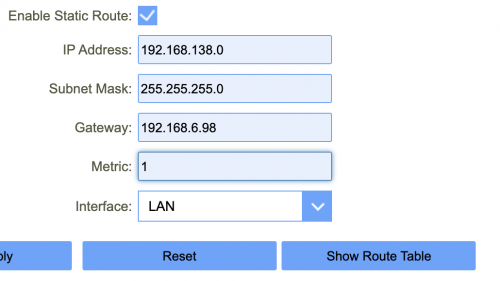
i recently was given D-Link DIR-825M for signing up TM Unifi. however, i have issue with Static route configuration. whenever i enable static route with the following config, the PPPoE will disconnect and never connect again. once i delete my route, and disable static route, then PPPoE would just work.

is this a bug? has it able to resolved via firmware?

Firmware version: HW:A1 FW:DIR-825M_V1.1.7

user posted image
coo|dude
post Feb 6 2021, 12:03 PM

Cool By The Pool!
******
Senior Member
1,064 posts

Joined: Oct 2008


I have DNS-320 sharecenter which I haven't been using for a long time. Today I boot it up and realized it is on a static IP and I am unable to access its configuration page despite entering the IP address on my browser. I am unsure if it is on the subnet or not. So I tried to reset it by clicking on the reset button at the back of the sharecenter but it doesn't seem to reset.

How can I reset it or at least access it's configuration page?


bell2roy
post Feb 11 2021, 10:01 AM

New Member
*
Junior Member
29 posts

Joined: Mar 2015
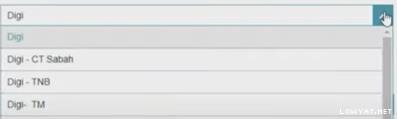
@d-link May I know what is the vlan number settings for digi fiber internet,VOIP,IPTV include(digi,digi-CT Sabah,digi TNB,digi TM)?

Attached Image
Edison83
post Mar 16 2021, 11:36 PM

No Games No Life.
******
Senior Member
1,374 posts

Joined: Jun 2008
From: Red Comet


Do anyone having trouble with the new DIR-X5460??

Problem
1. Keep getting randomly disconnected from the internet and it automatically reconnect later on. There 1 time it took 1 minute to reconnect.
2. Within the 1st 24hours of use, my wifi signal totally gone, but when i check the setting, it was enabled. The fix is just restart the router, however this shouldn't happen anyway.
3. Obviously I bought DIR-X5460, why in setting it was named DIR-X1560?

Is this a known issue or should I get a refund?


[UPDATE] It seems that D-Link themselves flash the wrong firmware on my batch. Download the firmware tsd.dlink.com.tw
Then do manual firmware update, now tested for 12 hours without a single disconnection from the internet (compare from before at least once every hour).
Will report back if the internet connection still unstable otherwise can consider already fixed.

This post has been edited by Edison83: Mar 18 2021, 10:15 AM
Brotherjoe
post Mar 23 2021, 10:39 PM

Look at all my stars!!
*******
Senior Member
2,215 posts

Joined: Jan 2003
From: Ipoh/Penang/PJ/Melaka
Anyone here using openwrt firmware?
https://openwrt.org/toh/start
StevenL
post Apr 19 2021, 01:06 PM

Enthusiast
*****
Junior Member
732 posts

Joined: Jul 2010
D-Link

Hi current DIR-842 provided by TM is 3.06TM dated 29-04-2019. Can i update it to latest Firmware: v3.13B05 per your website? Also will the new firmware allows the router to become a repeater?

Or should i just dump this and get a better latest router with Wifi 6

Thanks!
gc68
post May 5 2021, 04:46 PM

Getting Started
**
Junior Member
132 posts

Joined: Jan 2011

Dual DIR-X5460 in mesh network configuration ?

I heard that D-Link will be releasing an updated firmware that allows multiple DIR-X5460 routers to be configured as a mesh network.

Rumour says that the firmware will be out in June.

Can anyone confirm this ?
gc68
post May 6 2021, 09:18 AM

Getting Started
**
Junior Member
132 posts

Joined: Jan 2011
QUOTE(Edison83 @ Mar 16 2021, 11:36 PM)
Do anyone having trouble with the new DIR-X5460??

Problem
1. Keep getting randomly disconnected from the internet and it automatically reconnect later on. There 1 time it took 1 minute to reconnect.
2. Within the 1st 24hours of use, my wifi signal totally gone, but when i check the setting, it was enabled. The fix is just restart the router, however  this shouldn't happen anyway.
3. Obviously I bought DIR-X5460, why in setting it was named DIR-X1560?

Is this a known issue or should I get a refund?
[UPDATE] It seems that D-Link themselves flash the wrong firmware on my batch. Download the firmware tsd.dlink.com.tw
Then do manual firmware update, now tested for 12 hours without a single disconnection from the internet (compare from before at least once every hour).
Will report back if the internet connection still unstable otherwise can consider already fixed.
*
Thanks for sharing.

I bought the X5460 about the same time as you did. My firmware version is 1.04.

Is your current firmware on v1.10 ?

I just noticed that v1.10 supports Easy Mesh now - just what I was looking for!


gc68
post May 11 2021, 09:55 AM

Getting Started
**
Junior Member
132 posts

Joined: Jan 2011
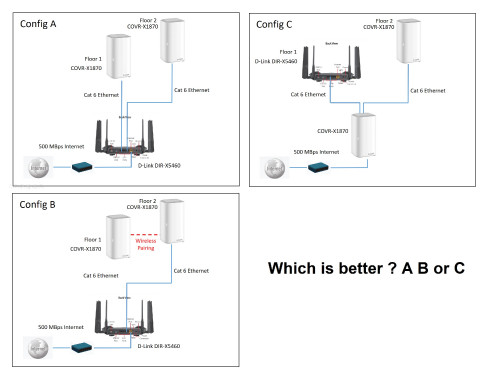
Appreciate your thoughts and comments on these options of set up using D-Link equipment :

1x DIR-X5460

2x COVR 1870

user posted image
ksuuk
post May 15 2021, 08:31 PM

Getting Started
**
Junior Member
56 posts

Joined: May 2012


QUOTE(gc68 @ May 11 2021, 04:55 AM)
Appreciate your thoughts and comments on these options of set up using D-Link equipment :

1x DIR-X5460

2x COVR 1870

user posted image
*
A, as usually router is more powerful and more adjustable and if needed You can change it, or add more accesspoints.


26 Pages « < 23 24 25 26 >Top
 

Change to:
| Lo-Fi Version
0.0410sec    0.66    6 queries    GZIP Disabled
Time is now: 10th December 2025 - 08:39 AM