


This post has been edited by ob8: Sep 3 2008, 02:48 PM
General Vista Discussion - V2, Welcome to the vista-tiam
|
|
 Sep 3 2008, 02:45 PM Sep 3 2008, 02:45 PM
|
 
Junior Member
48 posts Joined: May 2008 From: Vagina   
|
my ram is the culprit. i got serious errors when running mem test.
This post has been edited by ob8: Sep 3 2008, 02:48 PM |
|
|
|
|
|
Sep 3 2008, 03:15 PM
|

Senior Member
6,543 posts Joined: Dec 2004 From: Miri
|
QUOTE(ob8 @ Sep 3 2008, 02:45 PM) my ram is the culprit. i got serious errors when running mem test. ouch... good luck getting it replaced if it still under warranty... |
|
|
Sep 3 2008, 05:21 PM
|
|
Junior Member
48 posts Joined: May 2008 From: Vagina
|
i guess vista is very sensitive to bad hardware unlike xp.
 |
|
|
Sep 4 2008, 12:06 AM
|
 
Moderator
9,275 posts Joined: Jan 2005 From: KL. Best place in Malaysia. Nuff said
|
yes, it's to prevent data corruption
|
|
|
Sep 4 2008, 04:27 PM
|
|
Junior Member
48 posts Joined: May 2008 From: Vagina
|
update on my problem. change to new ram. do memtest on my frens system and ram got no problem. try to install vista but still the error occurs. checksum #$%$@#%.
 is it posible the vista dvd corrupt? i google around and found one or two similar problems. or is it my ide hdd? format my ide already. need to use sata hdd is it is it posible the vista dvd corrupt? i google around and found one or two similar problems. or is it my ide hdd? format my ide already. need to use sata hdd is it  |
|
|
Sep 4 2008, 06:52 PM
|
|
Moderator
9,275 posts Joined: Jan 2005 From: KL. Best place in Malaysia. Nuff said
|
First time I tried it it was on an IDE HDD, so there is no problem
Like I said, ur DVD might have a problem |
|
|
|
|
|
Sep 4 2008, 10:19 PM
|

Senior Member
785 posts Joined: Dec 2007 From: Perth
|
just want to ask how many times can you activate a genuine windows CD-key?
say, reformat windows and re-installing windows. |
|
|
Sep 4 2008, 11:26 PM
|
|
Moderator
9,275 posts Joined: Jan 2005 From: KL. Best place in Malaysia. Nuff said
|
unlimited? as long as it's the same PC
|
|
|
Sep 5 2008, 03:10 AM
|

Senior Member
826 posts Joined: Dec 2006 From: around kaybee
|
hi..wanna ask how to delete this file??

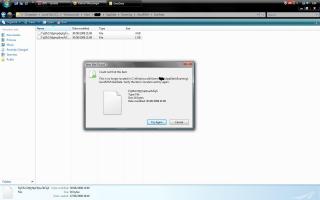
no matter how i try,cant delete it!safe mode oso cant..any other way??just upgraded from vista ultimatex86 to x64..cant delete folder window.old because of that file..someone help me..wanna make my drive C: clean.. |
|
|
Sep 5 2008, 08:27 AM
|
|
Senior Member
6,543 posts Joined: Dec 2004 From: Miri
|
QUOTE(DunkyKung @ Sep 5 2008, 03:10 AM) hi..wanna ask how to delete this file?? You can try Unlocker, this tool can delete files when you're rebooting Windows:
no matter how i try,cant delete it!safe mode oso cant..any other way??just upgraded from vista ultimatex86 to x64..cant delete folder window.old because of that file..someone help me..wanna make my drive C: clean.. CODE http://www.softpedia.com/get/System/System-Miscellaneous/Unlocker.shtml |
|
|
Sep 5 2008, 10:07 AM
|
|
Senior Member
785 posts Joined: Dec 2007 From: Perth
|
QUOTE(linkinstreet @ Sep 4 2008, 11:26 PM) unlimited? as long as it's the same PC oh okay, cheers  |
|
|
Sep 5 2008, 04:11 PM
|

Senior Member
517 posts Joined: Aug 2007 From: Melaka
|
Unlocker will not do, that problem is not caused by 'some program are using the file'. Rather, i got this problem when i tried to delete an 'already deleted' file on desktop, it seems that Vista doesn't update the status of the file so it appears as it is still on your computer. I refresh the screen and it's gone. But for your case i think it's not that simple, the file name seems to contain invalid characters so Vista cannot recognize it.
Guess you have to go back to the source of the file in order to figure out what's causing the name to contain invalid characters. |
|
|
Sep 5 2008, 06:04 PM
|
|
Moderator
9,275 posts Joined: Jan 2005 From: KL. Best place in Malaysia. Nuff said
|
QUOTE(caspersky @ Sep 5 2008, 04:11 PM) Unlocker will not do, that problem is not caused by 'some program are using the file'. Rather, i got this problem when i tried to delete an 'already deleted' file on desktop, it seems that Vista doesn't update the status of the file so it appears as it is still on your computer. I refresh the screen and it's gone. But for your case i think it's not that simple, the file name seems to contain invalid characters so Vista cannot recognize it. Ah the stupid problem. I usually delete it using DOS. Turn off explorer first thoGuess you have to go back to the source of the file in order to figure out what's causing the name to contain invalid characters. |
|
|
|
|
|
Sep 5 2008, 10:06 PM
|

Junior Member
11 posts Joined: Sep 2008
|
hi all.. Help me plz..
Can i install and activate vista business (which it is originally come from Dell laptop but the user downgrade it to XP) to my hp laptop.. Thanks  |
|
|
Sep 5 2008, 11:08 PM
|

Senior Member
22,158 posts Joined: Aug 2008 From: Singapore
|
in that case, u'll need to format and reinstall XP into the laptop...
MS only allow either of the 2 OS to exist at any one time with the same CD Key... This post has been edited by astria: Sep 5 2008, 11:08 PM |
|
|
Sep 5 2008, 11:16 PM
|
|
Moderator
9,275 posts Joined: Jan 2005 From: KL. Best place in Malaysia. Nuff said
|
QUOTE(sazlee @ Sep 5 2008, 10:06 PM) hi all.. Help me plz.. You still got the key? Install Vista, without putting the key in. Then when you activate, call microsoft and give then some excuse, and they will give you the activation unlock key. This will only work if you never use the Vista on the old laptop. And remember, now the key is binded to the new PC/Laptop that you installed it on.Can i install and activate vista business (which it is originally come from Dell laptop but the user downgrade it to XP) to my hp laptop.. Thanks |
|
|
Sep 5 2008, 11:18 PM
|
|
Senior Member
826 posts Joined: Dec 2006 From: around kaybee
|
QUOTE(caspersky @ Sep 5 2008, 04:11 PM) Unlocker will not do, that problem is not caused by 'some program are using the file'. Rather, i got this problem when i tried to delete an 'already deleted' file on desktop, it seems that Vista doesn't update the status of the file so it appears as it is still on your computer. I refresh the screen and it's gone. But for your case i think it's not that simple, the file name seems to contain invalid characters so Vista cannot recognize it. haih..try all method..except dos one,koz i dunno how..the only easy way is to reformat it..now using lanun xp...bye2 vista.. Guess you have to go back to the source of the file in order to figure out what's causing the name to contain invalid characters. |
|
|
Sep 5 2008, 11:23 PM
|
|
Moderator
9,275 posts Joined: Jan 2005 From: KL. Best place in Malaysia. Nuff said
|
QUOTE(DunkyKung @ Sep 5 2008, 11:18 PM) haih..try all method..except dos one,koz i dunno how..the only easy way is to reformat it..now using lanun xp...bye2 vista.. DOS deleting is simple. Turn off explorer.exe first using task manager. Now using DOS, go to the directory that the file is in. Use "CD" to change the directory, eg: to go to C:/example folder, at the command prompt, type C:>cd "example folder" and press enterto delete a file, use the "del" function with the tags /f (force delete) |
|
|
 Sep 6 2008, 11:44 AM Sep 6 2008, 11:44 AM
|
|
Junior Member
11 posts Joined: Sep 2008
|
QUOTE(linkinstreet @ Sep 5 2008, 11:16 PM) You still got the key? Install Vista, without putting the key in. Then when you activate, call microsoft and give then some excuse, and they will give you the activation unlock key. This will only work if you never use the Vista on the old laptop. And remember, now the key is binded to the new PC/Laptop that you installed it on. Yes, I have the product key with me.. That mean I do not need to contact MS lah.. Thank for your advice. |
|
|
Sep 6 2008, 12:25 PM
|

Senior Member
1,521 posts Joined: Jan 2003 From: Kuala Lumpur
|
vista ultimate for me
doing great so far |
| Change to: |  0.0319sec 0.0319sec
 0.66 0.66
 6 queries 6 queries
 GZIP Disabled GZIP Disabled
Time is now: 11th December 2025 - 01:25 PM |
 Quote
Quote