Welcome Guest ( Log In | Register )

249 Pages « < 208 209 210 211 212 > » Bottom

Outline · [ Standard ] · Linear+

 TP-LINK Malaysia Official Thread, Technical Enquiries and Support

views
     
afif92
post Aug 18 2022, 01:26 AM

Casual
***
Junior Member
374 posts

Joined: Mar 2010
QUOTE(blacktubi @ Aug 17 2022, 07:59 PM)
A router ad blocking service cannot block encrypted HTTPS ads unless it blocks the entire domain directly.

Ads vendor are getting pretty smart to evade this as well. Using a PiHole will get most of the ads blocked but the most effective is still on device ads blocking.
*
How about this Firewalla? Is it really working?

https://firewalla.com/
hasmidzul_jojo
post Aug 18 2022, 06:55 AM

Getting Started
**
Junior Member
203 posts

Joined: Feb 2008
QUOTE(koliqv @ Aug 17 2022, 05:24 PM)

Is there anyone have list of url to block ads?
Some of blocklist url.There is more,just for example.

QUOTE
https://raw.githubusercontent.com/badmojr/1Hosts/master/Xtra/domains.txt

QUOTE
https://raw.githubusercontent.com/jerryn70/GoodbyeAds/master/Hosts/GoodbyeAds.txt

QUOTE
https://raw.githubusercontent.com/StevenBlack/hosts/master/hosts

QUOTE
https://www.github.developerdan.com/hosts/lists/ads-and-tracking-extended.txt

QUOTE
https://oisd.nl/includedlists/full

Oltromen Ripot
post Aug 18 2022, 01:22 PM

👍 999999 person Likes this member
*******
Senior Member
4,034 posts

Joined: Dec 2019
(Unifi) I already have M9 Plus deployed with Cat6 backhaul in a Y-shaped relationship with Asus router (switched in middle by -SG108E).

What I like about having M9 Plus is, I can execute speedtest right inside it, through use of Deco app.

--

(Maxis) I have another premise currently with ISP's 3pcs Huawei Easymesh, with 1 of them serving as the gateway router. I can perform basic remote restart/sanity test through MyMaxis app, but, there is no quantitative value indicated, just qualitative "okay", or, unreachable altogether.

As I only spend few hours at the premise every week, I have not performed any rigorous test nor have any method to quantitatively measure and monitor connection from remote.

Except the gateway router node, I am thinking of either connect a single unit of M9 Plus on the LAN side of existing gateway router (will allow me to perform remote speedtest), or, replace the current mesh nodes ecology ALTOGETHER with Deco tri-band nodes (I can't pull Cat6 cable for this one).

(I am not yet replacing the gateway router.)

--

I am leaning towards replacing all mesh nodes with Deco.

What I need to learn first, in order to plan the spread; what exactly is the topology eventually laid out by a group of fully wireless Deco nodes?

Will they auto-connect between themselves with ONLY AIM IS TO BUILD a star topology?

each node is only able to daisy-chain with maximum another 2 nodes "behind" and "in front" of it?

If a middle node fail, will the group auto reconfigure itself to get a new layout?

This post has been edited by Oltromen Ripot: Aug 18 2022, 01:23 PM
nampaknyahebat
post Aug 24 2022, 08:00 PM

Getting Started
**
Junior Member
76 posts

Joined: Oct 2021
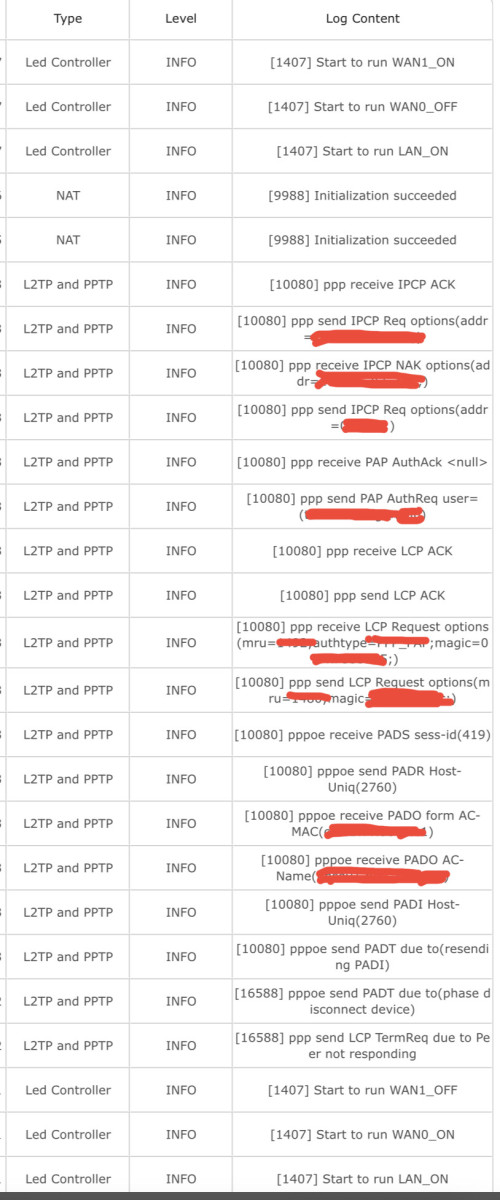
Hi, my router kept disconnecting from time to time and I have attached the system log. Is it my router issue or TM Unifi issue? My router is AX50.

user posted image
B u B u
post Aug 27 2022, 04:03 PM

chill
******
Senior Member
1,479 posts

Joined: Nov 2008


Im on time 500mbps, and currently I have ax73. Which mesh model is good for me to expand wifi coverage?
Oltromen Ripot
post Aug 27 2022, 09:46 PM

👍 999999 person Likes this member
*******
Senior Member
4,034 posts

Joined: Dec 2019
QUOTE(B u B u @ Aug 27 2022, 04:03 PM)
Im on time 500mbps, and currently I have ax73. Which mesh model is good for me to expand wifi coverage?
*
Since this is TP-Link thread, your option is .... Deco 😅

I think almost all of them are capable of wirelessly handling 500Mbps.
If you choose tri-band models, then you get a dedicated 5GHz to serve as wireless backhaul connecting between them; dual-band model will need to share 5Ghz with clients for wireless backhaul.
No need to worry about wireless backhaul, tri-band or dual-band if you connect them all using cable though. But, ....

What you need to watch out for is the cabled Ethernet port speed of the model you choose as you will either need to connect it between Decos, or to your existing router, or, to BTU if you want it to replace router itself.

I would avoid Deco E4; I never checked when I bought last year, before I signed up for fibre. E4R port speed is FastEthernet 100Mbps. That will not be able to handle 500Mbps.
B u B u
post Aug 28 2022, 07:27 PM

chill
******
Senior Member
1,479 posts

Joined: Nov 2008


QUOTE(Oltromen Ripot @ Aug 27 2022, 09:46 PM)
Since this is TP-Link thread, your option is .... Deco 😅

I think almost all of them are capable of wirelessly handling 500Mbps.
If you choose tri-band models, then you get a dedicated 5GHz to serve as wireless backhaul connecting between them; dual-band model will need to share 5Ghz with clients for wireless backhaul.
No need to worry about wireless backhaul, tri-band or dual-band if you connect them all using cable though. But, ....

What you need to watch out for is the cabled Ethernet port speed of the model you choose as you will either need to connect it between Decos, or to your existing router, or, to BTU if you want it to replace router itself.

I would avoid Deco E4; I never checked when I bought last year, before I signed up for fibre. E4R port speed is FastEthernet 100Mbps. That will not be able to handle 500Mbps.
*
Should I get the re605x or the x20?
Pair with my ax73

Tq
FusionXY
post Aug 28 2022, 08:36 PM

LAZZIE ON VACATION
*******
Senior Member
3,836 posts

Joined: Aug 2016

QUOTE(B u B u @ Aug 28 2022, 07:27 PM)
Should I get the re605x or the x20?
Pair with my ax73

Tq
*
AX73 can pair with repeater not mesh like Deco.
B u B u
post Aug 28 2022, 09:51 PM

chill
******
Senior Member
1,479 posts

Joined: Nov 2008


QUOTE(FusionXY @ Aug 28 2022, 08:36 PM)
AX73 can pair with repeater not mesh like Deco.
*
So the best option I have for my ax73 is to add re605x correct? Tq
FusionXY
post Aug 28 2022, 10:07 PM

LAZZIE ON VACATION
*******
Senior Member
3,836 posts

Joined: Aug 2016

QUOTE(B u B u @ Aug 28 2022, 09:51 PM)
So the best option I have for my ax73 is to add re605x correct? Tq
*
Yup. That's the limitation of one mesh system.
Deco mesh system is separate thing.
DannyChok
post Sep 1 2022, 01:23 PM

Getting Started
**
Junior Member
141 posts

Joined: Jan 2008
From: Sabah, (Tawau)


im on Maxis 300mbps with wifi6 router (provided by Maxis). Is it wise to replace the router to Tplink M9plus(old) to extend the wifi coverage?

This post has been edited by DannyChok: Sep 1 2022, 01:24 PM
phh9310
post Sep 1 2022, 01:37 PM

On my way
****
Senior Member
663 posts

Joined: Oct 2010
From: Penang Island


QUOTE(DannyChok @ Sep 1 2022, 01:23 PM)
im on Maxis 300mbps with wifi6 router (provided by Maxis). Is it wise to replace the router to Tplink M9plus(old) to extend the wifi coverage?
*
go add this easymesh by maxis

https://www.maxis.com.my/en/devices/wifi-6-easymesh/

monthly just add rm12.50 x 24 months contract under zerolution
19 Degree South
post Sep 15 2022, 12:27 AM

Regular
******
Senior Member
1,689 posts

Joined: Oct 2012
just wanna ask, can M4 pair with wifi 6 router? coz unifi is giving a new router as i had upgraded my wifi speed to 500 mbps. if cannot then i just stick with the old wifi 5 router.
Oltromen Ripot
post Sep 15 2022, 01:10 AM

👍 999999 person Likes this member
*******
Senior Member
4,034 posts

Joined: Dec 2019
QUOTE(19 Degree South @ Sep 15 2022, 12:27 AM)
just wanna ask, can M4 pair with wifi 6 router? coz unifi is giving a new router as i had upgraded my wifi speed to 500 mbps. if cannot then i just stick with the old wifi 5 router.
*
Maybe should put FAQ up front and center:
Deco is TP-Link's proprietary technology that is not compatible to mesh with non-Deco.
19 Degree South
post Sep 15 2022, 08:12 AM

Regular
******
Senior Member
1,689 posts

Joined: Oct 2012
QUOTE(Oltromen Ripot @ Sep 15 2022, 01:10 AM)
Maybe should put FAQ up front and center:
Deco is TP-Link's proprietary technology that is not compatible to mesh with non-Deco.
*
sorry didn't get you. i am currently pairing M4 with unifi 's old wifi 5 router.
PRSXFENG
post Sep 15 2022, 08:53 AM

Look at all my stars!!
*******
Senior Member
2,616 posts

Joined: Nov 2020


QUOTE(19 Degree South @ Sep 15 2022, 08:12 AM)
sorry didn't get you. i am currently pairing M4 with unifi 's old wifi 5 router.
*
So, you're currently doing this setup?

ONT/Modem -> TM Provided Router -> Deco Mesh and nodes
This is what tm recommends but it's flawed as your original tm router is still broadcasting wifi and causing conflicts.

Consider
ONT/Modem -> Deco Mesh
There are guides online if you search for deco mesh PPPoE setup
Do note that if you use the old Unifi TV Box that plugs into lan4/vlan600 things might be a bit more complicated.

If you want to just upgrade to your new wifi 6 router by tm, you could just repeat your current setup
ONT/Modem -> TM wifi 6 router -> Deco Mesh
But uhhhh... Mixing wifi 6 alongside this seems messy 😅

These new routers do have a mesh standard, wifi alliance easymesh, but not compatible with deco

This post has been edited by PRSXFENG: Sep 15 2022, 08:54 AM
19 Degree South
post Sep 15 2022, 09:00 AM

Regular
******
Senior Member
1,689 posts

Joined: Oct 2012
QUOTE(PRSXFENG @ Sep 15 2022, 08:53 AM)
So, you're currently doing this setup?

ONT/Modem -> TM Provided Router -> Deco Mesh and nodes
This is what tm recommends but it's flawed as your original tm router is still broadcasting wifi and causing conflicts.

Consider
ONT/Modem -> Deco Mesh
There are guides online if you search for deco mesh PPPoE setup
Do note that if you use the old Unifi TV Box that plugs into lan4/vlan600 things might be a bit more complicated.

If you want to just upgrade to your new wifi 6 router by tm, you could just repeat your current setup
ONT/Modem -> TM wifi 6 router -> Deco Mesh
But uhhhh... Mixing wifi 6 alongside this seems messy 😅

These new routers do have a mesh standard, wifi alliance easymesh, but not compatible with deco
*
thanks for the heads up. my current set uP ok wor. managed to get near max speed. what i meant was if i changed the router to wifi 6 , can my M4 pair with it? coz my svcloud tv box is using the ancient tech, laugh.gif so my option would be to buy a set of new deco if i want to use wifi 6 router or i could just use back the wifi 5 router coz i think M4 can sapport up to 800 mbps.
Oltromen Ripot
post Sep 15 2022, 12:57 PM

👍 999999 person Likes this member
*******
Senior Member
4,034 posts

Joined: Dec 2019
QUOTE(19 Degree South @ Sep 15 2022, 08:12 AM)
sorry didn't get you. i am currently pairing M4 with unifi 's old wifi 5 router.
*
QUOTE(19 Degree South @ Sep 15 2022, 09:00 AM)
thanks for the heads up.  my current set uP ok wor. managed to get near max speed. what i meant was if i changed the router to wifi 6 , can my M4 pair with it? coz my svcloud tv box is using the ancient tech, laugh.gif  so my option would be to buy a set of new deco if i want to use wifi 6 router or i could just use back the wifi 5 router coz i think M4 can sapport up to 800 mbps.
*
so, how did you link old 5 with Deco all this while?
LAN-to-LAN cable, right?

19 Degree South
post Sep 15 2022, 01:11 PM

Regular
******
Senior Member
1,689 posts

Joined: Oct 2012
QUOTE(Oltromen Ripot @ Sep 15 2022, 12:57 PM)
so, how did you link old 5 with Deco all this while?
LAN-to-LAN cable, right?
*
one deco node connect to existing wifi 5 router at ground floor and the other node on the first floor. managed to get the whole house covered through 5g connection. my worry is if i switch to wifi 6 router, i may have to get a new set of deco. but reading through the responses given by a few bro, i think i will stick to wifi 5 for the time being .
PRSXFENG
post Sep 15 2022, 01:30 PM

Look at all my stars!!
*******
Senior Member
2,616 posts

Joined: Nov 2020


It will work fine I think

249 Pages « < 208 209 210 211 212 > » Top
 

Change to:
| Lo-Fi Version
0.0251sec    1.17    6 queries    GZIP Disabled
Time is now: 23rd December 2025 - 11:54 AM