Welcome Guest ( Log In | Register )

Bump Topic Topic Closed RSS Feed
121 Pages « < 68 69 70 71 72 > » Bottom

Outline · [ Standard ] · Linear+

 Digi Infinite Fan Club [V2], Infinite 150 and Infinite 80

views
     
captvizcenzo
post Jun 20 2017, 04:49 PM

Regular
******
Senior Member
1,484 posts

Joined: Feb 2009
From: Kuching - Samarahan, Sarawak


QUOTE(fruitie @ Jun 20 2017, 03:17 PM)
It's already activated when it is registered and will start charging you. doh.gif
Can check via MyDigi as well.
*
Yup, I can see it in MyDiGi. I have 867 SMS left, they prorated it right away.

QUOTE(Dozz @ Jun 20 2017, 03:19 PM)
@captvizcenzo

You should be OK to get the replacement SIM from DiGi center now smile.gif
*
Will try and do so after office! Hahaha
ajoi57
post Jun 20 2017, 04:49 PM

On my way
****
Senior Member
530 posts

Joined: Jan 2010
From: South Lehgoland


QUOTE(blacktubi @ Jun 20 2017, 04:38 PM)
LMT devices have the best firmware out there. I flashed the LMT firmware on my E5186 as well.  biggrin.gif
*
u shud make the tutorial on how to flash the firmware biggrin.gif
thenuts15
post Jun 20 2017, 04:54 PM

Casual
***
Junior Member
385 posts

Joined: Oct 2013
I just upgraded my Digi Prepaid to Postpaid Digi Infinite150 just now.
Noted from 1 sms that my International Roaming is self activated.
I went to my portal in MyDigi to deactivate it.

My question is do we need to deactivate it if we not using?

Will there be charges if its activated but we dont use it?

Is it sufficient to just deactivate via myDigi?

Thank you.
TSblacktubi
post Jun 20 2017, 05:00 PM

-
Group Icon
Elite
8,415 posts

Joined: Jul 2008

QUOTE(ajoi57 @ Jun 20 2017, 04:49 PM)
u shud make the tutorial on how to flash the firmware  biggrin.gif
*
Will try and do that during Hari Raya. I manage to find a way but further experiment required.

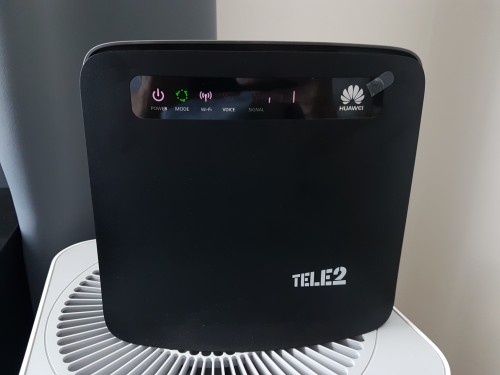
user posted image
Here's how a successful firmware flash looks like.

Edit: The LED will be green.

This post has been edited by blacktubi: Jun 20 2017, 05:13 PM
fruitie
post Jun 20 2017, 05:02 PM

Rise and Shine
Group Icon
Staff
72,842 posts

Joined: Sep 2005
From: KUL

QUOTE(thenuts15 @ Jun 20 2017, 04:54 PM)
I just upgraded my  Digi Prepaid to Postpaid Digi Infinite150 just now.
Noted from 1 sms that my International Roaming is self activated.
I went to my portal in MyDigi to deactivate it.

My question is do we need to deactivate it if we not using?

Will there be charges if its activated but we dont use it?

Is it sufficient to just deactivate via myDigi?

Thank you.
*
International Roaming is not Roam Like Home and Roam Like Home is still free for now.
As for international roaming, if you don't use it in overseas of course no charges. sweat.gif

QUOTE(blacktubi @ Jun 20 2017, 05:00 PM)
Will try and do that during Hari Raya. I manage to find a way but further experiment required.

user posted image
Here's how a successful firmware flash looks like.
*
Same router. biggrin.gif
r-care
post Jun 20 2017, 05:06 PM

Getting Started
**
Junior Member
103 posts

Joined: Jul 2007


QUOTE(blacktubi @ Jun 20 2017, 05:00 PM)
Will try and do that during Hari Raya. I manage to find a way but further experiment required.

user posted image
Here's how a successful firmware flash looks like.
*
succesfully flash firmware & ui using tutorial you shared.
fruitie
post Jun 20 2017, 05:08 PM

Rise and Shine
Group Icon
Staff
72,842 posts

Joined: Sep 2005
From: KUL

QUOTE(r-care @ Jun 20 2017, 05:06 PM)
succesfully flash firmware & ui using tutorial you shared.
*
From my initial reading, it seems quite difficult. Don't dare to try and leave me with no router to use. laugh.gif
Is it difficult? I hope blacktubi can come out with a simpler version for us. tongue.gif
ajoi57
post Jun 20 2017, 05:08 PM

On my way
****
Senior Member
530 posts

Joined: Jan 2010
From: South Lehgoland


QUOTE(blacktubi @ Jun 20 2017, 05:00 PM)
Will try and do that during Hari Raya. I manage to find a way but further experiment required.

user posted image
Here's how a successful firmware flash looks like.
*
what happen to your middle signal bar? go raya already? hmm.gif
TSblacktubi
post Jun 20 2017, 05:12 PM

-
Group Icon
Elite
8,415 posts

Joined: Jul 2008

QUOTE(ajoi57 @ Jun 20 2017, 05:08 PM)
what happen to your middle signal bar?  go raya already? hmm.gif
*
This is firmware flash indicator. Router is in flashing mode now. laugh.gif

QUOTE(r-care @ Jun 20 2017, 05:06 PM)
succesfully flash firmware & ui using tutorial you shared.
*
Can you show a printscreen of the firmware you successfully flashed? Before and after if available.

How many attempt it takes?

QUOTE(fruitie @ Jun 20 2017, 05:08 PM)
From my initial reading, it seems quite difficult. Don't dare to try and leave me with no router to use. laugh.gif
Is it difficult? I hope blacktubi can come out with a simpler version for us. tongue.gif
*
My way will not be much better. More or less the same. Maybe just better instruction on entering the flash mode. sweat.gif
fruitie
post Jun 20 2017, 05:16 PM

Rise and Shine
Group Icon
Staff
72,842 posts

Joined: Sep 2005
From: KUL

QUOTE(blacktubi @ Jun 20 2017, 05:12 PM)
My way will not be much better. More or less the same. Maybe just better instruction on entering the flash mode. sweat.gif
*
That's good enough to kick start. bruce.gif
r-care
post Jun 20 2017, 05:21 PM

Getting Started
**
Junior Member
103 posts

Joined: Jul 2007


QUOTE(blacktubi @ Jun 20 2017, 05:12 PM)

Can you show a printscreen of the firmware you successfully flashed? Before and after if available.

How many attempt it takes?

*
i dont have screenshot before . but here after flashed. took me 4-5 attempt.


Attached thumbnail(s)
Attached Image
r-care
post Jun 20 2017, 05:25 PM

Getting Started
**
Junior Member
103 posts

Joined: Jul 2007


QUOTE(fruitie @ Jun 20 2017, 05:08 PM)
From my initial reading, it seems quite difficult. Don't dare to try and leave me with no router to use. laugh.gif
Is it difficult? I hope blacktubi can come out with a simpler version for us. tongue.gif
*
yes. quite difficult compared to other huawei model.

TSblacktubi
post Jun 20 2017, 05:26 PM

-
Group Icon
Elite
8,415 posts

Joined: Jul 2008

QUOTE(r-care @ Jun 20 2017, 05:21 PM)
i dont have screenshot before . but here after flashed. took me 4-5 attempt.
*
We have the same firmware. biggrin.gif

The guide only manage to flash web UI no matter how long I leave it to run. I guess you have a pretty old firmware previously.
r-care
post Jun 20 2017, 05:31 PM

Getting Started
**
Junior Member
103 posts

Joined: Jul 2007


QUOTE(blacktubi @ Jun 20 2017, 05:26 PM)
We have the same firmware. biggrin.gif

The guide only manage to flash web UI no matter how long I leave it to run. I guess you have a pretty old firmware previously.
*
nope. previously i have 21.28x.xx.xx.xxx firmware.

first to third attempt only updated the web ui.

and i dont really know how i managed to get to latest firmware. tongue.gif thought might be mistake from the info, so i restore factory setting, the latest firmware still there. guess its my lucky day.

this latest firmware quite stable than previous.
TSblacktubi
post Jun 20 2017, 05:36 PM

-
Group Icon
Elite
8,415 posts

Joined: Jul 2008

QUOTE(r-care @ Jun 20 2017, 05:31 PM)
nope. previously i have 21.28x.xx.xx.xxx firmware.

first to third attempt only updated the web ui.

and i dont really know how i managed to get to latest firmware.  tongue.gif  thought might be mistake from the info, so i restore factory setting, the latest firmware still there. guess its my lucky day.

this latest firmware quite stable than previous.
*
I pretty much have the same situation. I agree that the latest firmware is a lot more stable than the old one. tongue.gif

Do you have the same green LED show up in the end? That's how I got it to work.
r-care
post Jun 20 2017, 05:40 PM

Getting Started
**
Junior Member
103 posts

Joined: Jul 2007


QUOTE(blacktubi @ Jun 20 2017, 05:36 PM)
I pretty much have the same situation. I agree that the latest firmware is a lot more stable than the old one. tongue.gif

Do you have the same green LED show up in the end? That's how I got it to work.
*
exactly same. 1st i thought i bricked the router. prepared to try the USB serial method.
peoplemoney
post Jun 20 2017, 05:42 PM

New Member
*
Junior Member
32 posts

Joined: Apr 2017
QUOTE(blacktubi @ Jun 20 2017, 05:26 PM)
We have the same firmware. biggrin.gif

The guide only manage to flash web UI no matter how long I leave it to run. I guess you have a pretty old firmware previously.
*
what are the good things about firmware update and UI change? any speed improvements?
alvpkl
post Jun 20 2017, 06:24 PM

Getting Started
**
Junior Member
124 posts

Joined: Mar 2011


I ordered the Infinite 150 on Sunday and received today.
Below is the result with E5186s-22a with MIMO Antenna:

user posted image
alvpkl
post Jun 20 2017, 06:36 PM

Getting Started
**
Junior Member
124 posts

Joined: Mar 2011


QUOTE(alvpkl @ Jun 20 2017, 06:24 PM)
I ordered the Infinite 150 on Sunday and received today.
Below is the result with E5186s-22a with MIMO Antenna:

user posted image
*
Set to LTE-A B3 + B7 here is the result:

user posted image
ajoi57
post Jun 20 2017, 07:17 PM

On my way
****
Senior Member
530 posts

Joined: Jan 2010
From: South Lehgoland


QUOTE(alvpkl @ Jun 20 2017, 06:36 PM)
Set to LTE-A B3 + B7 here is the result:

user posted image
*
rclxms.gif

121 Pages « < 68 69 70 71 72 > » Top
Topic ClosedOptions
 

Change to:
| Lo-Fi Version
0.0267sec    1.19    6 queries    GZIP Disabled
Time is now: 14th December 2025 - 06:19 AM