Welcome Guest ( Log In | Register )

Bump Topic Topic Closed RSS Feed

Outline · [ Standard ] · Linear+

Unifi Official TM UniFi High Speed Broadband Thread V31, Speed Upgrade Coming Slowly

views
     
chrischiang
post Aug 8 2017, 09:18 AM

Regular
******
Senior Member
1,081 posts

Joined: Oct 2009
QUOTE(doremon @ Aug 8 2017, 09:15 AM)
Of course. You're absolutely right. But surely you should at least have an inputs, ideas, clues and knowledge on how to tackle up this issue by now even before I posted on your comment  tongue.gif .  For now I'm on 30mbps (Pending foc 50mbps) RM169.00. Will try to negotiate further discount soon. Will keep you guys posted.
*
cool.. now im 30mbps with hyppvTv ruby package paying 179.. might find some time go to tmpoint..
muhammadnajmi96
post Aug 8 2017, 11:56 AM

Getting Started
**
Junior Member
233 posts

Joined: Jan 2013
From: Sepang


So this is their answer after I lodged my complaint to MCMC last week..

What's your thought?


Attached thumbnail(s)
Attached Image
crixalisrox
post Aug 8 2017, 12:13 PM

On my way
****
Junior Member
556 posts

Joined: Feb 2008
From: PJ

QUOTE(TheMrBinary @ Aug 8 2017, 05:29 AM)
How about OpenNIC DNS ?
*
Ok , will try it out.

Thanks
prs516
post Aug 8 2017, 02:05 PM

Casual
***
Junior Member
300 posts

Joined: Jan 2007
From: Penang


Just got free speed upgrade from 50Mbps to 100Mbps. I can get full 100-103Mbps download and 50-52Mbps upload when tested using LAN via my Pc. When i tested using wifi AC from my iphone 7plus i can only get 20 to 30Mbps download only but can get 50-52Mbps upload. I'm using Asus RT-AC55UHP. Any thought?
fruitie
post Aug 8 2017, 02:09 PM

Rise and Shine
Group Icon
Staff
72,780 posts

Joined: Sep 2005
From: KUL

QUOTE(prs516 @ Aug 8 2017, 02:05 PM)
Just got free speed upgrade from 50Mbps to 100Mbps. I can get full 100-103Mbps download and 50-52Mbps upload when tested using LAN via my Pc. When i tested using wifi AC from my iphone 7plus i can only get 20 to 30Mbps download only but can get 50-52Mbps upload. I'm using Asus RT-AC55UHP. Any thought?
*
Try changing WiFi channel to 1,6 or 11 if using 2.4GHz. Channel 11 works the best for me in my location.
Malvo
post Aug 8 2017, 03:36 PM

Look at all my stars!!
*******
Senior Member
2,871 posts

Joined: Jan 2003


QUOTE(VeeJay @ Aug 7 2017, 05:12 PM)
Whats the model number of the DLINK and the speed you have now, and number of concurrent connections?
*
dlink 615, about 20mbps and connected to 1 PC.
lcliang
post Aug 8 2017, 04:50 PM

New Member
*
Junior Member
24 posts

Joined: Jun 2010
QUOTE(prs516 @ Aug 8 2017, 03:05 PM)
Just got free speed upgrade from 50Mbps to 100Mbps. I can get full 100-103Mbps download and 50-52Mbps upload when tested using LAN via my Pc. When i tested using wifi AC from my iphone 7plus i can only get 20 to 30Mbps download only but can get 50-52Mbps upload. I'm using Asus RT-AC55UHP. Any thought?
*
I am using 100Mbps as well. Speed test with S8+ with Asus AC68 router able to get full 100-104Mbps download and 50 to 52Mbps upload.
fruitie
post Aug 8 2017, 04:55 PM

Rise and Shine
Group Icon
Staff
72,780 posts

Joined: Sep 2005
From: KUL

QUOTE(lcliang @ Aug 8 2017, 04:50 PM)
I am using 100Mbps as well. Speed test with S8+ with Asus AC68 router able to get full 100-104Mbps download and 50 to 52Mbps upload.
*
It's a common issue with Apple products. I used to have this problem with my iPad.
cucubud
post Aug 8 2017, 05:16 PM

Super Moderator
*******
Senior Member
3,076 posts

Joined: Jan 2008


QUOTE(prs516 @ Aug 8 2017, 02:05 PM)
Just got free speed upgrade from 50Mbps to 100Mbps. I can get full 100-103Mbps download and 50-52Mbps upload when tested using LAN via my Pc. When i tested using wifi AC from my iphone 7plus i can only get 20 to 30Mbps download only but can get 50-52Mbps upload. I'm using Asus RT-AC55UHP. Any thought?
*
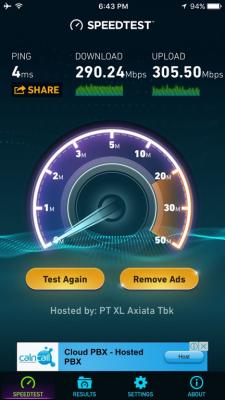
This is strange.
I tested iPhone 6S on 5GHz WiFi with D-Link DIR 868L router in Singapore.
It can reach to about 300Mbps upload and download speed.
Attached Image
VeeJay
post Aug 8 2017, 05:23 PM

Look at all my stars!!
*******
Senior Member
3,845 posts

Joined: Aug 2005


QUOTE(Malvo @ Aug 8 2017, 03:36 PM)
dlink 615, about 20mbps and connected to 1 PC.
*
Dlink615 is a 2.4Ghz router, hence the only thing i could suggest is to check the channel setting on the router.
Use Wifi Analyzer on your cellphone to determine the best channel (not congested) and do your speed check.
prs516
post Aug 8 2017, 05:47 PM

Casual
***
Junior Member
300 posts

Joined: Jan 2007
From: Penang


QUOTE(cucubud @ Aug 8 2017, 05:16 PM)
This is strange.
I tested iPhone 6S on 5GHz WiFi with D-Link DIR 868L router in Singapore.
It can reach to about 300Mbps upload and download speed.
Attached Image
*
Yes it is strange. When i install the router that the installer gave to me(D-Link DIR-850L) and test the 5GHz wifi, i can get full speed 108Mbps download & 51Mbps upload without any problem using the same iphone.
Ckmwpy0370
post Aug 8 2017, 05:52 PM

Look at all my stars!!
*******
Senior Member
3,821 posts

Joined: May 2016
QUOTE(prs516 @ Aug 8 2017, 02:05 PM)
Just got free speed upgrade from 50Mbps to 100Mbps. I can get full 100-103Mbps download and 50-52Mbps upload when tested using LAN via my Pc. When i tested using wifi AC from my iphone 7plus i can only get 20 to 30Mbps download only but can get 50-52Mbps upload. I'm using Asus RT-AC55UHP. Any thought?
*
any others device sharing the Wifi besides on you Iphone 7+?
prs516
post Aug 8 2017, 05:53 PM

Casual
***
Junior Member
300 posts

Joined: Jan 2007
From: Penang


QUOTE(Ckmwpy0370 @ Aug 8 2017, 05:52 PM)
any others device sharing the Wifi besides on you Iphone 7+?
*
Nope. Only my phone.
cucubud
post Aug 8 2017, 06:02 PM

Super Moderator
*******
Senior Member
3,076 posts

Joined: Jan 2008


QUOTE(prs516 @ Aug 8 2017, 05:47 PM)
Yes it is strange. When i install the router that the installer gave to me(D-Link DIR-850L) and test the 5GHz wifi, i can get full speed 108Mbps download & 51Mbps upload without any problem using the same iphone.
*
If that is the case, check your Asus router settings.
prs516
post Aug 8 2017, 06:18 PM

Casual
***
Junior Member
300 posts

Joined: Jan 2007
From: Penang


QUOTE(cucubud @ Aug 8 2017, 06:02 PM)
If that is the case, check your Asus router settings.
*
Yes i think my asus router got problem. Factory reset it but when i try to set it up i got error that my unifi username and password is wrong which is false because i can use the same username and password to setup the d-link dir-850l without any problem.

This post has been edited by prs516: Aug 8 2017, 06:19 PM
duckaton
post Aug 8 2017, 06:58 PM

Progress is Imminent
******
Senior Member
1,216 posts

Joined: Mar 2009
From: Cut Throat Land
QUOTE(prs516 @ Aug 8 2017, 05:47 PM)
Yes it is strange. When i install the router that the installer gave to me(D-Link DIR-850L) and test the 5GHz wifi, i can get full speed 108Mbps download & 51Mbps upload without any problem using the same iphone.
*
Your answer right there.
no reason full speed with other router but asus cannot.

If you ask asus, they will tell you it is 2.4ghz interference.
wrong setting, ask you change channel, move position, disable ipv6, tok kok sing song.
end up rma take few months
same thing after that, ask you change more expensive model.
boycott asus long ago edi
prs516
post Aug 8 2017, 07:09 PM

Casual
***
Junior Member
300 posts

Joined: Jan 2007
From: Penang


QUOTE(duckaton @ Aug 8 2017, 06:58 PM)
Your answer right there.
no reason full speed with other router but asus cannot.

If you ask asus, they will tell you it is 2.4ghz interference.
wrong setting, ask you change channel, move position, disable ipv6, tok kok sing song.
end up rma take few months
same thing after that, ask you change more expensive model.
boycott asus long ago edi
*
Waiting for reply from Asus thread. Hopefully can resolve the problem after rma. Thanks for sharing your experience. Appreciate it.
acapniamaxtor
post Aug 8 2017, 07:32 PM

Getting Started
**
Junior Member
131 posts

Joined: Nov 2011


QUOTE(muhammadnajmi96 @ Aug 8 2017, 11:56 AM)
So this is their answer after I lodged my complaint to MCMC last week..

What's your thought?
*
same typical answer from TM. shakehead.gif shakehead.gif
Ckmwpy0370
post Aug 8 2017, 08:30 PM

Look at all my stars!!
*******
Senior Member
3,821 posts

Joined: May 2016
QUOTE(duckaton @ Aug 8 2017, 06:58 PM)
Your answer right there.
no reason full speed with other router but asus cannot.

If you ask asus, they will tell you it is 2.4ghz interference.
wrong setting, ask you change channel, move position, disable ipv6, tok kok sing song.
end up rma take few months
same thing after that, ask you change more expensive model.
boycott asus long ago edi
*
a lot of users commented Asus is good!
duckaton
post Aug 8 2017, 09:01 PM

Progress is Imminent
******
Senior Member
1,216 posts

Joined: Mar 2009
From: Cut Throat Land
QUOTE(Ckmwpy0370 @ Aug 8 2017, 08:30 PM)
a lot of users commented  Asus is good!
*
you go asus thread there.
read the last 100 pages,
then you come talk.


122 Pages « < 119 120 121 122 >Top
Topic ClosedOptions
 

Change to:
| Lo-Fi Version
0.0333sec    0.63    6 queries    GZIP Disabled
Time is now: 1st December 2025 - 12:41 PM