

QUOTE(EBBattlefield @ Feb 15 2021, 12:01 PM)
Zen 3000 X 570 

Zen 3000 and B570 AMD Ryzen, AM4 / AM5 Platform
|
|
 Feb 15 2021, 04:00 PM Feb 15 2021, 04:00 PM
Return to original view | Post
#121
|
 
Senior Member
5,261 posts Joined: Oct 2004 From: J@Y B33  
|
QUOTE(EBBattlefield @ Feb 15 2021, 12:01 PM) Zen 3000 X 570 Zen 3000 and B570 |
|
|
|
|
|
Feb 17 2021, 10:18 PM
Return to original view | Post
#122
|
|
Senior Member
5,261 posts Joined: Oct 2004 From: J@Y B33
|
QUOTE(timeonce @ Feb 17 2021, 03:59 PM) Hi guys. This is my first time posting here. As im building my rig. And Im too hasty... i found myself a 5800x and 5900x. 5900X for sure. You bought both CPU?Before i put it to my motherboard. Which one will you guys think i should keep. I just do normal gaming only and going to use this desktop for working purposes more. How much for it? |
|
|
Feb 18 2021, 10:11 AM
Return to original view | Post
#123
|
|
Senior Member
5,261 posts Joined: Oct 2004 From: J@Y B33
|
QUOTE(timeonce @ Feb 18 2021, 09:35 AM) Got it for RM2800 kinda mark up abit for 5900x. Like yimingwuzere said, all 5000 series still being sold at marked up price or bundle so easier to sell now. Later when stock plenty and price start to come back down then will be hard to sell it.I got 5800x as thought no hope for my 5900x for RM2400.. sigh... Now I'm unsure what should i do with it. If i sell my 5800 open box u think got ppl buy ?? As 5900x is mint in box. 5800x is install to my desktop. I got MSI unify as my mother board as saw review one of best budget motherboard. |
|
|
Feb 18 2021, 06:56 PM
Return to original view | Post
#124
|
|
Senior Member
5,261 posts Joined: Oct 2004 From: J@Y B33
|
QUOTE(timeonce @ Feb 18 2021, 01:28 PM) Do you think got ppl buy 2nd hand 5800x at Rm2k . Dont mind selling it at loss but then i buy it as set. Not so sure how the buyer claim in future. Put both for sale, whichever sold first means you keep the otherBut downside is i did liquid metal already. TT yimingwuzere liked this post
|
|
|
Feb 21 2021, 10:27 AM
Return to original view | Post
#125
|
|
Senior Member
5,261 posts Joined: Oct 2004 From: J@Y B33
|
So now it's not the CPU problem but mobo chipset?
Lucky too also still using X470 |
|
|
Feb 21 2021, 06:01 PM
Return to original view | Post
#126
|
|
Senior Member
5,261 posts Joined: Oct 2004 From: J@Y B33
|
QUOTE(cstkl1 @ Feb 21 2021, 10:49 AM) personally i think its because of agesa. If due to Agesa then problem will not be limited to only b550/x570.just to drop some info based on intel cpu and pre ryzen cpu electrical spec etc given to aib with final test units aib design the board. test based on sampling of 1k tray es units. cpu is stable DAY 1. what happens after this is memory tuning for various chipset etc etc for sensing. so ppl can oc and various firmware updates to other parts of the board cpu might get a mrc code update . might affect tuning but day 1 cpu is stable with stock ram. now comes agesa unknown spec its a cluster F cause u might see some boards from aib had a tolerance level in the design to accommodate the new agesa changes and some not. so this shit got to stop. amd has no biz on tuning sensing for fclk 2k etc. that shit wont work with all boards. Y amd went agesa. its to hide the fact the cpu yield has variation and some of it is unstable. it wasnt until b550 that ryzen 3 series was boosting to its advertised stock clocks. keep defending them by fantards sayin my shit works etc.. so dont blame amd.. Blindly attacking is as bad as blindly defending. |
|
|
|
|
|
Feb 21 2021, 11:59 PM
Return to original view | Post
#127
|
|
Senior Member
5,261 posts Joined: Oct 2004 From: J@Y B33
|
QUOTE(Bonchi @ Feb 21 2021, 06:50 PM) i had the issue on B450 (MSI), changed to B550 (GGB) also kena. In that reddit post, there’s plenty of users have the same problems on their x470. AMD acknowledge issue with 500 series chipset , not 400 series. Anyone can complaint their system also have same issue, but whether their problem really due to same chipset issue or others , will never know unless everyone also have same issue.AMD did release an agesa to address a USB issue before but it didnt work, if im not mistaken was as far back as Agesa 1.0.0.4 PatchB which suppose to solve compatibility with PCIE/USB devices especially soundcards. thus this issue has been raised quite long ago before but still not solved. So yeah it is an agesa problem, and the fix will be through agesa as well. He is not blindly attacking. 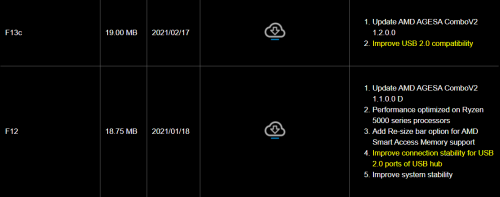 |
|
|
Feb 22 2021, 08:05 AM
Return to original view | Post
#128
|
|
Senior Member
5,261 posts Joined: Oct 2004 From: J@Y B33
|
QUOTE(cstkl1 @ Feb 22 2021, 12:14 AM) da first line Now I tak paham content? Oklu tak da paham the content but just got triggered with few key words agesa, b550 etc.. its like somebody wrote obama rode a horse got injured and didnt die from covid and all you got from it "obama die from covid" lol. QUOTE(Bonchi @ Feb 22 2021, 12:29 AM) those agesa changelog is also applicable to 400 series Like I said, anyone can complain. and it has already been complained about in the VR community back at zen+ launch in 2019 and the problem still persisted till 2021. Unfortunately, my audio setup seems to trigger this problem across 3 AMD rigs but not happening on my macbook pro and my new intel rig. So it is a good enough indication that it's more of a compatibility issue. and it has already been complained about in the VR community back at zen+ launch in 2019 and the problem still persisted till 2021. Unfortunately, my audio setup seems to trigger this problem across 3 AMD rigs but not happening on my macbook pro and my new intel rig. So it is a good enough indication that it's more of a compatibility issue. And in a way, for them to not officially state 400 series in this post means.... they're telling those who currently running 400 series that AMD will no longer give a shit and please buy their 500 chipsets. Well to be fair, AMD did say new AGESA on 400 series mobo will not be officially support but to be up to AIB's discretion and that they will "try their best" to help. So 400 series can cry all they want but sad to say, support has ended and AMD will only focus on 500 series. Now I just hope AMD will finally look seriously into this (not vaguely state "fix compatibility" in the Agesa changelog but fixed nothing) and hopefully fix it for affected users who cannot afford to simply change rig like me... but for me, this experience have left a very bad taste. |
|
|
Feb 22 2021, 07:46 PM
Return to original view | Post
#129
|
|
Senior Member
5,261 posts Joined: Oct 2004 From: J@Y B33
|
QUOTE(SSJBen @ Feb 22 2021, 04:41 PM) Possible reason yes. I am using a SX8200 Pro 1TB as the OS drive. It doesn't always happen, but when it does it is frustratingly slow. From 130+MB/s average, it would drop down to below 40MB/s average. Possible hardware, yes. Also more possibly is Windows problem. I give up on finding the root cause, instead as long as there's workaround I'll use it..What's weird was that once I disabled torrenting (qbtorrent) the transfer speeds never dropped. But what's REALLY weird is that torrenting usually only uses very little bandwidth as the transfer speeds are below 10MB/s. But when I use say jdownloader2 for direct downloads, of which would max out my internet speed (over 50MB/s), transfer speed on the disk DO NOT drop.  Example is I transfer files from PC to NAS can't maximized the bandwidth, play around with some settings and able to transfer full speed. Windows do some update then broken again.  Mount my PC drive in NAS and use NAS to do the transfer, every time can get full speed. Now is trying to solve usb wifi intermittent disconnect on my HTPC, last time already solve it but same story, Windows update some things and it broke again. |
|
|
Feb 23 2021, 12:24 AM
Return to original view | Post
#130
|
|
Senior Member
5,261 posts Joined: Oct 2004 From: J@Y B33
|
QUOTE(JohnLai @ Feb 22 2021, 08:31 PM) USB Wifi, must be that darned Power Plan again. That one is the first thing I disable when use usb wifi or bluetooth. Power saving mode always create problems. USB Selective Suspend or that Wireless Adapter Setting Power Saving Mode. QUOTE(Bonchi @ Feb 22 2021, 09:00 PM) It’s more of an AMD power management issue which is probably related to the USB issue... there’s a bigger picture rather than just a USB issue actually. Because it is also related to the PCIE, Ram and SATA, been giving me alot of headache when i was on ryzen. Never had such problem after moving to intel. Except that my HTPC is using Intel CPU Now im interested to see how many more issues will appear since this has started to get noticed and people will most likely probe into this matter. |
|
|
Feb 23 2021, 12:34 AM
Return to original view | Post
#131
|
|
Senior Member
5,261 posts Joined: Oct 2004 From: J@Y B33
|
QUOTE(Bonchi @ Feb 23 2021, 12:32 AM) wasnt talking about your problem but to john's USB wifi and power management problem about USB suspend settings with ryzen... it's a common workaround to Ryzen's USB dropping off. He's talking about my usb wifi problem.Jangan shyok sendiri. |
|
|
Feb 23 2021, 08:44 AM
Return to original view | Post
#132
|
|
Senior Member
5,261 posts Joined: Oct 2004 From: J@Y B33
|
QUOTE(Bonchi @ Feb 23 2021, 12:41 AM) And his problem is with AMD not intel. And Im giving him an insight because I have had that problem on 3 AMD rigs. But FYI, not on my new intel rig. Huh? What you talking about? He don't have problem with his wifi. Beside his wifi is built in with motherboard. |
|
|
Feb 28 2021, 05:54 PM
Return to original view | Post
#133
|
|
Senior Member
5,261 posts Joined: Oct 2004 From: J@Y B33
|
QUOTE(timeonce @ Feb 28 2021, 05:22 PM) 16 core running more than 4.4ghz.. kinda weird though. Any 5950X user here to share the exp. I wonder if my first 3 days running at full speed impact the CPU running at so high speed always. Try checking "Minimum processor state" in Advance Power Settings if it is set at 100%.But will continue to push all core to max tomorrow for my new simulation for 48 hours non stop. [attachmentid=10799981] I also remember some same issue and turn out some program for the motherboard's RGB that caused the CPU to not idle. |
|
|
|
|
|
Feb 28 2021, 07:54 PM
Return to original view | Post
#134
|
|
Senior Member
5,261 posts Joined: Oct 2004 From: J@Y B33
|
QUOTE(timeonce @ Feb 28 2021, 06:18 PM) Sorry boss. How to check on min cpu state. At the taskbar, type "power option" and choose the green battery icon, label should be "edit power plan"I bought MSI X570 Unify hence zero RGB. As heard value for money for it cool board. Then click "Change Advanced Power Settings", another window will open. Expand "Processor Power Management" and expand "Minimum Processor State" Could be other program too, I just roughly remember from others discussion previously so not very sure which program. |
|
|
Mar 1 2021, 01:48 PM
Return to original view | Post
#135
|
|
Senior Member
5,261 posts Joined: Oct 2004 From: J@Y B33
|
QUOTE(JohnLai @ Feb 28 2021, 08:45 PM) CPU idling eh...... Maintaining 100+ connections that upload and download at same time is intensive. My router would hang when too many connections.......I just discovered running Qbittorrent......around 100+ connections results in "boosts" state on both 5950x and 3950x. The software or hardware cpu scheduler too aggressive. Boosting to 4.6 - 4.9 Ghz just for Qbittorrent running?  Tried other torrent clients = same. Tried other torrent clients = same.My ancient I5-3570K and I3-4330 never turbo boost like this. These oldies just stay at 1600mhz and 800mhz idle when running torrent client. AMD power plan is really more aggressive to push max speed when there's work to be done, even sync files or Defender scanning also can push to max. Right now I got Microsoft OneDriveFile Co-Authoring Executable doing some processing, using Power Saver the CPU only 2.42GHz speed and 7% utilization. When change to Ryzen Balanced, 10% utilization and CPU 4.0GHz speed.  QUOTE(sHawTY @ Mar 1 2021, 09:18 AM) Control Panel > Power Options > AMD Ryzen Balanced > Change plan settings > Changed advanced power settings > Processor power management > Minimum processor state > Set to 5% > Apply > OK > Save Changes I set to 0%, no stability issue.  |
|
|
Mar 14 2021, 01:24 AM
Return to original view | Post
#136
|
|
Senior Member
5,261 posts Joined: Oct 2004 From: J@Y B33
|
QUOTE(JohnLai @ Mar 13 2021, 11:56 PM) Both. Maybe some setting wrong? Can't be so much usage if all write to RAM drive. Steam background is disabled. My system pretty much has nothing running. Anyway, I got other issue to worry about. 120 Power On Hours with 3924GB total host write!?  [attachmentid=10809883] Didn't I put all those source code stuff RAM drive? |
|
|
Mar 14 2021, 09:05 AM
Return to original view | Post
#137
|
|
Senior Member
5,261 posts Joined: Oct 2004 From: J@Y B33
|
QUOTE(1024kbps @ Mar 14 2021, 01:40 AM) If he daily shutdown the PC, and the ramdrive utility save the ramdrive state everyday = tons of write everyday lol Ya, could be. Should not be saving the RAM drive state.I also notice it's the C drive. Could also be the program he running use a lot of memory and he didn't disable paging files. And the CPU temp at the same ambient temp makes me scratch my head. Does it not produce any heat at all during light workload and also not affected by other components heat?  |
|
|
Mar 17 2021, 08:55 AM
Return to original view | Post
#138
|
|
Senior Member
5,261 posts Joined: Oct 2004 From: J@Y B33
|
Earlier, there's much discussion on Ryzen's idle voltage. I just saw this video. Ryzen was supposed to idle or lower load at highest voltage?
From 13:05 minutes |
|
|
Mar 27 2021, 11:51 AM
Return to original view | Post
#139
|
|
Senior Member
5,261 posts Joined: Oct 2004 From: J@Y B33
|
QUOTE(cyclone2 @ Mar 27 2021, 06:55 AM) Hi All, Since this will be last gen that support the mobo, might be better to get 5900x that have more cores but not much expensive than 5800x. If can find the CPU.Currently i'm using 2700x with msi x570 gaming plus, previously my x470 gaming pro carbon was spoilt and send for RMA during MCO period, hence I have to buy x570 in order to continue to use with 2700x during mco. Since now I got an extra M/B, was thinking to upgrade 5800x and sell off my 2700x bundle with x470. Is it worth to upgrade 5800x now? I found lazada seller selling around 2299 now although slightly higher than srp. Also understand 5000 series is the last gen for AM4 socket, so after upgrade this would be last me for another 3 yrs I guess. |
|
|
Mar 27 2021, 01:40 PM
Return to original view | Post
#140
|
|
Senior Member
5,261 posts Joined: Oct 2004 From: J@Y B33
|
QUOTE(cyclone2 @ Mar 27 2021, 01:26 PM) 5900x price around 3k and above, diff by almost RM1k which over my budget. That's why looking at 5800x. Price still high... Maybe better wait it to go down first. |
| Change to: |  0.2064sec 0.2064sec
 0.57 0.57
 7 queries 7 queries
 GZIP Disabled GZIP Disabled
Time is now: 8th December 2025 - 08:57 PM |
 Quote
Quote