Welcome Guest ( Log In | Register )

12 Pages « < 9 10 11 12 >Bottom

Outline · [ Standard ] · Linear+

 Tutorial on Ubiquiti Edgerouter for unifi/maxis, Edgerouter settings ftw

views
     
TSwanttotree
post Jan 22 2021, 12:23 AM

On my way
****
Junior Member
677 posts

Joined: Apr 2008
QUOTE(taqu @ Jan 21 2021, 10:09 PM)
What I have done with my ER-X so far:

1. Normal Unifi config, DHCP, MSS clamping, HW offload, turn on DPI, enable UNMS, enable UISP mobile app
2. DNS server to my internal Adguard Home server, force all DNS/DOT requests to this server too (via NAT)
3. Port forwarding & hairpin/loopback NAT to my internal apps/services
4. DDNS to no-ip
5. Parental control, turn off Internet to my kids' devices at nighttime, using firewall policies & rulesets
6. Use Edgerouter's unofficial API (and some custom programming) to get active DHCP lease & current bandwidth, for my Grafana dashboards

user posted image

user posted image
*
That dashboard looks awesome man. Didnt know that is available for edgerouters. Also, kudos on using firewall policies for managing internet for yr kids. I just experimented on adguard last month. I have to say its quite impressive, not to forget the pretty interface.
taqu
post Jan 22 2021, 12:44 AM

Enthusiast
*****
Junior Member
864 posts

Joined: May 2005
QUOTE(wanttotree @ Jan 22 2021, 12:23 AM)
That dashboard looks awesome man. Didnt know that is available for edgerouters. Also, kudos on using firewall policies for managing internet for yr kids. I just experimented on adguard last month. I have to say its quite impressive, not to forget the pretty interface.
*
Thanks. It's actually data from Edgerouter, Adguard Home, ntopng (amazing network monitor tool), blended together into Grafana. I used Pi-Hole before but I find Adguard Home better due to built-in DOH/DOT listeners.
Orpheus1120
post Jan 25 2021, 03:44 AM

Getting Started
**
Junior Member
176 posts

Joined: Dec 2008


I am thinking of porting over to maxis. Currently running on ER4. I have my firewall rules and port-forwarding all setup, and other settings like hardware offloading etc done.

How would I configure my existing ER4 for Maxis without losing my current configuration?
TSwanttotree
post Jan 25 2021, 01:22 PM

On my way
****
Junior Member
677 posts

Joined: Apr 2008
QUOTE(Orpheus1120 @ Jan 25 2021, 03:44 AM)
I am thinking of porting over to maxis. Currently running on ER4. I have my firewall rules and port-forwarding all setup, and other settings like hardware offloading etc done.

How would I configure my existing ER4 for Maxis without losing my current configuration?
*
Simply change yr vlan tag from 500 to 621. The rest stays the same.
Orpheus1120
post Jan 25 2021, 02:11 PM

Getting Started
**
Junior Member
176 posts

Joined: Dec 2008


QUOTE(wanttotree @ Jan 25 2021, 01:22 PM)
Simply change yr vlan tag from 500 to 621. The rest stays the same.
*
And my internet account info
amin_bp
post Jan 26 2021, 07:59 AM

New Member
*
Junior Member
13 posts

Joined: Mar 2005
I just purchased Edgemax Er-10X, added to it Synology NAS DS220+ and Mesh Router TPlink M9+ Deco. I used to have multiple AP router to serve my house , now only I router and 1 Wifi Mesh AP. I also have multiple CCTV camera mix Reolink ,Panasonic and Foscam. While its a hard rock stable router, I have some problem and need some help. I have upgraded to EdgeOSv2.0.9.

Speed and latency was fantastic, no more frequent pixelization on the Reolink camera, no more dropout VPN with ssh and Plex video is fast and stable, no more hang on fast forward video. The best thing is no more complained from my sons and daughter as their google meet classes is stable and no more dropouts. rclxms.gif thumbup.gif

I also applied config on this thread inclusive HW offloading, my problems are :

1. Speedtest on M9 Deco on my previous router(TPlink Archer C5) can go 500D/100U, but max I can go with this router is 450D/110U, increase 10% on upload speed but 10% reduction in download. What setting did I miss?

2. I am unable to set Hypptv Vlan 600. It does not work. If I do a network test on the setop box I get a failure on Central Connectivity and Multicast Test.

Is it possible Ubiquiti only focus to fix hyptv vlan 600 tagging on Edge router lite rather than high end Er10x? hmm.gif Anybody can help? icon_question.gif

taqu
post Jan 26 2021, 08:39 AM

Enthusiast
*****
Junior Member
864 posts

Joined: May 2005
QUOTE(amin_bp @ Jan 26 2021, 07:59 AM)
I just purchased Edgemax Er-10X, added to it Synology NAS DS220+ and Mesh Router TPlink M9+ Deco. I used to have multiple AP router to serve my house , now only I router and 1 Wifi Mesh AP. I also have multiple CCTV camera mix Reolink ,Panasonic and Foscam. While its a hard rock stable router, I have some problem and need some help. I have upgraded to EdgeOSv2.0.9.

Speed and latency was fantastic, no more frequent pixelization on the Reolink camera, no more dropout VPN with ssh and Plex video is fast and stable, no more hang on fast forward video. The best thing is no more complained from my sons and daughter as their google meet classes is stable and no more dropouts. rclxms.gif  thumbup.gif

I also applied config on this thread inclusive HW offloading, my problems are :

1. Speedtest on M9 Deco on my previous router(TPlink Archer C5)  can go 500D/100U, but max I can go with this router is 450D/110U, increase 10% on upload speed but 10% reduction in download. What setting did I miss?

2. I am unable to set Hypptv Vlan 600. It does not work. If I do a network test on the setop box I get a failure on Central Connectivity and Multicast Test.

Is it possible  Ubiquiti only focus to fix hyptv vlan 600 tagging on Edge router lite rather than high end Er10x?  hmm.gif Anybody can help? icon_question.gif
*
Perhaps v 2.0.9 still buggy on ER-10X? v 2.0.9 on my ER-X luckily stable & no speed reduction.
dannielshazmeer
post Jan 27 2021, 12:59 AM

On my way
****
Senior Member
628 posts

Joined: Apr 2016
bandwidth 80mhz will make i got a light headache? why does this happen? ubiquiti unifi AP AC Pro
taqu
post Jan 27 2021, 08:25 PM

Enthusiast
*****
Junior Member
864 posts

Joined: May 2005
QUOTE(dannielshazmeer @ Jan 27 2021, 12:59 AM)
bandwidth 80mhz will make i got a light headache? why does this happen? ubiquiti unifi AP AC Pro
*
What do you mean?
hayenadeblue
post Mar 31 2021, 12:30 AM

Getting Started
**
Junior Member
53 posts

Joined: Nov 2011


QUOTE(amin_bp @ Jan 26 2021, 07:59 AM)
I just purchased Edgemax Er-10X, added to it Synology NAS DS220+ and Mesh Router TPlink M9+ Deco. I used to have multiple AP router to serve my house , now only I router and 1 Wifi Mesh AP. I also have multiple CCTV camera mix Reolink ,Panasonic and Foscam. While its a hard rock stable router, I have some problem and need some help. I have upgraded to EdgeOSv2.0.9.

Speed and latency was fantastic, no more frequent pixelization on the Reolink camera, no more dropout VPN with ssh and Plex video is fast and stable, no more hang on fast forward video. The best thing is no more complained from my sons and daughter as their google meet classes is stable and no more dropouts. rclxms.gif  thumbup.gif

I also applied config on this thread inclusive HW offloading, my problems are :

1. Speedtest on M9 Deco on my previous router(TPlink Archer C5)  can go 500D/100U, but max I can go with this router is 450D/110U, increase 10% on upload speed but 10% reduction in download. What setting did I miss?

2. I am unable to set Hypptv Vlan 600. It does not work. If I do a network test on the setop box I get a failure on Central Connectivity and Multicast Test.

Is it possible  Ubiquiti only focus to fix hyptv vlan 600 tagging on Edge router lite rather than high end Er10x?  hmm.gif Anybody can help? icon_question.gif
*
Hi,
A bit off-topic (thats the culture in lowyat.net anyway). Do u run Plex Server in your NAS? How many 4K stream u can run? I am asking because DS220+ have Celeron processor. I am using AS4004T, non-Intel, but not good when it comes to Plex Server. I bought it bcoz of 10Gbps LAN, but still cannot test; 10 Gbps switch is still very expensive. I use the NAS for heavy file transfer. Right now, I set up Plex Server on one of my NVidia Shield TVs, runs okay, internally. But still cannot beat running through normal SMB and Kodi on every devices on my LAN. Very smooth. But I need to use Plex one day.

Sorry to hear abt your problem on your ER-X. I am on the latest firmware (ER-4) and on 500/100 Unifi package and my speedtest to TM servers can "spike" up to 8xx Mbps. I am also not using that kind of HyppTV. I just download the UnifiTV app into my Shield TV and key-in the username and password and can watch the content without any problem.

This post has been edited by hayenadeblue: Mar 31 2021, 01:47 AM
lazzy
post Jun 18 2021, 10:26 AM

New Member
*
Junior Member
38 posts

Joined: May 2006


Hi Sifus,

I had an ERL for many years but could never set it up for use with Maxis BB with VoIP.

Somewhat rather tagging vlan 821 & 822 to pass through eth2 to maxis (or rather Thomson) router does not work.

Is this only supported on ERX (with switching feature)?

Any feedback is much appreciated.

This post has been edited by lazzy: Jun 18 2021, 10:49 AM
kelvin4578
post Jul 4 2021, 12:21 AM

Getting Started
**
Junior Member
271 posts

Joined: Jan 2003
From: KL, wangsa Maju


QUOTE(taqu @ Jan 26 2021, 08:39 AM)
Perhaps v 2.0.9 still buggy on ER-10X? v 2.0.9 on my ER-X luckily stable & no speed reduction.
*
Bro i also got question for u, today i just get upgrade to 500 mbps unifi. I have using ER-X and using deco m9 as my wireless, pervious i get full speed as 300/50 after upgrade to 500 mbps i only got 250/120 for wireless. Did I miss something setting on router
taqu
post Jul 4 2021, 01:38 AM

Enthusiast
*****
Junior Member
864 posts

Joined: May 2005
QUOTE(kelvin4578 @ Jul 4 2021, 12:21 AM)
Bro i also got question for u, today i just get upgrade to 500 mbps unifi. I have using ER-X and using deco m9 as my wireless, pervious i get full speed as 300/50 after upgrade to 500 mbps i only got 250/120 for wireless. Did I miss something setting on router
*
Turn on hardware offload in ER-X.
kelvin4578
post Jul 4 2021, 08:03 AM

Getting Started
**
Junior Member
271 posts

Joined: Jan 2003
From: KL, wangsa Maju


QUOTE(taqu @ Jul 4 2021, 01:38 AM)
Turn on hardware offload in ER-X.
*
I have turn on, yesterday I have find solution is mtu and tcp mss
Batu1235 P
post Aug 22 2021, 12:15 PM

New Member
*
Probation
12 posts

Joined: Dec 2019
QUOTE(Anime4000 @ Jun 28 2020, 09:08 PM)
This is what I did with ER-X:
[attachmentid=10525031]
[attachmentid=10525030]

eth0.821--br0--eth4.821
eth0.822--br1--eth4.822

It works just fine biggrin.gif
*
Hi Sifu,

I notice that i configured for the VOIP, i could get dial tone but it cannot be dialed as it will have a long beep on whatever number i dial.
Another thing is whatever i connected to it (wired) will lose internet connection.

Thank you very much in advance.
Batu1235 P
post Aug 26 2021, 10:54 AM

New Member
*
Probation
12 posts

Joined: Dec 2019
QUOTE(Batu1235 @ Aug 22 2021, 12:15 PM)
Hi Sifu,

I notice that i configured for the VOIP, i could get dial tone but it cannot be dialed as it will have a long beep on whatever number i dial.
Another thing is whatever i connected to it (wired) will lose internet connection.

Thank you very much in advance.
*
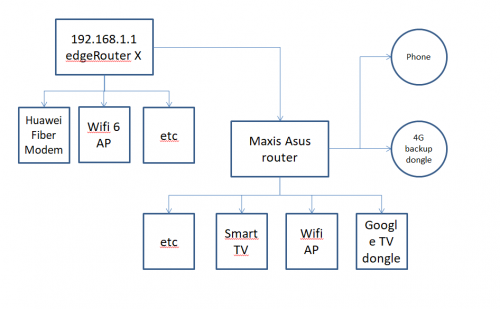
user posted image

Currently this is my setup illustrated in the diagram above.

I manage to setup to go online but

1. I have no idea how to do the VOIP setup, tried several times and still fail. Could not find any step by step to do this.

2. to Fail over to 4G backup dongle, anyone know any guide for this?
TSwanttotree
post Aug 26 2021, 11:01 AM

On my way
****
Junior Member
677 posts

Joined: Apr 2008
QUOTE(Batu1235 @ Aug 26 2021, 10:54 AM)
user posted image

Currently this is my setup illustrated in the diagram above.

I manage to setup to go online but

1. I have no idea how to do the VOIP setup, tried several times and still fail. Could not find any step by step to do this.

2. to Fail over to 4G backup dongle, anyone know any guide for this?
*
You also need to bridge vlan 621 to maxis router. Yes, you need pppoe connected in maxis router too.
lazzy
post Aug 27 2021, 09:55 AM

New Member
*
Junior Member
38 posts

Joined: May 2006


QUOTE(Batu1235 @ Aug 26 2021, 10:54 AM)
user posted image

Currently this is my setup illustrated in the diagram above.

I manage to setup to go online but

1. I have no idea how to do the VOIP setup, tried several times and still fail. Could not find any step by step to do this.

2. to Fail over to 4G backup dongle, anyone know any guide for this?
*
I’m not familiar with ERX as I own ERL which does not support on-board switching as I read but a chap at local Ubiquiti distributor suggest bridging the entire eth0 (connected to Huawei modem) to eth2 (maxis router - connected to phone), then the normal internet vlan to eth1 which is then connected to my standalone AP.

This works like a charm for me; hope this helps.
sukhoi35mk
post Aug 28 2021, 01:03 PM

Casual
***
Junior Member
420 posts

Joined: Feb 2007
Hi All,

I want to ask the firewall in Ubiquiti Edge Router X 5 port Gigabit ER-X is capable of monitor ipv6 traffic? i am currently using tp-link AX50 and I found that the parental control work flawlessly with ipv4 but not with ipv6.

E.g. with ipv4 only, i can block websites such as youtube without any issue but once i enable ipv6 internet connection then the parental control become useless.

so i am planning maybe to add Ubiquiti Edge Router X between my AX50 and unifi modem to further control ipv6 traffic.

thanks
TSwanttotree
post Sep 14 2021, 09:05 AM

On my way
****
Junior Member
677 posts

Joined: Apr 2008
Hi everyone, before i start posting to other marketplaces, i would like to honor our own forumer by posting it here and the official ubiquiti thread. I am selling my usg3 in perfect condition barely used. Selling for rm289. You all know how much usg3 cost.
(First come first serve basis)
https://next.shahrocks.cf/index.php/s/3y4s76sxS6eYwT8

12 Pages « < 9 10 11 12 >Top
 

Change to:
| Lo-Fi Version
0.0379sec    0.24    6 queries    GZIP Disabled
Time is now: 6th December 2025 - 06:33 AM