Welcome Guest ( Log In | Register )

Outline · [ Standard ] · Linear+

 Tutorial on Ubiquiti Edgerouter for unifi/maxis, Edgerouter settings ftw

views
     
hayenadeblue
post Aug 9 2020, 04:31 PM

Getting Started
**
Junior Member
53 posts

Joined: Nov 2011


Hi wanttotree (and everyone else),

I just ordered ER-4 (I know it is an overkill for normal user, which I am, but I look forward to use all the functions that the router capable in the future). Very excited about it but I did noticed, one of the differences between ER-4 and ER-X commonly used here is the internal switching capability. I know, ER-4 can do switching by software (some call it bridging), but I do not have plan to use that feature.

I don't bother with switching because I just need one RJ45 port from the ER-4 to my other switch that handle the switching part. I also do not use the HyppTV, only use the phone, which connected to the supplied modem.

My question, if I disable the bridging/switching (feel free to correct me if I'm using the wrong term):

1. with eth0 set as my WAN (this is default, or I can also set eth3 which is SFP port as WAN), what will happen with eth1, eth2 and eth3 (SFP port)?

2. Can I simply connect the eth1 to my other switch? I believe it is possible after configuring the DHCP etc. but with bridging/switching disabled, what will happen with the other ports?

I am also thinking of simplifying my server rack, and thinking of ditching the modem or BTU supplied by TM. With SFP port at the ER-4, do you think it is possible, by using certain adapter to connect the fibre to the SFP port?

This post has been edited by hayenadeblue: Aug 9 2020, 04:32 PM
hayenadeblue
post Aug 13 2020, 12:08 PM

Getting Started
**
Junior Member
53 posts

Joined: Nov 2011


QUOTE(wanttotree @ Aug 10 2020, 12:36 AM)
1) you can set any port to be wan or lan.(multiple wan(s) and lan(s) too)
2) Your other eth ports wont be usable. Usually people just left it alone after they setup their wan and lan ports. Some will utilize all 4 with multiple interfaces.

I wont recommend using sfp module for our isp. They lock it to their respective vendor. There and some people did a hack to make it work, but i cant help you with that case(sorry).
*
Many thanks for the fast reply! I noticed that, even though I can only reply back only today. Really appreciate it.

Got my ER-4, followed your basic setup as shown in the first page. However, I cannot connect to the internet. Looks like the modem (ONU device) does not give IP to the ER-4. Here is my screenshot.

Attached Image

VLAN ID is set to 500

Attached Image

Everything is default except for the eth1 that I changed from 192.168.1.1 to 192.168.0.1 because I already have devices in my home network that fixed to this IP ranges (192.168.0.XXX)

Attached Image

And I changed the user account too! BUT, after restarting the router, there is no IP assign to my eth0 AND eth0.500 as shown below

Attached Image

My PC can get IP address, which mean that the DHCP is working but it looks like something wrong at my WAN side. Can you point me towards the right direction? I know, you are using ERX, but maybe you have any idea?

I did use eth0 during the setup (from my PC through a 24 ports TP-LINK non-managed switch) and after reboot, my PC is connected to eth1 (through the switch) and eth0 is connected to the ONU/modem. No IPTV is used/involved. My phone is connected directly to the ONU/modem.

Thanks.

This post has been edited by hayenadeblue: Aug 13 2020, 12:19 PM
hayenadeblue
post Aug 13 2020, 01:18 PM

Getting Started
**
Junior Member
53 posts

Joined: Nov 2011


QUOTE(wanttotree @ Aug 13 2020, 12:46 PM)
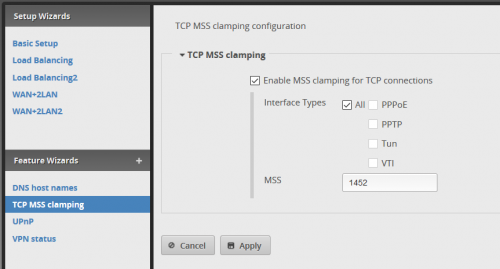
It should all work with that config. Make sure u done your mss clamping too.

user posted image
*
Thanks for the very quick reply.

Ok, just did that,

Attached Image

But still no IP at WAN side, and I cannot access the Internet. I can access my NAS though. I've already update the firmware before. In the meantime, I simply plug back the TM router and my Internet works.

Thanks.
hayenadeblue
post Aug 13 2020, 05:10 PM

Getting Started
**
Junior Member
53 posts

Joined: Nov 2011


QUOTE(hayenadeblue @ Aug 13 2020, 01:18 PM)
Thanks for the very quick reply.

Ok, just did that,

Attached Image

But still no IP at WAN side, and I cannot access the Internet. I can access my NAS though. I've already update the firmware before. In the meantime, I simply plug back the TM router and my Internet works.

Thanks.
*
I found the solution. The hotfix firmware is the reason i.e. the latest v2.0.8 is buggy. When I use the v1.10.11, I can connect to the Internet without any issue.

Thanks for all the help!
hayenadeblue
post Mar 31 2021, 12:30 AM

Getting Started
**
Junior Member
53 posts

Joined: Nov 2011


QUOTE(amin_bp @ Jan 26 2021, 07:59 AM)
I just purchased Edgemax Er-10X, added to it Synology NAS DS220+ and Mesh Router TPlink M9+ Deco. I used to have multiple AP router to serve my house , now only I router and 1 Wifi Mesh AP. I also have multiple CCTV camera mix Reolink ,Panasonic and Foscam. While its a hard rock stable router, I have some problem and need some help. I have upgraded to EdgeOSv2.0.9.

Speed and latency was fantastic, no more frequent pixelization on the Reolink camera, no more dropout VPN with ssh and Plex video is fast and stable, no more hang on fast forward video. The best thing is no more complained from my sons and daughter as their google meet classes is stable and no more dropouts. rclxms.gif  thumbup.gif

I also applied config on this thread inclusive HW offloading, my problems are :

1. Speedtest on M9 Deco on my previous router(TPlink Archer C5)  can go 500D/100U, but max I can go with this router is 450D/110U, increase 10% on upload speed but 10% reduction in download. What setting did I miss?

2. I am unable to set Hypptv Vlan 600. It does not work. If I do a network test on the setop box I get a failure on Central Connectivity and Multicast Test.

Is it possible  Ubiquiti only focus to fix hyptv vlan 600 tagging on Edge router lite rather than high end Er10x?  hmm.gif Anybody can help? icon_question.gif
*
Hi,
A bit off-topic (thats the culture in lowyat.net anyway). Do u run Plex Server in your NAS? How many 4K stream u can run? I am asking because DS220+ have Celeron processor. I am using AS4004T, non-Intel, but not good when it comes to Plex Server. I bought it bcoz of 10Gbps LAN, but still cannot test; 10 Gbps switch is still very expensive. I use the NAS for heavy file transfer. Right now, I set up Plex Server on one of my NVidia Shield TVs, runs okay, internally. But still cannot beat running through normal SMB and Kodi on every devices on my LAN. Very smooth. But I need to use Plex one day.

Sorry to hear abt your problem on your ER-X. I am on the latest firmware (ER-4) and on 500/100 Unifi package and my speedtest to TM servers can "spike" up to 8xx Mbps. I am also not using that kind of HyppTV. I just download the UnifiTV app into my Shield TV and key-in the username and password and can watch the content without any problem.

This post has been edited by hayenadeblue: Mar 31 2021, 01:47 AM


Change to:
| Lo-Fi Version
0.0268sec    0.56    7 queries    GZIP Disabled
Time is now: 9th December 2025 - 04:31 PM