Welcome Guest ( Log In | Register )

12 Pages « < 7 8 9 10 11 > » Bottom

Outline · [ Standard ] · Linear+

 Tutorial on Ubiquiti Edgerouter for unifi/maxis, Edgerouter settings ftw

views
     
TSwanttotree
post Jun 18 2020, 01:09 PM

On my way
****
Junior Member
677 posts

Joined: Apr 2008
QUOTE(Drian @ Jun 18 2020, 12:37 PM)
Quick question
Does the USG or edgerouter support openvpn?
if yes how is the speed like?

My appletv does not support vpn app , which means i will need to rely on the router to do the VPN stuff so that I can watch disney/netflix etc with US content.
My internet speed is now 500mbit and it seems like my ac-68u can't do full 500mbit with openvpn. I think it was only 30Mbit/s when openvpn is on.
*
Edgerouters does support openvpn. Though none of the model can reach 500mbps. If you rely on vpn, i would recommend to run any x86 based routers. Eg: pfsense/opnsense/openwrt(x86) running on any descent cpu over 2ghz.

I would look into wireguard instead of openvpn, provided that your vpn provider offers it. Wireguard uses a lot less cpu/crypto resources which result faster connection.
TSwanttotree
post Jun 18 2020, 01:13 PM

On my way
****
Junior Member
677 posts

Joined: Apr 2008
A quick google, i found someone runs wireguard vpn on his rt-ac86u.

user posted image

This post has been edited by wanttotree: Jun 18 2020, 01:21 PM
Drian
post Jun 18 2020, 06:14 PM

Look at all my stars!!
*******
Senior Member
4,999 posts

Joined: Jan 2003


QUOTE(wanttotree @ Jun 18 2020, 01:09 PM)
Edgerouters does support openvpn. Though none of the model can reach 500mbps. If you rely on vpn, i would recommend to run any x86 based routers. Eg: pfsense/opnsense/openwrt(x86) running on any descent cpu over 2ghz.

I would look into wireguard instead of openvpn, provided that your vpn provider offers it. Wireguard uses a lot less cpu/crypto resources which result faster connection.
*
pfsense ...hmm steep learning curve but I guess you're right, the fastest I think for home consumer is the AC-86u with its 1.8GHz cpu.


TSwanttotree
post Jun 18 2020, 06:39 PM

On my way
****
Junior Member
677 posts

Joined: Apr 2008
QUOTE(Drian @ Jun 18 2020, 06:14 PM)
pfsense ...hmm steep learning curve but I guess you're right, the fastest I think for home consumer is the AC-86u with its 1.8GHz cpu.
*
For a beginner yes pretty steep. Openvpn can only utilize 1 cpu core. Wireguard can use multiple cores. Easier on openwrt. Goodluck with your journey.
jongoz
post Jun 28 2020, 11:10 AM

New Member
*
Junior Member
33 posts

Joined: Jan 2003


Hi all,
I am trying to get ER-X to work nicely with VOIP setup on the old Archer c5v (i've given up the BTU HG8240H route)

Previously I'm on Openwrt setup and it was working nicely. Plug Archer c5v to Wan port and the er-x port (eth1) that has untag vlan 821/822.

I've followed the tutorial here but somehow the archer c5v is not communicating. here's the step i have done:


Followed the previous setup to create 'local 2' and disabled secondary IP - in the ER-X its now eth1 (not eth2).

Setup Vlan 821 and 822. tag to eth0 (CPU)

user posted image

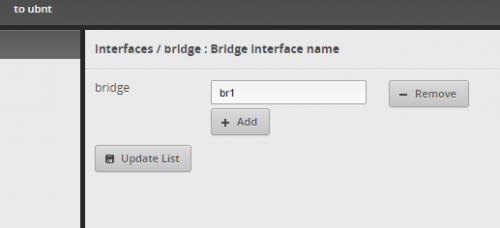
Setup Bridge - br1

user posted image

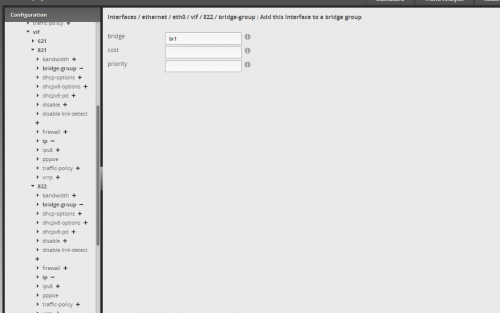
Then i link the vlan 821 and 822 into vif br1

user posted image

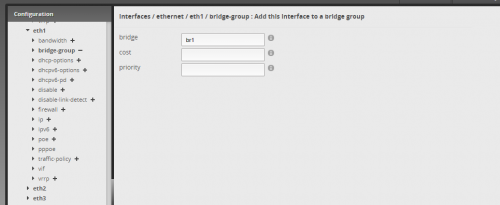
After that i link br1 into the eth1 port

user posted image

reboot both er-x and archer. still not connected.

anybody can help? what am i doing wrong?
TSwanttotree
post Jun 28 2020, 11:55 AM

On my way
****
Junior Member
677 posts

Joined: Apr 2008
QUOTE(jongoz @ Jun 28 2020, 11:10 AM)
Hi all,
I am trying to get ER-X to work nicely with VOIP setup on the old Archer c5v (i've given up the BTU HG8240H route)

Previously I'm on Openwrt setup and it was working nicely. Plug Archer c5v to Wan port  and the er-x port (eth1) that has untag vlan 821/822.

I've followed the tutorial here but somehow the archer c5v is not communicating. here's the step i have done:
Followed the previous setup to create 'local 2' and disabled secondary IP - in the ER-X its now eth1 (not eth2).

Setup Vlan 821 and 822. tag to eth0 (CPU)

user posted image

Setup Bridge - br1

user posted image

Then i link the vlan 821 and 822 into vif br1

user posted image

After that i link br1 into the eth1 port

user posted image

reboot both er-x and archer. still not connected.

anybody can help? what am i doing wrong?
*
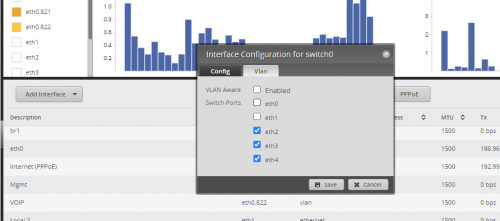
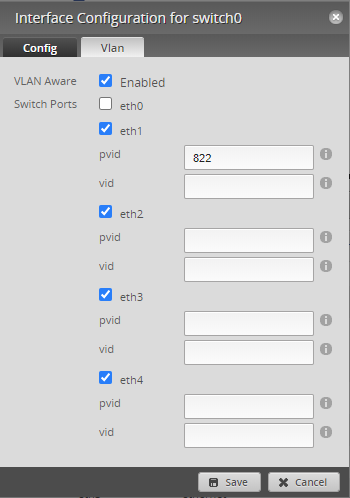
Have you made sure that your eth1 is at pvid(untag) instead of vid(tag)?
That setting is at = Dashboard > switch0 > Actions > Config > VLAN
I figure you might not have checked that cz i didnt see any of it mentioned in your post.
jongoz
post Jun 28 2020, 12:13 PM

New Member
*
Junior Member
33 posts

Joined: Jan 2003


whoa thanks for the quick reply

this is my current setup.
switc0 is only for eth2,eth3,eth4.
eth1 is currently not setup

what should i do?

user posted image


QUOTE(wanttotree @ Jun 28 2020, 11:55 AM)
Have you made sure that your eth1 is at pvid(untag) instead of vid(tag)?
That setting is at = Dashboard > switch0 > Actions > Config > VLAN
I figure you might not have checked that cz i didnt see any of it mentioned in your post.
*
jongoz
post Jun 28 2020, 12:25 PM

New Member
*
Junior Member
33 posts

Joined: Jan 2003


i made changes like this, rebooted archer but also not connecting.

user posted image

QUOTE(jongoz @ Jun 28 2020, 12:13 PM)
whoa thanks for the quick reply

this is my current setup.
switc0 is only for eth2,eth3,eth4.
eth1 is currently not setup

what should i do?

user posted image
*
TSwanttotree
post Jun 28 2020, 12:30 PM

On my way
****
Junior Member
677 posts

Joined: Apr 2008
QUOTE(jongoz @ Jun 28 2020, 12:25 PM)
i made changes like this, rebooted archer but also not connecting.

user posted image
*
Make sure eth0 is on vid. Uncheck other port not used for vlan. Im no longer using maxis, so maybe voip is on 821. Try that. I also saw your eth0 is not enabled for vlan aware.

This post has been edited by wanttotree: Jun 28 2020, 12:30 PM
jongoz
post Jun 28 2020, 12:50 PM

New Member
*
Junior Member
33 posts

Joined: Jan 2003


it doesn't allow me to tick eth0 for switch.

i think the only way to do it is a proper vlan setup for all switch ports. maybe i need to setup local vlan = 1, bridge it so that it does the routing properly.

hope to get some light at the end of the tunnel... right now have to live without VOIP for a while

QUOTE(wanttotree @ Jun 28 2020, 12:30 PM)
Make sure eth0 is on vid. Uncheck other port not used for vlan. Im no longer using maxis, so maybe voip is on 821. Try that. I also saw your eth0 is not enabled for vlan aware.
*
TSwanttotree
post Jun 28 2020, 02:03 PM

On my way
****
Junior Member
677 posts

Joined: Apr 2008
QUOTE(jongoz @ Jun 28 2020, 12:50 PM)
it doesn't allow me to tick eth0 for switch.

i think the only way to do it is a proper vlan setup for all switch ports. maybe i need to setup local vlan = 1, bridge it so that it does the routing properly.

hope to get some light at the end of the tunnel... right now have to live without VOIP for a while
*
Thats correct. Just as long as u alrdy tag 822/821 on eth0. Right now what you should do is. Instead of bridging eth0.822 with eth1. You should bridge eth0.822 with sw0.
Anime4000
post Jun 28 2020, 09:08 PM

Look at all my stars!!
*******
Senior Member
2,399 posts

Joined: Jul 2009
From: /dev/null


QUOTE(jongoz @ Jun 28 2020, 11:10 AM)
Hi all,
I am trying to get ER-X to work nicely with VOIP setup on the old Archer c5v (i've given up the BTU HG8240H route)

Previously I'm on Openwrt setup and it was working nicely. Plug Archer c5v to Wan port  and the er-x port (eth1) that has untag vlan 821/822.

I've followed the tutorial here but somehow the archer c5v is not communicating. here's the step i have done:
Followed the previous setup to create 'local 2' and disabled secondary IP - in the ER-X its now eth1 (not eth2).

Setup Vlan 821 and 822. tag to eth0 (CPU)

user posted image

Setup Bridge - br1

user posted image

Then i link the vlan 821 and 822 into vif br1

user posted image

After that i link br1 into the eth1 port

user posted image

reboot both er-x and archer. still not connected.

anybody can help? what am i doing wrong?
*
QUOTE(wanttotree @ Jun 28 2020, 02:03 PM)
Thats correct. Just as long as u alrdy tag 822/821 on eth0. Right now what you should do is. Instead of bridging eth0.822 with eth1. You should bridge eth0.822 with sw0.
*
This is what I did with ER-X:
Attached Image
Attached Image

eth0.821--br0--eth4.821
eth0.822--br1--eth4.822

It works just fine biggrin.gif
jongoz
post Jun 28 2020, 09:36 PM

New Member
*
Junior Member
33 posts

Joined: Jan 2003


OMG!! it works! thank you bro. now can move on to other mini project

QUOTE(Anime4000 @ Jun 28 2020, 09:08 PM)
This is what I did with ER-X:
Attached Image
Attached Image

eth0.821--br0--eth4.821
eth0.822--br1--eth4.822

It works just fine biggrin.gif
*
mazranz
post Jul 9 2020, 05:26 PM

New Member
*
Junior Member
37 posts

Joined: Apr 2006
From: PeeJay
Hi guys... need some help with config or ideas:

I have Edge Router working on my Unifi network (home) therefore 1 port is set for hypptv.

... now, can I set a port for internet and do a split at the TV location with a USW-MINI switch to then split to hypptv iptv and network port?
I have the ubiquiti unifi network running already for others.

Thanks.
TSwanttotree
post Jul 9 2020, 11:06 PM

On my way
****
Junior Member
677 posts

Joined: Apr 2008
QUOTE(mazranz @ Jul 9 2020, 05:26 PM)
Hi guys... need some help with config or ideas:

I have Edge Router working on my Unifi network (home) therefore 1 port is set for hypptv.

... now, can I set a port for internet and do a split at the TV location with a USW-MINI switch to then split to hypptv iptv and network port?
I have the ubiquiti unifi network running already for others.

Thanks.
*
You can bridge your vlan1 and vlan600 ports. Make sure tagged vlan 600 and leave the normal vlan1 untagged on the trunk port on your usw. Then u can untag(vlan600) on one of the port for connecting to hypptv. Leave the rest of the port(vlan1).
mazranz
post Jul 10 2020, 10:11 AM

New Member
*
Junior Member
37 posts

Joined: Apr 2006
From: PeeJay
QUOTE(wanttotree @ Jul 9 2020, 11:06 PM)
You can bridge your vlan1 and vlan600 ports. Make sure tagged vlan 600 and leave the normal vlan1 untagged on the trunk port on your usw. Then u can untag(vlan600) on one of the port for connecting to hypptv. Leave the rest of the port(vlan1).
*
Sorry, I'm don't quite follow. Bridge is done on the USW or ErX?

so is it correct to say on ErX, I bridge vlan 1 and vlan600 to the port that goes to the hypptv.... then at the hypptv side, I put the USW which I will configure to untag vlan600 on one of its ports?
hayenadeblue
post Aug 9 2020, 04:31 PM

Getting Started
**
Junior Member
53 posts

Joined: Nov 2011


Hi wanttotree (and everyone else),

I just ordered ER-4 (I know it is an overkill for normal user, which I am, but I look forward to use all the functions that the router capable in the future). Very excited about it but I did noticed, one of the differences between ER-4 and ER-X commonly used here is the internal switching capability. I know, ER-4 can do switching by software (some call it bridging), but I do not have plan to use that feature.

I don't bother with switching because I just need one RJ45 port from the ER-4 to my other switch that handle the switching part. I also do not use the HyppTV, only use the phone, which connected to the supplied modem.

My question, if I disable the bridging/switching (feel free to correct me if I'm using the wrong term):

1. with eth0 set as my WAN (this is default, or I can also set eth3 which is SFP port as WAN), what will happen with eth1, eth2 and eth3 (SFP port)?

2. Can I simply connect the eth1 to my other switch? I believe it is possible after configuring the DHCP etc. but with bridging/switching disabled, what will happen with the other ports?

I am also thinking of simplifying my server rack, and thinking of ditching the modem or BTU supplied by TM. With SFP port at the ER-4, do you think it is possible, by using certain adapter to connect the fibre to the SFP port?

This post has been edited by hayenadeblue: Aug 9 2020, 04:32 PM
TSwanttotree
post Aug 10 2020, 12:36 AM

On my way
****
Junior Member
677 posts

Joined: Apr 2008
QUOTE(hayenadeblue @ Aug 9 2020, 04:31 PM)
Hi wanttotree (and everyone else),

I just ordered ER-4 (I know it is an overkill for normal user, which I am, but I look forward to use all the functions that the router capable in the future). Very excited about it but I did noticed, one of the differences between ER-4 and ER-X commonly used here is the internal switching capability. I know, ER-4 can do switching by software (some call it bridging), but I do not have plan to use that feature.

I don't bother with switching because I just need one RJ45 port from the ER-4 to my other switch that handle the switching part. I also do not use the HyppTV, only use the phone, which connected to the supplied modem.

My question, if I disable the bridging/switching (feel free to correct me if I'm using the wrong term):

1. with eth0 set as my WAN (this is default, or I can also set eth3 which is SFP port as WAN), what will happen with eth1, eth2 and eth3 (SFP port)?

2. Can I simply connect the eth1 to my other switch? I believe it is possible after configuring the DHCP etc. but with bridging/switching disabled, what will happen with the other ports?

I am also thinking of simplifying my server rack, and thinking of ditching the modem or BTU supplied by TM. With SFP port at the ER-4, do you think it is possible, by using certain adapter to connect the fibre to the SFP port?
*
1) you can set any port to be wan or lan.(multiple wan(s) and lan(s) too)
2) Your other eth ports wont be usable. Usually people just left it alone after they setup their wan and lan ports. Some will utilize all 4 with multiple interfaces.

I wont recommend using sfp module for our isp. They lock it to their respective vendor. There and some people did a hack to make it work, but i cant help you with that case(sorry).
hayenadeblue
post Aug 13 2020, 12:08 PM

Getting Started
**
Junior Member
53 posts

Joined: Nov 2011


QUOTE(wanttotree @ Aug 10 2020, 12:36 AM)
1) you can set any port to be wan or lan.(multiple wan(s) and lan(s) too)
2) Your other eth ports wont be usable. Usually people just left it alone after they setup their wan and lan ports. Some will utilize all 4 with multiple interfaces.

I wont recommend using sfp module for our isp. They lock it to their respective vendor. There and some people did a hack to make it work, but i cant help you with that case(sorry).
*
Many thanks for the fast reply! I noticed that, even though I can only reply back only today. Really appreciate it.

Got my ER-4, followed your basic setup as shown in the first page. However, I cannot connect to the internet. Looks like the modem (ONU device) does not give IP to the ER-4. Here is my screenshot.

Attached Image

VLAN ID is set to 500

Attached Image

Everything is default except for the eth1 that I changed from 192.168.1.1 to 192.168.0.1 because I already have devices in my home network that fixed to this IP ranges (192.168.0.XXX)

Attached Image

And I changed the user account too! BUT, after restarting the router, there is no IP assign to my eth0 AND eth0.500 as shown below

Attached Image

My PC can get IP address, which mean that the DHCP is working but it looks like something wrong at my WAN side. Can you point me towards the right direction? I know, you are using ERX, but maybe you have any idea?

I did use eth0 during the setup (from my PC through a 24 ports TP-LINK non-managed switch) and after reboot, my PC is connected to eth1 (through the switch) and eth0 is connected to the ONU/modem. No IPTV is used/involved. My phone is connected directly to the ONU/modem.

Thanks.

This post has been edited by hayenadeblue: Aug 13 2020, 12:19 PM
TSwanttotree
post Aug 13 2020, 12:46 PM

On my way
****
Junior Member
677 posts

Joined: Apr 2008
QUOTE(hayenadeblue @ Aug 13 2020, 12:08 PM)
Many thanks for the fast reply! I noticed that, even though I can only reply back only today. Really appreciate it.

Got my ER-4, followed your basic setup as shown in the first page. However, I cannot connect to the internet. Looks like the modem (ONU device) does not give IP to the ER-4. Here is my screenshot.

Attached Image

VLAN ID is set to 500

Attached Image

Everything is default except for the eth1 that I changed from 192.168.1.1 to 192.168.0.1 because I already have devices in my home network that fixed to this IP ranges (192.168.0.XXX)

Attached Image

And I changed the user account too! BUT, after restarting the router, there is no IP assign to my eth0 AND eth0.500 as shown below

Attached Image

My PC can get IP address, which mean that the DHCP is working but it looks like something wrong at my WAN side. Can you point me towards the right direction? I know, you are using ERX, but maybe you have any idea?

I did use eth0 during the setup (from my PC through a 24 ports TP-LINK non-managed switch) and after reboot, my PC is connected to eth1 (through the switch) and eth0 is connected to the ONU/modem. No IPTV is used/involved. My phone is connected directly to the ONU/modem.

Thanks.
*
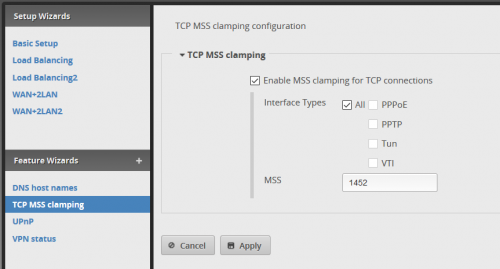
It should all work with that config. Make sure u done your mss clamping too.

user posted image

12 Pages « < 7 8 9 10 11 > » Top
 

Change to:
| Lo-Fi Version
0.0279sec    0.23    6 queries    GZIP Disabled
Time is now: 3rd December 2025 - 01:34 AM