Welcome Guest ( Log In | Register )

4 Pages  1 2 3 > » Bottom

Outline · [ Standard ] · Linear+

 Tutorial on Ubiquiti Edgerouter for unifi/maxis, Edgerouter settings ftw

views
     
TSwanttotree
post Dec 26 2016, 03:09 PM, updated 5y ago

On my way
****
Junior Member
677 posts

Joined: Apr 2008
user posted image
Hey guys! A few months ago i posted a topic regarding edgerouter lite and how i finally set it up to use with my tm unifi with hypptv. I got involved with ubiquiti forum(amazing forum btw), asked around and had many experiments with the settings including cli based settings. Dont be afraid though. I had a discussion a few months ago with ubiquiti engineer and they agree that they should implement vlan based connection. Lo and behold, firmware 1.9 came out with a wizard that set up PPPoE connection with vlan tag! Pretty awesome of them to hear an opinion from a couple of forumer in Malaysia. I say kudos to Ubiquiti. This is important to all users in Malaysia that mainly connect to the internet the 'vlan' way.LOL.

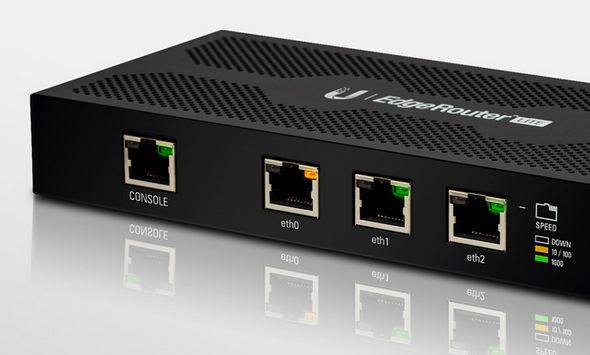
Enough background check, lets get to it. In this tutorial, i will be using edgerouter-lite as reference. Lets hit it!


1) Download the latest firmware from ( https://www.ubnt.com/download/edgemax ). As of the day im writing this, the latest firmware is at 1.9.1

2) Log into your router page at 192.168.1.1, click system, click 'upload a file' on upload system image, wait a few seconds and the router will ask to reboot, then reboot. =)

3) After aprox 3 minutes the router will finish booting, login into the router again then click wizards, then click;
a) basic setup
b) PPPoE
c) fill in your unifi/maxis/time account name and password
d) click to check vlan, fill in vlan according to your isp (eg: unifi= 500 / maxis fiber= 621)
e) click 'configure this section' on (Optional) Secondary LAN port (eth2)
f) uncheck 'Enable the DHCP server'
g) under 'user setup' choose 'create new admin user', fill in your new user and password(dont use default ubnt, change your password! very important)
h) click apply and reboot.

Viola! your router is set up for internet use! enjoy!!!

Part one of the setup is done, this is mainly for people who doesnt care about iptv like hypptv or astro via maxis fiber. U can hop away and start your beautiful day with the edgerouter! Now moving on to part two where we will set up iptv, hypptv and astro via maxis fiber. lets go!

1) On the router dashboard page click on
a) Add interface
b) Add Vlan
c) Fill in Vlan id (eg: unifi= 600 / maxis fiber= 823)
d) Select eth0 on 'interface'
e) Fill in 'Hyyptv' or 'astro' according to your iptv
f) Click save

2) At 'Local 2', click on 'actions', 'config', change 'manually define ip address' to 'no address', click save.

3) Click on 'Config tree',
a) click interfaces, bridge, click add, fill in 'br0'
b) click ethernet, eth0, vif, 600, bridge-group, fill in 'br0' in 'bridge'
c) click eth2, bridge-group, fill in 'br0' in 'bridge'
d) click 'preview' and 'apply'

4) At this point you can plug your iptv cable to eth2 of your router, make sure restart the iptv box after plugging it in.

Thats it guys! its not as complicated as u think. sure if i were to make a tutorial using cli then that would be a slightly different story. LOL.

I hope u guys enjoy the tutorial! Please point out something that i missed or mistakes.

This wraps up this tutorial, please tell me if any of u guys need to set up ipv6 and set up dns forwarding, ipv6 forwarding, upnp or upnp2 with nat-pmp. These can be done on the next one. Cheers!
TSwanttotree
post Dec 26 2016, 06:25 PM

On my way
****
Junior Member
677 posts

Joined: Apr 2008
QUOTE(kutitata @ Dec 26 2016, 04:38 PM)
Awesome thanks for writing this!

If I have 9 ethernet connections in total (3 desktop, 2 android boxes, 1 cctv dvr) and 3 of them need POE (to drive UAP AC LR) what would be the best hardware from ubiquiti to use? plan on getting a router and switch.

this is for home use only running on unifi
*
Thanx man. U can go a few routes with ubiquiti. Depending on yr budget too.

1) Edgerouter-x and toughswitch 8ports

2) Edgerouter lite and edgeswitch 8 or unifi switch 8

3) edgerouter-x sfp and any 5/8 ports smart switch.

The last choice is there if u wanna minimize budget. Pair an edgerouter-x sfp with any smart switch. Netgear/cisco/linksys are all good. That would be the cheapest option.
If u wanna go all out, i would say get option 2.
TSwanttotree
post Dec 28 2016, 07:00 PM

On my way
****
Junior Member
677 posts

Joined: Apr 2008
QUOTE(kutitata @ Dec 28 2016, 05:54 PM)
you have been so patient to answer my questions I am grateful to you

maybe you could also explain how to setup for cctv dvrs is it port forwarding?

does android boxes need any specific set up requirements?

how about the UAP AC LR?
*
You are welcome sir, just an enthusiast helping another. Port forwarding is pretty straight forward(no pun intended). Its exactly how u setup with any decent router. U can easily find it in the router page. As for android android box, i have not seen any need for special configurations. U can always enable upnp or upnp2 if u want auto port assign on everyrhing else. Uap ac lr, all u need to do is enable poe 24v on es-8. Ur gonna use 3 uap lrs? Wow, yr house must be a mansion. =) Btw, may i know your speed subscription bro?

This post has been edited by wanttotree: Dec 28 2016, 07:01 PM
TSwanttotree
post Dec 28 2016, 07:04 PM

On my way
****
Junior Member
677 posts

Joined: Apr 2008
QUOTE(eastherd @ Dec 28 2016, 06:20 PM)
Just bought and setup ER-X. Work perfectly. (even though without TV yet, i can see the traffic coming in from the EdgeOS GUI).

Thanks!

I just bought 1X ER-X and 2XUAP-AC-LITE. Will get some old cisco POE switch soon.
*
Awesome. Thats cool. Please do the hypptv sooner or later and share yr experience here. =) U guys can post your photos of the setup jere too. It would be nice to see how u guys set it.
TSwanttotree
post Dec 28 2016, 09:32 PM

On my way
****
Junior Member
677 posts

Joined: Apr 2008
QUOTE(kutitata @ Dec 28 2016, 09:09 PM)
The setup would be another thing to have a tutorial on...

Hahahah...

I was just trying to imagine placing the switch and er-x and fiber modem on the wall to see how the cable connections will work....
*
Putting it on the wall will look nice.i did think bout smthg like that. It just looks modern n "canggih'
TSwanttotree
post Dec 28 2016, 09:36 PM

On my way
****
Junior Member
677 posts

Joined: Apr 2008
QUOTE(kutitata @ Dec 28 2016, 09:17 PM)
My house is actually quite small but I wanted the best coverage even in the kitchen and all that plus through the walls and rebar I am afraid the signal will be poor.

This set up will be at a new house currently under renovation so I am not sure what unifi speed I will use either the 30 or 50 plan.
*
Oh cool. I can see quite a few ppl i know been renovating/rewiring their house. Makes me feel like rewiring mine too. Oh mannn. Im jealous of u guys.
TSwanttotree
post Dec 29 2016, 08:17 AM

On my way
****
Junior Member
677 posts

Joined: Apr 2008
QUOTE(kutitata @ Dec 29 2016, 07:54 AM)
I am curious, why is the Edge Router X cheaper than the Edge Router Lite although the ER-X has more ports?
*
Edgerouter-x has a mediatek processor running at 880mhz single core. Paired with a switch chip. This router is capable of offloading a nated internet up to 800mbit/second.
In the other hand, edgerouter lite has a cavium processor running at 500mhz dual core. All of the ports are connected to the cpu directly, because it lacks a switch chip. So if u have an internet that can provide 2gbit/second, u can actually pull 920mbit/second per port from the other 2 lan. Usually people use this router because they have their own robust l2/l3 switch to pair it with. I hope my expalanation is clear. Cheers
TSwanttotree
post Dec 29 2016, 02:15 PM

On my way
****
Junior Member
677 posts

Joined: Apr 2008
QUOTE(sikentut @ Dec 29 2016, 10:45 AM)
you are an absolute legend.should pin this up
*
Thank u so much bro. My intention is only to capture the energy of network community here locally. Cz everywhere else is really good. Im hoping this will get some of us to advance ahead level up with the best out there. Cheers to u. N u guys.
TSwanttotree
post Dec 29 2016, 02:21 PM

On my way
****
Junior Member
677 posts

Joined: Apr 2008
QUOTE(kutitata @ Dec 29 2016, 10:27 AM)
Okey, so for an unifi application could the ER Lite difference be noticable? I am no expert in networking or IT.

I am now mulling using both connect both the

Fiber Modem

--ER Lite

---ER X

----Desktop

----Desktop

----US-8-150

-----(balance connections)

Does this configuration makes sense? Or no difference?

Or should I connect the US-8-150 to the ER Lite directly?

blink.gif
*
Its not a very good idea to put edgerouter-x in between edgerouter-lite and us-8. May i know why u r trying to set up two routers together? Maybe i can figure something out.
About edgerouter lite being noticable compared to edgerouter-x. Most probably not. As long as u are not breaking the 920-940mbps, it wont make any difference in performance. But in case of pairing it with a couple of switch, it will improve yr lan eg: file transfer or local file streaming. So the choice is yours, in many household application. U wont go wrong with either.
Look at it this way.

If u have more ethernet devices eg: desktop,nas,laptop,tv,streaming box,cctv,a bunch of aps. = Er-l + switch/switches

But if u have something like this eg: smartphones, 1-2 APs, laptop connected to wifi, ipad, wireless tv. = Er-x
Im sure by now u can get the idea.

This post has been edited by wanttotree: Dec 29 2016, 02:28 PM
TSwanttotree
post Dec 30 2016, 12:58 AM

On my way
****
Junior Member
677 posts

Joined: Apr 2008
QUOTE(kutitata @ Dec 29 2016, 02:56 PM)
I am trying to connect all 9 connections. Actually 2 them won't be used often (maybe not used at all).

Ethernet devices : 1 mac desktop, 1 hypp tv, 1 cctv dvr, 1 android box, 3 APs...

So I have decided to go for ER-L + US-8, that way I can connect to 8 devices (7 in us-8, 1 in er-lite, and in future add a dumb switch to add more connections). I will leave one out for now.

What would be your ideal set up for 6 connections and 3 APs?
*
I think maybe get an er-poe and a dumb 8 port switch. Get a decent ones.
TSwanttotree
post Dec 30 2016, 05:19 PM

On my way
****
Junior Member
677 posts

Joined: Apr 2008
QUOTE(kutitata @ Dec 30 2016, 01:13 PM)
Thank you so much! This is my favorite thread on lowyat!

What would be a decent Dumb Switch? Looking at Ubiquiti looks like they don't have
*
Ubiquiti dont have one. Maybe u can look into netgear gs108 or linksys lgs108. Even the ones from cisco is not that expensive. Heyy.. ur the best man! Its my fav too. Probably a lil bias. Lol
TSwanttotree
post Dec 30 2016, 05:26 PM

On my way
****
Junior Member
677 posts

Joined: Apr 2008
QUOTE(jio @ Dec 30 2016, 03:54 AM)
ER-X actually had dual core. The NAT (over PPPoE without encryption/compression) performance I tested is actually about 900Mbps single direction. I read it was somehow crippled by design that it cannot do 1Gbps bidirectional. And what do you mean by 2Gbps internet? 1Gb bidirectional (2x1Gbps)? That doesn't mean you can download at 2Gbps, just that you can upload 1Gbps & download 1Gbps at the same time. Technically speaking it is possible for 2Gbps single direction if you connect all the 3 ports to a switch with VLAN etc, but it will be messy & not worth the money.

Anyway since you have ERL, can you benchmark (NAT over PPPoE without encyption/compression) it when you free. I'm curious about the actual number since back when I used to have an ERL, PPPoE offloading was not supported back then.
*
Thank you for pointing it out. Maybe i was just trying explain it in theory. I think u have explained it better than i did. Yes, all of the performance details u mentioned are accurate. Pppoe from a few guys off ubiquiti forum hit 920ish up and down. I can try do the test but i have to fly back home to sarawak to do that. I hope u can find someone who can do that since my erl is not very accessible for the time being.
TSwanttotree
post Dec 31 2016, 01:47 PM

On my way
****
Junior Member
677 posts

Joined: Apr 2008
QUOTE(kutitata @ Dec 31 2016, 10:31 AM)
How is the interface for ER-POE to control the UAP AC LR?

Because the US-8-150 is perfect for that right? how about the ER-POE?

Briging this article to attention as well:-

https://community.ubnt.com/t5/EdgeMAX/ERPoE...RO/td-p/1507325
*
U can use the unifi controller for us-8 and all your aps. Only er-poe has its own web gui.
TSwanttotree
post Jan 1 2017, 06:00 PM

On my way
****
Junior Member
677 posts

Joined: Apr 2008
QUOTE(kutitata @ Jan 1 2017, 12:43 PM)
So after reading and trying to understand...

For 9 connections (3 of needing POE)

option A
ERPOE5 & Linksys LGS108

option B
ERL & US-8-150 (1 WAN and 2 LAN on ERL)

option C
ERL connects to US-8-150 which connects to Linksys LGS 108
*
Option A is perfect
Option B only gives 8 usable ports
Option C is a no brainer.
=)
TSwanttotree
post Jan 1 2017, 11:08 PM

On my way
****
Junior Member
677 posts

Joined: Apr 2008
QUOTE(kutitata @ Jan 1 2017, 06:16 PM)
Thanks again for answering my question...

One last thing...

when I do set up all the LANs, how will it go?

the three APs connected to the ER-POE will be on separate LANs?

How will that affect the network..?
Some people set up one LAN for wired and a WLAN for the wireless...

Then it would be ERL, TS-5-POE and Linksys LGS108
*
u can set it up either way. a lot of people do that because they want to segment their activity. some even do it for fun. setup different subnet for different places in the house. saperate their cctv is common. i think you should segment subnet separating only cctv vs all other online devices. unless u have voip, u can add another subnet with different vlan.
wired and wireless is not necessarily needed to be separated. what if u want to cast your youtube from yr phone to your tv via chromecast or miracast. yr phone and your tv wont be able to see each other if u want to cast. maybe you want to stream something from your nas to your laptop. that also prevent it to communicate to each other.

erl+ts5poe+lgs108 is not bad. it makes it possible for u to setup hypptv together.

your setup maybe look like this for erl
eth0 = wan
eth1= lan 1
eth2= hypptv

lan 1 can daisy chain both ts5poe and lgs108 with no issue.
ts5poe can accommodate 3 aps and one more lan available to use
lgs108 is clearly open for everything else. =)
TSwanttotree
post Jan 3 2017, 01:35 PM

On my way
****
Junior Member
677 posts

Joined: Apr 2008
QUOTE(kutitata @ Jan 3 2017, 10:22 AM)
Thank you so much  smile.gif

I would like to view the CCTV stream on mobile devices whilst at home, would that mean that it should be on the same subnet?

ERL

-Hypptv

-LGS108

--(all 6 connections)

--TS5POE

---(3 UAP AC LR)

---(Spare)

What about QoS? Does it help in a home set up? Like for instance to prioritize the android boxes to ensure good streaming?
*
Its all based on your own activity and how much people are using it simultiniously. If u have 30mbps and at least 2 ppl are streaming 4k videos at the same time, may a person is gaming online too. Maybe qos is a good idea. But other than that, the router on its own is performing rly well. Eg: 5 ppl max in my house at one time, i stream netflix 4k, another person stream youtube 4k, while another stream netflix on her phone. And the rest use normal youtube and web surfing normally. Never once my 50mbps is having a hiccup. Everything loads without buffer, n never slow down. Then again, this example is for a 50mbps. 30mbps and lower will vary. Non 4k streamer are always happy with 20-30mbps in my experience. Cheers
TSwanttotree
post Jan 4 2017, 10:54 PM

On my way
****
Junior Member
677 posts

Joined: Apr 2008
QUOTE(kutitata @ Jan 3 2017, 06:45 PM)
Wow, are you using the erl?

Mind explaining a bit on your hardware and set up?
*
Yeap i am on erl. Using a 8port smart switch to handle my vlan and lan. One uap ac lite. All can acommodate 10+ wired and wireless.
TSwanttotree
post Jan 5 2017, 09:20 PM

On my way
****
Junior Member
677 posts

Joined: Apr 2008
QUOTE(kutitata @ Jan 5 2017, 07:47 AM)
What about

ER-SFP & LGS108...

why ER-SFP and ER-POE5 so much difference in price?
*
Er-x sfp is basically er-x with sfp port. If u gonna find a use for it thats gonna be great. Price diff is because its not the same hardware. Both exist for somewhat diff users. In this case, er-sfp is better paired with sfp featured switch. Eg: es8 or us8.
TSwanttotree
post Jan 7 2017, 04:32 PM

On my way
****
Junior Member
677 posts

Joined: Apr 2008
I was thinkin u were to get erl+ts5poe+lgs108. I hope u understood. U did mentioned a few options, but its your decision 100% to buy which one.
TSwanttotree
post Jan 17 2017, 06:51 PM

On my way
****
Junior Member
677 posts

Joined: Apr 2008
QUOTE(kutitata @ Jan 8 2017, 03:33 PM)
Yea, I agree I am being going through so many options...

I mean to be honest they all cost almost the same...

Would a ERL+TS5POE+LGS108 be better than a ERPOE5+LGS108? I know you explain me it to me so many times...

blink.gif

Another question, how do we set up the UAP AC LR that the clients will keep re-connecting to the AP that is closest to them?
*
Sorry bro, i was on vacation. Im back. Yes it would be better. I recommended u that because i dont want to confuse u with more setups. So u can go ahead use erl+tspoe5+lgs108.

To get load balancing aps can be done if u applied a unifi controller. Either u get one from unifi, or install one via linux on any used pc and serve as one. Keep in mind, lr is long range, so usually ppl dial down minimum rssi so it will disconnect once signal is low, and look for closest one. The uap ac lr does not support seamless roaming, so u gotta set rssi manually to make it work.(yes, all ac versions dont support seemless roaming)

This post has been edited by wanttotree: Jan 17 2017, 06:58 PM

4 Pages  1 2 3 > » Top
 

Change to:
| Lo-Fi Version
0.0297sec    0.66    7 queries    GZIP Disabled
Time is now: 5th December 2025 - 11:29 AM