Welcome Guest ( Log In | Register )

Bump Topic Topic Closed RSS Feed
213 Pages « < 138 139 140 141 142 > » Bottom

Outline · [ Standard ] · Linear+

 astro byond V13

views
     
joshhd
post Sep 1 2017, 02:17 PM

Look at all my stars!!
*******
Senior Member
7,791 posts

Joined: Dec 2014
From: Malaysia


QUOTE(Fazrien97 @ Sep 1 2017, 11:58 AM)
[attachmentid=9090335]
yup i know about that. but the another pic i take from indonesian group shows tv3 have letterbox means tv3 on M3C are output the real 16:9 format. unlike myfreeview and astro that still in 4:3
*
Hmmm... This one I dunno...
sonypshomer
post Sep 1 2017, 03:16 PM

Regular
******
Senior Member
1,594 posts

Joined: Aug 2017
QUOTE(Fazrien97 @ Sep 1 2017, 11:58 AM)
[attachmentid=9090335]
yup i know about that. but the another pic i take from indonesian group shows tv3 have letterbox means tv3 on M3C are output the real 16:9 format. unlike myfreeview and astro that still in 4:3
*
Astro will be blank for one second everytime we change HD to SD channel
yongtjunkit
post Sep 1 2017, 05:28 PM

Look at all my stars!!
*******
Senior Member
2,516 posts

Joined: Mar 2016
QUOTE(sonypshomer @ Sep 1 2017, 03:16 PM)
Astro will be blank for one second everytime we change HD to SD channel
*
For some reason why can't ASTRO set the decoder to what resolution we set for the decoder to output? I noticed that it switches resolution when changing SD to HD for the 1st time

This post has been edited by yongtjunkit: Sep 1 2017, 05:30 PM
Anime in HD
post Sep 1 2017, 06:01 PM

Regular
******
Senior Member
1,510 posts

Joined: Oct 2016
From: Celcom Internet 4G × Malaysia
QUOTE(izwanikhsan @ Sep 1 2017, 10:13 AM)
Hai. Tiada siaran percuma yang dibuka sempena Merdeka ye. Namun anda boleh akses 40program baru bertemakan Malaysia melalui On Demand, Astro Go dan NJOI Now bermula pada 15/8/17 - 16/9/17. ^Aida
*
Not only Astro.
HyppTV also not give free preview this holiday weekend. sad.gif

Guess need to see Ansa(if it's available sooner) to make both Astro & HyppTV wake up. But, we all know the key is good channel & cheaper price. I really want to see "someday" Astro will begging their customer(like Maxis) to not leave them. devil.gif laugh.gif

This post has been edited by Anime in HD: Sep 1 2017, 06:03 PM
Anime in HD
post Sep 1 2017, 09:10 PM

Regular
******
Senior Member
1,510 posts

Joined: Oct 2016
From: Celcom Internet 4G × Malaysia
QUOTE(Fazrien97 @ Sep 1 2017, 11:58 AM)
[attachmentid=9090335]
yup i know about that. but the another pic i take from indonesian group shows tv3 have letterbox means tv3 on M3C are output the real 16:9 format. unlike myfreeview and astro that still in 4:3
*
Plot twist: 4:3 signal stretch to 16:9(fit to screen) same like Astro. biggrin.gif

Btw, Buletin Utama now broadcast in 16:9 feed. No more fat people.. doh.gif laugh.gif
KL_menJERIT
post Sep 1 2017, 10:23 PM

Casual
***
Junior Member
340 posts

Joined: Mar 2007
From: Malaysia


read at wikipedia tv3 broadcast in 4:3 or 16:9

some program 4:3, some program 16:9 ?? it can??
Anime in HD
post Sep 2 2017, 12:04 AM

Regular
******
Senior Member
1,510 posts

Joined: Oct 2016
From: Celcom Internet 4G × Malaysia
QUOTE(KL_menJERIT @ Sep 1 2017, 10:23 PM)
read at wikipedia tv3 broadcast in 4:3 or 16:9

some program 4:3, some program 16:9 ?? it can??
*
Not all program show in 16:9.
Some 1990 program will be in stretch or with black bars. smile.gif
joshhd
post Sep 2 2017, 01:16 AM

Look at all my stars!!
*******
Senior Member
7,791 posts

Joined: Dec 2014
From: Malaysia


QUOTE(sonypshomer @ Sep 1 2017, 03:16 PM)
Astro will be blank for one second everytime we change HD to SD channel
*
QUOTE(yongtjunkit @ Sep 1 2017, 05:28 PM)
For some reason why can't ASTRO set the decoder to what resolution we set for the decoder to output? I noticed that it switches resolution when changing SD to HD for the 1st time
*
That is because HDCP protection is enabled everytime you tune to HD channels. HDCP is a kind of security encryption to prevent you from illegal capturing the content (record/streaming) using any unauthorised devices such as HDMI capture card.

Everytime you tune to HD channels, Astro box will send a HDCP signal to your TV, so your TV got to decrypt it so that you can watch it as per usual. HDCP is to allow only HDCP compliant devices such as your TV to be able to decrypt HDCP signal, hence allowing you to watch it on your connected device. This is what actually happens when you see the "sudden blackout for few hundred milliseconds".

Devices that can't decrypt HDCP especially capture card or capture box, and certain computer monitors, you will see error messages relating to HDCP.

There's nothing to be surprised about, because this is also practiced by Hypp TV as well as all pay TV services in the world, and more.

However, HDCP protection will go off as you tune from HD to SD channels.
jamesleetech
post Sep 2 2017, 03:19 AM

On my way
****
Senior Member
684 posts

Joined: Apr 2010


QUOTE(joshhd @ Sep 2 2017, 01:16 AM)
That is because HDCP protection is enabled everytime you tune to HD channels. HDCP is a kind of security encryption to prevent you from illegal capturing the content (record/streaming) using any unauthorised devices such as HDMI capture card.

» Click to show Spoiler - click again to hide... «
*
To sonypshomer and yongtjunkit previous comments...

Yes, Joshhd is correct. When HD Video is played, the transmitting device sends out HDCP encrypted signal to the receiving device. When the receiving device is HDCP ready, a HDCP Key signal is sent back to the transmitting device. When this "milliseconds" handshake (communication) is completed and only when successfully verified by the transmitting device, the transmitting device will allow the picture to be shown.

So, whenever you change to any HD channel, the Assteruk decoder will always send out the HDCP signal to be replied by the TV or any receiving device. If the TV or any receiving device don't reply with the correct HDCP Key, then the Assteruk decoder will block the picture with a black screen and message. Already for many years, all HD TVs (including HT amps) do have HDCP inside so many don't even notice the HDCP working silently behind... except as many should have noticed... a short screen flicker or "delay" in picture appearing.

Even a bluray player also sends out HDCP encrypted signal when a bluray disc is played so, if the TV don't have HDCP, then the player will also block the picture too.

All manufacturers who produces devices that support HD and 4K must add in HDCP by paying licence to Intel. Hehe... Intel don't licence HDCP to any HD/4K device which can record such as the Hauppauge HD Personal Video Recorder 2. When you connect the Assteruk decoder to this "recorder" to illegally record from Assteruk, then only got black screen because the recorder don't have HDCP.

My 4K HD 3D LED TV have 4 HDMI Inputs... but something rosak for its HDMI No.4 which don't send HDCP Key out so when I connect Assteruk or Bluray Player to my TV HDMI 4, then black screen. Refer to the picture I attached here. All the other 3 HDMI Inputs are okay... weird !

Attached Image

Hehe.. same thing when use a Bluray Player to play DVD in SD, the HDTV will not "flicker" at the start... and after that, play a bluray in HD, then the TV will have a very short delay or flicker at the start.

HDCP 2.0 supports up to HD. For 4K, HDCP 2.2 is required. To play a 4K bluray disc or receive 4K TV channel, the TV must support HDCP 2.2. A 4K TV with HDCP 2.0 only... can still play HD bluray disc but NOT 4K bluray disc. HDCP is about the hardware, nothing related to HDMI cable 1.3, 1.4 or 2.0 cable.

If anyone ask me whether such HDCP have been "cracked" by generating HDCP master key for valid devices... yes, but obviously its not right for me to discuss it further here. For DVD and bluray discs, there are other protections too.... AACS 2.0 (disc copy protection) and Cinavia (for HD audio). Hehe... in my opinion, HDCP is picture copy protection during playback. AFAIK, AACS 2.0 for 4K Bluray discs have not yet been cracked so the direct ripping from 4K bluray discs is not possible.

If anyone finds any info here to be wrong, please correct me. I am also learning, so no problem.

Lots of info can found through Google Search, here are just 2 references...
https://www.digitalconnection.com/faq/hdtv_12.asp
https://en.wikipedia.org/wiki/High-bandwidt...tent_Protection

This post has been edited by jamesleetech: Sep 2 2017, 03:20 AM
nexona88
post Sep 2 2017, 08:13 AM

The Royal Club Member
*********
All Stars
48,421 posts

Joined: Sep 2014
From: REality
QUOTE(KL_menJERIT @ Sep 1 2017, 10:23 PM)
read at wikipedia tv3 broadcast in 4:3 or 16:9

some program 4:3, some program 16:9 ?? it can??
*
What I know the 8pm news is is 16:9
Also some Malay dramas serials..
sonypshomer
post Sep 2 2017, 09:03 AM

Regular
******
Senior Member
1,594 posts

Joined: Aug 2017
QUOTE(jamesleetech @ Sep 2 2017, 03:19 AM)

All manufacturers who produces devices that support HD and 4K must add in HDCP by paying licence to Intel. Hehe... Intel don't licence HDCP to any HD/4K device which can record such as the Hauppauge  HD Personal Video Recorder 2. When you connect the Assteruk decoder to this "recorder" to illegally record from Assteruk, then only got black screen because the recorder don't have HDCP.

So that Hauppauge HD Personal Video Recorder 2 records blank?
jamesleetech
post Sep 2 2017, 10:38 AM

On my way
****
Senior Member
684 posts

Joined: Apr 2010


QUOTE(sonypshomer @ Sep 2 2017, 09:03 AM)
So that Hauppauge HD Personal Video Recorder 2 records blank?
*
Yes. Black screen.
sonypshomer
post Sep 2 2017, 12:41 PM

Regular
******
Senior Member
1,594 posts

Joined: Aug 2017
QUOTE(jamesleetech @ Sep 2 2017, 10:38 AM)

Yes. Black screen.
*


Connect this in between and you're good to go

user posted image
yongtjunkit
post Sep 2 2017, 12:59 PM

Look at all my stars!!
*******
Senior Member
2,516 posts

Joined: Mar 2016
QUOTE(joshhd @ Sep 2 2017, 01:16 AM)
That is because HDCP protection is enabled everytime you tune to HD channels. HDCP is a kind of security encryption to prevent you from illegal capturing the content (record/streaming) using any unauthorised devices such as HDMI capture card.

Everytime you tune to HD channels, Astro box will send a HDCP signal to your TV, so your TV got to decrypt it so that you can watch it as per usual. HDCP is to allow only HDCP compliant devices such as your TV to be able to decrypt HDCP signal, hence allowing you to watch it on your connected device. This is what actually happens when you see the "sudden blackout for few hundred milliseconds".

Devices that can't decrypt HDCP especially capture card or capture box, and certain computer monitors, you will see error messages relating to HDCP.

There's nothing to be surprised about, because this is also practiced by Hypp TV as well as all pay TV services in the world, and more.

However, HDCP protection will go off as you tune from HD to SD channels.
*
QUOTE(jamesleetech @ Sep 2 2017, 03:19 AM)
To sonypshomer and yongtjunkit previous comments...

Yes, Joshhd is correct. When HD Video is played, the transmitting device sends out HDCP encrypted signal to the receiving device. When the receiving device is HDCP ready, a HDCP Key signal is sent back to the transmitting device. When this "milliseconds" handshake (communication) is completed and only when successfully verified by the transmitting device, the transmitting device will allow the picture to be shown.

So, whenever you change to any HD channel, the Assteruk decoder will always send out the HDCP signal to be replied by the TV or any receiving device. If the TV or any receiving device don't reply with the correct HDCP Key, then the Assteruk decoder will block the picture with a black screen and message. Already for many years, all HD TVs (including HT amps) do have HDCP inside so many don't even notice the HDCP working silently behind... except as many should have noticed... a short screen flicker or "delay" in picture appearing.

Even a bluray player also sends out HDCP encrypted signal when a bluray disc is played so, if the TV don't have HDCP, then the player will also block the picture too.

All manufacturers who produces devices that support HD and 4K must add in HDCP by paying licence to Intel. Hehe... Intel don't licence HDCP to any HD/4K device which can record such as the Hauppauge  HD Personal Video Recorder 2. When you connect the Assteruk decoder to this "recorder" to illegally record from Assteruk, then only got black screen because the recorder don't have HDCP.

My 4K HD 3D LED TV have 4 HDMI Inputs... but something rosak for its HDMI No.4 which don't send HDCP Key out so when I connect Assteruk or Bluray Player to my TV HDMI 4, then black screen. Refer to the picture I attached here. All the other 3 HDMI Inputs are okay... weird !

Attached Image

Hehe.. same thing when use a Bluray Player to play DVD in SD, the HDTV will not "flicker" at the start... and after that, play a bluray in HD, then the TV will have a very short delay or flicker at the start.

HDCP 2.0 supports up to HD. For 4K, HDCP 2.2 is required. To play a 4K bluray disc or receive 4K TV channel, the TV must support HDCP 2.2. A 4K TV with HDCP 2.0 only... can still play HD bluray disc but NOT 4K bluray disc. HDCP is about the hardware, nothing related to HDMI cable 1.3, 1.4 or 2.0 cable.

If anyone ask me whether such HDCP have been "cracked" by generating HDCP master key for valid devices... yes, but obviously its not right for me to discuss it further here. For DVD and bluray discs, there are other protections too.... AACS 2.0 (disc copy protection) and Cinavia (for HD audio). Hehe... in my opinion, HDCP is picture copy protection during playback. AFAIK, AACS 2.0 for 4K Bluray discs have not yet been cracked so the direct ripping from 4K bluray discs is not possible.

If anyone finds any info here to be wrong, please correct me. I am also learning, so no problem.

Lots of info can found through Google Search, here are just 2 references...
https://www.digitalconnection.com/faq/hdtv_12.asp
https://en.wikipedia.org/wiki/High-bandwidt...tent_Protection
*
Interesting, why not have the hdcp authorisation to be done when the decoder wakes from standby? Would be nicer to see it seamlessly switch between SD and HD

jamesleetech
post Sep 2 2017, 03:44 PM

On my way
****
Senior Member
684 posts

Joined: Apr 2010


QUOTE(yongtjunkit @ Sep 2 2017, 12:59 PM)
Interesting, why not have the hdcp authorisation to be done when the decoder wakes from standby? Would be nicer to see it seamlessly switch between SD and HD
*
Here is what I believe... The decoder do NOT constantly send out HDCP signal to get verification. When the decoder starts and immediately transmit HD video, it will send out HDCP signal once for the TV to answer, verufy and then allow the TV to show the video. No problem here. When the decoder changes to SD channel, no HDCP signal is sent out so nothing happens, no delay, and TV continues to show the video. Aah... when the decoder is changed back to any HD channel, the decoder MUST resend the HDCP signal to get verification again so the slight delay still happen again. Why resend HDCP signal each time decoder change to HD channel ? Those HDCP people are very clever loh. Let me explain below...

Decoder transmit HD channel and sent HDCP signal out once to TV... verified okay, and video allowed... then I switch decoder to SD channel and all ok... switched off the TV... disconnect HDMI on TV and plugs it to a HD Recorder device and then output connect back to TV. Switched on TV and then decoder changed back to HD channel... decoder will detect a change in connection and IF HDCP signal not send again, then the HD video can be recorded loh... so HDCP becomes useless.

That's why each time when an HDMI disconnection occurs OR when any channel is changed back to HD... the decoder will send the HDCP signal again for verification. Just send HDCP once whenever decoder wakes from standby is not enough because we changes between HD and SD channels when decoder is still "awake" (not standby)... if only send once, pirates can cheat and still record the HD video loh. The people in Intel are smart people who control how HDCP verification is done... always resend HDCP verification when any changes to HD video or connection occurs.

So, Assteruk decoder is "forced to comply with Intel regulations" to always resend HDCP verification whenever we changed from SD to HD channel and that's why the slight delay will always happen. Assteruk decoder do NOT just send HDCP signal only once when switched on from standby.. it will always resend HDCP whenever the channel is changed from SD to HD channel.

joshhd
post Sep 2 2017, 04:08 PM

Look at all my stars!!
*******
Senior Member
7,791 posts

Joined: Dec 2014
From: Malaysia


QUOTE(jamesleetech @ Sep 2 2017, 03:44 PM)
Here is what I believe... The decoder do NOT constantly send out HDCP signal to get verification. When the decoder starts and immediately transmit HD video, it will send out HDCP signal once for the TV to answer, verufy and then allow the TV to show the video. No problem here. When the decoder changes to SD channel, no HDCP signal is sent out so nothing happens, no delay, and TV continues to show the video. Aah... when the decoder is changed back to any HD channel, the decoder MUST resend the HDCP signal to get verification again so the slight delay still happen again. Why resend HDCP signal each time decoder change to HD channel ? Those HDCP people are very clever loh. Let me explain below...

Decoder transmit HD channel and sent HDCP signal out once to TV... verified okay, and video allowed... then I switch decoder to SD channel and all ok... switched off the TV... disconnect HDMI on TV and plugs it to a HD Recorder device and then output connect back to TV. Switched on TV and then decoder changed back to HD channel... decoder will detect a change in connection and IF HDCP signal not send again, then the HD video can be recorded loh... so HDCP becomes useless.

That's why each time when an HDMI disconnection occurs OR when any channel is changed back to HD... the decoder will send the HDCP signal again for verification. Just send HDCP once whenever decoder wakes from standby is not enough because we changes between HD and SD channels when decoder is still "awake" (not standby)... if only send once, pirates can cheat and still record the HD video loh. The people in Intel are smart people who control how HDCP verification is done... always resend HDCP verification when any changes to HD video or connection occurs.

So, Assteruk decoder is "forced to comply with Intel regulations" to always resend HDCP verification whenever we changed from SD to HD channel and that's why the slight delay will always happen. Assteruk decoder do NOT just send HDCP signal only once when switched on from standby.. it will always resend HDCP whenever the channel is changed from SD to HD channel.
*
Ahhh I see... Now I know.

Btw, I believe you do know, HDCP can be bypassed, so that unauthorized devices such as capture card can record the HDMI streams. Using what to bypass? The answer is HDMI splittter. I have one HDMI splitter as shown as the picture below
Attached Image
and I am able to view HD channels from Astro (HDMI) to my capture box without issues.

Note: This is bad. Don't learn.
jamesleetech
post Sep 2 2017, 05:11 PM

On my way
****
Senior Member
684 posts

Joined: Apr 2010


QUOTE(joshhd @ Sep 2 2017, 04:08 PM)
Ahhh I see... Now I know.

Btw, I believe you do know, HDCP can be bypassed, so that unauthorized devices such as capture card can record the HDMI streams. Using what to bypass? The answer is HDMI splittter. I have one HDMI splitter as shown as the picture below
Attached Image
and I am able to view HD channels from Astro (HDMI) to my capture box without issues.

Note: This is bad. Don't learn.
*
» Click to show Spoiler - click again to hide... «

You trying to be cheeky, eh? Oh... so you say... "Ahhh I see... Now I know." You only know "now" pulak. IF there is anything wrong in my previous reply, then just explain it and if its proven correct, then I will accept it. Yes, you have never said that I was right or wrong. I never claim to be correct or right in everything so that's why I requested anyone to correct me if there was anything wrong in my previous reply. The way you explain about the splitter shows to me you already know a long time ago, not only now. Just read my previous reply carefully... its not about circumventing HDCP.

Ya, you said right, I do know. Even sonypshomer replied and posted a picture of a HDMI box which can "strip" the HDCP BUT... your previous reply and also mine were about explaining why Assteruk decoder got such slight delay (blank) whenever changing from SD to HD channels. Not about getting rid of HDCP.

When Sonypshomer posted a short sentence about the "Astro will be blank...", nobody here will know how much he already knows about the HDCP... AND... Yongtjunkit also posted that he don't understand why ASTRO decoder don't fixed to the HD resolution the user have set ... so you replied to them with your HDCP explanation.

Only after Sonypshomer replied to my comment with a picture of the HDMI box, then only I know that he already knows how to get rid of the HDCP !!

Explanation On The Delay From SD To HD Channels
My previous reply explains the reason why the decoder don't just send HDCP verification only once so the slight delay issue will always happen. When I show the Hauppauge HD Personal Video Recorder 2, its to explain why this Non-HDCP device blocks the video... I never meant to explain anything on how to "crack" or "bypass" or "strip" the HDCP, hehe.

And I also did say this in my previous reply.... "If anyone ask me whether such HDCP have been "cracked" by generating HDCP master key for valid devices... yes, but obviously its not right for me to discuss it further here."
... which shows that I do know about the HDCP "stripper" such as the splitters... but I didn't continue to explain further because my reply was mainly aimed at answering why the Assteruk decoder will always have some slight delay when changing from SD to HD channels so Intel will never allow Assteruk to change anything to the decoder. Oh, I don't know much, so you tell me what else you already know that I don't know so that I will learn more.

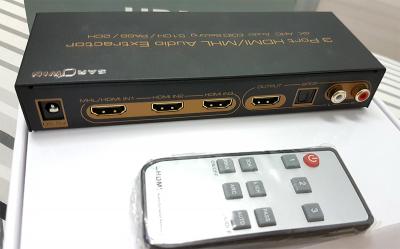
Yes, there are such "strippers" which bypasses HDCP using different methods... using HDMI splitters or connectors such as those shown by Sonypshomer and you BUT not all such devices support stripping HDCP. Another method is to change the HDMI signal to Component Video output which supports HD. My Sarowin 1-to-3 HDMI 4K HD switch support HDCP but never strip the HDCP so it don't work with any Non-HDCP HD Recorder... I don't use it now and keep it in storage.

» Click to show Spoiler - click again to hide... «


Please correct me if I may be wrong... I believe that the two cheap HDMI boxes shown by you and Sonypshomer don't give good quality HD output after bluffing the source (Assteruk) with the HDCP Key and then stripping off the HDCP signal. I believe the more expensive HDFury 3 is still the best HDMI device to use which supports 4K, 3D, HD and also strips the HDCP too.

https://www.hdfury.com/product/integral-4k60-444-600mhz/

Hehe... I don't want to do all the time-consuming work of recording from Assteruk because I have other "download alternatives"... not proper for me to explain more about *ah-hem* here. For me only, also no point to use splitter just to stream video.

Actually I don't have the Hauppauge HD Personal Video Recorder 2 shown in my previous reply. That device belongs to one of my online friends who do have this and told me about the "blank screen" issue so I had explained to him about the HDCP and also suggested him to either get HDFury or a HDMI splitter (must check which one that work to strip HDCP).

Finally... mmm... will the HDMI spltter mentioned by you work to prevent the slight delay whenever we change the Assteruk decoder from SD to HD Channel? I don't have any HDMI splitter that strips HDCP to try... so you do know more than me since you have the splitter. Actually I am not interested to know whether the splitter helps to stop the "slight delay" or not because I don't need it.

This post has been edited by jamesleetech: Sep 2 2017, 09:18 PM

joshhd
post Sep 2 2017, 10:23 PM

Look at all my stars!!
*******
Senior Member
7,791 posts

Joined: Dec 2014
From: Malaysia


QUOTE(jamesleetech @ Sep 2 2017, 05:11 PM)
» Click to show Spoiler - click again to hide... «

You trying to be cheeky, eh? Oh... so you say... "Ahhh I see... Now I know." You only know "now" pulak. IF there is anything wrong in my previous reply, then just explain it and if its proven correct, then I will accept it. Yes, you have never said that I was right or wrong. I never claim to be correct or right in everything so that's why I requested anyone to correct me if there was anything wrong in my previous reply. The way you explain about the splitter shows to me you already know a long time ago, not only now. Just read my previous reply carefully... its not about circumventing HDCP.

Ya, you said right, I do know. Even sonypshomer replied and posted a picture of a HDMI box which can "strip" the HDCP BUT... your previous reply and also mine were about explaining why Assteruk decoder got such slight delay (blank) whenever changing from SD to HD channels. Not about getting rid of HDCP.

When Sonypshomer posted a short sentence about the "Astro will be blank...", nobody here will know how much he already knows about the HDCP... AND... Yongtjunkit also posted that he don't understand why ASTRO decoder don't fixed to the HD resolution the user have set ... so you replied to them with your HDCP explanation.

Only after Sonypshomer replied to my comment with a picture of the HDMI box, then only I know that he already knows how to get rid of the HDCP !!

Explanation On The Delay From SD To HD Channels
My previous reply explains the reason why the decoder don't just send HDCP verification only once so the slight delay issue will always happen. When I show the Hauppauge HD Personal Video Recorder 2, its to explain why this Non-HDCP device blocks the video... I never meant to explain anything on how to "crack" or "bypass" or "strip" the HDCP, hehe.

And I also did say this in my previous reply.... "If anyone ask me whether such HDCP have been "cracked" by generating HDCP master key for valid devices... yes, but obviously its not right for me to discuss it further here."
... which shows that I do know about the HDCP "stripper" such as the splitters... but I didn't continue to explain further because my reply was mainly aimed at answering why the Assteruk decoder will always have some slight delay when changing from SD to HD channels so Intel will never allow Assteruk to change anything to the decoder. Oh, I don't know much, so you tell me what else you already know that I don't know so that I will learn more.

Yes, there are such "strippers" which bypasses HDCP using different methods... using HDMI splitters or connectors such as those shown by Sonypshomer and you BUT not all such devices support stripping HDCP. Another method is to change the HDMI signal to Component Video output which supports HD. My Sarowin 1-to-3 HDMI 4K HD switch support HDCP but never strip the HDCP so it don't work with any Non-HDCP HD Recorder... I don't use it now and keep it in storage.

» Click to show Spoiler - click again to hide... «


Please correct me if I may be wrong... I believe that the two cheap HDMI boxes shown by you and Sonypshomer don't give good quality HD output after bluffing the source (Assteruk) with the HDCP Key and then stripping off the HDCP signal. I believe the more expensive HDFury 3 is still the best HDMI device to use which supports 4K, 3D, HD and also strips the HDCP too.

https://www.hdfury.com/product/integral-4k60-444-600mhz/

Hehe... I don't want to do all the time-consuming work of recording from Assteruk because I have other "download alternatives"... not proper for me to explain more about *ah-hem* here. For me only, also no point to use splitter just to stream video.

Actually I don't have the Hauppauge HD Personal Video Recorder 2 shown in my previous reply. That device belongs to one of my online friends who do have this and told me about the "blank screen" issue so I had explained to him about the HDCP and also suggested him to either get HDFury or a HDMI splitter (must check which one that work to strip HDCP).

Finally... mmm... will the HDMI spltter mentioned by you work to prevent the slight delay whenever we change the Assteruk decoder from SD to HD Channel? I don't have any HDMI splitter that strips HDCP to try... so you do know more than me since you have the splitter. Actually I am not interested to know whether the splitter helps to stop the "slight delay" or not because I don't need it.
*
Sorry that you feel that way.... I'm not being cheeky, it's just that since you guys discussing about HDCP, the thought of stripping HDCP just came into my mind after I explained about HDCP, so I just share that info lo... I didn't meant to somewhat change the topic or rudely interrupt you, jamesleetech. Hope you don't take it to heart.

But, previously I wasn't sure about the reason why HDCP will be used everytime when HD content is on HDMI although I am aware of it. It's just that I didn't bother much about it, since I know how to strip HDCP. But after you explained the reason, I find it total makes sense, so I agree with your points and I trust your words. So sorry if I offended you in any way and I do not intent to do that... sad.gif

Regarding the HDMI splitter (the pic I showed on earlier post), the picture quality will be the same, no audio/video quality change for both HDMI outputs from HDMI splitter. It's just that, you need to plug to power source all the time to use it. Without power, both HDMI outputs will display nothing. Even with the splitter on, the "blank screen" will still present when tuning from SD to HD channels. However, conventional HDMI splitter that can strip HDCP (like the picture I showed you) are usually HDMI version 1.3 (especially like what you said, those cheap ones and some of them didn't even state which HDMI version it supports). So I think, most probably the HDMI splitter won't work if the video input is UHD/4K resolution.

But in this case, the "blank screen" won't mean anything to the display device since HDCP has been stripped by HDMI splitter.

So in other words, yeah, there's no way you can prevent that "blank screen" when tuning to HD channels on HDMI output from Astro box. Actually, that "blank screen" is nothing la... For me, it's no big deal to me...

This post has been edited by joshhd: Sep 2 2017, 10:28 PM
Anime in HD
post Sep 3 2017, 12:45 AM

Regular
******
Senior Member
1,510 posts

Joined: Oct 2016
From: Celcom Internet 4G × Malaysia
QUOTE(joshhd @ Sep 2 2017, 10:23 PM)
Sorry that you feel that way.... I'm not being cheeky, it's just that since you guys discussing about HDCP, the thought of stripping HDCP just came into my mind after I explained about HDCP, so I just share that info lo... I didn't meant to somewhat change the topic or rudely interrupt you, jamesleetech. Hope you don't take it to heart.

But, previously I wasn't sure about the reason why HDCP will be used everytime when HD content is on HDMI although I am aware of it. It's just that I didn't bother much about it, since I know how to strip HDCP. But after you explained the reason, I find it total makes sense, so I agree with your points and I trust your words. So sorry if I offended you in any way and I do not intent to do that...  sad.gif

Regarding the HDMI splitter (the pic I showed on earlier post), the picture quality will be the same, no audio/video quality change for both HDMI outputs from HDMI splitter. It's just that, you need to plug to power source all the time to use it. Without power, both HDMI outputs will display nothing. Even with the splitter on, the "blank screen" will still present when tuning from SD to HD channels. However, conventional HDMI splitter that can strip HDCP (like the picture I showed you) are usually HDMI version 1.3 (especially like what you said, those cheap ones and some of them didn't even state which HDMI version it supports). So I think, most probably the HDMI splitter won't work if the video input is UHD/4K resolution.

But in this case, the "blank screen" won't mean anything to the display device since HDCP has been stripped by HDMI splitter.

So in other words, yeah, there's no way you can prevent that "blank screen" when tuning to HD channels on HDMI output from Astro box. Actually, that "blank screen" is nothing la... For me, it's no big deal to me...
*
So, that why some smart people can share Astro First movie & get profits.
U use the same device like them. You also have YouTube account, right? INM, Josh HD is your account name in YouTube. Is that you? brows.gif

Btw, nice video. Is it like you screenshot Astro HD channel. And, not directly take picture from smartphone/camera(like me do). Anyway, i know the price to get that device will cost the BOMB. Not worth it to get. Unless, you want to store all Astro program/show in your own HDD.

Why bother to store? When we can download all TV series/movies ALL in HD & uncensored. Somemore, Astro program/show for 30 minute HD channel will COST YOU about 1GB-2GB data storage. I know you can FREE compress the video or convert to H.265 or H.264 to give better data storage.

All in all, not many people will do this. Internet also expensive. Wanna buy 500GB & 1TB HDD. Huhuhu... sad.gif doh.gif
TSskylinelover
post Sep 3 2017, 09:46 AM

Future Crypto Player😄👊Driver Abamsado😎😎
********
All Stars
11,245 posts

Joined: Jul 2005
QUOTE(Anime in HD @ Sep 3 2017, 12:45 AM)
So, that why some smart people can share Astro First movie & get profits.
U use the same device like them. You also have YouTube account, right? INM, Josh HD is your account name in YouTube. Is that you? brows.gif

Btw, nice video. Is it like you screenshot Astro HD channel. And, not directly take picture from smartphone/camera(like me do). Anyway, i know the price to get that device will cost the BOMB. Not worth it to get. Unless, you want to store all Astro program/show in your own HDD.

Why bother to store? When we can download all TV series/movies ALL in HD & uncensored. Somemore, Astro program/show for 30 minute HD channel will COST YOU about 1GB-2GB data storage. I know you can FREE compress the video or convert to H.265 or H.264 to give better data storage.

All in all, not many people will do this. Internet also expensive. Wanna buy 500GB & 1TB HDD. Huhuhu... sad.gif doh.gif
*
HDD cheap only😄😄If SSD then i understand😂😂

213 Pages « < 138 139 140 141 142 > » Top
Topic ClosedOptions
 

Change to:
| Lo-Fi Version
0.0327sec    0.38    6 queries    GZIP Disabled
Time is now: 2nd December 2025 - 03:02 AM