Welcome Guest ( Log In | Register )

Bump Topic Topic Closed RSS Feed
11 Pages « < 5 6 7 8 9 > » Bottom

Outline · [ Standard ] · Linear+

 Club VAIO

views
     
Miyabi
post Sep 26 2008, 09:30 PM

馬鹿じゃない
******
Senior Member
1,592 posts

Joined: Jul 2005
From: Poland
QUOTE(jellie7r @ Sep 26 2008, 11:40 AM)
Thanks miyabi.

i noob so wanna reconfirm sumting. when you say able to use but capped due to the 800mhz. meaning, if i put 2 4GDDR3 RAM, can the FW utilise all 8G? also, although the dedicated meomry for the GPU is 128, can it share from the 8G? one of thesales guy say can but i dunno if its real or he is just trying to sell....he even say i can upgrade the graphic card but will loose the warranty! this is from a sony guy at mid valley....

Thanks.


Added on September 26, 2008, 12:38 pm  VGN-FW290 Configure-to-Order
VGN-FW290
Customization Details
Microsoft® Works
LCD 16.4" (XBRITE-FullHD™)
No Fresh Start™
250 GB SATA Hard Disk Drive [7200 rpm]
Video Standard
Engraving
Standard Battery
QuickBooks Simple Start
WLAN (802.11a/b/g/n) with integrated Bluetooth® technology
ATI Mobility Radeon™ HD 3650 with 512MB vRAM
Intel® Core™ 2 Duo Processor P8600 (2.40GHz)
None
Blu-ray Disc™ Read and Write Drive
Windows Live OneCare 90-Day Trial
Titanium Gray
Microsoft® Windows Vista® Home Premium 64-bit
4 GB DDR2-SDRAM (DDR2-800, 2GBx2)
In stock. Estimated ship date: 10/03/2008.


The above specs is a configured on from the us sony style website...1700USD
can malaysia's sony customise some stuff?
else if buy from us can use in malaysia?
*
what i mean is, ddr3 worth to go for 1066Mhz for the memory bus. since the FW only able to handle the 800Mhz, you cant maximize the performance given by the ddr3. though, theres 800Mhz version of ddr3 ram, you might as well get the ddr2 since its cheaper than ddr3.
and maximum capacity ram that FW can use is up to 4gb. no more than that. the bus memory speed doesnt affect the total ram memory. and yes, max it up to 4gb will give some space to the ati gpu to share the memory from it.

about the ati gpu:
ATI Mobility™ Radeon® HD3470 128 MB dedicated VRAM (up to 1.023 MB total available graphics memory using HyperMemory™ technology with 2 GB system memory.
*HyperMemory™ technology share with the ram memory to enhance/support available gpu ram.
to conclude, the higher the dedicated memory provide by the gpu, is the best.


the vaio CTO is only applicable to US version. if you still want get the CTO, maybe can buy online via Sony US(iinm) or thru middle man. but the warranty will be valid in US, not for asia region, unless you get the international warranty from Sony US too(add more moolah for this).

This post has been edited by Miyabi: Sep 26 2008, 09:38 PM
Miyabi
post Sep 28 2008, 12:07 AM

馬鹿じゃない
******
Senior Member
1,592 posts

Joined: Jul 2005
From: Poland
QUOTE(narien @ Sep 27 2008, 10:27 PM)
new sony vaio fw12g reporting here. bought mine at digital stuff, lowyat ground floor. got mouse, headset, cleaning kit, 1gb ram upgrade and free 4gb thumbdrive..i really love it, this is my baby now. so can i officially join this club..hehehehe.. rclxms.gif
*
nice, gratz on the purchase! welcome to the club wink.gif
Miyabi
post Sep 28 2008, 01:43 AM

馬鹿じゃない
******
Senior Member
1,592 posts

Joined: Jul 2005
From: Poland
QUOTE(narien @ Sep 28 2008, 12:11 AM)
thanx..it's my first vaio, my first lappy and first time using vista. anything essential i need to do?how about the warranty? the shop says need to wait for 7 days for any prob so can replace one-to-one. if everything okay then register at sony's website. is it a normal procedure?
*
what you need to do is:
make the recovery dvd/cd on first booting up the system.

erm, about warranty,you can register online on sony website. not a normal procedure ( a normal usually the seller will register it upon purchase the notebook), maybe an extra privilege given to you if there is any problem occured.
Miyabi
post Oct 8 2008, 09:44 PM

馬鹿じゃない
******
Senior Member
1,592 posts

Joined: Jul 2005
From: Poland
QUOTE(narien @ Oct 7 2008, 07:26 PM)
anyone want to open-up a new thread for vaio's owner? seems like this thread is not active anymore.. yawn.gif
*
if it just for update the front page, i can be volunteer for it when im free. but it's still okay for now. unless you all insist and want to create a new thread lol..

QUOTE(attacusatlas @ Oct 8 2008, 03:52 PM)
Hi i would like to know more about the Sony Vaio recovery CD. When it says that the recovery CD will restore my Sony Vaio to its original factory settings, does it mean that my Sony Vaio is free from virus and malware as well?
*
Hi there, when you use recovery CD, it will restore/format back your HD back to factory setting. Of course its free from malware or virus, but you arent free from "bloatware". bloatware here means any unnecessary program running on the background. easy to settle by disable in msconfig or uninstall them .
Miyabi
post Oct 9 2008, 02:31 PM

馬鹿じゃない
******
Senior Member
1,592 posts

Joined: Jul 2005
From: Poland
QUOTE(attacusatlas @ Oct 9 2008, 11:19 AM)
hi miyabi thanks for your clarification. thumbup.gif  rclxms.gif
*
anytime biggrin.gif

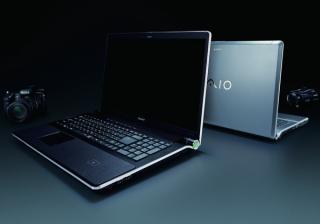
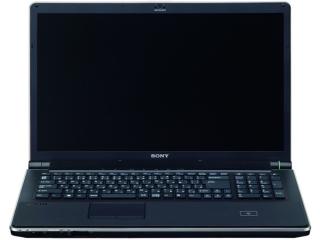
here, another VAIO from sony.

VAIO AW for photo and graphic enthusiast.
credits: PhilFlow of NBR forum ( www.notebookreview.com ) and Endgadget

Specifications:

CPU Intel® Core™ 2 Duo T9600
Memory 4096MB
HDD 628 GB (SSD Flash 128GB + HDD 500GB)
Others WLAN 802.11a/b/g/ Draft n, TV, FingerPrint, Bluetooth, Camera
Screen 18.4" Full HD X-black LCD with RGB 3chip LED technology Full HD WUXGA (1920x1080)
Optical Blu-ray Disc™ drive (reader/writer)
Graphics NVIDIA® GeForce® 9600M GT (512MB VRAM) * high end model will be equipped with Graphics NVIDIA® GeForce® 9600M GT (512MB DDR3 VRAM)
OS Windows Vista® Ultimate

http://www.engadget.com/2008/09/09/sonys-1...-personalities/

This post has been edited by Miyabi: Oct 9 2008, 02:31 PM


Attached thumbnail(s)
Attached Image Attached Image
Miyabi
post Oct 11 2008, 08:32 PM

馬鹿じゃない
******
Senior Member
1,592 posts

Joined: Jul 2005
From: Poland
QUOTE(bitterbutter @ Oct 11 2008, 08:02 PM)
Guys,
My Toshiba give me a headache for the last few weeks, so I just placed an order for my 1st Sony laptop! Will be ready for collection this monday, it is a FW series (VGN-FW11E) w/out blu ray- i don't think i can commit my $$$ for blu ray disc yet. Btw, I bought this in UK, with slight difference on the graphic card mem size (dedicated 256Mb) and cheaper by RM1200 (after currency conversion) compare to Sony Malaysia, which has smaller graphic card size (128Mb).
*
nice deal there, welcome aboard wink.gif
Miyabi
post Oct 12 2008, 01:01 AM

馬鹿じゃない
******
Senior Member
1,592 posts

Joined: Jul 2005
From: Poland
QUOTE(davidmak @ Oct 12 2008, 12:56 AM)
Yes, good decision. Welcome too! Ya, its pretty weird that other regions are getting the 256MB but Malaysia is getting 128MB. But anyway I assume you're getting 256MB DDR3 version and not DDR2. The ones sold in Malaysia is 128MB DDR3 as detected by GPU-Z. Anyway I read there are different display panels too for different regions and the resolution too. Mind sharing with us your specifications?
*
ill help him reply ;P
its ddr3 as report by fellas in nbr.
http://vaio.sony.co.uk/view/ShowProduct.ac...ry=VN+FW+Series

haha
Miyabi
post Oct 17 2008, 09:48 AM

馬鹿じゃない
******
Senior Member
1,592 posts

Joined: Jul 2005
From: Poland
the second batch of FW series will be equipped with 256mb gpu ram.
same goes with sr2 (second batch) + addtional hdmi output.

@nikrizal: theres already have, VGP-BPL12.
Miyabi
post Oct 17 2008, 10:12 AM

馬鹿じゃない
******
Senior Member
1,592 posts

Joined: Jul 2005
From: Poland
QUOTE(ntdote @ Oct 17 2008, 10:04 AM)
My sony VAIO FZ-15G gets very HOT everytime I use.

The temperature is not normal because its too hot to even touch.

Anyone encountered this problem before?
*
i believe it might be the nvidia as the culprit.
which part get hot most? idle and load temperature? ill suggest you monitor the gpu and cpu temp. im not intent to scare you, there a case where the nvidia gpu in fz failed. if you have the warranty still, get the notebook for recheck. and also there some "safe step" which is ensure that your notebook having good and decent air flow.

This post has been edited by Miyabi: Oct 17 2008, 10:14 AM
Miyabi
post Oct 21 2008, 08:17 AM

馬鹿じゃない
******
Senior Member
1,592 posts

Joined: Jul 2005
From: Poland
QUOTE(Claudio @ Oct 17 2008, 05:03 PM)
are you sure about this? coz will be getting the sz13 soon (with at dedicated gpu 128mb). when will the 2nd batch come in? if that's true then shall wait a little bit longer.
*
yes, im very sure of this. but not in malaysia. im not sure whether they going to release them out here. "usually it's take ages for malaysia to get this kind of update" sad.gif

QUOTE(accs_centre @ Oct 21 2008, 12:21 AM)
Now buying VGN-Z12GN still have camera as free gift or not? No price drop for it?
*
i think not anymore. its limited promotion, iinm. smile.gif
and no price drop, though there should be lower end specs version of z-series, just like vaio japan and us.

This post has been edited by Miyabi: Oct 21 2008, 08:18 AM
Miyabi
post Oct 24 2008, 10:50 AM

馬鹿じゃない
******
Senior Member
1,592 posts

Joined: Jul 2005
From: Poland
QUOTE(Xaser_3 @ Oct 23 2008, 07:27 AM)
Hi People. I bought a new Sony Vaio VGN-Z12GN last week. After upgrading the memory to 4GB. I was looking forward to do a clean install of Vista Ultimate x64. But than I realised there isn't any x64 drivers for it. Anybody made an upgrade to x64 before on their Vaio who would like to share their experieces? Thanks in advance.
*
theres no driver for 64-bit OS yet for vaio z. however some peeps already done that using resource from vaio japan etc:
take your time read on how they did here: http://forum.notebookreview.com/showthread.php?t=292536

maybe they will update later.
im currently eyeing on vaio bz. too bad, sony asia pacific always late getting new stuff from vaio japan/us. sad.gif
Miyabi
post Oct 25 2008, 12:36 PM

馬鹿じゃない
******
Senior Member
1,592 posts

Joined: Jul 2005
From: Poland
@accs_centre: gratz on the purchase and welcome to you.
yes, its expensive. take care well of it. smile.gif
Miyabi
post Oct 25 2008, 01:39 PM

馬鹿じゃない
******
Senior Member
1,592 posts

Joined: Jul 2005
From: Poland
create restore/recovery disc after your first time boot.
the restore/recovery disc will restore to factory setting. and no, it wont restore on what have you customize on the notebook.
Miyabi
post Oct 28 2008, 04:33 PM

馬鹿じゃない
******
Senior Member
1,592 posts

Joined: Jul 2005
From: Poland
QUOTE(AngelToh @ Oct 28 2008, 02:25 PM)
Recently I noticed, whenever I turn on my CR35, it will suddenly shut off while in the midst of loading. And I have to turn on again. This happens about 4 out of 10 times I turn it on. Can tell me what's wrong please?
*
time to send it for service. i have no idea whats that cause.

QUOTE(accs_centre @ Oct 28 2008, 03:26 PM)
Anyone know Vaio Z has extra mini-pci slot for 3.5G card? Or we must use the express card slot for 3.5G Internet?
*
look at the battery slot.
and if it not work with 3g connection in malaysia, go look for Option Globetrotter from http://www.dc-unlocker.com/

info: http://forum.notebookreview.com/showthread.php?t=298085
credits: Virtua of notebookreview
Miyabi
post Oct 28 2008, 06:08 PM

馬鹿じゃない
******
Senior Member
1,592 posts

Joined: Jul 2005
From: Poland
^ in wireless device switch?
it should have the option for 5ghz.
Miyabi
post Oct 28 2008, 10:51 PM

馬鹿じゃない
******
Senior Member
1,592 posts

Joined: Jul 2005
From: Poland
the static is due to ground wire (sorta) from the power adapter, not when connecting with battery. this issue happened to most cr series. and uh, the static just make you feel uneasy when do typing, nothing more than that. bet you might get used to it sometime. you can just place rubber or any non-conductor material to static area for your palm rest, or better still get external keyboard when typing

accs_centre: if problem persist, you can try visit forum.notebookreview.com, go to Sony section. many users , especially z series might help and assist you about your problem. if you dont have account, i highly suggest you join there too.

silverwave: only black colour.
Miyabi
post Oct 29 2008, 12:00 AM

馬鹿じゃない
******
Senior Member
1,592 posts

Joined: Jul 2005
From: Poland
QUOTE(Neo_Y @ Oct 28 2008, 11:11 PM)
So what's the point I do invest a huge amount of money on it? I still need to get an external keyboard when typing? OMG....  sweat.gif
*
you are right. cant really help much to cure that problem even you send for repair, just giving ya a thought. aint you playing that machine at first place before buying? i did play the cr at sony centre, and yes i do feel electrostatic..


Added on October 29, 2008, 12:06 amits not only on cr, any aluminium case notebook "will" have this electrostatic. its all about your power adapter folks.

This post has been edited by Miyabi: Oct 29 2008, 12:06 AM
Miyabi
post Oct 29 2008, 11:37 AM

馬鹿じゃない
******
Senior Member
1,592 posts

Joined: Jul 2005
From: Poland
QUOTE(Neo_Y @ Oct 29 2008, 10:55 AM)
Yup, I do play the machine at the first place. But luckily (or I might say is very unlucky) I didn't get any electrostatic by that time. After I know the problem, I went back there and test out the showing units. Then I found that all also got the same problem.  shakehead.gif

Oh yeah.. In additional, sometime I'll feel the electrostatic even without power adapter attach on it.
*
i see...cant really do much. sony malaysia not like sony usa where you can return back for money within 2 weeks of purchase..
accs_centre: what you do to solve your problem? share with us smile.gif
Miyabi
post Oct 29 2008, 12:49 PM

馬鹿じゃない
******
Senior Member
1,592 posts

Joined: Jul 2005
From: Poland
oh lol, so its the router side as the culprit.
anyway, enjoy teh speed tongue.gif
Miyabi
post Oct 29 2008, 01:34 PM

馬鹿じゃない
******
Senior Member
1,592 posts

Joined: Jul 2005
From: Poland
e-zdy: cant really do that since the oem os is include along with its driver for one notebook. and its unique among each other due to license key.

what you can do is, install your own vista business + download the requirement drivers from the website : http://www.sony-asia.com/support/download/...483n/modelfirst
or request from sony..


Added on October 29, 2008, 1:41 pm
QUOTE(accs_centre @ Oct 29 2008, 01:11 PM)
Draft n is still problematic..
My desktop has no issue using WPA to get draft n speed..
*
i see, so many problem.
might just use the normal frequency or just use wired connectivity. save those hassle for something else. lol
im on wired or 2.4 wireless anyway when im at home. old notebook is old and besides, my router doesnt support the new draft.

This post has been edited by Miyabi: Oct 29 2008, 01:41 PM

11 Pages « < 5 6 7 8 9 > » Top
Topic ClosedOptions
 

Change to:
| Lo-Fi Version
0.0234sec    0.87    7 queries    GZIP Disabled
Time is now: 10th December 2025 - 04:36 PM