Welcome Guest ( Log In | Register )

257 Pages « < 203 204 205 206 207 > » Bottom

Outline · [ Standard ] · Linear+

 APPLE PAY IN MALAYSIA, Official arrives in Malaysia! Aug 2022!

views
     
TSshyan90's
post Sep 9 2022, 01:30 PM

To Be Old and Wise You Must First be Young and Stupid
******
Senior Member
1,204 posts

Joined: Jun 2015
From: Malaysia


QUOTE(BuKeYi @ Sep 9 2022, 11:23 AM)
I didn't see any Add to Apple Wallet button on the bottom of Ikea email  hmm.gif
*
Just get mine done...Maybe due to late night they disable it...
You need to click into the email send by ikea to your phone, then once verified by OTP follow their instruction, it has a Apple Pay imagine/link there, click it then it will add into your apple wallet.
BuKeYi
post Sep 9 2022, 02:37 PM

Dame Dame
*****
Junior Member
909 posts

Joined: Apr 2019
From: BuKeYi Wonderland
QUOTE(shyan90's @ Sep 9 2022, 01:30 PM)
Just get mine done...Maybe due to late night they disable it...
You need to click into the email send by ikea to your phone, then once verified by OTP follow their instruction, it has a Apple Pay imagine/link there, click it then it will add into your apple wallet.
*
Ya, get mine done too just now.
MegaThroned
post Sep 9 2022, 02:43 PM

Getting Started
**
Junior Member
139 posts

Joined: Aug 2013
QUOTE(BuKeYi @ Sep 9 2022, 11:23 AM)
I didn't see any Add to Apple Wallet button on the bottom of Ikea email  hmm.gif
*
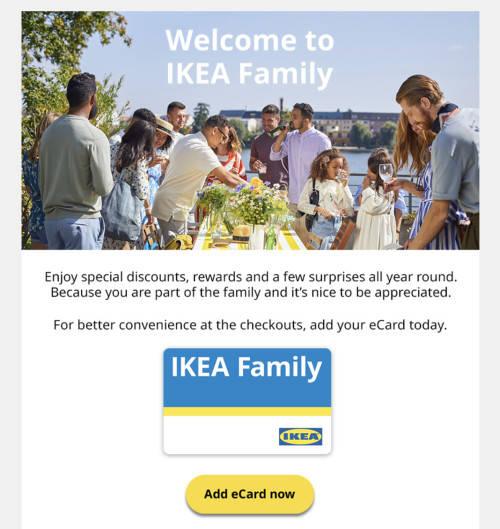
The email looks like this. Add ecard button should be there.

user posted image
megustatu
post Sep 9 2022, 03:16 PM

Getting Started
**
Junior Member
76 posts

Joined: Aug 2022


I have a question about pumping petrol at self-service pump using Apple Pay guys... Other than Petronas (which I tried & witnessed myself), any other petrols that doesn't charge RM200 floating as long as you got set the preset amount? I tried Shell yesterday and it seemed to ignore that preset amount and still wants to deduct RM200 from my account.

BTW I know Petron no longer impose mandatory RM200 floating but sadly their self-service pumps lack of paywave terminal.

This post has been edited by megustatu: Sep 9 2022, 03:19 PM
TSshyan90's
post Sep 9 2022, 03:23 PM

To Be Old and Wise You Must First be Young and Stupid
******
Senior Member
1,204 posts

Joined: Jun 2015
From: Malaysia


QUOTE(megustatu @ Sep 9 2022, 03:16 PM)
I have a question about pumping petrol at self-service pump using Apple Pay guys... Other than Petronas (which I tried & witnessed myself), any other petrols that doesn't charge RM200 floating as long as you got set the preset amount? I tried Shell yesterday and it seemed to ignore that preset amount and still wants to deduct RM200 from my account.

BTW I know Petron no longer impose mandatory RM200 floating but sadly their self-service pumps lack of paywave terminal.
*
I think as long you did not preset the amount, they will still charge you 200... So far I know Shell(some station) and petron can preset amount and they will charge maximum to that amount only.
megustatu
post Sep 9 2022, 03:30 PM

Getting Started
**
Junior Member
76 posts

Joined: Aug 2022


QUOTE(shyan90's @ Sep 9 2022, 03:23 PM)
I think as long you did not preset the amount, they will still charge you 200... So far I know Shell(some station) and petron can preset amount and they will charge maximum to that amount only.
*
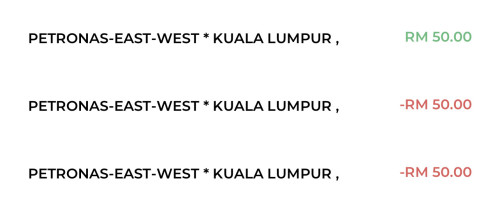
This is the effect of "exact deduction" seen from my bank statement. Appreciate if you/anyone can confirm if using the Shell's preset white panel would give the same result?

user posted image


P/S The same result can also be seen from our MAE transactions page I think.

user posted image

This post has been edited by megustatu: Sep 9 2022, 03:34 PM
Mavik
post Sep 11 2022, 07:47 AM

Patience is a virtue
Group Icon
Elite
7,826 posts

Joined: Jan 2003


QUOTE(megustatu @ Sep 9 2022, 03:16 PM)
I have a question about pumping petrol at self-service pump using Apple Pay guys... Other than Petronas (which I tried & witnessed myself), any other petrols that doesn't charge RM200 floating as long as you got set the preset amount? I tried Shell yesterday and it seemed to ignore that preset amount and still wants to deduct RM200 from my account.

BTW I know Petron no longer impose mandatory RM200 floating but sadly their self-service pumps lack of paywave terminal.
*
It isn't really an Apple Pay issue but rather more of a credit card setting that the petrol retailers have decided on to set. Mind you, it is also quite commonly used in Europe as well as a way to prevent fraud with a floating period to handle issues and cancellations.
SkyHermit
post Sep 13 2022, 09:54 PM

Regular
******
Senior Member
1,799 posts

Joined: Nov 2009


Is Apple Wallet linked to your iCloud ID ?

I am wondering if I buy new phone do they transfer automatically or need to add them again?
papyrous
post Sep 13 2022, 11:15 PM

Getting Started
**
Junior Member
214 posts

Joined: May 2017
QUOTE(SkyHermit @ Sep 13 2022, 09:54 PM)
Is Apple Wallet linked to your iCloud ID ?

I am wondering if I buy new phone do they transfer automatically or need to add them again?
*
automatic.
SkyHermit
post Sep 14 2022, 08:00 AM

Regular
******
Senior Member
1,799 posts

Joined: Nov 2009


QUOTE(papyrous @ Sep 13 2022, 11:15 PM)
automatic.
*
Good to know as I prepare to upgrade to 14 PM.

Since I have few foreign cards that require me to call bank to verify before I can use.
kokhoong0624
post Sep 14 2022, 11:39 AM

Casual
***
Junior Member
404 posts

Joined: Aug 2015
QUOTE(SkyHermit @ Sep 14 2022, 08:00 AM)
Good to know as I prepare to upgrade to 14 PM.

Since I have few foreign cards that require me to call bank to verify before I can use.
*
Unfortunately you have to reverify and "add" them again. You just don't have to "type" out the CC number but I believe you have to type the CVV and reverify
SkyHermit
post Sep 14 2022, 12:22 PM

Regular
******
Senior Member
1,799 posts

Joined: Nov 2009


QUOTE(kokhoong0624 @ Sep 14 2022, 11:39 AM)
Unfortunately you have to reverify and "add" them again. You just don't have to "type" out the CC number but I believe you have to type the CVV and reverify
*
It took me like 10 mins one call for my foreign card to verify for my current iPhone, then another 10 mins for my Apple Watch.. It asked for my card number, DOB, which branch I went to etc...

It seems like I have to do verification again if I buy iPhone 14 next
SkyHermit
post Sep 15 2022, 08:08 AM

Regular
******
Senior Member
1,799 posts

Joined: Nov 2009


Anyone tried their Malaysian cards in oversea before with Apple Pay? Does it work?

I am in Japan now and I tried my Maybank card in many places and only one place (convenience store called Lawson) worked. I put my Apple Watch infront of POS system for like 4-5 seconds and there was no response for my Maybank Card. I tried in 2 Lawsons and only 1 worked with my Maybank card

But when I use my Japanese card and there is no issue and transaction went through within second.

This post has been edited by SkyHermit: Sep 15 2022, 08:11 AM
wjleong15
post Sep 15 2022, 08:49 AM

Look at all my stars!!
*******
Senior Member
3,522 posts

Joined: Sep 2012
QUOTE(SkyHermit @ Sep 15 2022, 08:08 AM)
Anyone tried their Malaysian cards in oversea before with Apple Pay? Does it work?

I am in Japan now and I tried my Maybank card in many places and only one place (convenience store called Lawson) worked. I put my Apple Watch infront of POS system for like 4-5 seconds and there was no response for my Maybank Card. I tried in 2 Lawsons and only 1 worked with my Maybank card

But when I use my Japanese card and there is no issue and transaction went through within second.
*
Did you informed tiger about your travel itinerary and turn on overseas usage (debit card)?
just used in sg early this month it works
SkyHermit
post Sep 15 2022, 09:01 AM

Regular
******
Senior Member
1,799 posts

Joined: Nov 2009


QUOTE(wjleong15 @ Sep 15 2022, 08:49 AM)
Did you informed tiger about your travel itinerary and turn on overseas usage (debit card)?
just used in sg early this month it works
*
Yea. I have no problem using my tiger card in here, even withdrawing cash from ATM overseas.

Just that with Apply Pay, so far only 1 worked so far with my tiger card.
wjleong15
post Sep 15 2022, 09:18 AM

Look at all my stars!!
*******
Senior Member
3,522 posts

Joined: Sep 2012
QUOTE(SkyHermit @ Sep 15 2022, 09:01 AM)
Yea. I have no problem using my tiger card in here, even withdrawing cash from ATM overseas.

Just that with Apply Pay, so far only 1 worked so far with my tiger card.
*
no idea then
probably not all merchant can support as per Apple claim (support wave can support AP)
hmm.gif
like 99speedmart here with mastercard sure failed doh.gif
liberty0480
post Sep 15 2022, 02:40 PM

Getting Started
**
Junior Member
63 posts

Joined: Aug 2022
QUOTE(SkyHermit @ Sep 15 2022, 08:08 AM)
Anyone tried their Malaysian cards in oversea before with Apple Pay? Does it work?

I am in Japan now and I tried my Maybank card in many places and only one place (convenience store called Lawson) worked. I put my Apple Watch infront of POS system for like 4-5 seconds and there was no response for my Maybank Card. I tried in 2 Lawsons and only 1 worked with my Maybank card

But when I use my Japanese card and there is no issue and transaction went through within second.
*
Hey SkyHermit, I came across an article by Ata Distance (@Kanjo on Twitter) a couple months back on the mobile payment landscape in Japan which may be related to your situation (Google: "site:atadistance.net "Don’t say Apple Pay: what to say at checkout in Japan with Apple Pay"" and "site:atadistance.net "Apple Pay Japan Card Guide"").

The gist is that there's several key differences between contactless payment in Japan and elsewhere. Some of the key points mentioned in the articles are (I am paraphrasing them):
1. Japan uses FeliCa standard (NFC-F) predominantly for NFC where else EMV Contactless (Visa / Mastercard) uses NFC-A or NFC-B. The article states that Japan-issued Visa and Mastercard typically has a FeliCa network partner (e.g. iD and QUICPay).

2. Use the term "Credit" or "Touch" when you want to use overseas EMV-based cards (which is literally most of the world, Malaysia included).

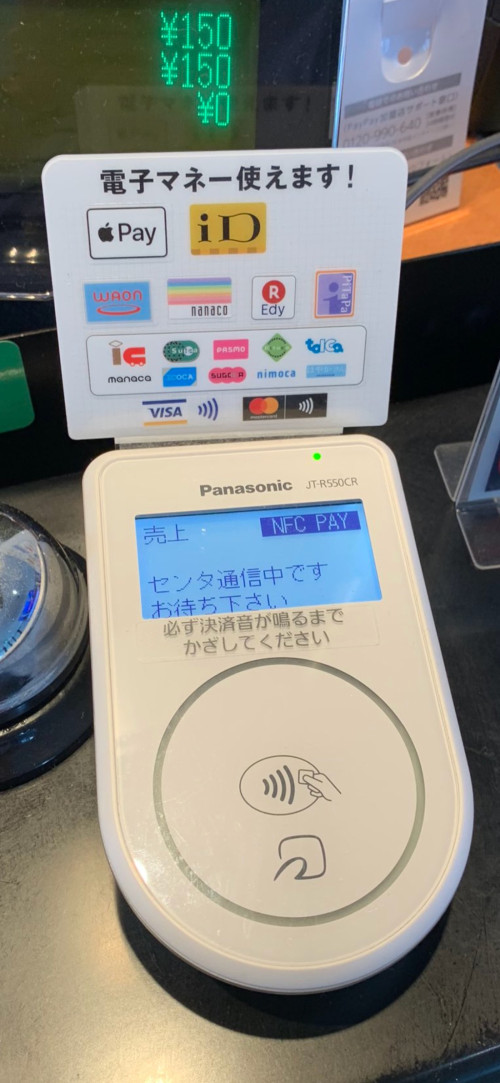
3. The EMV Contactless logo do not mean that the store supports EMV Contactless payments, rather rely on the acceptance marks for Visa / Mastercard contactless [see attached photo].

Hope these helps!
user posted image
SkyHermit
post Sep 15 2022, 03:13 PM

Regular
******
Senior Member
1,799 posts

Joined: Nov 2009


QUOTE(liberty0480 @ Sep 15 2022, 02:40 PM)
Hey SkyHermit, I came across an article by Ata Distance (@Kanjo on Twitter) a couple months back on the mobile payment landscape in Japan which may be related to your situation (Google: "site:atadistance.net "Don’t say Apple Pay: what to say at checkout in Japan with Apple Pay"" and "site:atadistance.net "Apple Pay Japan Card Guide"").

The gist is that there's several key differences between contactless payment in Japan and elsewhere. Some of the key points mentioned in the articles are (I am paraphrasing them):
1. Japan uses FeliCa standard (NFC-F) predominantly for NFC where else EMV Contactless (Visa / Mastercard) uses NFC-A or NFC-B. The article states that Japan-issued Visa and Mastercard typically has a FeliCa network partner (e.g. iD and QUICPay).

2. Use the term "Credit" or "Touch" when you want to use overseas EMV-based cards (which is literally most of the world, Malaysia included).

3. The EMV Contactless logo do not mean that the store supports EMV Contactless payments, rather rely on the acceptance marks for Visa / Mastercard contactless [see attached photo].

Hope these helps!

user posted image
*
Thanks for your info.
Yes in Japan 'QuicPay' icon (FeliCa) is needed in order to use ApplePay even though ApplePay icon isn't shown.

So basically Japan is outlier and Malaysian cards should probably work in most of the countries like in Europe using ApplePay?
yenchenje
post Sep 15 2022, 07:27 PM

Enthusiast
*****
Junior Member
932 posts

Joined: Dec 2019
QUOTE(SkyHermit @ Sep 15 2022, 08:08 AM)
Anyone tried their Malaysian cards in oversea before with Apple Pay? Does it work?

I am in Japan now and I tried my Maybank card in many places and only one place (convenience store called Lawson) worked. I put my Apple Watch infront of POS system for like 4-5 seconds and there was no response for my Maybank Card. I tried in 2 Lawsons and only 1 worked with my Maybank card

But when I use my Japanese card and there is no issue and transaction went through within second.
*
Just throwing my two cents here real quick, for me, I've tried to use AP in Singapore at Shaw Theatres but it failed outright, it wasn't like yours not giving response at all, rather it would appear on my AP history saying that it's rejected, usually if it's fine it should be accepted on tap. I'm fairly certain it's because some issues with my card that I don't know about that's making it reject overseas payment(I've activated almost everything in my M2U app and web, yet it's the same, and also it has rejected my physical card). For Japan with how their system works, it probably is because of either a configuration issue or just the terminal plain outdated. Or maybe it's not designed to work with foreign cards, that's what I think might have happened if your AP is just not responding vs outright rejected. icon_rolleyes.gif

Edit: My card is Maybank Visa Platinum Debit.

This post has been edited by yenchenje: Sep 15 2022, 07:28 PM
sean0411
post Sep 15 2022, 07:29 PM

New Member
*
Newbie
12 posts

Joined: Apr 2017


QUOTE(yenchenje @ Sep 4 2022, 11:33 PM)
Just a clarification, I paid for gas at the counter, the same terminal they were using to scan Petron Miles card, they initially took out a black (I assume Castles terminal?) and then the other cashier to the cashier that was serving me to use the same machine they used for scanning Petron Miles card. Iirc it's a silver terminal with a big touch screen (Didn't really see the brand of it hmm.gif)

Also another update, currently my Shopee Pay transactions doesn't show up in my wallet app as well, it might just be an Apple side issue after all this time, contactless is still fine though pretty sure.  hmm.gif
[attachmentid=11245926]
[attachmentid=11245927]
*
May I know how do you use the Perron Miles Card to scan at machine? Because at my place the can’t scan it at all

257 Pages « < 203 204 205 206 207 > » Top
 

Change to:
| Lo-Fi Version
0.0253sec    0.79    6 queries    GZIP Disabled
Time is now: 25th December 2025 - 12:25 AM