Welcome Guest ( Log In | Register )

Bump Topic Topic Closed RSS Feed
3 Pages  1 2 3 >Bottom

Outline · [ Standard ] · Linear+

 ILLEGEAR Custom Gaming Laptops v.3, RTX ON! ILLEGEAR RTX Gaming Notebook.

views
     
TSPrince J
post Aug 17 2016, 09:24 PM, updated 7y ago

Regular
******
Senior Member
1,272 posts

Joined: May 2010
From: Team ILLEGEAR


PRODUCTS

user posted image
ONYX
Introducing ONYX – our latest premium gaming laptop with a bezel-less 15.6” INFINIVISION display, geared with 8th gen. Intel Core processors and Nvidia RTX graphics in an ultra slim frame. ONYX is also equipped with the GENESWITCH mechanical keyboard for a full gaming experience everywhere you go.

Features & Specifications
15.6″ FHD IPS sRGB 100% Display with INFINIVISION Bezel-less Technology (144Hz)
8th gen. Intel i7-8750H
Nvidia RTX2070 8GB Max-Q
8GB DDR4 RAM (up to 32GB)
512GB NVMe PCIe M.2 SSD (up to 6TB)
Mechanical Keyboard v2 by GENESWITCH Brown
1.95kg | 19.9mm

I5 & GTX1050Ti (FHD 60Hz) RM3,899
I7 & GTX1050Ti (FHD 60Hz) RM4,298
I7 & RTX2070 Max-Q (FHD 144Hz) RM6,899
Additional 2% Cash Discount for Cash Payment.

Learn more: https://www.illegear.com/laptops/onyx/

Customize ONYX: http://store.illegear.com/extreme-performa...egear-onyx.html

Customize ONYX Lite: http://store.illegear.com/portable-perform...-onyx-lite.html


user posted image
SELENITE
Unleash your true gaming potential with SELENITE – the world’s first 17.3” bezel-less laptop and the world’s first silent mechanical keyboard by GENESWITCH BROWN. Expand your gaming boundaries with Selenite’s RTX graphics and experience infinity gaming with its INFINIVISION bezel-less display.

Features & Specifications
17.3″ FHD IPS sRGB 100% Display with INFINIVISION Bezel-less Technology (144Hz)
8th gen. Intel i7-8750H
Nvidia RTX2070 8GB
8GB DDR4 RAM (up to 32GB)
512GB NVMe PCIe M.2 SSD (up to 6TB)
Mechanical Keyboard v2 by GENESWITCH Brown
2.25kg | 25mm

I7 & RTX2070 (FHD 144Hz) RM7,399
Additional 2% Cash Discount for Cash Payment.

Learn more: https://www.illegear.com/laptops/selenite/

Customize SELENITE: http://store.illegear.com/extreme-performa...r-selenite.html


user posted image
RAVEN
RAVEN is our award-winning high-performance gaming laptop built to satisfy your thirst for a powerful machine. It is brimming with features such as its highlight GENESWITCH mechanical keyboard, IPS display, and Intel i5 and i7 6-core processors – everything for tactile gaming at an affordable price.

Features & Specifications
15.6″ Full HD IPS Display
8th gen. Intel i5-8300H / i7-8750H
Nvidia GTX1050 4GB / GTX1050Ti 4GB
8GB DDR4 RAM (up to 32GB)
1TB 7200RPM (up to 6TB)
RGB Chiclet Keyboard
2.2kg | 26mm

I5 & GTX1050 (FHD 60Hz) RM2,999
I7 & GTX1050 (FHD 60Hz) RM3,248
I5 & GTX1050Ti (FHD 60Hz) RM3,348
I7 & GTX1050Ti (FHD 60Hz) RM3,597
Additional 2% Cash Discount for Cash Payment.

Learn More: https://www.illegear.com/laptops/raven/

Customize RAVEN: http://store.illegear.com/game-ready-perfo...gear-raven.html


user posted image
Z7
Meet the beauty and the beast, all in one gaming laptop. The Z7 not only offers a menacing look, but is also capable of dishing out a badass performance as well.

Features & Specifications
17.3″ Full HD IPS sRGB 100% Display
8th gen. Intel i7-8750H
Nvidia GTX1050Ti 4GB
8GB DDR4 RAM (up to 32GB)
1TB 7200RPM (up to 4TB)
White LED Chiclet Keyboard and Touchpad
3.1kg | 32.2mm

I7 & GTX1050Ti RM4,099
Additional 2% Cash Discount if you pay with cash.

Learn More: https://www.illegear.com/laptops/z7/

Customize Z7: http://store.illegear.com/game-ready-performance/138-z7.html


user posted image
D5
From a built-in desktop processor to Nvidia RTX graphics, you can be assured of a whole new level of power, performance, and graphics with the D5. As a testament of being one of the top picks among gaming enthusiasts, it was awarded the Editor’s Choice Award by CHIP Malaysia.

Features & Specifications
15.6″ Full HD IPS sRGB 100% G-Sync Display (144Hz)
9th gen. Intel i5 / i7 / i9 Desktop Processor
Nvidia RTX2060 6GB / RTX2070 8GB / RTX2080 8GB
8GB DDR4 RAM (up to 64GB)
512GB NVMe PCIe M.2 SSD + 1TB 7200RPM (up to 8TB)
RGB Chiclet Keyboard
3.4kg | 38mm

RTX2060 (FHD 144Hz G-sync) RM9,199
RTX2070 (FHD 144Hz G-sync) RM10,698
RTX2080 (FHD 144Hz G-sync) RM13,398
Additional 2% Cash Discount if you pay with cash.

Customize your D5: http://store.illegear.com/desktop-replacem...llegear-d5.html


user posted image
D7X
Go all out with the D7X, a 17.3” gaming behemoth strengthened by 9th Generation Intel desktop processors, NVIDIA RTX graphics cards, and massive storage space that lets you conquer foes minus the lag.

Features & Specifications
17.3″ Full HD IPS sRGB 100% G-Sync Display (144Hz)
9th gen. Intel i5 / i7 / i9 Desktop Processor
Nvidia RTX2060 6GB / RTX2070 8GB / RTX2080 8GB
8GB DDR4 RAM (up to 64GB)
512GB NVMe PCIe M.2 SSD + 1TB 7200RPM (up to 8TB)
RGB Chiclet Keyboard
3.9kg | 40.9mm

RTX2060 (FHD 144Hz G-sync) RM9,999
RTX2070 (FHD 144Hz G-sync) RM11,498
RTX2080 (FHD 144Hz G-sync) RM14,198
Additional 2% Cash Discount if you pay with cash.

Customize your D7X: http://store.illegear.com/desktop-replacem...legear-d7x.html


user posted image
RAIDER
Dive into an explosive gaming experience with Raider, designed for entry-level gamers and advanced gamers alike. Open your gaming boundaries and live the game beyond the screen with Raider’s unique thick tinted tempered glass tower, illuminated with RGB LED light display as you play.

Features & Specifications
Intel® 9th Generation Core™ i5-9400F (Up to i9-9900K)
Nvidia GeForce GTX1660 (Up to RTX 2080Ti)
8GB DDR4 RAM (Up to 64GB 3200MHz)
Samsung 128GB PCIe NVMe M.2 SSD
Seagate Barracuda 1TB 7200RPM
Custom Water Cooling & Custom RGB Options
Starting from RM3,599
Additional 2% Cash Discount if you pay with cash.

Learn more at https://www.illegear.com/desktops/raider/

Customize your RAIDER: https://store.illegear.com/performance-desk...ear-raider.html


user posted image
TROIKA
TROIKA redefines the gaming experience with its out-of-this-world V-shape, tri-cabin casing that separates a gaming PC’s most heat generating parts into three compartments with individual airducts for a more effective cooling system in order to power longer hours of gaming and performance.

Features & Specifications
Intel® 9th Generation Core™ i5-9400F (Up to i9-9900K)
Nvidia GeForce GTX1660 (Up to RTX 2080Ti)
8GB DDR4 RAM (Up to 32GB 3200MHz)
Samsung 128GB PCIe NVMe M.2 SSD
Seagate Barracuda 1TB 7200RPM
Custom Water Cooling & Custom RGB Options
Starting from RM4,399
Additional 2% Cash Discount if you pay with cash.

Customize your TROIKA: http://store.illegear.com/performance-desk...ear-troika.html


user posted image
FANG
Meet the Fang, a high performance gaming mouse with a clean and ergonomic design. Equipped with the esports-grade 10,000 DPI sensor, Omron switches, 7x Programmable buttons, 16.8m RGB colors and many other features, the Fang gives you unrivaled precision and performance.

Features & Specifications
Pixart 3325 Gaming Optical Sensor
Resolution: 800 - 10,000 DPI
Acceleration: 50G
Speed: 250 IPS
Polling Rate: 1000Hz (1ms)
Buttons: 8 (Including Polling Rate Switch)
Fang Command Center Software
16.8 million Programmable RGB Color (Logo, Wheel and Sides)
Durable Omron Switches
7x Programmable Buttons
High Quality Textured Rubber Side Grips (Double Injection)
Onboard Memory
Black Matt UV Coating
1.8 meter Black Braided Cable
Gold Plated USB
122 x 66 x 38 mm
113g
Package: Retail Box, Mouse, User Manual, Fang Command Center Software CD.
RM189

Learn more https://store.illegear.com/gears/164-illegear-fang.html


MATMASTER
Introducing Matmaster, ILLEGEAR’s first gaming mouse mat made to improve your comfort and agility during gameplay. Matmaster comes in 2 editions: speed or control – both built to last against water and other extreme gaming wear and tear.

Features & Specifications
Two Editions: Speed and Control.
Rugged, stress-resistant build
Water resistant survive beverage spills
5mm thickness to minimize lumps on uneven table surface
Stitched border prevents fraying over long term use
Rubberized backing provides excellent grip and no-slip security
Width 320mm, Length 270mm, Thickness 5mm.
RM69

Learn more https://www.illegear.com/gears/matmaster/


Official Website https://www.illegear.com

Follow ILLEGEAR on Facebook

Follow ILLEGEAR on Instagram

Subscribe ILLEGEAR Youtube Channel


ILLEGEAR SDN BHD (GST No: 001628950528)
9-3A, 9th Floor, Oval Damansara,
Jalan Damansara, TTDI 60000,
Kuala Lumpur, Malaysia.

Tel: (+60) 3-28587399
Whatsapp: (+60) 18-6648599
https://wa.me/60186648599

This post has been edited by Prince J: Apr 21 2019, 07:48 PM
TSPrince J
post Aug 17 2016, 11:02 PM

Regular
******
Senior Member
1,272 posts

Joined: May 2010
From: Team ILLEGEAR


RAVEN Product Video


ONYX Product Video


SELENITE Product Video


LAGUNA Product Video


TROIKA Product Video


RAIDER Product Video


This post has been edited by Prince J: Jan 31 2019, 05:46 PM
TSPrince J
post Aug 17 2016, 11:02 PM

Regular
******
Senior Member
1,272 posts

Joined: May 2010
From: Team ILLEGEAR


Check out what Primeval Media had to say about ILLEGEAR ONYX gaming laptop.


ILLEGEAR ONYX Review in Bahasa Melayu by Monaliza.


Don’t just take our words, watch the ILLEGEAR RAVEN review by Primeval Media.


ILLEGEAR LAGUNA Review in Bahasa Melayu by Monaliza.


"The Selenite is the only gaming laptop we tested that can withstand one hour AIDA64 test without any throttle." -Monaliza


Amanz’s quick review for the ILLEGEAR SELENITE.


This post has been edited by Prince J: Dec 13 2018, 06:15 PM
TSPrince J
post Aug 17 2016, 11:02 PM

Regular
******
Senior Member
1,272 posts

Joined: May 2010
From: Team ILLEGEAR


RESERVED

This post has been edited by Prince J: Jan 7 2019, 02:37 AM
TSPrince J
post Aug 24 2016, 07:08 PM

Regular
******
Senior Member
1,272 posts

Joined: May 2010
From: Team ILLEGEAR


Reserved

This post has been edited by Prince J: Jun 30 2018, 11:13 PM
TSPrince J
post Aug 25 2016, 06:21 PM

Regular
******
Senior Member
1,272 posts

Joined: May 2010
From: Team ILLEGEAR


Reserved

This post has been edited by Prince J: Jun 30 2018, 11:13 PM
TSPrince J
post Aug 30 2016, 07:17 PM

Regular
******
Senior Member
1,272 posts

Joined: May 2010
From: Team ILLEGEAR


RESERVED

This post has been edited by Prince J: Mar 3 2017, 08:01 PM
TSPrince J
post Sep 1 2016, 09:05 PM

Regular
******
Senior Member
1,272 posts

Joined: May 2010
From: Team ILLEGEAR


RESERVED

This post has been edited by Prince J: Mar 3 2017, 08:02 PM
TSPrince J
post Sep 5 2016, 05:31 PM

Regular
******
Senior Member
1,272 posts

Joined: May 2010
From: Team ILLEGEAR


RESERVED

This post has been edited by Prince J: Mar 3 2017, 08:02 PM
TSPrince J
post Sep 14 2016, 07:36 PM

Regular
******
Senior Member
1,272 posts

Joined: May 2010
From: Team ILLEGEAR


RESERVED

This post has been edited by Prince J: Mar 3 2017, 08:02 PM
subrok007
post Sep 16 2016, 08:54 AM

Squirtle
******
Senior Member
1,632 posts

Joined: Oct 2007
From: Sea


hello illegear sifu,

S5 possible upgrade GPU in future? its MXM card or soldered to mobo?
hayrol
post Sep 16 2016, 09:38 AM

Getting Started
**
Junior Member
128 posts

Joined: Sep 2011
QUOTE(subrok007 @ Sep 16 2016, 08:54 AM)
hello illegear sifu,

S5 possible upgrade GPU in future? its MXM card or soldered to mobo?
*
So far only D series were using MxM card.
The rest is soldered to the mobo.

So if you plan to upgrade ur GPU in the future, get urself a D series
subrok007
post Sep 16 2016, 11:02 AM

Squirtle
******
Senior Member
1,632 posts

Joined: Oct 2007
From: Sea


D series is using desktop processor which mean I can upgrade the processor in later stage?
DarknessinKL
post Sep 16 2016, 02:22 PM

New Member
*
Junior Member
13 posts

Joined: Oct 2011


Guys, my illegear is stuck bootlooping at the illegear screen.
How do I clean install to fix this?

If I manage to boot from DVD
Can anyone give me the steps to clean install from there?

This post has been edited by DarknessinKL: Sep 16 2016, 03:04 PM
hayrol
post Sep 16 2016, 05:15 PM

Getting Started
**
Junior Member
128 posts

Joined: Sep 2011
QUOTE(subrok007 @ Sep 16 2016, 11:02 AM)
D series is using desktop processor which mean I can upgrade the processor in later stage?
*
Yes you can. If you use i5 6400 proc right now, you can upgrade later to I7 6700 proc since they use Intel Socket 1151 (Intel Gen 6 proc) in D series.
Same goes like mobo which use in PC.
Unless the Intel screw up by releasing new proc with new socket for the mobo. dry.gif

BTW I'm using Illegear D7 series biggrin.gif

This post has been edited by hayrol: Sep 16 2016, 05:19 PM
subrok007
post Sep 16 2016, 05:36 PM

Squirtle
******
Senior Member
1,632 posts

Joined: Oct 2007
From: Sea


QUOTE(hayrol @ Sep 16 2016, 05:15 PM)
Yes you can. If you use i5 6400 proc right now, you can upgrade later to I7 6700 proc since they use Intel Socket 1151 (Intel Gen 6 proc) in D series.
Same goes like mobo which use in PC.
Unless the Intel screw up by releasing new proc with new socket for the mobo. dry.gif

BTW I'm using Illegear D7 series  biggrin.gif
*
How was performance? Excellent? Any major problem?
hayrol
post Sep 16 2016, 07:51 PM

Getting Started
**
Junior Member
128 posts

Joined: Sep 2011
QUOTE(subrok007 @ Sep 16 2016, 05:36 PM)
How was performance? Excellent? Any major problem?
*
If you go for graphic performance, you can easily set your game with high/ultra preset game setting in 2k reso (1980x1080) with GTX1070 or GTX1080. Im using GTX1080 in my D7, so you can said that the performance is outstanding.
But here some my POV if you decided which GPU you wanna choose:
- GTX 1080 can run the game in high/ ultra preset even 4k reso; but not many game use 4K reso; just stick to mainstream 2K reso. So, GTX1070 or GTX1060 should be fine.
- If your budget tight or just go for the mainstream game such as CS:GO or Dota2; GTX1060 or GTX1070 or those GTX9xx series (maxwell) is more than enough, depend on your teacup. Google them for better comparison between those GPU. GTX 1080 price also like a bomb. sweat.gif

You should know that the GPU GTX10xx series is the same GPU that use in PC. That's mean their performance & the price tag almost the same with those GPU that use in PC.
**Heck, even my old D5 Haswell (GTX980M)& Z5 Haswell (GTX970M) runs smoothly with ultra (GTX980M) /high (GTX970M) preset for 2K reso with no sweat. Yes, I bough 2 model from them before**
As for CPU, both i5 & i7 delivery a good performance, it's depend on your taste. Anyway you don't need overclock in your laptop unless you really want to.

If you have extra budget. get urself some extra boost performance on your laptop like SSD & extra RAM (if you running extra task, 16GB is quite enough)
Anyway I don't have any problem regarding the overheat in my D7 & my old D5 &Z5. You can ask them to run test before they delivery to you.
..................................................................................................
As for the Illegear service, if you have any problem regarding with your laptop, just send it to them which is a better option rather than you fixing by yourself.
I can tell that their service was quite good so you don't have to worried about warranty. I got problem with my D5 Maxwell with its power connector, so I send it back for service and around 2 week my D5 return back to me.
(I'm from Sarawak, so 2 weeks is normal for me - time delivery). biggrin.gif

This post has been edited by hayrol: Sep 16 2016, 08:18 PM
subrok007
post Sep 16 2016, 09:21 PM

Squirtle
******
Senior Member
1,632 posts

Joined: Oct 2007
From: Sea


hayrol bro thanks your on-site experienced and sharing. Really informative. Since I looking for gaming laptop to replace my old school desktop.

Btw bro, why you don't upgrade your d5 GPU to gtx10 series card?


hayrol
post Sep 17 2016, 08:39 AM

Getting Started
**
Junior Member
128 posts

Joined: Sep 2011
QUOTE(subrok007 @ Sep 16 2016, 09:21 PM)
hayrol bro thanks your on-site experienced and sharing. Really informative. Since I looking for gaming laptop to replace my old school desktop.

Btw bro, why you don't upgrade your d5 GPU to gtx10 series card?
*
Because my old D5 using the 1st gen of D5 which using Clevo P7xxZM mobo and layout. The GTX10 series MXM more bigger and require more power consumption.
So the new D5 series (Clevo PxxDM or DM-G series)come with different mobo & layout which can support the latest GPU series today. sad.gif

But still my old D5 with GTX980M still handling most of my game with high & ultra settings preset. So, I won't bother so much.

This post has been edited by hayrol: Sep 17 2016, 08:44 AM
TSPrince J
post Sep 17 2016, 10:42 AM

Regular
******
Senior Member
1,272 posts

Joined: May 2010
From: Team ILLEGEAR


QUOTE(DarknessinKL @ Sep 16 2016, 02:22 PM)
Guys, my illegear is stuck bootlooping at the illegear screen.
How do I clean install to fix this?

If I manage to boot from DVD
Can anyone give me the steps to clean install from there?
*
Hi DarknessinKL,

Sounds like OS crashing, may I have your serial number to check your machine details? Will assist.

QUOTE(hayrol @ Sep 16 2016, 07:51 PM)
If you go for graphic performance, you can easily set your game with high/ultra preset game setting in 2k reso (1980x1080) with GTX1070 or GTX1080. Im using GTX1080 in my D7, so you can said that the performance is outstanding.
But here some my POV if you decided which GPU you wanna choose:
- GTX 1080 can run the game in high/ ultra preset even 4k reso; but not many game use 4K reso; just stick to mainstream 2K reso.  So, GTX1070 or GTX1060 should be fine.
- If your budget tight or just go for the mainstream game such as CS:GO or Dota2; GTX1060 or GTX1070 or those GTX9xx series (maxwell) is more than enough, depend on your teacup. Google them for better comparison between those GPU. GTX 1080 price also like a bomb.  sweat.gif

You should know that the GPU GTX10xx series is the same GPU that use in PC. That's mean their performance & the price tag almost the same with those GPU that use in PC.
**Heck, even my old D5 Haswell (GTX980M)& Z5 Haswell (GTX970M) runs smoothly with ultra (GTX980M)  /high (GTX970M) preset for 2K reso with no sweat. Yes, I bough 2 model from them before**
As for CPU, both i5 & i7 delivery a good performance, it's depend on your taste. Anyway you don't need overclock in your laptop unless you really want to.

If you have extra budget. get urself some extra boost performance on your laptop like SSD & extra RAM (if you running extra task, 16GB is quite enough)
Anyway I don't have any problem regarding the overheat in my D7 & my old D5 &Z5. You can ask them to run test before they delivery to you.
..................................................................................................
As for the Illegear service, if you have any problem regarding with your laptop, just send it to them which is a better option rather than you fixing by yourself.
I can tell that their service was quite good so you don't have to worried about warranty.  I got problem with my D5 Maxwell with its power connector, so I send it back for service and around 2 week my D5 return back to me.
(I'm from Sarawak, so 2 weeks is normal for me - time delivery). biggrin.gif
*
Hello hayrol,

You get yourself another GTX1080 machine?
sw1314
post Sep 17 2016, 05:30 PM

Casual
***
Junior Member
312 posts

Joined: Aug 2012
Z5 has 1000 series soon?
chtan
post Sep 19 2016, 03:49 PM

Look at all my stars!!
*******
Senior Member
2,353 posts

Joined: Jan 2003
Just ordered 1 D9X with single GTX1080. Hopefully will be able to receive it by this week.
The reason for single GTX1080 is because of the lack of supports from game dev. and company. But I love to keep the option open so that in case if I want to go SLI, the option is still there.
TSPrince J
post Sep 20 2016, 06:49 PM

Regular
******
Senior Member
1,272 posts

Joined: May 2010
From: Team ILLEGEAR


Deleted

This post has been edited by Prince J: Oct 1 2016, 12:36 PM
Wazzzap
post Sep 20 2016, 09:33 PM

On my way
****
Junior Member
506 posts

Joined: Jan 2003


nice was waiting for this, now i am contemplating whether to get the S5 or MSI GE62VR

by the way, I tried checking out and I noticed you guys only have installment plan for Maybank where are the other banks? Is it an error?

This post has been edited by Wazzzap: Sep 20 2016, 09:34 PM
chtan
post Sep 20 2016, 10:39 PM

Look at all my stars!!
*******
Senior Member
2,353 posts

Joined: Jan 2003
QUOTE(Prince J @ Sep 20 2016, 06:49 PM)
ILLEGEAR Malaysia Day Specials! Get up to RM1,025 FREE upgrades with gaming laptops powered by the new Nvidia GeForce GTX-10 series graphics cards at http://store.illegear.com
Offers are available at our webstore and our showroom http://www.illegear.com/getting-here

user posted image
*
What are the free upgrades? Am I entitle for that?
TSPrince J
post Sep 21 2016, 10:50 AM

Regular
******
Senior Member
1,272 posts

Joined: May 2010
From: Team ILLEGEAR


QUOTE(Wazzzap @ Sep 20 2016, 09:33 PM)
nice was waiting for this, now i am contemplating whether to get the S5 or MSI GE62VR

by the way, I tried checking out and I noticed you guys only have installment plan for Maybank where are the other banks? Is it an error?
*
Hi wazzzap,

Citibank, CIMB and Public Bank don't have online installment platforms, you have to walk into our office for processing this installment. Or, you can opt for staff delivery and our staff will bring a terminal for processing.

QUOTE(chtan @ Sep 20 2016, 10:39 PM)
What are the free upgrades? Am I entitle for that?
*
We have provided you another deal, you can't have both.
chtan
post Sep 21 2016, 03:44 PM

Look at all my stars!!
*******
Senior Member
2,353 posts

Joined: Jan 2003
QUOTE(Prince J @ Sep 21 2016, 10:50 AM)
We have provided you another deal, you can't have both.
*
Not that I wanted both. But the deal offered is nowhere near as good as this holiday promo. You should have extend this deal to me instead of offered another package which consists of only 1 piece of 8GB RAM, Diamond IC and Prof. color calibration. The new promo not only includes the IC diamond and color calibration but also an additional of free Intel SSD and Killer Wifi except the 8GB RAM.

Anyway, have already sorted out with you thru. whatapps. As agreed, I took this new promo + additional RM799 to upgrade my D9X RAM from 8GB to 32GB.

I know it can be a hassle for you if the company didn't convey the promo package to you in advanced.
shirogawawa
post Sep 21 2016, 03:57 PM

Laptop enthusiast
*******
Senior Member
2,383 posts

Joined: Feb 2015
From: IT wonderland


QUOTE(chtan @ Sep 21 2016, 03:44 PM)
Not that I wanted both. But the deal offered is nowhere near as good as this holiday promo. You should have extend this deal to me instead of  offered another package which consists of only 1 piece of 8GB RAM, Diamond IC and Prof. color calibration. The new promo not only includes the IC diamond and color calibration but also an additional of free Intel SSD and Killer Wifi except the 8GB RAM.

Anyway, have already sorted out with you thru. whatapps. As agreed, I took this new promo +  additional RM799 to upgrade my D9X RAM from 8GB to 32GB.

I know it can be a hassle for you if the company didn't convey the promo package to you in advanced.
*
rm 799 for 32 gb ddr 4 ram ? blink.gif thats pricey
chtan
post Sep 21 2016, 04:06 PM

Look at all my stars!!
*******
Senior Member
2,353 posts

Joined: Jan 2003
QUOTE(shirogawawa @ Sep 21 2016, 03:57 PM)
rm 799 for 32 gb ddr 4 ram ?  blink.gif thats pricey
*
I know. I have a friend in IT business. But I prefer to get thing done straight away then have to dismantle and put the RAM in myself. Avoiding any hassle so to say.
edthrax
post Sep 22 2016, 08:07 PM

Enthusiast
*****
Senior Member
829 posts

Joined: Jan 2003
From: TTDI


just ordered a S5 with GTX 1070.. gonna sell off my gaming rig for a gaming laptop...since the performance of mobile gtx 1070 is quite close to desktop counter part..

will try to hook up with my 144hz 1440p monitor and see how it performs..

love that it includes ESS Sabre DAC, can load up my hi-Res music in this baby

This post has been edited by edthrax: Sep 22 2016, 08:08 PM
Pronumeral
post Sep 23 2016, 04:26 AM

New Member
*
Junior Member
25 posts

Joined: Mar 2013
Hi,

I have a S5 and have a problem where if I play games with the keyboard , the W key will be registered even when I'm not holding the key.

for example , I will still go forward in CS:GO even if I'm not pressing W. I remembered another user in the previous thread having this issue, may I know how to resolve this?

Thanks.
TSPrince J
post Sep 23 2016, 10:33 AM

Regular
******
Senior Member
1,272 posts

Joined: May 2010
From: Team ILLEGEAR


QUOTE(Pronumeral @ Sep 23 2016, 04:26 AM)
Hi,

I have a S5 and have a problem where if I play games with the keyboard , the W key will be registered even when I'm not holding the key.

for example , I will still go forward in CS:GO even if I'm not pressing W. I remembered another user in the previous thread having this issue, may I know how to resolve this?

Thanks.
*
Hi Pronumeral,

Can you send in your laptop to us for testing next week?
Wazzzap
post Sep 23 2016, 11:30 AM

On my way
****
Junior Member
506 posts

Joined: Jan 2003


hi Prince J, may i know what are the installment rates for Citibank?
Pronumeral
post Sep 23 2016, 03:29 PM

New Member
*
Junior Member
25 posts

Joined: Mar 2013
QUOTE(Prince J @ Sep 23 2016, 10:33 AM)
Hi Pronumeral,

Can you send in your laptop  to us for testing next week?
*
Hi, I'm afraid that's not possible as I'm studying overseas at the moment. Is there anything else I can do?
TSPrince J
post Sep 23 2016, 03:53 PM

Regular
******
Senior Member
1,272 posts

Joined: May 2010
From: Team ILLEGEAR


QUOTE(Wazzzap @ Sep 23 2016, 11:30 AM)
hi Prince J, may i know what are the installment rates for Citibank?
*
Hi wazzzap,

It depends on how many months you are taking, I have pmed you details.

QUOTE(Pronumeral @ Sep 23 2016, 03:29 PM)
Hi, I'm afraid that's not possible as I'm studying overseas at the moment. Is there anything else I can do?
*
Your S5 is bought from another 2nd hand seller if I remember correctly? Can I have the serial number to check first?
Pronumeral
post Sep 23 2016, 04:07 PM

New Member
*
Junior Member
25 posts

Joined: Mar 2013
QUOTE(Prince J @ Sep 23 2016, 03:53 PM)
Hi wazzzap,

It depends on how many months you are taking, I have pmed you details.
Your S5 is bought from another 2nd hand seller if I remember correctly? Can I have the serial number to check first?
*
UGPM, thanks.
edthrax
post Sep 23 2016, 11:55 PM

Enthusiast
*****
Senior Member
829 posts

Joined: Jan 2003
From: TTDI


Got my S5 this evening..

this thing is heavy, this is my first gaming laptop anyways.

build quality quite good, and for experience technical person, quite easy to add additional ssd, manage to put my 1Tb SSD in this baby with no problem.

love the audio output thru headphone.. very clear and can play my hi-res audio nicely, need to disable SB xFi though,

the speaker on the laptop is tad disappointing, my macbook 12 speaker sounds 10X better..

Gaming, with gtx1070..its quite good and at times better than my current desktop using AMD Fury X..

trying to connect to my 144hz monitor but i think my mini-DP to DP cable is broken, gonna buy a new cable to test whether i can game at 1440p 144hz.. tongue.gif

This post has been edited by edthrax: Sep 24 2016, 12:00 AM
calintztan
post Sep 24 2016, 03:05 AM

Enthusiast
*****
Senior Member
915 posts

Joined: Aug 2011
QUOTE(edthrax @ Sep 23 2016, 11:55 PM)
Got my S5 this evening..

this thing is heavy, this is my first gaming laptop anyways.

build quality quite good, and for experience technical person, quite easy to add additional ssd, manage to put my 1Tb SSD in this baby with no problem.

love the audio output thru headphone.. very clear and can play my hi-res audio nicely, need to disable SB xFi though,

the speaker on the laptop is tad disappointing, my macbook 12 speaker sounds 10X better..

Gaming, with gtx1070..its quite good and at times better than my current desktop using AMD Fury X..

trying to connect to my 144hz monitor but i think my mini-DP to DP cable is broken, gonna buy a new cable to test whether i can game at 1440p 144hz.. tongue.gif
*
Nice review. How's the temperature when running game in max settings?
edthrax
post Sep 24 2016, 06:26 AM

Enthusiast
*****
Senior Member
829 posts

Joined: Jan 2003
From: TTDI


QUOTE(calintztan @ Sep 24 2016, 03:05 AM)
Nice review. How's the temperature when running game in max settings?
*
So far ok, the keyboard felt warm. Still comfortable to game with
calintztan
post Sep 24 2016, 07:06 AM

Enthusiast
*****
Senior Member
915 posts

Joined: Aug 2011
QUOTE(edthrax @ Sep 24 2016, 06:26 AM)
So far ok, the keyboard felt warm. Still comfortable to game with
*
What's the refresh rate of the display ya? I'm getting one next week as well to replace my desktop.
edthrax
post Sep 24 2016, 01:25 PM

Enthusiast
*****
Senior Member
829 posts

Joined: Jan 2003
From: TTDI


QUOTE(calintztan @ Sep 24 2016, 07:06 AM)
What's the refresh rate of the display ya? I'm getting one next week as well to replace my desktop.
*
Only 60hz
Wazzzap
post Sep 25 2016, 06:04 PM

On my way
****
Junior Member
506 posts

Joined: Jan 2003


just ordered myself a s5, went to the show room to take a look but the display laptops are all old models

wanted to test the s5 before buying but the sales person only showed me the non-workable s5 so i only get to see how it looks like

This post has been edited by Wazzzap: Sep 25 2016, 06:05 PM
edthrax
post Sep 26 2016, 10:48 AM

Enthusiast
*****
Senior Member
829 posts

Joined: Jan 2003
From: TTDI


QUOTE(Wazzzap @ Sep 25 2016, 06:04 PM)
just ordered myself a s5, went to the show room to take a look but the display laptops are all old models

wanted to test the s5 before buying but the sales person only showed me the non-workable s5 so i only get to see how it looks like
*
i think the look wise is the same as the old one..

after 3 days fully utilising the laptop, i can say this is one powerful laptop for the price..

manage to overclock the gpu by extra 150mhz and stable.. highest was 180mhz..but it was generating alot of heat fast.. so tone it down to 150mhz..which i think is the sweet spot for stability and thermal ...


Wazzzap
post Sep 26 2016, 11:21 AM

On my way
****
Junior Member
506 posts

Joined: Jan 2003


QUOTE(edthrax @ Sep 26 2016, 10:48 AM)
i think the look wise is the same as the old one..

after 3 days fully utilising the laptop, i can say this is one powerful laptop for the price..

manage to overclock the gpu by extra 150mhz and stable.. highest was 180mhz..but it was generating alot of heat fast.. so tone it down to 150mhz..which i think is the sweet spot for stability and thermal ...
*
are you using the older one? does illegear have any software themselves tuning the fans etc? or i have to do this manually or using 3rd party programs
TSPrince J
post Sep 26 2016, 11:29 AM

Regular
******
Senior Member
1,272 posts

Joined: May 2010
From: Team ILLEGEAR


QUOTE(Wazzzap @ Sep 25 2016, 06:04 PM)
just ordered myself a s5, went to the show room to take a look but the display laptops are all old models

wanted to test the s5 before buying but the sales person only showed me the non-workable s5 so i only get to see how it looks like
*
Hi wazzzap,

I think we showed some customers a S5 with Nvidia Pascal GPU without OS.

Sorry we didn't have time yet to complete the demo, will finish it once we clear all the backlogs.

As for the IPS display and structure fram, it looks pretty much the same as the old S5.

This post has been edited by Prince J: Sep 26 2016, 11:29 AM
Wazzzap
post Sep 26 2016, 11:46 AM

On my way
****
Junior Member
506 posts

Joined: Jan 2003


QUOTE(Prince J @ Sep 26 2016, 11:29 AM)
Hi wazzzap,

I think we showed some customers a S5 with Nvidia Pascal GPU without OS.

Sorry we didn't have time yet to complete the demo, will finish it once we clear all the backlogs.

As for the IPS display and structure fram, it looks pretty much the same as the old S5.
*
yeah its ok, i ordered the s5 on that day itself anyway haha. actually i wanted to ask more questions but then the lady said the sales person is not there at that time, so i didnt really bother anyway. maybe i will ask more questions when i collect the laptop then.


edthrax
post Sep 26 2016, 11:51 AM

Enthusiast
*****
Senior Member
829 posts

Joined: Jan 2003
From: TTDI


QUOTE(Wazzzap @ Sep 26 2016, 11:21 AM)
are you using the older one? does illegear have any software themselves tuning the fans etc? or i have to do this manually or using 3rd party programs
*
dont think its the old one... i just bought like 3 days ago.. GTX 1070 GC

it has a built in software ..quite simple to use..

can specify u want to use optimus (intel + gtx1070 switching) or direct use GTX1070 directly..

use gtx1070 will drain battery quicker though..

This post has been edited by edthrax: Sep 26 2016, 11:53 AM
Wazzzap
post Sep 26 2016, 11:57 AM

On my way
****
Junior Member
506 posts

Joined: Jan 2003


QUOTE(edthrax @ Sep 26 2016, 11:51 AM)
dont think its the old one... i just bought like 3 days ago.. GTX 1070 GC

it has a built in software ..quite simple to use..

can specify u want to use optimus (intel + gtx1070 switching) or direct use  GTX1070 directly..

use gtx1070 will drain battery quicker though..
*
alright great, will be looking forward to collect it and test it out. this is my first laptop by the way haha
edthrax
post Sep 26 2016, 12:24 PM

Enthusiast
*****
Senior Member
829 posts

Joined: Jan 2003
From: TTDI


QUOTE(Wazzzap @ Sep 26 2016, 11:57 AM)
alright great, will be looking forward to collect it and test it out. this is my first laptop by the way haha
*
its my first gaming laptop, have a gaming desktop ..but now i need something slightly mobile for gaming..

so selling off my desktop to get this..but i have another laptop for my office.. this is too heavy for me to bring to office daily
Wazzzap
post Sep 26 2016, 01:26 PM

On my way
****
Junior Member
506 posts

Joined: Jan 2003


QUOTE(edthrax @ Sep 26 2016, 12:24 PM)
its my first gaming laptop, have a gaming desktop ..but now i need something slightly mobile for gaming..

so selling off my desktop to get this..but i have another laptop for my office.. this is too heavy for me to bring to office daily
*
yeah i need it for work as well, how's your experience with the battery life for non-gaming session?
edthrax
post Sep 26 2016, 02:22 PM

Enthusiast
*****
Senior Member
829 posts

Joined: Jan 2003
From: TTDI


QUOTE(Wazzzap @ Sep 26 2016, 01:26 PM)
yeah i need it for work as well, how's your experience with the battery life for non-gaming session?
*
the battery life..for is ok la.. not that great but not that bad..

getting roughly 2 hours, but i am using GTX1070 directly..not optimus..probably can get more on optimus..

i'm used to my macbook 8-9 hours battery life...
TSPrince J
post Sep 26 2016, 02:41 PM

Regular
******
Senior Member
1,272 posts

Joined: May 2010
From: Team ILLEGEAR


QUOTE(edthrax @ Sep 26 2016, 02:22 PM)
the battery life..for is ok la.. not that great but not that bad..

getting roughly 2 hours, but i am using GTX1070 directly..not optimus..probably can get more on optimus..

i'm used to my macbook 8-9 hours battery life...
*
You can enable mshybrid (intel graphics switching) on BIOS.
edthrax
post Sep 26 2016, 02:44 PM

Enthusiast
*****
Senior Member
829 posts

Joined: Jan 2003
From: TTDI


QUOTE(Prince J @ Sep 26 2016, 02:41 PM)
You can enable mshybrid (intel graphics switching) on BIOS.
*
i purposely disable the MShybrid.. because 80% of time the laptop is plugged in.. tongue.gif
Wazzzap
post Sep 26 2016, 02:44 PM

On my way
****
Junior Member
506 posts

Joined: Jan 2003


QUOTE(Prince J @ Sep 26 2016, 02:41 PM)
You can enable mshybrid (intel graphics switching) on BIOS.
*
is there any other way or software to do that instead of going to BIOS?
edthrax
post Sep 26 2016, 02:50 PM

Enthusiast
*****
Senior Member
829 posts

Joined: Jan 2003
From: TTDI


QUOTE(Wazzzap @ Sep 26 2016, 02:44 PM)
is there any other way or software to do that instead of going to BIOS?
*
u can use the built in app ..its on the windows tray icon..but u still need to restart the laptop..

by the default the MShybrid is enabled
chtan
post Sep 26 2016, 05:48 PM

Look at all my stars!!
*******
Senior Member
2,353 posts

Joined: Jan 2003
Hey Prince J, was that you dealing with me just now in whatsapp? Thanks for making thing clear for me on pricing issue. It was my bad due to Monday blue and so eagerly waiting for the machine.
By the way, changing from single GTX1080 to GTX1070 SLI shouldn't posts any stability issue for P870DM3-G board right?
Hopefully you can expedite the unit for me.

This post has been edited by chtan: Sep 26 2016, 05:51 PM
TSPrince J
post Sep 27 2016, 10:27 AM

Regular
******
Senior Member
1,272 posts

Joined: May 2010
From: Team ILLEGEAR


QUOTE(chtan @ Sep 26 2016, 05:48 PM)
Hey Prince J, was that you dealing with me just now in whatsapp? Thanks for making thing clear for me on pricing issue. It was my bad due to Monday blue and so eagerly waiting for the machine.
By the way, changing from single GTX1080 to GTX1070 SLI shouldn't posts any stability issue for P870DM3-G board right?
Hopefully you can expedite the unit for me.
*
There are several persons dealing with our ILLEGEAR whatsapp and yeah I was the one answering your question.

Dual GTX 1070 SLI uses P870DM2 chassis.
chtan
post Sep 27 2016, 11:43 AM

Look at all my stars!!
*******
Senior Member
2,353 posts

Joined: Jan 2003
QUOTE(Prince J @ Sep 27 2016, 10:27 AM)
There are several persons dealing with our ILLEGEAR whatsapp and yeah I was the one answering your question.

Dual GTX 1070 SLI uses P870DM2 chassis.
*
I see. By the way, what is the differences between P870DM2 vs P870DM3?
TSPrince J
post Sep 28 2016, 08:48 PM

Regular
******
Senior Member
1,272 posts

Joined: May 2010
From: Team ILLEGEAR


Attention gamers! Taylor's University The Lakeside Cup DOTA2 tournament will be held using ILLEGEAR gaming laptops. ILLEGEAR will also have a booth there. Catch us up at the event!


Attached thumbnail(s)
Attached Image
TSPrince J
post Sep 29 2016, 11:01 AM

Regular
******
Senior Member
1,272 posts

Joined: May 2010
From: Team ILLEGEAR


QUOTE(chtan @ Sep 27 2016, 11:43 AM)
I see. By the way, what is the differences between P870DM2 vs P870DM3?
*
ID, motherboard structure and heatsink are different.
chtan
post Sep 29 2016, 04:30 PM

Look at all my stars!!
*******
Senior Member
2,353 posts

Joined: Jan 2003
QUOTE(Prince J @ Sep 29 2016, 11:01 AM)
ID, motherboard structure and heatsink are different.
*
Thanks. Received my unit just now after lunch. This machine is...huge compare to my previous Illegear RX-17. Also with the twin brick of power suppliers, wow.
chtan
post Sep 30 2016, 10:30 AM

Look at all my stars!!
*******
Senior Member
2,353 posts

Joined: Jan 2003
Received my D9X yesterday afternoon. Went back and turned on the machine. Did some setting such as switching the pagefile to D:\ Windows app storage to D:\ and the machine kept on crashing like nobody business.
However, after an intensive troubleshooting, I was able to isolate the problem to Windows app storage. Once switch to D:\ the whole machine became unstable. After reverting back to c:\ everything go back to normal now.
Prince, any idea why this happened? My existing RX-17 has never encounter this problem even by switch the storage to d:\.

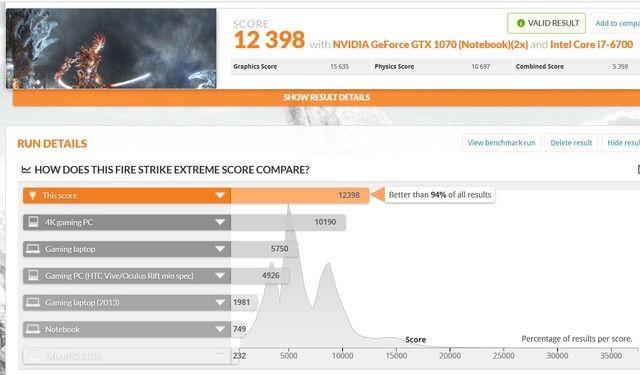
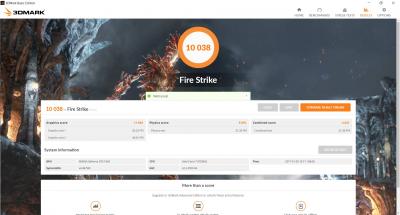
After reverting back the storage to c:\ again. Manage to capture some benchmark with Futuremark Fire Extreme1.1.
user posted image

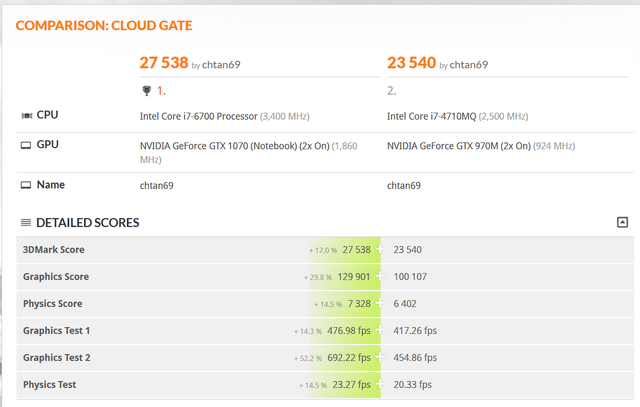
And Cloud gate comparing with my existing RX-17 GTX970M SLI
user posted image

And managed to try out Fallout4 in ultra. While my RX-17 running with a pair of GTX970M struggles with high setting, this machine with a pair of GTX1070 SLI burn thru. the game like hot knife thru. butter. Super silky smooth.

Overall, happy with the purchase.
TSPrince J
post Sep 30 2016, 10:39 AM

Regular
******
Senior Member
1,272 posts

Joined: May 2010
From: Team ILLEGEAR


QUOTE(chtan @ Sep 30 2016, 10:30 AM)
Received my D9X yesterday afternoon. Went back and turned on the machine. Did some setting such as switching the pagefile to D:\ Windows app storage to D:\ and the machine kept on crashing like nobody business.
However, after an intensive troubleshooting, I was able to isolate the problem to Windows app storage. Once switch to D:\ the whole machine became unstable. After reverting back to c:\ everything go back to normal now.
Prince, any idea why this happened? My existing RX-17 has never encounter this problem even by switch the storage to d:\.

After reverting back the storage to c:\ again. Manage to capture some benchmark with Futuremark Fire Extreme1.1.
user posted image

And Cloud gate comparing with my existing RX-17 GTX970M SLI
user posted image

And managed to try out Fallout4 in ultra. While my RX-17 running with a pair of GTX970M struggles with high setting, this machine with a pair of GTX1070 SLI burn thru. the game like hot knife thru. butter. Super silky smooth.

Overall, happy with the purchase.
*
We had the same problem report from some old D series who updated their windows 10 home to anniversary cumulative update. If you wish you can send us your machine and we will install an older version of windows 10 home.
chtan
post Sep 30 2016, 10:53 AM

Look at all my stars!!
*******
Senior Member
2,353 posts

Joined: Jan 2003
QUOTE(Prince J @ Sep 30 2016, 10:39 AM)
We had the same problem report from some old D series who updated their windows 10 home to anniversary cumulative update. If you wish you can send us your machine and we will install an older version of windows 10 home.
*
Nope. I am happy with my unit now. I can live with not able to switch the windows storage to d:\. Worse case I can just upgrade my c:\ to 1T ssd no issue for me.
I am on Anniversary edition now and its rock solid. I won't risk breaking it again. Beside, I purchased a lot of XBox play anywhere games which needs Win10 Anniversary Edition as a basic requirement.

Thanks.
TSPrince J
post Sep 30 2016, 10:55 AM

Regular
******
Senior Member
1,272 posts

Joined: May 2010
From: Team ILLEGEAR


QUOTE(chtan @ Sep 30 2016, 10:53 AM)
Nope. I am happy with my unit now. I can live with not able to switch the windows storage to d:\. Worse case I can just upgrade my c:\ to 1T ssd no issue for me.
I am on Anniversary edition now and its rock solid. I won't risk breaking it again. Beside, I purchased a lot of XBox play anywhere games which needs Win10 Anniversary Edition as a basic requirement.

Thanks.
*
Ok we have compiled a list of anniversary bugs from our users and send to Microsoft. Hope the new update will fix all of them.
ChaChaZero
post Sep 30 2016, 05:13 PM

On my way
****
Junior Member
566 posts

Joined: Sep 2006
I ordered an S5 from the website but there is no stock at the moment. I received an estimate that the stock will arrive next week. Do you have an exact date on when the stock will be coming in?
TSPrince J
post Sep 30 2016, 05:47 PM

Regular
******
Senior Member
1,272 posts

Joined: May 2010
From: Team ILLEGEAR


QUOTE(ChaChaZero @ Sep 30 2016, 05:13 PM)
I ordered an S5 from the website but there is no stock at the moment. I received an estimate that the stock will arrive next week. Do you have an exact date on when the stock will be coming in?
*
Mid of next week estimately.
ChaChaZero
post Sep 30 2016, 07:10 PM

On my way
****
Junior Member
566 posts

Joined: Sep 2006
QUOTE(Prince J @ Sep 30 2016, 05:47 PM)
Mid of next week estimately.
*
Will it be possible to get the laptop before next friday if the stock arrives as estimated?

Or is there additional lead time required that might delay receiving it?
TSPrince J
post Sep 30 2016, 07:13 PM

Regular
******
Senior Member
1,272 posts

Joined: May 2010
From: Team ILLEGEAR


QUOTE(ChaChaZero @ Sep 30 2016, 07:10 PM)
Will it be possible to get the laptop before next friday if the stock arrives as estimated?

Or is there additional lead time required that might delay receiving it?
*
Hi chachazero,

If the stock arrives on wednesday we are able to deliver by friday, do pm me your order number smile.gif
wonglokat
post Sep 30 2016, 07:54 PM

Getting Started
**
Junior Member
247 posts

Joined: Dec 2008
Prince J received any complaints or encountered any warranty claim regarding the hinge on any Illegear (or whatever base it's based on) models?

The Q/S models are in my shortlist of Pascal laptops so would love to know from you or any users here.
okf987
post Sep 30 2016, 08:14 PM

Getting Started
**
Junior Member
113 posts

Joined: Jan 2007
@chtan

Congratz on your purchase btw mind sharing your pc specs?

A few post ago you said you were going for a single 1080 thoughts on why you decided to switch to 1070 sli?

Im getting myself either D7X or D9X too not sure if I should wait for Kabylake first.

Edit: typo

This post has been edited by okf987: Sep 30 2016, 08:50 PM
TSPrince J
post Oct 1 2016, 10:36 AM

Regular
******
Senior Member
1,272 posts

Joined: May 2010
From: Team ILLEGEAR


QUOTE(wonglokat @ Sep 30 2016, 07:54 PM)
Prince J received any complaints or encountered any warranty claim regarding the hinge on any Illegear (or whatever base it's based on) models?

The Q/S models are in my shortlist of Pascal laptops so would love to know from you or any users here.
*
Hi wong

All our current models have stronge hinges, you can test them out at http://www.illegear.com/getting-here
edthrax
post Oct 1 2016, 09:48 PM

Enthusiast
*****
Senior Member
829 posts

Joined: Jan 2003
From: TTDI


just wondering are planning to bring display panels that are 120hz?

and if u do, is the current series can be upgraded?
BlizzardCraft
post Oct 3 2016, 11:25 AM

ChiakChiak
******
Senior Member
1,562 posts

Joined: May 2012


is there any plans on producing z5s wth Nvidia 10 series? my brother is considering buying from illegear too
calintztan
post Oct 4 2016, 05:34 AM

Enthusiast
*****
Senior Member
915 posts

Joined: Aug 2011
Hmm, any idea how to switch off the keyboard LED for S5?
TSPrince J
post Oct 4 2016, 10:32 AM

Regular
******
Senior Member
1,272 posts

Joined: May 2010
From: Team ILLEGEAR


QUOTE(edthrax @ Oct 1 2016, 09:48 PM)
just wondering are planning to bring display panels that are 120hz?

and if u do, is the current series can be upgraded?
*
Motherboard might not be compatible for existing users, but we will advise if it's posisble.

QUOTE(BlizzardCraft @ Oct 3 2016, 11:25 AM)
is there any plans on producing z5s wth Nvidia 10 series? my brother is considering buying from illegear too
*
Yes we will have it, ETA November.

QUOTE(calintztan @ Oct 4 2016, 05:34 AM)
Hmm, any idea how to switch off the keyboard LED for S5?
*
Control Center (bottom right corner)
edthrax
post Oct 4 2016, 10:50 AM

Enthusiast
*****
Senior Member
829 posts

Joined: Jan 2003
From: TTDI


QUOTE(Prince J @ Oct 4 2016, 10:32 AM)
Motherboard might not be compatible for existing users, but we will advise if it's posisble.
ah ok..thanks for the info..

so used to 144hz panel, gaming at 60hz can feel the difference..

btw manage to get around 100-120fps on overwatch using my 144hz 1440p panel.. epic settings with shadow at medium level..100% resolution scaling
chtan
post Oct 4 2016, 11:10 AM

Look at all my stars!!
*******
Senior Member
2,353 posts

Joined: Jan 2003
QUOTE(okf987 @ Sep 30 2016, 08:14 PM)
@chtan

Congratz on your purchase btw mind sharing your pc specs?

A few post ago you said you were going for a single 1080 thoughts on why you decided to switch to 1070 sli?

Im getting myself either D7X or D9X too not sure if I should wait for Kabylake first.

Edit: typo
*
Yap, originally I have ordered a single GTX1080 solution on D9X. However was told by Prince J that the system became unstable with 1 GPU and need to wait for another GPU with different ID to come in which will take another week or so. I hate waiting and that is why I decided to switch to GTX1070 SLI. The second reason is running single GPU in SLI enable board might lead to instability.
Anyway, I am happy with my decision. This machine is a monster. Tested with DeusEx Human divided. My old RX17 with a pair of GTX970Ms can't even hold the high setting consistently with some setting off while this monster is able to burn thru. it with Ultra, everything on. Min42 while Max at 64fps. This is a really impressive fps.
Also tested with Dumbuster's Homefront revolution with CryEngine 3. This machine able to run on it's highest setting with no hesitation at all. Silky smooth. On my old RX17, I have to run this game with medium and have to disable a few selection to get the game on acceptable fps.
If you have the budget to spare, I would recommend you to go for SLI.

Here is my spec.
17.3" Full HD Anti-glare Display featuring 120Hz Refresh Rate (1920 x 1080)
Professional Color Calibration
Intel Core i7-6700 DT processor
2 x Nvidia GTX1070 8GB DDR5 Pascal
IC Diamond Thermal Compound
Crucial 32GB Dual Channel DDR4 RAM 2133MHz - 4 X 8GB
1TB 7200rpm Hitachi Hard Drive
120GB Intel 540 M.2 SATA Solid State Drive
Killer Wireless AC 1535 M.2
Win10 Home 64bit
ILLEGEAR 2 Year Carry-In Warranty

And here are some of my benchmark:

Time spy:
New rig with a pair of GTX1070 manage a score of 8446 ( http://www.3dmark.com/spy/520185 )
My old rig with GTX 970M only manage 4272 ( http://www.3dmark.com/spy/34254)

Fire Strike Extreme:
12938 on new D9X ( http://www.3dmark.com/fs/10318196 ) while on my old rig is only manage to chuck out 10802 in normal, non-extreme test ( http://www.3dmark.com/fs/6189391 ).

Cloud gate:
27538 on my new D9X ( http://www.3dmark.com/cg/3802140 ) while RX17 manage to pull out 23540 ( http://www.3dmark.com/cg/3100725 ) which is not bad. This test do not scale very well with SLI i think.
calintztan
post Oct 4 2016, 11:38 AM

Enthusiast
*****
Senior Member
915 posts

Joined: Aug 2011
QUOTE(edthrax @ Oct 4 2016, 10:50 AM)
ah ok..thanks for the info..

so used to 144hz panel, gaming at 60hz can feel the difference..

btw manage to get around 100-120fps on overwatch using my 144hz 1440p panel.. epic settings with shadow at medium level..100% resolution scaling
*
Did you check the temperature? I running at low setting with 1070 and has around 50-60 temp. Scared that high temp will damage the hardware.
ChaChaZero
post Oct 4 2016, 11:45 AM

On my way
****
Junior Member
566 posts

Joined: Sep 2006
QUOTE(calintztan @ Oct 4 2016, 11:38 AM)
Did you check the temperature? I running at low setting with 1070 and has around 50-60 temp. Scared that high temp will damage the hardware.
*
I think you don't have to worry about that. There has been a lot of debate regarding how temperature affects hardware for laptops and desktops, or typically any kind of electronics.

The laptop's hardware is intelligent enough to shut off the device when it reaches a critical temperature limit. Some devices will throttle itself in an attempt to reduce the temperature. 50-60 Celsius is pretty much standard for a laptop and you're gaming at that temperature too. Sounds pretty good to me even if you're running it on low settings. Try maxing out the settings to push your laptop to the limits and see where it stabilizes. I bet its around the 70s to 80s.

You should only worry that your laptop does not shut down despite hitting critical temperatures of 100 degrees. Also it is good practice to have decent airflow beneath the laptop whenever possible. You're using the S5 right? You can check a review with some thermal notes at this link:

http://www.notebookcheck.net/Schenker-XMG-...w.172321.0.html

The XMG P507 is the same as the S5.
edthrax
post Oct 4 2016, 12:01 PM

Enthusiast
*****
Senior Member
829 posts

Joined: Jan 2003
From: TTDI


QUOTE(calintztan @ Oct 4 2016, 11:38 AM)
Did you check the temperature? I running at low setting with 1070 and has around 50-60 temp. Scared that high temp will damage the hardware.
*
Temp hovering around 85-90C. But so far ok, not having any instabilities. Never go over 90c even after few hours of
Gaming
Ur not really using the full power of the gtx1070 if around that temp.

This post has been edited by edthrax: Oct 4 2016, 12:07 PM
TSPrince J
post Oct 4 2016, 12:48 PM

Regular
******
Senior Member
1,272 posts

Joined: May 2010
From: Team ILLEGEAR


QUOTE(edthrax @ Oct 4 2016, 12:01 PM)
Temp hovering around 85-90C. But so far ok, not having any instabilities. Never go over 90c even after few hours of
Gaming
Ur not really using the full power of the gtx1070 if around that temp.
*
85 to 90C CPU or GPU temperature?
edthrax
post Oct 4 2016, 01:56 PM

Enthusiast
*****
Senior Member
829 posts

Joined: Jan 2003
From: TTDI


QUOTE(Prince J @ Oct 4 2016, 12:48 PM)
85 to 90C CPU or GPU temperature?
*
GPU temp i think..based on the overwatch's performance stat
TSPrince J
post Oct 4 2016, 02:13 PM

Regular
******
Senior Member
1,272 posts

Joined: May 2010
From: Team ILLEGEAR


QUOTE(edthrax @ Oct 4 2016, 01:56 PM)
GPU temp i think..based on the overwatch's performance stat
*
Can you let me know the temperature on HWMonitor and GPU-Z?
edthrax
post Oct 4 2016, 02:18 PM

Enthusiast
*****
Senior Member
829 posts

Joined: Jan 2003
From: TTDI


QUOTE(Prince J @ Oct 4 2016, 02:13 PM)
Can you let me know the temperature on HWMonitor and GPU-Z?
*
will get back to u on that..currently at office..laptop is at home...
BlizzardCraft
post Oct 4 2016, 05:24 PM

ChiakChiak
******
Senior Member
1,562 posts

Joined: May 2012


QUOTE(Prince J @ Oct 4 2016, 10:32 AM)
Motherboard might not be compatible for existing users, but we will advise if it's posisble.
Yes we will have it, ETA November.
Control Center (bottom right corner)
*
Mind if I ask about the price range ? And when will the next promotion coming ? smile.gif
TSPrince J
post Oct 4 2016, 05:27 PM

Regular
******
Senior Member
1,272 posts

Joined: May 2010
From: Team ILLEGEAR


QUOTE(BlizzardCraft @ Oct 4 2016, 05:24 PM)
Mind if I ask about the price range ? And when will the next promotion coming ? smile.gif
*
We will have GTX 1060 (desktop graphics) on the Z5/Z7, as for prices, we will announce soon.

This post has been edited by Prince J: Oct 4 2016, 05:27 PM
edthrax
post Oct 4 2016, 07:07 PM

Enthusiast
*****
Senior Member
829 posts

Joined: Jan 2003
From: TTDI


QUOTE(Prince J @ Oct 4 2016, 02:13 PM)
Can you let me know the temperature on HWMonitor and GPU-Z?
*
hi based on the HWmonitor..

the GPU Max Temp was 90C..

CPU temp 100C..huhu
TSPrince J
post Oct 4 2016, 07:37 PM

Regular
******
Senior Member
1,272 posts

Joined: May 2010
From: Team ILLEGEAR


QUOTE(edthrax @ Oct 4 2016, 07:07 PM)
hi based on the HWmonitor..

the GPU Max Temp was 90C..

CPU temp 100C..huhu
*
Disable Intel turbo boost, that should lower your temperature.
okf987
post Oct 5 2016, 03:35 AM

Getting Started
**
Junior Member
113 posts

Joined: Jan 2007
QUOTE(chtan @ Oct 4 2016, 11:10 AM)
Yap, originally I have ordered a single GTX1080 solution on D9X. However was told by Prince J that the system became unstable with 1 GPU and need to wait for another GPU with different ID to come in which will take another week or so. I hate waiting and that is why I decided to switch to GTX1070 SLI. The second reason is running single GPU in SLI enable board might lead to instability.
Anyway, I am happy with my decision. This machine is a monster. Tested with DeusEx Human divided. My old RX17 with a pair of GTX970Ms can't even hold the high setting consistently with some setting off while this monster is able to burn thru. it with Ultra, everything on. Min42 while Max at 64fps. This is a really impressive fps.
Also tested with Dumbuster's Homefront revolution with CryEngine 3. This machine able to run on it's highest setting with no hesitation at all. Silky smooth. On my old RX17, I have to run this game with medium and have to disable a few selection to get the game on acceptable fps.
If you have the budget to spare, I would recommend you to go for SLI.

Here is my spec.
17.3" Full HD Anti-glare Display featuring 120Hz Refresh Rate (1920 x 1080)
Professional Color Calibration
Intel Core i7-6700 DT processor
2 x Nvidia GTX1070 8GB DDR5 Pascal
IC Diamond Thermal Compound
Crucial 32GB Dual Channel DDR4 RAM 2133MHz - 4 X 8GB
1TB 7200rpm Hitachi Hard Drive
120GB Intel 540 M.2 SATA Solid State Drive
Killer Wireless AC 1535 M.2
Win10 Home 64bit
ILLEGEAR 2 Year Carry-In Warranty

And here are some of my benchmark:

Time spy:
New rig with a pair of GTX1070 manage a score of 8446 ( http://www.3dmark.com/spy/520185 )
My old rig with GTX 970M only manage 4272 ( http://www.3dmark.com/spy/34254)

Fire Strike Extreme:
12938 on new D9X ( http://www.3dmark.com/fs/10318196 ) while on my old rig is only manage to chuck out 10802 in normal, non-extreme test ( http://www.3dmark.com/fs/6189391 ).

Cloud gate:
27538 on my new D9X ( http://www.3dmark.com/cg/3802140 ) while RX17 manage to pull out 23540 ( http://www.3dmark.com/cg/3100725 ) which is not bad. This test do not scale very well with SLI i think.
*
Thanks for taking the time to reply.

The only thing that is holding me back from buying right now is probably the uncertain future of SLI.

I did some research on SLI saw the video on Linustechtips about it and how Nvidia is pushing the responsibility to game developers to support SLI and how he makes it sound like its not a good sign but goes on to say that Nvidia is reducing support for 3-4 way sli and focusing more on 2 way than again that is contradicting what they just said by pushing responsibility to game developers instead.

Also went to Nvidia reddit filter stuff with SLI and almost everyone is recommending to just go for the single biggest/fastest gpu you can afford. Notebook reviews forums more or less have people saying how they wish they opted for a single card rather than 2.

I have personally never had SLI or even tried it before I think in the end I just wanna know how was your experience with SLI?

Do you get heat problems? Bottlenecks? Micro stuttering?

Your input is greatly appreciated :-)


chtan
post Oct 5 2016, 08:09 AM

Look at all my stars!!
*******
Senior Member
2,353 posts

Joined: Jan 2003
QUOTE(okf987 @ Oct 5 2016, 03:35 AM)
Thanks for taking the time to reply.

The only thing that is holding me back from buying right now is probably the uncertain future of SLI.

I did some research on SLI saw the video on Linustechtips about it and how Nvidia is pushing the responsibility to game developers to support SLI and how he makes it sound like its not a good sign but goes on to say that Nvidia is reducing support for 3-4 way sli and focusing more on 2 way than again that is contradicting what they just said by pushing responsibility to game developers instead.

Also went to Nvidia reddit filter stuff with SLI and almost everyone is recommending to just go for the single biggest/fastest gpu you can afford. Notebook reviews forums more or less have people saying how they wish they opted for a single card rather than 2.

I have personally never had SLI or even tried it before I think in the end I just wanna know how was your experience with SLI?

Do you get heat problems? Bottlenecks? Micro stuttering?

Your input is greatly appreciated :-)
*
Heat is definitely not an issue for this machine. Never see the temperature go above 70C for CPU and the GPU hit the max is 82C (when running Dumbuster's Homefront for about 20min on the highest setting). Dumbuster's Homefront is really a system resource guzzler which incidentally running on CryEngine3 and it is a very beautiful game. This is the only game that turn the system fan up a notch so far beside futuremark benching.
I have tested it with Batman Arkham Knight, GTA V, Doom, TitanQuest Anniversary Edition(crunching this game now), DeusEx Human Divided. None of this post a challenge to this machine. It just burn right thru. them with ease. Never encountered any micro stutter or throttling at all. I don't think there are any game will make this machine struggle yet as of now or maybe I am just gaming in 1080p. Twin GTX10170 are just overkill on the resolution that I play. I have pre-ordered Gear 4 Ultimate edition from MS Store, let wait and see how this machine perform on this new DirectX12 title. Heat is never an issue for this machine.

Sound is also very good compare to my old RX17. Very solid and vibrant with depth.

I will try again tonight with DirectX12 game such as Forza Horizon 3 (just finished downloading last night), Gear of War Ultimate Edition, Recore and the dreaded Quantum Break from MS store. Will update here again later.

And lastly, I have to agree with your concern in SLI supports. Almost all the game being release without SLI support. They normal came a bit later with nvidia driver update. Once the game being supported, they fly. There are always a alternate solution to title which didn't support SLI. You can use the Nvidia Inspector to tailor you own SLI support or download the profile from fan's forum.

Have been using SLI since RX17, I am very confident that SLI are here to stay. Especially when people want to push 4K now. Single card barely cut it.

This post has been edited by chtan: Oct 5 2016, 08:16 AM
hitoshi
post Oct 5 2016, 12:07 PM

New Member
*
Junior Member
9 posts

Joined: Feb 2009


QUOTE(edthrax @ Oct 4 2016, 01:56 PM)
GPU temp i think..based on the overwatch's performance stat
*
If im not mistaken.. overwatch stats is CPU temp not GPU.. correct me if im wrong..
edthrax
post Oct 5 2016, 12:23 PM

Enthusiast
*****
Senior Member
829 posts

Joined: Jan 2003
From: TTDI


QUOTE(hitoshi @ Oct 5 2016, 12:07 PM)
If im not mistaken.. overwatch stats is CPU temp not GPU.. correct me if im wrong..
*
based when i test using HWMonitor app, the Overwatch temp display matches the GPU temp on HWMonitor..

another reason i think my laptop was having 90 GPU & 100 CPU temp was of my laptop placement.. i put the laptop on top of the velvet cover given, when i elevated the laptop abit, more clearing on the bottom, the temp reduced to 78-85 for the GPU and 86-90 for the CPU..

will try to source a laptop cooler and see whether it makes any more difference in temp..

This post has been edited by edthrax: Oct 5 2016, 12:23 PM
okf987
post Oct 5 2016, 05:12 PM

Getting Started
**
Junior Member
113 posts

Joined: Jan 2007
QUOTE(chtan @ Oct 5 2016, 08:09 AM)
Heat is definitely not an issue for this machine. Never see the temperature go above 70C for CPU and the GPU hit the max is 82C (when running Dumbuster's Homefront for about 20min on the highest setting). Dumbuster's Homefront is really a system resource  guzzler which incidentally running on CryEngine3 and it is a very beautiful game. This is the only game that turn the system fan up a notch so far beside futuremark benching.
I have tested it with Batman Arkham Knight, GTA V, Doom, TitanQuest Anniversary Edition(crunching this game now), DeusEx Human Divided. None of this post a challenge to this machine. It just burn right thru. them with ease. Never encountered any micro stutter or throttling at all. I don't think there are any game will make this machine struggle yet as of now or maybe I am just gaming in 1080p. Twin GTX10170 are just overkill on the resolution that I play. I have pre-ordered Gear 4 Ultimate edition from MS Store, let wait and see how this machine perform on this new DirectX12 title. Heat is never an issue for this machine.

Sound is also very good compare to my old RX17. Very solid and vibrant with depth.

I will try again tonight with DirectX12 game such as Forza Horizon 3 (just finished downloading last night), Gear of War Ultimate Edition, Recore and the dreaded Quantum Break from MS store. Will update here again later.

And lastly, I have to agree with your concern in SLI supports. Almost all the game being release without SLI support. They normal came a bit later with nvidia driver update. Once the game being supported, they fly. There are always a alternate solution to title which didn't support SLI. You can use the Nvidia Inspector to tailor you own SLI support or download the profile from fan's forum.

Have been using SLI since RX17, I am very confident that SLI are here to stay. Especially when people want to push 4K now. Single card barely cut it.
*
Im sold I think I might as well just grab my 1st sli right now lol.

But to think you got an rx17 sli and now you have to upgrade again you think its worth it?
chtan
post Oct 5 2016, 05:42 PM

Look at all my stars!!
*******
Senior Member
2,353 posts

Joined: Jan 2003
QUOTE(okf987 @ Oct 5 2016, 05:12 PM)
Im sold I think I might as well just grab my 1st sli right now lol.

But to think you got an rx17 sli and now you have to upgrade again you think its worth it?
*
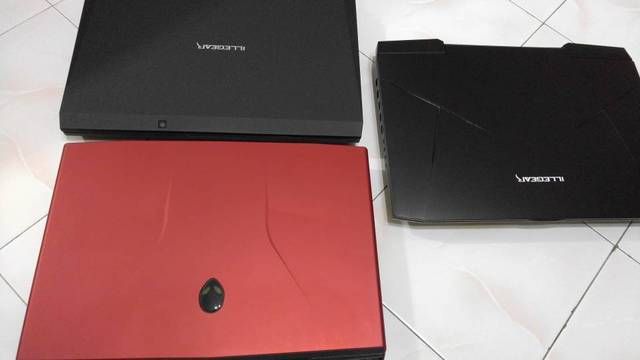
The reason is because my son's 4yrs+ Alienware M17xR4 starts to give problem now and he is hogging my RX17 for Overwatch. I have no choice but to get another machine for myself.
user posted image
okf987
post Oct 5 2016, 07:01 PM

Getting Started
**
Junior Member
113 posts

Joined: Jan 2007
QUOTE(chtan @ Oct 5 2016, 05:42 PM)
The reason is because my son's 4yrs+ Alienware M17xR4 starts to give problem now and he is hogging my RX17 for Overwatch. I have no choice but to get another machine for myself.
user posted image
*
Ah ok valid reason to spend on yourself than.

To bad for me late for the promo welp have to stick with mine for awhile.

Again thanks for the reply but it sure help with my decision to pick one up soon enough :-)
TSPrince J
post Oct 7 2016, 07:08 PM

Regular
******
Senior Member
1,272 posts

Joined: May 2010
From: Team ILLEGEAR


ILLEGEAR S5 was reviewed by HWM Malaysia and score a 9 over 10. Read more at:
http://www.hardwarezone.com.my/review-ille...e-conclusion-61

Attached Image
wonglokat
post Oct 7 2016, 08:33 PM

Getting Started
**
Junior Member
247 posts

Joined: Dec 2008
HWM messed up the pricing for the spec they published. Any info on the colour accuracy of the default FHD screen (or make / model of the LCD)?

Optimus doesn't work on G-sync panels but a few threads before Prince J mentioned about the ability to switch between discrete and the native graphics. I take it to mean all three screen options.
ChaChaZero
post Oct 7 2016, 09:47 PM

On my way
****
Junior Member
566 posts

Joined: Sep 2006
Just received my S5 today. I'll get a review up once I've had some fun with it.

Question, does anyone know how to stop the battery from charging over a certain percentage?
wonglokat
post Oct 7 2016, 11:12 PM

Getting Started
**
Junior Member
247 posts

Joined: Dec 2008
QUOTE(ChaChaZero @ Oct 7 2016, 09:47 PM)
Just received my S5 today. I'll get a review up once I've had some fun with it.

Question, does anyone know how to stop the battery from charging over a certain percentage?
*
Much needed. Be waiting for it!
ChaChaZero
post Oct 8 2016, 03:06 AM

On my way
****
Junior Member
566 posts

Joined: Sep 2006
QUOTE(wonglokat @ Oct 7 2016, 11:12 PM)
Much needed. Be waiting for it!
*
Ok here goes. Note that I am not a hardcore gamer so I don't have the latest games. I am coming from a Lenovo Y50 with a 860M prior to the S5.

First impressions, nice solid build. The laptop itself well built, very sturdy. To the earlier person asking about hinges, I can say the hinges of the S5 is rock solid. There is barely any movement when you open and close the laptop but I have to point out that the monitor is a little flimsy to the touch but it is of no concern. It is still a lot better than most laptops I have used. (Dell/Lenovo enterprise laptops, Asus ROG, Y50, Y700).

The specs I took comes with the 1060 (6GB). You can check the Illegear site for the rest of the specs as this is the main point of the laptop. The 1060 is very powerful for 1080p gaming. I've tried this on Doom, Tomb Raider 2013, Metro 2033 and Tales of Zesteria. It doesn't break a sweat hitting 60 FPS at Ultra settings. For some of the games here, I can crank it to the max and it still runs at 60FPS. If 4k or multiple displays are not your concern, a 1060 is more than enough to power your games.

Physically there is not much to complain about the laptop's design. The keyboard keys are pretty big and it is very comfortable to type with and the trackpad is top class but some might feel that it is a little rough to the touch. I got used to the input devices in less than 15 mins compared to my Y50 which I could never get used to the touchpad after 2 years. Big touchpad buttons are a plus but it never gets in the way despite the size. Palm rests are suitably large but I wished they put the stickers on the right side of the laptop instead. FPS players might accidentally peel it off after prolonged used of the WSAD keys.

The screen is freaking fantastic. I am not sure if it is because I took it with the professional color calibration but holy damn hell. I've not seen a laptop screen with such vibrant colors as of yet.

Some gripes I have:
1. The speakers don't complement the Soundblaster X-Fi. Holy shit the sound is so awesome with headphones but on the speakers a lot of the quality are lost. I can't say the speakers are terrible but neither are they really good. Its about average to me. A plus for the speakers though, it is really loud when cranked up to the max. It beat the Y50 that comes with a subwoofer. I thought Y50 was loud, the S5 tramples all over it like it was never there.

2. When gaming, the fans are really loud. Without earphones I can hear the sound of the fans spinning at top speed but strangely the temperature was never over 60 degrees celcius for the processors and around 60 for the GPU. I don't think the temperature is really high yet at that point but then again, maybe the fans are working hard to keep the temperature down.

3. When I change it to discrete GPU, the laptop suffers from micro stutters. I tried many games, all faced the same problem. 60 FPS constantly but micro stuttering every 5 secs or so. It is really annoying.When I switch it back to MSHybrid, it works perfectly. I tried switching a few times, upgraded and downgraded the drivers (clean install) and it never made a difference. I can't pin down whats the problem with it but it happens only during discrete GPU. Not a major problem for me though, I just switched it to MSHybrid. I just hope MSHybrid is not as stupid as Optimus.

4. LAN port is on the right side. This might be just me but the LAN port is on the right of the laptop. I also plug in an Xbone controller on the right. It limits the space for the mouse. Nothing major but becomes a small nuisance when typing and using the mouse at the same time.

5. So maaaaaany screws for the maintenance hatch.

Overall, I am very satisfied with this purchase despite the numerous complains I have.The major winning point for me was how quickly I felt accustomed to the laptop. Very nice design with lots of typing space. Oh did I mention it has a numpad? Awesome stuff. Another major point for me is the WiFi card it comes with. The intel 8260 has very good range. My router is one floor below and I had some issues with my Y50 getting full signal. It gets stuck at around 1 or 2 bars. The S5 easily maxes it out. I'd say there is a distance of about 10 meters with a thick floor between it.

I'd give this laptop a 8/10. Easily recommended for anyone looking for a good 1080p gaming and working laptop. The minimalist design makes it look professional too.

PS. I am not sure whats with the temperature. I tried running all kinds of things that should have shot up the temps but it never goes above 60. Not sure if this is a good thing or not.
TSPrince J
post Oct 8 2016, 10:57 AM

Regular
******
Senior Member
1,272 posts

Joined: May 2010
From: Team ILLEGEAR


QUOTE(ChaChaZero @ Oct 7 2016, 09:47 PM)
Just received my S5 today. I'll get a review up once I've had some fun with it.

Question, does anyone know how to stop the battery from charging over a certain percentage?
*
Hi Chachazero,

It can be done in BIOS, press F2 to access BIOS -> Advance Chipset Control.
TSPrince J
post Oct 8 2016, 10:58 AM

Regular
******
Senior Member
1,272 posts

Joined: May 2010
From: Team ILLEGEAR


QUOTE(ChaChaZero @ Oct 8 2016, 03:06 AM)
Ok here goes. Note that I am not a hardcore gamer so I don't have the latest games. I am coming from a Lenovo Y50 with a 860M prior to the S5.

First impressions, nice solid build. The laptop itself well built, very sturdy. To the earlier person asking about hinges, I can say the hinges of the S5 is rock solid. There is barely any movement when you open and close the laptop but I have to point out that the monitor is a little flimsy to the touch but it is of no concern. It is still a lot better than most laptops I have used. (Dell/Lenovo enterprise laptops, Asus ROG, Y50, Y700).

The specs I took comes with the 1060 (6GB). You can check the Illegear site for the rest of the specs as this is the main point of the laptop. The 1060 is very powerful for 1080p gaming. I've tried this on Doom, Tomb Raider 2013, Metro 2033 and Tales of Zesteria. It doesn't break a sweat hitting 60 FPS at Ultra settings. For some of the games here, I can crank it to the max  and it still runs at 60FPS. If 4k or multiple displays are not your concern, a 1060 is more than enough to power your games.

Physically there is not much to complain about the laptop's design. The keyboard keys are pretty big and it is very comfortable to type with and the trackpad is top class but some might feel that it is a little rough to the touch. I got used to the input devices in less than 15 mins compared to my Y50 which I could never get used to the touchpad after 2 years. Big touchpad buttons are a plus but it never gets in the way despite the size. Palm rests are suitably large but I wished they put the stickers on the right side of the laptop instead. FPS players might accidentally peel it off after prolonged used of the WSAD keys.

The screen is freaking fantastic. I am not sure if it is because I took it with the professional color calibration but holy damn hell. I've not seen a laptop screen with such vibrant colors as of yet.

Some gripes I have:
1. The speakers don't complement the Soundblaster X-Fi. Holy shit the sound is so awesome with headphones but on the speakers a lot of the quality are lost. I can't say the speakers are terrible but neither are they really good. Its about average to me. A plus for the speakers though, it is really loud when cranked up to the max. It beat the Y50 that comes with a subwoofer. I thought Y50 was loud, the S5 tramples all over it like it was never there.

2. When gaming, the fans are really loud. Without earphones I can hear the sound of the fans spinning at top speed but strangely the temperature was never over 60 degrees celcius for the processors and around 60 for the GPU. I don't think the temperature is really high yet at that point but then again, maybe the fans are working hard to keep the temperature down.

3. When I change it to discrete GPU, the laptop suffers from micro stutters. I tried many games, all faced the same problem. 60 FPS constantly but micro stuttering every 5 secs or so. It is really annoying.When I switch it back to MSHybrid, it works perfectly. I tried switching a few times, upgraded and downgraded the drivers (clean install) and it never made a difference. I can't pin down whats the problem with it but it happens only during discrete GPU. Not a major problem for me though, I just switched it to MSHybrid. I just hope MSHybrid is not as stupid as Optimus.

4. LAN port is on the right side. This might be just me but the LAN port is on the right of the laptop. I also plug in an Xbone controller on the right. It limits the space for the mouse. Nothing major but becomes a small nuisance when typing and using the mouse at the same time.

5. So maaaaaany screws for the maintenance hatch.

Overall, I am very satisfied with this purchase despite the numerous complains I have.The major winning point for me was how quickly I felt accustomed to the laptop. Very nice design with lots of typing space. Oh did I mention it has a numpad? Awesome stuff. Another major point for me is the WiFi card it comes with. The intel 8260 has very good range. My router is one floor below and I had some issues with my Y50 getting full signal. It gets stuck at around 1 or 2 bars. The S5 easily maxes it out. I'd say there is a distance of about 10 meters with a thick floor between it.

I'd give this laptop a 8/10. Easily recommended for anyone looking for a good 1080p gaming and working laptop. The minimalist design makes it look professional too.

PS. I am not sure whats with the temperature. I tried running all kinds of things that should have shot up the temps but it never goes above 60. Not sure if this is a good thing or not.
*
Thanks for the review. Just curious did you enable Nvidia Gsync?
ChaChaZero
post Oct 8 2016, 11:49 AM

On my way
****
Junior Member
566 posts

Joined: Sep 2006
QUOTE(Prince J @ Oct 8 2016, 10:58 AM)
Thanks for the review. Just curious did you enable Nvidia Gsync?
*
Yeah, thanks for the BIOS battery tip. I also found out what is causing the stuttering. It wasn't anything to do with the drivers or Nvidia settings.

It was caused by Google Chrome. My Google Chrome opens about 60 tabs sweat.gif . There are a handful of these tabs, mainly to manga sites that have those stupid ads loading at the back non-stop causing the CPU usage to shoot up to around 30%. Once I closed them, the problem went away.


TSPrince J
post Oct 8 2016, 12:37 PM

Regular
******
Senior Member
1,272 posts

Joined: May 2010
From: Team ILLEGEAR


QUOTE(ChaChaZero @ Oct 8 2016, 11:49 AM)
Yeah, thanks for the BIOS battery tip. I also found out what is causing the stuttering. It wasn't anything to do with the drivers or Nvidia settings.

It was caused by Google Chrome. My Google Chrome opens about 60 tabs sweat.gif . There are a handful of these tabs, mainly to manga sites that have those stupid ads loading at the back non-stop causing the CPU usage to shoot up to around 30%. Once I closed them, the problem went away.
*
Glad the stuttering issue was sorted out smile.gif

You may enable gsync with discrete GPU in Nvidia Control Panel.
TSPrince J
post Oct 8 2016, 12:39 PM

Regular
******
Senior Member
1,272 posts

Joined: May 2010
From: Team ILLEGEAR


QUOTE(wonglokat @ Oct 7 2016, 08:33 PM)
HWM messed up the pricing for the spec they published. Any info on the colour accuracy of the default FHD screen (or make / model of the LCD)?

Optimus doesn't work on G-sync panels but a few threads before Prince J mentioned about the ability to switch between discrete and the native graphics. I take it to mean all three screen options.
*
No, the default screen doesn't have Gsync feature, it's just a normal Full HD Anti-glare display.

Nvidia only authorize LG and Samsung for Gsync, so all the Gsync display are either LG (IPS) or Samsung (PLS) panels.
wonglokat
post Oct 8 2016, 01:17 PM

Getting Started
**
Junior Member
247 posts

Joined: Dec 2008
QUOTE(ChaChaZero @ Oct 8 2016, 03:06 AM)
Ok here goes. Note that I am not a hardcore gamer so I don't have the latest games. I am coming from a Lenovo Y50 with a 860M prior to the S5.

First impressions, nice solid build. The laptop itself well built, very sturdy. To the earlier person asking about hinges, I can say the hinges of the S5 is rock solid. There is barely any movement when you open and close the laptop but I have to point out that the monitor is a little flimsy to the touch but it is of no concern. It is still a lot better than most laptops I have used. (Dell/Lenovo enterprise laptops, Asus ROG, Y50, Y700).

The specs I took comes with the 1060 (6GB). You can check the Illegear site for the rest of the specs as this is the main point of the laptop. The 1060 is very powerful for 1080p gaming. I've tried this on Doom, Tomb Raider 2013, Metro 2033 and Tales of Zesteria. It doesn't break a sweat hitting 60 FPS at Ultra settings. For some of the games here, I can crank it to the max  and it still runs at 60FPS. If 4k or multiple displays are not your concern, a 1060 is more than enough to power your games.

Physically there is not much to complain about the laptop's design. The keyboard keys are pretty big and it is very comfortable to type with and the trackpad is top class but some might feel that it is a little rough to the touch. I got used to the input devices in less than 15 mins compared to my Y50 which I could never get used to the touchpad after 2 years. Big touchpad buttons are a plus but it never gets in the way despite the size. Palm rests are suitably large but I wished they put the stickers on the right side of the laptop instead. FPS players might accidentally peel it off after prolonged used of the WSAD keys.

The screen is freaking fantastic. I am not sure if it is because I took it with the professional color calibration but holy damn hell. I've not seen a laptop screen with such vibrant colors as of yet.

Some gripes I have:
1. The speakers don't complement the Soundblaster X-Fi. Holy shit the sound is so awesome with headphones but on the speakers a lot of the quality are lost. I can't say the speakers are terrible but neither are they really good. Its about average to me. A plus for the speakers though, it is really loud when cranked up to the max. It beat the Y50 that comes with a subwoofer. I thought Y50 was loud, the S5 tramples all over it like it was never there.

2. When gaming, the fans are really loud. Without earphones I can hear the sound of the fans spinning at top speed but strangely the temperature was never over 60 degrees celcius for the processors and around 60 for the GPU. I don't think the temperature is really high yet at that point but then again, maybe the fans are working hard to keep the temperature down.

3. When I change it to discrete GPU, the laptop suffers from micro stutters. I tried many games, all faced the same problem. 60 FPS constantly but micro stuttering every 5 secs or so. It is really annoying.When I switch it back to MSHybrid, it works perfectly. I tried switching a few times, upgraded and downgraded the drivers (clean install) and it never made a difference. I can't pin down whats the problem with it but it happens only during discrete GPU. Not a major problem for me though, I just switched it to MSHybrid. I just hope MSHybrid is not as stupid as Optimus.

4. LAN port is on the right side. This might be just me but the LAN port is on the right of the laptop. I also plug in an Xbone controller on the right. It limits the space for the mouse. Nothing major but becomes a small nuisance when typing and using the mouse at the same time.

5. So maaaaaany screws for the maintenance hatch.

Overall, I am very satisfied with this purchase despite the numerous complains I have.The major winning point for me was how quickly I felt accustomed to the laptop. Very nice design with lots of typing space. Oh did I mention it has a numpad? Awesome stuff. Another major point for me is the WiFi card it comes with. The intel 8260 has very good range. My router is one floor below and I had some issues with my Y50 getting full signal. It gets stuck at around 1 or 2 bars. The S5 easily maxes it out. I'd say there is a distance of about 10 meters with a thick floor between it.

I'd give this laptop a 8/10. Easily recommended for anyone looking for a good 1080p gaming and working laptop. The minimalist design makes it look professional too.

PS. I am not sure whats with the temperature. I tried running all kinds of things that should have shot up the temps but it never goes above 60. Not sure if this is a good thing or not.
*
Nice!

Wazzzap
post Oct 8 2016, 01:53 PM

On my way
****
Junior Member
506 posts

Joined: Jan 2003


there is no issue if the laptop is fully charged all the time right?
calintztan
post Oct 10 2016, 11:17 AM

Enthusiast
*****
Senior Member
915 posts

Joined: Aug 2011
QUOTE(Wazzzap @ Oct 8 2016, 01:53 PM)
there is no issue if the laptop is fully charged all the time right?
*
Parking cause curious to know as well.
ChaChaZero
post Oct 10 2016, 05:20 PM

On my way
****
Junior Member
566 posts

Joined: Sep 2006
QUOTE(Wazzzap @ Oct 8 2016, 01:53 PM)
there is no issue if the laptop is fully charged all the time right?
*
QUOTE(calintztan @ Oct 10 2016, 11:17 AM)
Parking cause curious to know as well.
*
It should be fine to keep the laptop fully charged. Technically Li-ion batteries do not have the problem of overcharging and modern batteries have chips built in them to stop charging once it reaches a certain threshold.

That said, based on my experience with Li-ion battery power laptops like Lenovo Y50-70, T410 to T460 series, I do notice a pretty bad level of degradation of the batteries when they are left plugged in. For those said laptops, the default charge level starts at 97 and stops at 100. Batteries, no matter how little you use them will always discharge a little bit. What I've noticed with them is that after 1 year (usually when the warranty ends) the batteries have already gone bad and can hold less than half their capacity.

My Y50 was capped to stop charging at 60 and start charging at 50. I do the same to my work laptop, a T440 which is approaching its third birthday. What I've noticed is that their battery wear is only around 3% after 2-3 years of constantly plugged in.

If you're worried, there is a BIOS setting in the Illegear laptop that allows Flexicharge, which caps the charge at a fixed percentage. Mine is set to start at 50 and stop at 60. Call me old fashioned but experience has taught me to not take it for granted.
wonglokat
post Oct 10 2016, 08:34 PM

Getting Started
**
Junior Member
247 posts

Joined: Dec 2008
QUOTE(ChaChaZero @ Oct 10 2016, 05:20 PM)
It should be fine to keep the laptop fully charged. Technically Li-ion batteries do not have the problem of overcharging and modern batteries have chips built in them to stop charging once it reaches a certain threshold.

That said, based on my experience with Li-ion battery power laptops like Lenovo Y50-70, T410 to T460 series, I do notice a pretty bad level of degradation of the batteries when they are left plugged in. For those said laptops, the default charge level starts at 97 and stops at 100. Batteries, no matter how little you use them will always discharge a little bit. What I've noticed with them is that after 1 year (usually when the warranty ends) the batteries have already gone bad and can hold less than half their capacity.

My Y50 was capped to stop charging at 60 and start charging at 50. I do the same to my work laptop, a T440 which is approaching its third birthday. What I've noticed is that their battery wear is only around 3% after 2-3 years of constantly plugged in.

If you're worried, there is a BIOS setting in the Illegear laptop that allows Flexicharge, which caps the charge at a fixed percentage. Mine is set to start at 50 and stop at 60. Call me old fashioned but experience has taught me to not take it for granted.
*
The reported wear is encouraging but was that after periodic recalibration of the battery?
ChaChaZero
post Oct 10 2016, 09:36 PM

On my way
****
Junior Member
566 posts

Joined: Sep 2006
QUOTE(wonglokat @ Oct 10 2016, 08:34 PM)
The reported wear is encouraging but was that after periodic recalibration of the battery?
*
Yup. I recalibrate my personal laptop once every few months. I just sold my Y50 about 3 weeks ago. I did one final recalibration before I passed it to the buyer. The numbers were consistent.

For my work laptop, I have not done it since forever. Not too concerned about it either.
NatalieRath
post Oct 12 2016, 08:54 AM

Regular
******
Senior Member
1,072 posts

Joined: Jan 2014


So.. My Note 7 is being recalled permanently and I am getting a refund. Since my laptop has been dying for a while. I currently have a budget of 4k. Just slowly saving up now for a laptop. Looking for at least a 10 series one.
TSPrince J
post Oct 15 2016, 11:13 AM

Regular
******
Senior Member
1,272 posts

Joined: May 2010
From: Team ILLEGEAR


QUOTE(NatalieRath @ Oct 12 2016, 08:54 AM)
So.. My Note 7 is being recalled permanently and I am getting a refund. Since my laptop has been dying for a while. I currently have a budget of 4k. Just slowly saving up now for a laptop. Looking for at least a 10 series one.
*
You can consider Z5 and S5 GTX 1060 smile.gif
NatalieRath
post Oct 15 2016, 04:02 PM

Regular
******
Senior Member
1,072 posts

Joined: Jan 2014


QUOTE(Prince J @ Oct 15 2016, 11:13 AM)
You can consider Z5 and S5 GTX 1060 smile.gif
*
Hi so sorry do you have a link to the S5? I can't find it.
TSPrince J
post Oct 15 2016, 04:21 PM

Regular
******
Senior Member
1,272 posts

Joined: May 2010
From: Team ILLEGEAR


QUOTE(NatalieRath @ Oct 15 2016, 04:02 PM)
Hi so sorry do you have a link to the S5? I can't find it.
*
Hi natalie,

http://store.illegear.com/s-series/113-illegear-s5.html
NatalieRath
post Oct 15 2016, 04:50 PM

Regular
******
Senior Member
1,072 posts

Joined: Jan 2014


QUOTE(Prince J @ Oct 15 2016, 04:21 PM)
What are the differences between S5 and Z5?
TSPrince J
post Oct 15 2016, 05:31 PM

Regular
******
Senior Member
1,272 posts

Joined: May 2010
From: Team ILLEGEAR


QUOTE(NatalieRath @ Oct 15 2016, 04:50 PM)
What are the differences between S5 and Z5?
*
S5 is our premium series with full body aluminium case, GTX 1070 and 4K display options. It has 4 ram slots, 2x SATA slots, 2x M.2 slots, triple cooling fan, RGB keyboard and Gsync.

Z5 is our affordable gaming series with better performance/price ratio.
NatalieRath
post Oct 15 2016, 06:41 PM

Regular
******
Senior Member
1,072 posts

Joined: Jan 2014


QUOTE(Prince J @ Oct 15 2016, 05:31 PM)
S5 is our premium series with full body aluminium case, GTX 1070 and 4K display options. It has 4 ram slots, 2x SATA slots, 2x M.2 slots, triple cooling fan, RGB keyboard and Gsync.

Z5 is our affordable gaming series with better performance/price ratio.
*
Ahh! Okay. I will just save up for now and wait for the release of the z5 and then I will judge on what I will get then. Thanks!
hyperyouth_firepower
post Oct 15 2016, 09:51 PM

BlackBerry enthusiast
******
Senior Member
1,964 posts

Joined: Apr 2005
From: Sabah, Malaysia.


hi. curious to ask;

for P150SM-A (RS-15, discontinued). How much would you charge for a brand new GTX1070 ? (i don't think a GTX1080 can fit in there)


do I have to trade in my old card? (980M)
TSPrince J
post Oct 18 2016, 11:05 AM

Regular
******
Senior Member
1,272 posts

Joined: May 2010
From: Team ILLEGEAR


QUOTE(hyperyouth_firepower @ Oct 15 2016, 09:51 PM)
hi. curious to ask;

for P150SM-A (RS-15, discontinued). How much would you charge for a brand new GTX1070 ? (i don't think a GTX1080 can fit in there)
do I have to trade in my old card? (980M)
*
Hi hyperyouth,

We don't think it's possible, the card itself cannot fit into the RS series as they are larger than the GTX980M.

FuNks
post Oct 19 2016, 12:12 AM

F z N
*******
Senior Member
2,812 posts

Joined: Dec 2011


QUOTE(ChaChaZero @ Oct 10 2016, 05:20 PM)
It should be fine to keep the laptop fully charged. Technically Li-ion batteries do not have the problem of overcharging and modern batteries have chips built in them to stop charging once it reaches a certain threshold.

That said, based on my experience with Li-ion battery power laptops like Lenovo Y50-70, T410 to T460 series, I do notice a pretty bad level of degradation of the batteries when they are left plugged in. For those said laptops, the default charge level starts at 97 and stops at 100. Batteries, no matter how little you use them will always discharge a little bit. What I've noticed with them is that after 1 year (usually when the warranty ends) the batteries have already gone bad and can hold less than half their capacity.

My Y50 was capped to stop charging at 60 and start charging at 50. I do the same to my work laptop, a T440 which is approaching its third birthday. What I've noticed is that their battery wear is only around 3% after 2-3 years of constantly plugged in.

If you're worried, there is a BIOS setting in the Illegear laptop that allows Flexicharge, which caps the charge at a fixed percentage. Mine is set to start at 50 and stop at 60. Call me old fashioned but experience has taught me to not take it for granted.
*
is there any guide for the Flexicharge ? blink.gif
ChaChaZero
post Oct 19 2016, 12:38 AM

On my way
****
Junior Member
566 posts

Joined: Sep 2006
QUOTE(FuNks @ Oct 19 2016, 12:12 AM)
is there any guide for the Flexicharge ?  blink.gif
*
It's just a BIOS setting.

When you power on or reboot your laptop, press and hold F2 on the keyboard to load in to the BIOS.

In the BIOS, go to Advance Chipset Management > Flexicharge.

Enable it then there will be additional options to select the start charge level and stop charge level.

Though I can't say if all Illegear BIOS has this feature. This is my first Illegear laptop.

Prince J might be able to clarify.
TSPrince J
post Oct 19 2016, 10:19 AM

Regular
******
Senior Member
1,272 posts

Joined: May 2010
From: Team ILLEGEAR


QUOTE(ChaChaZero @ Oct 19 2016, 12:38 AM)
It's just a BIOS setting.

When you power on or reboot your laptop, press and hold F2 on the keyboard to load in to the BIOS.

In the BIOS, go to Advance Chipset Management > Flexicharge.

Enable it then there will be additional options to select the start charge level and stop charge level.

Though I can't say if all Illegear BIOS has this feature. This is my first Illegear laptop.

Prince J might be able to clarify.
*
U, Q and Z series don't have flexicharger at the moment.

S and D series have flexicharger.
TSPrince J
post Oct 20 2016, 07:18 PM

Regular
******
Senior Member
1,272 posts

Joined: May 2010
From: Team ILLEGEAR


ILLEGEAR D7X is reviewed by PC.COM and received a Platinum award (9.2/10)!

"Illegear doesn’t mess around when it comes to its high-end, high-performance gaming laptops. Weighing in at 3.9kg, the D7X is heavier than it looks but purs like a kitten the moment you turn it on. It’s insanely quick start up and shut down is due to the usage of the 256GB SSD paired with the latest Intel Core i7-6700 processor. The D7X also comes with four DDR4 RAM slots, totaling to 64GB, allowing for greater multitasking capabilities without even breaking a sweat.

Running at the core of the D7X lies the NVIDIA GeForce GTX 1080 graphics card, the best graphics card money can buy in today’s current market. If you were ever worried about running your graphic-heavy games on the most basic or minimal settings in order for the game to run smoothly without any drop in frame rates, your worries will be diminished with the D7X. Lifelike gameplay and motion on the D7X brings about greater and truer levels of realism like never before."

Read what William had to say about the D7X: https://goo.gl/8LQ2HQ

Attached Image

This post has been edited by Prince J: Oct 20 2016, 07:38 PM
TSPrince J
post Oct 22 2016, 02:11 PM

Regular
******
Senior Member
1,272 posts

Joined: May 2010
From: Team ILLEGEAR


DELETED

This post has been edited by Prince J: Nov 1 2016, 01:10 PM
Madgeiser
post Oct 24 2016, 01:13 PM

Casual
***
Junior Member
433 posts

Joined: Jan 2003


Hello,

Just wanted to ask, i bought a Illegear S7, not too long ago. Just under 6 months, and looking to update from normal HDD drives into M.2 SSD.

Can this be done on own? I can just buy the M.2 SSD and open up and plug it in or not possible? I have been trying to find some video on youtube to do this, but was not able to find anything.


Thanks.
TSPrince J
post Oct 24 2016, 01:29 PM

Regular
******
Senior Member
1,272 posts

Joined: May 2010
From: Team ILLEGEAR


QUOTE(Madgeiser @ Oct 24 2016, 01:13 PM)
Hello,

Just wanted to ask, i bought a Illegear S7, not too long ago. Just under 6 months, and looking to update from normal HDD drives into M.2 SSD.

Can this be done on own? I can just buy the M.2 SSD and open up and plug it in or not possible? I have been trying to find some video on youtube to do this, but was not able to find anything.
Thanks.
*
Hi Madgeiser, it's possible as long as you don't break anything it's fine.


wonglokat
post Oct 24 2016, 08:19 PM

Getting Started
**
Junior Member
247 posts

Joined: Dec 2008
QUOTE(Prince J @ Oct 24 2016, 01:29 PM)
Hi Madgeiser, it's possible as long as you don't break anything it's fine.


*
Does Illegear provide free / charged service to, for lack a better word, "move" the OS to SSD? Or is it user sdn. bhd.?
clnvi
post Oct 25 2016, 12:04 AM

New Member
*
Junior Member
4 posts

Joined: Feb 2016
Is it possible to upgrade my display to g-sync?
bought s5 without the g-sync (gtx-10series)
Madgeiser
post Oct 25 2016, 09:02 AM

Casual
***
Junior Member
433 posts

Joined: Jan 2003


QUOTE(Prince J @ Oct 24 2016, 01:29 PM)
Hi Madgeiser, it's possible as long as you don't break anything it's fine.


*
Excellent video!


QUOTE(wonglokat @ Oct 24 2016, 08:19 PM)
Does Illegear provide free / charged service to, for lack a better word, "move" the OS to SSD? Or is it user sdn. bhd.?
*
I would also like to know about this.
TSPrince J
post Oct 25 2016, 10:47 AM

Regular
******
Senior Member
1,272 posts

Joined: May 2010
From: Team ILLEGEAR


QUOTE(wonglokat @ Oct 24 2016, 08:19 PM)
Does Illegear provide free / charged service to, for lack a better word, "move" the OS to SSD? Or is it user sdn. bhd.?
*
OS migration from a drive to another is possible, but we suggest you to do that when 2 drives have identical capacity.

If capacity are different, it would be better if you backup your important data then reinstall OS into the SSD.

QUOTE(clnvi @ Oct 25 2016, 12:04 AM)
Is it possible to upgrade my display to g-sync?
bought s5 without the g-sync (gtx-10series)
*
Hi clnvi,

You can upgrade your display to IPS/AHVA display later but you cannot upgrade it to G-sync.

sw1314
post Oct 25 2016, 08:56 PM

Casual
***
Junior Member
312 posts

Joined: Aug 2012
any news for z5 update? like pascal
fish@5311
post Oct 28 2016, 03:06 AM

Getting Started
**
Junior Member
202 posts

Joined: May 2008
From: Klang


Hi Prince J, any chance that the pascal gtx1080 is a compatible upgrade for my current D9x maxwell GTX 980?
TSPrince J
post Oct 28 2016, 07:31 PM

Regular
******
Senior Member
1,272 posts

Joined: May 2010
From: Team ILLEGEAR


user posted image
TSPrince J
post Nov 2 2016, 07:19 PM

Regular
******
Senior Member
1,272 posts

Joined: May 2010
From: Team ILLEGEAR


The all new ILLEGEAR Z series is powered by GeForce GTX 10-series GPU and some new features. They will be available mid of this month at affordable price. More details will be announced soon.

user posted image
vemp
post Nov 5 2016, 02:25 PM

Getting Started
**
Junior Member
197 posts

Joined: Sep 2008
From: Malaysia
Please fast fast annouce new release..using z5 970 atm...very tempted to get aw 17 r4...
subrok007
post Nov 6 2016, 02:29 PM

Squirtle
******
Senior Member
1,632 posts

Joined: Oct 2007
From: Sea


Anyone facing heat problem with the d series laptop?
Stress test , play games (long hour)....
junkieG
post Nov 8 2016, 12:17 AM

DIGITAL ERA
*******
Senior Member
2,687 posts

Joined: Jan 2003
From: Sue Bunk Jai Yaa!


i wanna buy S5...but without ssd, m2, and ram coz i oredi have it...can ah?
TSPrince J
post Nov 8 2016, 12:52 PM

Regular
******
Senior Member
1,272 posts

Joined: May 2010
From: Team ILLEGEAR


QUOTE(subrok007 @ Nov 6 2016, 02:29 PM)
Anyone facing heat problem with the d series laptop?
Stress test , play games (long hour)....
*
Are you an existing D series owner?

QUOTE(junkieG @ Nov 8 2016, 12:17 AM)
i wanna buy S5...but without ssd, m2, and ram coz i oredi have it...can ah?
*
Yes you can deduct RAM, HDD and SSD from the default config: http://store.illegear.com/s-series/113-illegear-s5.html
subrok007
post Nov 8 2016, 01:41 PM

Squirtle
******
Senior Member
1,632 posts

Joined: Oct 2007
From: Sea


QUOTE(Prince J @ Nov 8 2016, 12:52 PM)
Are you an existing D series owner?
Yes you can deduct RAM, HDD and SSD from the default config: http://store.illegear.com/s-series/113-illegear-s5.html
*

Nope. With intention to buy 1...
TSPrince J
post Nov 8 2016, 05:20 PM

Regular
******
Senior Member
1,272 posts

Joined: May 2010
From: Team ILLEGEAR


QUOTE(subrok007 @ Nov 8 2016, 01:41 PM)
Nope. With intention to buy 1...
*
D series has the best cooling and thermal control among all other ILLEGEAR series.

You still need to clean the dust every 6 months and reapply thermal paste every year.
vemp
post Nov 9 2016, 03:26 AM

Getting Started
**
Junior Member
197 posts

Joined: Sep 2008
From: Malaysia
just ordered a d9x from illegear. Currently using Z5 with 970. cant wait for it !!

btw. is there a free cleaning service for illegear laptop. if not mistaken , i was told that i can get 1 free cleaning for my z5 for 1 time.
wonglokat
post Nov 9 2016, 07:14 AM

Getting Started
**
Junior Member
247 posts

Joined: Dec 2008
QUOTE(Prince J @ Nov 8 2016, 05:20 PM)
D series has the best cooling and thermal control among all other ILLEGEAR series.

You still need to clean the dust every 6 months and reapply thermal paste every year.
*
My reading on discussion elsewhere regarding repasting applies to heat problem due to the use of inferior TP or problems immediately after a self repaste.

ICD doesn't breakdown so soon right? Which is why many suggest to opt for those reputable TPs when laptop is customizable as in the case for Illegear / Clevo ones. Or maybe this applies to D series only? Would be a little troublesome if owners live far away or not in the country.
TSPrince J
post Nov 9 2016, 11:48 AM

Regular
******
Senior Member
1,272 posts

Joined: May 2010
From: Team ILLEGEAR


QUOTE(vemp @ Nov 9 2016, 03:26 AM)
just ordered a d9x from illegear. Currently using Z5 with 970. cant wait for it !!

btw. is there a free cleaning service for illegear laptop. if not mistaken , i was told that i can get 1 free cleaning for my z5 for 1 time.
*
Hi vemp,

Can i have your order details to check on your Z5 970M service?

Thanks for your returning purchase smile.gif

QUOTE(wonglokat @ Nov 9 2016, 07:14 AM)
My reading on discussion elsewhere regarding repasting applies to heat problem due to the use of inferior TP or problems immediately after a self repaste.

ICD doesn't breakdown so soon right? Which is why many suggest to opt for those reputable TPs when laptop is customizable as in the case for Illegear / Clevo ones. Or maybe this applies to D series only? Would be a little troublesome if owners live far away or not in the country.
*
IC Diamond is a very lasting thermal paste and it can last 1 to 2 years normally.
wonglokat
post Nov 9 2016, 02:06 PM

Getting Started
**
Junior Member
247 posts

Joined: Dec 2008
QUOTE(Prince J @ Nov 9 2016, 11:48 AM)
Hi vemp,

Can i have your order details to check on your Z5 970M service?

Thanks for your returning purchase smile.gif
IC Diamond is a very lasting thermal paste and it can last 1 to 2 years normally.
*
Thanks PrinceJ. Will consider and decide between the z- and s-series whilst waiting to see if the market has better choices in terms of pricing and after-sales offerings.

This post has been edited by wonglokat: Nov 9 2016, 02:07 PM
TSPrince J
post Nov 10 2016, 11:23 AM

Regular
******
Senior Member
1,272 posts

Joined: May 2010
From: Team ILLEGEAR


QUOTE(wonglokat @ Nov 9 2016, 02:06 PM)
Thanks PrinceJ. Will consider and decide between the z- and s-series whilst waiting to see if the market has better choices in terms of pricing and after-sales offerings.
*
Sure no problem biggrin.gif
hotwebs
post Nov 13 2016, 12:59 PM

On my way
****
Senior Member
659 posts

Joined: Jan 2003
From: JB


Not professional Illegear S5 Review:

The reason why i choose Illegear S5 instead of D5, because of the heat & noise and the portability.

S5 Good:

-can change to Hybrid or Discrete mode, long battery life on Hybrid mode about 4 hours+, silent while normal usage surf net and music play.

-2.5KG weight is still acceptable

-Performance is comparable to my rig. I7 2700K + GTX 970, enough for video editing and max ultra setting to all 1080p game.

-low heat and acceptable noise level while gaming

S5 Bad:

-No TB3
-no future upgrade GPU & CPU
-Speaker no woofer(but sound quality is good, i am not audiophile)

Design and features:

Quite satisfied with the build quality, one word "solid". only the LCD got backlight leak issue. but not a big issue while gaming and normal office work.

Heat And Noise level:

I am quite sensitive at noise & temperature, overall is acceptable. that's why my desktop use Noctua cpu heatsink and GPU use Artic Extreme iv.

the noise during full load is noticeable, but is not annoying and is not like vacuum motor sound, while gaming totally cannot hear.

Temperature

GPU - Idle:43, full load:75max(77-79c while overclock)
CPU - Idle:41, Full load (4cores, 3.1-3.3Ghz): 70c shocking.gif (may be my prime95 problem, is a bit low)
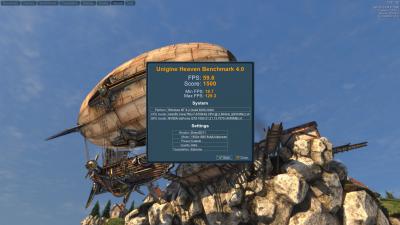
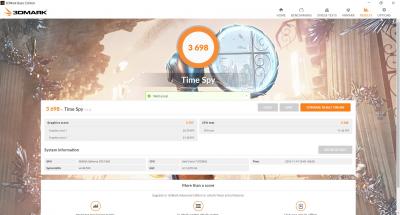
Benchmark
the benchmark is about the same to the official review. http://www.hardwarezone.com.my/review-ille...able-powerhouse

My Slightly OC result, no adjust voltage, just purely increase the core clock and memory to 200Mhz using control centre.

Unigine Heaven Benchmark 4.0
Attached Image

Time Spy
Attached Image

Fire Strike
Attached Image

The GPU temperature is maintain at 74c Max on this OC result. I changed back to default, since all my apps and games can run smoothly without the need of additional power.
wonglokat
post Nov 13 2016, 02:53 PM

Getting Started
**
Junior Member
247 posts

Joined: Dec 2008
hotwebs ambient temp? air-conditioned I assume?
hotwebs
post Nov 13 2016, 03:26 PM

On my way
****
Senior Member
659 posts

Joined: Jan 2003
From: JB


ambient temp is about 28c to 30c
wingwp
post Nov 13 2016, 03:31 PM

On my way
****
Senior Member
639 posts

Joined: Jan 2003


hotwebs how smooth is the video editing?
TSPrince J
post Nov 14 2016, 10:44 AM

Regular
******
Senior Member
1,272 posts

Joined: May 2010
From: Team ILLEGEAR


QUOTE(hotwebs @ Nov 13 2016, 12:59 PM)
Not professional Illegear S5 Review:

The reason why i choose Illegear S5 instead of D5, because of the heat & noise and the portability.

S5 Good:

-can change to Hybrid or Discrete mode, long battery life on Hybrid mode about 4 hours+, silent while normal usage surf net and music play.

-2.5KG weight is still acceptable

-Performance is comparable to my rig. I7 2700K + GTX 970, enough for video editing and max ultra setting to all 1080p game.

-low heat and acceptable noise level while gaming

S5 Bad:

-No TB3
-no future upgrade GPU & CPU
-Speaker no woofer(but sound quality is good, i am not audiophile)

Design and features:

Quite satisfied with the build quality, one word "solid". only the LCD got backlight leak issue. but not a big issue while gaming and normal office work.

Heat And Noise level:

I am quite sensitive at noise & temperature, overall is acceptable. that's why my desktop use Noctua cpu heatsink and GPU use Artic Extreme iv.

the noise during full load is noticeable, but is not annoying and is not like vacuum motor sound, while gaming totally cannot hear.

Temperature

GPU - Idle:43, full load:75max(77-79c while overclock)
CPU - Idle:41, Full load (4cores, 3.1-3.3Ghz): 70c shocking.gif (may be my prime95 problem, is a bit low)

Benchmark
the benchmark is about the same to the official review. http://www.hardwarezone.com.my/review-ille...able-powerhouse

My Slightly OC result, no adjust voltage, just purely increase the core clock and memory to 200Mhz using control centre.

Unigine Heaven Benchmark 4.0
Attached Image

Time Spy
Attached Image

Fire Strike
Attached Image

The GPU temperature is maintain at 74c Max on this OC result. I changed back to default, since all my apps and games can run smoothly without the need of additional power.
*
Hi hotwebs*,

Thanks for your review.

Just one small correction: S5 and D5 don't have subwoofer, S7 and D7X have subwoofer smile.gif

This post has been edited by Prince J: Nov 14 2016, 02:44 PM
hotwebs
post Nov 14 2016, 02:40 PM

On my way
****
Senior Member
659 posts

Joined: Jan 2003
From: JB


QUOTE(wingwp @ Nov 13 2016, 03:31 PM)
hotwebs how smooth is the video editing?
*
Haven't really start on video editing, but performed few CPU benchmark test, the result is about the same like my I7 2700K. If you want to understand more about to build the video editing rig, read here http://www.logicalincrements.com/articles/videoediting
TSPrince J
post Nov 14 2016, 06:09 PM

Regular
******
Senior Member
1,272 posts

Joined: May 2010
From: Team ILLEGEAR


ILLEGEAR flagship Z series is now armed with the next generation NVIDIA GeForce GTX 1060 GPU that handles almost all the latest games at the highest settings with ease. A few new features are also added to the all new Z series such as USB Type-C and VR( Virtual Reality). All this power packed into a light anodized aluminum chassis.

user posted image

New changes:

1. Z5 has a new palm rest design with full aluminium material, and matte (non reflective) screen bezel. Z7 design remains the same.
2. Nvidia GeForce GTX 1060 6GB GDDR5.
3. Adapter is now 230W, the weight doesn't increase much compared to 180W.
4. 2x USB Type C + 2x USB 3.1 Gen 1.
5. VR Ready
6. M.2 PCIe slot

This post has been edited by Prince J: Nov 14 2016, 06:16 PM
vemp
post Nov 15 2016, 08:46 PM

Getting Started
**
Junior Member
197 posts

Joined: Sep 2008
From: Malaysia
I bought D9x with 17.3" 3K QHD Anti-glare 120Hz with sRGB 100% Color & Wide View (2560x1440)(G-Sync)


but i dont see the setting to turn it on ?


and brightness adjustment doenst seems to be working..tried with function key and under display setting..no effect or what so ever..

This post has been edited by vemp: Nov 15 2016, 10:00 PM
hotwebs
post Nov 16 2016, 02:10 PM

On my way
****
Senior Member
659 posts

Joined: Jan 2003
From: JB


QUOTE(vemp @ Nov 15 2016, 08:46 PM)
I bought D9x with 17.3" 3K QHD Anti-glare 120Hz with sRGB 100% Color & Wide View (2560x1440)(G-Sync)
but i dont see the setting to turn it on ?
and brightness adjustment doenst seems to be working..tried with function key and under display setting..no effect or what so ever..
*
I guess, you haven't install the Nvidia driver, and G-Sync can be turn on in the Nvidia control panel & also install the Control Center to control the Fan, brightness and keyboard backlight profile.

This post has been edited by hotwebs: Nov 16 2016, 02:11 PM
TSPrince J
post Nov 16 2016, 02:14 PM

Regular
******
Senior Member
1,272 posts

Joined: May 2010
From: Team ILLEGEAR


QUOTE(vemp @ Nov 15 2016, 08:46 PM)
I bought D9x with 17.3" 3K QHD Anti-glare 120Hz with sRGB 100% Color & Wide View (2560x1440)(G-Sync)
but i dont see the setting to turn it on ?
and brightness adjustment doenst seems to be working..tried with function key and under display setting..no effect or what so ever..
*
QUOTE(hotwebs @ Nov 16 2016, 02:10 PM)
I guess, you haven't install the Nvidia driver, and G-Sync can be turn on in the Nvidia control panel & also install the Control Center to control the Fan, brightness and keyboard backlight profile.
*
After we updated vemp BIOS, it is fine now.
Alexdino
post Nov 17 2016, 02:10 PM

Look at all my stars!!
*******
Senior Member
2,006 posts

Joined: Sep 2007

Z5 harddisk is sata and m.2?

msata wont work? is there a space around m.2 for me to install msata with adapter?

btw if i choose not to take harddisk from the website, how do u provide the windows? if i have my own windows the price can be deduct further?
TSPrince J
post Nov 17 2016, 02:34 PM

Regular
******
Senior Member
1,272 posts

Joined: May 2010
From: Team ILLEGEAR


QUOTE(Alexdino @ Nov 17 2016, 02:10 PM)
Z5 harddisk is sata and m.2?

msata wont work? is there a space around m.2 for me to install msata with adapter?

btw if i choose not to take harddisk from the website, how do u provide the windows? if i have my own windows the price can be deduct further?
*
Hi alexdino,

Z5 won't work with MSATA SSD, only M.2 PCIE/SATA SSD. Z5 has 1x SATA slot and 1x M.2 slot.

We will provide Windows in COA form, you can activate after installing the windows.
imin
post Nov 17 2016, 07:04 PM

Enthusiast
*****
Senior Member
818 posts

Joined: Jan 2003
QUOTE(Prince J @ Nov 14 2016, 06:09 PM)
ILLEGEAR flagship Z series is now armed with the next generation NVIDIA GeForce GTX 1060 GPU that handles almost all the latest games at the highest settings with ease. A few new features are also added to the all new Z series such as USB Type-C and VR( Virtual Reality). All this power packed into a light anodized aluminum chassis.

user posted image

New changes:

1. Z5 has a new palm rest design with full aluminium material, and matte (non reflective) screen bezel. Z7 design remains the same.
2. Nvidia GeForce GTX 1060 6GB GDDR5.
3. Adapter is now 230W, the weight doesn't increase much compared to 180W.
4. 2x USB Type C + 2x USB 3.1 Gen 1.
5. VR Ready
6. M.2 PCIe slot
*
Is this Z5 battery is removable? And can you give us the battery run time? Really interested in it, since it support optimus.. currently doesn't see many laptop with 1060 and above series that supports optimus
TSPrince J
post Nov 17 2016, 07:13 PM

Regular
******
Senior Member
1,272 posts

Joined: May 2010
From: Team ILLEGEAR


QUOTE(imin @ Nov 17 2016, 07:04 PM)
Is this Z5 battery is removable? And can you give us the battery run time? Really interested in it, since it support optimus.. currently doesn't see many laptop with 1060 and above series that supports optimus
*
Hi imin,

Z5 and Z7 battery is removable but you need screwdriver to unscrew the bottom cover first. It's not hard to do that.
imin
post Nov 17 2016, 07:15 PM

Enthusiast
*****
Senior Member
818 posts

Joined: Jan 2003
QUOTE(Prince J @ Nov 17 2016, 07:13 PM)
Hi imin,

Z5 and Z7 battery is removable but you need screwdriver to unscrew the bottom cover first. It's not hard to do that.
*
how about s5? is the battery removeable?
TSPrince J
post Nov 17 2016, 09:08 PM

Regular
******
Senior Member
1,272 posts

Joined: May 2010
From: Team ILLEGEAR


QUOTE(imin @ Nov 17 2016, 07:15 PM)
how about s5? is the battery removeable?
*
Same as Z5, yes it is removable.

You can setup smart charging in BIOS to prevent overcharging.
TSPrince J
post Nov 24 2016, 05:01 PM

Regular
******
Senior Member
1,272 posts

Joined: May 2010
From: Team ILLEGEAR


The new Z5 pascal has new palm rest and matte screen bezel.

user posted image
TSPrince J
post Nov 28 2016, 04:26 PM

Regular
******
Senior Member
1,272 posts

Joined: May 2010
From: Team ILLEGEAR


ILLEGEAR D7X is on PC.COM November issue with platinum award (9.2/10)!

user posted image
asaku21
post Nov 28 2016, 07:10 PM

New Member
*
Junior Member
23 posts

Joined: Jul 2006
From: ipoh


been using rs 15 for more than 3 years already
really excellent i must say
now itching for d7x
have cristmas promotion?

hayrol
post Nov 30 2016, 06:40 PM

Getting Started
**
Junior Member
128 posts

Joined: Sep 2011
Hello PrinceJ,

Seems my D5 Haswell have another major problem. Right now my display turn into white after using its for some period (2 or 3 hours) .
It turn back to normal for some time (after restart) and turn back into the same problem. Other than that, my system were doing fine.
Have to depend to my extension monitor for now.

Attached Image
TSPrince J
post Nov 30 2016, 06:54 PM

Regular
******
Senior Member
1,272 posts

Joined: May 2010
From: Team ILLEGEAR


QUOTE(asaku21 @ Nov 28 2016, 07:10 PM)
been using rs 15 for more than 3 years already
really excellent i must say
now itching for d7x
have cristmas promotion?
*
Hi asaku21,

Thanks for your feedback, I will inform you if we have it smile.gif

QUOTE(hayrol @ Nov 30 2016, 06:40 PM)
Hello PrinceJ,

Seems my D5 Haswell have another major problem. Right now my display turn into white after using its for some period (2 or 3 hours) .
It turn back to normal for some time (after restart) and turn back into the same problem. Other than that, my system were doing fine.
Have to depend to my extension monitor for now.

Attached Image
*
Hi Hayrol,

can we have the system to check? The screen part is ready if there is a need for replacement.
hayrol
post Nov 30 2016, 07:42 PM

Getting Started
**
Junior Member
128 posts

Joined: Sep 2011
Ermm, seems I need to send by postage again. sweat.gif

I guess there's no other way.
Wazzzap
post Dec 5 2016, 06:39 PM

On my way
****
Junior Member
506 posts

Joined: Jan 2003


hi i noticed when i plugged in my headphones that time there's a buzzing sound and the weirdest part is when i scroll my mouse up and down while surfing it make noises according to the scrolls.

however if i plug it into another jack which is for speakers then it doesnt produce that kind of noise

anyone experience this?

This post has been edited by Wazzzap: Dec 5 2016, 06:41 PM
TSPrince J
post Dec 6 2016, 10:57 AM

Regular
******
Senior Member
1,272 posts

Joined: May 2010
From: Team ILLEGEAR


QUOTE(Wazzzap @ Dec 5 2016, 06:39 PM)
hi i noticed when i plugged in my headphones that time there's a buzzing sound and the weirdest part is when i scroll my mouse up and down while surfing it make noises according to the scrolls.

however if i plug it into another jack which is for speakers then it doesnt produce that kind of noise

anyone experience this?
*
Hi Wazzzap,

Can you pm me with the photos of the jack that you plug in? (with noise and without noise). If possible, we would like to test your headset and the computer.
Wazzzap
post Dec 6 2016, 02:47 PM

On my way
****
Junior Member
506 posts

Joined: Jan 2003


Hi Prince J, attached is the picture of the jacks that i used for the headphones

the left side (the jack with red light) is the one with noise and the right side is the normal one.

i think i will go back home and try to use different headphones to confirm on the problem. will get back to you on this.

Thank you very much.

This post has been edited by Wazzzap: Dec 6 2016, 02:49 PM


Attached thumbnail(s)
Attached Image
TSPrince J
post Dec 6 2016, 03:00 PM

Regular
******
Senior Member
1,272 posts

Joined: May 2010
From: Team ILLEGEAR


QUOTE(Wazzzap @ Dec 6 2016, 02:47 PM)
Hi Prince J, attached is the picture of the jacks that i used for the headphones

the left side (the jack with red light) is the one with noise and the right side is the normal one.

i think i will go back home and try to use different headphones to confirm on the problem. will get back to you on this.

Thank you very much.
*
Oh you are using S5. You plugged in your headphone to the wrong jack. The one with headphone logo is the one you were supposed to plug in.
Wazzzap
post Dec 7 2016, 01:15 AM

On my way
****
Junior Member
506 posts

Joined: Jan 2003


QUOTE(Prince J @ Dec 6 2016, 03:00 PM)
Oh you are using S5. You plugged in your headphone to the wrong jack. The one with headphone logo is the one you were supposed to plug in.
*
i didn't plug in the wrong one. there are 3 jacks. left is headphones, middle is microphone, the right side is like a speaker logo if i am not mistaken.

both left and right did produce sound for me. just that the jack with headphone logo have some minor buzzing sound but if you on loud music you wouldnt hear it
TSPrince J
post Dec 8 2016, 10:56 AM

Regular
******
Senior Member
1,272 posts

Joined: May 2010
From: Team ILLEGEAR


QUOTE(Wazzzap @ Dec 7 2016, 01:15 AM)
i didn't plug in the wrong one. there are 3 jacks. left is headphones, middle is microphone, the right side is like a speaker logo if i am not mistaken.

both left and right did produce sound for me. just that the jack with headphone logo have some minor buzzing sound but if you on loud music you wouldnt hear it
*
If I remember correctly, we always plug into the right in-jack, not the left one with red light. What's your S5 edition? I will check with my tech.
Wazzzap
post Dec 9 2016, 01:21 AM

On my way
****
Junior Member
506 posts

Joined: Jan 2003


QUOTE(Prince J @ Dec 8 2016, 10:56 AM)
If I remember correctly, we always plug into the right in-jack, not the left one with red light. What's your S5 edition? I will check with my tech.
*
how do i check? it is the gtx 1060 version
3antz
post Dec 9 2016, 09:08 AM

Getting Started
**
Junior Member
206 posts

Joined: Aug 2011
Hi there, can i know how long it takes to build the S5 upon order? Also the weight of S5 without the 2.5hdd - fully on SSD? Thanks.
TSPrince J
post Dec 9 2016, 10:57 AM

Regular
******
Senior Member
1,272 posts

Joined: May 2010
From: Team ILLEGEAR


QUOTE(Wazzzap @ Dec 9 2016, 01:21 AM)
how do i check? it is the gtx 1060 version
*
Ok will check with technician.

QUOTE(3antz @ Dec 9 2016, 09:08 AM)
Hi there, can i know how long it takes to build the S5 upon order? Also the weight of S5 without the 2.5hdd - fully on SSD? Thanks.
*
Current lead time is 5 to 7 working days without rush, 1 working day with rush.

S5 without HDD is 2.375kg.
wingwp
post Dec 10 2016, 05:47 PM

On my way
****
Senior Member
639 posts

Joined: Jan 2003


thinking to buy another Illegear for video works, which models r possible for component upgrade?
TSPrince J
post Dec 13 2016, 11:35 AM

Regular
******
Senior Member
1,272 posts

Joined: May 2010
From: Team ILLEGEAR


QUOTE(wingwp @ Dec 10 2016, 05:47 PM)
thinking to buy another Illegear for video works, which models r possible for component upgrade?
*
Hi wingwp,

For D series, it can upgrade RAM, HDD, SSD, WLAN card and screen in future. CPU and GPU have chances to upgrade as well (depends on future gen. GPU and CPU compatibility).

For other series, only RAM, HDD, SSD and WLAN can be upgraded.
Alexes
post Dec 13 2016, 11:41 AM

-=alx=-
******
Senior Member
1,314 posts

Joined: Aug 2007
From: Sarikei --> Kajang


Can I have the internal photo on q5?
wingwp
post Dec 13 2016, 08:40 PM

On my way
****
Senior Member
639 posts

Joined: Jan 2003


Oh.. I tot S series also can change cpu/gpu, D series is out of budget..

your place there can check out the 4k screen on 15"?

QUOTE(Prince J @ Dec 13 2016, 11:35 AM)
Hi wingwp,

For D series, it can upgrade RAM, HDD, SSD, WLAN card and screen in future. CPU and GPU have chances to upgrade as well (depends on future gen. GPU and CPU compatibility).

For other series, only RAM, HDD, SSD and WLAN can be upgraded.
*
leekaisuen69
post Dec 14 2016, 10:21 AM

Getting Started
**
Junior Member
123 posts

Joined: Dec 2009


QUOTE(wingwp @ Dec 13 2016, 08:40 PM)
Oh.. I tot S series also can change cpu/gpu, D series is out of budget..

your place there can check out the 4k screen on 15"?
*
dont go 4k screen on 15inch bro. some icons small like rice! stressssss... hahaha
TSPrince J
post Dec 14 2016, 10:42 AM

Regular
******
Senior Member
1,272 posts

Joined: May 2010
From: Team ILLEGEAR


QUOTE(Alexes @ Dec 13 2016, 11:41 AM)
Can I have the internal photo on q5?
*
Can you send a whatsapp msg to 0186648599? We will send you the internal photos.

QUOTE(wingwp @ Dec 13 2016, 08:40 PM)
Oh.. I tot S series also can change cpu/gpu, D series is out of budget..

your place there can check out the 4k screen on 15"?
*
I will need to check with my colleague.

QUOTE(leekaisuen69 @ Dec 14 2016, 10:21 AM)
dont go 4k screen on 15inch bro. some icons small like rice! stressssss... hahaha
*
The logo size can be adjusted on 4K display.
wingwp
post Dec 14 2016, 10:55 AM

On my way
****
Senior Member
639 posts

Joined: Jan 2003


lol tats y need to c first, if screen is good, the smaller fonts / icons will not b issue for me

QUOTE(leekaisuen69 @ Dec 14 2016, 10:21 AM)
dont go 4k screen on 15inch bro. some icons small like rice! stressssss... hahaha
*
thx bro, mayb ill whatsapp u

QUOTE(Prince J @ Dec 14 2016, 10:42 AM)
Can you send a whatsapp msg to 0186648599? We will send you the internal photos.
I will need to check with my colleague.
The logo size can be adjusted on 4K display.
*
edthrax
post Dec 19 2016, 11:14 AM

Enthusiast
*****
Senior Member
829 posts

Joined: Jan 2003
From: TTDI


hi Prince J,

I bought S5 GTX1070 few months ago, just saw that now there's option to upgrade to 120hz panel. Is my laptop able to upgrade to the 120hz Panel?
TSPrince J
post Dec 20 2016, 11:11 AM

Regular
******
Senior Member
1,272 posts

Joined: May 2010
From: Team ILLEGEAR


QUOTE(edthrax @ Dec 19 2016, 11:14 AM)
hi Prince J,

I bought S5 GTX1070 few months ago, just saw that now there's option to upgrade to 120hz panel. Is my laptop able to upgrade to the 120hz Panel?
*
We never tried that, because it's a very new display option, not sure if it can be swapped. Will update if it's possible.
edthrax
post Dec 20 2016, 12:01 PM

Enthusiast
*****
Senior Member
829 posts

Joined: Jan 2003
From: TTDI


QUOTE(Prince J @ Dec 20 2016, 11:11 AM)
We never tried that, because it's a very new display option, not sure if it can be swapped. Will update if it's possible.
*
ok.. please do update if can..i am very interested in upgrading mine if the cost is not that high
TSPrince J
post Dec 22 2016, 07:09 PM

Regular
******
Senior Member
1,272 posts

Joined: May 2010
From: Team ILLEGEAR


ILLEGEAR will be at Malaysia IT Expo 2016, do swing by our booth to check out our kickass gaming laptops, experience VR and get some awesome deals!
Date: 31st December 2016 to 2nd January 2017
Venue: Mid Valley Exhibition Centre, KL
Booth Location: C100 & C101 (Hall 3 Entrance)
Time: 11am to 10pm

user posted image
TSPrince J
post Dec 29 2016, 09:55 PM

Regular
******
Senior Member
1,272 posts

Joined: May 2010
From: Team ILLEGEAR


ILLEGEAR Z5 2016 edition has been nominated by Lowyat.NET as the best value for money gaming laptop. Vote for us now and stand a chance to receive prize (gadgets) from Lowyat.NET! P/S: Voting will close in 3 hours. http://goo.gl/YgtfUF

Attached Image

This post has been edited by Prince J: Dec 30 2016, 10:30 AM
hotwebs
post Jan 15 2017, 10:37 AM

On my way
****
Senior Member
659 posts

Joined: Jan 2003
From: JB


QUOTE(edthrax @ Dec 20 2016, 12:01 PM)
ok.. please do update if can..i am very interested in upgrading mine if the cost is not that high
*
If not mistaken the 120Hz lcd panel is TN screen, i got a lot of feedback of the color accuracy is worse compare to the 60hz IPS panel.

anyway I am using 60hz IPS G-sync.
TSPrince J
post Jan 17 2017, 11:06 AM

Regular
******
Senior Member
1,272 posts

Joined: May 2010
From: Team ILLEGEAR


QUOTE(hotwebs @ Jan 15 2017, 10:37 AM)
If not mistaken the 120Hz lcd panel is TN screen, i got a lot of feedback of the color accuracy is worse compare to the 60hz IPS panel.

anyway I am using 60hz IPS G-sync.
*
7th generation S5's 120Hz screen has IPS and G-sync smile.gif

This post has been edited by Prince J: Jan 17 2017, 11:06 AM
dinbk90
post Jan 17 2017, 09:10 PM

New Member
*
Junior Member
23 posts

Joined: Mar 2012


QUOTE(Prince J @ Jan 17 2017, 11:06 AM)
7th generation S5's 120Hz screen has IPS and G-sync smile.gif
*
Nice! rclxms.gif I plan to get s5 by mid year. One question though; lets say if I buy s5 with ips 60hz g-sync panel, will I be able to upgrade to the 120 hz ips g-sync panel later? Or I have to purchase the laptop directly with the 120hz panel though??
TSPrince J
post Jan 19 2017, 11:19 AM

Regular
******
Senior Member
1,272 posts

Joined: May 2010
From: Team ILLEGEAR


QUOTE(dinbk90 @ Jan 17 2017, 09:10 PM)
Nice!  rclxms.gif  I plan to get s5 by mid year. One question though; lets say if I buy s5 with ips  60hz g-sync panel, will I be able to upgrade to the 120 hz ips g-sync panel later? Or I have to purchase the laptop directly with the 120hz panel though??
*
Dinbk90

You can but cable need to be changed as well.
dinbk90
post Jan 19 2017, 01:43 PM

New Member
*
Junior Member
23 posts

Joined: Mar 2012


QUOTE(Prince J @ Jan 19 2017, 11:19 AM)
Dinbk90

You can but cable need to be changed as well.
*
Oo... So the panel upgrade is indeed feasible la but need cable change as well? blink.gif

I guess the cable change means extra cost involve in the panel upgrade process?

The total cost for the panel upgrade will not be an issue since I can always save up enough budget, as long as the the approximate cost is mentioned before hand... tongue.gif


wonglokat
post Jan 19 2017, 10:22 PM

Getting Started
**
Junior Member
247 posts

Joined: Dec 2008
Would be lovely if new owners of the GTX10xx S5 can provide review of your experience and cooling / noise / performance.
ChaChaZero
post Jan 20 2017, 09:40 AM

On my way
****
Junior Member
566 posts

Joined: Sep 2006
QUOTE(wonglokat @ Jan 19 2017, 10:22 PM)
Would be lovely if new owners of the GTX10xx S5 can provide review of your experience and cooling / noise / performance.
*
I've been using the S5 for about 6 months now. Just to give you an idea of what you're asking but before that, I am using the 1060 version.

All I can say about the cooling is that it works very well. I got mine with the Diamond Thermal Compound which was free due to some promotion. I play games like Rise of the Tomb Raider at max settings for everything, the temperature peaks at around 68 to 72 Celsius, which I think is pretty good when compared to a Lenovo Y50 I used to have. That peaked at around 95 for the same game.

Another example, Overwatch, Tera and Titanfall 2 peaks around 68 to 72. Idle temperature is around 38 to 42. Standard browsing, Youtube, MS Office and other productivity work doesn't affect the temp much so it stays around the same as idle temperature.

Now the noise is something you need to be concerned about if you like gaming in quiet environments. It's pretty loud when they're spinning in AAA games. Not loud enough to distract you if you have the speakers set to high volume or if you put on some headphones. I don't consider this a problem as my volume is always set high as the speakers are top notch.

Can't complain about the performance either. The only game I had performance issues with is Rise of the Tomb Raider when I max out everything. Frame rates drop to around 45 FPS in certain parts of the game(this is just me, 45 FPS is actually very good for gaming). Other games like Titanfall 2 get a constant 70+ FPS and Doom stays above 80 FPS at all portions of the game with everything cranked to the max. Not suitable for 1440p gaming or 4k gaming though you can get away with 1440p gaming if you lower some options. Most options don't really make a difference anyway.
wonglokat
post Jan 20 2017, 10:39 AM

Getting Started
**
Junior Member
247 posts

Joined: Dec 2008
QUOTE(ChaChaZero @ Jan 20 2017, 09:40 AM)
I've been using the S5 for about 6 months now. Just to give you an idea of what you're asking but before that, I am using the 1060 version.

All I can say about the cooling is that it works very well. I got mine with the Diamond Thermal Compound which was free due to some promotion. I play games like Rise of the Tomb Raider at max settings for everything, the temperature peaks at around 68 to 72 Celsius, which I think is pretty good when compared to a Lenovo Y50 I used to have. That peaked at around 95 for the same game.

Another example, Overwatch, Tera and Titanfall 2 peaks around 68 to 72. Idle temperature is around 38 to 42. Standard browsing, Youtube, MS Office and other productivity work doesn't affect the temp much so it stays around the same as idle temperature.

Now the noise is something you need to be concerned about if you like gaming in quiet environments. It's pretty loud when they're spinning in AAA games. Not loud enough to distract you if you have the speakers set to high volume or if you put on some headphones. I don't consider this a problem as my volume is always set high as the speakers are top notch.

Can't complain about the performance either. The only game I had performance issues with is Rise of the Tomb Raider when I max out everything. Frame rates drop to around 45 FPS in certain parts of the game(this is just me, 45 FPS is actually very good for gaming). Other games like Titanfall 2 get a constant 70+ FPS and Doom stays above 80 FPS at all portions of the game with everything cranked to the max. Not suitable for 1440p gaming or 4k gaming though you can get away with 1440p gaming if you lower some options. Most options don't really make a difference anyway.
*
Thanks for the input, dude. With the 1050 priced in and the AW15R3 well beyond reach at the moment, the S5 is becoming attractive again.
ChaChaZero
post Jan 20 2017, 11:36 AM

On my way
****
Junior Member
566 posts

Joined: Sep 2006
QUOTE(wonglokat @ Jan 20 2017, 10:39 AM)
Thanks for the input, dude. With the 1050 priced in and the AW15R3 well beyond reach at the moment, the S5 is becoming attractive again.
*
I just noticed they have the S5 Lite today. You might wanna consider that too. Everything is the same as the S5 but with a 1060 3GB.
TSPrince J
post Jan 20 2017, 11:43 AM

Regular
******
Senior Member
1,272 posts

Joined: May 2010
From: Team ILLEGEAR


QUOTE(dinbk90 @ Jan 19 2017, 01:43 PM)
Oo... So the panel upgrade is indeed feasible la but need cable change as well?  blink.gif 

I guess the cable change means extra cost involve in the panel upgrade process?

The total cost for the panel upgrade will not be an issue since I can always save up enough budget, as long as the the approximate cost is mentioned before hand...  tongue.gif
*
Yes cable need to be changed as well. Cable + labor is around RM50~RM100 i estimate.

QUOTE(ChaChaZero @ Jan 20 2017, 09:40 AM)
I've been using the S5 for about 6 months now. Just to give you an idea of what you're asking but before that, I am using the 1060 version.

All I can say about the cooling is that it works very well. I got mine with the Diamond Thermal Compound which was free due to some promotion. I play games like Rise of the Tomb Raider at max settings for everything, the temperature peaks at around 68 to 72 Celsius, which I think is pretty good when compared to a Lenovo Y50 I used to have. That peaked at around 95 for the same game.

Another example, Overwatch, Tera and Titanfall 2 peaks around 68 to 72. Idle temperature is around 38 to 42. Standard browsing, Youtube, MS Office and other productivity work doesn't affect the temp much so it stays around the same as idle temperature.

Now the noise is something you need to be concerned about if you like gaming in quiet environments. It's pretty loud when they're spinning in AAA games. Not loud enough to distract you if you have the speakers set to high volume or if you put on some headphones. I don't consider this a problem as my volume is always set high as the speakers are top notch.

Can't complain about the performance either. The only game I had performance issues with is Rise of the Tomb Raider when I max out everything. Frame rates drop to around 45 FPS in certain parts of the game(this is just me, 45 FPS is actually very good for gaming). Other games like Titanfall 2 get a constant 70+ FPS and Doom stays above 80 FPS at all portions of the game with everything cranked to the max. Not suitable for 1440p gaming or 4k gaming though you can get away with 1440p gaming if you lower some options. Most options don't really make a difference anyway.
*
Did you try the fan overclocking app in S5's control center?

QUOTE(ChaChaZero @ Jan 20 2017, 11:36 AM)
I just noticed they have the S5 Lite today. You might wanna consider that too. Everything is the same as the S5 but with a 1060 3GB.
*
S5 Lite also don't have G-sync. But it's still a IPS screen.

This post has been edited by Prince J: Jan 20 2017, 11:44 AM
ChaChaZero
post Jan 20 2017, 11:46 AM

On my way
****
Junior Member
566 posts

Joined: Sep 2006
QUOTE(Prince J @ Jan 20 2017, 11:43 AM)
Did you try the fan overclocking app in S5's control center?
*
Nah I didn't change any settings for overclocking the GPU or fan.

70c is quite ok in my books. My only regret from buying this laptop is not going for the 1070 version.
TSPrince J
post Jan 21 2017, 10:58 AM

Regular
******
Senior Member
1,272 posts

Joined: May 2010
From: Team ILLEGEAR


QUOTE(ChaChaZero @ Jan 20 2017, 11:46 AM)
Nah I didn't change any settings for overclocking the GPU or fan.

70c is quite ok in my books. My only regret from buying this laptop is not going for the 1070 version.
*
One of our customers said he got good temperature and quiet fan by overclocking the fan using the apps in the machine.

You may have a try.
oopet
post Jan 24 2017, 11:00 AM

Getting Started
**
Junior Member
260 posts

Joined: Apr 2011
Hi,

Just read the post between z5 and s5. I planned to buy illegear laptop. Currently, I'm looking into z5 and s5 lite. However, z5 has 6gb gtx 1060 in compared to s5 (3gb).

Which will be the best?

I would like to use it for gaming, mapping and editing. Using ArcGIS, Illustrator and other adobe software.

Thanks!
TSPrince J
post Jan 24 2017, 11:40 AM

Regular
******
Senior Member
1,272 posts

Joined: May 2010
From: Team ILLEGEAR


QUOTE(oopet @ Jan 24 2017, 11:00 AM)
Hi,

Just read the post between z5 and s5. I planned to buy illegear laptop. Currently, I'm looking into z5 and s5 lite. However, z5 has 6gb gtx 1060 in compared to s5 (3gb).

Which will be the best?

I would like to use it for gaming, mapping and editing. Using ArcGIS, Illustrator and other adobe software.

Thanks!
*
Hi oopet,

Z5 offers better bang for bucks.

S5 offers more expansion slots in terms of ram, HDD, SSD and RGB keyboard.
oguraX
post Jan 24 2017, 12:32 PM

Getting Started
**
Junior Member
113 posts

Joined: Dec 2011


Hi, i want to ask about z5,

- is the 1TB SSHD is 7200rpm??
-can install windows at M.2 ssd instead of any sata drive??

Thnks biggrin.gif
TSPrince J
post Jan 24 2017, 06:36 PM

Regular
******
Senior Member
1,272 posts

Joined: May 2010
From: Team ILLEGEAR


Deleted

This post has been edited by Prince J: Feb 12 2017, 01:42 PM
subrok007
post Jan 26 2017, 11:34 AM

Squirtle
******
Senior Member
1,632 posts

Joined: Oct 2007
From: Sea


Just wandering, anyone here buy the behemoth d7x?
Any issue? Hot?

Thinking to buy but investing rm10k plus into laptop really need thoroughly study.
StenCL
post Jan 26 2017, 02:03 PM

New Member
*
Newbie
47 posts

Joined: Sep 2015


Hello Prince J,

Does the Power cord/AC Adapter included in warranty?

Because I can hear buzzing sound when connecting the power cord and the ac adapter and if it move a little bit around the the connection, the laptop won't charged.
TSPrince J
post Jan 26 2017, 04:16 PM

Regular
******
Senior Member
1,272 posts

Joined: May 2010
From: Team ILLEGEAR


QUOTE(StenCL @ Jan 26 2017, 02:03 PM)
Hello Prince J,

Does the Power cord/AC Adapter included in warranty?

Because I can hear buzzing sound when connecting the power cord and the ac adapter and if it move a little bit around the the connection, the laptop won't charged.
*
Yes covered, we will help to exchange a UK cord.
hayrol
post Jan 27 2017, 03:29 PM

Getting Started
**
Junior Member
128 posts

Joined: Sep 2011
I'm notice that D7X still using HDMI 1.4b port.

Was looking for the model that can support HDMI 2.0 sad.gif
TSPrince J
post Feb 1 2017, 12:01 PM

Regular
******
Senior Member
1,272 posts

Joined: May 2010
From: Team ILLEGEAR


QUOTE(hayrol @ Jan 27 2017, 03:29 PM)
I'm notice that D7X still using HDMI 1.4b port.

Was looking for the model that can support HDMI 2.0 sad.gif
*
Hi Hayrol

You want to output 4K display at 120Hz?
hayrol
post Feb 2 2017, 12:51 AM

Getting Started
**
Junior Member
128 posts

Joined: Sep 2011
QUOTE(Prince J @ Feb 1 2017, 12:01 PM)
Hi Hayrol

You want to output 4K display at 120Hz?
*
I'm using external monitor with Microboard M340CLZ right now (3440x1440 @ 100Hz native refresh rate) with HDMI 2.0 input right now.
Was planning to get Acer Predator X34P in future if this monitor will release by Q2 2017.

This post has been edited by hayrol: Feb 2 2017, 01:07 AM
hotwebs
post Feb 2 2017, 08:09 PM

On my way
****
Senior Member
659 posts

Joined: Jan 2003
From: JB


Nothing to do just ran the OC benchmark during Chinese new year, quite satisfy the OC result. just increase the core & memory clock 200/600, without adjust the power, the temperature maintain at 76c max, i think is the limit.

Attached Image


Attached Image
TheNutzs
post Feb 4 2017, 11:02 AM

New Member
*
Junior Member
17 posts

Joined: Sep 2012


Hi Illegear, I'm planning to buy the Z7 series sometime in the future. I just wanna know the average temp for heavy gaming (i7 Kaby Lake + GTX 1060 6GB)? The ability to overclock the GPU and will that overclock void the warranty?
TSPrince J
post Feb 4 2017, 03:30 PM

Regular
******
Senior Member
1,272 posts

Joined: May 2010
From: Team ILLEGEAR


QUOTE(TheNutzs @ Feb 4 2017, 11:02 AM)
Hi Illegear, I'm planning to buy the Z7 series sometime in the future. I just wanna know the average temp for heavy gaming (i7 Kaby Lake + GTX 1060 6GB)? The ability to overclock the GPU and will that overclock void the warranty?
*
Hi TheNutz,

For GTX1060 6GB, it maintains at 65C maximum, we tested Battlefield 1 Ultra settings 12 hours in IT Fair 2016.

For the CPU, we will do a benchmark as well.
TSPrince J
post Feb 4 2017, 03:34 PM

Regular
******
Senior Member
1,272 posts

Joined: May 2010
From: Team ILLEGEAR


The ILLEGEAR gaming laptops now come equipped with the latest 7th generation Intel Core i7 processors (Kabylake) and Nvidia GTX1050 & GTX1050Ti graphics.

user posted image

This post has been edited by Prince J: Feb 4 2017, 03:34 PM
TSPrince J
post Feb 8 2017, 12:33 PM

Regular
******
Senior Member
1,272 posts

Joined: May 2010
From: Team ILLEGEAR


Jinnyboy unbox ILLEGEAR D9X


This post has been edited by Prince J: Feb 12 2017, 01:42 PM
AZIM@ILLEGEAR
post Feb 8 2017, 05:22 PM

New Member
*
Junior Member
28 posts

Joined: Feb 2017
From: Team ILLEGEAR


Hi there laugh.gif I'm Azim, a customer service/sales representative from ILLEGEAR. For any inquiries regarding purchase/service, feel free to PM/contact me using the options in my signature.

Thank you very much & can't wait to serve you guys! icon_rolleyes.gif
TSPrince J
post Feb 13 2017, 09:35 PM

Regular
******
Senior Member
1,272 posts

Joined: May 2010
From: Team ILLEGEAR


Featuring the 7th generation Intel Core i5 / i7 processors, NVIDIA GTX 1050 / 1050Ti 4GB gaming graphics and a revamped chassis, you can look forward to a seamless gaming experience while fulfilling all your entertainment and productivity needs with the all new ILLEGEAR Q5 Evo.

user posted image
sonyfanzz
post Feb 17 2017, 02:37 PM

On my way
****
Senior Member
682 posts

Joined: Mar 2016


what is the clevo model for illegear s5 1070 version?
TSPrince J
post Feb 17 2017, 09:18 PM

Regular
******
Senior Member
1,272 posts

Joined: May 2010
From: Team ILLEGEAR


ILLEGEAR Q5 Evo internal thermal management.

user posted image
dinbk90
post Feb 23 2017, 09:09 PM

New Member
*
Junior Member
23 posts

Joined: Mar 2012


Just wanna share my experience. I went to the Illegear office today with the intention of inspecting the demo units for S-series. I'm surprised how nice their customer service is! biggrin.gif Very friendly and they do really seem to be passionate about gaming stuff. thumbup.gif I was even offered special promo and thus, I put my order for a s7 skylake gtx1060. rclxms.gif

So far my impression is very good! Really satisfied with their service. This will be my fourth gaming laptop so far and I have to say Illegear service is among the best I ever experienced. smile.gif Planning to do a mini review for s7 here once I got the laptop.
leonhang
post Feb 24 2017, 04:14 PM

Getting Started
**
Junior Member
248 posts

Joined: Nov 2008
Hi could I know which series of the laptop is upgrade-able for cpu and/or gpu ?
AZIM@ILLEGEAR
post Feb 24 2017, 05:03 PM

New Member
*
Junior Member
28 posts

Joined: Feb 2017
From: Team ILLEGEAR


QUOTE(leonhang @ Feb 24 2017, 04:14 PM)
Hi could I know which series of the laptop is upgrade-able for cpu and/or gpu ?
*
Hi leonhang,

CPU Upgrade-able:
S5: http://www.illegear.com/products/illegear-s5/
S7: http://www.illegear.com/products/illegear-s7/
Q5 Evo: http://www.illegear.com/products/illegear-q5-evo/
D5: http://www.illegear.com/products/illegear-d5/
D7X: http://www.illegear.com/products/illegear-d7x/
D9X: http://www.illegear.com/products/illegear-d9x/
U4: http://www.illegear.com/products/illegear-u4/

GPU Upgrade-able:
Q5 Evo: http://www.illegear.com/products/illegear-q5-evo/
Q5: http://www.illegear.com/products/illegear-q5/
Q7: http://www.illegear.com/products/illegear-q7/
S5: http://www.illegear.com/products/illegear-s5/
S7: http://www.illegear.com/products/illegear-s7/
D5: http://www.illegear.com/products/illegear-d5/
D7X: http://www.illegear.com/products/illegear-d7x/
D9X: http://www.illegear.com/products/illegear-d9x/
TSPrince J
post Feb 24 2017, 05:06 PM

Regular
******
Senior Member
1,272 posts

Joined: May 2010
From: Team ILLEGEAR


QUOTE(dinbk90 @ Feb 23 2017, 09:09 PM)
Just wanna share my experience. I went to the Illegear office today with the intention of inspecting the demo units for S-series.  I'm surprised how nice their customer service is!  biggrin.gif  Very friendly and they do really seem to be passionate about gaming stuff.  thumbup.gif  I was even offered special promo and thus, I put my order for a s7  skylake gtx1060.  rclxms.gif

So far my impression is very good! Really satisfied with their service. This will be my fourth gaming laptop so far and I have to say Illegear service is among the best I ever experienced.  smile.gif  Planning to do a mini review for s7 here once I got the laptop.
*
Hi dinbk90,

Thanks for visiting us and share your experience with several gaming laptop models.

We will notify you when your S7 order is ready for collection!
dinbk90
post Feb 24 2017, 07:36 PM

New Member
*
Junior Member
23 posts

Joined: Mar 2012


QUOTE(Prince J @ Feb 24 2017, 05:06 PM)
Hi dinbk90,

Thanks for visiting us and share your experience with several gaming laptop models.

We will notify you when your S7 order is ready for collection!
*
Thanks again! I was really having a good time with you guys! Super friendly! rclxms.gif

I will definitely write a review here for s7 once I got it. smile.gif
Azureknight94
post Feb 25 2017, 09:43 PM

Regular
******
Senior Member
1,667 posts

Joined: Oct 2006


Is there any info on the Q5 Evo's battery life for normal usage? Browsing etc
lolzcalvin
post Feb 26 2017, 07:29 PM

shibe in predicament
******
Senior Member
1,588 posts

Joined: Mar 2014
From: 75°26'11.6"S, 136°16'16.0"E


does q5 evo, like his big bro q5, comes with fingerprint sensor?
jslut
post Feb 27 2017, 07:48 AM

l@2y b@$t@rd
*******
Senior Member
2,236 posts

Joined: Jan 2003
From: KL


Bought myself an S5 last two weeks.

Service was friendly and good. My S5 is performing very well. It's been awhile since i've been able to play a game at high resolutions biggrin.gif

Thank you very much Illegear smile.gif
TSPrince J
post Feb 27 2017, 11:33 AM

Regular
******
Senior Member
1,272 posts

Joined: May 2010
From: Team ILLEGEAR


QUOTE(dinbk90 @ Feb 24 2017, 07:36 PM)
Thanks again! I was really having a good time with you guys! Super friendly!  rclxms.gif

I will definitely write a review here for s7 once I got it.  smile.gif
*
Can't wait to your review smile.gif

QUOTE(Azureknight94 @ Feb 25 2017, 09:43 PM)
Is there any info on the Q5 Evo's battery life for normal usage? Browsing etc
*
We have conducted a simple browsing test and the battery life of Q5 Evo is about the same as S5 (with optimus enabled).

QUOTE(lolzcalvin @ Feb 26 2017, 07:29 PM)
does q5 evo, like his big bro q5, comes with fingerprint sensor?
*
Q5 Evo doesn't have fingerprint sensor like the Q5.
Q5 Evo is more towards gaming with better internal thermal management, Q5 on the other hand comes with fingerprint sensor and capability to extend 3 external displays.

QUOTE(jslut @ Feb 27 2017, 07:48 AM)
Bought myself an S5 last two weeks.

Service was friendly and good. My S5 is performing very well. It's been awhile since i've been able to play a game at high resolutions biggrin.gif

Thank you very much Illegear smile.gif
*
Welcome to the club thumbup.gif
TSPrince J
post Feb 28 2017, 08:13 PM

Regular
******
Senior Member
1,272 posts

Joined: May 2010
From: Team ILLEGEAR


Fulfill your big storage need with the new ILLEGEAR Q5 Evo. The Q5 Evo comes with 1x SATA 3.0 port and 2x M.2 SSD slots for your future storage expansion possibility.

user posted image

This post has been edited by Prince J: Feb 28 2017, 08:14 PM
Cimo
post Mar 1 2017, 10:59 AM

Casual
***
Junior Member
324 posts

Joined: Jul 2005
From: Kuala Lumpur


Hi, I'm currently using 3+ year-old MSI GS70 and looking for potential replacement. I like the lightweight of my GS70 yet with sufficient capability to run games. What is the recommended model offerred by Illegear? I'm looking for laptop with the following criteria:
1) Lightweight
2) Able to run latest games with high settings (no need for highest or ultra, though). I plays a lot of Football Manager, SimCity like games, RPG/RTS games such as Diablo III and Starcraft II, occassionally FPS games like Crysis 3.
3) Good screen quality, preferrably IPS and sound system as I'm watching a lot of videos on the laptop
4) Better cooling capability than my GS70. I have experienced battery failure and display failure attributed to high temperature.
TSPrince J
post Mar 1 2017, 11:49 AM

Regular
******
Senior Member
1,272 posts

Joined: May 2010
From: Team ILLEGEAR


QUOTE(Cimo @ Mar 1 2017, 10:59 AM)
Hi, I'm currently using 3+ year-old MSI GS70 and looking for potential replacement. I like the lightweight of my GS70 yet with sufficient capability to run games. What is the recommended model offerred by Illegear? I'm looking for laptop with the following criteria:
1) Lightweight
2) Able to run latest games with high settings (no need for highest or ultra, though). I plays a lot of Football Manager, SimCity like games, RPG/RTS games such as Diablo III and Starcraft II, occassionally FPS games like Crysis 3.
3) Good screen quality, preferrably IPS and sound system as I'm watching a lot of videos on the laptop
4) Better cooling capability than my GS70. I have experienced battery failure and display failure attributed to high temperature.
*
Hi Cimo

I would recommend Q7 (with GTX1050 and GTX1050Ti, able to play the games you mentioned in ultra settings smoothly)

http://store.illegear.com/q-series/107-illegear-q7.html

and S7 (with GTX1060 and GTX1070, able to play AAA games in ultra settings smoothly)

http://store.illegear.com/s-series/114-illegear-s7.html

You can also visit us at http://illegear.com/getting-here to check out both models.

This post has been edited by Prince J: Mar 1 2017, 11:50 AM
Cimo
post Mar 1 2017, 12:40 PM

Casual
***
Junior Member
324 posts

Joined: Jul 2005
From: Kuala Lumpur


Thanks Prince J for your prompt response. S7's spec looks interesting, but a tad heavier than my current notebook. Any plan to introduce new model with more lighter and smaller footprint?
TSPrince J
post Mar 1 2017, 01:27 PM

Regular
******
Senior Member
1,272 posts

Joined: May 2010
From: Team ILLEGEAR


QUOTE(Cimo @ Mar 1 2017, 12:40 PM)
Thanks Prince J for your prompt response. S7's spec looks interesting, but a tad heavier than my current notebook. Any plan to introduce new model with more lighter and smaller footprint?
*
You can also consider S5 http://store.illegear.com/s-series/113-illegear-s5.html (2.5KG).

Please note GTX1060 and GTX1070 are high end desktop class GPU, they require enough space to store the thermal cooling materials for heat dissipation. If the laptop is made too thin, it may suffers from throttling and overheating.

You can also consider Q7 which is a lot lighter and thinner.

This post has been edited by Prince J: Mar 1 2017, 01:27 PM
jimmy_grimble
post Mar 1 2017, 03:12 PM

Getting Started
**
Junior Member
201 posts

Joined: Oct 2010


just received my z5 yesterday. too bad got 1 dead pixel and its not covered by warranty. sad.gif
AZIM@ILLEGEAR
post Mar 1 2017, 04:31 PM

New Member
*
Junior Member
28 posts

Joined: Feb 2017
From: Team ILLEGEAR


QUOTE(jimmy_grimble @ Mar 1 2017, 03:12 PM)
just received my z5 yesterday. too bad got 1 dead pixel and its not covered by warranty. sad.gif
*
Hi Jimmy,

Regarding your feedback, one dead pixel is actually quite normal in most modern LCD displays. It does not fall under the warranty but we do provide an insurance option to guarantee your laptop is free from dead/lit pixels within the first 6 months of purchase. As per checking, you order did not include the "no dead/lit pixel insurance" premium option for your laptop. ILLEGEAR do use Grade A LCD display from top-tier manufacturer in overseas, but even by that; there is still a chance for one less visible dead or lit pixel to appear on the display.

Different computer vendors have different dead pixel policies. For example, some vendors replace the screen only when there are at least 3 visible dead/lit pixels appearing on the center of your screen.

For ILLEGEAR, we do provide the "ILLEGEAR Display Quality Standards" to guarantee your screen has less than 3 lit pixels, 3 dead pixels or 3 lit and dead pixels in total. In choosing dead pixel insurance option, we will ensure that your screen is FREE from ANY dead pixel or partially-lit pixels within 180 days of purchasing.

We hope you understand this situation and we are very sorry for the inconvenience.
jslut
post Mar 2 2017, 11:51 PM

l@2y b@$t@rd
*******
Senior Member
2,236 posts

Joined: Jan 2003
From: KL


quick question.

is it possible for me to buy another power adaptor for my s5? it's too troublesome to lug around from work to/fro home

if possible, how much would it cost?

thanks
AZIM@ILLEGEAR
post Mar 3 2017, 10:14 AM

New Member
*
Junior Member
28 posts

Joined: Feb 2017
From: Team ILLEGEAR


QUOTE(jslut @ Mar 2 2017, 11:51 PM)
quick question.

is it possible for me to buy another power adaptor for my s5? it's too troublesome to lug around from work to/fro home

if possible, how much would it cost?

thanks
*
PMed smile.gif
TSPrince J
post Mar 3 2017, 08:00 PM

Regular
******
Senior Member
1,272 posts

Joined: May 2010
From: Team ILLEGEAR


At ILLEGEAR, we only use the premium 2x2 WiFi adapters in our laptop systems. A 2x2 has two transmitting antennas and two receiving antennas. Multiple antennas can further improve reception reliability, stability, data rates, throughput and range to the wireless connections.
1x1 WiFi adapters: Intel 3160, Intel 3165
2x2 WiFi adapters: Intel 8260, Intel 8265, Killer 1535

user posted image

This post has been edited by Prince J: Mar 4 2017, 05:43 PM
jslut
post Mar 6 2017, 07:31 AM

l@2y b@$t@rd
*******
Senior Member
2,236 posts

Joined: Jan 2003
From: KL


morning guys, got another quick question.

should we turn off the laptop when we're not using it overnight or can i afford to leave it on sleep mode?

twice on occasion mt s5 would be hot the next morning and drained of it's battery.

thanks
TSPrince J
post Mar 6 2017, 11:35 AM

Regular
******
Senior Member
1,272 posts

Joined: May 2010
From: Team ILLEGEAR


QUOTE(jslut @ Mar 6 2017, 07:31 AM)
morning guys, got another quick question.

should we turn off the laptop when we're not using it overnight or can i afford to leave it on sleep mode?

twice on occasion mt s5 would be hot the next morning and drained of it's battery.

thanks
*
Hi Jslut,

We recommend Hibernate instead of sleep.

Did you enable discrete graphics when you sleep you S5?
jslut
post Mar 6 2017, 12:04 PM

l@2y b@$t@rd
*******
Senior Member
2,236 posts

Joined: Jan 2003
From: KL


QUOTE(Prince J @ Mar 6 2017, 11:35 AM)
Hi Jslut,

We recommend Hibernate instead of sleep.

Did you enable discrete graphics when you sleep you S5?
*
would hibernate make starting up slower?

and how do i check the discrete graphic setting? may i know what is it exactly?

thanks
TSPrince J
post Mar 6 2017, 12:11 PM

Regular
******
Senior Member
1,272 posts

Joined: May 2010
From: Team ILLEGEAR


QUOTE(jslut @ Mar 6 2017, 12:04 PM)
would hibernate make starting up slower?

and how do i check the discrete graphic setting? may i know what is it exactly?

thanks
*
Hi jslut, you can refer to useful information here: http://www.diffen.com/difference/Hibernate_vs_Sleep

There are two ways:

1. Press F2 upon boot up, it's in advanced chipset control.
2. Access "Control Center" in windows environment, it's in bottom right hand corner.

You need to enable discrete graphics to enable Gsync.

This post has been edited by Prince J: Mar 6 2017, 12:20 PM
jslut
post Mar 6 2017, 03:00 PM

l@2y b@$t@rd
*******
Senior Member
2,236 posts

Joined: Jan 2003
From: KL


QUOTE(Prince J @ Mar 6 2017, 12:11 PM)
Hi jslut, you can refer to useful information here: http://www.diffen.com/difference/Hibernate_vs_Sleep

There are two ways:

1. Press F2 upon boot up, it's in advanced chipset control.
2. Access "Control Center" in windows environment, it's in bottom right hand corner.

You need to enable discrete graphics to enable Gsync.
*
sorry, i'm out of my depth. It's been awhile since i've really used windows.

i haven't accessed BIOS so i doubt i turned it on. and in the control panel, it's selected on "MSHybrid"

and when you say discrete graphic, you mean the GTX?

thanks
TSPrince J
post Mar 7 2017, 11:41 AM

Regular
******
Senior Member
1,272 posts

Joined: May 2010
From: Team ILLEGEAR


QUOTE(jslut @ Mar 6 2017, 03:00 PM)
sorry, i'm out of my depth. It's been awhile since i've really used windows.

i haven't accessed BIOS so i doubt i turned it on. and in the control panel, it's selected on "MSHybrid"

and when you say discrete graphic, you mean the GTX?

thanks
*
Hi Js,

Yes discrete graphics means you force using Nvidia GTX GPU all the time.
TSPrince J
post Mar 8 2017, 07:31 PM

Regular
******
Senior Member
1,272 posts

Joined: May 2010
From: Team ILLEGEAR


Intel 600P NVMe PCIe SSD is now one of ILLEGEAR laptop customisation options.

user posted image
AZIM@ILLEGEAR
post Mar 11 2017, 07:24 PM

New Member
*
Junior Member
28 posts

Joined: Feb 2017
From: Team ILLEGEAR


Recently we receive a lot of enquiries about the differences between Q5 and Q5 Evo because both models come with similar specifications. We would say the biggest difference is the thermal management system.

Q5 (N850HJ, N850HK1): Slimmer and lighter body. Supports up to 3 external displays. Come with fingerprint reader. Runs a lot hotter than Q5 Evo in gaming.

Q5 Evo: Solid build quality and aluminum back cover. Can only support 1 external display. Come with 2x M.2 PCIe slots. About 20 to 25 degree Celsius lower in gaming compared to Q5.

Conclusion: If portability is important to you and you only play games occasionally, the Q5 is more suitable to your needs. If you don't mind the extra 300 grams and you play games heavily, Q5 Evo is a better choice.

user posted image
miong93
post Mar 17 2017, 04:47 PM

~ Fulamak ~
******
Senior Member
1,236 posts

Joined: Apr 2013
Hello people.. I'm back after few years of hiatus..

Still rocking with my first gen Z5.. seems like the price went up a lot huh whistling.gif
TSPrince J
post Mar 17 2017, 06:48 PM

Regular
******
Senior Member
1,272 posts

Joined: May 2010
From: Team ILLEGEAR


QUOTE(miong93 @ Mar 17 2017, 04:47 PM)
Hello people.. I'm back after few years of hiatus..

Still rocking with my first gen Z5.. seems like the price went up a lot huh  whistling.gif
*
Hi miong93,

The Z5 now comes with GTX1060 6GB GDDR5, that's a huge jump from the first gen Z5 with GTX860M.
Jubo1507
post Mar 18 2017, 04:03 PM

New Member
*
Newbie
0 posts

Joined: Mar 2017
Hi there,

I'm an university student from Vietnam. Recently, I am looking to purchase a new laptop, and the ILLEGEAR Q5 series seem like a good deal to me. However, I am not sure about the quality of the product since there are no reviews on the internet.

So I would like to ask how the laptop handle heat? I am not a hardcore gamer I just play game about 2 hours a day. Furthermore, how long the battery last if i'm just surfing the web?

Another thing is that, when I order the laptop to ship to Vietnam, do I have to pay any extra expenses or the price is the same in the web.

I noticed that ILLEGEAR provide custom painting service, so can I remove the logo of the laptop in the back?. No offense but that logo is not my taste.

Sorry for the long ass post since my budget is very tight and I have to consider a lot of things. Thank you, I really appreciate your help
AZIM@ILLEGEAR
post Mar 18 2017, 05:35 PM

New Member
*
Junior Member
28 posts

Joined: Feb 2017
From: Team ILLEGEAR


QUOTE(Jubo1507 @ Mar 18 2017, 04:03 PM)
Hi there,

I'm an university student from Vietnam. Recently, I am looking to purchase a new laptop, and the ILLEGEAR Q5 series seem like a good deal to me. However, I am not sure about the quality of the product since there are no reviews on the internet.

So I would like to ask how the laptop handle heat? I am not a hardcore gamer I just play game about 2 hours a day. Furthermore, how long the battery last if i'm just surfing the web?

Another thing is that, when I order the laptop to ship to Vietnam, do I have to pay any extra expenses or the price is the same in the web.

I noticed that ILLEGEAR provide custom painting service, so can I remove the logo of the laptop in the back?. No offense but that logo is not my taste.

Sorry for the long ass post since my budget is very tight and I have to consider a lot of things. Thank you, I really appreciate your help
*
Hi Jubo1507,

Regarding your inquiries about the Q5, the build is quite sleek & slim at just 2.2kg in weight. Supports up to 3 external displays & comes with fingerprint reader too. However, it runs a lot hotter than its brother, Q5 Evo in gaming. If portability is important to you and you only play games occasionally, the Q5 is more suitable to your needs. If you don't mind the extra 300 grams and you play games heavily, Q5 Evo is a better choice. Battery for the Q5 is about 4 - 4.5 hours on normal usage, but then the definition of "normal usage" does vary greatly between users, so YMMV.

The price for the Q5 is already inclusive of shipping, even for shipping to Vietnam, so no worries about the additional shipping cost.

Regarding the logo removal service, I will have to get back to you regarding its possibility.

No worries, we welcome all sorts of inquiries laugh.gif have a great weekend ahead!

This post has been edited by AZIM@ILLEGEAR: Mar 18 2017, 10:08 PM
jslut
post Mar 23 2017, 11:34 AM

l@2y b@$t@rd
*******
Senior Member
2,236 posts

Joined: Jan 2003
From: KL


Hello Azim, got a question.

It seems my USB port on the right side of my S5 intermittently does not charge my device.

Is there an ON/OFF function for it or something?

Thanks
AZIM@ILLEGEAR
post Mar 23 2017, 12:48 PM

New Member
*
Junior Member
28 posts

Joined: Feb 2017
From: Team ILLEGEAR


QUOTE(jslut @ Mar 23 2017, 11:34 AM)
Hello Azim, got a question.

It seems my USB port on the right side of my S5 intermittently does not charge my device.

Is there an ON/OFF function for it or something?

Thanks
*
Hello jslut,

To utilize the smart charging feature, it is better to use the USB port on the left side instead smile.gif
jslut
post Mar 23 2017, 12:50 PM

l@2y b@$t@rd
*******
Senior Member
2,236 posts

Joined: Jan 2003
From: KL


QUOTE(AZIM@ILLEGEAR @ Mar 23 2017, 12:48 PM)
Hello jslut,

To utilize the smart charging feature, it is better to use the USB port on the left side instead  smile.gif
*
so the USB port on the right side is mainly for usb drives?
AZIM@ILLEGEAR
post Mar 23 2017, 01:30 PM

New Member
*
Junior Member
28 posts

Joined: Feb 2017
From: Team ILLEGEAR


QUOTE(jslut @ Mar 23 2017, 12:50 PM)
so the USB port on the right side is mainly for usb drives?
*
That is correct. smile.gif
jslut
post Mar 23 2017, 01:43 PM

l@2y b@$t@rd
*******
Senior Member
2,236 posts

Joined: Jan 2003
From: KL


QUOTE(AZIM@ILLEGEAR @ Mar 23 2017, 01:30 PM)
That is correct.  smile.gif
*
Oh well, looks like i gotta find a hub.

Thanks smile.gif
AZIM@ILLEGEAR
post Mar 23 2017, 02:42 PM

New Member
*
Junior Member
28 posts

Joined: Feb 2017
From: Team ILLEGEAR


QUOTE(jslut @ Mar 23 2017, 01:43 PM)
Oh well, looks like i gotta find a hub.

Thanks smile.gif
*
You're most welcome, really sorry for the inconvenience sweat.gif

This post has been edited by AZIM@ILLEGEAR: Mar 23 2017, 02:42 PM
JCogent
post Mar 23 2017, 04:29 PM

Getting Started
**
Junior Member
143 posts

Joined: Jul 2007
From: Globe Trotter


Hi Azim, I notice there's a sim card slot when I remove the battery pack from my Q5. Does it function or is it just a dummy slot?
TSPrince J
post Mar 23 2017, 05:28 PM

Regular
******
Senior Member
1,272 posts

Joined: May 2010
From: Team ILLEGEAR


QUOTE(JCogent @ Mar 23 2017, 04:29 PM)
Hi Azim, I notice there's a sim card slot when I remove the battery pack from my Q5. Does it function or is it just a dummy slot?
*
Hi JCogent,

The slot is useless at the moment because we are not using 3G/4G internal Wireless adapter.
TSPrince J
post Mar 23 2017, 07:54 PM

Regular
******
Senior Member
1,272 posts

Joined: May 2010
From: Team ILLEGEAR


deleted

This post has been edited by Prince J: Apr 17 2017, 06:23 PM
TSPrince J
post Mar 29 2017, 09:51 PM

Regular
******
Senior Member
1,272 posts

Joined: May 2010
From: Team ILLEGEAR


ILLEGEAR S5 is featured by PC.COM gaming laptop showdown and won against other gaming laptop brands. Read more on PC.COM March issue.

user posted image

user posted image
malakus
post Apr 5 2017, 03:21 PM

Getting Started
**
Junior Member
234 posts

Joined: Aug 2009


How big is the charger for S5?
AZIM@ILLEGEAR
post Apr 5 2017, 03:30 PM

New Member
*
Junior Member
28 posts

Joined: Feb 2017
From: Team ILLEGEAR


QUOTE(malakus @ Apr 5 2017, 03:21 PM)
How big is the charger for S5?
*
16.8cm x 8.2cm x 3.4cm
Smurfs
post Apr 5 2017, 03:54 PM

Regular
******
Senior Member
1,060 posts

Joined: Feb 2008


what is the average temperature of Q5 Evo for CPU & GPU during gaming?

Is it around 65c?
AZIM@ILLEGEAR
post Apr 5 2017, 04:02 PM

New Member
*
Junior Member
28 posts

Joined: Feb 2017
From: Team ILLEGEAR


QUOTE(Smurfs @ Apr 5 2017, 03:54 PM)
what is the average temperature of Q5 Evo for CPU & GPU during gaming?

Is it around 65c?
*
Yup, it hovers around that. From our stress test, we found out that the Q5 Evo peaks around 70°C - 75°C only during heavy load.
Xiang_flutist
post Apr 8 2017, 12:59 PM

New Member
*
Junior Member
27 posts

Joined: Apr 2013
I was contemplating on getting an illegear laptop but as I am not from Selangor, it seems abit of a trouble should I encounter any problem with the laptop. It would not be possible for me to bring my laptop all the way to selangor just for servicing sad.gif
TSPrince J
post Apr 8 2017, 01:49 PM

Regular
******
Senior Member
1,272 posts

Joined: May 2010
From: Team ILLEGEAR


QUOTE(Xiang_flutist @ Apr 8 2017, 12:59 PM)
I was contemplating on getting an illegear laptop but as I am not from Selangor, it seems abit of a trouble should I encounter any problem with the laptop. It would not be possible for me to bring my laptop all the way to selangor just for servicing sad.gif
*
Hi Xiang,

Where are you from may I ask? You can also mail in the laptop and not necessary to deliver it personally with the carry-in warranty.
bullfire90
post Apr 12 2017, 11:23 AM

New Member
*
Newbie
0 posts

Joined: May 2013


Hi.. my illegear s5 got some problem when playing on9 game. WASD key got some seriously delay when playing blade and soul, Digimon Master Online or whatever on9 games that using WASD key to move. My brother laptop just ok playing this game with the same internet connectivity. How to solve this problem? Offline games such as The Witcher 3, MGS 5, Fallout 4 doesnt face this problem at all.

Another problem is all games that I play stay at 60fps. Disable vsync could increase fps but the grafic not smooth at all.
TSPrince J
post Apr 12 2017, 11:23 AM

Regular
******
Senior Member
1,272 posts

Joined: May 2010
From: Team ILLEGEAR


QUOTE(bullfire90 @ Apr 12 2017, 11:23 AM)
Hi.. my illegear s5 got some problem when playing on9 game. WASD key got some seriously delay when playing blade and soul, Digimon Master Online or whatever on9 games that using WASD key to move. My brother laptop just ok playing this game with the same internet connectivity. How to solve this problem? Offline games such as The Witcher 3, MGS 5, Fallout 4 doesnt face this problem at all.

Another problem is all games that I play stay at 60fps. Disable vsync could increase fps but the grafic not smooth at all.
*
Hi bullfire90,

Can you pm me your serial number? Will assist on that smile.gif
bullfire90
post Apr 12 2017, 11:25 AM

New Member
*
Newbie
0 posts

Joined: May 2013


QUOTE(Prince J @ Apr 12 2017, 11:23 AM)
Hi bullfire90,

Can you pm me your serial number? Will assist on that smile.gif
*
hi princj,

where i can get this serial number?
TSPrince J
post Apr 12 2017, 11:26 AM

Regular
******
Senior Member
1,272 posts

Joined: May 2010
From: Team ILLEGEAR


QUOTE(bullfire90 @ Apr 12 2017, 11:25 AM)
hi princj,

where i can get this serial number?
*
Underneath your laptop smile.gif
TSPrince J
post Apr 14 2017, 06:42 PM

Regular
******
Senior Member
1,272 posts

Joined: May 2010
From: Team ILLEGEAR


Incoming.

user posted image
KenDiriwan
post Apr 15 2017, 03:55 PM


*******
Senior Member
2,277 posts

Joined: Sep 2007
From: It's a tarp


Picked up my Z5 1050TI this morning from Illegear. First off, huge compliments on Azim helped me through choice decision and customization upon my request. thumbup.gif I believe i did not had better services from any other retailer/seller. notworthy.gif

Initial inquiry on confirmed order at 11th April, was suppose to expect readiness by early next week guess what i got surprised that stuff is ready on 14th April. shocking.gif

Not sure if other representative are as good as Azim but they certainly need to learn from him on customer services.


AZIM@ILLEGEAR
post Apr 15 2017, 07:03 PM

New Member
*
Junior Member
28 posts

Joined: Feb 2017
From: Team ILLEGEAR


QUOTE(KenDiriwan @ Apr 15 2017, 03:55 PM)
Picked up my Z5 1050TI this morning from Illegear. First off, huge compliments on Azim helped me through choice decision and customization upon my request.  thumbup.gif I believe i did not had better services from any other retailer/seller. notworthy.gif

Initial inquiry on confirmed order at 11th April, was suppose to expect readiness by early next week guess what i got surprised that stuff is ready on 14th April. shocking.gif

Not sure if other representative are as good as Azim but they certainly need to learn from him on customer services.
*
Hi Ken,

Thank you very much for your wonderful feedback, you made our day! rclxm9.gif All the best with your new laptop & kindly do not hesitate to ask should you have any sorts of enquiries regarding the Z5. smile.gif
barara92
post Apr 17 2017, 05:40 PM

New Member
*
Newbie
0 posts

Joined: Apr 2017
Hi, is the Illegear Q5 evo still available?
TSPrince J
post Apr 17 2017, 05:49 PM

Regular
******
Senior Member
1,272 posts

Joined: May 2010
From: Team ILLEGEAR


QUOTE(barara92 @ Apr 17 2017, 05:40 PM)
Hi, is the Illegear Q5 evo still available?
*
i7 configs are all sold, i5 with GTX1050Ti and GTX1050 we have few units left.

Next batch of 300pcs Q5 Evo will arrive early to mid of May. Preorder is welcomed.
barara92
post Apr 17 2017, 06:41 PM

New Member
*
Newbie
0 posts

Joined: Apr 2017
QUOTE(Prince J @ Apr 17 2017, 05:49 PM)
i7 configs are all sold, i5 with GTX1050Ti and GTX1050 we have few units left.

Next batch of 300pcs Q5 Evo will arrive early to mid of May. Preorder is welcomed.
*
Nice, how much would the i5 with GTX 1050ti be? I'm very interested but on a budget :/
TSPrince J
post Apr 18 2017, 10:51 AM

Regular
******
Senior Member
1,272 posts

Joined: May 2010
From: Team ILLEGEAR


QUOTE(barara92 @ Apr 17 2017, 06:41 PM)
Nice, how much would the i5 with GTX 1050ti be? I'm very interested but on a budget :/
*
ILLEGEAR Q5 Evo
Details :
Display: 15.6" Full HD Anti-glare Display featuring IPS / AHVA Wide Color & Wide View (1920 x 1080)
Processor: 7th Gen. Intel® Core™ i5-7300HQ (6MB Cache, 2.50GHz to 3.50GHz)
Graphics Card: Nvidia GeForce GTX 1050Ti 4GB GDDR5 with Optimus (Pascal)
RAM: G.Skill Ripjaws 8GB DDR4 Gaming RAM 2400MHz - 1 X 8GB
1st SATA Drive: 1TB 7200rpm Hitachi Hard Drive
M.2 SSD RAID Options: Non-RAID
1st M.2 Solid State Drive: None
2nd M.2 Solid State Drive: None
Wireless Network Card: Intel Dual Band Wireless-AC 8265 2x2 M.2 - WLAN & Bluetooth 4.2 Combo
Operating System: Windows 10 Home Single Language 64-Bit Edition
Warranty: ILLEGEAR Carry-in Warranty with 1 Year Parts and Labor & Lifetime Technical Support
Accessories: ILLEGEAR Backpack & Velvet Sleeve

RM4298

http://store.illegear.com/q-series/141-illegear-q5-evo.html

This post has been edited by Prince J: Apr 18 2017, 10:52 AM
TSPrince J
post Apr 18 2017, 05:59 PM

Regular
******
Senior Member
1,272 posts

Joined: May 2010
From: Team ILLEGEAR


JinnyboyTV did an unboxing video for the Z series


TSPrince J
post Apr 21 2017, 11:02 PM

Regular
******
Senior Member
1,272 posts

Joined: May 2010
From: Team ILLEGEAR


user posted image

Introducing ILLEGEAR's first ever gaming desktop - TROIKA. Powered by 7th generation Intel overclockable processors, Nvidia GeForce 1080Ti graphics and ILLEGEAR Empower water cooling system. It's Everything but Ordinary.
Customize your TROIKA on http://goo.gl/tvLUVh


Tomokitsu
post Apr 25 2017, 02:05 AM

Getting Started
**
Junior Member
139 posts

Joined: Oct 2011


hello there may i ask if there are any promotions on-going for Illegear?

And about upgrading the laptop in the future only D-series with Z170 chipset is possible to upgrade??
TSPrince J
post Apr 25 2017, 11:46 AM

Regular
******
Senior Member
1,272 posts

Joined: May 2010
From: Team ILLEGEAR


QUOTE(Tomokitsu @ Apr 25 2017, 02:05 AM)
hello there may i ask if there are any promotions on-going for Illegear?

And about upgrading the laptop in the future only D-series with Z170 chipset is possible to upgrade??
*
Hi Tomokitsu,

D series has a MXM card slot, and there is a chance for future upgrade.
erszebeth
post Apr 30 2017, 06:07 AM

Getting Started
**
Junior Member
259 posts

Joined: Oct 2010
From: Kuching, Sarawak


QUOTE(Prince J @ Apr 21 2017, 11:02 PM)
user posted image

Introducing ILLEGEAR's first ever gaming desktop - TROIKA. Powered by 7th generation Intel overclockable processors, Nvidia GeForce 1080Ti graphics and ILLEGEAR Empower water cooling system. It's Everything but Ordinary.
Customize your TROIKA on http://goo.gl/tvLUVh
*
Want to ask, is this the same chassis as this one?
https://www.amazon.co.uk/Deepcool-TRISTELLA...112889911c05c5e

This post has been edited by erszebeth: Apr 30 2017, 06:07 AM
hyperyouth_firepower
post May 1 2017, 11:07 AM

BlackBerry enthusiast
******
Senior Member
1,964 posts

Joined: Apr 2005
From: Sabah, Malaysia.


Edited

This post has been edited by hyperyouth_firepower: May 1 2017, 06:54 PM
TSPrince J
post May 2 2017, 07:47 PM

Regular
******
Senior Member
1,272 posts

Joined: May 2010
From: Team ILLEGEAR


deleted

This post has been edited by Prince J: May 22 2017, 07:28 PM
TSPrince J
post May 8 2017, 07:33 PM

Regular
******
Senior Member
1,272 posts

Joined: May 2010
From: Team ILLEGEAR


Customer's custom painted ILLEGEAR Q5.

user posted image
sonyfanzz
post May 9 2017, 09:27 PM

On my way
****
Senior Member
682 posts

Joined: Mar 2016


My laptop got blinking black screen sometimes but if I hit/slap on the left lower corner of laptop it returns normal immediately...

Is it hardware issue or software issue?Also are your shop open tomorrow?
TSPrince J
post May 9 2017, 10:26 PM

Regular
******
Senior Member
1,272 posts

Joined: May 2010
From: Team ILLEGEAR


QUOTE(sonyfanzz @ May 9 2017, 09:27 PM)
My laptop got blinking black screen sometimes but if I hit/slap on the left lower corner of laptop it returns normal immediately...

Is it hardware issue or software issue?Also are your shop open tomorrow?
*
Hi sony

Which model are you using? That sounds a very weird and rare issue, could you pm me your serial number?

We do not open tomorrow.
practice_noob
post May 12 2017, 07:55 AM

New Member
*
Junior Member
23 posts

Joined: Mar 2009


Hi Guys,

I just turned on my laptop earlier today and this happened. Now my machine won't turn on anymore.


My machine's warranty just ended. Any suggestions on what I can do about this?

This post has been edited by practice_noob: May 12 2017, 08:06 AM
TSPrince J
post May 12 2017, 11:05 AM

Regular
******
Senior Member
1,272 posts

Joined: May 2010
From: Team ILLEGEAR


QUOTE(practice_noob @ May 12 2017, 07:55 AM)
Hi Guys,

I just turned on my laptop earlier today and this happened. Now my machine won't turn on anymore.


My machine's warranty just ended. Any suggestions on what I can do about this?
*
Hi practice_noob

It does look like a W230ST model, may I know if your fan is spinning?

By the way, please pm me your serial.
practice_noob
post May 12 2017, 11:11 AM

New Member
*
Junior Member
23 posts

Joined: Mar 2009


QUOTE(Prince J @ May 12 2017, 11:05 AM)
Hi practice_noob

It does look like a W230ST model, may I know if your fan is spinning?

By the way, please pm me  your serial.
*
Hi Prince J,

Just PMed you my serial number. Fan isn't moving at all.
TSPrince J
post May 12 2017, 11:17 AM

Regular
******
Senior Member
1,272 posts

Joined: May 2010
From: Team ILLEGEAR


QUOTE(practice_noob @ May 12 2017, 11:11 AM)
Hi Prince J,

Just PMed you my serial number. Fan isn't moving at all.
*
Great, will assist from there.
AZIM@ILLEGEAR
post May 13 2017, 05:24 PM

New Member
*
Junior Member
28 posts

Joined: Feb 2017
From: Team ILLEGEAR


QUOTE(practice_noob @ May 12 2017, 07:55 AM)
Hi Guys,

I just turned on my laptop earlier today and this happened. Now my machine won't turn on anymore.


My machine's warranty just ended. Any suggestions on what I can do about this?
*
Hi practice_noob

Quick update: We have inspected your laptop and turns out, it's a fan issue (fan replacement is necessary). We have installed a temporary fan replacement and the booting up issue seems fine now, benchmark tests are looking good as well. We are now several stress testing on your laptop before preparing the RMA report. Will contact you soon smile.gif
Wazzzap
post May 15 2017, 02:24 AM

On my way
****
Junior Member
506 posts

Joined: Jan 2003


Hi Prince J, there's something wrong with my laptop screen. When it started the colours are all good and then it slowly turned yellowish. Thats so weird. Anyone encounter this before?

TSPrince J
post May 15 2017, 11:45 AM

Regular
******
Senior Member
1,272 posts

Joined: May 2010
From: Team ILLEGEAR


QUOTE(Wazzzap @ May 15 2017, 02:24 AM)
Hi Prince J, there's something wrong with my laptop screen. When it started the colours are all good and then it slowly turned yellowish. Thats so weird. Anyone encounter this before?
*
What model are you using? Please pm me your serial.
kirawan
post May 15 2017, 02:26 PM

New Member
*
Newbie
0 posts

Joined: May 2017


Hello, may i ask you, does d7x comes with upgradable graphic card feature? for example, d7x(gtx 1060) upgrade to d7x(gtx1080)?
AZIM@ILLEGEAR
post May 15 2017, 05:09 PM

New Member
*
Junior Member
28 posts

Joined: Feb 2017
From: Team ILLEGEAR


QUOTE(kirawan @ May 15 2017, 02:26 PM)
Hello, may i ask you, does d7x comes with upgradable graphic card feature? for example, d7x(gtx 1060) upgrade to d7x(gtx1080)?
*
Hi kirawan,

Yes, it does (using MXM).
TSPrince J
post May 22 2017, 09:31 PM

Regular
******
Senior Member
1,272 posts

Joined: May 2010
From: Team ILLEGEAR


Experience the evolution of PC design, form and function: TROIKA breaks the monotony of case engineering. Armed with the 7th gen. Intel Core i5 / i7 processors, Nvidia GeForce GTX full length GPUs and a Z270 gaming motherboard, the TROIKA is the new pinnacle of desktop gaming.

user posted image
leekaisuen69
post May 23 2017, 01:58 PM

Getting Started
**
Junior Member
123 posts

Joined: Dec 2009


last few days i've seen z5 and z7 tat can opt for 4k resolution monitor.. but today i see the option is no longer there. can please clarify ? would really love to get a z5/z7 with 4k resolution. not really a fan of the d series
TSPrince J
post May 23 2017, 04:10 PM

Regular
******
Senior Member
1,272 posts

Joined: May 2010
From: Team ILLEGEAR


QUOTE(leekaisuen69 @ May 23 2017, 01:58 PM)
last few days i've seen z5 and z7 tat can opt for 4k resolution monitor.. but today i see the option is no longer there. can please clarify ? would really love to get a z5/z7 with 4k resolution. not really a fan of the d series
*
Hi,

We are doing internal testing, will put the 4k display option live once it's approved by technical team.
TSPrince J
post May 23 2017, 07:38 PM

Regular
******
Senior Member
1,272 posts

Joined: May 2010
From: Team ILLEGEAR


Inside ILLEGEAR TROIKA, EMPOWER 120 AIO water cooler ensure Intel Core i7-7700K processor doesn't exceed 57C in normal stress test and 70C in normal overclocking condition. The Empower 120 comes FOC and installed in every TROIKA we ship.

user posted image
leekaisuen69
post May 24 2017, 10:58 AM

Getting Started
**
Junior Member
123 posts

Joined: Dec 2009


QUOTE(Prince J @ May 23 2017, 04:10 PM)
Hi,

We are doing internal testing, will put the 4k display option live once it's approved by technical team.
*
oh yea. this is good. z7 4k display with 1070!!!!
hyperyouth_firepower
post May 24 2017, 01:08 PM

BlackBerry enthusiast
******
Senior Member
1,964 posts

Joined: Apr 2005
From: Sabah, Malaysia.


Hi there.

How can I test my GPU, to see if its running okay?

I'm using MSI Afterburner.

Or should I not use it?

I'm using Illegear RS-15, GTX 980M
AZIM@ILLEGEAR
post May 24 2017, 02:40 PM

New Member
*
Junior Member
28 posts

Joined: Feb 2017
From: Team ILLEGEAR


QUOTE(hyperyouth_firepower @ May 24 2017, 01:08 PM)
Hi there.

How can I test my GPU, to see if its running okay?

I'm using MSI Afterburner.

Or should I not use it?

I'm using Illegear RS-15, GTX 980M
*
Hi hyperyouth_firepower,

We would recommend either by using HWinfo (https://www.hwinfo.com/download.php) or GPU-Z (https://www.techpowerup.com/download/techpowerup-gpu-z/) for a complete summary and overview, up to your preference.

This post has been edited by AZIM@ILLEGEAR: May 24 2017, 07:03 PM
TSPrince J
post May 25 2017, 01:30 PM

Regular
******
Senior Member
1,272 posts

Joined: May 2010
From: Team ILLEGEAR


Z series commercial.


hyperyouth_firepower
post May 25 2017, 03:03 PM

BlackBerry enthusiast
******
Senior Member
1,964 posts

Joined: Apr 2005
From: Sabah, Malaysia.


QUOTE(AZIM@ILLEGEAR @ May 24 2017, 03:40 PM)
Hi hyperyouth_firepower,

We would recommend either by using HWinfo (https://www.hwinfo.com/download.php) or GPU-Z (https://www.techpowerup.com/download/techpowerup-gpu-z/) for a complete summary and overview, up to your preference.
*
many thanks. much appreciated.
sonyfanzz
post May 26 2017, 10:28 PM

On my way
****
Senior Member
682 posts

Joined: Mar 2016


QUOTE(Prince J @ May 9 2017, 10:26 PM)
Hi sony

Which model are you using? That sounds a very weird and rare issue, could you pm me your serial number?

We do not open tomorrow.
*
The laptop is working fine after RMA. Thank you thumbsup.gif

ckhait
post Jun 2 2017, 01:33 AM

New Member
*
Newbie
3 posts

Joined: Jun 2012
This happend when I try to close the lid of my S5, anyone have solution for this?
Attached Image
Attached Image
Attached Image
TSPrince J
post Jun 2 2017, 02:07 PM

Regular
******
Senior Member
1,272 posts

Joined: May 2010
From: Team ILLEGEAR


QUOTE(ckhait @ Jun 2 2017, 01:33 AM)
This happend when I try to close the lid of my S5, anyone have solution for this?
Attached Image
Attached Image
Attached Image
*
Hi chkait,

Can you pm us your serial number? Will assist from there.
TSPrince J
post Jun 5 2017, 08:28 PM

Regular
******
Senior Member
1,272 posts

Joined: May 2010
From: Team ILLEGEAR


user posted image
keanoppy
post Jun 8 2017, 09:30 AM

Click click click
******
Senior Member
1,090 posts

Joined: Nov 2008
Any side by side comparison of laguna vs q5 evo? Laguna seemed thin but quite heavy at 2.75kg..
AZIM@ILLEGEAR
post Jun 8 2017, 09:46 AM

New Member
*
Junior Member
28 posts

Joined: Feb 2017
From: Team ILLEGEAR


QUOTE(keanoppy @ Jun 8 2017, 09:30 AM)
Any side by side comparison of laguna vs q5 evo? Laguna seemed thin but quite heavy at 2.75kg..
*
Here you go:

user posted image
TSPrince J
post Jun 8 2017, 10:22 AM

Regular
******
Senior Member
1,272 posts

Joined: May 2010
From: Team ILLEGEAR


QUOTE(keanoppy @ Jun 8 2017, 09:30 AM)
Any side by side comparison of laguna vs q5 evo? Laguna seemed thin but quite heavy at 2.75kg..
*
The laguna uses better heatsink and material comparing to Q5 Evo, that's why it's heavier.
TSPrince J
post Jun 8 2017, 06:21 PM

Regular
******
Senior Member
1,272 posts

Joined: May 2010
From: Team ILLEGEAR


user posted image

Introducing ILLEGEAR LAGUNA. Engineered with incredible 7th Generation Intel Core i7 processors, Nvidia GeForce GTX 1060 / 1070 graphics and smart RGB keyboard & touchpad in a stylish anodized aluminum body, the 15.6" LAGUNA strikes the perfect balance between power, styles and mobility. Conquer the games wherever you go.

Starting from RM6,299, customize LAGUNA at http://goo.gl/0Bvbk7

This post has been edited by Prince J: Jun 8 2017, 06:22 PM
jedi_dc
post Jun 8 2017, 06:38 PM

Look at all my stars!!
*******
Senior Member
2,273 posts

Joined: Jan 2003
From: Miri,Sarawak.


Is the Laguna available in the showroom? Looks good and great pricing for a 1070 laptop. A few questions though:

What is Smart RGB keyboard? Individual backlit RGB or still zoned?
Also, is it possible to opt for a 120hz gsync panel?

edit: figured out its zoned from the screenshot of the control centre tongue.gif

This post has been edited by jedi_dc: Jun 9 2017, 12:48 AM
Darkshining
post Jun 9 2017, 02:17 AM

New Member
*
Junior Member
36 posts

Joined: Mar 2011


Hello Illegear, the latest Laguna looks good! I would appreciate it if you can tell me more about the screen because I'm a designer, particularly concerned about the colour accuracy and colour gamut of the screen.

Due to the slim design how does Laguna perform in thermal performance?

Thank you in advance.
AZIM@ILLEGEAR
post Jun 9 2017, 10:40 AM

New Member
*
Junior Member
28 posts

Joined: Feb 2017
From: Team ILLEGEAR


jedi_dc Yes, the ILLEGEAR Laguna is now available in our showroom, come2 visit to test the mini-beast! smile.gif Yes, the smart keyboard has a tri-zone RGB coloring that you can customize in the control centre. The smart touchpad light color is also customizable & it has a sensor built-in, so it will actually light up upon contact. At the moment, there is no 120Hz G-SYNC panel option available.

Darkshining The IPS screen that we're utilizing for ILLEGEAR LAGUNA has a 100% sRGB color coverage actually, perfect for designers but we would recommend to opt for the professional color calibration, it will yield the best results later for the color coverage as well as the color accuracy. In terms of thermal performance, it is actually slightly better than the S5. Under heavy load, the estimation of the temperature is <68°C for GTX 1060 and <75°C for GTX 1070.
jedi_dc
post Jun 9 2017, 11:17 AM

Look at all my stars!!
*******
Senior Member
2,273 posts

Joined: Jan 2003
From: Miri,Sarawak.


QUOTE(AZIM@ILLEGEAR @ Jun 9 2017, 10:40 AM)
jedi_dc Yes, the ILLEGEAR Laguna is now available in our showroom, come2 visit to test the mini-beast!  smile.gif  Yes, the smart keyboard has a tri-zone RGB coloring that you can customize in the control centre. The smart touchpad light color is also customizable & it has a sensor built-in, so it will actually light up upon contact. At the moment, there is no 120Hz G-SYNC panel option available.

*
Thanks for the reply! Will be checking it out in the coming days biggrin.gif
Darkshining
post Jun 9 2017, 11:22 AM

New Member
*
Junior Member
36 posts

Joined: Mar 2011


QUOTE(AZIM@ILLEGEAR @ Jun 9 2017, 10:40 AM)
Darkshining The IPS screen that we're utilizing for ILLEGEAR LAGUNA has a 100% sRGB color coverage actually, perfect for designers but we would recommend to opt for the professional color calibration, it will yield the best results later for the color coverage as well as the color accuracy. In terms of thermal performance, it is actually slightly better than the S5. Under heavy load, the estimation of the temperature is <68°C for GTX 1060 and <75°C for GTX 1070.
*
Thank you for the reply Azim. The showroom is at Oval Damansara right?

AZIM@ILLEGEAR
post Jun 9 2017, 11:44 AM

New Member
*
Junior Member
28 posts

Joined: Feb 2017
From: Team ILLEGEAR


QUOTE(Darkshining @ Jun 9 2017, 11:22 AM)
Thank you for the reply Azim. The showroom is at Oval Damansara right?
*
Yes, the showroom is located at Oval Damansara & the operating hours are from 9am - 6pm. Kindly find the directions here: http://www.illegear.com/getting-here/
kirawan
post Jun 13 2017, 04:47 PM

New Member
*
Newbie
0 posts

Joined: May 2017


Hello, I want to ask several questions regarding laguna laptop:

1) Can I assume that this newest entry is max q design laptop?
2) Is there a big gap difference in terms of performance and cooling factor, between laguna and S series?.
3) May I know why is there a difference in price when I want to go for gtx 1070 for laguna(RM999), s5(RM1099),s7(RM1199) and d5(RM1299) laptop?
4) Is it because the different types of laptop on handling the gpu performance? If so, then d5 can fully utilize the maximum performance of gtx 1070 compare to the three laptop that I have mention above?
4) Lastly, will there be an upcoming promotion in this month?

I'm sorry for asking these question that maybe inconvenience to you. Thank you.
AZIM@ILLEGEAR
post Jun 13 2017, 05:20 PM

New Member
*
Junior Member
28 posts

Joined: Feb 2017
From: Team ILLEGEAR


QUOTE(kirawan @ Jun 13 2017, 04:47 PM)
Hello, I want to ask several questions regarding laguna laptop:

1) Can I assume that this newest entry is max q design laptop?
2) Is there a big gap difference in terms of performance and cooling factor, between laguna and S series?.
3) May I know why is there a difference in price when I want to go for gtx 1070 for laguna(RM999), s5(RM1099),s7(RM1199) and d5(RM1299) laptop?
4) Is it because the different types of laptop on handling the gpu performance? If so, then d5 can fully utilize the maximum performance of gtx 1070 compare to the three laptop that I have mention above?
4) Lastly, will there be an upcoming promotion in this month?

I'm sorry for asking these question that maybe inconvenience to you. Thank you.
*
Hello kirawan smile.gif regarding your enquiries:

1) Although it is slim, Laguna is not utilizing the MAX-Q technology technically, kindly note.
2) Not really a big gap, although if you are comparing between the two, Laguna > S-Series in terms of thermal management.
3) Difference in series mainly, S-Series are aimed towards professionals who demands heavy graphical performance & also more expendability in terms of RAMs and SSD/HDD. We also received bulk discounts on the Laguna units compared to the S-Series, that also explains the difference in price.
4) GPU performance should be similar between the two but the D-Series are much more reliable in terms of overclockability on A/C because of the larger power supply (330W vs 180W)
5) Will announce soon~ laugh.gif
kirawan
post Jun 13 2017, 06:46 PM

New Member
*
Newbie
0 posts

Joined: May 2017


Thank you very much for the fast reply. With that answers, I'm almost done with my homework. For my last questions (I guess):

1) Does D5 compatible with razer core or any external gpu docks? since D5 have thunderbolt 3.
2) I'm not an audiophile person but since I'm curious about the sub-woofer, is there any significant impact in audio department if the laptop does not have the sub-woofer?
3) Is D5 deafult monitor screen 100% sRGB color coverage?

Again, I'm sorry for such weird questions. Thank you.

This post has been edited by kirawan: Jun 13 2017, 06:56 PM
TSPrince J
post Jun 14 2017, 10:29 AM

Regular
******
Senior Member
1,272 posts

Joined: May 2010
From: Team ILLEGEAR


QUOTE(kirawan @ Jun 13 2017, 06:46 PM)
Thank you very much for the fast reply. With that answers, I'm almost done with my homework. For my last questions (I guess):

1) Does D5 compatible with razer core or any external gpu docks? since D5 have thunderbolt 3.
2) I'm not an audiophile person but since I'm curious about the sub-woofer, is there any significant impact in audio department if the laptop does not have the sub-woofer?
3) Is D5 deafult monitor screen 100% sRGB color coverage?

Again, I'm sorry for such weird questions. Thank you.
*
Hi.

1. It can be compatible with eGPU.
2. You can experience yourself at http://illegear.com/getting-here
3. It's NTSC 72%, same level as sRGB 100% color reproduction.
TSPrince J
post Jun 14 2017, 05:46 PM

Regular
******
Senior Member
1,272 posts

Joined: May 2010
From: Team ILLEGEAR


deleted

This post has been edited by Prince J: Jul 11 2017, 12:13 PM
Baconateer
post Jun 15 2017, 12:05 PM

Meh..... (TM)
*******
Senior Member
5,088 posts

Joined: Jun 2013
From: Blue Planet


Hi, before I come over this Saturday, I would like to ask do you have ready stocks for Q5 Evo for all configurations??

and will I be able to choose in what configuration I want and get it on the spot or do I have to wait few hours/days?
TSPrince J
post Jun 15 2017, 01:12 PM

Regular
******
Senior Member
1,272 posts

Joined: May 2010
From: Team ILLEGEAR


QUOTE(Baconateer @ Jun 15 2017, 12:05 PM)
Hi, before I come over this Saturday, I would like to ask do you have ready stocks for Q5 Evo for all configurations??

and will I be able to choose in what configuration I want and get it on the spot or do I have to wait few hours/days?
*
Hi Baconateer,

Some configs on Q5 Evo are already out of stock. You can ask our sales representative for checking stock conditions.

With rush service, we can deliver the order within same day, provided you place your order by 12pm.
Baconateer
post Jun 15 2017, 01:14 PM

Meh..... (TM)
*******
Senior Member
5,088 posts

Joined: Jun 2013
From: Blue Planet


..

This post has been edited by Baconateer: Jun 15 2017, 01:15 PM
Tedtsen
post Jun 18 2017, 08:03 PM

New Member
*
Newbie
0 posts

Joined: Apr 2017
Can you guys add a 120 hz monitor option for Laguna? It'd be perfect if that laptop has it
zstan
post Jun 19 2017, 08:37 PM

10k Club
********
All Stars
15,856 posts

Joined: Nov 2007
From: Zion


Hello. May i know how is the battery life for the U3? Can it last for 8 hours or more?
afag
post Jun 20 2017, 08:53 AM

Getting Started
**
Junior Member
211 posts

Joined: May 2005


Hi,

Few questions on Laguna:

1) Laguna is based on which Clevo's model?
2) What is the material use for palm rest?
3) How's the cooling performance compared to Z5 and S5?

Thanks
AZIM@ILLEGEAR
post Jun 20 2017, 09:34 AM

New Member
*
Junior Member
28 posts

Joined: Feb 2017
From: Team ILLEGEAR


QUOTE(afag @ Jun 20 2017, 08:53 AM)
Hi,

Few questions on Laguna:

1) Laguna is based on which Clevo's model?
2) What is the material use for palm rest?
3) How's the cooling performance compared to Z5 and S5?

Thanks
*
Regarding your questions:

1) Laguna is actually not based from Clevo, it's actually ILLEGEAR's custom design
2) Aluminium, but a thicker variant compared to the Z5, hence the weight
3) Laguna > Z5 > S5. Under heavy load, the estimation of the temperature is <68°C for GTX 1060 and <75°C for GTX 1070.


The RGB of the touchpad (as well as the power button & the keyboard) can be turned off. For the Clevo P950 model, we will announce it officially soon smile.gif

This post has been edited by AZIM@ILLEGEAR: Jun 20 2017, 09:51 AM
AZIM@ILLEGEAR
post Jun 20 2017, 09:50 AM

New Member
*
Junior Member
28 posts

Joined: Feb 2017
From: Team ILLEGEAR


QUOTE(zstan @ Jun 19 2017, 08:37 PM)
Hello. May i know how is the battery life for the U3? Can it last for 8 hours or more?
*
Hello smile.gif It can last around 7-8 hours upon normal surfing based on our testing, but some users reported that the battery lasted beyond 8 hours too. Depends on each user's usage actually, but the long lasting battery life is contributed because of the absence of the discrete GPU, kindly note.
zstan
post Jun 20 2017, 10:58 AM

10k Club
********
All Stars
15,856 posts

Joined: Nov 2007
From: Zion


QUOTE(AZIM@ILLEGEAR @ Jun 20 2017, 09:50 AM)
Hello smile.gif It can last around 7-8 hours upon normal surfing based on our testing, but some users reported that the battery lasted beyond 8 hours too. Depends on each user's usage actually, but the long lasting battery life is contributed because of the absence of the discrete GPU, kindly note.
*
Thanks for the info. Since U3 has a Type C USB, I am assuming that it can be charged using a powerbank?
TSPrince J
post Jun 20 2017, 11:05 AM

Regular
******
Senior Member
1,272 posts

Joined: May 2010
From: Team ILLEGEAR


QUOTE(zstan @ Jun 20 2017, 10:58 AM)
Thanks for the info. Since U3 has a Type C USB, I am assuming that it can be charged using a powerbank?
*
U3 has thunderbolt 3 / type-c combo port, it's utilizing the Intel ULV processor as well.
TSPrince J
post Jun 23 2017, 06:48 PM

Regular
******
Senior Member
1,272 posts

Joined: May 2010
From: Team ILLEGEAR


Engineered with incredible 7th Generation Intel Core i7 processors, Nvidia GeForce GTX 1060 / 1070 graphics and smart RGB keyboard & touchpad in a stylish anodized aluminum body, the 15.6" LAGUNA strikes the perfect balance between power, styles and mobility. Conquer the games wherever you go.

user posted image
hayrol
post Jun 23 2017, 09:12 PM

Getting Started
**
Junior Member
128 posts

Joined: Sep 2011
Hello Prince J,

I'm planning to fix my D5 (Haswell) screen after raya holiday (& since I have backup machine to do my work).
The issues on my D5 since Dec 2016 (have to rely on ext monitor since then):
Attached Image

This post has been edited by hayrol: Jun 23 2017, 09:46 PM
TSPrince J
post Jun 24 2017, 10:48 AM

Regular
******
Senior Member
1,272 posts

Joined: May 2010
From: Team ILLEGEAR


QUOTE(hayrol @ Jun 23 2017, 09:12 PM)
Hello Prince J,

I'm planning to fix my D5 (Haswell) screen after raya holiday (& since I have backup machine to do my work).
The issues on my D5 since Dec 2016 (have to rely on ext monitor since then):
Attached Image
*
Hi hayrol

No problem will assist.
TSPrince J
post Jul 1 2017, 04:25 PM

Regular
******
Senior Member
1,272 posts

Joined: May 2010
From: Team ILLEGEAR


ILLEGEAR LAGUNA is cooled by Quad Heatpipe, Triple Air-vents and Dual Fans. You can enjoy gaming session without any thermal throttling on the LAGUNA.
Furmark 2 Hour Stress Test:
GTX1060 6GB 67C
GTX1070 8GB 74C

user posted image
TSPrince J
post Jul 6 2017, 11:08 AM

Regular
******
Senior Member
1,272 posts

Joined: May 2010
From: Team ILLEGEAR


TROIKA commercial


TSPrince J
post Jul 13 2017, 05:09 PM

Regular
******
Senior Member
1,272 posts

Joined: May 2010
From: Team ILLEGEAR


user posted image

ILLEGEAR allows you to transform your laptop into a desktop gaming experience via External Graphics Card Enclosure. Connect to the future with the most advanced and versatile external desktop graphics solution available. Easily upgrade or customize your preferred level of performance with support for full-length, double-wide PCIe desktop graphics cards for a level of performance that fits your play style. Customize U3 at http://goo.gl/Vb8rGp
shenshenshen
post Jul 13 2017, 07:13 PM

Regular
******
Senior Member
1,368 posts

Joined: Jun 2007
From: Kuala Lumpur


Hi there, anybody had video reviews/benchmarks on the Illegear Laguna?

Would be nice if can get some stats for comparison smile.gif

Thanks
TSPrince J
post Jul 14 2017, 07:46 PM

Regular
******
Senior Member
1,272 posts

Joined: May 2010
From: Team ILLEGEAR


"Having only been around for a handful of years, ILLEGEAR has managed to come up with a strong line-up of gaming laptops to
suit the many needs and wants. From a budget-friendly device to an over-the-top achiever, ILLEGEAR features a wide range, all of which are customisable. In the end, the LAGUNA was made for top quality games as the GTX 1070 can handle almost anything you throw at it." - Wi-Liam from PC.COM.

Check out what PC.COM has to say about the LAGUNA in their July issue!
Customize LAGUNA at http://goo.gl/99rH9t

user posted image
user posted image
hotwebs
post Jul 16 2017, 12:51 PM

On my way
****
Senior Member
659 posts

Joined: Jan 2003
From: JB


QUOTE(Prince J @ Jul 13 2017, 05:09 PM)
user posted image

ILLEGEAR allows you to transform your laptop into a desktop gaming experience via External Graphics Card Enclosure. Connect to the future with the most advanced and versatile external desktop graphics solution available. Easily upgrade or customize your preferred level of performance with support for full-length, double-wide PCIe desktop graphics cards for a level of performance that fits your play style. Customize U3 at http://goo.gl/Vb8rGp
*
The Illegear U3 is only come with a I7 7500u, which i think there is bottleneck when compare to the HQ series processor, due to lower core and "U" series is energy efficient processor. some review benchmark is 10-20+fps different.

It will be good, in future, if there is slim + HQ series or Desktop series + TB 3.

https://egpu.io/external-gpu-is-it-worth-it/


TSPrince J
post Jul 16 2017, 03:53 PM

Regular
******
Senior Member
1,272 posts

Joined: May 2010
From: Team ILLEGEAR


QUOTE(hotwebs @ Jul 16 2017, 12:51 PM)
The Illegear U3 is only come with a I7 7500u, which i think there is bottleneck when compare to the HQ series processor, due to lower core and "U" series is energy efficient processor. some review benchmark is 10-20+fps  different.

It will be good, in future, if there is slim + HQ series or Desktop series + TB 3.

https://egpu.io/external-gpu-is-it-worth-it/
*
Hi there

The difference between connecting GPU via Thunderbolt 3 and PCI Express is 5 to 15%, it can be lowered down to 5% if you connect external monitors.

The bottleneck is caused by the Thunderbolt transfer rate, no the CPU as per our test.
dragonblayde
post Jul 17 2017, 09:13 PM

Getting Started
**
Junior Member
62 posts

Joined: Oct 2013
any offer for Laguna soon? tongue.gif
vankodoq
post Jul 18 2017, 10:02 PM

Casual
***
Junior Member
377 posts

Joined: Oct 2013


QUOTE(Prince J @ Jul 13 2017, 05:09 PM)
[img*]http://www.illegear.com/materials/egpu.png[/img]

ILLEGEAR allows you to transform your laptop into a desktop gaming experience via External Graphics Card Enclosure. Connect to the future with the most advanced and versatile external desktop graphics solution available. Easily upgrade or customize your preferred level of performance with support for full-length, double-wide PCIe desktop graphics cards for a level of performance that fits your play style. Customize U3 at http://goo.gl/Vb8rGp
*
So is there any video or review on the use of this External Graphics Card Enclosure from Illegear? I'm quite interested in it since I guess the GPU upgrade option isn't available anymore. hmm.gif
TSPrince J
post Jul 19 2017, 11:52 AM

Regular
******
Senior Member
1,272 posts

Joined: May 2010
From: Team ILLEGEAR


QUOTE(vankodoq @ Jul 18 2017, 10:02 PM)
So is there any video or review on the use of this External Graphics Card Enclosure from Illegear? I'm quite interested in it since I guess the GPU upgrade option isn't available anymore. hmm.gif
*
Which laptop model are you using?

We are planning to run a few game benchmark tests with the eGPU + GTX1080Ti.
vankodoq
post Jul 19 2017, 02:24 PM

Casual
***
Junior Member
377 posts

Joined: Oct 2013


QUOTE(Prince J @ Jul 19 2017, 11:52 AM)
Which laptop model are you using?

We are planning to run a few game benchmark tests with the eGPU + GTX1080Ti.
*
I have the RS-15. Btw, Illegear might as well do benchmark tests with all of the graphics card options on the website. More comprehensive for the (potential) customers, don't you think? hmm.gif
TSPrince J
post Jul 20 2017, 11:22 AM

Regular
******
Senior Member
1,272 posts

Joined: May 2010
From: Team ILLEGEAR


The S5X comes equipped with the latest Intel Core i7-7700HQ processor and Nvidia GeForce GTX1060 6GB / GTX1070 8GB Max-Q graphcis in a 18.6mm thin chassis. Weighing no more than 1.9kg, your S5X is the perfect lightweight gaming companion, wherever you choose to go. Starting from RM6,899, customize your S5X at http://goo.gl/yiJ1sr

user posted image
TSPrince J
post Jul 25 2017, 05:34 PM

Regular
******
Senior Member
1,272 posts

Joined: May 2010
From: Team ILLEGEAR


DELETED

This post has been edited by Prince J: Aug 16 2017, 02:18 AM
huislaw
post Aug 1 2017, 12:19 AM

Regular
******
Senior Member
1,344 posts

Joined: Jan 2013


QUOTE(Prince J @ Jul 6 2017, 11:08 AM)
TROIKA commercial


*
Nice logo intro.
cocobunana
post Aug 1 2017, 02:13 PM

Getting Started
**
Junior Member
77 posts

Joined: Mar 2013
hello illegear, if I place my order now and selected the rush service, is it possible for me to collect it tomorrow morning?

also, do you guys accept credit card?
AZIM@ILLEGEAR
post Aug 1 2017, 02:22 PM

New Member
*
Junior Member
28 posts

Joined: Feb 2017
From: Team ILLEGEAR


QUOTE(cocobunana @ Aug 1 2017, 02:13 PM)
hello illegear, if I place my order now and selected the rush service, is it possible for me to collect it tomorrow morning?

also, do you guys accept credit card?
*
Hello cocobunana, order might be ready for collection after 2pm onwards tomorrow since we will need some time to perform the stress testing.

Yes, we do accept credit cards for the payment method.
TSPrince J
post Aug 14 2017, 03:53 PM

Regular
******
Senior Member
1,272 posts

Joined: May 2010
From: Team ILLEGEAR


LAGUNA Product Video

This post has been edited by Prince J: Aug 14 2017, 06:34 PM
TSPrince J
post Aug 15 2017, 06:11 PM

Regular
******
Senior Member
1,272 posts

Joined: May 2010
From: Team ILLEGEAR


Platinum Award by PC.COM:
"Being ILLEGEAR's first ever gaming rig and taking a break from creating customisable gaming laptops, the ILLEGEAR TROIKA is in a league of its own. Featuring a one-of-a-kind shape that resembles an alien spaceship, ILLEGEAR has quite clearly gone to town with its design, making it stand out."
Read what PC.COM has to say about the TROIKA.
Starting from RM5,999, customize TROIKA at http://goo.gl/eeX5Ym

user posted image
myway1985
post Aug 15 2017, 07:43 PM

10k Club
********
All Stars
12,089 posts

Joined: Jun 2014
From: Kuchai Lama


prince J custom stainless steel chassis ur boss interested boh... i got factory willing to do le

60yrs old company who specialized in stainless steel modding

This post has been edited by myway1985: Aug 15 2017, 07:53 PM
TSPrince J
post Aug 17 2017, 10:23 PM

Regular
******
Senior Member
1,272 posts

Joined: May 2010
From: Team ILLEGEAR


user posted image
TSPrince J
post Aug 19 2017, 06:19 PM

Regular
******
Senior Member
1,272 posts

Joined: May 2010
From: Team ILLEGEAR


Engineered with revolutionary mechanical gaming keyboard, the RAVEN sets a new standard delivering desktop gaming experience in laptop form factor. Armed with the game-changing Intel Kabylake processors and Nvidia Pascal GPUs, unleash gaming dominance in the ultra-sleek RAVEN. Starting from RM4,099, customize RAVEN at http://goo.gl/Syy3Me

user posted image

This post has been edited by Prince J: Aug 19 2017, 06:20 PM
hayrol
post Aug 19 2017, 07:17 PM

Getting Started
**
Junior Member
128 posts

Joined: Sep 2011
While lurking internet....
user posted image

CHALLENGE ACCEPTED....... J/K biggrin.gif
Lets bring it to the next level, shall we?
How to turn ur laptop to 4K gaming PC setup. All u need is:

1. Illegear D5....... Check
2. Gaming Keyboard + Gaming Mouse.....Check)
3. Sound system...Check
4. Last but not lease....4K Gaming monitor .... Check. Bring the next main weapon....
Attached Image

===========================================================
Step 1:
Install & setup ur hardware.
» Click to show Spoiler - click again to hide... «


Step 2:
Turn on ur system and config all the setup u need.
» Click to show Spoiler - click again to hide... «


Step 3:
Sit down and enjoy ur ride.

Test setup
Room Lights OFF
Attached Image
Room Lights ON
Attached Image
RGB is a must. But I love work in the dark. biggrin.gif

Pretty amazing running the game with G-Sync support feature. Running 4k reso, running 60fps with no problem.
World of Warships (High setting)
» Click to show Spoiler - click again to hide... «


Need For Speed (High setting)
» Click to show Spoiler - click again to hide... «


Oh yeah

This post has been edited by hayrol: Aug 19 2017, 07:22 PM
TSPrince J
post Aug 19 2017, 07:42 PM

Regular
******
Senior Member
1,272 posts

Joined: May 2010
From: Team ILLEGEAR


Engineered with revolutionary mechanical gaming keyboard, the RAVEN sets a new standard delivering desktop gaming experience in laptop form factor. Armed with the game-changing Intel Kabylake processors and Nvidia Pascal GPUs, unleash gaming dominance in the ultra-sleek RAVEN. Starting from RM4,099, customize RAVEN at http://goo.gl/Syy3Me

user posted image

This post has been edited by Prince J: Aug 19 2017, 07:42 PM
dinraxxx
post Aug 21 2017, 02:09 PM

Ex-Intern Editor for Lowyat.NET.
******
Senior Member
1,836 posts

Joined: Dec 2007


QUOTE(Prince J @ Aug 19 2017, 07:42 PM)
Engineered with revolutionary mechanical gaming keyboard, the RAVEN sets a new standard delivering desktop gaming experience in laptop form factor. Armed with the game-changing Intel Kabylake processors and Nvidia Pascal GPUs, unleash gaming dominance in the ultra-sleek RAVEN. Starting from RM4,099, customize RAVEN at http://goo.gl/Syy3Me

» Click to show Spoiler - click again to hide... «

*
tempting, when will it be available for viewing boss? Any chance of your Illegear Raven with a thunderbolt 3 someday? Very keen of your Laguna, until I saw this. brows.gif

This post has been edited by dinraxxx: Aug 21 2017, 02:10 PM
TSPrince J
post Aug 21 2017, 05:33 PM

Regular
******
Senior Member
1,272 posts

Joined: May 2010
From: Team ILLEGEAR


QUOTE(dinraxxx @ Aug 21 2017, 02:09 PM)
tempting, when will it be available for viewing boss? Any chance of your Illegear Raven with a thunderbolt 3 someday? Very keen of your Laguna, until I saw this. brows.gif
*
Hi dinraxx,

We won't be using Thunderbolt 3 on RAVEN and LAGUNA because they already have dedicated GPU embedded.

RAVEN demo will be ready end of August. smile.gif*
Joey-kun
post Aug 21 2017, 09:50 PM

no avatar plagarism plz, foxboy sez nuz
*******
Senior Member
4,662 posts

Joined: Jan 2003
From: Pandan Indah


was at your office today but it was closed >_<

quite interested in the Raven as my current mobo is ailing
TSPrince J
post Aug 22 2017, 10:57 AM

Regular
******
Senior Member
1,272 posts

Joined: May 2010
From: Team ILLEGEAR


QUOTE(Joey-kun @ Aug 21 2017, 09:50 PM)
was at your office today but it was closed >_<

quite interested in the Raven as my current mobo is ailing
*
Hi Joey

Our business has resumed today, you may visit us again. Sorry for the inconvenience.
Azureknight94
post Aug 24 2017, 08:00 AM

Regular
******
Senior Member
1,667 posts

Joined: Oct 2006


QUOTE(Prince J @ Aug 22 2017, 10:57 AM)
Hi Joey

Our business has resumed today, you may visit us again. Sorry for the inconvenience.
*
Hi there can I know what's the battery life of the s5x like? smile.gif
TSPrince J
post Aug 24 2017, 11:22 AM

Regular
******
Senior Member
1,272 posts

Joined: May 2010
From: Team ILLEGEAR


QUOTE(Azureknight94 @ Aug 24 2017, 08:00 AM)
Hi there can I know what's the battery life of the s5x like? smile.gif
*
Hi Azure

S5X battery is 55Wh.
Azureknight94
post Aug 24 2017, 12:37 PM

Regular
******
Senior Member
1,667 posts

Joined: Oct 2006


QUOTE(Prince J @ Aug 24 2017, 11:22 AM)
Hi Azure

S5X battery is 55Wh.
*
I meant an estimate on how long it would last for normal use smile.gif eg 5 hours for web browsing?
AZIM@ILLEGEAR
post Aug 24 2017, 12:43 PM

New Member
*
Junior Member
28 posts

Joined: Feb 2017
From: Team ILLEGEAR


QUOTE(Azureknight94 @ Aug 24 2017, 12:37 PM)
I meant an estimate on how long it would last for normal use smile.gif eg 5 hours for web browsing?
*
The S5X is equipped with a 4-cell battery and for the battery lifetime, approximately around 3 hours for normal surfing. Depends on your usage/backround applications running/brightness level too.

The usage is definitely shorter on battery compared to Raven (60Wh with Optimus) and Laguna (86Wh without Optimus).
Likesh
post Aug 25 2017, 03:44 PM

New Member
*
Junior Member
31 posts

Joined: Mar 2013
Hi, any good gaming laptop at 17" screen? budget around 5k to 6k.

looking for good cooling and big screen laptop.

TSPrince J
post Aug 29 2017, 11:48 AM

Regular
******
Senior Member
1,272 posts

Joined: May 2010
From: Team ILLEGEAR


QUOTE(Likesh @ Aug 25 2017, 03:44 PM)
Hi, any good gaming laptop at 17" screen? budget around 5k to 6k.

looking for good cooling and big screen laptop.
*
Hi Likesh,

Submitted our recommendations via whatsapp wink.gif
Madgeiser
post Aug 30 2017, 11:26 AM

Casual
***
Junior Member
433 posts

Joined: Jan 2003


Hello,

Would like to inquire if the Illegear shop will be open during these two days 31 August and 1 September? If it is not, would you guys be open on Saturday or Sunday? May i also inquire where the shop is at?

I am planning to come and sent my notebook in for checkup, notice some issue where the fan is spinning quite hard. Figure it might be some clogged fan or something.

Thanks!
TSPrince J
post Aug 30 2017, 11:53 AM

Regular
******
Senior Member
1,272 posts

Joined: May 2010
From: Team ILLEGEAR


QUOTE(Madgeiser @ Aug 30 2017, 11:26 AM)
Hello,

Would like to inquire if the Illegear shop will be open during these two days 31 August and 1 September? If it is not, would you guys be open on Saturday or Sunday? May i also inquire where the shop is at? 

I am planning to come and sent my notebook in for checkup, notice some issue where the fan is spinning quite hard. Figure it might be some clogged fan or something.

Thanks!
*
Hi Madgeiser,

We will be closing from 31st Aug to 1st Sep. We will be working on Saturday but sunday will be closed as usual.

Please email us with your serial number and details support@illegear.com.
TSPrince J
post Aug 30 2017, 06:28 PM

Regular
******
Senior Member
1,272 posts

Joined: May 2010
From: Team ILLEGEAR


ILLEGEAR will be at Malaysia IT Fair 2017, find us at Hall 1 booth P120 to check out our awesome gaming systems and epic gaming deals!

user posted image
bullfire90
post Sep 4 2017, 08:34 PM

New Member
*
Newbie
0 posts

Joined: May 2013


QUOTE(ckhait @ Jun 2 2017, 01:33 AM)
This happend when I try to close the lid of my S5, anyone have solution for this?
Attached Image
Attached Image
Attached Image
*
Hallo.. im also face the same problem and my screen got some glitch after that. how much cost to fix it?
user posted image
http://s271.photobucket.com/user/bullfire9...WA0017.mp4.html
GamerKid
post Sep 4 2017, 08:43 PM

Getting Started
**
Junior Member
137 posts

Joined: Jun 2011
From: 6 feet underground


QUOTE(hayrol @ Aug 19 2017, 07:17 PM)
While lurking internet....
user posted image

CHALLENGE ACCEPTED....... J/K  biggrin.gif
Lets bring it to the next level, shall we?
How to turn ur laptop to 4K gaming PC setup. All u need is:

1. Illegear D5....... Check
2. Gaming Keyboard + Gaming Mouse.....Check)
3. Sound system...Check
4. Last but not lease....4K Gaming monitor .... Check. Bring the next main weapon....
Attached Image

===========================================================
Step 1:
Install & setup ur hardware.
» Click to show Spoiler - click again to hide... «


Step 2:
Turn on ur system and config all the setup u need.
» Click to show Spoiler - click again to hide... «


Step 3:
Sit down and enjoy ur ride.

Test setup
Room Lights OFF
Attached Image
Room Lights ON
Attached Image
RGB is a must. But I love work in the dark.  biggrin.gif

Pretty amazing running the game with G-Sync support feature. Running 4k reso, running 60fps with no problem.
World of Warships (High setting)
» Click to show Spoiler - click again to hide... «


Need For Speed (High setting)
» Click to show Spoiler - click again to hide... «


Oh yeah
*
Since when X34 is 4k? hmm.gif
shirogawawa
post Sep 4 2017, 10:56 PM

Laptop enthusiast
*******
Senior Member
2,383 posts

Joined: Feb 2015
From: IT wonderland


QUOTE(GamerKid @ Sep 4 2017, 08:43 PM)
Since when X34 is 4k?  hmm.gif
*
you are right , it just QHD with 1440 P  tongue.gif biggrin.gif
Azureknight94
post Sep 5 2017, 01:16 AM

Regular
******
Senior Member
1,667 posts

Joined: Oct 2006


Anyone bought a Raven yet ? Care to give a review? biggrin.gif Btw Illegear nice move sending stuff to Jinnyboy for unboxings but he's very casual when it comes to your products. Just mentions it can play games. Would like it if someone can do a more detailed review ala Dave2D on youtube biggrin.gif
TSPrince J
post Sep 5 2017, 12:10 PM

Regular
******
Senior Member
1,272 posts

Joined: May 2010
From: Team ILLEGEAR


Jinnyboy unbox ILLEGEAR LAGUNA.


TSPrince J
post Sep 7 2017, 05:21 PM

Regular
******
Senior Member
1,272 posts

Joined: May 2010
From: Team ILLEGEAR


ILLEGEAR ITFAIR 2017 Epic Promotion is finally on! 🔥 Visit us at Mid Valley Exhibition Centre (Hall 1, Booth P120) from 8th to 10th September to check out our awesome gaming systems!http://store.illegear.com.

user posted image

This post has been edited by Prince J: Sep 11 2017, 05:01 PM
dupont200
post Sep 8 2017, 01:22 PM

Getting Started
**
Junior Member
102 posts

Joined: Mar 2006
From: Penang


Pre order a raven on 15aug
Took it on 5sep .
bsod I get on this day alone more than my whole life with oth brand laptop.
Send back to claim warranty on 6sep. Refuse 1to1 exchange. Need to wait till 12sep only can attend my case.
I'm not happy dear illegear.

imin
post Sep 8 2017, 03:24 PM

Enthusiast
*****
Senior Member
818 posts

Joined: Jan 2003
QUOTE(dupont200 @ Sep 8 2017, 01:22 PM)
Pre order a raven on 15aug
Took it on 5sep .
bsod I get on this day alone more than  my whole life with oth brand laptop.
Send back to claim warranty on 6sep. Refuse 1to1 exchange. Need to wait till 12sep only can attend my case.
I'm not happy dear illegear.
*
err why does it take so long? 12 sep?
Smurfs
post Sep 8 2017, 03:48 PM

Regular
******
Senior Member
1,060 posts

Joined: Feb 2008


QUOTE(dupont200 @ Sep 8 2017, 01:22 PM)
Pre order a raven on 15aug
Took it on 5sep .
bsod I get on this day alone more than  my whole life with oth brand laptop.
Send back to claim warranty on 6sep. Refuse 1to1 exchange. Need to wait till 12sep only can attend my case.
I'm not happy dear illegear.
*
Do you opt for original windows?
Azureknight94
post Sep 8 2017, 05:15 PM

Regular
******
Senior Member
1,667 posts

Joined: Oct 2006


QUOTE(dupont200 @ Sep 8 2017, 01:22 PM)
Pre order a raven on 15aug
Took it on 5sep .
bsod I get on this day alone more than  my whole life with oth brand laptop.
Send back to claim warranty on 6sep. Refuse 1to1 exchange. Need to wait till 12sep only can attend my case.
I'm not happy dear illegear.
*
Any idea whats the cause of the BSOD? loose connectors somewhere? I think because Illegear quite a small company and their at ITFair now so no staff to attend to these things. Hopefully they can improve on this though as they do tout their customer service to be a selling point. Update us on what happens next biggrin.gif currently considering a raven but I don't live near KL so it'd be a hassle if I got one and it BSOD-ed.
dupont200
post Sep 8 2017, 06:55 PM

Getting Started
**
Junior Member
102 posts

Joined: Mar 2006
From: Penang


Too many stop code. Hdd,mem, irq bla bla
And worst is I not from kl as well. Purposely go down to collect but shit happen. And of coz original win10.

This post has been edited by dupont200: Sep 8 2017, 06:56 PM
TSPrince J
post Sep 8 2017, 11:42 PM

Regular
******
Senior Member
1,272 posts

Joined: May 2010
From: Team ILLEGEAR


QUOTE(dupont200 @ Sep 8 2017, 01:22 PM)
Pre order a raven on 15aug
Took it on 5sep .
bsod I get on this day alone more than  my whole life with oth brand laptop.
Send back to claim warranty on 6sep. Refuse 1to1 exchange. Need to wait till 12sep only can attend my case.
I'm not happy dear illegear.
*
Hi dupont200,

Just to clarify, we didn't refuse to one-to-one exchange for you. You actually requested for an "one-to-one exchange on the spot without any checking on the system" which is out of our company policy.

You also sent in the laptop one day before the ITFAIR in the evening time, all of us were extremely busy for the booth setup and stock preparation.

I believe our staff also had explained to you that we will be attending to your case right after the ITFAIR.

For BSOD, it could be caused by hardware or software, we will be more than happy to exchange a brand new stock to you if your unit is detected to have a hardware problem.

P/S: According to the technician that assembled your unit, he didn't see any BSOD in the burn-in test before we delivered to you, we will recheck what's the causes.

Thank you very much for your understanding.
terek
post Sep 12 2017, 09:37 AM

New Member
*
Newbie
1 posts

Joined: Mar 2012
H

This post has been edited by terek: Sep 12 2017, 09:40 AM
terek
post Sep 12 2017, 09:40 AM

New Member
*
Newbie
1 posts

Joined: Mar 2012
Hello, im interested in some of your products.

1) does the back of the external gpu have a connector to a monitor? like the alienware graphic amplifier? or do i have to do it like,
monitor >>> laptop <<<external gpu

2) whenever i connect my laptop to the external gpu do i need to restart my laptop? or no need, like the Asus ROG XG station 2.

3) does the S5 model compatible with the external GPU? Like having a thunderbolt 3? extremely interested in the S5 due to the processor upgrade of HK in a 15.6 slim notebook.

4) just curious, is the s5 model compatible with the Asus RoG XG Station 2?

Thank you for your time and sorry to disturb you.
TSPrince J
post Sep 12 2017, 12:26 PM

Regular
******
Senior Member
1,272 posts

Joined: May 2010
From: Team ILLEGEAR


QUOTE(terek @ Sep 12 2017, 09:40 AM)
Hello, im interested in some of your products.

1) does the back of the external gpu have a connector to a monitor? like the alienware graphic amplifier? or do i have to do it like,
monitor >>> laptop <<<external gpu

2) whenever i connect my laptop to the external gpu do i need to restart my laptop? or no need, like the Asus ROG XG station 2.

3) does the S5 model compatible with the external GPU? Like having a thunderbolt 3? extremely interested in the S5 due to the processor upgrade of HK in a 15.6 slim notebook.

4) just curious, is the s5 model compatible with the Asus RoG XG Station 2?

Thank you for your time and sorry to disturb you.
*
1. Yes there is, at the back of eGPU

2. No need, but it takes some time to detect the eGPU + graphics card.

3. S5 only has USB Type-C, no Thunderbolt 3.

4. You need Thunderbolt 3 for eGPU conenction, only D series and U3 have that.
okf987
post Sep 12 2017, 01:50 PM

Getting Started
**
Junior Member
113 posts

Joined: Jan 2007
Prince J

How much do you usually charge for normal dust clean and reapplying thermal paste?

I previously bought d7x was wondering how do I send it in?

This post has been edited by okf987: Sep 12 2017, 01:53 PM
TSPrince J
post Sep 12 2017, 04:11 PM

Regular
******
Senior Member
1,272 posts

Joined: May 2010
From: Team ILLEGEAR


QUOTE(okf987 @ Sep 12 2017, 01:50 PM)
Prince J

How much do you usually charge for normal dust clean and reapplying thermal paste?

I previously bought d7x was wondering how do I send it in?
*
Hi okf987, currently we have a long queue. it's 2 to 3 working days.

This post has been edited by Prince J: Sep 12 2017, 04:11 PM
vemp
post Sep 13 2017, 03:28 PM

Getting Started
**
Junior Member
197 posts

Joined: Sep 2008
From: Malaysia
Please Tell me that raven keyboard can be use on D9X...Please please please
TSPrince J
post Sep 14 2017, 08:26 PM

Regular
******
Senior Member
1,272 posts

Joined: May 2010
From: Team ILLEGEAR


RAVEN internal.

user posted image
TSPrince J
post Sep 15 2017, 09:14 PM

Regular
******
Senior Member
1,272 posts

Joined: May 2010
From: Team ILLEGEAR


ILLEGEAR RAVEN Mechanical Keyboard features N-Key Rollover and Per-key RGB.

user posted image

This post has been edited by Prince J: Sep 15 2017, 09:14 PM
lint3s
post Sep 21 2017, 09:01 AM

Getting Started
**
Junior Member
132 posts

Joined: Jul 2009


do you accept trade in old laptop?
TSPrince J
post Sep 28 2017, 01:35 PM

Regular
******
Senior Member
1,272 posts

Joined: May 2010
From: Team ILLEGEAR


deleted

This post has been edited by Prince J: Oct 11 2017, 11:22 AM
SUSIdiuU
post Oct 7 2017, 01:21 AM

Casual
***
Junior Member
346 posts

Joined: Apr 2017


are drivers from clevo and sager same? coz last month or so, i reset my laptop, i just went to sager websites download drivers

and how often i need to update those drivers?
TSPrince J
post Oct 7 2017, 11:39 AM

Regular
******
Senior Member
1,272 posts

Joined: May 2010
From: Team ILLEGEAR


QUOTE(IdiuU @ Oct 7 2017, 01:21 AM)
are drivers from clevo and sager same?  coz last month or so, i reset my laptop, i just went to sager websites download drivers

and how often i need to update those drivers?
*
Hi IdiuU

You may pm me your serial number and I will direct you to the download link.
TSPrince J
post Oct 7 2017, 04:52 PM

Regular
******
Senior Member
1,272 posts

Joined: May 2010
From: Team ILLEGEAR


Joshua: "The last time I heard about a gaming laptop having a mechanical keyboard, it had a 5-figure price tag. With more than half of that amount gone, the Raven's keyboard is a very interesting addition into the mid-range category. It boasts as an RGB mechanical keyboard with per-key RGB lighting and N-Key Rollover features for anti-ghosting (pressing more than 10 keys simultaneously). There was barely any flex when typing, and the keys do feel mechanical in some way, giving out some tactile feedback. Just like any other mechanical keyboard, it can get a little too loud sometimes, especially in quiet areas full of people like an office or a library, but that's no big deal. I have awesome lights to show off! This is Illegear's own version of mechanical switches, unlike anything we've seen like a Cherry MX or Kailh. We hope to see more of these embedded in their future releases."
Read what GritGeek had to say about the RAVEN at https://gritgeek.tech/2017/10/07/review-illegear-raven/
TSPrince J
post Oct 14 2017, 10:53 AM

Regular
******
Senior Member
1,272 posts

Joined: May 2010
From: Team ILLEGEAR


RAVEN Product Video


hotwebs
post Oct 16 2017, 11:42 AM

On my way
****
Senior Member
659 posts

Joined: Jan 2003
From: JB


QUOTE(Prince J @ Oct 7 2017, 04:52 PM)
Joshua: "The last time I heard about a gaming laptop having a mechanical keyboard, it had a 5-figure price tag. With more than half of that amount gone, the Raven's keyboard is a very interesting addition into the mid-range category. It boasts as an RGB mechanical keyboard with per-key RGB lighting and N-Key Rollover features for anti-ghosting (pressing more than 10 keys simultaneously). There was barely any flex when typing, and the keys do feel mechanical in some way, giving out some tactile feedback. Just like any other mechanical keyboard, it can get a little too loud sometimes, especially in quiet areas full of people like an office or a library, but that's no big deal. I have awesome lights to show off! This is Illegear's own version of mechanical switches, unlike anything we've seen like a Cherry MX or Kailh. We hope to see more of these embedded in their future releases."
Read what GritGeek had to say about the RAVEN at https://gritgeek.tech/2017/10/07/review-illegear-raven/
*
The review is not details enough and i think most of the consumer will prefer to read something like below :

https://www.notebookcheck.net/Guru-Mars-K-C...w.258238.0.html

or

https://forum.obsidian-pc.com/discussion/21...ries-rp6-g-rs-g

The review should include:
chassis quality
Pointing Device quality
Weight
Display quality
Keyboard
Connectivity (Bluetooth, Wireless, TB3..etc)
Battery Life
Games & Application Performance (Prime95, 3D Marks)
Temperature (Idle and Max)
Noise db level
Audio Performance

All the laptops will have pro and cons. If possible we wish to see all the illegear laptop in more details review and provided by illegear yourself.

Furthermore, we would like to have the drivers download page, like Software driver, utilities, and Bios update, instead of we request manually.
Eterman
post Oct 21 2017, 03:11 PM

Casual
***
Junior Member
490 posts

Joined: Aug 2006


can raven's cpu be changed after assembly? there is no thermal paste option for raven ?
AZIM@ILLEGEAR
post Oct 21 2017, 03:56 PM

New Member
*
Junior Member
28 posts

Joined: Feb 2017
From: Team ILLEGEAR


QUOTE(Eterman @ Oct 21 2017, 03:11 PM)
can raven's cpu be changed after assembly? there is no thermal paste option for raven ?
*
Hi Eterman, kindly note that the CPU and GPU of RAVEN are not upgradable after purchase since both components are soldered onto the motherboard. An upgrade is only possible by a complete motherboard replacement, kindly note.

We decided not to offer the Thermal Grizzly Kryonaut since the performance of the stock thermal paste is comparable to Kryonaut's actually smile.gif The thermal paste of RAVEN can be changed to Kryonaut's though after ~1.5 years of usage, should overheating issues arise later.
AZIM@ILLEGEAR
post Oct 21 2017, 04:00 PM

New Member
*
Junior Member
28 posts

Joined: Feb 2017
From: Team ILLEGEAR


QUOTE(hotwebs @ Oct 16 2017, 11:42 AM)
The review is not details enough and i think most of the consumer will prefer to read something like below :

https://www.notebookcheck.net/Guru-Mars-K-C...w.258238.0.html 

or

https://forum.obsidian-pc.com/discussion/21...ries-rp6-g-rs-g

The review should include:
chassis quality
Pointing Device quality
Weight
Display quality
Keyboard
Connectivity (Bluetooth, Wireless, TB3..etc)
Battery Life
Games & Application Performance (Prime95, 3D Marks)
Temperature (Idle and Max)
Noise db level
Audio Performance

All the laptops will have pro and cons. If possible we wish to see all the illegear laptop in more details review and provided by illegear yourself. 

Furthermore, we would like to have the drivers download page, like Software driver,  utilities, and Bios update, instead of we request manually.
*
Thank you very much for the feedback given smile.gif We will try our best to provide more comprehensive reviews for our laptops soon. Regarding the utilities, we are indeed in the process of revamping the official website and the drivers download page will be available soon~
TSPrince J
post Oct 24 2017, 07:32 PM

Regular
******
Senior Member
1,272 posts

Joined: May 2010
From: Team ILLEGEAR


deleted

This post has been edited by Prince J: Nov 3 2017, 10:22 PM
Ajix
post Oct 25 2017, 12:38 AM

New Member
*
Newbie
0 posts

Joined: Oct 2017


Hi Illegear ! Sorry if this seems out of topic. I need a quick consultation and in dire need of it.

The question is,

Do you guys ever face the problem of copy ori ? I mean, when someone or some company ever try to pick on you guys and they copied your products and sell them to people. THANK YOU FOR YOUR TIME !!
Smurfs
post Oct 25 2017, 08:02 AM

Regular
******
Senior Member
1,060 posts

Joined: Feb 2008


QUOTE(Ajix @ Oct 25 2017, 12:38 AM)
Hi Illegear ! Sorry if this seems out of topic. I need a quick consultation and in dire need of it.

The question is,

Do you guys ever face the problem of copy ori ? I mean, when someone or some company ever try to pick on you guys and they copied your products and sell them to people. THANK YOU FOR YOUR TIME !!
*
Joined: Today, 12:30 AM
Post : 1

What are you trying to do biggrin.gif
ChaChaZero
post Oct 25 2017, 10:14 AM

On my way
****
Junior Member
566 posts

Joined: Sep 2006
QUOTE(AZIM@ILLEGEAR @ Oct 21 2017, 03:56 PM)
Hi Eterman, kindly note that the CPU and GPU of RAVEN are not upgradable after purchase since both components are soldered onto the motherboard. An upgrade is only possible by a complete motherboard replacement, kindly note.
Referring to this comment, does this mean it is possible to bring the laptop back to you for an upgrade, assuming I am willing to pay for the whole motherboard change so I can get a higher spec in future?
marvinben
post Oct 25 2017, 11:31 PM

Getting Started
**
Junior Member
249 posts

Joined: Mar 2010
Bought a barely used Raven from a forumer here. Intel i5 with GTX1050. The mechanical keyboard is really a pleasure for touch typist. This is not an issue for me (I'm used to Kailh Blue switch that's heavy AF) but I noticed some keys have different clicky sound and different weight to others. Do note that the top row keyboard buttons are the normal membrane type. RGB keyboard is nice to have too. But the backlighting on the top row number key only backlit the symbols and not the numerals. I find this annoying.
Touchpad is good and and the surface is matte. Multi finger gesture works well.

My use case is as a desktop replacement for office works, I needed the high clocks of intel HQ series CPU. I appreciate the rear position Kensington Lock port as it keep the side of my laptop completely clear. This Raven also comes with tons of USB port (6 USB + 1 type C). 2 USB port at the back and again, keep the side of the laptop completely clear of obstruction.

If we could turn off the Red light accent on top of the keyboards, this will be a perfect business laptop.

During idle or normal office work load, the fan noise is not noticable.
Gaming wise, from my limited testing, I can say the thermals are excellent! There's two fan, and the CPU and GPU cooling are completely separate from each other. But the fans can get very loud during heavy load, but I do accept that as a price to pay for the excellent thermals. The heat exhaust to the back away from the user.

Upgrading RAM and SSD are super easy. Just 4 screws and slide out the bottom half cover, zero prying needed. I swapped the 1tb hdd to my own 480gb SSD and it's very snappy. No stupid "Warranty Void if Sticker Removed" warnings also. I guess Illegear understand this is enthusiast level laptop and trust users who will upgrade them.

Battery life is around 2.5-3.5 hours. Not Dell 7567 level but this laptop also lighter. You want to keep it plugged in anyway to keep clocks speed high.

Overall build quality is good. The design is really beautiful, pictures on the brochure doesnt do it justice. IPS Screen is decent.

The built in speakers are mediocre but usable. I do appreciate that this Raven come with separate Headphone and Mic jack, many newer laptops use combo port.

The power brick is quality stuff from FSP, power connector is also standard type which make replacement easy to find.

I just had one small issue with the left cooling fan making noise like the fan blades are hitting something but that noise is somehow gone now so all is good. I'm sure fan replacement is easy as well if required.

Between HP Omen 15, Acer Nitro 5, Lenovo Y520. Why not consider Illegear Raven? I'm very picky and critical yet I'm happy with this laptop notworthy.gif

This post has been edited by marvinben: Oct 25 2017, 11:32 PM
jaydenz
post Oct 26 2017, 11:25 AM

New Member
*
Newbie
12 posts

Joined: Dec 2012
QUOTE(marvinben @ Oct 25 2017, 11:31 PM)
Bought a barely used Raven from a forumer here. Intel i5 with GTX1050. The mechanical keyboard is really a pleasure for touch typist. This is not an issue for me (I'm used to Kailh Blue switch that's heavy AF) but I noticed some keys have different clicky sound and different weight to others. Do note that the top row keyboard buttons are the normal membrane type. RGB keyboard is nice to have too. But the backlighting on the top row number key only backlit the symbols and not the numerals. I find this annoying.
Touchpad is good and and the surface is matte. Multi finger gesture works well.

My use case is as a desktop replacement for office works, I needed the high clocks of intel HQ series CPU. I appreciate the rear position Kensington Lock port as it keep the side of my laptop completely clear. This Raven also comes with tons of USB port (6 USB + 1 type C). 2 USB port at the back and again, keep the side of the laptop completely clear of obstruction.

If we could turn off the Red light accent on top of the keyboards, this will be a perfect business laptop.

During idle or normal office work load, the fan noise is not noticable.
Gaming wise, from my limited testing, I can say the thermals are excellent! There's two fan, and the CPU and GPU cooling are completely separate from each other. But the fans can get very loud during heavy load, but I do accept that as a price to pay for the excellent thermals. The heat exhaust to the back away from the user.

Upgrading RAM and SSD are super easy. Just 4 screws and slide out the bottom half cover, zero prying needed. I swapped the 1tb hdd to my own 480gb SSD and it's very snappy. No stupid "Warranty Void if Sticker Removed" warnings also. I guess Illegear understand this is enthusiast level laptop and trust users who will upgrade them.

Battery life is around 2.5-3.5 hours. Not Dell 7567 level but this laptop also lighter. You want to keep it plugged in anyway to keep clocks speed high.

Overall build quality is good. The design is really beautiful, pictures on the brochure doesnt do it justice. IPS Screen is decent.

The built in speakers are mediocre but usable. I do appreciate that this Raven come with separate Headphone and Mic jack, many newer laptops use combo port.

The power brick is quality stuff from FSP, power connector is also standard type which make replacement easy to find.

I just had one small issue with the left cooling fan making noise like the fan blades are hitting something but that noise is somehow gone now so all is good. I'm sure fan replacement is easy as well if required.

Between HP Omen 15, Acer Nitro 5, Lenovo Y520. Why not consider Illegear Raven? I'm very picky and critical yet I'm happy with this laptop  notworthy.gif
*
So why the forumer sell it so fast just not long after he bought it, any valid reasoning behind?

marvinben
post Oct 29 2017, 08:44 PM

Getting Started
**
Junior Member
249 posts

Joined: Mar 2010
QUOTE(jaydenz @ Oct 26 2017, 11:25 AM)
So why the forumer sell it so fast just not long after he bought it, any valid reasoning behind?
*
No idea, didnt bother to ask. Saw his WTS thread and straight paid his asking price. Laptop is fine and for the price I got it for, super happy with it biggrin.gif
FuNks
post Oct 30 2017, 11:54 AM

F z N
*******
Senior Member
2,812 posts

Joined: Dec 2011


is it an upgrade if were to change from 970m Z5 to 1050ti raven?
finecut
post Oct 30 2017, 12:57 PM

Casual
***
Junior Member
497 posts

Joined: Jan 2008
From: Seventh Heaven

I have an older Q3 i7-4710mq. Currently running a single ddr3 8gb PC3-12800.
Can i add another stick to this lappie?

ChaChaZero
post Oct 30 2017, 02:24 PM

On my way
****
Junior Member
566 posts

Joined: Sep 2006
QUOTE(FuNks @ Oct 30 2017, 11:54 AM)
is it an upgrade if were to change from 970m Z5 to 1050ti raven?
*
GPU wise, not really. They're both on par.
FuNks
post Oct 30 2017, 05:19 PM

F z N
*******
Senior Member
2,812 posts

Joined: Dec 2011


QUOTE(ChaChaZero @ Oct 30 2017, 02:24 PM)
GPU wise, not really. They're both on par.
*
aite, means can keep for another year biggrin.gif
huislaw
post Oct 30 2017, 06:50 PM

Regular
******
Senior Member
1,344 posts

Joined: Jan 2013


QUOTE(FuNks @ Oct 30 2017, 05:19 PM)
aite, means can keep for another year  biggrin.gif
*
970m still can play latest game biggrin.gif
FuNks
post Oct 30 2017, 07:01 PM

F z N
*******
Senior Member
2,812 posts

Joined: Dec 2011


QUOTE(huislaw @ Oct 30 2017, 06:50 PM)
970m still can play latest game biggrin.gif
*
true that ! thumbup.gif
AZIM@ILLEGEAR
post Nov 4 2017, 05:27 PM

New Member
*
Junior Member
28 posts

Joined: Feb 2017
From: Team ILLEGEAR


QUOTE(marvinben @ Oct 25 2017, 11:31 PM)
Bought a barely used Raven from a forumer here. Intel i5 with GTX1050. The mechanical keyboard is really a pleasure for touch typist. This is not an issue for me (I'm used to Kailh Blue switch that's heavy AF) but I noticed some keys have different clicky sound and different weight to others. Do note that the top row keyboard buttons are the normal membrane type. RGB keyboard is nice to have too. But the backlighting on the top row number key only backlit the symbols and not the numerals. I find this annoying.
Touchpad is good and and the surface is matte. Multi finger gesture works well.

My use case is as a desktop replacement for office works, I needed the high clocks of intel HQ series CPU. I appreciate the rear position Kensington Lock port as it keep the side of my laptop completely clear. This Raven also comes with tons of USB port (6 USB + 1 type C). 2 USB port at the back and again, keep the side of the laptop completely clear of obstruction.

If we could turn off the Red light accent on top of the keyboards, this will be a perfect business laptop.

During idle or normal office work load, the fan noise is not noticable.
Gaming wise, from my limited testing, I can say the thermals are excellent! There's two fan, and the CPU and GPU cooling are completely separate from each other. But the fans can get very loud during heavy load, but I do accept that as a price to pay for the excellent thermals. The heat exhaust to the back away from the user.

Upgrading RAM and SSD are super easy. Just 4 screws and slide out the bottom half cover, zero prying needed. I swapped the 1tb hdd to my own 480gb SSD and it's very snappy. No stupid "Warranty Void if Sticker Removed" warnings also. I guess Illegear understand this is enthusiast level laptop and trust users who will upgrade them.

Battery life is around 2.5-3.5 hours. Not Dell 7567 level but this laptop also lighter. You want to keep it plugged in anyway to keep clocks speed high.

Overall build quality is good. The design is really beautiful, pictures on the brochure doesnt do it justice. IPS Screen is decent.

The built in speakers are mediocre but usable. I do appreciate that this Raven come with separate Headphone and Mic jack, many newer laptops use combo port.

The power brick is quality stuff from FSP, power connector is also standard type which make replacement easy to find.

I just had one small issue with the left cooling fan making noise like the fan blades are hitting something but that noise is somehow gone now so all is good. I'm sure fan replacement is easy as well if required.

Between HP Omen 15, Acer Nitro 5, Lenovo Y520. Why not consider Illegear Raven? I'm very picky and critical yet I'm happy with this laptop  notworthy.gif
*
Hi Marvin, is it possible to drop us an email at support@illegear.com? The warranty might still belong to the original purchaser and we will guide you regarding the Ownership Transfer Application accordingly.
TSPrince J
post Nov 6 2017, 09:29 PM

Regular
******
Senior Member
1,272 posts

Joined: May 2010
From: Team ILLEGEAR


user posted image
TSPrince J
post Nov 9 2017, 05:24 PM

Regular
******
Senior Member
1,272 posts

Joined: May 2010
From: Team ILLEGEAR


Our mechanical gaming keyboard model RAVEN now comes with GTX1060 6GB and 4K display options.

user posted image
YVONNE@ILLEGEAR
post Nov 10 2017, 01:27 PM

New Member
*
Newbie
2 posts

Joined: Nov 2017
From: Team ILLEGEAR


Hi. I'm Yvonne!

I am available here to assist with any Sales and After Sales services required for all your Illegear enquiries and issues.

Do not hesitate to contact and PM me at any time! smile.gif

I am working together with Prince J and Azim to provide the best service to you in the most efficient manner.
TSPrince J
post Nov 10 2017, 05:10 PM

Regular
******
Senior Member
1,272 posts

Joined: May 2010
From: Team ILLEGEAR


user posted image

ILLEGEAR 11-11 Epic Promotion is now ON! Customize our award-winning gaming laptops with FREE RAM/SSD upgrades worth up to RM995 on store.illegear.com.
SGSuser
post Nov 12 2017, 01:22 PM

In your way
*******
Senior Member
2,449 posts

Joined: Jul 2010
From: 4.2105° N, 101.9758° E


interested with the S5X promotion currently

when will the new 8th gen processor be available?
TSPrince J
post Nov 14 2017, 12:40 PM

Regular
******
Senior Member
1,272 posts

Joined: May 2010
From: Team ILLEGEAR


QUOTE(SGSuser @ Nov 12 2017, 01:22 PM)
interested with the S5X promotion currently

when will the new 8th gen processor be available?
*
Hi sguser,

I have dropped you a pm smile.gif
Eiraku
post Nov 14 2017, 03:09 PM

Geeking since 1985!
*******
Senior Member
7,037 posts

Joined: Apr 2006


Hey ho folks, my MSI GE40 has finally died on me (RIP old friend) and my attempts to revive the little bugger has all but ended it frustration.

Long story short, I needed new lappy. I've been eyeing Illegear for the longest time (even prior to buying the GE40) and at first the Raven seemed to be a perfect fit for my needs...

... but yeah, you know what they say about having to physically touch what you're gonna buy FIRST before committing to anything? Now that Illegear has a showroom, off I went ler to feel2 and touch2 the Raven.

Bad move. Baddddddd.

Now I'm lusting for the S5X and might just get one. Damn.

This post has been edited by Eiraku: Nov 14 2017, 08:25 PM
buggeroff
post Nov 15 2017, 10:09 AM

New Member
*
Junior Member
43 posts

Joined: Nov 2009
Bought my illegear in 2015. In 10 days it would be full 2 years old but today turn on my lappy n saw the WiFi adapter missing. Anyone can help me bout this?

Attached Image
YVONNE@ILLEGEAR
post Nov 15 2017, 12:37 PM

New Member
*
Newbie
2 posts

Joined: Nov 2017
From: Team ILLEGEAR


QUOTE(buggeroff @ Nov 15 2017, 10:09 AM)
Bought my illegear in 2015. In 10 days it would be full 2 years old but today turn on my lappy n saw the WiFi adapter missing. Anyone can help me bout this?

Attached Image
*
Hi buggeroff,

Have you tried disconnecting and reconnecting the Wireless Card from your laptop?

If the card is indeed faulty, kindly send in asap for us to perform the replacement.

The location of our office can be found here: http://www.illegear.com/getting-here/
huislaw
post Nov 15 2017, 01:18 PM

Regular
******
Senior Member
1,344 posts

Joined: Jan 2013


QUOTE(Eiraku @ Nov 14 2017, 03:09 PM)
Hey ho folks, my MSI GE40 has finally died on me (RIP old friend) and my attempts to revive the little bugger has all but ended it frustration.

Long story short, I needed new lappy. I've been eyeing Illegear for the longest time (even prior to buying the GE40) and at first the Raven seemed to be a perfect fit for my needs...

... but yeah,  you know what they say about having to physically touch what you're gonna buy FIRST before committing to anything? Now that Illegear has a showroom,  off I went ler to feel2 and touch2 the Raven.

Bad move. Baddddddd.

Now I'm lusting for the S5X and might just get one. Damn.
*
Just in time for Christmas.
TSPrince J
post Nov 15 2017, 07:38 PM

Regular
******
Senior Member
1,272 posts

Joined: May 2010
From: Team ILLEGEAR


user posted image

ILLEGEAR TROIKA is now available in Intel 8th generation Core processors and NVIDIA GTX 1070Ti graphics! Check out the new additions with the new six-core architecture at http://goo.gl/qj8xiv
Eiraku
post Nov 15 2017, 08:13 PM

Geeking since 1985!
*******
Senior Member
7,037 posts

Joined: Apr 2006


QUOTE(Prince J @ Nov 15 2017, 07:38 PM)
ILLEGEAR TROIKA is now available in Intel 8th generation Core processors and NVIDIA GTX 1070Ti graphics! Check out the new additions with the new six-core architecture at http://goo.gl/qj8xiv
*
Hopefully S6X (or whatever Coffee Lake version of the S5X) will take its sweet time arriving lol. Otherwise, if I get my S5X just to find Coffee Lake coming in February or something, I'll cry rivers.

Rivers I tell you.

And if Volta arrives in tandem, I'll cry rivers of blood.

This post has been edited by Eiraku: Nov 15 2017, 08:15 PM
TSPrince J
post Nov 16 2017, 11:07 AM

Regular
******
Senior Member
1,272 posts

Joined: May 2010
From: Team ILLEGEAR


QUOTE(Eiraku @ Nov 15 2017, 08:13 PM)
Hopefully S6X (or whatever Coffee Lake version of the S5X) will take its sweet time arriving lol. Otherwise, if I get my S5X just to find Coffee Lake coming in February or something, I'll cry rivers.

Rivers I tell you.

And if Volta arrives in tandem, I'll cry rivers of blood.
*
If you wanted to wait for mobile 8th gen. (coffeelake), might as well wait for the next gen. GPU refresh in 3 months after the mobile coffeelake released.
Eiraku
post Nov 16 2017, 11:54 AM

Geeking since 1985!
*******
Senior Member
7,037 posts

Joined: Apr 2006


QUOTE(Prince J @ Nov 16 2017, 11:07 AM)
If you wanted to wait for mobile 8th gen. (coffeelake), might as well wait for the next gen. GPU refresh in 3 months after the mobile coffeelake released.
*
Lol true that. All in all, including waiting for the ODMs to pack them in new cases, I guess we're looking at a May-June release of BOTH Volta and CL then...

... and my lappy is dead now.

Besides once Volta hits people are gonna say wait for Cannon. Or Ice. Lol.

Oh well. I've always traditionally had bad timing when it comes to having to purchase stuff. Plus only God knows how these new lappies are gonna be priced and how my financial situation is gonna be like once the May-June window hits.

Also, dat Singles Day promo. Delicious thin S5X + freebies mmmmm.

This post has been edited by Eiraku: Nov 16 2017, 02:46 PM
TSPrince J
post Nov 16 2017, 10:56 PM

Regular
******
Senior Member
1,272 posts

Joined: May 2010
From: Team ILLEGEAR


QUOTE(Eiraku @ Nov 16 2017, 11:54 AM)
Lol true that. All in all, including waiting for the ODMs to pack them in new cases, I guess we're looking at a May-June release of BOTH Volta and CL then...

... and my lappy is dead now.

Besides once Volta hits people are gonna say wait for Cannon. Or Ice. Lol.

Oh well. I've always traditionally had bad timing when it comes to having to purchase stuff. Plus only God knows how these new lappies are gonna be priced and how my financial situation is gonna be like once the May-June window hits.

Also, dat Singles Day promo. Delicious thin S5X + freebies mmmmm.
*
That will be late Q3 to Q4 in 2018 estimately. In conclusion, it's a forever waiting game.
Eiraku
post Nov 16 2017, 11:30 PM

Geeking since 1985!
*******
Senior Member
7,037 posts

Joined: Apr 2006


QUOTE(Prince J @ Nov 16 2017, 10:56 PM)
That will be late Q3 to Q4 in 2018 estimately. In conclusion, it's a forever waiting game.
*
I know right.

So yeah, S5X now. I regret nothing. Not even the left kidney I'll probably have to sell off to afford one.

laugh.gif laugh.gif laugh.gif

This post has been edited by Eiraku: Nov 16 2017, 11:34 PM
dragonblayde
post Nov 21 2017, 11:31 AM

Getting Started
**
Junior Member
62 posts

Joined: Oct 2013
QUOTE(Eiraku @ Nov 16 2017, 11:30 PM)
I know right.

So yeah, S5X now. I regret nothing. Not even the left kidney I'll probably have to sell off to afford one.

laugh.gif laugh.gif laugh.gif
*
Yea like Prince J said, it's a forever waiting game. I was initially planning to wait for coffeelake & volta, but in the end decided on the Laguna. Have not looked back ever since.

I was also initially skeptical with illegear, so it's pretty much a leap of faith to go for the Laguna. So glad I made the decision, the machine IS A BEAST ! Good temps, good performance, and most importantly, good customer service from Illegear. Game worry free, any issues you can always raise to the Illegear team and they are always prepared to help.

Illegear in summary : Not a famous world brand, but offers similar or even better level of performance, with a price tag that is much more reasonable, and a dedicated customer service team is always prepared to help you handle any issues or dissatisfaction on your machine. rclxms.gif rclxms.gif
TSPrince J
post Nov 21 2017, 04:18 PM

Regular
******
Senior Member
1,272 posts

Joined: May 2010
From: Team ILLEGEAR


Meet the Fang, a high performance gaming mouse with a clean and ergonomic design. Equipped with the esports-grade 10,000 DPI sensor, Omron switches, 7x Programmable buttons, 16.8m RGB colors and many other features, the Fang gives you unrivaled precision and performance.

user posted image
TSPrince J
post Nov 28 2017, 11:15 PM

Regular
******
Senior Member
1,272 posts

Joined: May 2010
From: Team ILLEGEAR


Customize your Fang gaming mouse's keys, macro keys, RGB color, sensitivity, DPI, double-click speed etc in Fang Command Center. All the settings will be saved into Fang's onboard memory to let you connect to other computers without resetting again.

user posted image

This post has been edited by Prince J: Nov 28 2017, 11:16 PM
TSPrince J
post Nov 29 2017, 07:52 PM

Regular
******
Senior Member
1,272 posts

Joined: May 2010
From: Team ILLEGEAR


ILLEGEAR U3 now comes with Intel Core i7-8550U quad-core processor. The quad core processor enhances the desktop gaming experience together with the external desktop graphics enclosure and Thunderbolt 3. Priced at RM5,299, customize yours at http://goo.gl/NQ9gVw.

user posted image
TSPrince J
post Dec 4 2017, 06:23 PM

Regular
******
Senior Member
1,272 posts

Joined: May 2010
From: Team ILLEGEAR


Q4 2017 Catalog:

user posted image

user posted image

user posted image

user posted image

user posted image

user posted image

user posted image

user posted image
Eterman
post Dec 5 2017, 11:36 AM

Casual
***
Junior Member
490 posts

Joined: Aug 2006


QUOTE(Prince J @ Nov 9 2017, 05:24 PM)
Our mechanical gaming keyboard model RAVEN now comes with GTX1060 6GB and 4K display options.
how well is the cooling system coping with, say 1060 and 7700hq? i read that other systems with these 2 same components often have throttling and some even has the CPU reaching 90 celcius. What is the color gamut of the standard screen? How many keys are supported for its antighosting capability?
TSPrince J
post Dec 5 2017, 03:28 PM

Regular
******
Senior Member
1,272 posts

Joined: May 2010
From: Team ILLEGEAR


With great power comes great portability. Comes equipped with a super-slim 17.3" body, GTX1060 / 1070 graphics, Thunderbolt 3 and triple fan cooling system, the S7 Elite offers you the freedom of indulging in the most graphically intense games wherever and whenever. Starting from RM7,299, customize S7 Elite on goo.gl/wzTJ6v.

user posted image
AZIM@ILLEGEAR
post Dec 5 2017, 06:05 PM

New Member
*
Junior Member
28 posts

Joined: Feb 2017
From: Team ILLEGEAR


QUOTE(Eterman @ Dec 5 2017, 11:36 AM)
how well is the cooling system coping with, say 1060 and 7700hq? i read that other systems with these 2 same components often have throttling and some even has the CPU reaching 90 celcius. What is the color gamut of the standard screen? How many keys are supported for its antighosting capability?
*
Hi Eterman,

For RAVEN configured with i7-7700HQ + GTX1060, the idle temperature levels for the CPU and GPU are 49°C and 34°C respectively. Under maximum load, the temperature levels recorded for the CPU and GPU are 79°C and 64°C respectively:

user posted image

Kindly be advised that the temperature levels were recorded with the Intel TurboBoost enabled and the temperature can be further reduced with the TurboBoost disabled. We also have performed multiple benchmark applications (Cinebench, Superposition, 3DMark, Unigine & FurMark) to stress test the machine into its full potential.

For the default IPS screen, the color coverage is 100% for sRGB and 99% for AdobeRGB. As for the number of keys supported (for anti-ghosting), you can register up to 9 keys smile.gif

This post has been edited by AZIM@ILLEGEAR: Dec 5 2017, 07:13 PM
Kerplunk
post Dec 7 2017, 06:33 PM

Enthusiast
Group Icon
Elite
802 posts

Joined: Nov 2007


Just out of curiosity but i just gotta ask before plonking down more than RM5k on one of your laptops. Are u guys gonna have a special sale / promo for 12/ 12 or christmas?
TSPrince J
post Dec 7 2017, 11:02 PM

Regular
******
Senior Member
1,272 posts

Joined: May 2010
From: Team ILLEGEAR


ILLEGEAR RAVEN is nominated for Lowyat.NET's 2017 Community Choice Awards under "Best Budget Gaming Laptop"! Cast your votes now at http://goo.gl/HWyCW9. We will launch a surprise giveaway soon if we win.

user posted image

This post has been edited by Prince J: Dec 11 2017, 10:41 PM
huislaw
post Dec 8 2017, 12:31 AM

Regular
******
Senior Member
1,344 posts

Joined: Jan 2013


QUOTE(Prince J @ Dec 7 2017, 11:02 PM)
ILLEGEAR RAVEN is nominated for Lowyat.NET's 2017 Community Choice Awards under "Best Budget Gaming Laptop"! Cast your votes now at http://goo.gl/HWyCW9. We will launch a surprise giveaway soon if we win.

user posted image
*
Voted:D
ZRong223
post Dec 10 2017, 11:04 PM

Enthusiast
*****
Senior Member
864 posts

Joined: Dec 2009
From: Selangor


QUOTE(AZIM@ILLEGEAR @ Dec 5 2017, 06:05 PM)

Kindly be advised that the temperature levels were recorded with the Intel TurboBoost enabled and the temperature can be further reduced with the TurboBoost disabled. We also have performed multiple benchmark applications (Cinebench, Superposition, 3DMark, Unigine & FurMark) to stress test the machine into its full potential.
*
Hi Azim.
Kinda interested if you are able to upload the screenshot for the results of multiple benchmark also.
Much appreciated. biggrin.gif
TSPrince J
post Dec 11 2017, 06:02 PM

Regular
******
Senior Member
1,272 posts

Joined: May 2010
From: Team ILLEGEAR


deleted

This post has been edited by Prince J: Dec 19 2017, 10:21 AM
kvynn
post Dec 11 2017, 08:13 PM

Getting Started
**
Junior Member
147 posts

Joined: Aug 2005


Hi,
Is there any review videos available for s5x?
Are the ram/ssd slots easy accessible?
TSPrince J
post Dec 12 2017, 12:09 PM

Regular
******
Senior Member
1,272 posts

Joined: May 2010
From: Team ILLEGEAR


QUOTE(ZRong223 @ Dec 10 2017, 11:04 PM)
Hi Azim.
Kinda interested if you are able to upload the screenshot for the results of multiple benchmark also.
Much appreciated.  biggrin.gif
*
Will do when we have the time. smile.gif

You can also test it at our IT Fair Mid Valley booth.

QUOTE(kvynn @ Dec 11 2017, 08:13 PM)
Hi,
Is there any review videos available for s5x?
Are the ram/ssd slots easy accessible?
*
S5X RAM and SSD slots can be easily accessed from the bottom.
Wazzzap
post Dec 13 2017, 11:53 AM

On my way
****
Junior Member
506 posts

Joined: Jan 2003


Hi, I noticed that recently my Control Center icon disappeared from the bottom right corner bar where all my applications are running. May I know where do i find it? tried using the search bar but couldnt find it. Thanks.
AZIM@ILLEGEAR
post Dec 13 2017, 02:17 PM

New Member
*
Junior Member
28 posts

Joined: Feb 2017
From: Team ILLEGEAR


QUOTE(Wazzzap @ Dec 13 2017, 11:53 AM)
Hi, I noticed that recently my Control Center icon disappeared from the bottom right corner bar where all my applications are running. May I know where do i find it? tried using the search bar but couldnt find it. Thanks.
*
Hi Wazzzap, kindly PM me your serial number, will provide the download link according to your laptop model later smile.gif
Wazzzap
post Dec 13 2017, 05:06 PM

On my way
****
Junior Member
506 posts

Joined: Jan 2003


QUOTE(AZIM@ILLEGEAR @ Dec 13 2017, 02:17 PM)
Hi Wazzzap, kindly PM me your serial number, will provide the download link according to your laptop model later smile.gif
*
hi Azim, but it is still installed in my pc as i can see it under the program list
AZIM@ILLEGEAR
post Dec 13 2017, 07:47 PM

New Member
*
Junior Member
28 posts

Joined: Feb 2017
From: Team ILLEGEAR


Perhaps a reinstallation of the Control Center is necessary for your laptop. May I know the laptop model as well as the CPU model?
ZRong223
post Dec 13 2017, 10:28 PM

Enthusiast
*****
Senior Member
864 posts

Joined: Dec 2009
From: Selangor


QUOTE(Prince J @ Dec 12 2017, 12:09 PM)
Will do when we have the time. smile.gif

You can also test it at our IT Fair Mid Valley booth.
*

You actually demonstrate the benchmarks on the spot? blink.gif

Wazzzap
post Dec 13 2017, 10:42 PM

On my way
****
Junior Member
506 posts

Joined: Jan 2003


QUOTE(AZIM@ILLEGEAR @ Dec 13 2017, 07:47 PM)
Perhaps a reinstallation of the Control Center is necessary for your laptop. May I know the laptop model as well as the CPU model?
*
using S5 and i7 6th gen if i m not mistaken, bought it last year during september month thanks
TSPrince J
post Dec 14 2017, 09:54 AM

Regular
******
Senior Member
1,272 posts

Joined: May 2010
From: Team ILLEGEAR


QUOTE(ZRong223 @ Dec 13 2017, 10:28 PM)
You actually demonstrate the benchmarks on the spot?  blink.gif
*
Yes we can do that. We have benchmark software installed in the demo at IT Fair.

QUOTE(Wazzzap @ Dec 13 2017, 10:42 PM)
using S5 and i7 6th gen if i m not mistaken, bought it last year during september month thanks
*
We received quite a few reports regarding the control center issue after windows update.

Have you tried to reinstall the control center?

AZIM@ILLEGEAR
post Dec 14 2017, 10:07 AM

New Member
*
Junior Member
28 posts

Joined: Feb 2017
From: Team ILLEGEAR


QUOTE(Wazzzap @ Dec 13 2017, 10:42 PM)
using S5 and i7 6th gen if i m not mistaken, bought it last year during september month thanks
*
PMed the driver link smile.gif
TSPrince J
post Dec 14 2017, 10:48 AM

Regular
******
Senior Member
1,272 posts

Joined: May 2010
From: Team ILLEGEAR


deleted

This post has been edited by Prince J: Dec 19 2017, 10:22 AM
vankodoq
post Dec 14 2017, 12:48 PM

Casual
***
Junior Member
377 posts

Joined: Oct 2013


Is is still possible to upgrade the GPU of my RS-15 Illegear laptop?
kungpow
post Dec 18 2017, 01:22 PM

New Member
*
Newbie
34 posts

Joined: Apr 2014


may i know wat is the differences between illegear laguna, s5, s5x, z7? since all can customize to similarily specced? Looking for 1070 setup.
TSPrince J
post Dec 19 2017, 11:31 AM

Regular
******
Senior Member
1,272 posts

Joined: May 2010
From: Team ILLEGEAR


QUOTE(kungpow @ Dec 18 2017, 01:22 PM)
may i know wat is the differences between illegear laguna, s5, s5x, z7? since all can customize to similarily specced? Looking for 1070 setup.
*
Hi Kungpow,

Z7 cannot have GTX1070.

Laguna GTX1070 has anodized aluminum build, better battery and better cooling.

S5X 1070 max-q is slimmer with max-q grade GTX1070 performance.
TSPrince J
post Dec 19 2017, 11:31 AM

Regular
******
Senior Member
1,272 posts

Joined: May 2010
From: Team ILLEGEAR


QUOTE(vankodoq @ Dec 14 2017, 12:48 PM)
Is is still possible to upgrade the GPU of my RS-15 Illegear laptop?
*
Which GPU you would like to upgrade to? What's your serial number?
paya
post Dec 19 2017, 11:41 AM

New Member
*
Newbie
19 posts

Joined: Aug 2015


hi,

how was the battery performance of any illegear laptop? aside from gaming, i will use the laptop for my daily work and assignments.
TSPrince J
post Dec 19 2017, 11:52 AM

Regular
******
Senior Member
1,272 posts

Joined: May 2010
From: Team ILLEGEAR


QUOTE(paya @ Dec 19 2017, 11:41 AM)
hi,

how was the battery performance of any illegear laptop? aside from gaming, i will use the laptop for my daily work and assignments.
*
Hi paya

Which ILLEGEAR model you are looking for? For gaming and working, I recommend the Laguna with GTX1050Ti (83Wh with Optimus enabled).
paya
post Dec 19 2017, 11:59 AM

New Member
*
Newbie
19 posts

Joined: Aug 2015


QUOTE(Prince J @ Dec 19 2017, 11:52 AM)
Hi paya

Which ILLEGEAR model you are looking for? For gaming and working, I recommend the Laguna with GTX1050Ti (83Wh with Optimus enabled).
*
Doesn't matter any model. I needed the battery to last at least 3-4 hours with web surfing, mic office, adobe softwares, etc. Is it possible? Because i will do some work outside of the house. Hows raven in terms of the battery performance?
TSPrince J
post Dec 19 2017, 12:18 PM

Regular
******
Senior Member
1,272 posts

Joined: May 2010
From: Team ILLEGEAR


QUOTE(paya @ Dec 19 2017, 11:59 AM)
Doesn't matter any model. I needed the battery to last at least 3-4 hours with web surfing, mic office, adobe softwares, etc. Is it possible? Because i will do some work outside of the house. Hows raven in terms of the battery performance?
*
Hi paya,

Raven has 4.5 hours battery life according to battery mark. For normal surfing, it can last 3-4 hours no problem.
paya
post Dec 19 2017, 12:25 PM

New Member
*
Newbie
19 posts

Joined: Aug 2015


how about laguna?
TSPrince J
post Dec 19 2017, 03:05 PM

Regular
******
Senior Member
1,272 posts

Joined: May 2010
From: Team ILLEGEAR


QUOTE(paya @ Dec 19 2017, 12:25 PM)
how about laguna?
*
Laguna 83Wh battery with 1060 and 1070 can last around 4.5 hours without Optimus. With 1050Ti optimus, it is around 5 to 6 hours.

This post has been edited by Prince J: Dec 19 2017, 03:06 PM
TSPrince J
post Dec 23 2017, 04:07 PM

Regular
******
Senior Member
1,272 posts

Joined: May 2010
From: Team ILLEGEAR


DELETED

This post has been edited by Prince J: Jan 1 2018, 03:39 PM
Eiraku
post Dec 25 2017, 02:31 AM

Geeking since 1985!
*******
Senior Member
7,037 posts

Joined: Apr 2006


Flight out from Japan later today. Gonna be my first day with my new S5X tomorrow (26th) so I'm a bit anxious lol. Hopefully it goes well and everything is as it should be.

Damn, it's nerve wrecking to say the least. Funny that I could wait weeks while being in Japan but these few hours seem almost unbearable lol.

And hey, Merry Christmas all.

This post has been edited by Eiraku: Dec 25 2017, 02:32 AM
wonglokat
post Dec 25 2017, 09:19 AM

Getting Started
**
Junior Member
247 posts

Joined: Dec 2008
QUOTE(Eiraku @ Dec 25 2017, 02:31 AM)
Flight out from Japan later today. Gonna be my first day with my new S5X tomorrow (26th) so I'm a bit anxious lol. Hopefully it goes well and everything is as it should be.

Damn, it's nerve wrecking to say the least. Funny that I could wait weeks while being in Japan but these few hours seem almost unbearable lol.

Andhhey, Merry Christmas all.
*
Merry Christmas! Do post back with your impression and thermals when you're able. Safe journey home.
Eterman
post Dec 25 2017, 11:31 AM

Casual
***
Junior Member
490 posts

Joined: Aug 2006


hi illegear team, do you have other versions of MyApp with finer fan control?

the smart mode is good when the system is under load, but not so good when the system is near idle.
TSPrince J
post Dec 25 2017, 04:12 PM

Regular
******
Senior Member
1,272 posts

Joined: May 2010
From: Team ILLEGEAR


QUOTE(Eiraku @ Dec 25 2017, 02:31 AM)
Flight out from Japan later today. Gonna be my first day with my new S5X tomorrow (26th) so I'm a bit anxious lol. Hopefully it goes well and everything is as it should be.

Damn, it's nerve wrecking to say the least. Funny that I could wait weeks while being in Japan but these few hours seem almost unbearable lol.

And hey, Merry Christmas all.
*
Hi Eiraku,

Tuesday is deferred holiday of our staff after ITFair, so you won't be able to pickup the goods at our office.

We can still provide special arrangement for you to pickup at a specific time, kindly check your pm.

QUOTE(Eterman @ Dec 25 2017, 11:31 AM)
hi illegear team, do you have other versions of MyApp with finer fan control?

the smart mode is good when the system is under load, but not so good when the system is near idle.
*
Hi there

Can I have your serial number?
Eterman
post Dec 25 2017, 04:18 PM

Casual
***
Junior Member
490 posts

Joined: Aug 2006


QUOTE(Prince J @ Dec 25 2017, 04:12 PM)
Hi there

Can I have your serial number?
*
is this the serial number? ILG8502714L

huislaw
post Dec 25 2017, 04:27 PM

Regular
******
Senior Member
1,344 posts

Joined: Jan 2013


QUOTE(Eiraku @ Dec 25 2017, 02:31 AM)
Flight out from Japan later today. Gonna be my first day with my new S5X tomorrow (26th) so I'm a bit anxious lol. Hopefully it goes well and everything is as it should be.

Damn, it's nerve wrecking to say the least. Funny that I could wait weeks while being in Japan but these few hours seem almost unbearable lol.

And hey, Merry Christmas all.
*
Wah, S5X.
What's your full spec?
Eiraku
post Dec 26 2017, 02:43 AM

Geeking since 1985!
*******
Senior Member
7,037 posts

Joined: Apr 2006


QUOTE(huislaw @ Dec 25 2017, 04:27 PM)
Wah, S5X.
What's your full spec?
*
It's the 1070 MaxQ ver, with 60Hz FullHD IPS screen, my own 256GB NVMe SSD (Crucial IINM, pulled it out of my Miix), the 2TB Firecuda and the freebies from the Singles Day promo (yeah I ordered it a loooooooong time ago lol).

Otherwise, specs shouldn't vary much from the site, it's a BGA laptop after all.

This post has been edited by Eiraku: Dec 26 2017, 05:06 AM
Eiraku
post Dec 26 2017, 12:58 PM

Geeking since 1985!
*******
Senior Member
7,037 posts

Joined: Apr 2006


So yeah, I just took delivery of my S5X and damn, it's exactly as I'd imagined it to be.

First, a pic to start things off:

user posted image

So, a Full Review will be up later when I have spent more time with the thing, but for now here's my initial thoughts:

1) It's even more well built then the preview unit they have up at the Oval. Everything is hemmed shut, and other than some seams originating from the 2-piece, cup-bottom design of the S5X itself (and the plastic screen/keyboard frame), the thing really feels solid. The seams/gaps around the edges do look a tad unsightly though, IF you focus too much on them.

2) Screen bleed is ooookay. It's IPS and after all and while loosening the frame MIGHT help lessen the bleed, it also MIGHT just gonna lead to creaking and other stuff happening (which will annoy me even more), so it's probably as good as it gets. Image Quality is very nice though, especially considering it's JUST a full HD screen. It's probably the same unit used in the Guru Fire KS reviewed on Notebookcheck (looking from the ID), so the specs on that unit applies. And yeah, calibration does make a noticeable difference BTW.

3) The fans on the S5X is NOT as noisy as I initially thought it would be. Now downloading stuff through Origin/Steam and surfing and the thing is relatively quiet, alternating between low and low-medium amounts of fan noise (and I'm not even in an air conditioned room). I do have the Coolermaster U2 pad beneath it, but as I broke the CM fans it's just a passive raiser pad now. I'm thinking that with a little undervolt it would probably fare even better.

4) Unit comes with Windows 10 Creator Update pre-installed. Haven't had issues yet but CU is infamous for effing up gaming. Will disable Xbox/DVR later and hopefully that would be enough to not make things stutter too much (without having to resort to uninstalling Xbox completely OR having to roll back to Pre-CU W10).

5) The pre-installed Clevo Control Centre is NOT installed with the XTU service along with it, which is STELLAR, as the XTU service is known to mess up fan tables, leading to fan noise when there shouldn't be any.

6) The Chicony adapter is much more compact than I thought it was, now that have spent more than a few minutes with it. Which is surprising for something rated up to 180W.

7) Caps Lock and Num Lock not having actual physical indicators can be a bit of a pain. The on-screen indicators help a bit, but can be obstructive sometimes. I mean, how hard is it to just drill a tiny hole in the keycaps and sticking an extra white LED in there?

So yeah, I guess that's all I have for starters. Does sound a tad critical but keep in mind I REALLY like the S5X I've received in general, so negative points above are more or less just nitpicks.

For even more detailed info, I'll post up my full review later when I'm done with it in a week or so.

This post has been edited by Eiraku: Dec 30 2017, 08:33 PM
AZIM@ILLEGEAR
post Dec 30 2017, 06:13 PM

New Member
*
Junior Member
28 posts

Joined: Feb 2017
From: Team ILLEGEAR


Thanks Eiraku for the splendid first impression!! rclxms.gif

QUOTE(Eterman @ Dec 25 2017, 04:18 PM)
is this the serial number? ILG8502714L
*
Hi Eterman, sorry for missing out your post. As per checking, the pre-installed MyApp Control Center on the Raven is the latest version available. Regarding the audible fan noise, you can decrease the speed of the fan either by operating the laptop in an air-conditioned room or by equipping a slanted cooling pad underneath the laptop to decrease its temperature.

We shall update this thread later with the Unigine Heaven benchmark score for Raven with GTX 1060, stay tuned smile.gif
TSPrince J
post Dec 30 2017, 07:20 PM

Regular
******
Senior Member
1,272 posts

Joined: May 2010
From: Team ILLEGEAR


ILLEGEAR RAVEN is the Runner Up of Lowyat.NET's community choice award 2017. Words are not enough to express our gratitude to the community and will will continue to strive for the best in 2018!

Read more at https://www.lowyat.net/2017/151469/lowyat-n...awards-winners/

user posted image
Eterman
post Jan 2 2018, 04:32 PM

Casual
***
Junior Member
490 posts

Joined: Aug 2006


Does raven has oem program that is able to limit max battery charge to, say 90% ?
TSPrince J
post Jan 2 2018, 06:37 PM

Regular
******
Senior Member
1,272 posts

Joined: May 2010
From: Team ILLEGEAR


QUOTE(Eterman @ Jan 2 2018, 04:32 PM)
Does raven has oem program that is able to limit max battery charge to, say 90% ?
*
Hi Eterman,

For RAVEN, the EC does have the smart charging feature.
Eterman
post Jan 2 2018, 06:55 PM

Casual
***
Junior Member
490 posts

Joined: Aug 2006


QUOTE(Prince J @ Jan 2 2018, 06:37 PM)
Hi Eterman,

For RAVEN, the EC does have the smart charging feature.
*
Hi Prince J, what are the details of the smart charging? Is there any program for user tinkering?
Eiraku
post Jan 3 2018, 03:37 PM

Geeking since 1985!
*******
Senior Member
7,037 posts

Joined: Apr 2006


QUOTE(Eterman @ Jan 2 2018, 06:55 PM)
Hi Prince J, what are the details of the smart charging? Is there any program for user tinkering?
*
For Clevo-based models (S5, S7, S5X etc), IINM this is called FlexiCharge and it's actually built into the BIOS/UEFI. It's configurable to start/stop charging at predetermined points, but you can only really tinker with it in BIOS/UEFI.

But the Raven and the Laguna isn't actually Clevo-based units AFAIK so I'm not really sure myself. Maybe the "smart charging" works the same way (UEFI-based) or maybe it works the way Lenovo makes it work (with their own Windows-based software); but let's wait for Prince J to chime in with his input.

This post has been edited by Eiraku: Jan 5 2018, 01:11 PM
TSPrince J
post Jan 10 2018, 07:35 PM

Regular
******
Senior Member
1,272 posts

Joined: May 2010
From: Team ILLEGEAR


GIVEAWAY!! As promised, we are giving away 5x ILLEGEAR FANG gaming mouses (worth RM189/ea) to five lucky winners. To take part in this giveaway, visit our Facebook page http://goo.gl/JYPZsg .

user posted image

This post has been edited by Prince J: Jan 10 2018, 07:35 PM
Nakaoji
post Jan 11 2018, 03:43 PM

Getting Started
**
Junior Member
102 posts

Joined: Aug 2011


Hey guys, how much does it costs to upgrade 8GB RAM to 16GB RAM for your RAVEN series laptop?
TSPrince J
post Jan 12 2018, 11:54 AM

Regular
******
Senior Member
1,272 posts

Joined: May 2010
From: Team ILLEGEAR


QUOTE(Nakaoji @ Jan 11 2018, 03:43 PM)
Hey guys, how much does it costs to upgrade 8GB RAM to 16GB RAM for your RAVEN series laptop?
*
Hi Nakaoji,

It's RM409.
TSPrince J
post Jan 12 2018, 02:22 PM

Regular
******
Senior Member
1,272 posts

Joined: May 2010
From: Team ILLEGEAR


deleted

This post has been edited by Prince J: Jan 21 2018, 10:24 PM
pandera999
post Jan 12 2018, 03:16 PM

모든 것​에는 정해진 때​가 있으니
*******
Senior Member
6,214 posts

Joined: Sep 2010
From: Busan, Kr | Kuching, Swk


do illegear sell External Graphics Card? hmm.gif is it compatible with all notebook?
TSPrince J
post Jan 12 2018, 07:32 PM

Regular
******
Senior Member
1,272 posts

Joined: May 2010
From: Team ILLEGEAR


QUOTE(pandera999 @ Jan 12 2018, 03:16 PM)
do illegear sell External Graphics Card? hmm.gif is it compatible with all notebook?
*
Yeah we do.

Attached Image

http://store.illegear.com/gearshop/156-ext...-enclosure.html

The new facelift comes with 2x Thunderbolt 3 ports, 1x displayport and 500W PSU.
Eterman
post Jan 12 2018, 07:41 PM

Casual
***
Junior Member
490 posts

Joined: Aug 2006


i configured raven's keyboard lighting intensity at low. But when laptop comes out from idle, the brightness is always at medium. The lighting app doesn't remember my setting?
TSPrince J
post Jan 12 2018, 07:43 PM

Regular
******
Senior Member
1,272 posts

Joined: May 2010
From: Team ILLEGEAR


QUOTE(Eterman @ Jan 12 2018, 07:41 PM)
i configured raven's keyboard lighting intensity at low. But when laptop comes out from idle, the brightness is always at medium. The lighting app doesn't remember my setting?
*
The MyApp does save the settings, there might be a bug or error. Can you pm me your serial? Will assist.
pandera999
post Jan 12 2018, 08:36 PM

모든 것​에는 정해진 때​가 있으니
*******
Senior Member
6,214 posts

Joined: Sep 2010
From: Busan, Kr | Kuching, Swk


QUOTE(Prince J @ Jan 12 2018, 07:32 PM)
Yeah we do.

Attached Image

http://store.illegear.com/gearshop/156-ext...-enclosure.html

The new facelift comes with 2x Thunderbolt 3 ports, 1x displayport and 500W PSU.
*
seems only compatible with notebook with thunderbolt only.. hmm.gif
Eterman
post Jan 13 2018, 12:11 PM

Casual
***
Junior Member
490 posts

Joined: Aug 2006


QUOTE(Prince J @ Jan 12 2018, 07:43 PM)
The MyApp does save the settings, there might be a bug or error. Can you pm me your serial? Will assist.
*
serial PM-ed. i stumbled upon a fix or it is the actual method of saving setting. hmm.gif

i need to spam click on the "save" button, then the light intensity will be saved, even when coming out of idle mode.
TSPrince J
post Jan 13 2018, 01:04 PM

Regular
******
Senior Member
1,272 posts

Joined: May 2010
From: Team ILLEGEAR


QUOTE(pandera999 @ Jan 12 2018, 08:36 PM)
seems only compatible with notebook with thunderbolt only..  hmm.gif
*
Yes that's the requirement. USB Type-C doesn't have enough transfer speed for the eGPU.

QUOTE(Eterman @ Jan 13 2018, 12:11 PM)
serial PM-ed. i stumbled upon a fix or it is the actual method of saving setting.  hmm.gif

i need to spam click on the "save" button, then the light intensity will be saved, even when coming out of idle mode.
*
Will reply smile.gif
Eterman
post Jan 13 2018, 06:19 PM

Casual
***
Junior Member
490 posts

Joined: Aug 2006


QUOTE(Eterman @ Jan 13 2018, 12:11 PM)
serial PM-ed. i stumbled upon a fix or it is the actual method of saving setting.  hmm.gif

i need to spam click on the "save" button, then the light intensity will be saved, even when coming out of idle mode.
*
need to correct myself, sometimes the spam click doesn't work either bangwall.gif
TSPrince J
post Jan 15 2018, 11:18 AM

Regular
******
Senior Member
1,272 posts

Joined: May 2010
From: Team ILLEGEAR


QUOTE(Eterman @ Jan 13 2018, 06:19 PM)
need to correct myself, sometimes the spam click doesn't work either  bangwall.gif
*
Hi Eterman,

Noted and i have forwarded to FAE team to check if it's a Myapps bug on isolated machine or all.
TSPrince J
post Jan 18 2018, 07:56 PM

Regular
******
Senior Member
1,272 posts

Joined: May 2010
From: Team ILLEGEAR


ILLEGEAR LAGUNA now comes with 120Hz IPS display as an optional upgrade, only at RM199. By eliminating motion blur and minimizing input lag, there’s nothing slowing you down.

user posted image
TSPrince J
post Jan 19 2018, 02:04 PM

Regular
******
Senior Member
1,272 posts

Joined: May 2010
From: Team ILLEGEAR


Intel Vulnerability BIOS Fix is now available for the the ILLEGEAR laptops (Kabylake and Skylake), kindly send us an email to support@illegear.com with your serial number.
hyperyouth_firepower
post Jan 19 2018, 10:17 PM

BlackBerry enthusiast
******
Senior Member
1,964 posts

Joined: Apr 2005
From: Sabah, Malaysia.


Hey everyone, heads up.

Just wanna drop in and say that for whatever reason(s), the latest Microsoft Windows 10 update (its a really big update) will mess with your screen's colour calibration. Now my white looks bloody "rusty red". For some reason, I think they call it "warm" colour, but what's white is now "rusty red". Sigh. :/

Be careful though!

3 Pages  1 2 3 >Top
Topic ClosedOptions
 

Change to:
| Lo-Fi Version
0.4788sec    0.53    6 queries    GZIP Disabled
Time is now: 4th December 2025 - 03:33 AM