can raven's cpu be changed after assembly? there is no thermal paste option for raven ?
ILLEGEAR Custom Gaming Laptops v.3, RTX ON! ILLEGEAR RTX Gaming Notebook.
ILLEGEAR Custom Gaming Laptops v.3, RTX ON! ILLEGEAR RTX Gaming Notebook.
|
|
 Oct 21 2017, 03:11 PM Oct 21 2017, 03:11 PM
Return to original view | Post
#1
|
 
Junior Member
490 posts Joined: Aug 2006  
|
can raven's cpu be changed after assembly? there is no thermal paste option for raven ?
|
|
|
|
|
|
Dec 5 2017, 11:36 AM
Return to original view | Post
#2
|
|
Junior Member
490 posts Joined: Aug 2006
|
QUOTE(Prince J @ Nov 9 2017, 05:24 PM) Our mechanical gaming keyboard model RAVEN now comes with GTX1060 6GB and 4K display options. how well is the cooling system coping with, say 1060 and 7700hq? i read that other systems with these 2 same components often have throttling and some even has the CPU reaching 90 celcius. What is the color gamut of the standard screen? How many keys are supported for its antighosting capability? |
|
|
Dec 25 2017, 11:31 AM
Return to original view | Post
#3
|
|
Junior Member
490 posts Joined: Aug 2006
|
hi illegear team, do you have other versions of MyApp with finer fan control?
the smart mode is good when the system is under load, but not so good when the system is near idle. |
|
|
Dec 25 2017, 04:18 PM
Return to original view | Post
#4
|
|
Junior Member
490 posts Joined: Aug 2006
|
QUOTE(Prince J @ Dec 25 2017, 04:12 PM) Hi there is this the serial number? ILG8502714LCan I have your serial number?  |
|
|
Jan 2 2018, 04:32 PM
Return to original view | Post
#5
|
|
Junior Member
490 posts Joined: Aug 2006
|
Does raven has oem program that is able to limit max battery charge to, say 90% ?
|
|
|
Jan 2 2018, 06:55 PM
Return to original view | Post
#6
|
|
Junior Member
490 posts Joined: Aug 2006
|
QUOTE(Prince J @ Jan 2 2018, 06:37 PM) Hi Eterman, Hi Prince J, what are the details of the smart charging? Is there any program for user tinkering?For RAVEN, the EC does have the smart charging feature. |
|
|
|
|
|
Jan 12 2018, 07:41 PM
Return to original view | Post
#7
|
|
Junior Member
490 posts Joined: Aug 2006
|
i configured raven's keyboard lighting intensity at low. But when laptop comes out from idle, the brightness is always at medium. The lighting app doesn't remember my setting?
|
|
|
Jan 13 2018, 12:11 PM
Return to original view | Post
#8
|
|
Junior Member
490 posts Joined: Aug 2006
|
QUOTE(Prince J @ Jan 12 2018, 07:43 PM) The MyApp does save the settings, there might be a bug or error. Can you pm me your serial? Will assist. serial PM-ed. i stumbled upon a fix or it is the actual method of saving setting.  i need to spam click on the "save" button, then the light intensity will be saved, even when coming out of idle mode. |
|
|
Jan 13 2018, 06:19 PM
Return to original view | Post
#9
|
|
Junior Member
490 posts Joined: Aug 2006
|
QUOTE(Eterman @ Jan 13 2018, 12:11 PM) serial PM-ed. i stumbled upon a fix or it is the actual method of saving setting. need to correct myself, sometimes the spam click doesn't work either i need to spam click on the "save" button, then the light intensity will be saved, even when coming out of idle mode.  |
|
|
Jan 23 2018, 04:04 PM
Return to original view | Post
#10
|
|
Junior Member
490 posts Joined: Aug 2006
|
any updates on raven keyboard lighting not saving?
There are some further lighting behavior i wanna clarify, including the mycolor2 process. 1. as per my previous post, my lighting brightness setting most of the time doesn't set, when coming out of idle (not sleep/hibernate), it will default to original medum brightness (the setting in the app remained at medium-low) 2. mycolor2 process taking up CPU power when some of the lighting options are selected : -static color : 6-10% -stacker : 6-8% -impact : 6-7% -music : 7-15% -other color options show usage <1% is this a bug, or it is normal for keyboard lighting to use so much CPU power? 3. the "Saving mode" according to description, if i tick it, the lighting will go off after 10minutes idle or when the screen goes idle(blank), but to me , it doesn't make a difference, the lighting is like on permanent "saving mode", the lighting will go off after idle or screen goes blank, regardless whether i tick or untick "saving mode". This post has been edited by Eterman: Jan 23 2018, 04:05 PM |
|
|
Jan 23 2018, 10:44 PM
Return to original view | Post
#11
|
|
Junior Member
490 posts Joined: Aug 2006
|
QUOTE(Prince J @ Jan 23 2018, 08:10 PM) Hi Eterman, i recently received a bios update. Doing as per instruction, running f.bat and installing ME drivers.The new Raven EC is released together with the Intel Vulnerability BIOS fix. You may request from support@illegear.com with your serial number. Currently: bios : N.1.02 EC : 1.07.00 Based on the update folder name, i have only updated the bios, but not the EC. Is there a separate installation for EC? |
|
|
Feb 2 2018, 04:03 PM
Return to original view | Post
#12
|
|
Junior Member
490 posts Joined: Aug 2006
|
QUOTE(Eterman @ Jan 23 2018, 04:04 PM) any updates on raven keyboard lighting not saving? after updated the myapp program to a newer version :There are some further lighting behavior i wanna clarify, including the mycolor2 process. 1. as per my previous post, my lighting brightness setting most of the time doesn't set, when coming out of idle (not sleep/hibernate), it will default to original medum brightness (the setting in the app remained at medium-low) 2. mycolor2 process taking up CPU power when some of the lighting options are selected : -static color : 6-10% -stacker : 6-8% -impact : 6-7% -music : 7-15% -other color options show usage <1% is this a bug, or it is normal for keyboard lighting to use so much CPU power? 3. the "Saving mode" according to description, if i tick it, the lighting will go off after 10minutes idle or when the screen goes idle(blank), but to me , it doesn't make a difference, the lighting is like on permanent "saving mode", the lighting will go off after idle or screen goes blank, regardless whether i tick or untick "saving mode". 1. mycolor2 process' cpu usage is <1% for all lighting options except - music : around 6%, sometimes drops to 1%++ 2. lighting brightness is saved properly now 3. "Saving Mode" still the same , tick or untick makes no difference |
|
|
Feb 15 2018, 01:49 PM
Return to original view | Post
#13
|
|
Junior Member
490 posts Joined: Aug 2006
|
QUOTE(kokoke @ Feb 15 2018, 12:24 PM) just did some research and found out nvidia optimus actually had more problems. but last time i had a fren who use a single-gpu laptop with no intel and he complained his laptop getting super overheated and it restarted everytime he played games. any existing user had similar problem before? my optimus does have the infamous desktop right click microstutter ,it seems like an intel igpu driver issue. So far, i used a workaround posted on intel/microsoft forum and it doesn't bother me. IMO, overheating usually means the cooling system have problems, optimus or not. |
|
|
|
|
|
Feb 15 2018, 10:34 PM
Return to original view | Post
#14
|
|
Junior Member
490 posts Joined: Aug 2006
|
QUOTE(Eiraku @ Feb 15 2018, 10:27 PM) Didn't actually have any of the micro-stutter thing on my S5X TBH, though I don't actually have any of the Intel/Nvidia stuff on my context menu (removed them all via registry) and actually stuck with the stock drivers for both Intel and Nvidia so that might just be it. oh, you already done the workaround, removing the intel options from the menu, via registry. That's why you don't get the microstutters. Also, yeah, overheating is more the cooling system (heat paste, sinks and fans) then either Optimus or the GPU/GPU. I mean, the chips get hot anyway, if it overheats to the point of restarting then that particular chip has NO place within the laptop it's being used in, i.e. it's just bad design. For example, the SHIT loose-tripod heatsink system on the current Alienwares are the MAIN reason why some Alienwares have the infamous unbalanced CPU overheating as the heatsink isn't being evenly held down against the CPU. Although, heat paste application quality can actually vary quite a lot amongst laptops so it might just be that.  I'm using stock intel igpu drivers, but updated nvidia's to 390.65. I'm using stock intel igpu drivers, but updated nvidia's to 390.65.just a thought, what's your s5x max-q gpu max power draw? nvidia website only shows a range at 80-90w. Wonder what is s5x configuration. |
|
|
May 4 2018, 08:40 AM
Return to original view | Post
#15
|
|
Junior Member
490 posts Joined: Aug 2006
|
QUOTE(Prince J @ May 3 2018, 04:15 PM) We have gathered most of the feedback and sent them to FAE so we shall expect new EC and BIOS updates very soon. is there any updates on spectre patches for raven? Meanwhile, there will be a new ONYX/RAVEN Command Center released next 2 weeks as well. seems like there are new spectre-related flaws discovered : https://www.heise.de/ct/artikel/Exclusive-Spectre-NG-Multiple-new-Intel-CPU-flaws-revealed-several-serious-4040648.html |
|
|
May 22 2018, 09:16 AM
Return to original view | Post
#16
|
|
Junior Member
490 posts Joined: Aug 2006
|
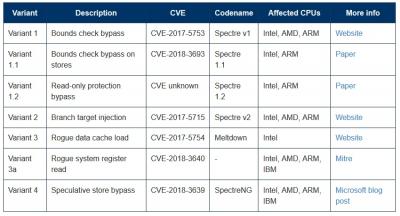
4th variant of meltdown/spectre vulnerability , reported by microsoft and google
 4th variant meltdown/spectre microoft site QUOTE What is affected? AMD, ARM, and Intel CPUs are affected by CVE-2018-3639 to varying degrees. What is the risk? Microsoft currently assesses the risk posed by CVE-2018-3639 to our customers as low. We are not aware of any exploitable instances of this vulnerability class in our software at this time, but we are continuing to investigate and we encourage researchers to find and report any exploitable instances of CVE-2018-3639 as part of our Speculative Execution Side Channel Bounty program. We will adapt our mitigation strategy for CVE-2018-3639 as our understanding of the risk evolves. What is the mitigation? Microsoft has already released mitigations as part of our response to Spectre and Meltdown that are applicable to CVE-2018-3639 in certain scenarios, such as reducing timer precision in Microsoft Edge and Internet Explorer. Software developers can address individual instances of CVE-2018-3639 if they are discovered by introducing a speculation barrier instruction as described in Microsoft’s C++ developer guidance for speculative execution side channels. Microsoft is working with CPU manufacturers to assess the availability and readiness of new hardware features that can be used to resolve CVE-2018-3639. In some cases, these features will require a microcode or firmware update to be installed. Microsoft plans to provide a mitigation that leverages the new hardware features in a future Windows update. moar patches incoming  |
|
|
Jul 16 2018, 01:28 AM
Return to original view | Post
#17
|
|
Junior Member
490 posts Joined: Aug 2006
|
There are further new spectre variants, 1.1 and 1.2 discovered. Are there any firmware patches for any of the spectre/meltdown variants for raven 2017 ?
source : https://www.bleepingcomputer.com/news/security/new-spectre-11-and-spectre-12-cpu-flaws-disclosed/ » Click to show Spoiler - click again to hide... « |
|
|
Aug 6 2018, 05:11 PM
Return to original view | Post
#18
|
|
Junior Member
490 posts Joined: Aug 2006
|
my raven 2017 "c" key is not working, how do i send in for repair?
mini-side-rant: first time in my ownership of desktops and laptops that i have keyboard failed in some way, luckily my windows login doesn't use that key, maybe i just got a lemon key.  This post has been edited by Eterman: Aug 7 2018, 10:16 AM |
|
|
Oct 26 2018, 08:10 PM
Return to original view | Post
#19
|
|
Junior Member
490 posts Joined: Aug 2006
|
hello illegear team, the RMA is good, the replaced keyboard is woking well so far, the whole laptop body looks like it has never been disassembled before.
But a similar problem appear, my keyboard backlight brightness setting has failed to save, it kept default back to medium brightness when waking from sleep/idle, as in my previous old posts. The myapp version is 1.4.2.0 , is it the latest one? |
|
Topic ClosedOptions
|
| Change to: |  0.0613sec 0.0613sec
 0.34 0.34
 7 queries 7 queries
 GZIP Disabled GZIP Disabled
Time is now: 4th December 2025 - 09:33 AM |
 Quote
Quote