Welcome Guest ( Log In | Register )

Bump Topic Topic Closed RSS Feed

Outline · [ Standard ] · Linear+

 ILLEGEAR Custom Gaming Laptops v.3, RTX ON! ILLEGEAR RTX Gaming Notebook.

views
     
hotwebs
post Nov 13 2016, 12:59 PM

On my way
****
Senior Member
659 posts

Joined: Jan 2003
From: JB


Not professional Illegear S5 Review:

The reason why i choose Illegear S5 instead of D5, because of the heat & noise and the portability.

S5 Good:

-can change to Hybrid or Discrete mode, long battery life on Hybrid mode about 4 hours+, silent while normal usage surf net and music play.

-2.5KG weight is still acceptable

-Performance is comparable to my rig. I7 2700K + GTX 970, enough for video editing and max ultra setting to all 1080p game.

-low heat and acceptable noise level while gaming

S5 Bad:

-No TB3
-no future upgrade GPU & CPU
-Speaker no woofer(but sound quality is good, i am not audiophile)

Design and features:

Quite satisfied with the build quality, one word "solid". only the LCD got backlight leak issue. but not a big issue while gaming and normal office work.

Heat And Noise level:

I am quite sensitive at noise & temperature, overall is acceptable. that's why my desktop use Noctua cpu heatsink and GPU use Artic Extreme iv.

the noise during full load is noticeable, but is not annoying and is not like vacuum motor sound, while gaming totally cannot hear.

Temperature

GPU - Idle:43, full load:75max(77-79c while overclock)
CPU - Idle:41, Full load (4cores, 3.1-3.3Ghz): 70c shocking.gif (may be my prime95 problem, is a bit low)

Benchmark
the benchmark is about the same to the official review. http://www.hardwarezone.com.my/review-ille...able-powerhouse

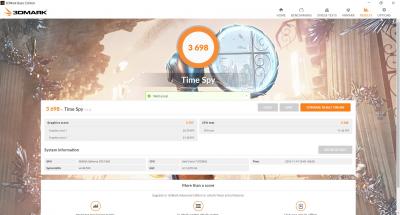
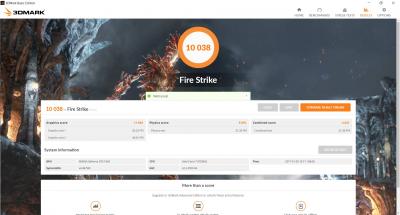
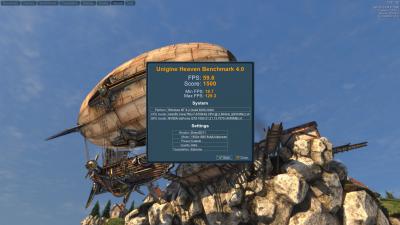
My Slightly OC result, no adjust voltage, just purely increase the core clock and memory to 200Mhz using control centre.

Unigine Heaven Benchmark 4.0
Attached Image

Time Spy
Attached Image

Fire Strike
Attached Image

The GPU temperature is maintain at 74c Max on this OC result. I changed back to default, since all my apps and games can run smoothly without the need of additional power.
hotwebs
post Nov 13 2016, 03:26 PM

On my way
****
Senior Member
659 posts

Joined: Jan 2003
From: JB


ambient temp is about 28c to 30c
hotwebs
post Nov 14 2016, 02:40 PM

On my way
****
Senior Member
659 posts

Joined: Jan 2003
From: JB


QUOTE(wingwp @ Nov 13 2016, 03:31 PM)
hotwebs how smooth is the video editing?
*
Haven't really start on video editing, but performed few CPU benchmark test, the result is about the same like my I7 2700K. If you want to understand more about to build the video editing rig, read here http://www.logicalincrements.com/articles/videoediting
hotwebs
post Nov 16 2016, 02:10 PM

On my way
****
Senior Member
659 posts

Joined: Jan 2003
From: JB


QUOTE(vemp @ Nov 15 2016, 08:46 PM)
I bought D9x with 17.3" 3K QHD Anti-glare 120Hz with sRGB 100% Color & Wide View (2560x1440)(G-Sync)
but i dont see the setting to turn it on ?
and brightness adjustment doenst seems to be working..tried with function key and under display setting..no effect or what so ever..
*
I guess, you haven't install the Nvidia driver, and G-Sync can be turn on in the Nvidia control panel & also install the Control Center to control the Fan, brightness and keyboard backlight profile.

This post has been edited by hotwebs: Nov 16 2016, 02:11 PM
hotwebs
post Jan 15 2017, 10:37 AM

On my way
****
Senior Member
659 posts

Joined: Jan 2003
From: JB


QUOTE(edthrax @ Dec 20 2016, 12:01 PM)
ok.. please do update if can..i am very interested in upgrading mine if the cost is not that high
*
If not mistaken the 120Hz lcd panel is TN screen, i got a lot of feedback of the color accuracy is worse compare to the 60hz IPS panel.

anyway I am using 60hz IPS G-sync.
hotwebs
post Feb 2 2017, 08:09 PM

On my way
****
Senior Member
659 posts

Joined: Jan 2003
From: JB


Nothing to do just ran the OC benchmark during Chinese new year, quite satisfy the OC result. just increase the core & memory clock 200/600, without adjust the power, the temperature maintain at 76c max, i think is the limit.

Attached Image


Attached Image
hotwebs
post Jul 16 2017, 12:51 PM

On my way
****
Senior Member
659 posts

Joined: Jan 2003
From: JB


QUOTE(Prince J @ Jul 13 2017, 05:09 PM)
user posted image

ILLEGEAR allows you to transform your laptop into a desktop gaming experience via External Graphics Card Enclosure. Connect to the future with the most advanced and versatile external desktop graphics solution available. Easily upgrade or customize your preferred level of performance with support for full-length, double-wide PCIe desktop graphics cards for a level of performance that fits your play style. Customize U3 at http://goo.gl/Vb8rGp
*
The Illegear U3 is only come with a I7 7500u, which i think there is bottleneck when compare to the HQ series processor, due to lower core and "U" series is energy efficient processor. some review benchmark is 10-20+fps different.

It will be good, in future, if there is slim + HQ series or Desktop series + TB 3.

https://egpu.io/external-gpu-is-it-worth-it/


hotwebs
post Oct 16 2017, 11:42 AM

On my way
****
Senior Member
659 posts

Joined: Jan 2003
From: JB


QUOTE(Prince J @ Oct 7 2017, 04:52 PM)
Joshua: "The last time I heard about a gaming laptop having a mechanical keyboard, it had a 5-figure price tag. With more than half of that amount gone, the Raven's keyboard is a very interesting addition into the mid-range category. It boasts as an RGB mechanical keyboard with per-key RGB lighting and N-Key Rollover features for anti-ghosting (pressing more than 10 keys simultaneously). There was barely any flex when typing, and the keys do feel mechanical in some way, giving out some tactile feedback. Just like any other mechanical keyboard, it can get a little too loud sometimes, especially in quiet areas full of people like an office or a library, but that's no big deal. I have awesome lights to show off! This is Illegear's own version of mechanical switches, unlike anything we've seen like a Cherry MX or Kailh. We hope to see more of these embedded in their future releases."
Read what GritGeek had to say about the RAVEN at https://gritgeek.tech/2017/10/07/review-illegear-raven/
*
The review is not details enough and i think most of the consumer will prefer to read something like below :

https://www.notebookcheck.net/Guru-Mars-K-C...w.258238.0.html

or

https://forum.obsidian-pc.com/discussion/21...ries-rp6-g-rs-g

The review should include:
chassis quality
Pointing Device quality
Weight
Display quality
Keyboard
Connectivity (Bluetooth, Wireless, TB3..etc)
Battery Life
Games & Application Performance (Prime95, 3D Marks)
Temperature (Idle and Max)
Noise db level
Audio Performance

All the laptops will have pro and cons. If possible we wish to see all the illegear laptop in more details review and provided by illegear yourself.

Furthermore, we would like to have the drivers download page, like Software driver, utilities, and Bios update, instead of we request manually.
hotwebs
post Apr 4 2018, 03:58 PM

On my way
****
Senior Member
659 posts

Joined: Jan 2003
From: JB


This 8th Generation CPU, performance quite impressive, the I7 8750H 6 cores 12 Threads.

Gaming Performance about the same grade with I7 4790K and I7 6700K.

And also benefit with multi cores, performance same grade with Ryzen 1600x. big improvement compare to I7 7700HQ.

If pair with GTX 1070 (not MAX-Q), the bottleneck should be reduce.

This post has been edited by hotwebs: Apr 4 2018, 03:59 PM
hotwebs
post Jul 22 2018, 02:53 PM

On my way
****
Senior Member
659 posts

Joined: Jan 2003
From: JB


QUOTE(AZIM@ILLEGEAR @ Jul 20 2018, 11:33 AM)
Hi  BBXiong, based on my experience, the M.2 SATA SSD would be more stable in terms of drive compatibility in comparison to the M.2 NVMe SSD since the interface is much more common amongst legacy devices, hope this clarifies.
*
Hi BBXiong, for my experience, i found that when you purchase the M.2 SSD sata, you may need to check the voltage supply for the M.2 SSD. Some M.2 SSD give higher speed and more voltage, but also generate more heat, end up you may consider to add more maintenance cost to buy the M.2 ssd heatsink. i am not sure adding more storage will reduce the air ventilation in the case and end up temperature increase.

I have few question to ask as well. I am using my illegear S5 for 1 and half year already, but i never utilized the ESS Sabre HIFI DAC, may i know how can i activate it? i read the manual, when the headphone plug in to the audio jack, the Control Centre will enabled the ESS Sabre HIFI Dac automatically, but i tried is not working at all. may i know is it the compatible gaming headset only can activate it or normal headset or headphone will do?

RAM upgrade.
Just to double confirm, is my Illegear S5 model, the 6th Generation I7 with GTX 1060 6GB support RAM DDR4 2400mhz? currently i am using 2 x Crucial DDR4 8GB 2133mhz, if i change to DDR4 8gb 2400mhz, the performance will increase?

Would appreciate, if any Illegear S5, S7 or any users who experienced it also welcome to share your experience as well. notworthy.gif

Topic ClosedOptions
 

Change to:
| Lo-Fi Version
0.0635sec    0.30    7 queries    GZIP Disabled
Time is now: 4th December 2025 - 02:54 AM