Outline ·
[ Standard ] ·
Linear+
ILLEGEAR Custom Gaming Laptops v.3, RTX ON! ILLEGEAR RTX Gaming Notebook.
|
Omega5777
|
 Mar 7 2019, 02:22 PM Mar 7 2019, 02:22 PM
|
New Member


|
QUOTE(AZIM@ILLEGEAR @ Mar 7 2019, 12:27 PM) Hi Omega5777, thank you very much for the details provided  Since the laptop newly received, I believe the issue is rooted to the CPU speed instead. I would recommend to set the power plan to 'Balanced' regardless if the laptop is powered by charger/battery: https://www.howtogeek.com/240840/should-you...lan-on-windows/This is because the High Performance mode will activate the TurboBoost at all times and this could be causing excess temperature compounded while the laptop is running on idle, hope this clarifies. got it. Will try it out and monitor. Thanks bro. |
|
|
|
|
|
Omega5777
|
Mar 7 2019, 11:22 PM
|
New Member
|
QUOTE(AZIM@ILLEGEAR @ Mar 7 2019, 12:27 PM) Hi Omega5777, thank you very much for the details provided Since the laptop newly received, I believe the issue is rooted to the CPU speed instead. I would recommend to set the power plan to 'Balanced' regardless if the laptop is powered by charger/battery: https://www.howtogeek.com/240840/should-you...lan-on-windows/This is because the High Performance mode will activate the TurboBoost at all times and this could be causing excess temperature compounded while the laptop is running on idle, hope this clarifies. 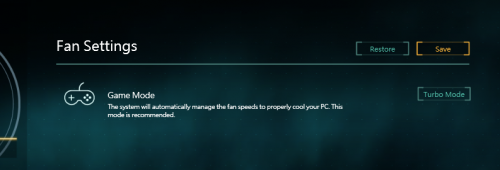 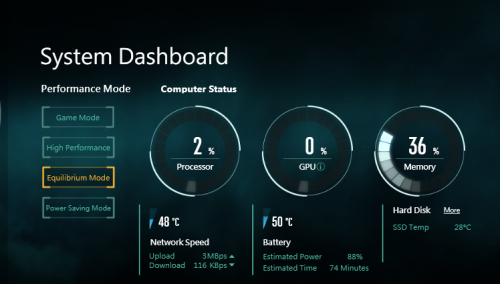 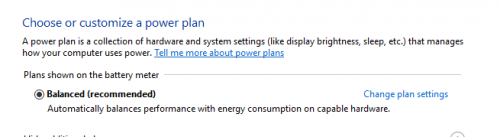 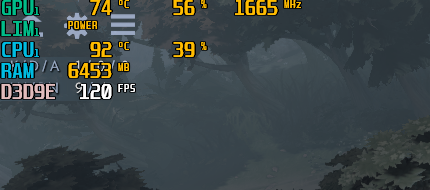 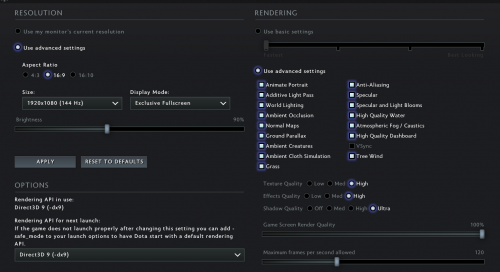 This only applies to dota 2, the rest of the games the graphic does not exceed 80'C (apex legends n others) |
|
|
|
|
|
TSPrince J
|
Mar 8 2019, 05:35 PM
|
|
|
DELETED
This post has been edited by Prince J: Mar 18 2019, 12:18 PM
|
|
|
|
|
|
mcloudteo
|
Mar 9 2019, 12:28 AM
|
Getting Started
|
QUOTE(Omega5777 @ Mar 7 2019, 11:22 PM) Here you go the screen cap 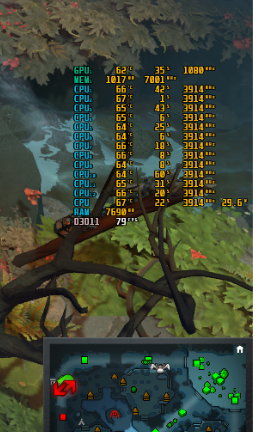 This post has been edited by mcloudteo: Mar 9 2019, 02:55 PM This post has been edited by mcloudteo: Mar 9 2019, 02:55 PM |
|
|
|
|
|
orangutan
|
Mar 9 2019, 03:52 PM
|
|
|
When will i9 be introduced and is there plan for i9 for new model for 17" screen ?
|
|
|
|
|
|
AZIM@ILLEGEAR
|
Mar 9 2019, 04:40 PM
|
New Member
|
QUOTE(orangutan @ Mar 9 2019, 03:52 PM) When will i9 be introduced and is there plan for i9 for new model for 17" screen ? Soon |
|
|
|
|
|
Omega5777
|
Mar 9 2019, 06:18 PM
|
New Member
|
QUOTE(mcloudteo @ Mar 9 2019, 12:28 AM) Here you go the screen cap Thanks bro. The temp seems to reduce after changing the API rendering in video settings from dx9 to dx11. So all good for now. |
|
|
|
|
|
zoixc
|
Mar 11 2019, 11:47 AM
|
|
|
Hi new to this company and was planning to get one for myself Laguna. I have a question for those who have been using the laptop for a couple of year. I'm planning to use it for at least 5 year
|
|
|
|
|
|
TSPrince J
|
Mar 11 2019, 12:01 PM
|
|
|
QUOTE(zoixc @ Mar 11 2019, 11:47 AM) Hi new to this company and was planning to get one for myself Laguna. I have a question for those who have been using the laptop for a couple of year. I'm planning to use it for at least 5 year Hi there We have a laguna thread here: https://forum.lowyat.net/topic/4364788/+100 |
|
|
|
|
|
Winn@Illegear
|
Mar 13 2019, 01:22 PM
|
New Member
|
 You will now receive a Call of Duty : Black Ops 4 game code worth RM250 for every ILLEGEAR laptop / desktop purchase from us 🤗 This offer would be eligible for all gaming systems with INTEL Core i5,i7 and i9 processors purchased within March Madness Promotion period! This post has been edited by Winn@Illegear: Mar 13 2019, 01:23 PM |
|
|
|
|
|
l2k
|
Mar 13 2019, 02:02 PM
|
New Member
|
Hey guys, received my selenite Any recommendation of "must-have" software for - tuning (undervolt) - temp and fps monitor - battery charging protection software? - any others? This post has been edited by l2k: Mar 13 2019, 02:12 PM |
|
|
|
|
|
Uzumaki NaruTo
|
Mar 13 2019, 02:30 PM
|
|
|
QUOTE(Winn@Illegear @ Mar 13 2019, 01:22 PM) You will now receive a Call of Duty : Black Ops 4 game code worth RM250 for every ILLEGEAR laptop / desktop purchase from us 🤗 This offer would be eligible for all gaming systems with INTEL Core i5,i7 and i9 processors purchased within March Madness Promotion period! Does this apply to those who just recently purchased it like yesterday ? XD |
|
|
|
|
|
mcloudteo
|
Mar 13 2019, 07:43 PM
|
Getting Started
|
QUOTE(l2k @ Mar 13 2019, 02:02 PM) Hey guys, received my selenite Any recommendation of "must-have" software for - tuning (undervolt) - temp and fps monitor - battery charging protection software? - any others? Hey l2k come to Selenite thread help to keep our thread alive  |
|
|
|
|
|
TSPrince J
|
Mar 13 2019, 11:31 PM
|
|
|
QUOTE(Uzumaki NaruTo @ Mar 13 2019, 02:30 PM) Does this apply to those who just recently purchased it like yesterday ? XD Yes as long as you fall under March Madnesss Promo. |
|
|
|
|
|
Winn@Illegear
|
Mar 19 2019, 11:54 AM
|
New Member
|
 https://www.tech-critter.com/review-illegea...xXpABtyDIOx16GE https://www.tech-critter.com/review-illegea...xXpABtyDIOx16GETech Review by Tech Critter-John Diew Pros: Compact form factor Classy RGB lighting with per-key RGB keyboard Tactile typing experience Slim display bezels Fast & responsive display Dual M.2 slot Great performance Excellent gaming experience Great cooling for RTX 2070 A more affordable price tag Cons: Normal key caps, please USB port placement should have be at the left or rear Noisy fan at high loads High CPU temp at loads This post has been edited by Winn@Illegear: Mar 19 2019, 11:55 AM |
|
|
|
|
|
dylan_chng
|
Mar 20 2019, 07:11 PM
|
|
|
Received my Raven today. After connecting to a non metered connection, the laptop downloaded automatically Sound Blaster Connect and Realtek Audio Console. Any reason why this isn't pre-installed like the Raven Command Centre?
This post has been edited by dylan_chng: Mar 21 2019, 01:05 PM
|
|
|
|
|
|
dylan_chng
|
Mar 21 2019, 01:06 PM
|
|
|
For the Raven Fn+F5/F6 intended function is what? Keyboard backlight level? cause I can't seem to get it to do anything.
|
|
|
|
|
|
AZIM@ILLEGEAR
|
Mar 21 2019, 04:40 PM
|
New Member
|
Hi dylan_chngKindly note that the two applications listed are native UWP applications and it would be updated via Microsoft Store instead of Windows Updates, hope this clarifies. For FN+F5, it will toggle the touchpad functionality but for the keyboard backlight's brightness level, it can be toggled by pressing FN+F6 (to decrease) and FN+F7 (to increase), hope this helps |
|
|
|
|
|
Winn@Illegear
|
Mar 21 2019, 06:09 PM
|
New Member
|
.
This post has been edited by Winn@Illegear: Apr 2 2019, 01:55 PM
|
|
|
|
|
|
Exeunt
|
Mar 22 2019, 10:21 AM
|
|
|
QUOTE(Winn@Illegear @ Mar 21 2019, 07:09 PM)  ILLEGEAR IT Expo Promotion has begun! Upgrade your gaming experience today with exclusive IT Expo deals 🤗 Every purchases made will be eligible for freebies worth up to RM1,036! Date: 29th March 2019 to 31st March 2019 (Pre-order Available NOW) Booth: Mid Valley Exhibition Centre, Hall 1, P121. IT Expo Brochures in high resolution: http://gg.gg/dfvnzDeals are available at IT Expo ILLEGEAR booth and online. Customize and build your ultimate gaming laptop / PC today at https://www.illegear.com. hi boss, in this https://store.illegear.com/high-performance...gear-raven.htmlwhy dont have option to select 144hz screen ya ? even after select 1050ti |
|
|
|
|



 Quote
Quote





 0.0299sec
 0.50
0.50
 6 queries
 GZIP Disabled