Welcome Guest ( Log In | Register )

Bump Topic Topic Closed RSS Feed
64 Pages « < 56 57 58 59 60 > » Bottom

Outline · [ Standard ] · Linear+

 ILLEGEAR Custom Gaming Laptops v.3, RTX ON! ILLEGEAR RTX Gaming Notebook.

views
     
l2k
post Mar 2 2019, 05:12 PM

New Member
*
Newbie
13 posts

Joined: Apr 2009
QUOTE(prasys @ Mar 2 2019, 03:29 PM)
What are the specs

I wanted to pick Illegar , but then ended up going for Thinkpad - needed something to last long and being durable + international warranty smile.gif
Perosnally I would ecommend illegar...well , tons of options to customize
*
I end up picking selenite, mainly due to its 17 inch with a close to 15inch footprint, along with rtx 2060, 2tb hdd, others are all standard I guess (e.g. Intel i7, 512Gb ssd, mech keyboard.. Etc)

This post has been edited by l2k: Mar 2 2019, 05:16 PM
prasys
post Mar 2 2019, 05:50 PM

Heros Never Die
Group Icon
VIP
12,925 posts

Joined: Mar 2005
From: Kuala Lumpur
QUOTE(mcloudteo @ Mar 2 2019, 05:06 PM)
Yeah both are different category I have both of these laptop Thinkpad T470 & Selenite ( actually I have 3 laptop another 1 is Dell Inspiron 7000 2 in 1  tongue.gif ) while Thinkpad T series just for me to carry around for business use, but not really a powerful laptop for heavy gaming or video editing, it's build to be durable it better suit for business and student with light gaming need and the T series with 32 Wh + 72 Wh battery it's very very portable thumbsup.gif  for you to bring to school/library/Workplace/Starbucks without charger easily last you a day.  laugh.gif
*
True , now i need to scout an eGPU - but i think the 1050Ti should be still okay for light gaming

QUOTE(l2k @ Mar 2 2019, 05:12 PM)
I end up picking selenite, mainly due to its 17 inch with a close to 15inch footprint, along with rtx 2060, 2tb hdd, others are all standard I guess (e.g. Intel i7, 512Gb ssd, mech keyboard.. Etc)
*
Good choice smile.gif
l2k
post Mar 2 2019, 06:43 PM

New Member
*
Newbie
13 posts

Joined: Apr 2009
QUOTE(mcloudteo @ Mar 2 2019, 05:09 PM)
haha just that thát very ugly and untidy if put any other object the cooler pad look more presentable and it's not expensive so why not right?  tongue.gif
*
My thought initially is to raise up the laptop and at the same time help abit on the cooling department. Watched a few youtube videos, a quality cooler like CM notepal x3 seems like able to reduce GPU temp by few degrees, not so much for CPU somehow.

Found one interesting which is Deepcool m6, a cooler with speaker blink.gif However, it seems like it is not sold here.

This post has been edited by l2k: Mar 2 2019, 06:43 PM
mcloudteo
post Mar 2 2019, 07:31 PM

Getting Started
**
Junior Member
72 posts

Joined: Dec 2009
QUOTE(l2k @ Mar 2 2019, 05:12 PM)
I end up picking selenite, mainly due to its 17 inch with a close to 15inch footprint, along with rtx 2060, 2tb hdd, others are all standard I guess (e.g. Intel i7, 512Gb ssd, mech keyboard.. Etc)
*
Actually for the NVME SSD I rather they use 970 Evo than PM981 since 970 Evo is almost the same price listed in Illegear website benchmark wise 970 Evo is faster than PM981 although just 12% we won't notice any difference as NVME already very speedy but greedy me tongue.gif


PM981 vs 970 Evo

l2k
post Mar 2 2019, 08:14 PM

New Member
*
Newbie
13 posts

Joined: Apr 2009
QUOTE(mcloudteo @ Mar 2 2019, 07:31 PM)
Actually for the NVME SSD I rather they use 970 Evo than PM981 since 970 Evo is almost the same price listed in Illegear website benchmark wise 970 Evo is faster than PM981 although just 12% we won't notice any difference as NVME already very speedy but greedy me  tongue.gif
PM981 vs 970 Evo
*
Hmm, for my Selenite config, I just opted for the default 512GB nvme SSD, I do not really know which brand is it. Another option is 256GB Samsung PM981 M.2 PCIe NVMe without increasing price. So naturally I favor bigger SSD than a speedier one.

This post has been edited by l2k: Mar 2 2019, 08:15 PM
mcloudteo
post Mar 2 2019, 10:13 PM

Getting Started
**
Junior Member
72 posts

Joined: Dec 2009
QUOTE(l2k @ Mar 2 2019, 08:14 PM)
Hmm, for my Selenite config, I just opted for the default 512GB nvme SSD, I do not really know which brand is it. Another option is 256GB Samsung PM981 M.2 PCIe NVMe without increasing price. So naturally I favor bigger SSD than a speedier one.
*
yeah i did the same but that time they said have compatibility issues so have to charge to samsung one.

If for me i will use xpg 8200 pro the performance is better than PM981 but 34% cheaper than PM981
l2k
post Mar 2 2019, 11:16 PM

New Member
*
Newbie
13 posts

Joined: Apr 2009
QUOTE(mcloudteo @ Mar 2 2019, 10:13 PM)
yeah i did the same but that time they said have compatibility issues so have to charge to samsung one.

If for me i will use xpg 8200 pro the performance is better than PM981 but 34% cheaper than PM981
*
Yeah, you are right. The xpg 8200 pro is currently one of the best value to performance NVME SSD. Actually in my planned ITX build, I picked this model. Samsung is kinda overpriced IMO.

well123
post Mar 3 2019, 05:43 PM

New Member
*
Newbie
0 posts

Joined: Oct 2009
HELLO.I need to go where to find Driver(Raven) and Raven control centre softwave?

dylan_chng
post Mar 3 2019, 06:22 PM

On my way
****
Junior Member
693 posts

Joined: Jul 2017
QUOTE(well123 @ Mar 3 2019, 05:43 PM)
HELLO.I need to go where to find Driver(Raven) and Raven control centre softwave?
*
QUOTE(AZIM@ILLEGEAR @ Jan 30 2019, 01:12 PM)
Hi Dylan,

To download the drivers, you would first have to determine the model of your Raven (whether it is running a Kaby Lake CPU or a Coffeelake CPU or a Raven Elite. Kindly find the driver suites for the ILLEGEAR Raven series as provided below:

Raven (Kaby Lake Edition - 7th Gen CPU: http://illegear.com/drivers/Raven.rar
Raven (Coffeelake Edition - 8th Gen CPU): http://illegear.com/drivers/Raven_coffee.rar
Raven Elite: http://illegear.com/drivers/Raven_elite.rar

For extracting the archive, kindly use this software: http://www.7-zip.org/download.html

For the service manual, kindly drop us an email at support@illegear.com and we shall provide the respective documents to you accordingly smile.gif
*
low0915
post Mar 4 2019, 03:07 PM

Getting Started
**
Junior Member
59 posts

Joined: Jan 2013
just wondering which model does the Illegear Raven based on, for example Onyx is based on TONGFANG GK5CN6Z
dylan_chng
post Mar 4 2019, 03:23 PM

On my way
****
Junior Member
693 posts

Joined: Jul 2017
QUOTE(low0915 @ Mar 4 2019, 03:07 PM)
just wondering which model does the Illegear Raven based on, for example Onyx is based on TONGFANG GK5CN6Z
*
tongfang gi5cn5e
DuitNow
post Mar 4 2019, 08:17 PM

On my way
****
Junior Member
597 posts

Joined: Oct 2018
QUOTE(mcloudteo @ Mar 2 2019, 05:06 PM)
Yeah both are different category I have both of these laptop Thinkpad T470 & Selenite ( actually I have 3 laptop another 1 is Dell Inspiron 7000 2 in 1  tongue.gif ) while Thinkpad T series just for me to carry around for business use, but not really a powerful laptop for heavy gaming or video editing, it's build to be durable it better suit for business and student with light gaming need and the T series with 32 Wh + 72 Wh battery it's very very portable thumbsup.gif  for you to bring to school/library/Workplace/Starbucks without charger easily last you a day.  laugh.gif
*
You have dell 17inch inspiron 7000 laptop? blink.gif Spec?
Omega5777
post Mar 5 2019, 10:43 AM

New Member
*
Newbie
17 posts

Joined: Jun 2016
QUOTE(mcloudteo @ Feb 27 2019, 01:13 PM)
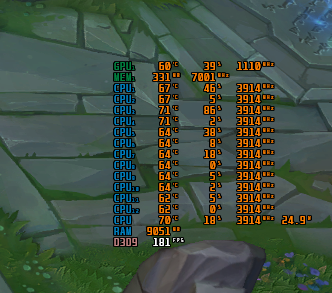
1. I'm just a occasionally gamer, spend most of my time with work and family, so far I did try league and legend and Dota 2 max out all the settings i can get 120++ fps for Dota 2 for LoL i post the screen shot below btw I never experience any throttling at least for this two game.

user posted image

2. You can just research online plenty of information and compare them with the price listed in Illegear website.
btw If you no need mobility it's better off with Desktop than Laptop to be honest it's always more powerful/cheaper and upgradeable and you have more option to deal with heat issue.
*
bro hows the CPU temp when playing dota 2.
I'm getting 90-95C.
pluginbaby
post Mar 6 2019, 08:40 AM

Look at all my stars!!
*******
Senior Member
2,661 posts

Joined: Apr 2007


For Raven coffee users gtx1050, do you have grizzly applied? And what's your temp when gaming? Any underclocking in MSI Afterburner?

This post has been edited by pluginbaby: Mar 6 2019, 02:24 PM
AZIM@ILLEGEAR
post Mar 6 2019, 05:32 PM

New Member
*
Junior Member
28 posts

Joined: Feb 2017
From: Team ILLEGEAR


QUOTE(Omega5777 @ Mar 5 2019, 10:43 AM)
bro hows the CPU temp when playing dota 2.
I'm getting 90-95C.
*
Hi Omega5777, may I know when was the last time that you have applied the thermal paste for your laptop? Furthermore, may I know if your power option is set to 'Balanced' or 'High Performance'?

QUOTE(pluginbaby @ Mar 6 2019, 08:40 AM)
For Raven coffee users gtx1050, do you have grizzly applied? And what's your temp when gaming? Any underclocking in MSI Afterburner?
*
Hi pluginbaby, the performance of the stock thermal compound for RAVEN is quite close to Thermal Grizzly Kryonaut actually, that's why we didn't offer for the upgrade option. But you can re-apply the thermal paste with the Thermal Grizzly Kryonaut option, perhaps after ±1 year, after the stock thermal paste has dried up.

However in regards to the temperature levels achieved, I will let the RAVEN users to chime in smile.gif
mcloudteo
post Mar 6 2019, 10:07 PM

Getting Started
**
Junior Member
72 posts

Joined: Dec 2009
QUOTE(DuitNow @ Mar 4 2019, 08:17 PM)
You have dell 17inch inspiron 7000 laptop? blink.gif  Spec?
*
Yeah i do, you can find the spec in dell website. But mine is older generation not the new one.
mcloudteo
post Mar 6 2019, 10:09 PM

Getting Started
**
Junior Member
72 posts

Joined: Dec 2009
QUOTE(Omega5777 @ Mar 5 2019, 10:43 AM)
bro hows the CPU temp when playing dota 2.
I'm getting 90-95C.
*
90-95? that's hot!! don't remember i see that high during the game play let me test again coming weekends will screen capture the result.
mcloudteo
post Mar 6 2019, 10:15 PM

Getting Started
**
Junior Member
72 posts

Joined: Dec 2009
QUOTE(low0915 @ Mar 4 2019, 03:07 PM)
just wondering which model does the Illegear Raven based on, for example Onyx is based on TONGFANG GK5CN6Z
*
QUOTE(dylan_chng @ Mar 4 2019, 03:23 PM)
tongfang gi5cn5e
*
This is the link to the model in TongFang website if you can read Chinese.

Tongfang GK5CN67

This post has been edited by mcloudteo: Mar 6 2019, 10:17 PM
Omega5777
post Mar 7 2019, 10:45 AM

New Member
*
Newbie
17 posts

Joined: Jun 2016
QUOTE(AZIM@ILLEGEAR @ Mar 6 2019, 05:32 PM)
Hi Omega5777, may I know when was the last time that you have applied the thermal paste for your laptop? Furthermore, may I know if your power option is set to 'Balanced' or 'High Performance'?
Hi pluginbaby, the performance of the stock thermal compound for RAVEN is quite close to Thermal Grizzly Kryonaut actually, that's why we didn't offer for the upgrade option. But you can re-apply the thermal paste with the Thermal Grizzly Kryonaut option, perhaps after ±1 year, after the stock thermal paste has dried up.

However in regards to the temperature levels achieved, I will let the RAVEN users to chime in smile.gif
*
Hi Azim,
I set the power option to High Performance.
Just pick up the laptop last week so thermal paste should still be ok.
Not sure if its game related or not as CPU stays around 75% when playing Apex & Battlefield.
AZIM@ILLEGEAR
post Mar 7 2019, 12:27 PM

New Member
*
Junior Member
28 posts

Joined: Feb 2017
From: Team ILLEGEAR


QUOTE(Omega5777 @ Mar 7 2019, 10:45 AM)
Hi Azim,
I set the power option to High Performance.
Just pick up the laptop last week so thermal paste should still be ok.
Not sure if its game related or not as CPU stays around 75% when playing Apex & Battlefield.
*
Hi Omega5777, thank you very much for the details provided smile.gif

Since the laptop newly received, I believe the issue is rooted to the CPU speed instead. I would recommend to set the power plan to 'Balanced' regardless if the laptop is powered by charger/battery: https://www.howtogeek.com/240840/should-you...lan-on-windows/

This is because the High Performance mode will activate the TurboBoost at all times and this could be causing excess temperature compounded while the laptop is running on idle, hope this clarifies.

64 Pages « < 56 57 58 59 60 > » Top
Topic ClosedOptions
 

Change to:
| Lo-Fi Version
0.0261sec    0.27    6 queries    GZIP Disabled
Time is now: 8th December 2025 - 02:00 AM