Welcome Guest ( Log In | Register )

Bump Topic Topic Closed RSS Feed

Outline · [ Standard ] · Linear+

 ILLEGEAR Custom Gaming Laptops v.3, RTX ON! ILLEGEAR RTX Gaming Notebook.

views
     
zoixc
post Mar 11 2019, 11:47 AM

haha
******
Senior Member
1,406 posts

Joined: Aug 2018
Hi new to this company and was planning to get one for myself Laguna. I have a question for those who have been using the laptop for a couple of year. I'm planning to use it for at least 5 year
zoixc
post Mar 25 2019, 08:48 PM

haha
******
Senior Member
1,406 posts

Joined: Aug 2018
Laguna user here, any one using any software to tweak the speaker ? the speaker sound kinda flat
zoixc
post Mar 25 2019, 10:21 PM

haha
******
Senior Member
1,406 posts

Joined: Aug 2018
QUOTE(Asgaard @ Mar 25 2019, 09:00 PM)
Same. my speaker like no sound. Need to use headphone. raven here
*
i have to adjust using the default equalizer to make it better. On some music is good after adjusting but on those video which has more talking one it's usually not good
zoixc
post Apr 5 2019, 09:57 PM

haha
******
Senior Member
1,406 posts

Joined: Aug 2018
Laguna user here , the touchpad won't move the cursor around but all the gesture work fine.

I tried uninstalling the device and the touchpad seems to be working just fine but without the synaptic driver and can't disable it. (After installing synaptic driver the touch pad won't move the cursor anymore but the gesture all work fine)

Any idea what could be causing this ?
zoixc
post Apr 6 2019, 12:01 PM

haha
******
Senior Member
1,406 posts

Joined: Aug 2018
QUOTE(STEVE@ILLEGEAR @ Apr 6 2019, 10:56 AM)
Hi zoixc, PM-ed on whatsapp
Thanks!

zoixc
post Apr 16 2019, 06:21 PM

haha
******
Senior Member
1,406 posts

Joined: Aug 2018
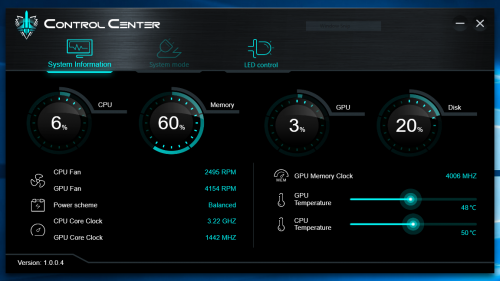
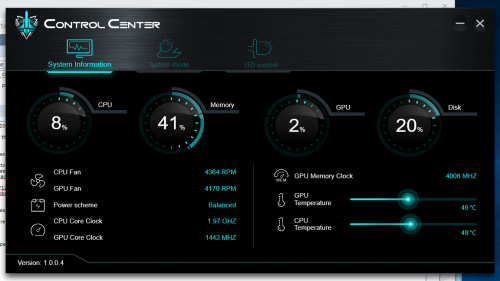
After using the laptop for around 3 hours, the laptop fan seems to stuck at one speed even when the temperature is around 40++ something. This does not happen when the laptop first start up and the fan is quite loud and kinda annoying.

Anyone else having this problem ?

*Illegear Laguna Model

user posted image
zoixc
post Apr 16 2019, 07:22 PM

haha
******
Senior Member
1,406 posts

Joined: Aug 2018
QUOTE(AZIM@ILLEGEAR @ Apr 16 2019, 06:52 PM)
Hi zoixc, may I know if the issue is still present if the fan is turbo-boosted? You may do so by pressing FN+1 smile.gif

On the other hand, may I know if the behaviour is still happening after the system is rebooted? Aside from the fan boost functionality, kindly find the rest of the LAGUNA Keyboard Shortcuts for your reference as listed below:

FN+1 - Toggle fan speed (auto/max)
FN+3 - Toggle rear led strips
FN+9 - Toggle touchpad light, bottom LED strips
FN+0 - Toggle touchpad light, screen display & led lights
FN+spacebar - Toggle keyboard backlight brightness

The rest are indicated on the F1-F12 keys, hope this helps!
*
Yes the issue is still there after press FN + 1, i can see cpu and gpu fan speed up but only the cpu fan slows down after pressing again.

No, the fan speed is normal after rebooting, but will have same issue after certain hour of usage.


*Edit*
After pressing on FN+1, the fan speed when up as expected but when i press again, only the CPU fan speed when down and the GPU fan speed did not changed at all. The fan noise can be heard after rebooting as well, did not encounter this issues before

This is when the fan speed is at max speed.
» Click to show Spoiler - click again to hide... «


This is after i press again FN+1.
» Click to show Spoiler - click again to hide... «


This post has been edited by zoixc: Apr 17 2019, 12:29 AM

Topic ClosedOptions
 

Change to:
| Lo-Fi Version
0.0590sec    0.30    7 queries    GZIP Disabled
Time is now: 6th December 2025 - 10:47 AM