Welcome Guest ( Log In | Register )

Bump Topic Topic Closed RSS Feed

Outline · [ Standard ] · Linear+

 ILLEGEAR Custom Gaming Laptops v.3, RTX ON! ILLEGEAR RTX Gaming Notebook.

views
     
mcloudteo
post Feb 26 2019, 05:29 PM

Getting Started
**
Junior Member
72 posts

Joined: Dec 2009
QUOTE(l2k @ Feb 26 2019, 12:05 PM)
A question for illegear and also sifus here. What is the drawback of gaming laptop version of RTX 2060 vs desktop version? In terms of real life fps impact?
*
Here is my test result compare to desktop 2060 version (RTX 2060 Illegear Selenite), Desktop version is 21 to 28 percent faster.


https://gpu.userbenchmark.com/Compare/Nvidi...0/4034vsm701609

This post has been edited by mcloudteo: Feb 26 2019, 05:57 PM
mcloudteo
post Feb 27 2019, 01:13 PM

Getting Started
**
Junior Member
72 posts

Joined: Dec 2009
QUOTE(l2k @ Feb 27 2019, 09:40 AM)
Thanks for all the info, appreciate your input. 20% of difference is still bearable I guess. I got few more questions (sorry, always sceptical about gaming laptop).

1. Illegear selenite, will it throttle under long hour, graphic and cpu intense gaming?
2. How does it compare to Asus Strix Scar 2 GL704 which comparable in terms of pricing?

Still undecided whether I should go mini ITX route or gaming laptop, since mini ITX + monitor will definitely be cheaper by about RM 1.5k.
*
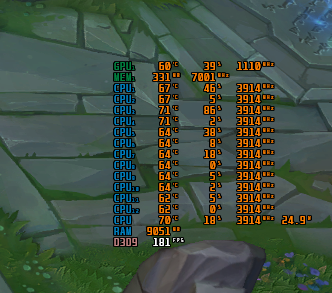
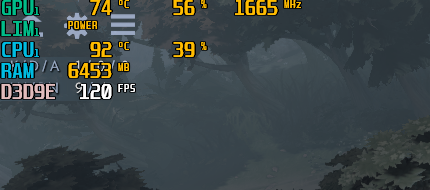
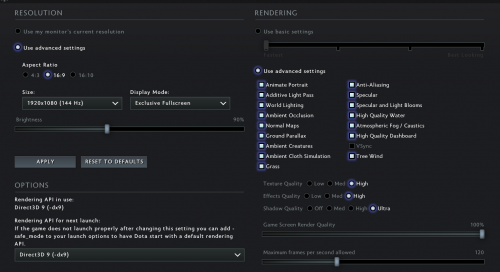
1. I'm just a occasionally gamer, spend most of my time with work and family, so far I did try league and legend and Dota 2 max out all the settings i can get 120++ fps for Dota 2 for LoL i post the screen shot below btw I never experience any throttling at least for this two game.

user posted image

2. You can just research online plenty of information and compare them with the price listed in Illegear website.


btw If you no need mobility it's better off with Desktop than Laptop to be honest it's always more powerful/cheaper and upgradeable and you have more option to deal with heat issue.

This post has been edited by mcloudteo: Feb 27 2019, 01:24 PM
mcloudteo
post Feb 27 2019, 02:22 PM

Getting Started
**
Junior Member
72 posts

Joined: Dec 2009
QUOTE(ZM Fong @ Feb 27 2019, 01:41 PM)
Did you undervolt CPU or GPU?
*
I received the unit with -0.050v undervolt (not sure Illegear or manufacturing setting), so far i set it to -0.120 anything beyond that I will get BSOD and the xtu setting is built-in in the BIOS not external xtu or throttlestop
mcloudteo
post Feb 28 2019, 08:22 AM

Getting Started
**
Junior Member
72 posts

Joined: Dec 2009
QUOTE(l2k @ Feb 27 2019, 08:06 PM)
Thanks guys for all the advice. Did a big of googling of Asus Strix Scar 2, indeed it is plagued with temp issue. Seems like I am close to making a decision to go for selenite rather than ITX.

Maybe just last 2 questions.

How is the audio quality of selenite? (heard that it is subpar for previous model).

How is the brightness of the IPS panel?
*
The volume is very soft indeed, you better off with external speaker or headphone for high quality sound. I can still can listen to spotify while working with this laptop just that don't expect too much.


Brightness wise i always use below 50% so not a problem for me, some review said it's around 280-300nit.

This post has been edited by mcloudteo: Feb 28 2019, 09:02 AM
mcloudteo
post Mar 2 2019, 04:50 PM

Getting Started
**
Junior Member
72 posts

Joined: Dec 2009
QUOTE(l2k @ Mar 2 2019, 03:14 PM)
Decided to go with Illegear after a rather long consideration. Just to share, the whole decision making was separated into 2 parts.

1st, ITX vs gaming laptop, and I went for gaming laptop despite its higher cost and slightly lower performance. Bring along ITX and setting up monitor, kb and mouse at multiple places simply isn't pratical.

2nd, Illegear vs other established players. This is simpler as after some time of researching, Illegear seems to check all the points with one possible downside which is the inferior audio system.

Hopefully I don't regret my purchase as this is my very first gaming laptop, and I went with a custom builder tongue.gif

BTW, any good notebook cooler to recommend here?
*
QUOTE(dylan_chng @ Mar 2 2019, 03:48 PM)
I don't recommend notebook cooler pads. They just aren't able to create enough airflow to matter.
*
I using cooler pad but without turning it on the fan most of the time i just want to lift up the laptop so the bottom have more room for airflow the chassis fan is good enough to cool the laptop, but only when I gaming or exporting video after editing (cpu run 100% all the core), the other time i just put it aside. Oh and 1 more situation is when I use it on the bed tongue.gif ventilation is very bad on those soft surface cooler pad will come in handy.

I got the idea from Asus Zephyrus like below.

user posted image

I found the one can fit the size of Selenite which is Cooler Master L1.

This post has been edited by mcloudteo: Mar 2 2019, 05:40 PM

mcloudteo
post Mar 2 2019, 05:06 PM

Getting Started
**
Junior Member
72 posts

Joined: Dec 2009
QUOTE(prasys @ Mar 2 2019, 03:29 PM)
What are the specs

I wanted to pick Illegar , but then ended up going for Thinkpad - needed something to last long and being durable + international warranty smile.gif
Perosnally I would ecommend illegar...well , tons of options to customize
*
QUOTE(ZM Fong @ Mar 2 2019, 04:51 PM)
Both different categories
*
Yeah both are different category I have both of these laptop Thinkpad T470 & Selenite ( actually I have 3 laptop another 1 is Dell Inspiron 7000 2 in 1 tongue.gif ) while Thinkpad T series just for me to carry around for business use, but not really a powerful laptop for heavy gaming or video editing, it's build to be durable it better suit for business and student with light gaming need and the T series with 32 Wh + 72 Wh battery it's very very portable thumbsup.gif for you to bring to school/library/Workplace/Starbucks without charger easily last you a day. laugh.gif

This post has been edited by mcloudteo: Mar 2 2019, 05:36 PM
mcloudteo
post Mar 2 2019, 05:09 PM

Getting Started
**
Junior Member
72 posts

Joined: Dec 2009
QUOTE(ZM Fong @ Mar 2 2019, 04:52 PM)
Cooler pad is useless unless you spend RM100+

Just use a hard enough yet thin object like notepad to raise up the back, easy yet free method
*
haha just that thát very ugly and untidy if put any other object the cooler pad look more presentable and it's not expensive so why not right? tongue.gif


mcloudteo
post Mar 2 2019, 07:31 PM

Getting Started
**
Junior Member
72 posts

Joined: Dec 2009
QUOTE(l2k @ Mar 2 2019, 05:12 PM)
I end up picking selenite, mainly due to its 17 inch with a close to 15inch footprint, along with rtx 2060, 2tb hdd, others are all standard I guess (e.g. Intel i7, 512Gb ssd, mech keyboard.. Etc)
*
Actually for the NVME SSD I rather they use 970 Evo than PM981 since 970 Evo is almost the same price listed in Illegear website benchmark wise 970 Evo is faster than PM981 although just 12% we won't notice any difference as NVME already very speedy but greedy me tongue.gif


PM981 vs 970 Evo

mcloudteo
post Mar 2 2019, 10:13 PM

Getting Started
**
Junior Member
72 posts

Joined: Dec 2009
QUOTE(l2k @ Mar 2 2019, 08:14 PM)
Hmm, for my Selenite config, I just opted for the default 512GB nvme SSD, I do not really know which brand is it. Another option is 256GB Samsung PM981 M.2 PCIe NVMe without increasing price. So naturally I favor bigger SSD than a speedier one.
*
yeah i did the same but that time they said have compatibility issues so have to charge to samsung one.

If for me i will use xpg 8200 pro the performance is better than PM981 but 34% cheaper than PM981
mcloudteo
post Mar 6 2019, 10:07 PM

Getting Started
**
Junior Member
72 posts

Joined: Dec 2009
QUOTE(DuitNow @ Mar 4 2019, 08:17 PM)
You have dell 17inch inspiron 7000 laptop? blink.gif  Spec?
*
Yeah i do, you can find the spec in dell website. But mine is older generation not the new one.
mcloudteo
post Mar 6 2019, 10:09 PM

Getting Started
**
Junior Member
72 posts

Joined: Dec 2009
QUOTE(Omega5777 @ Mar 5 2019, 10:43 AM)
bro hows the CPU temp when playing dota 2.
I'm getting 90-95C.
*
90-95? that's hot!! don't remember i see that high during the game play let me test again coming weekends will screen capture the result.
mcloudteo
post Mar 6 2019, 10:15 PM

Getting Started
**
Junior Member
72 posts

Joined: Dec 2009
QUOTE(low0915 @ Mar 4 2019, 03:07 PM)
just wondering which model does the Illegear Raven based on, for example Onyx is based on TONGFANG GK5CN6Z
*
QUOTE(dylan_chng @ Mar 4 2019, 03:23 PM)
tongfang gi5cn5e
*
This is the link to the model in TongFang website if you can read Chinese.

Tongfang GK5CN67

This post has been edited by mcloudteo: Mar 6 2019, 10:17 PM
mcloudteo
post Mar 9 2019, 12:28 AM

Getting Started
**
Junior Member
72 posts

Joined: Dec 2009
QUOTE(Omega5777 @ Mar 7 2019, 11:22 PM)
user posted image
user posted image
user posted image
user posted image
user posted image

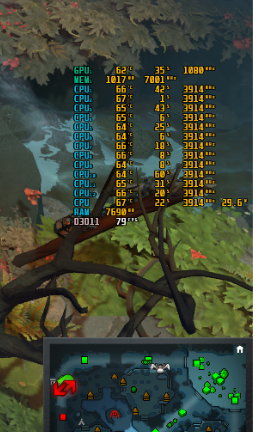
This only applies to dota 2, the rest of the games the graphic does not exceed 80'C (apex legends n others)
*
Here you go the screen cap
user posted image

This post has been edited by mcloudteo: Mar 9 2019, 02:55 PM
mcloudteo
post Mar 13 2019, 07:43 PM

Getting Started
**
Junior Member
72 posts

Joined: Dec 2009
QUOTE(l2k @ Mar 13 2019, 02:02 PM)
Hey guys, received my selenite smile.gif

Any recommendation of "must-have" software for
- tuning (undervolt)
- temp and fps monitor
- battery charging protection software?
- any others?
*
Hey l2k come to Selenite thread help to keep our thread alive tongue.gif
mcloudteo
post Mar 24 2019, 11:48 AM

Getting Started
**
Junior Member
72 posts

Joined: Dec 2009
QUOTE(Asgaard @ Mar 24 2019, 01:13 AM)
sometimes playing game, it will keep trigger touch pad on..

i definitely din press FN +F5. not sure what keep triggers them.

Any solution?
*
touchpad can turn on by double tap the upper left corner, not sure if this the trigger point for you.
mcloudteo
post Mar 25 2019, 04:53 PM

Getting Started
**
Junior Member
72 posts

Joined: Dec 2009
QUOTE(dylan_chng @ Mar 25 2019, 04:24 PM)
[attachmentid=10211727]

Is there any way to show the display's brightness in the menu shown above?
*
You mean brightness percentage?
mcloudteo
post Mar 26 2019, 07:15 AM

Getting Started
**
Junior Member
72 posts

Joined: Dec 2009
QUOTE(dylan_chng @ Mar 25 2019, 06:08 PM)
yes
*
just click on the notification icon on the lower right corner the screen brightness is over there.

user posted image
mcloudteo
post Mar 28 2019, 10:10 AM

Getting Started
**
Junior Member
72 posts

Joined: Dec 2009
QUOTE(dylan_chng @ Mar 26 2019, 09:39 PM)
How come every time I go into additional mouse options, this error pops up? I just dismiss it.
*
just uninstall it will do the trick it will not affect your touch pad function

Topic ClosedOptions
 

Change to:
| Lo-Fi Version
0.0624sec    0.46    7 queries    GZIP Disabled
Time is now: 9th December 2025 - 02:16 AM