

This post has been edited by tot31: Jan 26 2007, 10:52 AM
Technical PSP Homebrew Discussion Thread V2, Note: Please read discussion guidelines
|
|
 Jan 26 2007, 10:50 AM Jan 26 2007, 10:50 AM
|
 
Senior Member
2,451 posts Joined: Jan 2003 From: GOD's Land  
|
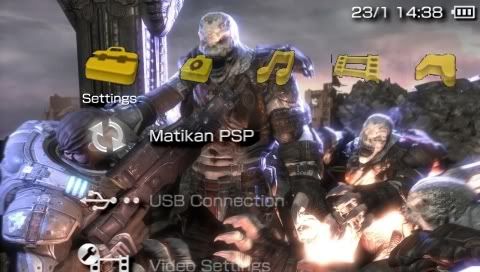
The rebooter prx and topmenu_plugin custom icons hacks work with 3.03OE-C...really a great job. The Toggle USB for flash0 from the recovery menu is indeed a good feature. Can delete PSPFiler now.
This post has been edited by tot31: Jan 26 2007, 10:52 AM |
|
|
|
|
|
Jan 26 2007, 11:02 AM
|

Senior Member
570 posts Joined: May 2006
|
Happy to report that Vsh Ftpd Module also works.
I think PSP Filer is useful if you don't have a PC. Doesn't take up much space anyhow. My Cintro now requires hex editing to get it working. |
|
|
Jan 26 2007, 11:05 AM
|

Senior Member
842 posts Joined: Jan 2003 From: ~around da world~
|
err, guys.. like wheres the background.bmp? cant find it in flash0, theres only 01-12.bmp and it shows the colour of this month
|
|
|
Jan 26 2007, 11:14 AM
|
 
Elite
1,161 posts Joined: Jan 2003 From: SF Snakeplain
|
Keeping fingers xrossed that the exploit would work on TA-082 too!
This post has been edited by Xrossfire: Jan 26 2007, 11:16 AM |
|
|
Jan 26 2007, 11:15 AM
|
|
Senior Member
2,451 posts Joined: Jan 2003 From: GOD's Land
|
background.bmp is in flash1, IIRC.
|
|
|
Jan 26 2007, 11:18 AM
|
|
Senior Member
570 posts Joined: May 2006
|
QUOTE(four_add @ Jan 26 2007, 11:05 AM) err, guys.. like wheres the background.bmp? cant find it in flash0, theres only 01-12.bmp and it shows the colour of this month Firmware 3.03 name their wallpaper 01-12.bmp. So rename your background.bmp to 01-12.bmp and flash it into flash0. |
|
|
|
|
|
Jan 26 2007, 11:30 AM
|

Senior Member
3,174 posts Joined: Jan 2003
|
QUOTE(Bernard Yeo @ Jan 26 2007, 11:18 AM) Firmware 3.03 name their wallpaper 01-12.bmp. So rename your background.bmp to 01-12.bmp and flash it into flash0. not as simple as that...u need to join all the background by using cmd or u can create bat file in the same folder of all the bg... create a background (12 bgs), rename it same as before 1.bmp,2.bmp and so on. create new text file n paste QUOTE copy /b 01.bmp+02.bmp+03.bmp+04.bmp+05.bmp+06.bmp+07.bmp+08.bmp+09.bmp+10.bmp+11.bmp+12.bmp 01-12.bmp pause rename it to .bat extension... run the .bat file and u get the 1-12.bmp |
|
|
Jan 26 2007, 11:37 AM
|
|
Senior Member
842 posts Joined: Jan 2003 From: ~around da world~
|
in flash1 theres this theme folder and inside it is this wallpaper.bmp
anyone have this? after i replace the 01-12.bmp with a new one, only january shows the new background colour that i replace with. The rest are empty    @figure8 create text file with notepad can? erm, how to run the .bat file? |
|
|
Jan 26 2007, 11:40 AM
|
|
Senior Member
3,174 posts Joined: Jan 2003
|
QUOTE(four_add @ Jan 26 2007, 11:37 AM) in flash1 theres this theme folder and inside it is this wallpaper.bmp yup.just run the bat file, rename it to xxxx.batanyone have this? after i replace the 01-12.bmp with a new one, only january shows the new background colour that i replace with. The rest are empty @figure8 create text file with notepad can? erm, how to run the .bat file? -u get ur 1-12.bmp then the wallpaper.bmp is a wallpaper... not a background image...dont get confuse. This post has been edited by figure8: Jan 26 2007, 11:41 AM |
|
|
Jan 26 2007, 11:55 AM
|

Senior Member
1,253 posts Joined: Jan 2007 From: Columbus, Ohio
|
topic. check my blog for detail. i not making the exploit. but the noobz team. u can download the proof of concept there. http://psp-customize.blogspot.com
|
|
|
Jan 26 2007, 11:57 AM
|
|
Senior Member
2,451 posts Joined: Jan 2003 From: GOD's Land
|
Wifi with 333Mhz now is working great, don't need to use the wlan.prx file from 2.00/2.01 firmware.
|
|
|
Jan 26 2007, 12:06 PM
|

Elite
5,824 posts Joined: Jan 2003 From: Damansara Perdana 
|
QUOTE(Mgsrulz @ Jan 25 2007, 11:45 PM) and it only happens in MGS PO...ri-di-cu-lous.. Didn't happen before on mine, weird. |
|
|
Jan 26 2007, 12:08 PM
|
|
Senior Member
570 posts Joined: May 2006
|
QUOTE(figure8 @ Jan 26 2007, 11:30 AM) not as simple as that... I've run the .bat according to your instructions. The output file shows the same image as 1.bmp. If I flash that into flash0, will the image change every month like the standard theme? Also, the image size is 1.75mb. Isn't that too large for flash0?u need to join all the background by using cmd or u can create bat file in the same folder of all the bg... create a background (12 bgs), rename it same as before 1.bmp,2.bmp and so on. create new text file n paste rename it to .bat extension... run the .bat file and u get the 1-12.bmp Sorry for the questions, I can't test this right now because I'm in the office and should be seen working.  |
|
|
|
|
|
Jan 26 2007, 12:21 PM
|

Senior Member
1,843 posts Joined: Jan 2006
|
solved ady.
This post has been edited by MR.Shiney: Jan 26 2007, 12:31 PM |
|
|
Jan 26 2007, 12:34 PM
|

Senior Member
1,776 posts Joined: Oct 2004
|
QUOTE(MR.Shiney @ Jan 26 2007, 12:21 PM) solved ady. haiyaa....many time ald do it  ..... .....rename the sony oficial firmware 1.50 and 3.03 to 150.PBP and 303.PBP.... need help just msn me at cupboardart@hotmail.com...im at 3.03OE-C ald.... |
|
|
Jan 26 2007, 12:44 PM
|
 
VIP
1,764 posts Joined: Jan 2003 From: Helghan
|
QUOTE(slickz @ Jan 25 2007, 11:20 PM) I would appreciate it if u could upload the updated transcoding.ini for your previous guide. Can I still use the old one for the 3gp converter ? I've edited my transcoding file. You can download it here: http://www.sendspace.com/file/5ojni1 I've included selection for 1500kbps video bitrate encoding, but with 1-pass only. Copy 'Transcoding_PSPOEC.ini' to 'default_setting' folder and run Setup.exe. Select 'Model: MP4, for PSP 3.03OE-C'.  A few screenshots of '300 The Movie' trailer encoded with 1500kbps bitrate:       |
|
|
Jan 26 2007, 12:44 PM
|
|
Senior Member
1,843 posts Joined: Jan 2006
|
QUOTE(zero_hour @ Jan 26 2007, 12:34 PM) haiyaa....many time ald do it never done before la bro.. .....rename the sony oficial firmware 1.50 and 3.03 to 150.PBP and 303.PBP.... need help just msn me at cupboardart@hotmail.com...im at 3.03OE-C ald.... upgraded too! |
|
|
Jan 26 2007, 01:01 PM
|

Senior Member
2,149 posts Joined: Jan 2003 From: Behind you! Look! 
|
QUOTE(Ninja @ Jan 26 2007, 12:44 PM) I've edited my transcoding file. You can download it here: http://www.sendspace.com/file/5ojni1 thank you! I tried encoding the exact same movie trailer before 3.03OE-C and I had problems playing the video. It stopped halfway and my psp complained.I've included selection for 1500kbps video bitrate encoding, but with 1-pass only. Copy 'Transcoding_PSPOEC.ini' to 'default_setting' folder and run Setup.exe. Select 'Model: MP4, for PSP 3.03OE-C'. A few screenshots of '300 The Movie' trailer encoded with 1500kbps bitrate: edit: The link seems to be broken or something, I tried it 3 times and it didnt work This post has been edited by slickz: Jan 26 2007, 01:05 PM |
|
|
Jan 26 2007, 01:44 PM
|
|
Senior Member
1,776 posts Joined: Oct 2004
|
the latest AFKIM is ver what???i wanna use msn messanger in the psp....
*Ninja,if u change ur psp faceplat to gold colour one will match ur wallpaper and icon,verycun wor....  |
|
|
Jan 26 2007, 02:23 PM
|
|
Senior Member
3,174 posts Joined: Jan 2003
|
QUOTE(Bernard Yeo @ Jan 26 2007, 12:08 PM) I've run the .bat according to your instructions. The output file shows the same image as 1.bmp. If I flash that into flash0, will the image change every month like the standard theme? Also, the image size is 1.75mb. Isn't that too large for flash0? yup, it will show the 1st bmp i think, but it include all the files...Sorry for the questions, I can't test this right now because I'm in the office and should be seen working. u got 1MB, it mean u use high resolution, keep in mind, psp bg only support small resolution file (im not sure the exact resolution, i will try it later)... -yes the image will change for each month. not wallpaper kay, the bg images is the image that u see that blend with wavery lines... edit:_ -okay, i read in other forum and im not really sure about it, 1.if u combine all backgrounds 1-12 with standard resolution (60x43pixel), u can access all the theme correctly. 2.but im not sure if u want to use higher resolution.. ---maybe u can try this:_ if u want the april theme, try pick u desired 4.bmp (with higer resolution), and then the others put the standard one (60x43). see what happen if u change the theme... This post has been edited by figure8: Jan 26 2007, 02:37 PM |
|
Topic ClosedOptions
|
| Change to: |  0.0266sec 0.0266sec
 0.40 0.40
 6 queries 6 queries
 GZIP Disabled GZIP Disabled
Time is now: 8th December 2025 - 10:50 PM |
 Quote
Quote