

wow.taobao is seilling this WS880 for RMB 699.is about rm460.
Cheap Asus Wifi Router Alternative, Huawei WS880 & Others
Cheap Asus Wifi Router Alternative, Huawei WS880 & Others
|
|
 Jul 23 2016, 12:58 PM Jul 23 2016, 12:58 PM
|
 
Junior Member
103 posts Joined: Mar 2007 
|
wow.taobao is seilling this WS880 for RMB 699.is about rm460.
|
|
|
|
|
|
Jul 23 2016, 01:47 PM
|

Junior Member
879 posts Joined: Jan 2007
|
bought the unit from nabielz, immediately flashed to vortex. coming from openwrt firmware, the GUI is a bit heavy.
i have enabled entware, installed in usb flash drive. at surface level, entware is very similar with optware. i have 1 annoying issue with vortex, my ssh keep disconnected (suspected ssh daemon stopped). re-enabling ssh service from GUI doesn't helped much, so the only way to gain ssh back is to reboot the router. Logs: Jul 23 13:50:26 dropbear[1337]: Exit (admin): Error reading: Connection timed out from my pc, there's no ping time out to the router when ssh disconnected. This post has been edited by neuromancerx: Jul 23 2016, 01:52 PM |
|
|
Jul 23 2016, 07:24 PM
Show posts by this member only | IPv6 | Post
#883
|

Senior Member
1,138 posts Joined: May 2010
|
2.4ghz max speed only 216mbps
Attached thumbnail(s) 
|
|
|
Jul 23 2016, 08:27 PM
|
|
Junior Member
383 posts Joined: May 2005
|
QUOTE(Khalid21 @ Jul 23 2016, 07:24 PM) 2.4ghz max speed only 216mbps So what? I rather had that 216mbps. That 300mbps (2 stream) or 450mbps (3 stream) is "syok sendiri" settings with 40mhz, which shouldn't be used in crowded environment and in auto mode, it won't be enabled if there is neighbour detected on the sideband. 216mbps is the max speed with 3 stream with 20mhz. |
|
|
Jul 23 2016, 09:17 PM
|

Junior Member
151 posts Joined: Oct 2008 
|
QUOTE(jio @ Jul 23 2016, 08:27 PM) So what? I rather had that 216mbps. That 300mbps (2 stream) or 450mbps (3 stream) is "syok sendiri" settings with 40mhz, which shouldn't be used in crowded environment and in auto mode, it won't be enabled if there is neighbour detected on the sideband. 216mbps is the max speed with 3 stream with 20mhz. 216Mbps is connection speed, or about ~115Mbps max throughput over short distances without obstacles |
|
|
Jul 24 2016, 09:00 AM
|

Senior Member
665 posts Joined: Mar 2010
|
QUOTE(Alexdino @ Jul 22 2016, 06:52 PM) Ok finally manage to setup on maxis fibre (TM(Zte h268e) modem) with internet on huawei router and VoiP on technicolor router. also got the same btu as u for unifi. How did you setup it? did you connect the lan from the btu to the wan port on the router or lan port on the router? Need to do port binding and vlan tagging for both.  |
|
|
|
|
|
Jul 24 2016, 11:03 AM
|

Senior Member
6,035 posts Joined: Jan 2003 From: Penang 
|
I thought bro here help me buy a unit but looks like I won't be getting it..tough luck for me as it's better to sell it make some money is surely better than help each other.
|
|
|
Jul 25 2016, 05:29 AM
|
|
Senior Member
6,266 posts Joined: Jul 2005 From: UEP Subang Jaya 
|
QUOTE(PowerSlide @ Jul 24 2016, 11:03 AM) I thought bro here help me buy a unit but looks like I won't be getting it..tough luck for me as it's better to sell it make some money is surely better than help each other. That's the risk if asking someone buy for you. Anyway if you didn't put money down then no loss for you. |
|
|
Jul 25 2016, 10:49 AM
|

Senior Member
2,006 posts Joined: Sep 2007
|
QUOTE(syin16 @ Jul 24 2016, 09:00 AM) also got the same btu as u for unifi. How did you setup it? did you connect the lan from the btu to the wan port on the router or lan port on the router? u got 1 unifi btu, 1 router right? before adding the huawei?did you use iptv? btw my setting didnt test on iptv and it is on maxis fiber. tm modem (Zte h268e)- lan 2 connect to wan huawei, lan 3 connect to wan technicolor router (maxis). log into Zte h268e, go to port binding, select 621 to lan2, the rest 821, 822, 823 to lan 3, then go to VLAN Tagging go to Lan2, select tagging only 621, then lan3 select tagging on 821, 822, 823. huawei setting as usual. |
|
|
Jul 25 2016, 02:14 PM
Show posts by this member only | IPv6 | Post
#890
|
|
Senior Member
1,138 posts Joined: May 2010
|
cannot access Sarawak report from lan (ws880 xvotex)
wireless can updates: my antivirus block.. This post has been edited by Khalid21: Jul 25 2016, 02:16 PM |
|
|
Jul 25 2016, 05:13 PM
|
|
Junior Member
84 posts Joined: Feb 2005
|
I had managed to get to CFE screen on the first attempt. That's good.
However, I am stuck there. When I chose the TRX file and click upload, it will fail. PING result shows 192.168.1.1 can't maintain connection. I get a series of response from PING before it goes into GENERAL FAILURE... After a series of GENERAL FAILURE, it returns 192.168.1.4 (my laptop) in unreachable .. while I ping 192.168.1.1.. After a series of unreachable, 192.168.1.1 begins to respond again. I had changed the network adapter speed to 100mbps full duplex. Any idea? |
|
|
Jul 25 2016, 05:17 PM
|

Senior Member
1,040 posts Joined: Oct 2004 From: the other side
|
keep retrying with different browser.
|
|
|
Jul 25 2016, 05:22 PM
|
|
Junior Member
84 posts Joined: Feb 2005
|
The PING result tells me it's connection problem, not browser problem. |
|
|
|
|
|
Jul 25 2016, 05:24 PM
|

All Stars
14,909 posts Joined: Jul 2005
|
QUOTE(AhRon @ Jul 25 2016, 05:13 PM) I had managed to get to CFE screen on the first attempt. That's good. Browse to the previous pages & look for my previous posts to set static IP on your computerHowever, I am stuck there. When I chose the TRX file and click upload, it will fail. PING result shows 192.168.1.1 can't maintain connection. I get a series of response from PING before it goes into GENERAL FAILURE... After a series of GENERAL FAILURE, it returns 192.168.1.4 (my laptop) in unreachable .. while I ping 192.168.1.1.. After a series of unreachable, 192.168.1.1 begins to respond again. I had changed the network adapter speed to 100mbps full duplex. Any idea? Whatever you do, don't turn off the router at all |
|
|
Jul 25 2016, 07:19 PM
|
|
Junior Member
84 posts Joined: Feb 2005
|
My computer is already on static IP of 192.168.1.4
Have not turn off the router at all. |
|
|
Jul 25 2016, 07:25 PM
|
 
Staff
72,862 posts Joined: Sep 2005 From: KUL 
|
Somehow this router will lose connection, not so often anymore after I switched my WiFi channel. Is it still related to WiFi channels or any other possible causes?
 |
|
|
Jul 25 2016, 07:29 PM
|
|
Junior Member
84 posts Joined: Feb 2005
|
Ok, finally got the upload completed screen.
Waiting for system to reboot. Running my PING -t |
|
|
Jul 25 2016, 11:58 PM
|
|
Junior Member
91 posts Joined: Mar 2010
|
guys..need help here..been using the Huawei router with stock firmware for some time now..all was good before this..starting from yesterday..wifi keep getting disconnected from my devices..any idea what causes it?change wifi channel already as well as reinstalling the wifi adapter driver already and it is still dropping..all windows device would drop connection at the same time but mobile devices wouldnt..
 |
|
|
Jul 26 2016, 10:02 AM
|
|
Junior Member
151 posts Joined: Oct 2008
|
QUOTE(ks1230 @ Jul 25 2016, 11:58 PM) guys..need help here..been using the Huawei router with stock firmware for some time now..all was good before this..starting from yesterday..wifi keep getting disconnected from my devices..any idea what causes it?change wifi channel already as well as reinstalling the wifi adapter driver already and it is still dropping..all windows device would drop connection at the same time but mobile devices wouldnt.. try check event log |
|
|
Jul 26 2016, 10:15 AM
|
|
Junior Member
60 posts Joined: Nov 2014
|
QUOTE(Kiding @ Jul 8 2016, 08:19 PM) I was browsing WIFI router last weekend at Lowyat plaza, and I spot a rarely seen router - Huawei WS880 AC1750 wifi router. great pricing dude.. thinking about replacing old grey square TM stupid slow router after 1 year of use. maybe at end of july, i would try to find it at lowyart plaza. btw, the asus merlin support hyppTV right? (never try tomato and merlin before due to always flash DDWRT) 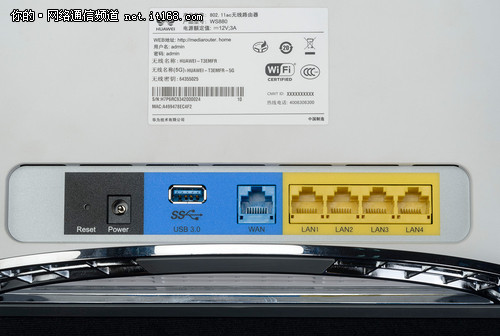 Basic Spec is » Click to show Spoiler - click again to hide... « How to flash to third party firmware » Click to show Spoiler - click again to hide... « Since it is broadcom chipset, it is supported by ASUSWRT and Tomato firmware, I managed to flash the firmware to ASUSWRT-MERLIN, and it detected WS880 as AC68U [attachmentid=7046142] It even supports UNIFI and Maxis broadband out of the box [attachmentid=7046151] The speed is awesome, I can get full speed of UNIFI 30Mbps even I sit at the far corner of 1st floor while my router is sitting at the ground floor living room This router is really value for money (just below RM200 price tag), and you can get an equivalence features and performance of Asus AC66U |
| Change to: |  0.0680sec 0.0680sec
 0.71 0.71
 6 queries 6 queries
 GZIP Disabled GZIP Disabled
Time is now: 16th December 2025 - 06:00 AM |
 Quote
Quote