Welcome Guest ( Log In | Register )

9 Pages < 1 2 3 4 5 > » Bottom

Outline · [ Standard ] · Linear+

 LG OLED TV Discussion Thread, OLED TV

views
     
ben3003
post Apr 20 2020, 07:31 PM

10k Club
********
All Stars
10,859 posts

Joined: Jan 2003
From: Sarawak


QUOTE(ginodave @ Apr 20 2020, 03:56 PM)
everything works except tv turn ON/OFF for me when I dont point the remote to the IR sensor. Now I am wondering hmm.gif
can you verify this once again?
*
ah sorry about it, maybe it reflected somewhere from the remote lol.
ben3003
post Apr 22 2020, 03:58 PM

10k Club
********
All Stars
10,859 posts

Joined: Jan 2003
From: Sarawak


QUOTE(noob90 @ Apr 22 2020, 11:11 AM)
Anyone manage to watch disney+ using expressvpn? Mind to share which server you choose?
*
I use nordvpn, have to use Australia, cos our tv cannot connect to US download US disney app..
ben3003
post Apr 22 2020, 09:46 PM

10k Club
********
All Stars
10,859 posts

Joined: Jan 2003
From: Sarawak


QUOTE(szecheng @ Apr 22 2020, 05:17 PM)
nordvpn install in wireless router?
*
Ya set up at router can set onlt the tv will use. So anytime i wan to watch i just go router switch on. But australia content less than US one.
ben3003
post Apr 22 2020, 09:47 PM

10k Club
********
All Stars
10,859 posts

Joined: Jan 2003
From: Sarawak


QUOTE(noob90 @ Apr 22 2020, 07:14 PM)
Thank you. I managed to make it work now.

Steps:
1. Change location to australia (in setting -> general -> location)
2. Download disney app from app store.
3. Set vpn server to australia (i use expressvpn, and set it through router)
4. Success
*
Yeah the step like tat. If ur router can set specific which client go thru the vpn then better so not all ur thing go thru. But australia disney plus less content la.. expressvpn stable? Have u tried if netflix can use expressvpn or not.. cos nordvpn cannot it will ask to stop proxy or unblocker

This post has been edited by ben3003: Apr 22 2020, 09:48 PM
ben3003
post Apr 23 2020, 07:58 AM

10k Club
********
All Stars
10,859 posts

Joined: Jan 2003
From: Sarawak


QUOTE(madballs @ Apr 23 2020, 01:12 AM)
Disney+ is not Netflix. Content is the same as USA.
I know cause I use my b6, my ipad, and my apple TV to test it out.

I used smartdns to view it, but the bitrate fluctuate from 1080p to 4k for quite abit.

I have tried a few vpn as well. It's hard to maintain 4k, especially during peak hours.

Vpn might be better I guess?
*
Different abit bro, onward oledi release in US but not in Aus, this is the diff lol.

Vpn also same, keep fluctuate also.. thats y i abit fedup but i think expressvpn better, heard ppl complain about nordvpn
ben3003
post Apr 23 2020, 09:58 AM

10k Club
********
All Stars
10,859 posts

Joined: Jan 2003
From: Sarawak


QUOTE(noob90 @ Apr 23 2020, 09:15 AM)
I can use both netflix and disney with no problem. The connection is good as well, quite stable.
*
like tat i think i should get expressvpn lol.
ben3003
post Apr 23 2020, 07:34 PM

10k Club
********
All Stars
10,859 posts

Joined: Jan 2003
From: Sarawak


QUOTE(szecheng @ Apr 23 2020, 06:05 PM)
any particular router supports vpn?
sorry i'm new to this
*
Asus Like ac68u and up mostly can with asus merlin firmware. Now i suggest ac86u. Not sure tplink can or not but asus good is u can set only which device will passthru the vpn, others will not.
ben3003
post Apr 24 2020, 12:48 PM

10k Club
********
All Stars
10,859 posts

Joined: Jan 2003
From: Sarawak


QUOTE(szecheng @ Apr 24 2020, 12:07 PM)
ok, good router
need to spend another 400+ for it

let me consider
*
U can save if try ask if tplink got such function or not
ben3003
post Apr 24 2020, 02:24 PM

10k Club
********
All Stars
10,859 posts

Joined: Jan 2003
From: Sarawak


QUOTE(szecheng @ Apr 24 2020, 02:06 PM)
using tm dlink dir-842
*
I mean u can buy tplink maybe cheaper. But wan safe can invest in asus, really top quality
ben3003
post Apr 28 2020, 11:30 AM

10k Club
********
All Stars
10,859 posts

Joined: Jan 2003
From: Sarawak


why never see b9 55inch before suddenly come out lol.
ben3003
post Apr 28 2020, 01:23 PM

10k Club
********
All Stars
10,859 posts

Joined: Jan 2003
From: Sarawak


QUOTE(madballs @ Apr 28 2020, 12:13 PM)
According to the sales guy I bought the TV from, the B series they use it for lazada/online sales only.
They previously bring in 65in b9 only, leftover stock were release to reseller to resell.
For this 55in, should be the same.

But hor, you can get c9 at rm5999 just right before mco. Unlike the 65in.which you can get at rm7999 compare to c9 at rm9999.
*
Ohh.. yalo c9 price also around 6.5k if got discount voucher all.. if retail b9 5999 can find at senq i will get from senq earlier but no regret la c9 brightness higher can reach 800nits but b9 i think 500+ only

B9 also have hdmi 2.1 and but most teview dite say b9 is much better value compare c9. Just tat at msia c9 and b9 price is closer..

This post has been edited by ben3003: Apr 28 2020, 01:24 PM
ben3003
post Apr 28 2020, 01:50 PM

10k Club
********
All Stars
10,859 posts

Joined: Jan 2003
From: Sarawak


QUOTE(noahlee @ Apr 28 2020, 01:49 PM)
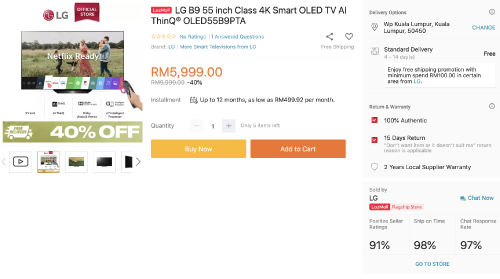
ahhh, really? but i guess as we are confined within our home now, online seems to a better option then. i think 5,999 is the final price already... hmm.gif

user posted image
*
try find some cashback like milkadeal or watever. I used milkadeal bought a subwoofer for 2.3k, i got rm120 off. well it is better than nothing.
ben3003
post Apr 29 2020, 12:32 PM

10k Club
********
All Stars
10,859 posts

Joined: Jan 2003
From: Sarawak


The pricing will eat by their nanocell category. Most Malaysian buy tv is see size no see specs. So later if put 48” no ppl buy cos the size and the price

Malaysia punya distributor memang wan fuk kao us consumer la. See the soundbar they bring in sl4, then sl5y they no bring in, but they bring in sl6y. Sl4 specs so suck also they sell rm700 which doesnt make sense. Sl5y pricing should be 700-800 then sl4 shud be 500-600. Next tier is like 1.1k already sl6y

But they wan fuk up consumer so they give u no choice. Hate those marketing shit ppl in malaysia.

This post has been edited by ben3003: Apr 29 2020, 12:35 PM
ben3003
post Apr 29 2020, 02:45 PM

10k Club
********
All Stars
10,859 posts

Joined: Jan 2003
From: Sarawak


QUOTE(noahlee @ Apr 29 2020, 01:41 PM)
wooo nice, thanks for the tip! i’ve been doing some googling and it seems like this 55B9 is actually not bad too,  nod.gif pretty much same as the 65 one but smaller. maybe will suit smaller family
*
Depends on ur room la.. for me i buy 55inch becos tis is bedroom tv but also my man cave la. I stay with parents. If condo less than 1k sqt 55inch shud be just nice. B9 is less bright than c9. But c9 dunno 55inch wat price now la.. see u think worth or not lo. Most review site ask ppl go b9 becos in US b9 is much cheaper than c9. Here little diff ppl maybe go c9 liao.
ben3003
post Apr 30 2020, 04:13 PM

10k Club
********
All Stars
10,859 posts

Joined: Jan 2003
From: Sarawak


QUOTE(noahlee @ Apr 30 2020, 03:52 PM)
ya i get what you saying, b9 is cheaper by rm2000 than c9, based on lazada la, today last day for the sales already. i might consider it for my bedroom. we have a 65b9 in the living room and my family enjoy it so far thumbsup.gif
*
ohh u have 65b9 oledi.. if u cant find 55c9 at 6k+ at lazada, maybe b9 more worth la cos 7999 and 5999 diff alot lol. but i saw ada shop selling 6.8k lowest? if u use at bedroom 55inch just nice la.. unless ur bedroom super big.
ben3003
post May 1 2020, 12:43 PM

10k Club
********
All Stars
10,859 posts

Joined: Jan 2003
From: Sarawak


I wanna ask, is anyone being bothered by judder issue on c9? I saw when panning if i focus on something then will be blur and cannot see. I saw got oled motion pro function which is BFI but will reduce brightness by 50%.. and i saw reddit ppl saying if use trumotion dejudder then will introduce artifact.
ben3003
post May 2 2020, 01:03 PM

10k Club
********
All Stars
10,859 posts

Joined: Jan 2003
From: Sarawak


QUOTE(Convael @ May 2 2020, 11:50 AM)
The problem is not exclusive to just C9 .
It is a " problem " for all of the OLED screens because the OLED pixels response times are near instantaneous .
This caused the pixel which has finished transition to stay on the screen for longer than LCD TV , hence causing the stutter effects you are experiencing .

Normally it shouldn't be a problem for stuff like Car races or Sportshows which are mastered at high fps  .

The movie and TV shows industry are still getting stuck at the good old 24P .

We have had several experimental ones such as Will Smith's Gemini Man but it was poorly received since most people don't really like overly smooth effect especially when they are watching it on LCD screen .

Which is why I think it is acceptable if OLED owners want to turn on frame interpolation features on their TV . Ya ya  I heard Tom Cruise asked you to turn it off but for LCD TV it is simply too much ( fake ).
*
Oh ok.. is there any impact on opening de-judder at 2? I so far see nothing impact on image quality la.. maybe my eyes not so good lol. But i can see less judder with this. Even i try the user setting deblur at 10 actually not so bad at c9. Not smooth until like samsung fake-ish. The true motion smooth is too smooth. But i see everywhere normal Home user will leave this setting on. Like my friends they are impressed by the smoothness lol.
ben3003
post May 2 2020, 06:46 PM

10k Club
********
All Stars
10,859 posts

Joined: Jan 2003
From: Sarawak


QUOTE(SSJBen @ May 2 2020, 05:02 PM)
Meh. Just use Smooth Motion with madvr. It's not motion interpolation, more like a motion blur technique which helps transitions frames which is helpful for low framerate content (movies basically).

Understand that there is no way to eliminate judder from 24p content without it looking like a soap opera, there is inherent judder with the source itself. It's simply how it is.

P.S I disagree with using de-blur 10. Motion blur HELPS with reducing perceived judder.
*
I just cant seem to get hdr output from my laptop well. Tried alot setting and i switch to plex and heck plex output much better and less hassle. My laptop is using nvidia 1060 tho. I connect my monitor to it, just now i tried only display to my TV. Tried alot setting still not satisfied. And from PC is 60hz the judder is worst. I tried set madvr smooth motion when required, it makes the video stutter
ben3003
post May 2 2020, 09:24 PM

10k Club
********
All Stars
10,859 posts

Joined: Jan 2003
From: Sarawak


QUOTE(SSJBen @ May 2 2020, 08:00 PM)
I don't use plex, so can't help you with that. I personally just use Kodi as the front end then when I select a movie, it switches to an external player which is PotPlayer. I configure Pot to use madvr and LAVfilters. This is my preferred way of watching movies off my PC. There is no hassle for me other than the initial setup, pretty much select and play.

You need to create a custom resolution with custom timings for 23.976hz to match it to the TV's 24hz display. I have no judder when using Smooth Motion. Also make sure your GPU is under the render budget (below 40ms minimum, preferably under 35ms) when you enable Smooth Motion. You will have to tweak settings to match your GPU's capability. GTX 1060 isn't really that great of a GPU, especially the mobile variant.
*
Ok will explore more of the setting. I tried to open the smooth motion but i watch aquaman seems like heavy action scene everything become very blur.. not sure is it correct or not. Where to see the render budget, ctrl+j can do?

I did do add at display modes 2160p23. The custom mode how to know the timing?

Btw do u turn on dynamic tone mapping for hdr10 content?

This post has been edited by ben3003: May 2 2020, 09:26 PM
ben3003
post May 2 2020, 11:49 PM

10k Club
********
All Stars
10,859 posts

Joined: Jan 2003
From: Sarawak


QUOTE(SSJBen @ May 2 2020, 11:14 PM)
Yes, check the render time with CTRL+J.

Here is the custom resolution and refresh rate setting for C9:

[attachmentid=10481545]
It depends on the movie that I watch. Not all movies benefit with DTM in my experience as some movies can even cause the black levels to be elevated when DTM is enabled. So yeah, I don't think it's a set it and forget it option.

Currently I'm just experimenting with manually tone mapping myself using MadVR's hdr tone mapper. It's better to set a clipping level for your display's brightness rather than a dynamic setting if you ask me. The only issue I have with it is that at this moment, I do not have a tool to check my display's peak brightness so I cannot get the correct peak nits value to be input into MadVR.
*
ah ok.. i just meddling with the setting, i found out 1 thing that i use MPC-HC madvr, i get some banding when watch ready player one, the scene is at 31:10+ onwards.. but i use plex no banding at all. not sure wat is the problem.. i no touch those other setting like reduce artifact those..

i did saw the setting on tone mapping ourselves but yeah the peak brightness not sure what to put, and i did put 780nits and i get kinda shitty results so i just did passthru for now, but it doesnt solve the banding issue.. nvidia control panel i set highest desktop color depth, output color depth 10bpc, output color format YCbCr422, output dynamic range limited. i follow 1 guide but not sure can use or not.

9 Pages < 1 2 3 4 5 > » Top
 

Change to:
| Lo-Fi Version
0.0263sec    1.18    7 queries    GZIP Disabled
Time is now: 2nd December 2025 - 12:24 AM