


Unifi Official TM UniFi High Speed Broadband Thread V23, ( -_・) ︻デ═一▸ Maxis & Time
Unifi Official TM UniFi High Speed Broadband Thread V23, ( -_・) ︻デ═一▸ Maxis & Time
|
|
 Nov 14 2015, 02:02 PM Nov 14 2015, 02:02 PM
Show posts by this member only | IPv6 | Post
#641
|
 
Elite
4,619 posts Joined: Jul 2011 
|
me too, but haven't opened it yet
|
|
|
|
|
|
Nov 14 2015, 02:13 PM
Show posts by this member only | IPv6 | Post
#642
|
 
Senior Member
6,373 posts Joined: May 2007
|
can't wait to know what is it for.
 |
|
|
Nov 14 2015, 02:30 PM
|

Senior Member
3,032 posts Joined: Dec 2011 
|
Here attached.
QUOTE(fkinmeng @ Nov 14 2015, 02:13 PM) can't wait to know what is it for.  Attached thumbnail(s) 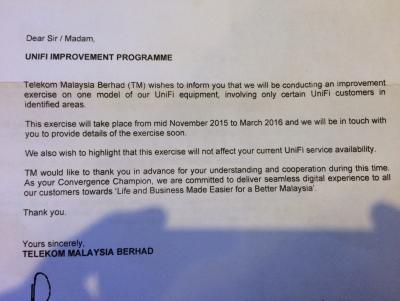
|
|
|
Nov 14 2015, 02:40 PM
|
|
Junior Member
23 posts Joined: Nov 2014
|
Sifu-Sifus , i need some help , i upgraded my 5mpbs to 30mpbs 3 weeks alrdy.. Anyone encounter the line very sucks and unstable when in the night , around 7-11pm??
My line is very unstable , when i plug the lan cable to my device and do speedtest , the result show 30mpbs but when i using wifi to do speedtest but just only gt 22mpbs...Do you hv this kind of problem? i called TM but they said if using lan cable gt 30mpbs speed , then they cant do anything to me...If i staying my room , and the router at my living room, the speed getting worse.. Did i need to change my router or any solution sifus can teach me... ? If need to change router, is it Asus RT-N14UHP useful ? |
|
|
Nov 14 2015, 02:43 PM
|
|
Senior Member
3,032 posts Joined: Dec 2011
|
Yup, change to better router can help.
But don forget unifi currently fixing some routing issue to international line. So just be patience until they fixed the issue. QUOTE(Aordinarypeople @ Nov 14 2015, 02:40 PM) Sifu-Sifus , i need some help , i upgraded my 5mpbs to 30mpbs 3 weeks alrdy.. Anyone encounter the line very sucks and unstable when in the night , around 7-11pm?? My line is very unstable , when i plug the lan cable to my device and do speedtest , the result show 30mpbs but when i using wifi to do speedtest but just only gt 22mpbs...Do you hv this kind of problem? i called TM but they said if using lan cable gt 30mpbs speed , then they cant do anything to me...If i staying my room , and the router at my living room, the speed getting worse.. Did i need to change my router or any solution sifus can teach me... ? If need to change router, is it Asus RT-N14UHP useful ? |
|
|
Nov 14 2015, 03:11 PM
|

Senior Member
3,345 posts Joined: Jan 2003
|
QUOTE(jusbella @ Nov 14 2015, 02:29 AM) LOL did anyone received TM letter regarding Programme Improvement? They state they carried out maintenance at mid nov until mac 2016, sometime they will contact u regarding the service. QUOTE(eternity4av @ Nov 14 2015, 08:06 AM) yes I did. what's your package & location? QUOTE(raist86 @ Nov 14 2015, 08:29 AM) Got a letter about it too. Maybe they are testing a new fibre modem or new iptv. Thats the only 2 equipment in house that must use tm eq. New STB perhaps? I got the letter too. VIP20 with Mega pack.This post has been edited by ruffstuff: Nov 14 2015, 03:12 PM |
|
|
|
|
|
Nov 14 2015, 03:31 PM
|

Junior Member
47 posts Joined: Mar 2015
|
my unifi internet connection is really crappy now
|
|
|
Nov 14 2015, 04:04 PM
|

Senior Member
4,225 posts Joined: Jan 2003 From: Selangor 
|
when they install unifi 30, can ask them install higher speed like 38?
|
|
|
Nov 14 2015, 04:14 PM
|
|
Senior Member
3,032 posts Joined: Dec 2011
|
Yes try bribe them...
QUOTE(ycs @ Nov 14 2015, 04:04 PM) when they install unifi 30, can ask them install higher speed like 38? |
|
|
Nov 14 2015, 04:19 PM
|
|
Senior Member
4,225 posts Joined: Jan 2003 From: Selangor
|
QUOTE(jusbella @ Nov 14 2015, 04:14 PM) Yes try bribe them... no need, just them my pass card |
|
|
Nov 14 2015, 04:45 PM
|
|
Junior Member
12 posts Joined: Sep 2012
|
QUOTE(ycs @ Nov 14 2015, 04:04 PM) when they install unifi 30, can ask them install higher speed like 38? Like This?  Bad Ping though.. lol This post has been edited by KevinS: Nov 14 2015, 05:00 PM |
|
|
Nov 14 2015, 05:13 PM
|
|
Junior Member
23 posts Joined: Nov 2014
|
QUOTE(jusbella @ Nov 14 2015, 02:43 PM) Yup, change to better router can help. But in the night the line become very unstable..i scare after i changed the router , the problem still presist.But don forget unifi currently fixing some routing issue to international line. So just be patience until they fixed the issue. |
|
|
Nov 14 2015, 05:16 PM
|
|
Senior Member
3,032 posts Joined: Dec 2011
|
Normally they start maintenance at midnight.
Here what u can do, u can call 100 to ask for technical issue, den ask them reset ur port. QUOTE(Aordinarypeople @ Nov 14 2015, 05:13 PM) But in the night the line become very unstable..i scare after i changed the router , the problem still presist. |
|
|
|
|
|
Nov 14 2015, 09:41 PM
|

Senior Member
795 posts Joined: Jun 2009
|
how do i imporove unifi 30mbps for dota2? keep disconecting
|
|
|
Nov 14 2015, 10:39 PM
|

Senior Member
4,490 posts Joined: Oct 2014
|
QUOTE(fuadfadz @ Nov 14 2015, 09:41 PM) how do i imporove unifi 30mbps for dota2? keep disconecting Are you connected via wifi? How's the signal strength? |
|
|
Nov 14 2015, 11:11 PM
|

Junior Member
288 posts Joined: Sep 2010
|
Hi guys, abit of an issue here. I don't know if my cable got cut by someone or what but it's detached at my apartment blocks point. Picture attached.
Lodged a report to TM but they said probably Monday only can fix. Any suggestions? Damansara Damai area. 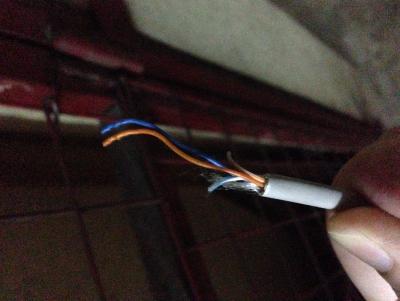
|
|
|
Nov 14 2015, 11:54 PM
|
|
Senior Member
3,032 posts Joined: Dec 2011
|
That is adsl streamyx or telephone cable. Not unifi cable.
QUOTE(dante1989 @ Nov 14 2015, 11:11 PM) Hi guys, abit of an issue here. I don't know if my cable got cut by someone or what but it's detached at my apartment blocks point. Picture attached. Lodged a report to TM but they said probably Monday only can fix. Any suggestions? Damansara Damai area.
|
|
|
Nov 15 2015, 12:36 AM
|

Senior Member
1,128 posts Joined: Nov 2008
|
Last time my VIP20 charges is
Internet : RM220 HyppTV :RM9 the latest become Internet : RM124.88 HyppTV : RM104.52 Wtf.... How can they transfer the price to HyppTV.. They should reduce to cheaper price... |
|
|
Nov 15 2015, 01:00 AM
|
|
Senior Member
4,622 posts Joined: Mar 2007
|
QUOTE(jusbella @ Nov 14 2015, 11:54 PM) That is adsl streamyx or telephone cable. Not unifi cable. high rise Unifi using VDSL... cable suppose to be like this which is old copper wire use by phone and streamyxThis post has been edited by vez: Nov 15 2015, 01:01 AM |
|
|
Nov 15 2015, 01:40 PM
|

Senior Member
1,726 posts Joined: Oct 2007 From: Taiping Perak 
|
anyone know how to check for port availability for unifi? wanted to subscribe to unifi, Maxis or Unifi fiber better? my location is pandan perdana, perdana villa PV3, Jalan Perdana 2/1, 55300 KL
currently i rented a room, and my house already have maxis fiber, but due to the constant upload data, my game experience has been horrible with the ping fluctuation between 14ms ping to 1000ms ping. I've been thinking about setting up QoS to improve my condition, but Maxis Fiber router provided does not have QoS function(i know it has it via Telnet configuration), but account and router belongs to landlord. so i think i should avoid screwing up his router. |
|
Topic ClosedOptions
|
| Change to: |  0.0326sec 0.0326sec
 0.39 0.39
 6 queries 6 queries
 GZIP Disabled GZIP Disabled
Time is now: 4th December 2025 - 01:36 AM |
 Quote
Quote