

i got problem
after finish boot, open hypptv and it goes to black screen
whos get the problem like me?
New Unifi IPTV Box - Huawei EC6108V8, Need some help on configuration and tips
New Unifi IPTV Box - Huawei EC6108V8, Need some help on configuration and tips
|
|
 Jul 12 2017, 08:14 PM Jul 12 2017, 08:14 PM
|
 
Junior Member
340 posts Joined: Mar 2007 From: Malaysia  
|
i got problem
after finish boot, open hypptv and it goes to black screen whos get the problem like me? |
|
|
|
|
|
Jul 12 2017, 10:41 PM
|

Newbie
3 posts Joined: Sep 2011
|
QUOTE(OCMAX @ Jul 6 2017, 08:30 PM) What maintenance code you got there 304830 or 3008? code : 6872   |
|
|
Jul 12 2017, 10:42 PM
|
|
Newbie
3 posts Joined: Sep 2011
|
QUOTE(voncrane @ Jul 7 2017, 12:29 AM) Read a bit cannot is it? Just go back one page.. Code: 6872 Do share the latest code... PM welcome..  |
|
|
Jul 12 2017, 11:40 PM
Show posts by this member only | IPv6 | Post
#2544
|

Senior Member
7,118 posts Joined: Oct 2011 From: Wakanda
|
QUOTE(Eric1910 @ Jul 12 2017, 10:42 PM) Code: As I live and breathe.. Actually works on the latest firmware...  |
|
|
Jul 12 2017, 11:42 PM
|
|
Newbie
3 posts Joined: Sep 2011
|
QUOTE(voncrane @ Jul 12 2017, 07:40 AM) As I live and breathe.. Actually works on the latest firmware... Hehheeh.. welcome  |
|
|
Jul 13 2017, 11:18 AM
Show posts by this member only | IPv6 | Post
#2546
|
|
Newbie
3 posts Joined: Feb 2011 
|
QUOTE(monoikhwan @ Jul 11 2017, 09:41 PM) Lan plugged out. But but but, my iflix still didn't work. nope already disable update for TM STB. just using iflix download from aptoideU're not using the one that comes built in the Hypptv? Unfortunately, I did read your post before, but still doesn't work |
|
|
|
|
|
Jul 13 2017, 04:40 PM
|

Junior Member
37 posts Joined: Nov 2004 From: BANDARAYO BESUT, TRG
|
Hi, anyone else having problem using youtube?
I had tried installing the latest version from apk-pure, but for some reason the video would not play. I would appreciate it if you guys could share which youtube version you guys are using and still work with hypptv huawei stb. |
|
|
Jul 13 2017, 04:52 PM
|
|
Senior Member
858 posts Joined: Jan 2003
|
QUOTE(cheyumm @ Jul 13 2017, 04:40 PM) Hi, anyone else having problem using youtube? You need to used these version but you won't able to login and utilize account synchronization feature. I had tried installing the latest version from apk-pure, but for some reason the video would not play. I would appreciate it if you guys could share which youtube version you guys are using and still work with hypptv huawei stb. Another way is to used Kodi youtube addon. |
|
|
Jul 13 2017, 05:01 PM
|
|
Junior Member
37 posts Joined: Nov 2004 From: BANDARAYO BESUT, TRG
|
QUOTE(OCMAX @ Jul 13 2017, 04:52 PM) You need to used these version but you won't able to login and utilize account synchronization feature. Ok noted and thanks I will try this versionAnother way is to used Kodi youtube addon. |
|
|
Jul 14 2017, 08:59 AM
|
|
Junior Member
37 posts Joined: Nov 2004 From: BANDARAYO BESUT, TRG
|
QUOTE(cheyumm @ Jul 13 2017, 05:01 PM) Ok noted and thanks I will try this version Ok I can confirm youtube is working now. On another note, I notice the picture quality for huawei hypptv stb compared to my android tv is a lot lower i.e. you could actually notice jagged lines etc even though the resolution for both are the same(1080p).  I would assume this is due to the huawei stb is optimised for hypptv only and not other apps  |
|
|
Jul 14 2017, 09:17 AM
|
|
Senior Member
858 posts Joined: Jan 2003
|
QUOTE(cheyumm @ Jul 14 2017, 08:59 AM) Ok I can confirm youtube is working now. there's a vid quality option. you need a mouse to navigate to choose, click on the screen a option bar will pop up. On another note, I notice the picture quality for huawei hypptv stb compared to my android tv is a lot lower i.e. you could actually notice jagged lines etc even though the resolution for both are the same(1080p). I would assume this is due to the huawei stb is optimised for hypptv only and not other apps  You might want to try Kodi youtube addon can work with youtube login and you can also used custom setting to choose the best quality available for the vid. It even works with 4K video. This post has been edited by OCMAX: Jul 14 2017, 09:29 AM |
|
|
Jul 14 2017, 09:23 AM
Show posts by this member only | IPv6 | Post
#2552
|
|
All Stars
24,219 posts Joined: Mar 2007 From: Kuala Lumpur
|
QUOTE(cheyumm @ Jul 14 2017, 08:59 AM) Ok I can confirm youtube is working now. Its an aged box with medicore specs. Plus its free so cant complain. On another note, I notice the picture quality for huawei hypptv stb compared to my android tv is a lot lower i.e. you could actually notice jagged lines etc even though the resolution for both are the same(1080p). I would assume this is due to the huawei stb is optimised for hypptv only and not other apps |
|
|
Jul 14 2017, 05:51 PM
|

All Stars
10,783 posts Joined: Jan 2003 
|
QUOTE(OCMAX @ Jul 4 2017, 02:06 PM) Search for ES File Explorer pro. 'ad-free" I use ES File Explorer PRO also.. but somehow when I select the APK, I cannot see which selection button is highlighted (i.e. Cancel / Market / Install)QUOTE(OCMAX @ Jul 14 2017, 09:17 AM) there's a vid quality option. you need a mouse to navigate to choose, click on the screen a option bar will pop up. How to setup mouse to navigate? Can plugin keyboard to the box to navigate also?You might want to try Kodi youtube addon can work with youtube login and you can also used custom setting to choose the best quality available for the vid. It even works with 4K video. Just 'hack' the white box yesterday haha. It's been idle for almost a year there, time to utilize it. |
|
|
|
|
|
Jul 14 2017, 06:13 PM
|
|
Senior Member
858 posts Joined: Jan 2003
|
QUOTE(navilink @ Jul 14 2017, 05:51 PM) I use ES File Explorer PRO also.. but somehow when I select the APK, I cannot see which selection button is highlighted (i.e. Cancel / Market / Install) Get a USB RF mouse or you can get a USB mini keyboard with mouse pad function. Is pretty cheap.How to setup mouse to navigate? Can plugin keyboard to the box to navigate also? Just 'hack' the white box yesterday haha. It's been idle for almost a year there, time to utilize it. as for the Es explorer pro. yup! the selection bar highlight is very dim. It will be easier to used with a mouse. |
|
|
Jul 16 2017, 02:05 AM
|
|
Junior Member
340 posts Joined: Mar 2007 From: Malaysia
|
what version of iflix u all used on ur stb?
|
|
|
Jul 17 2017, 03:07 PM
|

Junior Member
385 posts Joined: Apr 2013
|
QUOTE(fruitie @ Oct 25 2016, 06:12 PM) Yes, it does. Hi fruitie, sorry for bringing up an old post.I'm also using it with my IPS monitor which has no sound output, so just HDMI for video and external speaker for audio. But when i plugged in my external speaker into the AV port, i got loud buzzing sound if i plug the 3.5mm jack all the way in. If i plugged in half way it works fine, but will become too easy to detach. How is your setup? Do u use TS connector plugged in to AV port? Or can we just use a speaker that draws the audio signal from USB? Thanks in advance |
|
|
Jul 17 2017, 04:15 PM
|
 
Staff
72,772 posts Joined: Sep 2005 From: KUL 
|
QUOTE(monoikhwan @ Jul 17 2017, 03:07 PM) Hi fruitie, sorry for bringing up an old post. Same, half way then OK.But when i plugged in my external speaker into the AV port, i got loud buzzing sound if i plug the 3.5mm jack all the way in. If i plugged in half way it works fine, but will become too easy to detach. How is your setup? Do u use TS connector plugged in to AV port? Or can we just use a speaker that draws the audio signal from USB? Thanks in advance I haven't tried USB audio splitter or this box as I have given it to my sister who is using it with TV. My own box is using USB audio splitter and it works. |
|
|
Jul 17 2017, 05:13 PM
|
|
Junior Member
385 posts Joined: Apr 2013
|
QUOTE(fruitie @ Jul 17 2017, 04:15 PM) Same, half way then OK. ohhh no wonder, nevermind, ill see what i can do.I haven't tried USB audio splitter or this box as I have given it to my sister who is using it with TV. My own box is using USB audio splitter and it works. Thanks for the verification |
|
|
Jul 17 2017, 05:56 PM
|
|
Senior Member
858 posts Joined: Jan 2003
|
QUOTE(fruitie @ Jul 17 2017, 04:15 PM) Same, half way then OK. I haven't tried USB audio splitter or this box as I have given it to my sister who is using it with TV. My own box is using USB audio splitter and it works. QUOTE(monoikhwan @ Jul 17 2017, 05:13 PM) ohhh no wonder, nevermind, ill see what i can do. I think they used different pin configuration. you might want to try to solder your own 3.5mm jack that comes with 4 section. Thanks for the verification those common ones they used is 3 section. https://qph.ec.quoracdn.net/main-qimg-62fa3...53488a48388e99f 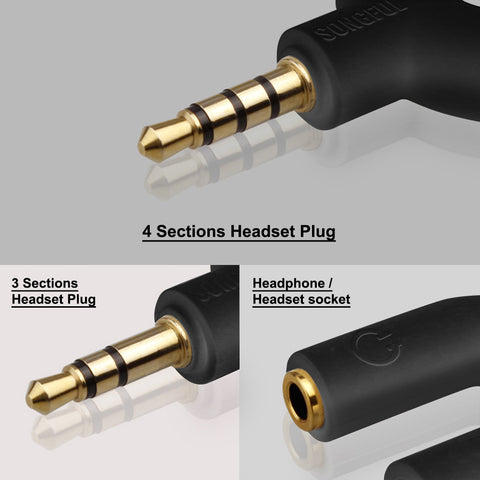 This post has been edited by OCMAX: Jul 17 2017, 05:58 PM |
|
|
Jul 17 2017, 06:07 PM
|
|
Junior Member
385 posts Joined: Apr 2013
|
QUOTE(OCMAX @ Jul 17 2017, 05:56 PM) I think they used different pin configuration. you might want to try to solder your own 3.5mm jack that comes with 4 section. Hi OCMAX, thanks for the input.those common ones they used is 3 section. https://qph.ec.quoracdn.net/main-qimg-62fa3...53488a48388e99f I'm well aware of the different set of connector config, unfortunately I've tried TRRRS, TRRS, TRS and none worked. I also did tried with both wiring standard, OMTP and CTIA, but to no avail. Still buzzing. I also compared the length of the connector just incase if this STB is using the 15mm connector type, but it all has the same length with the original connector. Last hint is using TS connector. I'm yet to try with TS connector as speaker with this type of connector is quite rare nowadays. Anyone have speaker with TS connector can lend me their speaker for awhile?  |
| Change to: |  0.0662sec 0.0662sec
 0.77 0.77
 6 queries 6 queries
 GZIP Disabled GZIP Disabled
Time is now: 1st December 2025 - 08:43 AM |
 Quote
Quote