

That's a 15 inch Alienware right?
Alienware Mothership V12, Intruder alert!
Alienware Mothership V12, Intruder alert!
|
|
 Jul 26 2018, 10:09 AM Jul 26 2018, 10:09 AM
|
 
Senior Member
1,198 posts Joined: Aug 2009  
|
That's a 15 inch Alienware right?
|
|
|
|
|
|
Jul 26 2018, 12:12 PM
|

Junior Member
31 posts Joined: Jun 2010
|
QUOTE(aaronpang @ Jul 25 2018, 11:31 PM) Alienware M14 R4 fully upgraded to 16GB RAM 1TB NVME Bro, Can I ask u some question, Plus new 4k monitor, keyboard and mouse to keep for company  [attachmentid=9938054] [attachmentid=9938056] [attachmentid=9938057] [attachmentid=9938058] [attachmentid=9938064] Alienware graphics AMP  reserve for future use. reserve for future use.[attachmentid=9938061]  1. What Memory RAM u are using ? Thinking to upgrade memory too ... 2. How do u transfer Windows to SSD ? Clean Windows install, Use Windows Recovery or use EaseUS to transfer ? |
|
|
Jul 26 2018, 12:20 PM
Show posts by this member only | IPv6 | Post
#1143
|

All Stars
10,536 posts Joined: Jul 2008
|
Any recommendations for a reliable and reputable service store where I can get my Alienware17 R3 internal's cleaned?
|
|
|
Jul 26 2018, 01:12 PM
|
Senior Member
5,907 posts Joined: Dec 2012 From: Taiping,Perak
|
https://www.lelong.com.my/thermal-grizzly-k...9-06-Sale-P.htm
Is this suitable for repasting aw 15 r3? |
|
|
Jul 26 2018, 02:59 PM
|

Senior Member
1,979 posts Joined: Jan 2003 From: Kuala Lumpur
|
QUOTE(Alan Chong @ Jul 26 2018, 12:12 PM) Bro, Can I ask u some question, Sure happy to answer 1. What Memory RAM u are using ? Thinking to upgrade memory too ... 2. How do u transfer Windows to SSD ? Clean Windows install, Use Windows Recovery or use EaseUS to transfer ?  1. What Memory RAM u are using ? Thinking to upgrade memory too ... Out of the box my laptop came with SK Hynix 8GB DDR4 stick. Bought matching exact RAM model for dual channel. HMA81GS6AFR8N-UH https://www.skhynix.com/products.view.do?vseq=2066&cseq=75 Dell might install other brand memory, check what's installed in your machine before buying. 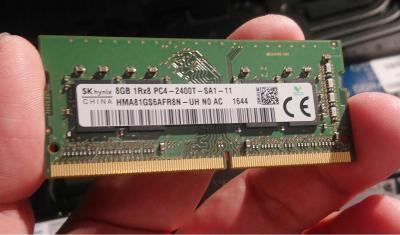
2. How do u transfer Windows to SSD ? Clean Windows install, Use Windows Recovery or use EaseUS to transfer ? Cloned HDD to SSD using Acronis direct 1 to 1 copy. My method is kinda long winded  1) removed original HDD 2) swapped in temp HDD - Windows 10 and Acronis pre-installed. 3) Installed NVME SSD 4) Installed original HDD in external USB case. 5) Boot the machine * plug in USB HDD after windows has started. 6) Clone original HDD to NVME SSD 7) Format original HDD and swapped temp HDD 8) Restart laptop booted straight to NVME (didn't change anything in BIOS) There's better ways to do this I just didn't bother  This post has been edited by aaronpang: Jul 26 2018, 03:26 PM |
|
|
Jul 26 2018, 03:24 PM
|
|
Senior Member
1,979 posts Joined: Jan 2003 From: Kuala Lumpur
|
QUOTE(myway1985 @ Jul 25 2018, 11:53 PM) kurang 1 alienware monitor bro... If kena lottery numbor belanja AW3418DW   Highly recommend large curved monitors, gaming experience is really immersive esp up close  This post has been edited by aaronpang: Jul 26 2018, 03:28 PM |
|
|
|
|
|
Jul 26 2018, 03:36 PM
|
|
Junior Member
31 posts Joined: Jun 2010
|
QUOTE(aaronpang @ Jul 26 2018, 02:59 PM) Sure happy to answer Thanks bro. 1. What Memory RAM u are using ? Thinking to upgrade memory too ... Out of the box my laptop came with SK Hynix 8GB DDR4 stick. Bought matching exact RAM model for dual channel. HMA81GS6AFR8N-UH https://www.skhynix.com/products.view.do?vseq=2066&cseq=75 Dell might install other brand memory, check what's installed in your machine before buying.
2. How do u transfer Windows to SSD ? Clean Windows install, Use Windows Recovery or use EaseUS to transfer ? Cloned HDD to SSD using Acronis direct 1 to 1 copy. My method is kinda long winded 1) removed original HDD 2) swapped in temp HDD - Windows 10 and Acronis pre-installed. 3) Installed NVME SSD 4) Installed original HDD in external USB case. 5) Boot the machine 6) Clone original HDD to NVME SSD 7) Format original HDD and swapped temp HDD 8) Restart laptop booted straight to NVME (didn't change anything in BIOS) There's better ways to do this I just didn't bother My memory RAM is Samsung M471A1K43BB1-CRC, will looking for it. Anyway, after you clone your HDD, did you remove EFI and some hidden partition in your original harddisk ? |
|
|
Jul 26 2018, 03:41 PM
|
|
All Stars
12,089 posts Joined: Jun 2014 From: Kuchai Lama
|
QUOTE(aaronpang @ Jul 26 2018, 03:24 PM) If kena lottery numbor belanja AW3418DW try not use predator.. if not might hv A vs P IV Highly recommend large curved monitors, gaming experience is really immersive esp up close |
|
|
Jul 26 2018, 04:30 PM
|
|
Senior Member
1,979 posts Joined: Jan 2003 From: Kuala Lumpur
|
QUOTE(Alan Chong @ Jul 26 2018, 03:36 PM) Thanks bro. Nope didn't remove the partitions. My memory RAM is Samsung M471A1K43BB1-CRC, will looking for it. Anyway, after you clone your HDD, did you remove EFI and some hidden partition in your original harddisk ? Before deleting hidden partitions recommend to perform a full backup. Some of partitions are boot partitions, example deleting EFI will make system non-bootable. Don't delete it  Others are factory restore image for windows. Honestly wouldn't bother removing those partitions they're fairly small. This post has been edited by aaronpang: Jul 26 2018, 05:05 PM |
|
|
Jul 26 2018, 05:26 PM
|
|
Junior Member
31 posts Joined: Jun 2010
|
QUOTE(aaronpang @ Jul 26 2018, 04:30 PM) Nope didn't remove the partitions. Thanks bro Before deleting hidden partitions recommend to perform a full backup. Some of partitions are are boot partitions, example deleting EFI will make system non-bootable. Don't delete it Others are factory restore image for windows. Honestly wouldn't bother removing those partitions they're fairly small. |
|
|
Jul 27 2018, 01:58 PM
|

Junior Member
67 posts Joined: Aug 2008 From: Kuala Lumpur
|
Hi All,
Anyone by any chance got a CRTG1 (dual drive caddy for alienware x51 r2) that they're willing to let go? Thanks |
|
|
Jul 30 2018, 12:40 PM
|
|
Junior Member
31 posts Joined: Jun 2010
|
I found this article, really no commend
https://www.dell.com/community/Alienware-La...ng/td-p/6089563 The new specification for Alienware 15 R4 / 17 R5 is: CPU peak temperature will be no greater than 100 degree C CPU average temperature will be equal or less than 95 degree C Anything under these figures will be normal for the Alienware 15 R4 / 17 R5. (from Alienware Technical Support) |
|
|
Jul 30 2018, 01:04 PM
|
|
Junior Member
31 posts Joined: Jun 2010
|
Found another article, may be this will help ...
According this user, grizzly kryonaut not really help for heat issue, disable Turbo boost is the best way to go ... https://www.reddit.com/r/Alienware/comments...r4_overheating/ " VaxusRS, post 3 days ago just go into power settings and put your cpu usage at 99% itll disable the turbo boost so your cpu clocks at around like 2.09-2.22ghz rather than the constant 3.2-3.9 that it runs at when you game. Unless you're like super super hardcore competitive or something the difference seems rather negligible. I repasted my cpu with grizzly kryonaut and even then it was still hitting like 92 while game so i repasted it again with one of those permananent graphite thermal pads on the cpu instead and it almost never throttles now and maybe peaks around 87-90 before settling down around 76-78 while gaming. Then once i turned off the turbo boost for my cpu while gaming for extended hours i don't break 59-60deg cpu temps and don't notice large difference to performance. You can repaste the cpu as much times as you want using any brand of paste and fact is itll always idle around upper 80s-low 90s thats just how these new 8th gen intel cpus run. Every laptop i've seen with them hits high temps like this whether its alienware,gigabyte,msi etc its just how they were designed. So as i said best thing to do is to turn off the turbo boost by limiting your cpu performance to 99%/100% to drop it about 20deg c. I undervolted my cpu by 140v as well which helps a tiny bit. Download and use INTEL extreme tuning utility ...." This post has been edited by Alan Chong: Jul 30 2018, 01:07 PM |
|
|
|
|
|
Jul 30 2018, 03:22 PM
|
|
Newbie
17 posts Joined: Jul 2008
|
Just received 15r4 today, I noticed there is light bleed on my ips display, is that normal?Can it be fix?
|
|
|
Jul 30 2018, 09:34 PM
|
|
Senior Member
1,979 posts Joined: Jan 2003 From: Kuala Lumpur
|
QUOTE(ahqiang988 @ Jul 30 2018, 03:22 PM) Just received 15r4 today, I noticed there is light bleed on my ips display, is that normal?Can it be fix? It might be IPS glow, often users mistake it for back-light bleeding.Mine doesn't exhibit back-light bleeding. Monitor Defects As Fast As Possible Maybe compare with samples shown here:- https://www.monitornerds.com/backlight-blee...ad-stuck-pixel/ End of the day suggest contact customer support. This post has been edited by aaronpang: Jul 30 2018, 09:38 PM |
|
|
Jul 31 2018, 01:51 AM
|
|
Senior Member
1,198 posts Joined: Aug 2009
|
QUOTE(Alan Chong @ Jul 30 2018, 12:40 PM) I found this article, really no commend The whole point of using such thick laptop is to have good thermal performance, if Dell decided those are the new normal temperature then I'm not going to recommend future AW to anyone. Those are ridiculous temperature on such thick laptops. Anything under these figures will be normal for the Alienware 15 R4 / 17 R5. (from Alienware Technical Support) |
|
|
Jul 31 2018, 02:53 PM
|
|
Junior Member
31 posts Joined: Jun 2010
|
QUOTE(edmund_yung @ Jul 31 2018, 01:51 AM) The whole point of using such thick laptop is to have good thermal performance, if Dell decided those are the new normal temperature then I'm not going to recommend future AW to anyone. Those are ridiculous temperature on such thick laptops. Actually I just claim a replacement unit from Dell, my first unit dead after 3 weeks using.  My first unit problem: Crazy overheat (CPU average temperature 99c after 5mins game playing) - > Complaint to Dell, Replace Heat sink & fan -> Display Screen Blinking -> Windows corrupt abnormally (Windows create dump file every second, should be hardware problem) -> Reinstall Windows -> Windows and Application keep hang -> few days later Audio not working -> Reinstall Windows again, but install process stop at 30% for 3 hours -> Complaint to Dell to request replacement -> Wait 1 month -> finally get replacement unit !!! I finalist the problems may cause my first unit dead: 1. I received a faulty unit from Dell. 2. Crazy overheat damage my system. 3. Dell technician damage my system while exchange heat sink. 4. Upgrade CMOS damage my system. Now I get 2nd unit and play around few days, the CPU average temperature around 80-85c while gaming, but maximum temperature sometime still hit 99c. I disable CPU Turbo boost with adjust power option, average temperature around 70c while playing Wicther3, fps almost same and loading speed slightly slower but maximum temperature never go above 80c. I think i will remain disable CPU turbo boost until Dell, Intel or any IT expert come out a better solution to solve 8th Gen CPU overheat problem. I scared already .. hahaha This post has been edited by Alan Chong: Jul 31 2018, 03:18 PM |
|
|
Jul 31 2018, 03:34 PM
|
|
Senior Member
1,198 posts Joined: Aug 2009
|
Did Dell just shipped broken Alienware to customer hoping they only play CSgo and never find out it is broken...
|
|
|
Jul 31 2018, 05:34 PM
|
|
Junior Member
31 posts Joined: Jun 2010
|
I think Dell need to improve their QC team ...
 Anyway, my 2nd unit so far so good except CPU temperature a bit high. Hopefully won't trouble me again ... and I don't think Dell will allow me to get another replacement again .... hahaha |
|
|
Jul 31 2018, 06:25 PM
|
|
Senior Member
1,198 posts Joined: Aug 2009
|
QUOTE(Alan Chong @ Jul 31 2018, 05:34 PM) and I don't think Dell will allow me to get another replacement again .... hahaha If they clearly state 95C is a new norm for peak temperature, then yeah you won't get your replacement hehe. |
| Change to: |  0.0312sec 0.0312sec
 0.52 0.52
 6 queries 6 queries
 GZIP Disabled GZIP Disabled
Time is now: 4th December 2025 - 01:17 PM |
 Quote
Quote