

Hi Sifus, I’m interested in the aw15 on dell 8th gen i5 gtx1060. I just wanna know if its worth the money and what upgrade should I opt for? Trying not to break the bank here haha
Alienware Mothership V12, Intruder alert!
Alienware Mothership V12, Intruder alert!
|
|
 Jul 11 2018, 06:30 PM Jul 11 2018, 06:30 PM
Show posts by this member only | IPv6 | Post
#1121
|
 
Junior Member
88 posts Joined: Oct 2014 
|
Hi Sifus, I’m interested in the aw15 on dell 8th gen i5 gtx1060. I just wanna know if its worth the money and what upgrade should I opt for? Trying not to break the bank here haha
|
|
|
|
|
|
Jul 11 2018, 07:44 PM
|

Senior Member
5,907 posts Joined: Dec 2012 From: Taiping,Perak 
|
QUOTE(NoNameForMe @ Jul 11 2018, 06:30 PM) Hi Sifus, I’m interested in the aw15 on dell 8th gen i5 gtx1060. I just wanna know if its worth the money and what upgrade should I opt for? Trying not to break the bank here haha you already break the bank the moment when you opt for alienware,sir. hahah |
|
|
Jul 11 2018, 08:25 PM
Show posts by this member only | IPv6 | Post
#1123
|
|
Junior Member
88 posts Joined: Oct 2014
|
QUOTE(Jay Chua CC @ Jul 11 2018, 07:44 PM) you already break the bank the moment when you opt for alienware,sir. hahah Yea I don’t wanna break further hahaI’m thinking for 5.5k to spend which means I can opt for another 120 hz display or SSD upgrade. Only one, so in your opinion which wold you suggest me to go for This post has been edited by NoNameForMe: Jul 11 2018, 08:27 PM |
|
|
Jul 11 2018, 11:57 PM
|
|
Senior Member
2,992 posts Joined: Feb 2015
|
QUOTE(NoNameForMe @ Jul 11 2018, 08:25 PM) Yea I don’t wanna break further haha Well, I would upgrade the monitor since later on getting a new ssd is easier and cheaper.I’m thinking for 5.5k to spend which means I can opt for another 120 hz display or SSD upgrade. Only one, so in your opinion which wold you suggest me to go for This post has been edited by AthrunIJ: Jul 12 2018, 12:00 AM |
|
|
Jul 12 2018, 12:00 AM
|
|
Senior Member
2,992 posts Joined: Feb 2015
|
QUOTE(edmund_yung @ Jul 11 2018, 09:16 AM) That's non aircond room right? My AW13 with less powerful i7-7700HQ is cooler than that without re-paste. Yea, aircond ~70 Celsius while non air con ~80 Celsius.Wondering about gtx1070 with i7 8series. |
|
|
Jul 12 2018, 07:12 PM
Show posts by this member only | IPv6 | Post
#1126
|

Junior Member
37 posts Joined: Nov 2012 From: KL, Malaysia
|
Hey guys. I'm looking for an i7-920XM/940XM for my M15X. Anyone here has any for sale?
|
|
|
|
|
|
Jul 18 2018, 08:44 PM
Show posts by this member only | IPv6 | Post
#1127
|

Junior Member
366 posts Joined: Mar 2011
|
QUOTE(Zelz92 @ Jun 28 2018, 01:39 PM) Hi all, My 15 R4 (i7-8750H, GTX 1070 OC, 1TB HDD) is on its way. I'm curious about the thermals. I've seen forum online that it has thermal issue. Can anyone share their experience? QUOTE(AthrunIJ @ Jul 10 2018, 11:17 PM) Looking at the latest Alienware R5. The thermals (when it is working well) seems to hover around 80c underload for CPU (GTX1060 it seems). Got my Alienware 15 R4 with following spec for a week now. Thought wanted to give my experience with it.Very tempted to get one  . So far cant find any details about GTX1070 thermals pair with i7 . So far cant find any details about GTX1070 thermals pair with i7  i7-8750, GTX1070, 1TB SSD, 8GB 2400mhz, 1080p 60hz (G-Sync Enabled) Build Quality As expected, top of the line quality feel. Nice and sturdy, almost 0 keyboard flex and display panel flex. Keyboard is nice to type on. However the Alien Command Center is a bit buggy sometime when starting the computer (missing Home & FX Tab form time to time). Had to close the ACC service and restart the Command Center. The track pad is nice and it lights up! Webcam was okay, although speaker is a bit distorted at high volume. not sure if wanted to call Dell to have a look at it. Battery life is around 2.5 hrs for my normal usage as the display is G-sync. Gaming The gaming experience is awesome. Didn't get to play many games. Played Dota 2 with max setting (Dx11), around 120 fps. Tomb Raider on 1080p max setting on the other hand is around max, 150fps, min 70fps and avg of 110 fps. Thermal This part is a bit disappointing. At first I didn't believe what they're saying in notebookreview forum. What they discussed is true. Playing Tomb Raider the system throttles on Core # 0, 2 & 4 with temp reach above 90 to even 100. While the other core are at 84 degree to 95 degree. Suspected an uneven heat sink to CPU die as mentioned by iunlock. Running Dell Stress test result in same temperature with max clock of 3.992Ghz.  Due to this temp, I contacted Dell yesterday (17/8/2018). They respond very quickly and will provide replacement parts (asked what part and they didn't reply) and wait for on site engineer to make an appointment. Bought myself Thermal grizzly Kryonaut to ask the engineer to use this instead. Edit: the replacement part is the heat sink. Today i try undervolting the CPU using XTU. Undervolt to -0.05, Playing Tomb Raider the temperature barely hit 90 degree. Further undervolting to -0.100, resulting temp barely reaching 80 degree and maintain clock speed of 3.992 GHz. I did accidentally overvolted to +0.100 and ran Tomb Raider. Will this damage the CPU? The system throttles to 3.82 Ghz. Note: I always rise the laptop to allow airflow. While in subject of clock, Tried overclocking the display. only manage to overclock until 67Hz, any higher will cause black screen. Overall Like the laptop and will keep it. The thermal is the only issue with this laptop. Hope the on site engineer will be able to fix it with the new parts. planning to do LM in the future. For now, ill utilize the on site support that come with this laptop. Will re-pasting with LM void warranty? This post has been edited by Zelz92: Jul 18 2018, 09:06 PM |
|
|
Jul 18 2018, 08:54 PM
|
|
Senior Member
2,992 posts Joined: Feb 2015
|
QUOTE(Zelz92 @ Jul 18 2018, 08:44 PM) Got my Alienware 15 R4 with following spec for a week now. Thought wanted to give my experience with it. Thanks bro for the review.i7-8750, GTX1070, 1TB SSD, 8GB 2400mhz, 1080p 60hz (G-Sync Enabled) Build Quality As expected, top of the line quality feel. Nice and sturdy, almost 0 keyboard flex and display panel flex. Keyboard is nice to type on. However the Alien Command Center is a bit buggy sometime when starting the computer (missing Home & FX Tab form time to time). Had to close the ACC service and restart the Command Center. The track pad is nice and it lights up! Webcam was okay, although speaker is a bit distorted at high volume. not sure if wanted to call Dell to have a look at it. Battery life is around 2.5 hrs for my normal usage as the display is G-sync. Gaming The gaming experience is awesome. Didn't get to play many games. Played Dota 2 with max setting (Dx11), around 120 fps. Tomb Raider on 1080p max setting on the other hand is around max, 150fps, min 70fps and avg of 110 fps. Thermal This part is a bit disappointing. At first I didn't believe what they're saying in notebookreview forum. What they discussed is true. Playing Tomb Raider the system throttles on Core # 0, 2 & 4 with temp reach above 90 to even 100. While the other core are at 84 degree to 95 degree. Suspected an uneven heat sink to CPU die as mentioned by iunlock. Running Dell Stress test result in same temperature with max clock of 3.992Ghz. Due to this temp, I contacted Dell yesterday (17/8/2018). They respond very quickly and will provide replacement parts (asked what part and they didn't reply) and wait for on site engineer to make an appointment. Bought myself Thermal grizzly Kryonaut to ask the engineer to use this instead. Edit: the replacement part is the heat sink. Today i try undervolting the CPU using XTU. Undervolt to -0.05, Playing Tomb Raider the temperature barely hit 90 degree. Further undervolting to -0.100, resulting temp barely reaching 80 degree and maintain clock speed of 3.992 GHz. I did accidentally overvolted to +0.100 and ran Tomb Raider. Will this damage the CPU? The system throttles to 3.82 Ghz. Note: I always rise the laptop to allow airflow. While in subject of clock, Tried overclocking the display. only manage to overclock until 67Hz, any higher will cause black screen. Overall Like the laptop and will keep it. The thermal is the only issue with this laptop. Hope the on site engineer will be able to fix it with the new parts. planning to do LM in the future. For now, ill utilize the on site support that come with this laptop. Will re-pasting with LM void warranty? As long the voltage is not over the max voltage that the CPU can handle it is OK. Seems like thermal is always an issue. Well i might need to buy myself the thermal paste and repaste it. I myself have also ordered Alienware R4 15 waiting for it. If you dont mind me asking, where did you buy the thermal grizzly kyronaut? This post has been edited by AthrunIJ: Jul 18 2018, 08:55 PM |
|
|
Jul 18 2018, 09:03 PM
Show posts by this member only | IPv6 | Post
#1129
|
|
Junior Member
366 posts Joined: Mar 2011
|
QUOTE(AthrunIJ @ Jul 18 2018, 08:54 PM) Thanks bro for the review. Afraid to damage the CPU or reduce its lifespan.As long the voltage is not over the max voltage that the CPU can handle it is OK. Seems like thermal is always an issue. Well i might need to buy myself the thermal paste and repaste it. I myself have also ordered Alienware R4 15 waiting for it. If you dont mind me asking, where did you buy the thermal grizzly kyronaut? Bought at Shopee for Rm29 (1g). Rm 33 after shipping. One thing to add, the palm rest has nice rubbery texture. However, it attracts oily/wet palm and cause it to stain. you can wipe with damp cloth to remove it, but it'll show some traces of the wiped area (my sensitive eye). Recommend putting dbrand skin. I Plan to put one on my laptop as well. |
|
|
Jul 18 2018, 09:27 PM
|
|
Senior Member
2,992 posts Joined: Feb 2015
|
QUOTE(Zelz92 @ Jul 18 2018, 09:03 PM) Afraid to damage the CPU or reduce its lifespan. All right. Thanks man Bought at Shopee for Rm29 (1g). Rm 33 after shipping. One thing to add, the palm rest has nice rubbery texture. However, it attracts oily/wet palm and cause it to stain. you can wipe with damp cloth to remove it, but it'll show some traces of the wiped area (my sensitive eye). Recommend putting dbrand skin. I Plan to put one on my laptop as well.  |
|
|
Jul 19 2018, 12:57 AM
|
|
Senior Member
5,907 posts Joined: Dec 2012 From: Taiping,Perak
|
QUOTE(Zelz92 @ Jul 18 2018, 09:03 PM) Afraid to damage the CPU or reduce its lifespan. yea. im waiting for dbrand to have sales now/ Bought at Shopee for Rm29 (1g). Rm 33 after shipping. One thing to add, the palm rest has nice rubbery texture. However, it attracts oily/wet palm and cause it to stain. you can wipe with damp cloth to remove it, but it'll show some traces of the wiped area (my sensitive eye). Recommend putting dbrand skin. I Plan to put one on my laptop as well.  |
|
|
Jul 19 2018, 10:48 AM
|

Junior Member
143 posts Joined: Mar 2009
|
Saw the new AW15, thinking of buying one since they have instant RM500 cash rebate now.
I'm thinking of upgrading the GPU to 1070 , Storage to 256GB SSD + 1TB HDD and panel to 120Hz Gsync. Maintain CPU. RAM will get aftermarket. Any recommendation with the upgrades? Will the GPU be ok with the stock i5 8300H? Thanks |
|
|
Jul 21 2018, 05:04 PM
|
|
Junior Member
366 posts Joined: Mar 2011
|
QUOTE(Jay Chua CC @ Jul 19 2018, 12:57 AM) yea. im waiting for dbrand to have sales now/ Count me in. Bet would look awesome with matte black. Edit: Dbrand is selling for 25% only for today QUOTE(jonlee @ Jul 19 2018, 10:48 AM) Saw the new AW15, thinking of buying one since they have instant RM500 cash rebate now. I chose the same configuration with the RM 500 rebate as well. However opted with i7-8750h and gtx 1070. 8750h will provide a bit future proofing imo. cheaper 1080 60hz display for mobile gaming and can hook with 4k monitor if want to. besides, GTX 1100 series is coming out soon, can use amplifier to boost performance. So yeah, i opted 8750 for future proofing.I'm thinking of upgrading the GPU to 1070 , Storage to 256GB SSD + 1TB HDD and panel to 120Hz Gsync. Maintain CPU. RAM will get aftermarket. Any recommendation with the upgrades? Will the GPU be ok with the stock i5 8300H? Thanks I dont bother upgrading SSD and ram that much as SSD wont add significant FPS to your gaming (faster loading time however), While 8gb is enough for gaming. If need more. I can always add this. Whereas, you cant upgrade then soldered CPIU & GPU. That said, the i5 is more than capable handling the GTX1070 without bottle necking. However, Dell won't let you choose 1070 with the i5 and error on some confusing windows option. Don't forget to ask Dell costumer service to give you quotation. Could safe you couple hundred more. I've save another RM 250 on mine This post has been edited by Zelz92: Jul 21 2018, 09:08 PM |
|
|
|
|
|
Jul 21 2018, 09:25 PM
|
|
Senior Member
5,907 posts Joined: Dec 2012 From: Taiping,Perak
|
QUOTE(Zelz92 @ Jul 21 2018, 05:04 PM) Count me in. Bet would look awesome with matte black. I already bought ytd since have promo. But it seems i cant apply any code or stated there is 25% off in the payment section. The price shown is already deducted? Edit: Dbrand is selling for 25% only for today I chose the same configuration with the RM 500 rebate as well. However opted with i7-8750h and gtx 1070. 8750h will provide a bit future proofing imo. cheaper 1080 60hz display for mobile gaming and can hook with 4k monitor if want to. besides, GTX 1100 series is coming out soon, can use amplifier to boost performance. So yeah, i opted 8750 for future proofing. I dont bother upgrading SSD and ram that much as SSD wont add significant FPS to your gaming (faster loading time however), While 8gb is enough for gaming. If need more. I can always add this. Whereas, you cant upgrade then soldered CPIU & GPU. That said, the i5 is more than capable handling the GTX1070 without bottle necking. However, Dell won't let you choose 1070 with the i5 and error on some confusing windows option. Don't forget to ask Dell costumer service to give you quotation. Could safe you couple hundred more. I've save another RM 250 on mine |
|
|
Jul 23 2018, 06:47 PM
|
|
Junior Member
366 posts Joined: Mar 2011
|
QUOTE(Jay Chua CC @ Jul 21 2018, 09:25 PM) I already bought ytd since have promo. But it seems i cant apply any code or stated there is 25% off in the payment section. The price shown is already deducted? Already deducted. normal would be $50/set. |
|
|
Jul 24 2018, 02:30 PM
|
|
Junior Member
143 posts Joined: Mar 2009
|
QUOTE(Zelz92 @ Jul 21 2018, 05:04 PM) Count me in. Bet would look awesome with matte black. Thank you for your comments. After some consideration, I'll go with the entry model (i5-8300 and 1060) and just upgrade to 60Hz Gsync. I don have a lot of time for gaming, just wanna play some story campaign in FPS games (COD, Battlefield), so don need to spend RM8k on sth i don utilize hehe. Edit: Dbrand is selling for 25% only for today I chose the same configuration with the RM 500 rebate as well. However opted with i7-8750h and gtx 1070. 8750h will provide a bit future proofing imo. cheaper 1080 60hz display for mobile gaming and can hook with 4k monitor if want to. besides, GTX 1100 series is coming out soon, can use amplifier to boost performance. So yeah, i opted 8750 for future proofing. I dont bother upgrading SSD and ram that much as SSD wont add significant FPS to your gaming (faster loading time however), While 8gb is enough for gaming. If need more. I can always add this. Whereas, you cant upgrade then soldered CPIU & GPU. That said, the i5 is more than capable handling the GTX1070 without bottle necking. However, Dell won't let you choose 1070 with the i5 and error on some confusing windows option. Don't forget to ask Dell costumer service to give you quotation. Could safe you couple hundred more. I've save another RM 250 on mine Thanks again |
|
|
Jul 24 2018, 05:25 PM
|

Senior Member
1,979 posts Joined: Jan 2003 From: Kuala Lumpur
|
QUOTE(jonlee @ Jul 24 2018, 02:30 PM) Thank you for your comments. After some consideration, I'll go with the entry model (i5-8300 and 1060) and just upgrade to 60Hz Gsync. I don have a lot of time for gaming, just wanna play some story campaign in FPS games (COD, Battlefield), so don need to spend RM8k on sth i don utilize hehe. That's a good configuration, i5-8300 is very competent CPU and GTX1060 is more then capable.Thanks again I'm playing Skyrim and framerate stays at 60fps the whole time. Fun fact going beyond 60FPS causes Skyrim to go crazy  |
|
|
Jul 24 2018, 06:52 PM
|
|
Senior Member
1,198 posts Joined: Aug 2009
|
QUOTE(jonlee @ Jul 24 2018, 02:30 PM) Thank you for your comments. After some consideration, I'll go with the entry model (i5-8300 and 1060) and just upgrade to 60Hz Gsync. I don have a lot of time for gaming, just wanna play some story campaign in FPS games (COD, Battlefield), so don need to spend RM8k on sth i don utilize hehe. very balanced built!Thanks again |
|
|
Jul 25 2018, 11:31 PM
|
|
Senior Member
1,979 posts Joined: Jan 2003 From: Kuala Lumpur
|
Alienware 15 R4 fully upgraded to 16GB RAM 1TB NVME
Plus new 4k monitor, keyboard and mouse to keep for company  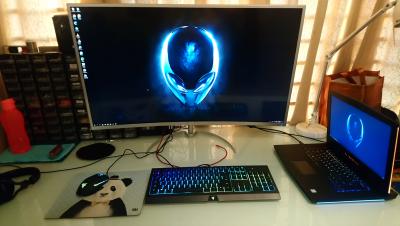
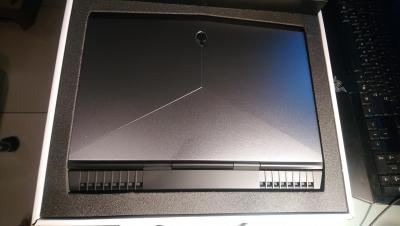

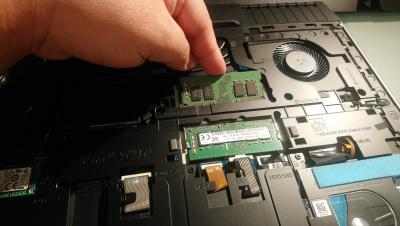
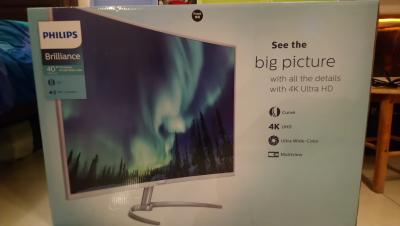
Alienware graphics AMP reserve for future use.
This post has been edited by aaronpang: Jul 26 2018, 03:28 PM |
|
|
Jul 25 2018, 11:53 PM
|
|
All Stars
12,089 posts Joined: Jun 2014 From: Kuchai Lama
|
QUOTE(aaronpang @ Jul 25 2018, 11:31 PM) Alienware M14 R4 fully upgraded to 16GB RAM 1TB NVME kurang 1 alienware monitor bro... Plus new 4k monitor, keyboard and mouse to keep for company
Alienware graphics AMP reserve for future use.
|
| Change to: |  0.0189sec 0.0189sec
 0.58 0.58
 6 queries 6 queries
 GZIP Disabled GZIP Disabled
Time is now: 2nd December 2025 - 03:00 PM |
 Quote
Quote