
Welcome Guest ( Log In | Register )

Bump Topic Topic Closed RSS Feed
37 Pages « < 15 16 17 18 19 > » Bottom

Outline · [ Standard ] · Linear+

 The SSD Thread V5, Solid State Drive

views
     
horns
post Jan 15 2016, 06:12 PM

\m/
*******
Senior Member
3,038 posts

Joined: Nov 2009
QUOTE(kizwan @ Jan 15 2016, 04:37 PM)
His SSD working again based on his last reply. Sound like his BIOS/motherboard acting up, not the SSD. Disabling IRST in BIOS will make the SSD unbootable (referring to one of his troubleshooting step).
*
yeah this is the one that is imo more related to the 'missing' ssd.

QUOTE(kizwan @ Jan 15 2016, 04:59 PM)
Look at the changelog. There is possibility the drive (M6S) might freeze/hang under some circumstances. This is what you don't want to hear. biggrin.gif Probably good idea to avoid Plextor for now. But at least they are being frank with what is going on with their drive. Other companies probably put "fixed bug" or "improve drive compatibility" in their firmware changelog.

» Click to show Spoiler - click again to hide... «

*
yeah, the freezing bug has been fixed. i suggest applying the firmware if it's not yet done.

to be fair, we need more concrete news related to this.


horns
post Jan 16 2016, 12:21 PM

\m/
*******
Senior Member
3,038 posts

Joined: Nov 2009
QUOTE(jchue73 @ Jan 16 2016, 12:00 PM)
I have a 512GB Samsung NVMe 950 Pro incoming but no motherboard as of yet. Is the Asrock motherboard still the one to get pair it up or should I look for something else? If I could, I would want to stay with smallish mATX.
*
if you referred to m.2 slot that can run pcie 3.0 x4, you also have plenty of choices from almost all brands now. just remember to check out their m.2 slot specs carefully because the slot usually share pcie lanes with pcie slots.
horns
post Jan 17 2016, 02:28 AM

\m/
*******
Senior Member
3,038 posts

Joined: Nov 2009
QUOTE(jchue73 @ Jan 16 2016, 12:38 PM)
Thanks for the tips. Yes m.2 slot. I don't plan to run dual GPUs or anything but yeah, I ideally want to future proof and jump onto the LGA 2011 with entry level i5820k processor. The thing is mATX form factor severely limits my choices. The other reason wanting LGA 2011 is that I would get to have 4 x DIMMs available on the mATX form factor.
*
oh. matx.. yeah your choice is quite limited if that's the case.

QUOTE(skylinelover @ Jan 16 2016, 05:17 PM)
Thanks 4 the update laugh.gif rclxms.gif
*
np man biggrin.gif

horns
post Jan 19 2016, 01:13 AM

\m/
*******
Senior Member
3,038 posts

Joined: Nov 2009
QUOTE(orangutan @ Jan 17 2016, 06:35 PM)
Is it possible / recommended to get a 2.5' ssd enclosure for dual M.2 ssd ?

I'm asking cos it makes more sense incase one needs to upgrade, there's an extra slot.

Will the heat be a factor?
*
you can check something like that with search engines. it's pretty rare. be sure to check out the specs. it's important to have a heat spreader for peace of mind.

QUOTE(leCat @ Jan 18 2016, 09:20 AM)
hi, can anyone suggest me best bang for the buck ssd 240/250gb? currently eyeing on kingston hyperx fury, is it good? biggrin.gif (budget less than 450, lower is better hehe)

thanks in advance biggrin.gif
*
samsung 850 evo 250gb.

QUOTE(aaronpang @ Jan 18 2016, 02:13 PM)
Planning to get a M.2 SSD to get for my Dell XPS 8900. Sharing list for everyone's benefit... Collected the information from LYN price list section.
[attachmentid=5841416]

Narrowed choices within budget to either:-
Crucial MX200 512 M.2 SATA    RM789
PLEXTOR M6E 256 M.2 PCI-E  RM859

Both drives are M.2 and similarly priced with two trade-off of being SPEED for CAPACITY and vice versa.

I'm more inclined to choose Crucial for Capacity, does anyone have experience with these drives and how reliable are Crucial SSD's ?

Would have preferred SAMSUNG 850EVO 512GB M.2 but none are listed in the price-lists and I don't want to purchase outside of proper retail channels.

Thanks for the advice  thumbup.gif
*
yes. between the two, i suggest you go for capacity. plextor m6e is just slightly faster than sata (pcie 2.0 x2).

QUOTE(yenama @ Jan 19 2016, 12:04 AM)
hi to all, i plan to get ssd later and for now i have 3 question before i do that...

1) is kingston V300 series ssd still worth to buy?
i heard last time this series got some problem.

2)Is the speed between cheap and expensive ssd is noticable in real live usage?

3)What is the best bang for buck for ssd right now?
*
1. about kingston v300, this has been brought up many times previously. i suggest you also do some leg work, search for reviews about it, then make up your mind.

2. for common usage, relatively insignificant.

3. you can go for values drives like transcend ssd370 256gb; MYR350.00. (the previous version had a plastic case; now it's aluminum)

horns
post Jan 19 2016, 09:15 AM

\m/
*******
Senior Member
3,038 posts

Joined: Nov 2009
QUOTE(Skidd Chung @ Jan 19 2016, 01:57 AM)
Just bought a Samsung 850 250GB in SG, under the Samsung magician optimization, should I go for maximum performance or reliability?
*
er it's up to you. basically they are based on manual ssd optimization guides such as the one at thessdreview.com. you can check out which system features get adjusted in the detailed listing of each option. sometimes, adjustments in such optimizations will impact your computer systems. the easiest way to find out which one is good for you is to run each option for a week or two, and then you decide based on results. or, you can go for advanced option, in which you choose what to turn on, or off.

before samsung magician, i use manual optimizations for quite some time. to me i'm ok with maximum optimizations, so i just choose max reliability. (with 15% OP, over provisioning)

QUOTE(leCat @ Jan 19 2016, 04:34 AM)
how about liteon s900? or galax gamer 240gb? samsung evo 850 maximize my budget  sweat.gif  but will probably buy it if it's the best among all
*
yeah liteon s900 is still one of the best deals to me. the thing is that it seems to become rare in the market (256gb option), and there are people who sell liteon ssd models that are non-s900. i'm not sure about galax gamer. i suggest 850 evo because of its longer warranty period (5 yrs; normally 3 yrs) and tbw (150tb; normally 72tbw for mainstream ssds), and its rapid mode if you have more than 8gb of system ram. recently i also noticed there was a price drop compared to a few months ago.

another option is samsung 750evo. however there is only one capacity now, 120gb. also, be sure to check out garage sales section. there are good deals from time to time.

edit: i forgot to correct this: transcend ssd370 is an old model which used plastic case. ssd370s is the new model with aluminum case.

This post has been edited by horns: Jan 19 2016, 09:18 AM
horns
post Jan 19 2016, 07:36 PM

\m/
*******
Senior Member
3,038 posts

Joined: Nov 2009
QUOTE(Skidd Chung @ Jan 19 2016, 06:44 PM)
OK still getting used to this ssd. I notice my performance benchmark in Samsung magician is low. I thought those sequential write speeds should exceed 400+. Mine is only 300+.

Also notice RAPID is not enabled, should I enable it?
*
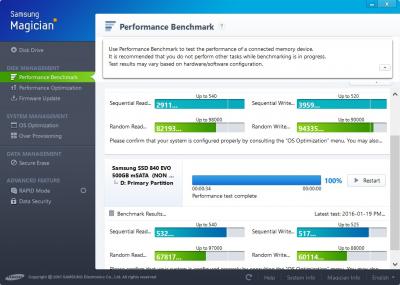
what's the capacity of your 850evo?

below is the benchmarks for 840 evo (500gb each, sata and msata version), showing the difference between rapid mode (top, sata) and normal (bottom, msata) speeds.

Attached Image
horns
post Jan 19 2016, 08:29 PM

\m/
*******
Senior Member
3,038 posts

Joined: Nov 2009
QUOTE(Skidd Chung @ Jan 19 2016, 07:42 PM)
A 250GB, wow your bench are like max. Mine is like half of what the max is.
*
yeah. this is a laptop (xps 15; 4702hq, 16gb ram, full-ssd setup;w10 1511, intel rst 14.8).

after firmware fix for previous slow read bug a few months ago, samsung 840 evo works nicely ever since imo.

half? like sata2 speed? how come?
horns
post Jan 19 2016, 09:11 PM

\m/
*******
Senior Member
3,038 posts

Joined: Nov 2009
QUOTE(Skidd Chung @ Jan 19 2016, 08:56 PM)
I dunno, pretty new to this.

I just set it to reliability optimization, RAPID is off at the moment.

Now I have to check whether I put it in SATA 2 or 3 port  doh.gif

Does the cable matter? Or all SATA cables are the same?
*
For intel based systems, it's best to connect ssd to intel sata port.

For sata cables, they shouldn't be an issue unless they're faulty. I use those that come with mobo. Also tried sleeved sata cables bought from sellers at garage sales. Worked too.
horns
post Jan 19 2016, 10:22 PM

\m/
*******
Senior Member
3,038 posts

Joined: Nov 2009
QUOTE(Skidd Chung @ Jan 19 2016, 09:18 PM)
Hmmm I'm using a Gigabyte Z68 that comes with Marvell and Intel SATA 3, so I should connect to Intel SATA 3 right? Will check this later.
Edit:

Damn I just realise I did not install any Intel or Marvell SATA drivers for my motherboard when I clean install Windows. Could this be a problem?  sweat.gif
*
yeah you need to identify the 2x intel sata3 ports (referring to mobo manual)

as for the drivers, maybe, but usually ms.ahci driver should work also.
horns
post Jan 19 2016, 11:39 PM

\m/
*******
Senior Member
3,038 posts

Joined: Nov 2009
QUOTE(Skidd Chung @ Jan 19 2016, 11:05 PM)
Yeah just checked online and saw which is which, but i am not on at home now. Will check when I get back. Thanks for the help.

I mean the SSD is still super fast but the benchmark got me all suspicious at the speed.
*
No problem smile.gif

Yeah it's fast alright, because for common usage, read speed and random iops are still very useful in most cases.

That's also why it's ok to use ssd with sata2 ports. Not great, but good enough.
horns
post Jan 20 2016, 12:06 AM

\m/
*******
Senior Member
3,038 posts

Joined: Nov 2009
QUOTE(XeactorZ @ Jan 19 2016, 11:37 PM)
actually does the samsung magician software compulsory to install if using samsung ssd ??
I didn't install it once I got them on both my laptop and desktop, as I didn't clone laugh.gif
*
Not compulsory. To me it's just for activation of rapid mode. I disable it from startup after that's done. System tweaks and op are usually manual, unless i'm lazy hehe


horns
post Jan 20 2016, 09:07 AM

\m/
*******
Senior Member
3,038 posts

Joined: Nov 2009
QUOTE(XeactorZ @ Jan 20 2016, 01:21 AM)
rapid mode ? is it looks like fast startup that build in on Windows 10 ?
by default it is enabled hmm.gif
*
it's a ram cache, taking care of things AFTER the os is fully loaded.

don't be bothered by benchmark i showed earlier. i just wanted to show that rapid mode is working, and there are significant difference when you bench.

in reality, note that samsung's rapid mode, like many ram-caching features provided by others (eg. plextor's plexturbo, crucial's momentum), might slow things down in some scenarios. the best way to find out whether you can benefit from it is to test it out with your usage. compared to earlier versions of rapid mode, newer ones have some improvements. however, if you cannot feel any performance boost at all, just turn it off.

Edit: forgot to answer the question lol it's more like superfetch. The benchmark feature that samsung magician provides is testing queue depth of 32, meaning server loads. For common usage, we refer to queue depth of 4. Excellent results for qd32 doesn't reflect the same at qd4.

This post has been edited by horns: Jan 20 2016, 10:25 AM
horns
post Jan 20 2016, 02:50 PM

\m/
*******
Senior Member
3,038 posts

Joined: Nov 2009
QUOTE(XeactorZ @ Jan 20 2016, 01:17 PM)
thanks for the explanation, feel so confusing laugh.gif
anyway I will install it and see how it performs biggrin.gif
*
Oh nvm most users don't need to understand these queue depth la or whatever technical because they are just looking at outcomes haha

That's why i said for rapid mode, just enable it and test your usage for a week or two, then test again with it disabled. If you don't feel anything different, you don't need it. Disabling it will free up occupied ram space for system use, and also reduce writes to ssd due to cache flushing to disk for next reuse everytime you shut down the computer.
horns
post Jan 20 2016, 10:22 PM

\m/
*******
Senior Member
3,038 posts

Joined: Nov 2009
QUOTE(XeactorZ @ Jan 20 2016, 05:10 PM)
Ohh back home I test it
But after disable it then can uninstall right ?
*
Sure lol
horns
post Jan 23 2016, 01:50 AM

\m/
*******
Senior Member
3,038 posts

Joined: Nov 2009
QUOTE(sammm33 @ Jan 22 2016, 09:39 AM)
Plextor 256GB m6s user here. at 1st all is good , using it as 2nd drive to put my game data.

use less than 30 days then suddenly cannot be detected when playing game, the game was stopped. reboot , unplug and reinstall ssd, plug in another pc, change sata cable , still cannot detect. also notice when this problematic ssd was plugged in, the entire PC / laptop cannot boot up, despite it was a 2ndary drive.

currently still RMA in progress. dam sad this Plextor ssd.

BTW, my primary C is a Corsair Force Series GT 120 GB, which still up and running since 2011.
*
less than 30 days. wow. was the firmware updated? your symptoms seemed to be similar to this, http://superuser.com/questions/887306/ssd-...ys-of-power-off

horns
post Jan 23 2016, 12:35 PM

\m/
*******
Senior Member
3,038 posts

Joined: Nov 2009
QUOTE(sammm33 @ Jan 23 2016, 11:58 AM)
buy early nov 2015 then it was dead early dec 2015, so yeah , 30 days max.

can't update at all cuz suddenly it was like literally dead and cannot be detected.
and was never update the firmware btw. previously was function nicely.

for the case in the url u show me , that one at least his ssd still can be detect in another system. and his using the problematic plextor ssd as a primary drive.

my case, the plextor ssd not even showing up in the BIOS and not was used as primary drive so i assume it was not being heavily used or constantly under high rate of read/write... best part is if it was plugged with other primary hard drive or SSD, the entire system cannot be boot in to the windows . everything works fine if the plextor ssd was plugged out. (similar to what happen in the link you show me)

tried two desktop and one laptop, same result, cannot detect.

so much hassle for a premium price ssd...
*
yeah similar, but different usage. a switch in bios settings might make it accessible. the latest firmware released last year was to get rid of this freezing bug. the bug seemed to be not related to heavy usage.

nevermind luckily you still can do rma.


horns
post Jan 24 2016, 07:38 PM

\m/
*******
Senior Member
3,038 posts

Joined: Nov 2009
QUOTE(hafiez @ Jan 24 2016, 06:21 PM)
hey guys,

I want to ask a question regarding mSata

what is your guys opinion about plugging mSATA SSD using mSATA adapter?

will there any performance loss?

I kinda tempting to get this mSata SSD but it required a mSATA adapter to make it work.

any thoughts?
*
what kind of adapter? msata to sata? or msata to usb? the latter will have performance drops.

horns
post Jan 24 2016, 08:24 PM

\m/
*******
Senior Member
3,038 posts

Joined: Nov 2009
QUOTE(hafiez @ Jan 24 2016, 08:07 PM)
msata to sata bro

advisable to buy or just get the normal ones.
*
well, the price of msata ssds might be slightly higher than sata ssds, and you need to get an additional adapter. the cost should higher than getting a sata ssd.

performance wise they should be the same. however it's better to check out their specs first.
horns
post Jan 24 2016, 11:34 PM

\m/
*******
Senior Member
3,038 posts

Joined: Nov 2009
QUOTE(XeactorZ @ Jan 24 2016, 09:52 PM)
sata > msata > m.2 > pci-e laugh.gif
*
more like sata = msata =< m.2 =< pcie lol

horns
post Jan 25 2016, 12:04 AM

\m/
*******
Senior Member
3,038 posts

Joined: Nov 2009
QUOTE(XeactorZ @ Jan 24 2016, 11:50 PM)
lol, no idea but confirmed pci-e is the fastest tongue.gif
*
yeah it is. it has the largest capacity also. (but damn expensive lol!) for personal computing, sata ssd is actually a sensible option to have for now.

the best minimal combo for a main rig is still 1x ssd for os and 1x hdd for storage. move all other hard disks to a separate system. this way your main rig will run much faster because it has less hardware connecting to it.


37 Pages « < 15 16 17 18 19 > » Top
Topic ClosedOptions
 

Change to:
| Lo-Fi Version
0.0748sec    0.66    7 queries    GZIP Disabled
Time is now: 13th December 2025 - 06:27 AM