Outline ·
[ Standard ] ·
Linear+
The SSD Thread V5, Solid State Drive
|
horns
|
 Mar 31 2015, 06:10 PM Mar 31 2015, 06:10 PM
|

|
QUOTE(ejoeflizzow @ Mar 31 2015, 05:11 PM) Anybody knows where can i claim warranty for Kingston V300? Seller didnt provide the receipt. last time CONVERGENT DISTRIBUTION located at 4th floor if im not mistaken but moved out already. maybe call the number in the listing at kingston and ask about it? http://www.kingston.com/en/company/warranty |
|
|
|
|
|
SUSHuman10
|
Mar 31 2015, 06:29 PM
|
|
|
QUOTE(ejoeflizzow @ Mar 31 2015, 05:11 PM) Anybody knows where can i claim warranty for Kingston V300? Seller didnt provide the receipt. last time CONVERGENT DISTRIBUTION located at 4th floor if im not mistaken but moved out already. By right should be same as RAM, https://forum.lowyat.net/topic/505086 |
|
|
|
|
|
Exeunt
|
Apr 2 2015, 11:31 PM
|
|
|
hai guys just bought liteon ssd 128gb and installed it in my acer 4820tg already set ahci mode in bios and trim enabled .. so the following pic normal ka speed? Attached thumbnail(s)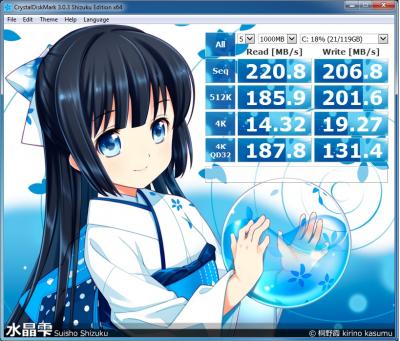
|
|
|
|
|
|
SUSHuman10
|
Apr 2 2015, 11:41 PM
|
|
|
QUOTE(Exeunt @ Apr 2 2015, 11:31 PM) hai guys just bought liteon ssd 128gb and installed it in my acer 4820tg already set ahci mode in bios and trim enabled .. so the following pic normal ka speed? Normal, your notebook is old and on SATA2 IINM (similar to my notebook, only SATA2). One of the most significant characteristic of SATA2 you can notice is the number won't breach 300. |
|
|
|
|
|
Exeunt
|
Apr 2 2015, 11:46 PM
|
|
|
QUOTE(Human10 @ Apr 3 2015, 12:41 AM) Normal, your notebook is old and on SATA2 IINM (similar to my notebook, only SATA2). One of the most significant characteristic of SATA2 you can notice is the number won't breach 300. Thanks for the insight.. just want to make sure the result of the benchmark is same level to other laptop that on sata2 ..  i saw on youtube about ssd write caching indexing thingy ...those thing really necessary ahh?? |
|
|
|
|
|
horns
|
Apr 3 2015, 08:58 AM
|
|
|
after kingston hyperx predator, intel 750 is coming. pcie 3.0 x4 nvme! http://www.anandtech.com/show/9090/intel-s...-for-the-clienthttp://techreport.com/review/28050/intel-7...-drive-reviewedhttp://www.thessdreview.com/our-reviews/in...e-the-industry/QUOTE(Exeunt @ Apr 2 2015, 11:46 PM) Thanks for the insight.. just want to make sure the result of the benchmark is same level to other laptop that on sata2 .. i saw on youtube about ssd write caching indexing thingy ...those thing really necessary ahh?? write caching can be enabled because it helps to boost performance. for client systems, it's good to have it. for a safer side, do not enable the feature that turn off write cache flushing. disabling indexing reduces writes to ssd. it's good too. it's better you check the ssd optimizations at the first post. |
|
|
|
|
|
subrok007
|
Apr 3 2015, 09:46 AM
|
|
|
kingston hyperX 3k 120gb reliable or not?
|
|
|
|
|
|
NightFelix
|
Apr 3 2015, 09:58 AM
|
|
|
QUOTE(Exeunt @ Apr 2 2015, 11:31 PM) hai guys just bought liteon ssd 128gb and installed it in my acer 4820tg already set ahci mode in bios and trim enabled .. so the following pic normal ka speed? How was your booting up time? |
|
|
|
|
|
subrok007
|
Apr 3 2015, 09:01 PM
|
|
|
hi all sifu, recently i just bought kingston hyperX 3k 120gb. here is my crystal disk mark.. mine is SATA 2 only. is it correct speed? but of course not as advertised speed due to SATA 2... BTW, my Kingston SSD toolbox cant detect my SSD.. why?  This post has been edited by subrok007: Apr 3 2015, 09:01 PM
 |
|
|
|
|
|
horns
|
Apr 4 2015, 01:12 AM
|
|
|
QUOTE(subrok007 @ Apr 3 2015, 09:01 PM) hi all sifu, recently i just bought kingston hyperX 3k 120gb. here is my crystal disk mark.. mine is SATA 2 only. is it correct speed? but of course not as advertised speed due to SATA 2... BTW, my Kingston SSD toolbox cant detect my SSD.. why?
uh? it's more like sata1 to me. what's your mobo? |
|
|
|
|
|
subrok007
|
Apr 4 2015, 09:14 AM
|
|
|
QUOTE(horns @ Apr 4 2015, 01:12 AM) uh? it's more like sata1 to me. what's your mobo? Asus P5N-D, its LGA 775 platform. Btw, my bios cant set AHCI mode. only enable SMART.  any tweak? |
|
|
|
|
|
horns
|
Apr 4 2015, 10:31 AM
|
|
|
QUOTE(subrok007 @ Apr 4 2015, 09:14 AM) Asus P5N-D, its LGA 775 platform. Btw, my bios cant set AHCI mode. only enable SMART. any tweak? checked the specs of your mobo, now it makes sense that the ssd can only run at sata1 speed max even if it's connected to sata2 ports. the bottleneck is from the mobo. you can try sata3 addin card, but i am not sure if it works well for your system, especially when you put ssd as boot drive. |
|
|
|
|
|
subrok007
|
Apr 4 2015, 03:16 PM
|
|
|
QUOTE(horns @ Apr 4 2015, 10:31 AM) checked the specs of your mobo, now it makes sense that the ssd can only run at sata1 speed max even if it's connected to sata2 ports. the bottleneck is from the mobo. you can try sata3 addin card, but i am not sure if it works well for your system, especially when you put ssd as boot drive. but my mobo is SATA 2... Arent the speed shall SATA 2 speed instead of SATA 1 speed.. what cause that drag the speed? |
|
|
|
|
|
NightFelix
|
Apr 4 2015, 04:04 PM
|
|
|
QUOTE(subrok007 @ Apr 4 2015, 03:16 PM) but my mobo is SATA 2... Arent the speed shall SATA 2 speed instead of SATA 1 speed.. what cause that drag the speed? Mobo firmware?  |
|
|
|
|
|
subrok007
|
Apr 4 2015, 04:06 PM
|
|
|
QUOTE(NightFelix @ Apr 4 2015, 04:04 PM) Mobo firmware? updated the latest.. no more published from Asus after that. |
|
|
|
|
|
clawhammer
|
Apr 4 2015, 04:11 PM
|
///M

|
QUOTE(subrok007 @ Apr 4 2015, 04:06 PM) updated the latest.. no more published from Asus after that. You're probably running SATA 2 with IDE mode? It will definitely make a huge difference in terms of speed. You need to enable AHCI. Time for a new motherboard? |
|
|
|
|
|
horns
|
Apr 4 2015, 06:11 PM
|
|
|
QUOTE(subrok007 @ Apr 4 2015, 03:16 PM) but my mobo is SATA 2... Arent the speed shall SATA 2 speed instead of SATA 1 speed.. what cause that drag the speed? sorry i should have stated clearly, yeah my thought was what clawhammer said. running sata2 in ide mode. with ahci you should get about double the speed, but there is no ahci option in the mobo. i spent some time to google the similar issue. while most of them are bad news, this might be a good one. there were people saying that there were success running ssds at sata2 speed. the trick is using msahci driver, by uninstalling nvidia chipset/stoage controller driver. http://www.overclock.net/t/828683/looking-...-750i-sli-boardtry that out and see if it helps. edit: here is another one. http://answers.microsoft.com/en-us/windows...c4-947ad1b47243This post has been edited by horns: Apr 4 2015, 06:16 PM |
|
|
|
|
|
subrok007
|
Apr 5 2015, 10:53 AM
|
|
|
QUOTE(horns @ Apr 4 2015, 06:11 PM) sorry i should have stated clearly, yeah my thought was what clawhammer said. running sata2 in ide mode. with ahci you should get about double the speed, but there is no ahci option in the mobo. i spent some time to google the similar issue. while most of them are bad news, this might be a good one. there were people saying that there were success running ssds at sata2 speed. the trick is using msahci driver, by uninstalling nvidia chipset/stoage controller driver. http://www.overclock.net/t/828683/looking-...-750i-sli-boardtry that out and see if it helps. edit: here is another one. http://answers.microsoft.com/en-us/windows...c4-947ad1b47243Thanks for the great info. Result: after following this website http://answers.microsoft.com/en-us/windows...c4-947ad1b47243 my SSD speed drop drastically especially READ. But good thing is my Kingston SSD Toolbox can detect my SSD status. I decided to change back to nforce driver. is time for me to change new platform.  |
|
|
|
|
|
horns
|
Apr 5 2015, 11:42 AM
|
|
|
QUOTE(subrok007 @ Apr 5 2015, 10:53 AM) Thanks for the great info. Result: after following this website http://answers.microsoft.com/en-us/windows...c4-947ad1b47243 my SSD speed drop drastically especially READ. But good thing is my Kingston SSD Toolbox can detect my SSD status. I decided to change back to nforce driver. is time for me to change new platform. oh worst haha yes, it's good to change the platform for much better performance. at least for main computers, imo it's better to do it every 5 years to take up newer technologies and better compatibilities. |
|
|
|
|
|
Exeunt
|
Apr 5 2015, 09:03 PM
|
|
|
QUOTE(NightFelix @ Apr 3 2015, 10:58 AM) How was your booting up time? well the booting time improve a lot ... this is the benchmark after i follow the ssd optimization and update my driver using driver pack solution.. Attached thumbnail(s)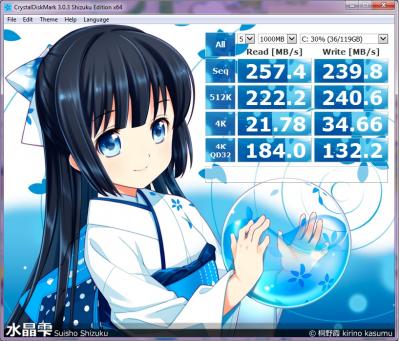
|
|
|
|
|



 Quote
Quote








 0.0174sec
 0.64
0.64
 6 queries
 GZIP Disabled