

is it really bad for having private IP? Google can answer my question.
Streamyx Streamyx 4Mbps Club V6
Streamyx Streamyx 4Mbps Club V6
|
|
 Mar 21 2017, 10:42 AM Mar 21 2017, 10:42 AM
|
 
All Stars
17,467 posts Joined: May 2008 From: Lazada   
|
is it really bad for having private IP? Google can answer my question.
|
|
|
|
|
|
Mar 21 2017, 05:36 PM
|

Junior Member
145 posts Joined: Jun 2009
|
QUOTE(JohnLai @ Mar 21 2017, 01:27 AM) The good news = yes, you can request for public IPv4. Only need to mention the reason for it. Eg: remote CCTV access, baby monitor, security system etc. But after I make a complain about my speed and ask them is it change to private IP they told me no such thing. So how to request to change. |
|
|
Mar 21 2017, 08:58 PM
|

Senior Member
3,669 posts Joined: Apr 2006
|
QUOTE(alicia-l @ Mar 21 2017, 05:36 PM) But after I make a complain about my speed and ask them is it change to private IP they told me no such thing. So how to request to change. Better use TM LiveChat. Don't complain about speed. Just complain on why you can't access your CCTV remotely.Some support agents on duty have no idea about these stuffs. Screenshot your assigned IP address at router/modem configuration page. Upload to TM Live Chat. Ask TM Live Chat on why your modem/router is assigned with private IP instead of public IPv4 address. |
|
|
Mar 22 2017, 05:53 PM
|
|
Senior Member
3,669 posts Joined: Apr 2006
|
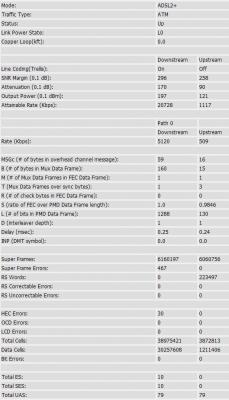
QUOTE(alicia-l @ Mar 20 2017, 01:02 PM) OIC tq for ur advice Okay, so here is my follow up on live chat + technician coming over and informing them about dsl noise profile that can only be changed on TM side stuff few days ago.Oh ya, I create the report on monday 20/3/2017 and it was changed just now 22/3/2017. Before (Interleaving mode)  CODE Pinging 202.188.1.5 with 32 bytes of data: Reply from 202.188.1.5: bytes=32 time=78ms TTL=58 Reply from 202.188.1.5: bytes=32 time=48ms TTL=58 Reply from 202.188.1.5: bytes=32 time=55ms TTL=58 Reply from 202.188.1.5: bytes=32 time=51ms TTL=58 Ping statistics for 202.188.1.5: Packets: Sent = 4, Received = 4, Lost = 0 (0% loss), Approximate round trip times in milli-seconds: Minimum = 48ms, Maximum = 78ms, Average = 58ms Today (Fastpath mode)  CODE Pinging 202.188.1.5 with 32 bytes of data: Reply from 202.188.1.5: bytes=32 time=37ms TTL=58 Reply from 202.188.1.5: bytes=32 time=38ms TTL=58 Reply from 202.188.1.5: bytes=32 time=38ms TTL=58 Reply from 202.188.1.5: bytes=32 time=38ms TTL=58 Ping statistics for 202.188.1.5: Packets: Sent = 4, Received = 4, Lost = 0 (0% loss), Approximate round trip times in milli-seconds: Minimum = 37ms, Maximum = 38ms, Average = 37ms  for Miri City TM technicians. for Miri City TM technicians.Edit: Note that I don't get charged...okay.... Edit2: Replacing pictures with PNG version because lowyat JPEG compressor quality is disappointing.... This post has been edited by JohnLai: Mar 22 2017, 06:13 PM Attached thumbnail(s) 
|
|
|
Mar 22 2017, 05:57 PM
|
|
Senior Member
1,007 posts Joined: Nov 2006
|
QUOTE(Mubarak90 @ Mar 16 2017, 11:35 AM) 4mbps Streamyx is not that bad. Already can stream Youtube at 720p. That is given that there is only one user is using the connection at a time. Tell us how to do iCloud backup, Facebook live, video upload with that upload speed, even if there is nobody else is contending the connection with you? |
|
|
Mar 22 2017, 10:33 PM
|

All Stars
14,037 posts Joined: Nov 2004
|
QUOTE(JohnLai @ Mar 22 2017, 05:53 PM) Okay, so here is my follow up on live chat + technician coming over and informing them about dsl noise profile that can only be changed on TM side stuff few days ago. Seems like if I go from Interleave to Fastpath, it can give me better pings? Question, how do I check which am I on?Oh ya, I create the report on monday 20/3/2017 and it was changed just now 22/3/2017. Before (Interleaving mode) CODE Pinging 202.188.1.5 with 32 bytes of data: Reply from 202.188.1.5: bytes=32 time=78ms TTL=58 Reply from 202.188.1.5: bytes=32 time=48ms TTL=58 Reply from 202.188.1.5: bytes=32 time=55ms TTL=58 Reply from 202.188.1.5: bytes=32 time=51ms TTL=58 Ping statistics for 202.188.1.5: Packets: Sent = 4, Received = 4, Lost = 0 (0% loss), Approximate round trip times in milli-seconds: Minimum = 48ms, Maximum = 78ms, Average = 58ms Today (Fastpath mode) CODE Pinging 202.188.1.5 with 32 bytes of data: Reply from 202.188.1.5: bytes=32 time=37ms TTL=58 Reply from 202.188.1.5: bytes=32 time=38ms TTL=58 Reply from 202.188.1.5: bytes=32 time=38ms TTL=58 Reply from 202.188.1.5: bytes=32 time=38ms TTL=58 Ping statistics for 202.188.1.5: Packets: Sent = 4, Received = 4, Lost = 0 (0% loss), Approximate round trip times in milli-seconds: Minimum = 37ms, Maximum = 38ms, Average = 37ms for Miri City TM technicians.Edit: Note that I don't get charged...okay.... Edit2: Replacing pictures with PNG version because lowyat JPEG compressor quality is disappointing.... |
|
|
|
|
|
Mar 22 2017, 10:45 PM
|
|
Junior Member
389 posts Joined: Oct 2016 From: Kota Kinabalu
|
Upstream Downstream
Current Rate (Kbps) 637 10237 Max Rate (Kbps) 1140 26680 SNR Margin (dB) 25.3 22.8 Line Attenuation (dB) 6.4 6.5 Errors (Pkts) 0 0 Are these stats good enough to request the change to Fast Path? |
|
|
Mar 22 2017, 11:23 PM
|
|
Senior Member
3,669 posts Joined: Apr 2006
|
QUOTE(celciuz @ Mar 22 2017, 10:33 PM) Seems like if I go from Interleave to Fastpath, it can give me better pings? Question, how do I check which am I on? Login into the modem/router and check the adsl stats.Dlink, asus and tplink display "Interleave Depth" value for both upstream and downstream. In my case, it was 64 depth downstream and 8 depth upstream If you use TM supplied innacomm, then you out of luck. Notice how much delay/latency interleaving by taking a look at "Delay (msec)" When my adsl line was in Interleave mode, the "Delay (msec)" were 7.85ms for downstream and 7.91ms for upstream. Once it is changed to fastpath, Interleave Depth is 1 for both upstream and downstream (depth of 1 means fastpath). The Delay (msec) for both downstream and upstream become 0.25ms and 0.24ms respectively. Some people is unlucky, for example, the forummer HolySatan here:  Source: https://forum.lowyat.net/index.php?showtopi...post&p=84153387 His "Delay (msec)" is.......  15ms for both downstream and upstream. Total up 30ms latency. His adsl noise profile probably is configured at maximum stability mode. 15ms for both downstream and upstream. Total up 30ms latency. His adsl noise profile probably is configured at maximum stability mode.QUOTE(rhytion @ Mar 22 2017, 10:45 PM) Upstream Downstream 25.3 with 6.4?Current Rate (Kbps) 637 10237 Max Rate (Kbps) 1140 26680 SNR Margin (dB) 25.3 22.8 Line Attenuation (dB) 6.4 6.5 Errors (Pkts) 0 0 Are these stats good enough to request the change to Fast Path? 22.8 with 6.5? Yes, stable enough. EDIT: Anyone with SNR (upstream and downstream) lower than 25, don't bother changing to fastpath. Otherwise, the dsl line will be forced to retrain randomly due to error/noise/low signal (layman term, dsl light will be unstable) or there will be a lot of packet loss. This post has been edited by JohnLai: Mar 22 2017, 11:30 PM |
|
|
Mar 22 2017, 11:33 PM
|
|
All Stars
14,037 posts Joined: Nov 2004
|
Oh dear, I'm on interleaved mode
 64 and 8... so that's why I'm getting high pings for my online game! 64 and 8... so that's why I'm getting high pings for my online game! Well, with my ADSL stats I should be able to request for fastpath? 
|
|
|
Mar 22 2017, 11:55 PM
|
|
Senior Member
3,669 posts Joined: Apr 2006
|
QUOTE(celciuz @ Mar 22 2017, 11:33 PM) Oh dear, I'm on interleaved mode Only 1.4db attenuation for upstream? 64 and 8... so that's why I'm getting high pings for my online game! Well, with my ADSL stats I should be able to request for fastpath?
Sure, no problem. Upstream SNR 23.4 should be fine since the attenuation is quite low. If your attenuation is more than 10, then better don't change. Luckily it is only 1.4db. Must be new copper wire........ But seriously......you better hope the technician at your local DSLAM exchange know how to change it. Changing "interleave" to "fastpath" can only be done on TM side, not user side. No need to ask TM technician to come over. (TM charges RM50+ for each visit, in my case though, TM technicians came over and I explained to them about dsl interleaving,fastpath, and depth value plus how those things have impact on latency, when fastpath or interleave should be used and how it can be only changed by TM since TM doesn't expose such setting to user unlike Australia Telstra ISP. I showed them Australia Telstra website too. I don't get charged for the visit.  They said they will refer to their senior and voila, mine got changed to fastpath the next day They said they will refer to their senior and voila, mine got changed to fastpath the next day  ) )This post has been edited by JohnLai: Mar 22 2017, 11:56 PM |
|
|
Mar 23 2017, 12:01 AM
|
|
All Stars
14,037 posts Joined: Nov 2004
|
QUOTE(JohnLai @ Mar 22 2017, 11:55 PM) Only 1.4db attenuation for upstream? About 4-5 years ago pulled the cable to my home for the coolunipack thingy... that's the cable you referring to? But I think the DSLAM is pretty close to me actually.Sure, no problem. Upstream SNR 23.4 should be fine since the attenuation is quite low. If your attenuation is more than 10, then better don't change. Luckily it is only 1.4db. Must be new copper wire........ But seriously......you better hope the technician at your local DSLAM exchange know how to change it. Changing "interleave" to "fastpath" can only be done on TM side, not user side. No need to ask TM technician to come over. (TM charges RM50+ for each visit, in my case though, TM technicians came over and I explained to them about dsl interleaving,fastpath, and depth value plus how those things have impact on latency, when fastpath or interleave should be used and how it can be only changed by TM since TM doesn't expose such setting to user unlike Australia Telstra ISP. I showed them Australia Telstra website too. I don't get charged for the visit. They said they will refer to their senior and voila, mine got changed to fastpath the next day )Hmm, think I gotta make it known to them about this then... get them to refer to their senior haha! |
|
|
Mar 23 2017, 12:38 AM
|
 
Elite
8,418 posts Joined: Jul 2008 
|
JohnLai That's some really competent technician you have over there! Pretty significant improvement on latency as well. Do report back if you face any issues.
Anyway, my 8Mbps Streamyx is on interleaved mode. I realize cable quality is really important. I lay my own telephone cable and I use a decent splitter. I use the cheapest TP-LINK modem so I couldn't check the depth. SNR Margin : 24.7 18.1 db Line Attenuation : 7.7 4.4 db  |
|
|
Mar 23 2017, 01:24 AM
|
|
Senior Member
3,669 posts Joined: Apr 2006
|
QUOTE(blacktubi @ Mar 23 2017, 12:38 AM) JohnLai That's some really competent technician you have over there! Pretty significant improvement on latency as well. Do report back if you face any issues. So far, so good,even my parent also said their internet browsing (through wifi) is quite responsive than usual today.Anyway, my 8Mbps Streamyx is on interleaved mode. I realize cable quality is really important. I lay my own telephone cable and I use a decent splitter. I use the cheapest TP-LINK modem so I couldn't check the depth. SNR Margin : 24.7 18.1 db Line Attenuation : 7.7 4.4 db Except the part where my area IPv6 connectivity still borked since October 2016.........  Not really a problem as I can use HE tunnel to access IPv6 only websites.  The bad news, I might not be using dsl for long. Currently awaiting call from unifi installer. Installer may call me for installation between April to June.  True, copper cable quality is important. But with your current upstream SNR......don't take the risk of changing to fastpath. EDIT: wah, even with interleaving, your 22ms ping is quite good. I guess 38ms is quite reasonable for my location in Sarawak. This post has been edited by JohnLai: Mar 23 2017, 01:25 AM |
|
|
|
|
|
Mar 23 2017, 10:11 AM
|
|
Elite
8,418 posts Joined: Jul 2008
|
QUOTE(JohnLai @ Mar 23 2017, 01:24 AM) So far, so good,even my parent also said their internet browsing (through wifi) is quite responsive than usual today. I just disable IPV6 entirely. No incentive for me to use that for now.Except the part where my area IPv6 connectivity still borked since October 2016......... Not really a problem as I can use HE tunnel to access IPv6 only websites. The bad news, I might not be using dsl for long. Currently awaiting call from unifi installer. Installer may call me for installation between April to June. True, copper cable quality is important. But with your current upstream SNR......don't take the risk of changing to fastpath. EDIT: wah, even with interleaving, your 22ms ping is quite good. I guess 38ms is quite reasonable for my location in Sarawak. I wouldn't bother changing, wouldn't fix what's not broken. |
|
|
Mar 23 2017, 02:21 PM
|

Junior Member
27 posts Joined: Jan 2011 From: Semenyih
|
» Click to show Spoiler - click again to hide... « Hi. Do you mind sharing what type of cable and splitter you use? I want to improve my streamyx line. Thanks |
|
|
Mar 23 2017, 03:06 PM
|

Senior Member
1,065 posts Joined: Jan 2003 From: Born in Kedah, Now @Putrajaya 
|
QUOTE(JohnLai @ Mar 21 2017, 12:33 AM) I had been saying 4Mbps users will be allocated with private IP since last year. mine already change to private IP last saturday.. call TM to change back to public.. they just ignored it.. Before this, only 384kbps, 512,1mbps and 2mbps users got 'unlucky'. Here another news, seem like 8Mbps will hit the shit too IF UNIFI uptake keep increasing.  |
|
|
Mar 23 2017, 03:30 PM
|
|
All Stars
14,037 posts Joined: Nov 2004
|
Sigh, contacted live chat and requested to change from interleaved to fast path saying to reduce ping to online game but now they requesting for ping plotter ._.
What reason did you guys give for changing the dsl noise profile? |
|
|
Mar 23 2017, 04:17 PM
|
|
Senior Member
3,669 posts Joined: Apr 2006
|
QUOTE(momuchi @ Mar 23 2017, 03:06 PM) mine already change to private IP last saturday.. call TM to change back to public.. they just ignored it.. I got mine changed back to public IP.QUOTE(celciuz @ Mar 23 2017, 03:30 PM) Sigh, contacted live chat and requested to change from interleaved to fast path saying to reduce ping to online game but now they requesting for ping plotter ._. Oh ya, livechat agent also requested ping plotter result from me.What reason did you guys give for changing the dsl noise profile? I simply provided her/him with the result and clarify that the ping can be lowered further if adsl noise profile is set to fastpath. I also wrote the interleave depth is adding 25ms plus 5ms extra ping time. So, from the pingplotter result, there is total 30ms extra latency which is caused by dsl interleaving which is simply unacceptable for online gaming. I provided them the source for the info http://www.kitz.co.uk/adsl/interleaving.htm and http://www.juniper.net/techpubs/software/c...e-config31.html , at the bottom graph, had* the livechat agent took a look at 'burst protection' latency values because TM dsl line has it activated. In worst case scenario, interleaving can increase latency up to 47ms for depth value of 64 with INP value of 2. You can check my interleaved dsl stats screenshot where my INP were 2.64 and 2.63 for downstream and upstream. In fastpath, INP is disabled. EDIT: Some stuff for reading....how INP and interleave depth affect each other......fair use.....two pages only. Sourced from google book?   This post has been edited by JohnLai: Mar 23 2017, 04:24 PM |
|
|
Mar 23 2017, 04:28 PM
|
|
All Stars
14,037 posts Joined: Nov 2004
|
QUOTE(JohnLai @ Mar 23 2017, 04:17 PM) I got mine changed back to public IP. I would be able to identify how much ping is contributed by the interleaved mode? By saying ping plotter, it is referring to the app ping plotter right?Oh ya, livechat agent also requested ping plotter result from me. I simply provided her/him with the result and clarify that the ping can be lowered further if adsl noise profile is set to fastpath. I also wrote the interleave depth is adding 25ms plus 5ms extra ping time. So, from the pingplotter result, there is total 30ms extra latency which is caused by dsl interleaving which is simply unacceptable for online gaming. I provided them the source for the info http://www.kitz.co.uk/adsl/interleaving.htm and http://www.juniper.net/techpubs/software/c...e-config31.html , at the bottom graph, had* the livechat agent took a look at 'burst protection' latency values because TM dsl line has it activated. In worst case scenario, interleaving can increase latency up to 47ms for depth value of 64 with INP value of 2. You can check my interleaved dsl stats screenshot where my INP were 2.64 and 2.63 for downstream and upstream. In fastpath, INP is disabled. EDIT: Some stuff for reading....how INP and interleave depth affect each other......fair use.....two pages only. Sourced from google book? |
|
|
Mar 23 2017, 04:54 PM
|
|
Junior Member
389 posts Joined: Oct 2016 From: Kota Kinabalu
|
The live chat agent never requested anything about ping for me and they just make report to change DSL noise profile, I think they don't even know what it is.
|
| Change to: |  0.0354sec 0.0354sec
 0.60 0.60
 6 queries 6 queries
 GZIP Disabled GZIP Disabled
Time is now: 16th December 2025 - 06:35 PM |
 Quote
Quote