

Meanwhile, my IPv6 totally no connection since 1:30AM 20 October 2016.
I still got allocated with public IPv6 address. Cant be used at all.
Streamyx Streamyx 4Mbps Club V6
Streamyx Streamyx 4Mbps Club V6
|
|
 Dec 11 2016, 09:13 PM Dec 11 2016, 09:13 PM
|
 
Senior Member
3,669 posts Joined: Apr 2006 
|
Meanwhile, my IPv6 totally no connection since 1:30AM 20 October 2016.
I still got allocated with public IPv6 address. Cant be used at all. |
|
|
|
|
|
Dec 11 2016, 10:03 PM
|

Junior Member
498 posts Joined: Jun 2009 
|
QUOTE(newmel @ Dec 11 2016, 06:10 PM) hi guys. just a quick question. assuming I would like to use my existing streamyx account at another location. can I just get a phone line at the new place, hook up a DSL modem and key in my current account settings, and get connected (Not at both places at the same time of course) a salesperson said our accounts are linked to our landline phone numbers nd that wouldn't work  QUOTE(Ebony & Ivory @ Dec 11 2016, 06:57 PM) Possible. But your phone line in new place need to has DSL signal in order to work, and u may get a slower speed due to the port is capped at different rate. How even that possible? The new place line must be set up first with the TM ADSL box (usually located outside of your house or at TM Pole if the house is a landed unit). By then you can connect to the net |
|
|
Dec 12 2016, 02:45 AM
Show posts by this member only | IPv6 | Post
#3183
|

Senior Member
962 posts Joined: Jan 2016
|
QUOTE(syncomp @ Dec 11 2016, 10:03 PM) How even that possible? The new place line must be set up first with the TM ADSL box (usually located outside of your house or at TM Pole if the house is a landed unit). By then you can connect to the net pls read bfore u post, or u simply cannot understand such simple word or sentence?QUOTE Possible. But your phone line in new place need to has DSL signal in order to work, and u may get a slower speed due to the port is capped at different rate. for certain user, even though they do not subscribe to any streamyx package, but their phone line is still has the DSL signal. So, it is possible or may works for them. get it?This post has been edited by Ebony & Ivory: Dec 12 2016, 02:59 AM |
|
|
Dec 12 2016, 07:27 AM
|
|
Junior Member
498 posts Joined: Jun 2009
|
QUOTE(Ebony & Ivory @ Dec 12 2016, 02:45 AM) pls read bfore u post, or u simply cannot understand such simple word or sentence? Forgive me my lord, I am asking question here because I do not know how it can be done. I am aware of the procedure if it is done thru TM helpline and the TM contractor come over to that new house to install. And I do not know how to check the phone wire for any signal. Do we need special equipment for that? Not because I am ignorance toward your really simple english. for certain user, even though they do not subscribe to any streamyx package, but their phone line is still has the DSL signal. So, it is possible or may works for them. get it? Ah.. And sorry for my standard 1 english |
|
|
Dec 12 2016, 01:08 PM
|

Junior Member
222 posts Joined: Jun 2015
|
any dealer? please pm me for the latest price for 4m and 8m. What I have to pay for the first time? Thanks
|
|
|
Dec 12 2016, 03:19 PM
|

Junior Member
532 posts Joined: May 2012
|
Anybody encountered this before? I can't access certain websites on my phone through the wifi of my streamyx but it's completely fine if I use data instead. The page just display tm ads.. what's the problem?
|
|
|
|
|
|
Dec 12 2016, 03:22 PM
|

Senior Member
1,043 posts Joined: Jun 2009
|
QUOTE(Gamerjim @ Dec 12 2016, 03:19 PM) Anybody encountered this before? I can't access certain websites on my phone through the wifi of my streamyx but it's completely fine if I use data instead. The page just display tm ads.. what's the problem? screenshot? |
|
|
Dec 12 2016, 04:10 PM
|
|
Junior Member
532 posts Joined: May 2012
|
QUOTE(aku_dia @ Dec 12 2016, 03:22 PM) screenshot? 
|
|
|
Dec 12 2016, 08:51 PM
Show posts by this member only | IPv6 | Post
#3189
|
|
Senior Member
962 posts Joined: Jan 2016
|
QUOTE(Gamerjim @ Dec 12 2016, 04:10 PM)
|
|
|
Dec 16 2016, 08:59 AM
|

Senior Member
572 posts Joined: Sep 2008
|
my Dlink DSL light is consistently blinking these few days, if manage to connect it will DC shortly after few mins,
upon checking on router page the SNR drop tremendously to 10ish (before that i hv excellent SNR & Attn), and DL cap around 1-1.5k ish, WTF and weirder, each time connected the stat completely differs, sometime still getting normal SNR and 5k DL spd. base on above problem, is it likely my router prob or cabling prob? not dare to call TM technician as they tend to come bare-handed and find a way to charge rm53 Edit: - tried call 100 reset port but doesn't solve the prob - confirmed no breakdown in my area This post has been edited by monkeybeh: Dec 16 2016, 09:02 AM |
|
|
Dec 17 2016, 12:24 AM
Show posts by this member only | IPv6 | Post
#3191
|

Junior Member
312 posts Joined: Aug 2015 
|
Hi guys
my torrent dl speed is around 400kbps but im having problems buffering youtube videos im talking about buffering 5mins 480p videos for 20minutes and something its still not complete... and recently i got high ping in dota 2 previously i dont have these problem when i was on 1Mbps. |
|
|
Dec 17 2016, 10:11 AM
|

All Stars
14,312 posts Joined: Jan 2011
|
QUOTE(monkeybeh @ Dec 16 2016, 08:59 AM) my Dlink DSL light is consistently blinking these few days, if manage to connect it will DC shortly after few mins, I never buy this brand as it is.....upon checking on router page the SNR drop tremendously to 10ish (before that i hv excellent SNR & Attn), and DL cap around 1-1.5k ish, WTF and weirder, each time connected the stat completely differs, sometime still getting normal SNR and 5k DL spd. base on above problem, is it likely my router prob or cabling prob? not dare to call TM technician as they tend to come bare-handed and find a way to charge rm53 Edit: - tried call 100 reset port but doesn't solve the prob - confirmed no breakdown in my area |
|
|
Dec 17 2016, 10:44 AM
Show posts by this member only | IPv6 | Post
#3193
|

Senior Member
699 posts Joined: Aug 2006 From: Today, 02:33 AM 
|
Done upgrade from 4mbps to 8mbps without additional monthly fee. RM140.
 Just go tm point ask for upgrade. |
|
|
|
|
|
Dec 17 2016, 11:34 AM
|

Senior Member
1,495 posts Joined: Dec 2012
|
QUOTE(Tokik Siwok @ Dec 17 2016, 01:24 AM) Hi guys You must disable IPV6 in your modem. What is your TM modem model number, is it the silver one ? I will teach u how to disable it.my torrent dl speed is around 400kbps but im having problems buffering youtube videos im talking about buffering 5mins 480p videos for 20minutes and something its still not complete... and recently i got high ping in dota 2 previously i dont have these problem when i was on 1Mbps. Youtube on IPV6 is slow. This post has been edited by GOPI56: Dec 17 2016, 11:39 AM |
|
|
Dec 17 2016, 12:09 PM
|

Junior Member
82 posts Joined: Mar 2008 From: Kota Kinabalu
|
Just need to ask for upgrade only then free upgrade?
|
|
|
Dec 17 2016, 12:32 PM
|

Senior Member
1,459 posts Joined: Oct 2009 From: BOLEHLAND
|
QUOTE(acid427 @ Dec 17 2016, 10:44 AM) Done upgrade from 4mbps to 8mbps without additional monthly fee. RM140. just walk in and say wanna upgrade to 8mbps?Just go tm point ask for upgrade. |
|
|
Dec 17 2016, 02:43 PM
Show posts by this member only | IPv6 | Post
#3197
|
|
Junior Member
312 posts Joined: Aug 2015
|
QUOTE(GOPI56 @ Dec 17 2016, 11:34 AM) You must disable IPV6 in your modem. What is your TM modem model number, is it the silver one ? I will teach u how to disable it. im using Innacomm w3410n from tmYoutube on IPV6 is slow. what exactly does disabling ipv6 do?  This post has been edited by Tokik Siwok: Dec 17 2016, 02:54 PM |
|
|
Dec 17 2016, 03:11 PM
Show posts by this member only | IPv6 | Post
#3198
|
|
Senior Member
699 posts Joined: Aug 2006 From: Today, 02:33 AM
|
QUOTE(ddr3 @ Dec 17 2016, 12:32 PM) just walk in and say wanna upgrade to 8mbps? Yep  |
|
|
Dec 17 2016, 03:57 PM
|
|
Senior Member
1,495 posts Joined: Dec 2012
|
QUOTE(Tokik Siwok @ Dec 17 2016, 03:43 PM) im using Innacomm w3410n from tm You can disable IPV6 on Innatech W3410N router.Here are the steps:what exactly does disabling ipv6 do? 1.Open your browser and point to http://192.168.1.1 2.In the login page: Username: tmadmin Password: Adm@_ _ _ _ (followed by the 4 last digit of the Mac ID found on your modem box or underneath the modem it self)  3.Then click interface tab and choose WAN. 4.Then follow the steps like in picture below. 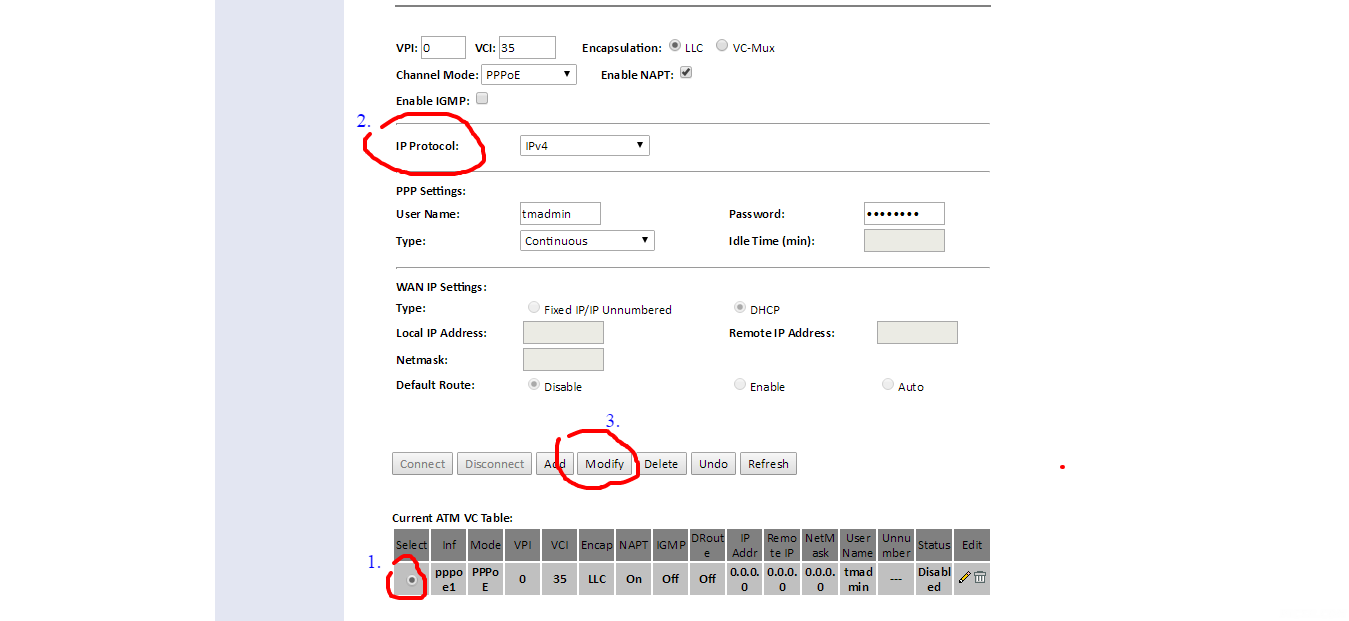 5.Then u will see a drop down menu beside IP Protocol like in the picture below. Here you choose IPV4. ( Area inside red circle in picture). And click modify to save settings. 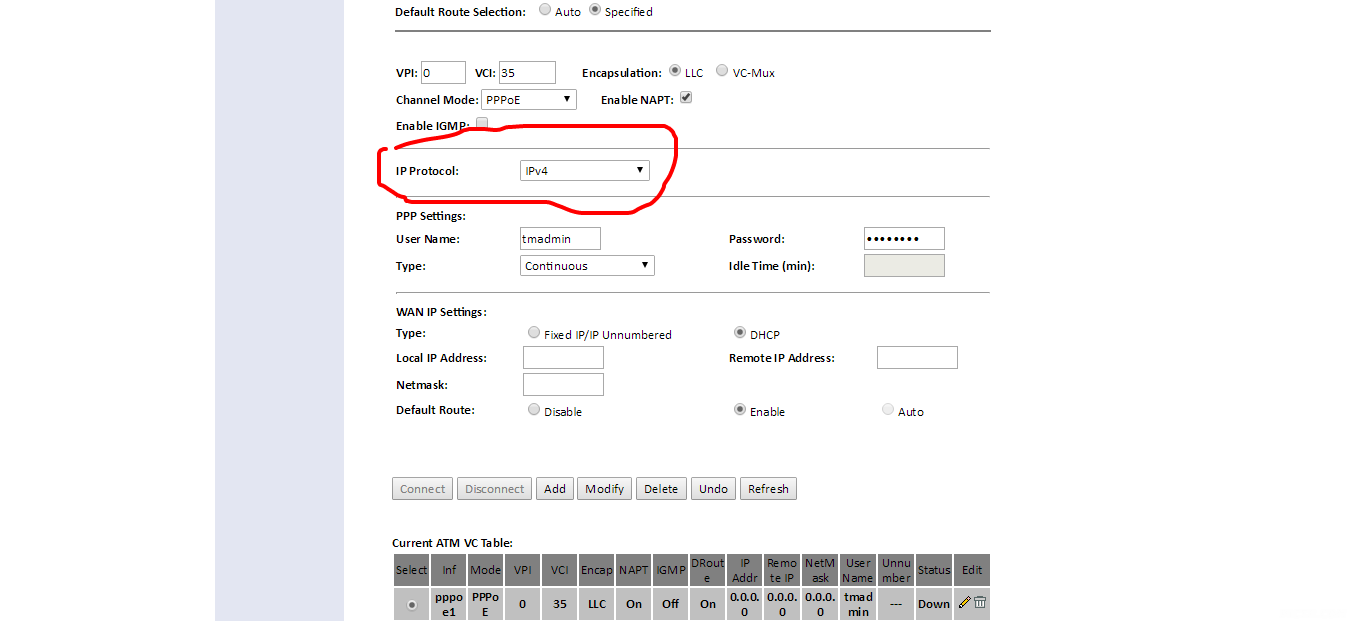 6.Now restart your modem. Done. |
|
|
Dec 17 2016, 04:19 PM
|
|
Junior Member
312 posts Joined: Aug 2015
|
QUOTE(GOPI56 @ Dec 17 2016, 03:57 PM) » Click to show Spoiler - click again to hide... « thanks   |
| Change to: |  0.0522sec 0.0522sec
 0.88 0.88
 6 queries 6 queries
 GZIP Disabled GZIP Disabled
Time is now: 20th December 2025 - 02:15 PM |
 Quote
Quote