


Xiaomi Redmi 1S Discussion Thread V2, THE MID-END GODPHONE
Xiaomi Redmi 1S Discussion Thread V2, THE MID-END GODPHONE
|
|
 Sep 8 2014, 11:14 AM Sep 8 2014, 11:14 AM
|
 
Junior Member
361 posts Joined: Dec 2008  
|
By the way i not quite understand why post like #3 is talking about Samsung phone
|
|
|
|
|
|
Sep 8 2014, 11:45 AM
|
|
Junior Member
361 posts Joined: Dec 2008
|
Screenshot for my problem:
1. Select the messy contact name that i want to delete 
2. Choose delete 
3. Yeah  
This post has been edited by bluecat68: Sep 8 2014, 11:51 AM |
|
|
Sep 8 2014, 12:06 PM
|

Senior Member
3,532 posts Joined: May 2008
|
Phone arrived..
Money still stuck.. sti not deduct from my account Attached thumbnail(s) 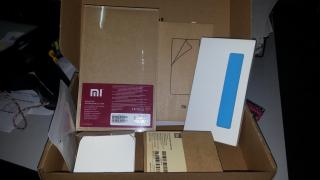
|
|
|
Sep 8 2014, 12:27 PM
|
|
Senior Member
3,532 posts Joined: May 2008
|
QUOTE(Anonymous34 @ Sep 8 2014, 01:11 AM) Illusion bro. Manada.jpg backlight for capacitive keyz Im not the only one that having illision before.. Yes if you bought it on Merdeka Sale. Worse come to worse, flash a new ROM, you have no choice bro.   |
|
|
Sep 8 2014, 12:29 PM
|

Junior Member
496 posts Joined: Sep 2008
|
QUOTE(adie82 @ Sep 8 2014, 12:06 PM) Phone arrived.. gooding mang Money still stuck.. sti not deduct from my account  |
|
|
Sep 8 2014, 01:18 PM
|
|
Senior Member
3,532 posts Joined: May 2008
|
QUOTE(yibaandre @ Sep 8 2014, 12:29 PM) gooding mang After unbox suddenly decided want to use.. dont want to sell... |
|
|
|
|
|
Sep 8 2014, 01:20 PM
|
|
Senior Member
1,699 posts Joined: Jan 2013
|
QUOTE(bluecat68 @ Sep 8 2014, 10:52 AM) Thats mean i have to root my phone first is it ?? You don't have to root your phone for some rom flashes.Contacts -> Settings -> Organize contacts -> configure SIM card. By the way I ask few times already but no one answer me this. Everytime i start my phone the Mi CLoud will ask me to send something to 33488 to activate my sim card. Is this really necessary ?? Yeah i know i can import number from Sim to phone & then edit number from there but 1) There is a delete option to delete any sim number -> "configure sim card" but error occur. 2) Sim number & phone number appear to together in the contact list. Also if i can flash the phone without root so which version i should download ?? 1. Redmi 1s-WCDMA/CDMA China - Version: JHCCNBF37.0 (V5) ?? 2. Redmi 1s-TD - Version: JHFCNBF18.0 (V5)?? or 3. Redmi 1s-WCDMA Global - Version: JHCMIBF36.0 (V5) ?? Thanks first I didn't not create an account for Mi cloud (choose skip option when booting for the 1st time), I think I just denied access for that app so it never asked me again. Editing numbers on the sim card works without any errors for me. It better to reflash your new phone because the stock rom may be old and buggy. The TD version is only for China, it won't work for phones in Malaysia or elsewhere. The WCDMA China version is configured with Chinese apps/language for China market. The WDMA global one will work for Malaysian customers but it still comes with some extra Chinese apps I think. Procedure to flash redmi 1s ================ I prefer the Malaysian rom instead of the global one above because it comes without any extra Chinese apps and has google apps preinstalled without too much junk. The latest version is 36. http://en.miui.com/thread-36919-1-1.html Recovery Rom: Redmi 1S WCDMA Stable Version (Global) JHCMIBF36.0 Fastboot Rom: Redmi 1S WCDMA Stable Version (Malaysia) JHCMIBF36.0 (* applicable for Malaysia Rom) Fastboot method- I use this because its simple and I get to wipe everything: --------------------------------------------------------------------------------------- Download the fastboot rom since it will allow you to wipe the phone. Download the fastboot driver here: https://drive.google.com/file/d/0B1eqnVInak...dit?usp=sharing Follow the simple procedures on this page: http://en.miui.com/forum.php?mod=viewthread&tid=38688 What you have to do mainly is install the driver and set the path then extract the rom to a directory on the harddisk, before switching on the phone using the right buttons and connecting it via usb cable to the pc. I chose flash_all.bat to wipe everything since theres nothing to keep on the new phone. Update method- Easiest method but will not delete junk/unwanted apps on the phone -------------------------------------------------------------------------------------------------- I think the "Recovery Rom: Redmi 1S WCDMA Stable Version (Global) JHCMIBF36.0" above should work using the update method. Version 37.0 WCDMA Global is available but its here: http://bigota.d.miui.com/JHCMIBF37.0/miui_...8300ab2_4.3.zip Follow the procedure here: http://en.miui.com/thread-11242-1-1.html All you have to do is copy the zip file to the sd card and run the update from the menu. The menu is found in the updater app - select update package. |
|
|
Sep 8 2014, 01:29 PM
|
|
Junior Member
361 posts Joined: Dec 2008
|
QUOTE(imbibug @ Sep 8 2014, 01:20 PM) You don't have to root your phone for some rom flashes. I first update the version thru wifi and i think mine is China version cause its v37. I didn't not create an account for Mi cloud (choose skip option when booting for the 1st time), I think I just denied access for that app so it never asked me again. Editing numbers on the sim card works without any errors for me. It better to reflash your new phone because the stock rom may be old and buggy. The TD version is only for China, it won't work for phones in Malaysia or elsewhere. The WCDMA China version is configured with Chinese apps/language for China market. The WDMA global one will work for Malaysian customers but it still comes with some extra Chinese apps I think. Procedure to flash redmi 1s ================ I prefer the Malaysian rom instead of the global one above because it comes without any extra Chinese apps and has google apps preinstalled without too much junk. The latest version is 36. http://en.miui.com/thread-36919-1-1.html Recovery Rom: Redmi 1S WCDMA Stable Version (Global) JHCMIBF36.0 Fastboot Rom: Redmi 1S WCDMA Stable Version (Malaysia) JHCMIBF36.0 (* applicable for Malaysia Rom) Fastboot method- I use this because its simple and I get to wipe everything: --------------------------------------------------------------------------------------- Download the fastboot rom since it will allow you to wipe the phone. Download the fastboot driver here: https://drive.google.com/file/d/0B1eqnVInak...dit?usp=sharing Follow the simple procedures on this page: http://en.miui.com/forum.php?mod=viewthread&tid=38688 What you have to do mainly is install the driver and set the path then extract the rom to a directory on the harddisk, before switching on the phone using the right buttons and connecting it via usb cable to the pc. I chose flash_all.bat to wipe everything since theres nothing to keep on the new phone. Update method- Easiest method but will not delete junk/unwanted apps on the phone -------------------------------------------------------------------------------------------------- I think the "Recovery Rom: Redmi 1S WCDMA Stable Version (Global) JHCMIBF36.0" above should work using the update method. Version 37.0 WCDMA Global is available but its here: http://bigota.d.miui.com/JHCMIBF37.0/miui_...8300ab2_4.3.zip Follow the procedure here: http://en.miui.com/thread-11242-1-1.html All you have to do is copy the zip file to the sd card and run the update from the menu. The menu is found in the updater app - select update package. Just downloaded the Global v36 (Recovery Rom) so lets see what it can do for me. Also how to @ someone user name actually ?? Thanks. |
|
|
Sep 8 2014, 01:34 PM
|

Junior Member
275 posts Joined: Nov 2012
|
halo... can anyone reply me? thx
|
|
|
Sep 8 2014, 02:04 PM
Show posts by this member only | IPv6 | Post
#490
|
|
Senior Member
656 posts Joined: Feb 2009
|
QUOTE(boonsheng @ Sep 8 2014, 10:39 AM) why got the word 3g.. as i had close the data alrd This is the Digi Network, does not matter you use Data or not. If you use data there will be a different icon with E or H+ instead of the normal wifi icon. That's what I think, may be wrong. |
|
|
Sep 8 2014, 02:32 PM
|
|
Junior Member
361 posts Joined: Dec 2008
|
QUOTE(boonsheng @ Sep 8 2014, 10:39 AM) why got the word 3g.. as i had close the data alrd Mine also same show My Maxis 3G even the data is off. I bet the 3G here is mean our sim card is 3G enable  |
|
|
Sep 8 2014, 02:41 PM
|
 
Elite
3,249 posts Joined: Oct 2011
|
I'm a new user to redmi here. Been using the phone for 2 weeks already, noticed some flaws (imo).
The battery life seems really poor to me, with wifi turned on and normal browsing (not watching video), it only last like 3-4 hours, using facebook most of the time. Updated the phone to latest UI as soon as I received it. But I am only allowed to run 1 app at a time. For example, if I clicked any link on facebook that opens up the browser, I will have to scroll all the way down again after returning to facebook since it closed the app for me. I've turned off memory cleaning but this still happens. Same thing didn't exist in my previous Lenovo A889 before. By the way, the phone is good for the High-res screen, good looking design and friendly UI.  |
|
|
Sep 8 2014, 02:48 PM
|

Senior Member
3,176 posts Joined: May 2013 From: Petaling Jaya
|
QUOTE(bluecat68 @ Sep 8 2014, 10:52 AM) Thats mean i have to root my phone first is it ?? You can flash without rooting.Contacts -> Settings -> Organize contacts -> configure SIM card. By the way I ask few times already but no one answer me this. Everytime i start my phone the Mi CLoud will ask me to send something to 33488 to activate my sim card. Is this really necessary ?? Yeah i know i can import number from Sim to phone & then edit number from there but 1) There is a delete option to delete any sim number -> "configure sim card" but error occur. 2) Sim number & phone number appear to together in the contact list. Also if i can flash the phone without root so which version i should download ?? 1. Redmi 1s-WCDMA/CDMA China - Version: JHCCNBF37.0 (V5) ?? 2. Redmi 1s-TD - Version: JHFCNBF18.0 (V5)?? or 3. Redmi 1s-WCDMA Global - Version: JHCMIBF36.0 (V5) ?? Thanks first Flash the WCDMA global version |
|
|
|
|
|
Sep 8 2014, 02:58 PM
|

Senior Member
1,173 posts Joined: Aug 2010 From: Malaysia 
|
anyone has this problem of the 3G signal keeps turning on and off (occasionally, not all the time) after upgrading to V36 Global?
eg, downloading photos from Whatsapp/using NAS apps, the "signal bar" will always reset itself from 0 to 100. Line is Maxis  V34 still okay back then. V34 still okay back then. |
|
|
Sep 8 2014, 03:27 PM
|
|
Junior Member
361 posts Joined: Dec 2008
|
Mmm my nightmare is continue .. try to flash the phone with fastboot rom (Malaysia v36) but no luck, click the flash_all but nothing, a cmd windows pop-up & close immediately.
If i drag the flash_all bat to the cmd windows and press enter i get this --> 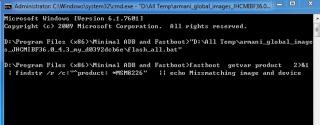
"echo missmatching image & device" !!?? I wonder should i enable usb debugging ?? Pls advise. Thank you. This post has been edited by bluecat68: Sep 8 2014, 03:39 PM |
|
|
Sep 8 2014, 04:24 PM
|

Senior Member
2,119 posts Joined: Apr 2012
|
Hi jus bought a xiaomi Redmi 1s and forumer claim is original Malaysia set, how to check if it's really Malaysia set and not ap? How do I also register for warranty?
|
|
|
Sep 8 2014, 04:54 PM
|
|
Senior Member
1,699 posts Joined: Jan 2013
|
QUOTE(bluecat68 @ Sep 8 2014, 03:27 PM) Mmm my nightmare is continue .. try to flash the phone with fastboot rom (Malaysia v36) but no luck, click the flash_all but nothing, a cmd windows pop-up & close immediately. It doesn't look like an error, just the command echoing to the screen. The fastboot will take time (5 minutes?)to complete and if you interrupt it halfway, it will be messed up and the only way to fix it would be to perform a fastboot flash (the other flash method may not work).If i drag the flash_all bat to the cmd windows and press enter i get this -->
"echo missmatching image & device" !!?? I wonder should i enable usb debugging ?? Pls advise. Thank you. To your previous question: https://forum.lowyat.net/index.php?showtopic=2657753 This post has been edited by imbibug: Sep 8 2014, 04:55 PM |
|
|
Sep 8 2014, 05:04 PM
|
|
Senior Member
2,237 posts Joined: Jul 2011
|
QUOTE(Memories_Fallen @ Sep 8 2014, 04:24 PM) Hi jus bought a xiaomi Redmi 1s and forumer claim is original Malaysia set, how to check if it's really Malaysia set and not ap? How do I also register for warranty? Don't need to register for warranty |
|
|
Sep 8 2014, 05:05 PM
|
|
Junior Member
361 posts Joined: Dec 2008
|
QUOTE(imbibug @ Sep 8 2014, 04:54 PM) It doesn't look like an error, just the command echoing to the screen. The fastboot will take time (5 minutes?)to complete and if you interrupt it halfway, it will be messed up and the only way to fix it would be to perform a fastboot flash (the other flash method may not work). @imbibug Mmm lets make it clear step by step. First are you saying the fastboot screen will stay like this --> 
for like 5 mins ?? This post has been edited by bluecat68: Sep 8 2014, 05:05 PM |
|
|
Sep 8 2014, 05:09 PM
|
|
Senior Member
2,237 posts Joined: Jul 2011
|
Why page 1 showing Galaxy Note 2 Info???
|
| Change to: |  0.0219sec 0.0219sec
 0.38 0.38
 6 queries 6 queries
 GZIP Disabled GZIP Disabled
Time is now: 7th December 2025 - 01:45 AM |
 Quote
Quote