QUOTE(xperiaVuser @ Sep 8 2014, 08:28 PM)
Are you using the Mi Flash Tool to flash the 'fastboot' ROM?
Yes. The "Minimal ADB and Fastboot" which suggest on that page.
QUOTE(imbibug @ Sep 8 2014, 08:32 PM)
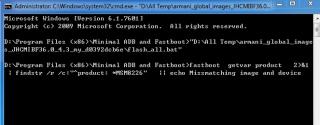
From the picture you posted, the cmd window hung at the very first line and did not proceed furthur which is strange. No flashing took place, so your phone should be able to boot normally I think.
Did you correctly set the path? If you open a command window and run the command "path", you should see c:\program files (x86)\Minimal ADB and Fastboot within the output.
If the path is set correctly trying copying the flash_all.bat file in the images directory (maybe the unzip program did not recreate the directories properly) where all the rom files are (directory with gpt*bin files) and run the copied flash_all.bat. Its also suggested in the this thread:
http://en.miui.com/forum.php?mod=viewthread&tid=38688Make sure your phone has enough juice before flashing.
If i type path in cmd i get this .. is this correct ??
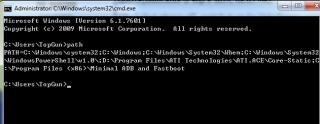
QUOTE(imbibug @ Sep 8 2014, 08:39 PM)
bluecat68 I think I figured out your flashing problem. There must not be any spaces in your rom directory on the harddisk. And there is a space where you put your rom "D:\ALL TEMP" so stick it in D:\TEMP instead.
Not quite. I actually try to just put it on D drive but still no luck.
Headache

By the way when i plug in usb cable in fastboot mode my computer didnt show up anything, is that normal ??
This post has been edited by bluecat68: Sep 8 2014, 08:50 PM 

 Sep 8 2014, 05:27 PM


 Quote
Quote





 0.0202sec
 0.80
0.80
 6 queries
 GZIP Disabled