Welcome Guest ( Log In | Register )

Bump Topic Topic Closed RSS Feed
66 Pages « < 20 21 22 23 24 > » Bottom

Outline · [ Standard ] · Linear+

TIME TIME Fibre Broadband™ v2.0, 500 Mbps into the future

views
     
jjj2
post Mar 14 2015, 08:09 AM

Look at all my stars!!
*******
Senior Member
3,607 posts

Joined: Feb 2006
QUOTE(bbtat @ Mar 13 2015, 10:48 PM)
Hi anyone encounter slow browsing ?
*
Hi Bro,

Do you mean you are having slowness issue when normal browsing websites ?? All websites??

Before going further, can you check your Internet Speed at Speedtest.net ?

Thanks.

jjj2
post Mar 16 2015, 01:34 AM

Look at all my stars!!
*******
Senior Member
3,607 posts

Joined: Feb 2006
QUOTE(wayne.chin @ Mar 16 2015, 01:08 AM)
anyone can provide me the website address for changing the time broadband password?
*
Hi Bro,

If you mean changing the password for your Time account, I'm sorry this feature has been disabled due to too many previous cases where customers changed the password & eventually can't connect to Internet.
If you still wish to change, you may contact TIME Customer Service at 1800 18 1818 or customerservice@time.com.my

If you refer to the Wi-Fi key/password, then you can login to the Router to change it.

Feel free to Buzz me if you need further assistance.

Thanks.
jjj2
post Mar 16 2015, 03:31 AM

Look at all my stars!!
*******
Senior Member
3,607 posts

Joined: Feb 2006
QUOTE(wayne.chin @ Mar 16 2015, 01:47 AM)
ya i mean to change the wifi password... i deleted the bookmarked address the installer gave to me...
*
Hi Bro,

Please login to your Router via 192.168.1.1
Then go to Wireless tab to change the wifi password.

Refer pm for username & password.

Thanks.
jjj2
post Mar 16 2015, 09:39 AM

Look at all my stars!!
*******
Senior Member
3,607 posts

Joined: Feb 2006
QUOTE(scFoong @ Mar 16 2015, 09:16 AM)
An update on my findings (Not fully resolve yet):

Decided to switch to another router to replace the existing Cisco E1000 -> Mi router. At least, the download speed is closer to at what is should be.

user posted image

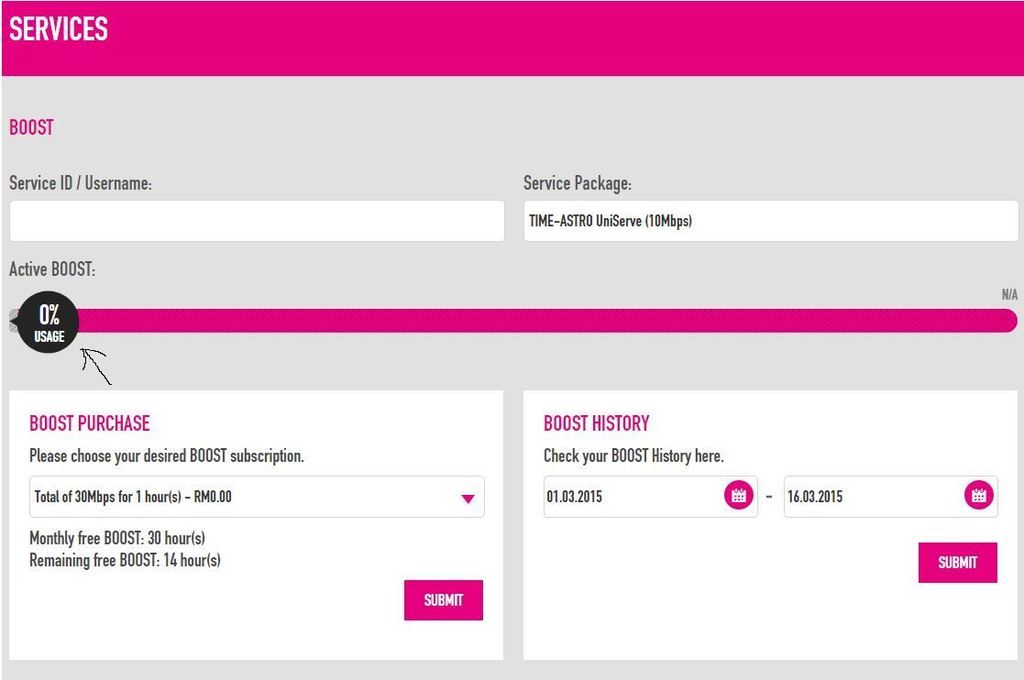
Again, the remaining item is the boost section. The speed is no change even after the boost activated (confirmed via speedtest from both speedtest.net & time.come.my)

I have question here:

Shall i be expecting any % from the Boost usage (as pointed by the arrow below)? As you can see, i still left 14hours more but the usage is always 0% usage. I did a check yesterday by logging into the selfcare page during the boost...still observing 0%. I just hope that the boost is activated at my side instead of accidentally to other user.
user posted image
*
Hi Bro,

Before changing your Router, u may refer to the guideline in your PM to further determine the root cause.

Yes the % indicator bar ought to move to show the remaining balance of Boost time each session.

Thanks.
jjj2
post Mar 18 2015, 08:55 AM

Look at all my stars!!
*******
Senior Member
3,607 posts

Joined: Feb 2006
QUOTE(kr_nexus @ Mar 17 2015, 09:16 PM)
I'm experiencing it too today, very slow speed, even with boost
Yesterday evening was fine

anyone know why?
*
Hi Bro,

We need more info..there are few root cause to your problem...feel free to call me for faster response...

Cheers smile.gif
jjj2
post Mar 19 2015, 01:00 AM

Look at all my stars!!
*******
Senior Member
3,607 posts

Joined: Feb 2006
QUOTE(kr_nexus @ Mar 18 2015, 09:17 PM)
May I know how long will it take? Im at ara damansara so I think I'm affected too.
because my net has been slow this past 2 days
*
Hi Bro,

Feel free to pm me your account details, I request port refresh for you.

Do feel free to call/text me for troubleshooting.

Thanks.
jjj2
post Mar 19 2015, 08:34 AM

Look at all my stars!!
*******
Senior Member
3,607 posts

Joined: Feb 2006
QUOTE(Ree73 @ Mar 19 2015, 08:17 AM)
hi all,

Can share with us the 8Mb/15Mb/30Mb/50Mb and 100Mb speed with us?

I am still thinking of what package to sign up with. Are there any free 1 month promotion? Heard some ppl told this deal is on till 31st march?

based on some torrent speed share here, I saw the speed is around 900K only, below 1Mbytes speed sad.gif ? Even my old streamyx can get xunlei dl rate of 1MBytes per second.
*
Hi Bro,

Thank you for your great interest in Time Fibre Home Broadband.

Well...based on our on-site experiences these years, the advertised speed & the speed you are actually getting are very much consistent.

Yes, 1 Month Free Trial promo is until 31 Mar 2015.

The actual download speed varies from case to case, Time does not block p2p/torrent traffic, but you'll have some problems with Xunlei, it won't work without some tweakings.

Since you have 1 Month Free Trial, why don't you give it a try ?

Cheers smile.gif
jjj2
post Mar 19 2015, 08:47 AM

Look at all my stars!!
*******
Senior Member
3,607 posts

Joined: Feb 2006
QUOTE(Ree73 @ Mar 19 2015, 08:21 AM)
Anyone sign up the monthly rm10 free 2000 minutes call? From the printout, it only stated free 2000 minute in 1 year.

How abt 2nd year onwards? this 2000 minute will reset annually? or only 1 time deal?

If 1 time deal, what for I pay extra 10 for year 2 onwards?
*
Hi Bro,

The 10 Plan (RM10/month) is only valid for a 1 Year contract, 2nd years onwards, you don't have to pay RM10/month anymore.

Thanks.
jjj2
post Mar 20 2015, 09:07 PM

Look at all my stars!!
*******
Senior Member
3,607 posts

Joined: Feb 2006
QUOTE(Ree73 @ Mar 20 2015, 09:22 AM)
I did some math on the 100Mbit with 100GB capped and normal unlimited line comparison:

100Mbit speed:(Ex, to run 100Mbps in 1 hour, total data that we get upon conversion to hour)

3600 (second in 1 hour) x 12.5 (MByte, 100Mbps converted to MB) = 45GByte (per hour)

Hence, by 2 hours, the quota will hit 90GByte! and the speed will fall back to 10Mbps, and none 50 hours boost...
Syok sendiri for 2 hours every month only smile.gif

For 8/10/15/20/30 Mbps speed:

Just calculate the speed boost for 30 hours... without counting in the package that you take

3600 (second in 1 hour) x 30 hours x 6.25 (50Mbps convert to MB) = 675GByte (in 1 month!)

Hence, just calculate the speed boost, we are getting 675GByte monthly. Just the boost alone is already worth the $.

In summary, I think TIME should revise the 100Mbps to make it more attractive. For example, the quota should revise to 1TeraByte, for sure this can attract more 100mbps subscribers....Don't forget that with 1TBytes capped, 100mbps user will easily fill up their quota in around 30 hours. This is something on par with other package as 30hours speed boost...

Only Time change this quota limit to 1Tera byte in 100mbps package... I will/might considering to switch over smile.gif
*
Hi Bro,

Thanks for the comparison...very interesting thumbup.gif

That is why for heavy downloader, 100Mbps is not recommended at all tongue.gif
jjj2
post Mar 25 2015, 02:16 PM

Look at all my stars!!
*******
Senior Member
3,607 posts

Joined: Feb 2006
QUOTE(Ree73 @ Mar 25 2015, 01:53 PM)
No one have any issue with VPN log in?
*
Hi Bro, please Pm or email me for more details.

No issues being reported.


jjj2
post Mar 25 2015, 11:42 PM

Look at all my stars!!
*******
Senior Member
3,607 posts

Joined: Feb 2006
QUOTE(Unknown50211 @ Mar 25 2015, 06:21 PM)
Hi All,

Anyone replace the Linksys E1200 router? I am looking for a replacement. Any experience any problem or compatibility issue?

I was thinking of Asus:

http://www.asus.com/my/Networking/RTN12_D1/specifications/

Any recommendation?

Thanks.
*
Hi Bro,

Asus RT-N12 is fine, we tested for long hours with heavy loading, it only disconnect once...If you have little more budget, go for Asus RT-N14UHP, which has better Range & no disconnection issue.

Feel free to buzz me if you need further help.
jjj2
post Mar 27 2015, 09:47 AM

Look at all my stars!!
*******
Senior Member
3,607 posts

Joined: Feb 2006
QUOTE(vankodoq @ Mar 26 2015, 09:17 PM)
Just want to drop by and say that the download rate from the filehosting websites is now back to normal. For whatever reason, thanks TIME. tongue.gif
*
Hi Bro,

Glad to hear that, feel free to buzz us should you require further assistance.

Thanks.

jjj2
post Mar 28 2015, 09:39 AM

Look at all my stars!!
*******
Senior Member
3,607 posts

Joined: Feb 2006
QUOTE(loafer @ Mar 28 2015, 09:17 AM)
Is anyone having to wait an unusually long time for the selfcare page to load? Or is it just me?
*
Hi Bro,

We don't face such problem here. What about other sites ?
Anyways do check out my guide in PM.

Thanks.


jjj2
post Mar 29 2015, 01:17 PM

Look at all my stars!!
*******
Senior Member
3,607 posts

Joined: Feb 2006
QUOTE(kmrdeva @ Mar 29 2015, 01:14 PM)
I pinged from my location (Tanjung Bunga, Penang).

Pinging 5.133.182.38 with 32 bytes of data:
Reply from 5.133.182.38: bytes=32 time=217ms TTL=52
Reply from 5.133.182.38: bytes=32 time=223ms TTL=52
Reply from 5.133.182.38: bytes=32 time=216ms TTL=52

Ping statistics for 5.133.182.38:
    Packets: Sent = 4, Received = 4, Lost = 0 (0% loss),
Approximate round trip times in milli-seconds:
    Minimum = 216ms, Maximum = 223ms, Average = 218ms

Pinging 209.18.114.232 with 32 bytes of data:
Reply from 209.18.114.232: bytes=32 time=218ms TTL=51
Reply from 209.18.114.232: bytes=32 time=219ms TTL=51
Reply from 209.18.114.232: bytes=32 time=217ms TTL=51
Reply from 209.18.114.232: bytes=32 time=218ms TTL=51

Ping statistics for 209.18.114.232:
    Packets: Sent = 4, Received = 4, Lost = 0 (0% loss),
Approximate round trip times in milli-seconds:
    Minimum = 217ms, Maximum = 219ms, Average = 218ms
*
Thanks Bro...

Actually pinging from PG or KL does not make any big difference.

jjj2
post Mar 29 2015, 03:25 PM

Look at all my stars!!
*******
Senior Member
3,607 posts

Joined: Feb 2006
QUOTE(archive @ Mar 29 2015, 02:04 PM)
Thank you both for your tests, I appreciate it. Looks like TIME is going to be where I go; Maxis has the same poor response that I had with Streamyx. I've double checked with TIME to verify availability at my condo, and they've confirmed that I can indeed get it there. Looks like I'll be signing up when I get back to KL. Unfortunately, I wont be back until just after the free trial promo finishes so no free month for me.
*
No worries, feel free to check out my PM to you.

Thanks.
jjj2
post Mar 30 2015, 08:31 AM

Look at all my stars!!
*******
Senior Member
3,607 posts

Joined: Feb 2006
QUOTE(archive @ Mar 29 2015, 05:57 PM)
How does installation work in condo complex?

Does the technician drill the wall and install the cable, or only run the cable along the floor from outside?

I emailed TIME, but they sent me a generic jpg that didn't explain it very well. I would like to know hard facts and detail about the installation process so I can prepare my condo for it.
*
Hi Bro, we are one of the Pioneer Installer.

There are numerous ways of getting the fibre into yr unit, minor drilling of your wall is one of it.

Anyhow depending on condo, some will have special predetermined path to follow, and Time does have their guidelines to follow as well.
We can't simply propose our own ways.

Feel free to buzz me should you required further more details info.

Thanks.
jjj2
post Mar 30 2015, 12:54 PM

Look at all my stars!!
*******
Senior Member
3,607 posts

Joined: Feb 2006
QUOTE(deejay220989 @ Mar 30 2015, 11:42 AM)
Conceal in plaster ceiling?

Btw is concealing a good idea? I get feedback that fibre optic cable can spoil easily..so in the case need to replace the cable..need to tear down the plaster ceiling?

Coz I just recently renovated too..
*
Hi Bro,

There are many professional ways of doing it just like I mentioned to you.


Cheers smile.gif
jjj2
post Mar 30 2015, 04:17 PM

Look at all my stars!!
*******
Senior Member
3,607 posts

Joined: Feb 2006
QUOTE(Amy09 @ Mar 30 2015, 03:41 PM)
want to ask if previous the house have unifi before ...and we apply for time broadband will that will save the installation fees?
*
Hi Bro,

Unifi infra is not related to Time at all...Time still need to pull in the fibre, unless you are referring to some special projects where internal infra is built to share.

Buzz me should you required further assistance.

Thanks.


jjj2
post Mar 30 2015, 04:24 PM

Look at all my stars!!
*******
Senior Member
3,607 posts

Joined: Feb 2006
QUOTE(LTG @ Mar 30 2015, 04:07 PM)
hi ,currently  i am timefiber user , now i just replace my router to asus  rt-ac68u , any configration need ? how to setup pppoe for my account ?
*
Hi Bro,

Very easy, just login to your Router, go to Internet Setup (PPPOE section), put in your TIME given Username & Password, click Next & follow the on-screen instructions, & you are ready to go.


Feel free to buzz me should you require further help.

Thanks.

jjj2
post Mar 31 2015, 09:24 AM

Look at all my stars!!
*******
Senior Member
3,607 posts

Joined: Feb 2006
GOOD NEWS

1 MONTH FREE TRIAL Promo has been extended to 30 April 2015.

Cheers rclxm9.gif


66 Pages « < 20 21 22 23 24 > » Top
Topic ClosedOptions
 

Change to:
| Lo-Fi Version
0.1638sec    0.46    7 queries    GZIP Disabled
Time is now: 12th December 2025 - 01:19 AM