Outline ·
[ Standard ] ·
Linear+
LCD Monitor Thread v13.
|
Andrewtst
|
 Sep 14 2017, 09:49 AM Sep 14 2017, 09:49 AM
|

|
QUOTE(Cynox @ Sep 14 2017, 09:32 AM) wow.... good to hear that. How long have you got the monitor? Why they not replacing a brand new unit but rather offer a full refund? Two months. Because this is rare case, they not sure why it happen and will happen again or not. |
|
|
|
|
|
Andrewtst
|
Sep 14 2017, 09:58 AM
|
|
|
QUOTE(Cynox @ Sep 14 2017, 09:51 AM) haha... they are not confident in their own product.  So time to get the Asus PG348Q?  Can PM me the contact to get it at good price at Taman U area if you are interested.  Oops too late. I already purchase LG 34UC79G. Waiting arrival now.  Asus PG348Q too expansive to me already. This post has been edited by Andrewtst: Sep 14 2017, 09:59 AM |
|
|
|
|
|
Andrewtst
|
Sep 15 2017, 01:33 AM
|
|
|
QUOTE(Cynox @ Sep 14 2017, 10:03 AM) wow... not bad too. But coming from the giant 32" VX3209, you will find the 34" ultra-wide too short on height.  Btw, how much you get this? Yup, I check comparison already, not as high height as 32" wide, only 38" ultra wide will be similar height but then 38" is too way expensive and also too long already. I bought at here , wished later can get else will need wait until Monday already. Now in transit. |
|
|
|
|
|
Andrewtst
|
Sep 15 2017, 07:49 AM
|
|
|
QUOTE(PowerSlide @ Sep 15 2017, 02:08 AM) Nice, another join the ultrawide gang haha Ultrawide is too seducing. Haha! |
|
|
|
|
|
Andrewtst
|
Sep 15 2017, 06:13 PM
|
|
|
QUOTE(craxors @ Sep 15 2017, 12:00 PM) why LG 34UC79G?  It fulfil my requirement. This monitor is half price of thar awesome Asus. Also my laptop (currently using laptop) only have HDMI 1.4 which cannot even have 50hz for Ultrawide 1440p. QUOTE(PowerSlide @ Sep 15 2017, 12:12 PM) im from vx3209 now to X34 pocket burn a hole but damn its amazing  Yalo. Fully empty already this month. |
|
|
|
|
|
Andrewtst
|
Sep 15 2017, 06:13 PM
|
|
|
QUOTE(Cynox @ Sep 15 2017, 12:56 PM) yes, 38" is still a bit out of reach now. Hopefully 3 years later from now will be a main stream model. Btw, can you ask Viewsonic Malaysia whether they will bring in VX3211-2K? Heard from a local computer shop that it will not be brought in as Msia Custom put a hefty import duty on it. Thanks. Ya but I feel 38" Ultrawide a bit too long. ViewSonic said this Nov will coming in a lot model. |
|
|
|
|
|
Andrewtst
|
Sep 15 2017, 06:19 PM
|
|
|
 Ultrawide screen is awesome! LG 34" 34UC79G |
|
|
|
|
|
Andrewtst
|
Sep 15 2017, 06:59 PM
|
|
|
QUOTE(Cynox @ Sep 15 2017, 06:45 PM) Wow....poison poison...tempt me want to get one too. If 1440p is unnecessary, I think this monitor very worth it. Later tonight will play more and update. |
|
|
|
|
|
Andrewtst
|
Sep 17 2017, 12:17 AM
|
|
|
QUOTE(kevyeoh @ Sep 16 2017, 11:31 PM) Been using monitor for 20 plus years and first time hear ant can enter... and thanks for the info... Will not consider Viewsonic as well... My first time also, but lucky ViewSonic finally decide full refund me. I am waiting their refund for the moment. |
|
|
|
|
|
Andrewtst
|
Sep 17 2017, 02:41 PM
|
|
|
QUOTE(kevyeoh @ Sep 17 2017, 10:16 AM) But game can support this resolution? Not every games but most is support. I had screenshot some at my review here - https://forum.lowyat.net/index.php?showtopi...post&p=86370743 QUOTE(craxors @ Sep 17 2017, 12:46 PM) but.. all monitor have air vent for heat... no? I believe the ants is going in from front not behind. |
|
|
|
|
|
Andrewtst
|
Sep 17 2017, 08:47 PM
|
|
|
QUOTE(craxors @ Sep 17 2017, 04:11 PM) clever ant. Haha! I hope no more such clever ants anymore. |
|
|
|
|
|
Andrewtst
|
Sep 19 2017, 12:42 AM
|
|
|
QUOTE(kietto @ Sep 18 2017, 09:14 PM) sifu i wanna ask some opinions i would like to get a 23inch+ monitor for my nintendo switch and design works -high level of color accuracy -matte screen (if possible) -brand limits to dell, samsung and LG -budget around 600-800 You can easier find 24" Full HD IPS LCD in market (not gaming series) within your price range except Dell. Dell only U & P series is anti-glare (matte) but U series is at least RM 1k, Dell S series within your budget but is shining surface which reflection to light. All others brand in market all is anti-glare surface. Below is some Full HD IPS model within your price range. - LG 24MP68VQ - IPS monitor with good spec and freesync support (for AMD card only). The most nicer and modern looking here.
- LG 24MP59G - IPS gaming series with good spec and freesync support (for AMD card only). Same leg design as my LG 34UC79G. Haha!
- Samsung LS24F350 - PLS monitor with good spec and freesync support (for AMD card only). PLS is comparable to IPS and developed by Samsung.
- Dell S2415H - Nice and within your budget IPS monitor but this is shining surface. I personally won't take as it is hard to prevent reflection.
- Dell P2417H - I not sure how this monitor perform, Dell P series is not that famous compare with U or S. Some mentioned this got ghosting issue.
This post has been edited by Andrewtst: Sep 19 2017, 01:41 AM |
|
|
|
|
|
Andrewtst
|
Sep 19 2017, 01:53 PM
|
|
|
QUOTE(kietto @ Sep 19 2017, 08:00 AM) Great great  The LG 24MP68VQ looks good to me. Before i make my final decision, may i know the difference between LG 24MP68VQ and Dell S2415H o.o? If none big difference, then i will get LG 24MP68VQ The big differences is Dell is glossy shining surface which will having a difficult control of light reflection. Also LG support freesync but not the Dell. LG respond time is 5ms but Dell is 6ms. |
|
|
|
|
|
Andrewtst
|
Sep 19 2017, 03:35 PM
|
|
|
QUOTE(kietto @ Sep 19 2017, 09:15 AM) oh ya another question whats the differences between non-gaming and gaming series o.o''? is it just the look different? Generally LG is better than Dell on this 3 models, that two LG model is not very much differences except the LG 24MP59G had support of 1ms MBR and recommended on 75Hz refresh rate with Display Port support. Below is comparison among 3 models.  This post has been edited by Andrewtst: Sep 19 2017, 03:42 PM This post has been edited by Andrewtst: Sep 19 2017, 03:42 PM |
|
|
|
|
|
Andrewtst
|
Sep 19 2017, 04:46 PM
|
|
|
After the upgrade. No regret. 🤗🤗🤗 I should actually thanks the ant sacrificed. Oops! But please no more ants in future. One time is enough. 😊 
|
|
|
|
|
|
Andrewtst
|
Sep 22 2017, 03:08 PM
|
|
|
QUOTE(teng_08 @ Sep 22 2017, 01:43 PM) That's a good looking monitor there Thanks for liking. Both I also like. |
|
|
|
|
|
Andrewtst
|
Sep 24 2017, 01:02 AM
|
|
|
Today at home town got nothing better to do. Decided re-tune my BenQ EW2440ZH monitor. Now it looks as nice as it suppose on my preferable choice of color temperature. All 3 preset Color Temperature is very wrong. Normal is too yellowish, Bluish is OMG blue... The Reddish is RED! Previously I am using R 97, G 98 B 95 but somewhere not very right. Now I changing all value to 93 for R, G & B, also black level to 16 and everything just look perfect. Also successful overclock the BenQ EW2440ZH to 75hz. This post has been edited by Andrewtst: Sep 24 2017, 02:03 AM |
|
|
|
|
|
Andrewtst
|
Sep 25 2017, 11:39 AM
|
|
|
QUOTE(sepulse @ Sep 25 2017, 11:06 AM) hi guy im planning to buy a new monitor. budget around RM 500-600 only. so i will be using it for works, photoshop, lightroom etc + some gamings (not hardcore gaming). prefer IPS right now i dunno which 1 to choose between LG 24MP68VQ or DELL S2216H. any suggestion? Please take noted Dell S2216H is glossy panel which will make light reflection on it. I will pick LG 24MP68VQ because I cannot stand on glossy surface due to hard to control reflection. |
|
|
|
|
|
Andrewtst
|
Oct 7 2017, 05:36 PM
|
|
|
Can't believe the LG 34" 34UC79G can run at 3440x1440 resolution by using CRU change the EDID... but that "Out of Range" warning from monitor cannot disable, technically means cannot use. Anyone know how to disable LG monitor warning of "out of range". 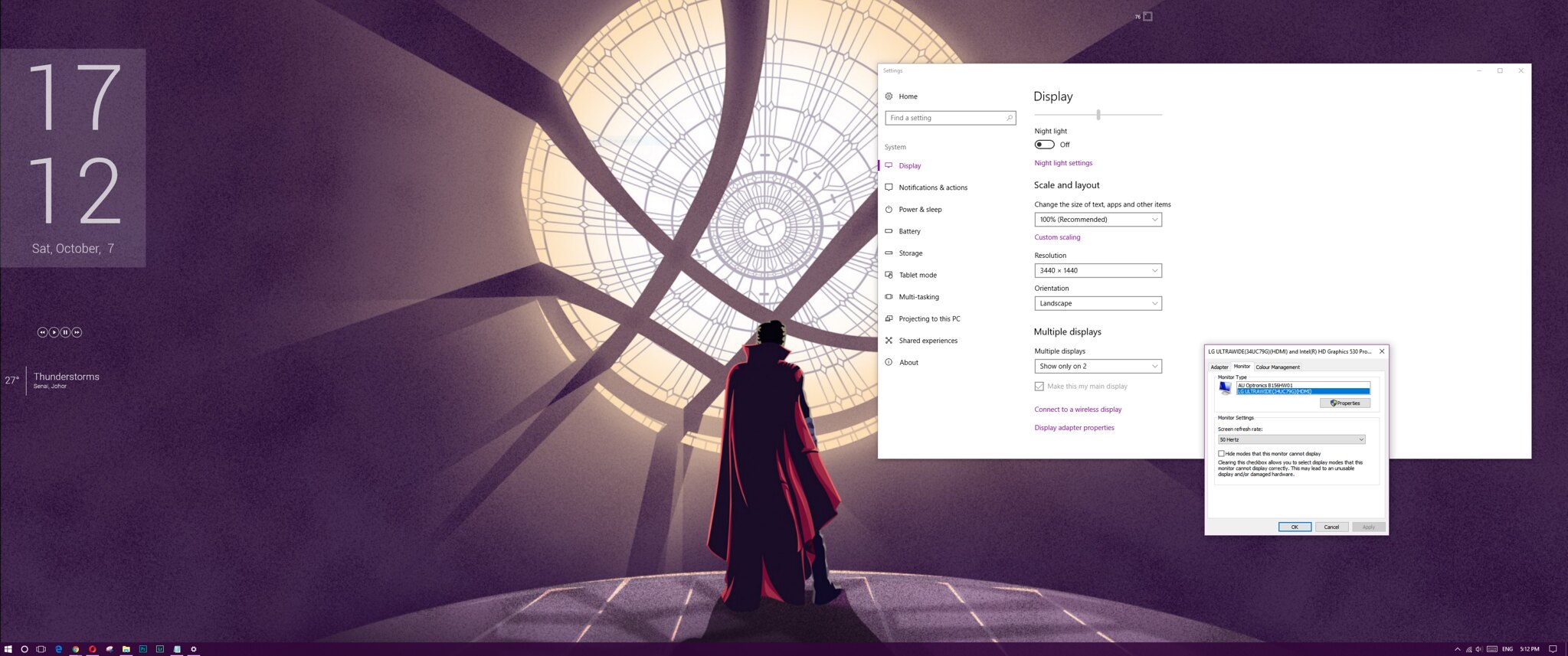 This post has been edited by Andrewtst: Oct 7 2017, 05:43 PM This post has been edited by Andrewtst: Oct 7 2017, 05:43 PM |
|
|
|
|
|
Andrewtst
|
Oct 7 2017, 10:08 PM
|
|
|
QUOTE(GameSky @ Oct 7 2017, 08:22 PM) Anyone using Acer XF240H or KG240A? The one with 144Hz TN freesync panel. Is it running 144Hz while gaming? Planning to get either one for CSGO It is running 144hz everywhere as long you set it. Make sure you have Display Port 1.2 as I HDMI 1.3 or 1.4 not able to reach 144hz. Based on my monitor 144hz and below is my testing result Using HDMI 1.3- 1920x1080, maximum 125hz
- 2560x1080, maximum 95hz
- 3440x1440, maximum 56.5hz
|
|
|
|
|





 Quote
Quote
 0.0883sec
 0.38
0.38
 7 queries
 GZIP Disabled