

So here some drill:
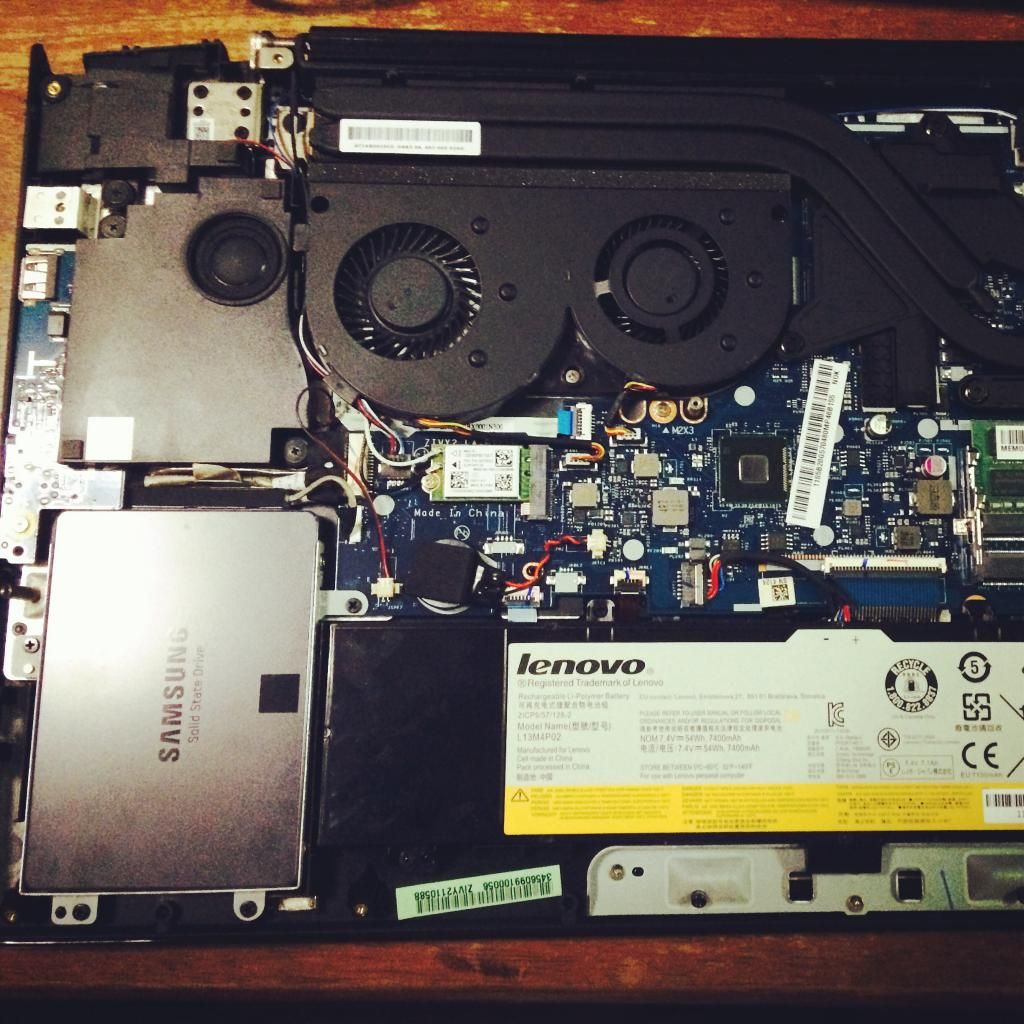
This post has been edited by jyu_bonk: Jul 17 2014, 02:27 PM
News ROG GL552VW i7-6700HQ GTX960m 128GB FHD W10 ~ 4399, XPS15 6300HQ GTX960,4K infinityEdge~6699
|
|
 Jul 17 2014, 02:26 PM Jul 17 2014, 02:26 PM
|
 
Junior Member
328 posts Joined: Mar 2010 
|
Just call lenovo and the representative said, if change to SSD by ourself, the only part that not cover by warranty is just the SSD, other parts (battery, mobo etc) WILL NOT VOID.
So here some drill: This post has been edited by jyu_bonk: Jul 17 2014, 02:27 PM |
|
|
|
|
|
Jul 17 2014, 03:15 PM
Show posts by this member only | IPv6 | Post
#662
|

Senior Member
3,102 posts Joined: May 2005 From: Penang *̡͌l̡*̡̡
|
QUOTE(jyu_bonk @ Jul 17 2014, 02:26 PM) Just call lenovo and the representative said, if change to SSD by ourself, the only part that not cover by warranty is just the SSD, other parts (battery, mobo etc) WILL NOT VOID. So your original HDD, keep as backup?So here some drill: » Click to show Spoiler - click again to hide... « I looking for another SSD upgrade too. Currently using M2 NGFF + Original HDD. Planning to add normal SSD and the ordinary HDD move to caddy drive  |
|
|
Jul 17 2014, 03:28 PM
|

Junior Member
79 posts Joined: Jul 2008 From: Subang USJ 
|
QUOTE(jyu_bonk @ Jul 17 2014, 02:26 PM) Just call lenovo and the representative said, if change to SSD by ourself, the only part that not cover by warranty is just the SSD, other parts (battery, mobo etc) WILL NOT VOID. How do you convert? since y50 dont have msata..So here some drill:  |
|
|
Jul 17 2014, 04:04 PM
|
|
Junior Member
328 posts Joined: Mar 2010
|
QUOTE(tachlio @ Jul 17 2014, 03:15 PM) So your original HDD, keep as backup? Gonna be awesome, the speed for boot up just change from 3 minutes ++ to 7 seconds lol, I can't enter bios sometimes cuz to fast. T_TI looking for another SSD upgrade too. Currently using M2 NGFF + Original HDD. Planning to add normal SSD and the ordinary HDD move to caddy drive QUOTE(simchengheng @ Jul 17 2014, 03:28 PM) How do you convert? since y50 dont have msata.. Correct, no mSATA, just change the SATA HDD to SSD direct.This post has been edited by jyu_bonk: Jul 17 2014, 04:05 PM |
|
|
Jul 17 2014, 04:37 PM
|
|
Junior Member
79 posts Joined: Jul 2008 From: Subang USJ
|
QUOTE(jyu_bonk @ Jul 17 2014, 04:04 PM) Gonna be awesome, the speed for boot up just change from 3 minutes ++ to 7 seconds lol, I can't enter bios sometimes cuz to fast. T_T OMG 7sec. so, how you install / move window 8.1 into the SSD drive? any special procedure to care about?Correct, no mSATA, just change the SATA HDD to SSD direct. |
|
|
Jul 17 2014, 04:47 PM
|

Senior Member
603 posts Joined: Jun 2006
|
QUOTE(jyu_bonk @ Jul 17 2014, 02:26 PM) Just call lenovo and the representative said, if change to SSD by ourself, the only part that not cover by warranty is just the SSD, other parts (battery, mobo etc) WILL NOT VOID. nice... 1tb? So here some drill: » Click to show Spoiler - click again to hide... «  |
|
|
|
|
|
Jul 17 2014, 05:02 PM
|

Junior Member
148 posts Joined: Apr 2010
|
QUOTE(leng2 @ Jul 17 2014, 04:47 PM) nice... 1tb? 1...tb ssd......it gonna cost half of the y50 itself |
|
|
Jul 17 2014, 06:24 PM
|
|
Senior Member
603 posts Joined: Jun 2006
|
QUOTE(w33wawa @ Jul 17 2014, 05:02 PM) 1...tb ssd......it gonna cost half of the y50 itself 500gb is equally expensive. 240/250gb is okay but the size can't get you much applications or games. |
|
|
Jul 17 2014, 09:05 PM
|
|
Junior Member
24 posts Joined: Aug 2012
|
QUOTE(AxeFire @ Jul 16 2014, 11:21 AM) why my earphone cannot fit into the earphone socket on my Y50??? there are 2 holes which one is for earphone ?the one closer to the screen must be the headset socket but somehow my earphone cannot fit into the socket! Why ah????? and what is the outer one for??? Not sure if you have found the solution for this problem but just to share, I had the same exact issue as you. None of my earphones, no matter the type, would fit in. They are always about 3/4 in and wouldn't go in any further. I tried to use a toothpick, thinking maybe some linen got stuck inside. Nothing was in there. Tried flashing to see if there's any damage inside but nothing was wrong as well. Finally, I thought perhaps it's a new machine so the spring inside must still be tough. So I applied a little more force than normal and the jack went through perfectly. Sound and everything works fine. Second time in, it's a lot more easy.So give it a try.  |
|
|
Jul 17 2014, 09:08 PM
|

Junior Member
368 posts Joined: Oct 2012 From: Penang
|
QUOTE(Lyril @ Jul 17 2014, 09:05 PM) Not sure if you have found the solution for this problem but just to share, I had the same exact issue as you. None of my earphones, no matter the type, would fit in. They are always about 3/4 in and wouldn't go in any further. I tried to use a toothpick, thinking maybe some linen got stuck inside. Nothing was in there. Tried flashing to see if there's any damage inside but nothing was wrong as well. Finally, I thought perhaps it's a new machine so the spring inside must still be tough. So I applied a little more force than normal and the jack went through perfectly. Sound and everything works fine. Second time in, it's a lot more easy. sure? u press with all your strength? I sked I break my BeatsSo give it a try. This post has been edited by AxeFire: Jul 17 2014, 09:09 PM |
|
|
Jul 17 2014, 09:42 PM
|
|
Junior Member
24 posts Joined: Aug 2012
|
QUOTE(AxeFire @ Jul 17 2014, 09:08 PM) sure? u press with all your strength? I sked I break my Beats Not all my strength lol. Just use a little more force than normal. I don't believe it will break your Beats but if you're afraid then use another cheaper one. |
|
|
Jul 17 2014, 09:55 PM
|
|
Junior Member
328 posts Joined: Mar 2010
|
QUOTE(w33wawa @ Jul 17 2014, 05:02 PM) 1...tb ssd......it gonna cost half of the y50 itself yup, 1 TB. The new variant of y50 with 512gb gnna cost about 5200++, 1TB do urself just 5100.QUOTE(AxeFire @ Jul 17 2014, 09:08 PM) sure? u press with all your strength? I sked I break my Beats I just got the chance to test my earphone jack and yes, its a bit thight and you need to put some strenght on in. push it all the way through and voila, my steelseries H series is working now.This post has been edited by jyu_bonk: Jul 17 2014, 09:57 PM |
|
|
Jul 17 2014, 10:00 PM
|
|
Junior Member
328 posts Joined: Mar 2010
|
QUOTE(simchengheng @ Jul 17 2014, 04:37 PM) OMG 7sec. so, how you install / move window 8.1 into the SSD drive? any special procedure to care about? I have macbook air with bootable windows 8.1, that I create using bootcamp on MacOS X, what I did was change to empty out of the box SSD into ur laptop --> put the bootable drive at the usb port --> laptop going to boot from pendrive for a moment instead of HD --> install windows from pendrive to harddisk --> done.I guess all you need to have is either bootable windows disc + external dvd driver or just create bootable pendrive with windows 8.1 in it. |
|
|
|
|
|
Jul 18 2014, 08:22 AM
|

Senior Member
3,304 posts Joined: Mar 2006 From: Chicago(Port25)
|
QUOTE(jyu_bonk @ Jul 17 2014, 02:26 PM) Just call lenovo and the representative said, if change to SSD by ourself, the only part that not cover by warranty is just the SSD, other parts (battery, mobo etc) WILL NOT VOID. Standard procedure for RMA would be replace back every stock, means if u added RAM, take it out. If you swapped from stock HDD to SSD, change it back to SSD, then u have your proper warranty to claim that this is the default spec that came out of the box. |
|
|
Jul 19 2014, 11:13 PM
|
|
Senior Member
1,087 posts Joined: Dec 2006
|
Y50 "WOW" special edition in China look tempting.
 Wonder it can make it to MY. Photo from zol.com.cn http://detail.zol.com.cn/382/381755/pic_6238_1.shtml   This post has been edited by ytlay: Jul 19 2014, 11:17 PM |
|
|
Jul 20 2014, 12:09 AM
|

Junior Member
214 posts Joined: Jun 2006 From: Malaysialand
|
Anybody found a review for the Flex 2-14? I've only found one from engadget and even then it's a user review, and not a pro review.
|
|
|
Jul 20 2014, 12:12 AM
|
 
Elite
15,694 posts Joined: Mar 2008
|
QUOTE(mudster @ Jul 20 2014, 12:09 AM) Anybody found a review for the Flex 2-14? I've only found one from engadget and even then it's a user review, and not a pro review. Got a unit and reviewed it. Not sure if it is the one that you are looking for. https://forum.lowyat.net/topic/3294875 This post has been edited by kingkingyyk: Jul 20 2014, 12:12 AM |
|
|
Jul 20 2014, 01:59 AM
|
|
Junior Member
7 posts Joined: Jul 2013
|
the head phone jack is quite tight for mine too
i just lub with a bit of wd-40 , just push all the way, cant be wrong anyone knows how to off the keyboard back lit ...too bright man and also the power management, it always off my ext drive usb power after like 15min ...how to on forever when stay connected ? |
|
|
Jul 20 2014, 04:58 AM
|

Senior Member
1,019 posts Joined: Sep 2009
|
QUOTE(MasterZew @ Jul 20 2014, 01:59 AM) the head phone jack is quite tight for mine too Fn + spacebar for the backlit brightnessi just lub with a bit of wd-40 , just push all the way, cant be wrong anyone knows how to off the keyboard back lit ...too bright man and also the power management, it always off my ext drive usb power after like 15min ...how to on forever when stay connected ? |
|
|
Jul 20 2014, 06:21 AM
|
|
Junior Member
7 posts Joined: Jul 2013
|
QUOTE(joonwei23 @ Jul 20 2014, 04:58 AM) Fn + spacebar for the backlit brightness thanks...This post has been edited by MasterZew: Jul 20 2014, 06:31 AM |
|
Topic ClosedOptions
|
| Change to: |  0.1955sec 0.1955sec
 0.43 0.43
 6 queries 6 queries
 GZIP Disabled GZIP Disabled
Time is now: 5th December 2025 - 03:04 PM |
 Quote
Quote