Welcome Guest ( Log In | Register )

Outline · [ Standard ] · Linear+

Home Networking TP-Link 3G Routers Owner Club V3, MR3420

views
     
TSblacktubi
post Nov 18 2013, 08:24 PM, updated 10y ago

-
Group Icon
Elite
8,415 posts

Joined: Jul 2008

Welcome to TP-LINK 3G modems discussion thread

MR3420, MR3020, MR3040, 703N etc

user posted image


Useful Links
3G/4G Internet Tips!LinkMore useful information compiled for enhancing your connection.
OpenWRT RooterLinkA customized build of OpenWRT with enhanced 3G/LTE modem support.
DD-WRTLinkA custom firmware also for our routers
Stock Firmware UpdateLinkFirmware Update is available here.
Stock Firmware Compatibility ListLinkIf your modem model is not supported, you can always use a custom firmwre to make it work

LTE Modem Compatibility List :
Stock Firmware + RooterRooter Only
E398E3276
E392K5006Z
320UMF821

Modification Available :
Use a better power brick.
» Click to show Spoiler - click again to hide... «

Use a better power supply for the USB modem especially power hungry modem.
» Click to show Spoiler - click again to hide... «
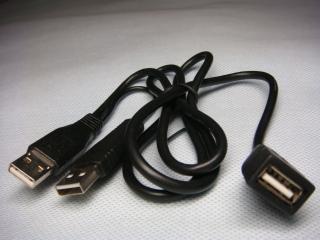
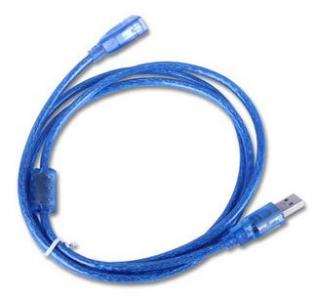
Use a USB extension cable to reduce interference.
» Click to show Spoiler - click again to hide... «
Use another router for better Wireless and better Network.
» Click to show Spoiler - click again to hide... «


This post has been edited by blacktubi: Nov 21 2013, 05:20 PM
TSblacktubi
post Nov 18 2013, 08:24 PM

-
Group Icon
Elite
8,415 posts

Joined: Jul 2008

More information regarding OpenWRT Rooter

Rooter is a custom firmware base on OpenWRT and customized to provide advance function for 3G/LTE modems.
Project Homepage

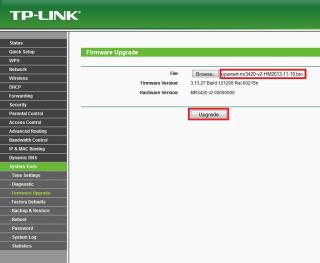
How to flash your Router to OpenWRT Rooter
» Click to show Spoiler - click again to hide... «

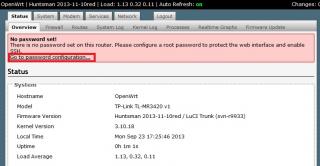
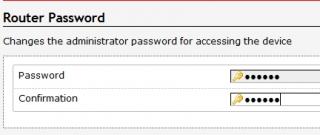
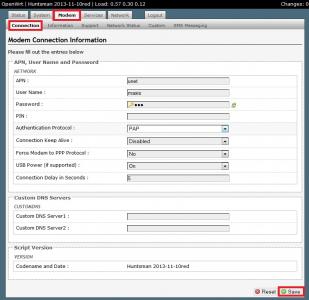
Initial Setup guide for OpenWRT Rooter
» Click to show Spoiler - click again to hide... «

Workaround for Huawei E3276 to work properly. - Only for firmware below 21.155. DONT do this if you are not
» Click to show Spoiler - click again to hide... «

Maintain your internet with the Keep Alive function.
» Click to show Spoiler - click again to hide... «


This post has been edited by blacktubi: Dec 24 2013, 09:11 PM
TSblacktubi
post Nov 18 2013, 08:25 PM

-
Group Icon
Elite
8,415 posts

Joined: Jul 2008

Reserved

This post has been edited by blacktubi: Nov 18 2013, 08:37 PM
ioi84
post Nov 18 2013, 08:58 PM

Getting Started
**
Junior Member
84 posts

Joined: Feb 2013
From: North Malaysia


Nice. Got new version already.
TQ sifu blacktubi for new update.. thumbup.gif thumbup.gif
maxcheam
post Nov 18 2013, 08:59 PM

Casual
***
Junior Member
384 posts

Joined: Jan 2006
From: Penang


Congrats on V3 of the thread!!!

Here's the AT commands for E398 and E3276, use at your own risk!!! whistling.gif
» Click to show Spoiler - click again to hide... «

maxcheam
post Nov 18 2013, 09:02 PM

Casual
***
Junior Member
384 posts

Joined: Jan 2006
From: Penang


For those having issues on ROOter firmware, please post your System Logs . If none of us can help you here, you may try the ROOter thread at http://ofmodemsandmen.com/redirect.html
ibnuasad
post Nov 18 2013, 09:03 PM

A screw is not a screw until you screw it!
****
Senior Member
558 posts

Joined: Jun 2006
From: Lowyat.Net


Wow..v3 already smile.gif
yonghong
post Nov 18 2013, 09:04 PM

On my way
****
Junior Member
551 posts

Joined: Jan 2011


» Click to show Spoiler - click again to hide... «

congratz for new threads !! support!! rclxms.gif rclxms.gif

This post has been edited by yonghong: Nov 18 2013, 09:46 PM
chuahcs79
post Nov 18 2013, 09:04 PM

Look at all my stars!!
Group Icon
Elite
6,931 posts

Joined: Apr 2011
From: Bolehland for sure ^_^


QUOTE(maxcheam @ Nov 18 2013, 08:59 PM)
Congrats on V3 of the thread!!!

Here's the AT commands for E398 and E3276, use at your own risk!!!  whistling.gif
» Click to show Spoiler - click again to hide... «

*
nice share on AT COMMAND notworthy.gif notworthy.gif
lpc26
post Nov 18 2013, 09:04 PM

Getting Started
**
Junior Member
135 posts

Joined: Jan 2003
rclxms.gif rclxms.gif rclxms.gif rclxms.gif

wow new de haha
TSblacktubi
post Nov 18 2013, 09:05 PM

-
Group Icon
Elite
8,415 posts

Joined: Jul 2008

QUOTE(maxcheam @ Nov 18 2013, 08:59 PM)
Congrats on V3 of the thread!!!

Here's the AT commands for E398 and E3276, use at your own risk!!!  whistling.gif
» Click to show Spoiler - click again to hide... «

*
Will add this to the 3G/4G Internet WiKi.

Thanks!
TSblacktubi
post Nov 18 2013, 09:06 PM

-
Group Icon
Elite
8,415 posts

Joined: Jul 2008

yonghong : Bro, spoiler that please notworthy.gif

This post has been edited by blacktubi: Nov 18 2013, 09:06 PM
digilife
post Nov 18 2013, 09:07 PM

The MNP guy, its me yeah.
*******
Senior Member
8,025 posts

Joined: Feb 2005
From: Planet Boleland


Lipoting in.


lpc26
post Nov 18 2013, 09:07 PM

Getting Started
**
Junior Member
135 posts

Joined: Jan 2003
E3276:
AT^SETPORT? - show current mode
AT^SETPORT=? - show available modes
AT^SETPORT="A1,A2;1,2,3" - set "only modem" mode.

MY AT COMMAND for E3276:
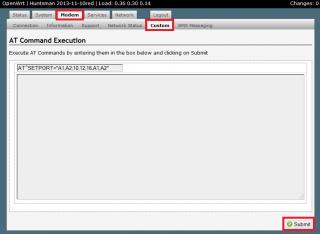
AT^SETPORT="A1,A2;1,2,3,10,12,13,16,A1,A2"
gastacopz
post Nov 18 2013, 09:10 PM

Newbie
*******
Senior Member
4,928 posts

Joined: Feb 2008
From: /K/opitiam Pak Hang Status: Permaban


Lipoting in

Btw, after reflash to older version from 2013-11-10, no more dc at 12 am..still wondering whats the problem..
chuahcs79
post Nov 18 2013, 09:12 PM

Look at all my stars!!
Group Icon
Elite
6,931 posts

Joined: Apr 2011
From: Bolehland for sure ^_^


QUOTE(gastacopz @ Nov 18 2013, 09:10 PM)
Lipoting in

Btw, after reflash to older version from 2013-11-10, no more dc at 12 am..still wondering whats the problem..
*
my rooter will DC itself no matter which version after connection running between 18 ~ 22 hour,.

so very weird hmm.gif
TSblacktubi
post Nov 18 2013, 09:13 PM

-
Group Icon
Elite
8,415 posts

Joined: Jul 2008

If you guys able to get this working then use this configuration, it work the best.
Only NCM(For the data) and PCUI (for the at commands aka diagnostics)

AT^SETPORT=”A1,A2;12,16″

So far 132 firmware will give a ERROR for this. My E3276 is running 260.
lpc26
post Nov 18 2013, 09:13 PM

Getting Started
**
Junior Member
135 posts

Joined: Jan 2003
USB 4-Port Powered Desktop Hub

http://www.belkin.com/sg/IWCatProductPage....oduct_Id=534857

good for E3276+MR3420 v2.2

because E3276 need a lot of power.
lpc26
post Nov 18 2013, 09:14 PM

Getting Started
**
Junior Member
135 posts

Joined: Jan 2003
QUOTE(blacktubi @ Nov 18 2013, 09:13 PM)
If you guys able to get this working then use this configuration, it work the best.
Only NCM(For the data) and PCUI (for the at commands aka diagnostics)

AT^SETPORT=”A1,A2;12,16″

So far 132 firmware will give a ERROR for this. My E3276 is running 260.
*
132 firmware fail on this too

AT^SETPORT="A1,A2;10,12,16,13,A1,A2"

ERROR
TSblacktubi
post Nov 18 2013, 09:22 PM

-
Group Icon
Elite
8,415 posts

Joined: Jul 2008

QUOTE(lpc26 @ Nov 18 2013, 09:14 PM)
132 firmware fail on this too
AT^SETPORT="A1,A2;10,12,16,13,A1,A2"
ERROR
*
AT^SETPORT="A1,A2;10,12,16,13,A1,A2"
Hmm, this should work as I did it for many people already.
For firmware 132, 13(DIAG) is compulsory.

What is the least essential code that work for you, NCM and PCUI only
lpc26
post Nov 18 2013, 09:26 PM

Getting Started
**
Junior Member
135 posts

Joined: Jan 2003
QUOTE(blacktubi @ Nov 18 2013, 09:22 PM)
AT^SETPORT="A1,A2;10,12,16,13,A1,A2"
Hmm, this should work as I did it for many people already.
For firmware 132, 13(DIAG) is compulsory.

What is the least essential code that work for you, NCM and PCUI only
*
AT^SETPORT="A1,A2;10,12,13,14,16,A1,A2"

this also won't work, tested anything that start from 10(which is start from 4g) will not run, will give ERROR.

so I have to add in the 3g modem function(1,2,3) inorder to make it work.

chuahcs79
post Nov 18 2013, 09:26 PM

Look at all my stars!!
Group Icon
Elite
6,931 posts

Joined: Apr 2011
From: Bolehland for sure ^_^


QUOTE(blacktubi @ Nov 18 2013, 09:22 PM)
AT^SETPORT="A1,A2;10,12,16,13,A1,A2"
Hmm, this should work as I did it for many people already.
For firmware 132, 13(DIAG) is compulsory.

What is the least essential code that work for you, NCM and PCUI only
*
yeah that's code works for my E3276 firmware version 132 too,.
lpc26
post Nov 18 2013, 09:32 PM

Getting Started
**
Junior Member
135 posts

Joined: Jan 2003
I think about the AT command, just remove the GPS of both 3g and 4g will be ok... as long as the modem is detectable.

My rooter able to bootup and connected within 1min.(which is faster than my E398u-15 connected)

This post has been edited by lpc26: Nov 18 2013, 09:34 PM
noobandroid
post Nov 18 2013, 09:33 PM

Audiophile
********
All Stars
11,836 posts

Joined: Mar 2011
From: Kota Kinabalu, Sabah


still on AA 12.09 and still loving it, and the saying goes " if it aint broken, dont fix it!"
chuahcs79
post Nov 18 2013, 09:34 PM

Look at all my stars!!
Group Icon
Elite
6,931 posts

Joined: Apr 2011
From: Bolehland for sure ^_^


QUOTE(noobandroid @ Nov 18 2013, 09:33 PM)
still on AA 12.09 and still loving it, and the saying goes " if it aint broken, dont fix it!"
*
AA not able to dial my E3276,.. ha ha,.. already tried sweat.gif
chuahcs79
post Nov 18 2013, 09:35 PM

Look at all my stars!!
Group Icon
Elite
6,931 posts

Joined: Apr 2011
From: Bolehland for sure ^_^


QUOTE(lpc26 @ Nov 18 2013, 09:32 PM)
I think about the AT command, just remove the GPS of both 3g and 4g will be ok... as long as the modem is detectable.

My rooter able to bootup and connected within 1min.(which is faster than my E398u-15 connected)
*
do you encounter Auto DC connection after 18~ 22 hour on your rooter ?
kwikpiks
post Nov 18 2013, 09:37 PM

New Member
*
Junior Member
24 posts

Joined: Oct 2013

waht is the maxis connection settings should use ka??
lpc26
post Nov 18 2013, 09:38 PM

Getting Started
**
Junior Member
135 posts

Joined: Jan 2003
QUOTE(chuahcs79 @ Nov 18 2013, 09:35 PM)
do you encounter Auto DC connection after 18~ 22 hour on your rooter ?
*
sorry I can't test that, I only open for 12hrs.
yonghong
post Nov 18 2013, 09:49 PM

On my way
****
Junior Member
551 posts

Joined: Jan 2011


QUOTE(chuahcs79 @ Nov 18 2013, 09:12 PM)
my rooter will DC itself no matter which version after connection running between 18 ~ 22 hour,.

so very weird  hmm.gif
*
bro, after dc, need restart again the modem? if use with original firmware , will auto dc or not? notworthy.gif notworthy.gif
TSblacktubi
post Nov 18 2013, 09:56 PM

-
Group Icon
Elite
8,415 posts

Joined: Jul 2008

QUOTE(yonghong @ Nov 18 2013, 09:49 PM)
bro, after dc, need restart again the modem? if use with original firmware , will auto dc or not? notworthy.gif  notworthy.gif
*
E3276 is incompatible with MR3420 stock firmware smile.gif
yonghong
post Nov 18 2013, 09:57 PM

On my way
****
Junior Member
551 posts

Joined: Jan 2011


QUOTE(blacktubi @ Nov 18 2013, 09:56 PM)
E3276 is incompatible with MR3420 stock firmware smile.gif
*
mean tat if use e372 which is compatible with original firmware, will not dc one. bt use rooter with e3276, will dc? hmm.gif hmm.gif
TSblacktubi
post Nov 18 2013, 10:04 PM

-
Group Icon
Elite
8,415 posts

Joined: Jul 2008

Added a compatibility list, let me know if you want to add anything.

Thanks
Skylinestar
post Nov 18 2013, 10:04 PM

Mega Duck
********
All Stars
10,476 posts

Joined: Jan 2003
From: Sarawak
I went to TPLink service center in LYP (top floor) to RMA my faulty MR3420 power supply. Too bad...warranty for the power brick is only 3 months, 2 years for the router. Bought a new power brick from them at RM10.

Then...went to Sricomp, saw the same power brick but with OEM wording instead of TPLink brand...RM15. Glad that I bought from TPLink service center.
chuahcs79
post Nov 18 2013, 10:37 PM

Look at all my stars!!
Group Icon
Elite
6,931 posts

Joined: Apr 2011
From: Bolehland for sure ^_^


after just now flash a few other version of rooter,

still 2013-10-12 yellow version works best for my E3276,..

the rest is totally not working and it detected wrong protocol sweat.gif

guess i will have to stay with this DC issue till new solution out

This post has been edited by chuahcs79: Nov 18 2013, 10:37 PM
TSblacktubi
post Nov 18 2013, 11:15 PM

-
Group Icon
Elite
8,415 posts

Joined: Jul 2008

QUOTE(chuahcs79 @ Nov 18 2013, 10:37 PM)
after just now flash a few other version of rooter,

still 2013-10-12 yellow version works best for my E3276,..

the rest is totally not working and it detected wrong protocol sweat.gif

guess i will have to stay with this DC issue till new solution out
*
USB modeswitch in 11-10 yellow seem broken.

Change to red and fixed
toucan
post Nov 18 2013, 11:17 PM

New Member
*
Junior Member
19 posts

Joined: Nov 2005
QUOTE(blacktubi @ Nov 18 2013, 09:56 PM)
E3276 is incompatible with MR3420 stock firmware smile.gif
*
Anyone has try below beta stock firmware?

http://www.tplink.com/fi/Support/download/...3420&version=V2

TL-MR3420_V2_130314_FI
Published Date 2013/3/14
Language English
File Size 3.77 MB
Operating System Win2000/XP/2003/Vista/7/Mac/Linux
Modifications and Bug Fixes
Beta Firmware Released Compatible for Huawei E3276

Notes For TL-MR3420 V2 hardware version

This post has been edited by toucan: Nov 18 2013, 11:17 PM
TSblacktubi
post Nov 18 2013, 11:33 PM

-
Group Icon
Elite
8,415 posts

Joined: Jul 2008

QUOTE(toucan @ Nov 18 2013, 11:17 PM)
Anyone has try below beta stock firmware?

http://www.tplink.com/fi/Support/download/...3420&version=V2

TL-MR3420_V2_130314_FI
Published Date 2013/3/14
Language English
File Size 3.77 MB
Operating System Win2000/XP/2003/Vista/7/Mac/Linux
Modifications and Bug Fixes
Beta Firmware Released Compatible for Huawei E3276

Notes For TL-MR3420 V2 hardware version
*
This is beta firmware, no it didnt work
chuahcs79
post Nov 18 2013, 11:49 PM

Look at all my stars!!
Group Icon
Elite
6,931 posts

Joined: Apr 2011
From: Bolehland for sure ^_^


QUOTE(blacktubi @ Nov 18 2013, 11:15 PM)
USB modeswitch in 11-10 yellow seem broken.

Change to red and fixed
*
yeah , but that version also can't solve my auto DC issue, haiz,


chuahcs79
post Nov 18 2013, 11:50 PM

Look at all my stars!!
Group Icon
Elite
6,931 posts

Joined: Apr 2011
From: Bolehland for sure ^_^


QUOTE(toucan @ Nov 18 2013, 11:17 PM)
Anyone has try below beta stock firmware?

http://www.tplink.com/fi/Support/download/...3420&version=V2

TL-MR3420_V2_130314_FI
Published Date 2013/3/14
Language English
File Size 3.77 MB
Operating System Win2000/XP/2003/Vista/7/Mac/Linux
Modifications and Bug Fixes
Beta Firmware Released Compatible for Huawei E3276

Notes For TL-MR3420 V2 hardware version
*
that firmware not even come close for my E3276,.. it keep blinking green LED,.. biggrin.gif
lpc26
post Nov 19 2013, 02:38 PM

Getting Started
**
Junior Member
135 posts

Joined: Jan 2003
My signal strength keep up and down... dunno why

» Click to show Spoiler - click again to hide... «


while E398 stay stable.

» Click to show Spoiler - click again to hide... «


This post has been edited by lpc26: Nov 19 2013, 02:40 PM
TSblacktubi
post Nov 19 2013, 02:45 PM

-
Group Icon
Elite
8,415 posts

Joined: Jul 2008

QUOTE(lpc26 @ Nov 19 2013, 02:38 PM)
My signal strength keep up and down... dunno why

» Click to show Spoiler - click again to hide... «


while E398 stay stable.

» Click to show Spoiler - click again to hide... «

*
Dont looks like a big deal to me, few dBm is usual

Lock the frequency if you want just to make sure it dont jump tower
lpc26
post Nov 19 2013, 02:49 PM

Getting Started
**
Junior Member
135 posts

Joined: Jan 2003
QUOTE(blacktubi @ Nov 19 2013, 02:45 PM)
Dont looks like a big deal to me, few dBm is usual

Lock the frequency if you want just to make sure it dont jump tower
*
the E3276 did jump to dunno what tower and become GPRS today...Off On then become normal.
TSblacktubi
post Nov 19 2013, 02:54 PM

-
Group Icon
Elite
8,415 posts

Joined: Jul 2008

QUOTE(lpc26 @ Nov 19 2013, 02:49 PM)
the E3276 did jump to dunno what tower and become GPRS today...Off On then become normal.
*
Then lock the frequency and Network mode using MDMA
lpc26
post Nov 19 2013, 03:11 PM

Getting Started
**
Junior Member
135 posts

Joined: Jan 2003
QUOTE(blacktubi @ Nov 19 2013, 02:54 PM)
Then lock the frequency and Network mode using MDMA
*
after use MDMA set 2100 then unable to connect sweat.gif sweat.gif
chuahcs79
post Nov 19 2013, 03:38 PM

Look at all my stars!!
Group Icon
Elite
6,931 posts

Joined: Apr 2011
From: Bolehland for sure ^_^


QUOTE(lpc26 @ Nov 19 2013, 03:11 PM)
after use MDMA set 2100 then unable to connect  sweat.gif  sweat.gif
*
u can try doing that using AT COMMAND in rooter hmm.gif
lpc26
post Nov 19 2013, 03:40 PM

Getting Started
**
Junior Member
135 posts

Joined: Jan 2003
QUOTE(chuahcs79 @ Nov 19 2013, 03:38 PM)
u can try doing that using AT COMMAND in rooter  hmm.gif
*
what AT command for 2100 only?


LOL what a mess...

» Click to show Spoiler - click again to hide... «


This post has been edited by lpc26: Nov 19 2013, 03:49 PM
TSblacktubi
post Nov 19 2013, 03:46 PM

-
Group Icon
Elite
8,415 posts

Joined: Jul 2008

You guys sure wanna mess with AT command on E3276? brows.gif

No reset option and impossible to reflash and no known way to backup for now

Make sure =? And ? First before playing tongue.gif
lpc26
post Nov 19 2013, 04:04 PM

Getting Started
**
Junior Member
135 posts

Joined: Jan 2003
QUOTE(blacktubi @ Nov 19 2013, 03:46 PM)
You guys sure wanna mess with AT command on E3276? brows.gif

No reset option and impossible to reflash and no known way to backup for now

Make sure =? And ? First before playing tongue.gif
*
you tried lock the 2100 at MDMA, then can use at rooter?

-------------------------------------------------------------

weird after MDMA, my old AT command unable to use already become ERROR (AT^SETPORT="A1,A2;1,2,3,10,12,13,16,A1,A2")

meanwhile AT^SETPORT="A1,A2;10,12,16,13,A1,A2" able to use already...kinda weird, and

after MDMA change to 2100 was unable to connect...after that I choose back auto for all band... also unable to connect.. then I check my AT code, it changed into AT^SETPORT="A1,A2;12,10,16,A1,A2" ..

I change to AT^SETPORT="A1,A2;10,12,16,A1,A2" and it WORKS.

This post has been edited by lpc26: Nov 19 2013, 04:25 PM
TSblacktubi
post Nov 19 2013, 04:24 PM

-
Group Icon
Elite
8,415 posts

Joined: Jul 2008

QUOTE(lpc26 @ Nov 19 2013, 04:04 PM)
you tried lock the 2100 at MDMA, then can use at rooter?
*
Can
chuahcs79
post Nov 19 2013, 04:28 PM

Look at all my stars!!
Group Icon
Elite
6,931 posts

Joined: Apr 2011
From: Bolehland for sure ^_^


best is leave the E3276 original condition for now until futher solution on flash update,..
lpc26
post Nov 19 2013, 04:33 PM

Getting Started
**
Junior Member
135 posts

Joined: Jan 2003
QUOTE(chuahcs79 @ Nov 19 2013, 04:28 PM)
best is leave the E3276 original condition for now until futher solution on flash update,..
*
ya the E3276 is too high tech already...but the best is the modem is not HOT... e398 is damn HOT.
chuahcs79
post Nov 19 2013, 04:40 PM

Look at all my stars!!
Group Icon
Elite
6,931 posts

Joined: Apr 2011
From: Bolehland for sure ^_^


QUOTE(lpc26 @ Nov 19 2013, 04:33 PM)
ya the E3276 is too high tech already...but the best is the modem is not HOT... e398 is damn HOT.
*
not even warm,.. i leave the cover of the sim slot side open,.. he he,. so now the E3276 is totally not even warm thumbup.gif
perfect10
post Nov 20 2013, 04:58 PM

Casual
***
Junior Member
416 posts

Joined: Nov 2005


hi bro, need some help here trying to do repeater to expand my internet connection..

I am having a TP Link MR3420 ----> connected to E3276 Maxis LTE

I have a Aztech 605EW which I would like to run as repeater for the TP LINK. I have tried but duno where to start sad.gif
chuahcs79
post Nov 20 2013, 05:51 PM

Look at all my stars!!
Group Icon
Elite
6,931 posts

Joined: Apr 2011
From: Bolehland for sure ^_^


finally i solve my Auto DC issue,.

using my E3276 on rooter 2013-11-10 red version rooter finally can solve with auto reconnect,

finally this is complete perfection for my E3276 with enable at keep connection alive option sweat.gif

with info below

» Click to show Spoiler - click again to hide... «


if info below detect, it wont auto reconnect after DC

» Click to show Spoiler - click again to hide... «


This post has been edited by chuahcs79: Nov 20 2013, 05:56 PM
Monolog
post Nov 20 2013, 06:16 PM

New Member
*
Newbie
1 posts

Joined: Sep 2013
Which one is better? TPLINK MR3420 or MR3040? I know that MR3040 is small, battery-powered but is there any other differences?
chuahcs79
post Nov 20 2013, 06:36 PM

Look at all my stars!!
Group Icon
Elite
6,931 posts

Joined: Apr 2011
From: Bolehland for sure ^_^


QUOTE(Monolog @ Nov 20 2013, 06:16 PM)
Which one is better? TPLINK MR3420 or MR3040? I know that MR3040 is small, battery-powered but is there any other differences?
*
MR3420 is built for home use mainly while MR3040 is built for mobile /on the move use
chuahcs79
post Nov 20 2013, 06:37 PM

Look at all my stars!!
Group Icon
Elite
6,931 posts

Joined: Apr 2011
From: Bolehland for sure ^_^


QUOTE(perfect10 @ Nov 20 2013, 04:58 PM)
hi bro, need some help here trying to do repeater to expand my internet connection..

I am having a TP Link MR3420 ----> connected to E3276 Maxis LTE

I have a Aztech 605EW which I would like to run as repeater for the TP LINK. I have tried but duno where to start sad.gif
*
do u use Lan connection from mr3420 to -> Aztech 605EW or wireless bridging ?

This post has been edited by chuahcs79: Nov 20 2013, 06:37 PM
TSblacktubi
post Nov 20 2013, 07:12 PM

-
Group Icon
Elite
8,415 posts

Joined: Jul 2008

QUOTE(perfect10 @ Nov 20 2013, 04:58 PM)
hi bro, need some help here trying to do repeater to expand my internet connection..

I am having a TP Link MR3420 ----> connected to E3276 Maxis LTE

I have a Aztech 605EW which I would like to run as repeater for the TP LINK. I have tried but duno where to start sad.gif
*
Refer to this. It is flexible of course. you can configure to the way that suit you
» Click to show Spoiler - click again to hide... «


This post has been edited by blacktubi: Nov 20 2013, 07:14 PM
digilife
post Nov 20 2013, 08:39 PM

The MNP guy, its me yeah.
*******
Senior Member
8,025 posts

Joined: Feb 2005
From: Planet Boleland


QUOTE(blacktubi @ Nov 20 2013, 07:12 PM)
Refer to this. It is flexible of course. you can configure to the way that suit you
» Click to show Spoiler - click again to hide... «

*
So this is your home setup ?

I read that Asus N56U have problem on the 2.4Mhz wiFi Bandwidth , yours not affected ?

Btw, how to overcome the 25Mbps limitations of E3276 on ROOter as my area sometimes can have stable speed of > 30Mbps when LTE bandwidth is available to me like now.

user posted image


TSblacktubi
post Nov 20 2013, 08:43 PM

-
Group Icon
Elite
8,415 posts

Joined: Jul 2008

QUOTE(digilife @ Nov 20 2013, 08:39 PM)
So this is your home setup ?

I read that Asus N56U have problem on the 2.4Mhz wiFi Bandwidth , yours not affected ?

Btw, how to overcome the 25Mbps limitations of E3276 on ROOter as my area sometimes can have stable speed of > 30Mbps when LTE bandwidth is available to me like now.

user posted image
*
Nope, this is for reference only, my home setup is very simple. biggrin.gif
I dont face any issue on N56U. Dont buy N56U now. Get the AC56U

Hmm, this shouldn't happen as Rooter main purpose is to solve the 25Mbps limit on old proocol, are you using the latest version now?
digilife
post Nov 20 2013, 08:53 PM

The MNP guy, its me yeah.
*******
Senior Member
8,025 posts

Joined: Feb 2005
From: Planet Boleland


QUOTE(blacktubi @ Nov 20 2013, 08:43 PM)
Nope, this is for reference only, my home setup is very simple.  biggrin.gif
I dont face any issue on N56U. Dont buy N56U now. Get the AC56U

Hmm, this shouldn't happen as Rooter main purpose is to solve the 25Mbps limit on old proocol, are you using the latest version now?
*
No, maybe I should flash one of my router to the latest ROOTer, I still have a MR3420 V2 unflash, which version of the latest stable ROOter you recommend to pair with my E3276 to break the 25Mbps barrier, I am free on Fri to test it but now now as I am going back to my hse which dun have LTE and tmr is my off day [ no work], so no LTE to play play.
TSblacktubi
post Nov 20 2013, 09:42 PM

-
Group Icon
Elite
8,415 posts

Joined: Jul 2008

QUOTE(digilife @ Nov 20 2013, 08:53 PM)
No, maybe I should flash one of my router to the latest ROOTer, I still have a MR3420 V2 unflash, which version of the latest stable ROOter you recommend to pair with my E3276 to break the 25Mbps barrier, I am free on Fri to test it but now now as I am going back to my hse which dun have LTE and tmr is my off day [ no work], so no LTE to play play.
*
My V2 is totally a useless brick sitting there unable to detect my E3276 doh.gif

Try the latest 11-10 red, my V1 work fine on that.


chuahcs79
post Nov 20 2013, 10:10 PM

Look at all my stars!!
Group Icon
Elite
6,931 posts

Joined: Apr 2011
From: Bolehland for sure ^_^


QUOTE(blacktubi @ Nov 20 2013, 09:42 PM)
My V2 is totally a useless brick sitting there unable to detect my E3276 doh.gif

Try the latest 11-10 red, my V1 work fine on that.
*
i think you better RMA your V2,.. because i am using that rooter with E3276 and is fine here hmm.gif
TSblacktubi
post Nov 20 2013, 10:30 PM

-
Group Icon
Elite
8,415 posts

Joined: Jul 2008

QUOTE(chuahcs79 @ Nov 20 2013, 10:10 PM)
i think you better RMA your V2,.. because i am using that rooter with E3276 and is fine here  hmm.gif
*
I will do it soon, haven't communicate with the seller.

Maybe I send it directly to TP-LINK.
chuahcs79
post Nov 20 2013, 10:33 PM

Look at all my stars!!
Group Icon
Elite
6,931 posts

Joined: Apr 2011
From: Bolehland for sure ^_^


QUOTE(blacktubi @ Nov 20 2013, 10:30 PM)
I will do it soon, haven't communicate with the seller.

Maybe I send it directly to TP-LINK.
*
your seller RMA faster or direct tplink faster ? it should be 1 to 1 exchange right ?
TSblacktubi
post Nov 20 2013, 10:55 PM

-
Group Icon
Elite
8,415 posts

Joined: Jul 2008

QUOTE(chuahcs79 @ Nov 20 2013, 10:33 PM)
your seller RMA faster or direct tplink faster ? it should be 1 to 1 exchange right ?
*
1 to 1, I don't think the seller will honor my warranty for this reason.

Maybe I shall do some magic to this router to make it work "weirdly"
chuahcs79
post Nov 20 2013, 11:15 PM

Look at all my stars!!
Group Icon
Elite
6,931 posts

Joined: Apr 2011
From: Bolehland for sure ^_^


QUOTE(blacktubi @ Nov 20 2013, 10:55 PM)
1 to 1, I don't think the seller will honor my warranty for this reason.

Maybe I shall do some magic to this router  to make it work "weirdly"
*
i think u should do your magic first ,
if still not working then direct to tplink and RMA,.
seller dont really response to this issue unless it is malfunction
rootlinux
post Nov 20 2013, 11:28 PM

Enthusiast
*****
Senior Member
898 posts

Joined: Jan 2003
From: ph/sbj/slgr
QUOTE(chuahcs79 @ Nov 20 2013, 05:51 PM)
finally i solve my Auto DC issue,.

using my E3276 on rooter 2013-11-10 red version rooter finally can solve with auto reconnect,

finally this is complete perfection for my E3276 with enable at keep connection alive option sweat.gif

with info below

» Click to show Spoiler - click again to hide... «


if info below detect, it wont auto reconnect after DC

» Click to show Spoiler - click again to hide... «

*
how do u do the unswitched/switched part? can explain more? i dun have an E3276 now. notworthy.gif
lpc26
post Nov 21 2013, 12:41 PM

Getting Started
**
Junior Member
135 posts

Joined: Jan 2003
QUOTE(blacktubi @ Nov 20 2013, 10:55 PM)
1 to 1, I don't think the seller will honor my warranty for this reason.

Maybe I shall do some magic to this router  to make it work "weirdly"
*
Bro, get a powered USB hub, everything will going fine.
maxcheam
post Nov 21 2013, 02:48 PM

Casual
***
Junior Member
384 posts

Joined: Jan 2006
From: Penang


QUOTE(lpc26 @ Nov 21 2013, 12:41 PM)
Bro, get a powered USB hub, everything will going fine.
*
getting a powered USB hub cannot entirely fix the problem, it might be okay for one scenario but not all.

Here's the information that I've gathered about E3276 working with TP-Link routers using ROOter firmwares (thanks to all that have shared their experiences notworthy.gif ):
- E3276 is power hungry especially when signal is weak.
» Click to show Spoiler - click again to hide... «

- Using a powered USB hub.
» Click to show Spoiler - click again to hide... «

- Using a better power supply.
» Click to show Spoiler - click again to hide... «


Hopefully, these information will help you make your router connected E3276 more reliable. As the motto that we all shared in this forum, sharing is caring! thumbup.gif
Keep sharing your successful/unsuccessful combinations to help others improve their connections. icon_rolleyes.gif

This post has been edited by maxcheam: Nov 21 2013, 02:52 PM
lpc26
post Nov 21 2013, 02:55 PM

Getting Started
**
Junior Member
135 posts

Joined: Jan 2003
ya as a conclusion.... E3276 is not really good for Rooter, use at laptop/pc maybe better.


btw, I tested at TL-WDR3600 v1.4 too, still not so stable...

This post has been edited by lpc26: Nov 21 2013, 02:58 PM
maxcheam
post Nov 21 2013, 03:17 PM

Casual
***
Junior Member
384 posts

Joined: Jan 2006
From: Penang


QUOTE(lpc26 @ Nov 21 2013, 02:55 PM)
ya as a conclusion.... E3276 is not really good for Rooter, use at laptop/pc maybe better.
btw, I tested at TL-WDR3600 v1.4 too, still not so stable...
*
agree with you about E3276. nod.gif

just notice that you've a lot of networking devices. I'm interested to know how R480T+ performs, mind sharing your experience/view on the product? rclxms.gif

This post has been edited by maxcheam: Nov 21 2013, 03:23 PM
lpc26
post Nov 21 2013, 03:27 PM

Getting Started
**
Junior Member
135 posts

Joined: Jan 2003
QUOTE(maxcheam @ Nov 21 2013, 03:17 PM)
just notice that you've a lot of networking devices. I'm interested to know how R480T+ performs, mind sharing your experience/view on the product?  rclxms.gif
*
R480T+ is a very powerful load balancer, for my experience, hmm able to handle nicely all job of load balance, very flexible, see which line you want to put in the bandwidth load(40%Line1 60%Line2), and able to do forward like port 80 to use Line1....able to makes network run at low latency, this product has served me for 5 years without give me problem.
maxcheam
post Nov 21 2013, 03:30 PM

Casual
***
Junior Member
384 posts

Joined: Jan 2006
From: Penang


QUOTE(lpc26 @ Nov 21 2013, 03:27 PM)
R480T+ is a very powerful load balancer, for my experience, hmm able to handle nicely all job of load balance, very flexible, see which line you want to put in the bandwidth load(40%Line1 60%Line2), and able to do forward like port 80 to use Line1....able to makes network run at low latency, this product has served me for 5 years without give me problem.
*
thanks for the quick review! notworthy.gif
I'm very tempted to try the cheaper version R470T+. Currently using Connectify Dispatch as my load balancer. I guess I'll give it a try after hearing your review. thumbup.gif
lpc26
post Nov 21 2013, 03:49 PM

Getting Started
**
Junior Member
135 posts

Joined: Jan 2003
QUOTE(maxcheam @ Nov 21 2013, 03:30 PM)
thanks for the quick review!  notworthy.gif
I'm very tempted to try the cheaper version R470T+. Currently using Connectify Dispatch as my load balancer. I guess I'll give it a try after hearing your review.  thumbup.gif
*
you want to use it with your 3G?
R470T+ i think is a good choice.. this router can run 4 wan, but lower hardware spec.
rootlinux
post Nov 21 2013, 03:53 PM

Enthusiast
*****
Senior Member
898 posts

Joined: Jan 2003
From: ph/sbj/slgr
QUOTE(lpc26 @ Nov 21 2013, 03:27 PM)
R480T+ is a very powerful load balancer, for my experience, hmm able to handle nicely all job of load balance, very flexible, see which line you want to put in the bandwidth load(40%Line1 60%Line2), and able to do forward like port 80 to use Line1....able to makes network run at low latency, this product has served me for 5 years without give me problem.
*
seriously, we would like to know what you use R480T+ for 5 years. can share? notworthy.gif notworthy.gif notworthy.gif
lpc26
post Nov 21 2013, 03:56 PM

Getting Started
**
Junior Member
135 posts

Joined: Jan 2003
QUOTE(rootlinux @ Nov 21 2013, 03:53 PM)
seriously, we would like to know what you use R480T+ for 5 years. can share?  notworthy.gif  notworthy.gif  notworthy.gif
*
use Dual Wan for my 2 Streamyx line...
maxcheam
post Nov 21 2013, 04:08 PM

Casual
***
Junior Member
384 posts

Joined: Jan 2006
From: Penang


QUOTE(lpc26 @ Nov 21 2013, 03:49 PM)
you want to use it with your 3G?
R470T+ i think is a good choice.. this router can run 4 wan, but lower hardware spec.
*
ya, gonna use it on 3G. Hopefully, it's as good as on wired WAN connection. whistling.gif
chinkw1
post Nov 21 2013, 04:56 PM

Look at all my stars!!
Group Icon
Elite
3,158 posts

Joined: Sep 2005


is this suitable for UNIFI ?
TSblacktubi
post Nov 21 2013, 05:22 PM

-
Group Icon
Elite
8,415 posts

Joined: Jul 2008

maxcheam

Great write out, pinned on first post
ejoybaik
post Nov 21 2013, 09:01 PM

New Member
*
Junior Member
17 posts

Joined: Jan 2009


how to put a ping command on rooter ...?
chuahcs79
post Nov 21 2013, 09:16 PM

Look at all my stars!!
Group Icon
Elite
6,931 posts

Joined: Apr 2011
From: Bolehland for sure ^_^


QUOTE(ejoybaik @ Nov 21 2013, 09:01 PM)
how to put a ping command on rooter ...?
*
rooter come with built in ping command,

login LuCI -> modem -> connection -> keep connection alive -> enable

that's the ping command notworthy.gif
ejoybaik
post Nov 21 2013, 09:31 PM

New Member
*
Junior Member
17 posts

Joined: Jan 2009


QUOTE(chuahcs79 @ Nov 21 2013, 09:16 PM)
rooter come with built in ping command,

login LuCI -> modem -> connection -> keep connection alive -> enable

that's the ping command  notworthy.gif
*
tq mr chuah....
chuahcs79
post Nov 21 2013, 09:42 PM

Look at all my stars!!
Group Icon
Elite
6,931 posts

Joined: Apr 2011
From: Bolehland for sure ^_^


QUOTE(ejoybaik @ Nov 21 2013, 09:31 PM)
tq mr chuah....
*
u can choose which one u want,

enable = just only ping the connection
enable with wan restart = it will restart your modem connection once the ping detect failed
enable with modem toggle = it will restart the power to your modem once the ping detect failed,.
TSblacktubi
post Nov 21 2013, 09:55 PM

-
Group Icon
Elite
8,415 posts

Joined: Jul 2008

QUOTE(chuahcs79 @ Nov 21 2013, 09:42 PM)
u can choose which one u want,

enable = just only ping the connection
enable with wan restart = it will restart your modem connection once the ping detect failed
enable with modem toggle = it will restart the power to your modem once the ping detect failed,.
*
Added to the first page.
chuahcs79
post Nov 21 2013, 09:57 PM

Look at all my stars!!
Group Icon
Elite
6,931 posts

Joined: Apr 2011
From: Bolehland for sure ^_^


QUOTE(blacktubi @ Nov 21 2013, 09:55 PM)
Added to the first page.
*
personally

i found out that enable with wanrestart and enable with modem toggle is both quite similar,..

either one of them can do the auto reconnect job easily,.

but enable with wan restart is much faster in reconnect compare to modem toggle,.

This post has been edited by chuahcs79: Nov 21 2013, 09:58 PM
TSblacktubi
post Nov 21 2013, 10:02 PM

-
Group Icon
Elite
8,415 posts

Joined: Jul 2008

QUOTE(chuahcs79 @ Nov 21 2013, 09:57 PM)
personally

i found out that enable with wanrestart and enable with modem toggle is both quite similar,..

either one of them can do the auto reconnect job easily,.

but enable with wan restart is much faster in reconnect compare to modem toggle,.
*
Under normal case a power cycle is not required.

Unless some weird power issue faced by newer LTE modems and more.
chuahcs79
post Nov 21 2013, 10:25 PM

Look at all my stars!!
Group Icon
Elite
6,931 posts

Joined: Apr 2011
From: Bolehland for sure ^_^


QUOTE(blacktubi @ Nov 21 2013, 10:02 PM)
Under normal case a power cycle is not required.

Unless some weird power issue faced by newer LTE modems and more.
*
yeah wan restart is the best choices so far notworthy.gif
khairilyazit
post Nov 22 2013, 08:47 AM

Casual
***
Junior Member
406 posts

Joined: Sep 2010
From: Papar, Sabah


blacktubi chuahcs79

this q may go out of topic.. but i'm wondering can i team the lan ports on the router? meaning making link agregation..
TSblacktubi
post Nov 22 2013, 10:53 AM

-
Group Icon
Elite
8,415 posts

Joined: Jul 2008

QUOTE(khairilyazit @ Nov 22 2013, 08:47 AM)
blacktubi chuahcs79

this q may go out of topic.. but i'm wondering can i team the lan ports on the router? meaning making link agregation..
*
If you mean bonding aka load balance, yes it is possible

BUT, it is a long process
ejoybaik
post Nov 22 2013, 12:44 PM

New Member
*
Junior Member
17 posts

Joined: Jan 2009


can rooter firmware sedot other wifi ...
tanks268
post Nov 22 2013, 01:24 PM

New Member
*
Junior Member
18 posts

Joined: Dec 2007


QUOTE(chuahcs79 @ Nov 20 2013, 05:51 PM)
finally i solve my Auto DC issue,.

using my E3276 on rooter 2013-11-10 red version rooter finally can solve with auto reconnect,

finally this is complete perfection for my E3276 with enable at keep connection alive option sweat.gif

with info below

» Click to show Spoiler - click again to hide... «


if info below detect, it wont auto reconnect after DC

» Click to show Spoiler - click again to hide... «

*
hi chuahcs79,

how do u resolve Auto DC issue? my rooter with e3276 sure will DC whenever keep it on overnight.

can explain more on the unswitched/switched part? notworthy.gif

thank you
lpc26
post Nov 22 2013, 03:49 PM

Getting Started
**
Junior Member
135 posts

Joined: Jan 2003
QUOTE(ejoybaik @ Nov 22 2013, 12:44 PM)
can rooter firmware sedot other wifi ...
*
mean log in another wifi router's AP bridge?


if that then YES, rooter able to do that.

This post has been edited by lpc26: Nov 22 2013, 03:54 PM
ejoybaik
post Nov 22 2013, 04:23 PM

New Member
*
Junior Member
17 posts

Joined: Jan 2009


QUOTE(lpc26 @ Nov 22 2013, 03:49 PM)
mean log in another wifi router's AP bridge?
if that then YES, rooter able to do that.
*
yeah... let say... i got

1 yes zoom

1 maxis bb

so.. can combine the speed...?


khairilyazit
post Nov 22 2013, 04:41 PM

Casual
***
Junior Member
406 posts

Joined: Sep 2010
From: Papar, Sabah


QUOTE(ejoybaik @ Nov 22 2013, 04:23 PM)
yeah... let say... i got

1 yes zoom

1 maxis bb

so.. can combine the speed...?
*
u want to load balance through wifi? no..
ur talking abt bonding or link agregation..
physical connection is the one feasible to do it..
wireless cannot..
lpc26
post Nov 22 2013, 04:50 PM

Getting Started
**
Junior Member
135 posts

Joined: Jan 2003
QUOTE(ejoybaik @ Nov 22 2013, 04:23 PM)
yeah... let say... i got

1 yes zoom

1 maxis bb

so.. can combine the speed...?
*
oh combine speed.... Rooter don't have that function, you must get a Load Balancer.
btw wifi not allow to load balance, all u have to use cable to connect to the device.

I thought you want to do AP station.

This post has been edited by lpc26: Nov 22 2013, 04:51 PM
chuahcs79
post Nov 22 2013, 05:56 PM

Look at all my stars!!
Group Icon
Elite
6,931 posts

Joined: Apr 2011
From: Bolehland for sure ^_^


QUOTE(tanks268 @ Nov 22 2013, 01:24 PM)
hi chuahcs79,

how do u resolve Auto DC issue? my rooter with e3276 sure will DC whenever keep it on overnight.

can explain more on the unswitched/switched part?  notworthy.gif

thank you
*
u have to choose these option under keep connection alive
best choose wan restart, then it will auto reconnect

enable = just only ping the connection
enable with wan restart = it will restart your modem connection once the ping detect failed
enable with modem toggle = it will restart the power to your modem once the ping detect failed,.
chuahcs79
post Nov 22 2013, 05:58 PM

Look at all my stars!!
Group Icon
Elite
6,931 posts

Joined: Apr 2011
From: Bolehland for sure ^_^


QUOTE(ejoybaik @ Nov 22 2013, 12:44 PM)
can rooter firmware sedot other wifi ...
*
wireless bridge from other wireless router ?

yes, you cam,

just go to LuCI 192.168.1.1 -> network -> wifi -> click Scan -> Add -> key in the wireless password -> click save and apply notworthy.gif
tanks268
post Nov 22 2013, 06:17 PM

New Member
*
Junior Member
18 posts

Joined: Dec 2007


QUOTE(chuahcs79 @ Nov 22 2013, 05:56 PM)
u have to choose these option under keep connection alive
best choose wan restart, then it will auto reconnect

enable = just only ping the connection
enable with wan restart = it will restart your modem connection once the ping detect failed
enable with modem toggle = it will restart the power to your modem once the ping detect failed,.
*
did you mean once using "enable with wan restart", the info will changed as below?

Unswitched Vendor ID
12d1

Unswitched Product ID
1506

currently my rooter still showing Unswitched Product ID = 14fe rclxub.gif

can advise how to change it Unswitched Product ID = 1506
TSblacktubi
post Nov 22 2013, 06:41 PM

-
Group Icon
Elite
8,415 posts

Joined: Jul 2008

QUOTE(tanks268 @ Nov 22 2013, 06:17 PM)
did you mean once using "enable with wan restart", the info will changed as below?
Unswitched Vendor ID
12d1
Unswitched Product ID
1506
currently my rooter still showing Unswitched Product ID = 14fe  rclxub.gif
can advise how to change it Unswitched Product ID = 1506
*
Erm, 12d1 14fe means CD Mode. Anyway that wont make a difference. wink.gif

If you want a good solution, maybe there will be some soon.
gastacopz
post Nov 22 2013, 07:19 PM

Newbie
*******
Senior Member
4,928 posts

Joined: Feb 2008
From: /K/opitiam Pak Hang Status: Permaban


How to set LTE under network?currently 3g only..

Need put auto select or straight away LTE..?

Sorry, coz previously set by other people..lol

and, how to reset bandwidth?press reset, but nothing change rclxub.gif

LTE signal 40-48%, but cant connect... hmm.gif

anything wrong?

This post has been edited by gastacopz: Nov 22 2013, 10:08 PM
evanswiftoxophy
post Nov 23 2013, 12:22 AM

New Member
*
Junior Member
22 posts

Joined: Jul 2010
I finally successfully connected to the Internet by following guides from sifus here..MR3420 v2.2 with E3276..many thanks

Now another problem is when I trying to download a torrent file(utorrent)
It couldn't connect to any seed n the download never start
Previously when I use UNIFI it was fine

Is there any setting to do on the modem?
Sifu plz assist
TQ

This post has been edited by evanswiftoxophy: Nov 23 2013, 12:24 AM
TSblacktubi
post Nov 23 2013, 12:24 AM

-
Group Icon
Elite
8,415 posts

Joined: Jul 2008

QUOTE(evanswiftoxophy @ Nov 23 2013, 12:22 AM)
I finally successfully connected to the Internet by following guides from sifus here..MR3420 v2.2 with E3276..many thanks

Now another problem is when I trying to download a torrent file(bit torrent)
It couldn't connect to any seed n the download never start
Previously when I use UNIFI it was fine

Is there any setting to do on the modem?
Sifu plz assist
TQ
*
Go and read Maxis thread first page.

Torrent is blocked on daytime
evanswiftoxophy
post Nov 23 2013, 12:25 AM

New Member
*
Junior Member
22 posts

Joined: Jul 2010
QUOTE(blacktubi @ Nov 23 2013, 12:24 AM)
Go and read Maxis thread first page.

Torrent is blocked on daytime
*
Ok bro read ur maxis thread already I'll wait till 1am or 3am then
rclxms.gif

This post has been edited by evanswiftoxophy: Nov 23 2013, 12:29 AM
chuahcs79
post Nov 23 2013, 01:31 AM

Look at all my stars!!
Group Icon
Elite
6,931 posts

Joined: Apr 2011
From: Bolehland for sure ^_^


QUOTE(gastacopz @ Nov 22 2013, 07:19 PM)
How to set LTE under network?currently 3g only..

Need put auto select or straight away LTE..?

Sorry, coz previously set by other people..lol

and, how to reset bandwidth?press reset, but nothing change rclxub.gif

LTE signal 40-48%, but cant connect... hmm.gif

anything wrong?
*
if that LTE signal is open , then u can connect whether force LTE only or On Auto both,.

if both method cannot connect, probably is not ready for public
gastacopz
post Nov 23 2013, 01:48 AM

Newbie
*******
Senior Member
4,928 posts

Joined: Feb 2008
From: /K/opitiam Pak Hang Status: Permaban


QUOTE(chuahcs79 @ Nov 23 2013, 01:31 AM)
if that LTE signal is open , then u can connect whether force LTE only or On Auto both,.

if both method cannot connect, probably is not ready for public
*
what u means LTE signal open? hmm.gif

elaborate pls
chuahcs79
post Nov 23 2013, 02:21 AM

Look at all my stars!!
Group Icon
Elite
6,931 posts

Joined: Apr 2011
From: Bolehland for sure ^_^


QUOTE(gastacopz @ Nov 23 2013, 01:48 AM)
what u means LTE signal open? hmm.gif

elaborate pls
*
if the LTE is not open to public yet,.
no matter what you do, you wont be able to connect to it,..
gastacopz
post Nov 23 2013, 02:29 AM

Newbie
*******
Senior Member
4,928 posts

Joined: Feb 2008
From: /K/opitiam Pak Hang Status: Permaban


QUOTE(chuahcs79 @ Nov 23 2013, 02:21 AM)
if the LTE is not open to public yet,.
no matter what you do, you wont be able to connect to it,..
*
oic...thought its always open..

thanks...maybe can ask them to open to public... tongue.gif


2505702
post Nov 23 2013, 03:23 AM

New Member
*
Junior Member
23 posts

Joined: May 2009


did i need to flash to original firmware from old OpenWrt in order to update with huntsman version for MR3420 V1??
chuahcs79
post Nov 23 2013, 03:42 AM

Look at all my stars!!
Group Icon
Elite
6,931 posts

Joined: Apr 2011
From: Bolehland for sure ^_^


QUOTE(2505702 @ Nov 23 2013, 03:23 AM)
did i need to flash to original firmware from old OpenWrt in order to update with huntsman version for MR3420 V1??
*
yeah best is flash stock firmware first before u flash huntsman
maxcheam
post Nov 24 2013, 12:44 PM

Casual
***
Junior Member
384 posts

Joined: Jan 2006
From: Penang


New version of Huntsman available!
Change log for 2013-11-23:
New additions to this version of the firmware
- Expanded Conection Monitoring.
- Fix for MF823 modem.
cscheat
post Nov 24 2013, 04:10 PM

V.V.I.P member
******
Senior Member
1,262 posts

Joined: Aug 2005
From: Mars


Guys, Im newbie here

now using MF680 + MR3420 V2

all stock firmware

any advices where to start ?
chuahcs79
post Nov 25 2013, 12:30 AM

Look at all my stars!!
Group Icon
Elite
6,931 posts

Joined: Apr 2011
From: Bolehland for sure ^_^


QUOTE(cscheat @ Nov 24 2013, 04:10 PM)
Guys, Im newbie here

now using MF680 + MR3420 V2

all stock firmware

any advices where to start ?
*
so where to start as in what issue you refering to ?

is it where to start is refer to how to flash from stock firmware to rooter firmware for your mr3420 V2 ? hmm.gif

method to flash rooter :

» Click to show Spoiler - click again to hide... «


This post has been edited by chuahcs79: Nov 25 2013, 12:32 AM
gastacopz
post Nov 25 2013, 11:07 PM

Newbie
*******
Senior Member
4,928 posts

Joined: Feb 2008
From: /K/opitiam Pak Hang Status: Permaban


guys, why my LTE speed so so only...5-6 mbps only...

tot can get more than that..
TSblacktubi
post Nov 25 2013, 11:08 PM

-
Group Icon
Elite
8,415 posts

Joined: Jul 2008

QUOTE(gastacopz @ Nov 25 2013, 11:07 PM)
guys, why my LTE speed so so only...5-6 mbps only...

tot can get more than that..
*
You kena cap already bro
gastacopz
post Nov 25 2013, 11:10 PM

Newbie
*******
Senior Member
4,928 posts

Joined: Feb 2008
From: /K/opitiam Pak Hang Status: Permaban


QUOTE(blacktubi @ Nov 25 2013, 11:08 PM)
You kena cap already bro
*
how so???

only start using since 22nd nov... hmm.gif
chuahcs79
post Nov 25 2013, 11:33 PM

Look at all my stars!!
Group Icon
Elite
6,931 posts

Joined: Apr 2011
From: Bolehland for sure ^_^


QUOTE(gastacopz @ Nov 25 2013, 11:07 PM)
guys, why my LTE speed so so only...5-6 mbps only...

tot can get more than that..
*
nothing wrong with your device,
your plan is the issue,..
ejoybaik
post Nov 26 2013, 07:36 PM

New Member
*
Junior Member
17 posts

Joined: Jan 2009


just now using huddle + ROOter = it works....
chuahcs79
post Nov 26 2013, 08:02 PM

Look at all my stars!!
Group Icon
Elite
6,931 posts

Joined: Apr 2011
From: Bolehland for sure ^_^


QUOTE(ejoybaik @ Nov 26 2013, 07:36 PM)
just now using huddle + ROOter = it works....
*
congrats thumbup.gif
cscheat
post Nov 26 2013, 09:27 PM

V.V.I.P member
******
Senior Member
1,262 posts

Joined: Aug 2005
From: Mars


now no mood to upgrade firmware

My maxis kena throttle
rootlinux
post Nov 26 2013, 09:53 PM

Enthusiast
*****
Senior Member
898 posts

Joined: Jan 2003
From: ph/sbj/slgr
QUOTE(ejoybaik @ Nov 26 2013, 07:36 PM)
just now using huddle + ROOter = it works....
*
Yes??? which ROOter firmware?

Ah, I thought is Go. Thanks.

This post has been edited by rootlinux: Nov 26 2013, 09:55 PM
ejoybaik
post Nov 26 2013, 09:56 PM

New Member
*
Junior Member
17 posts

Joined: Jan 2009


QUOTE(rootlinux @ Nov 26 2013, 09:53 PM)
Yes??? which ROOter firmware? Thanks.
*
TP-Link TL-MR3420 v1 + Huntsman 2013-11-10red / LuCI Trunk (svn-r9933)
rootlinux
post Nov 26 2013, 10:33 PM

Enthusiast
*****
Senior Member
898 posts

Joined: Jan 2003
From: ph/sbj/slgr
QUOTE(ejoybaik @ Nov 26 2013, 09:56 PM)
TP-Link TL-MR3420 v1 + Huntsman 2013-11-10red / LuCI Trunk (svn-r9933)
*
How u connect to Huddle from MR3420 v1? Thanks.
chuahcs79
post Nov 26 2013, 10:35 PM

Look at all my stars!!
Group Icon
Elite
6,931 posts

Joined: Apr 2011
From: Bolehland for sure ^_^


QUOTE(rootlinux @ Nov 26 2013, 10:33 PM)
How u connect to Huddle from MR3420 v1? Thanks.
*
direct usb data cable, i guess hmm.gif
rootlinux
post Nov 26 2013, 10:37 PM

Enthusiast
*****
Senior Member
898 posts

Joined: Jan 2003
From: ph/sbj/slgr
QUOTE(chuahcs79 @ Nov 26 2013, 10:35 PM)
direct usb data cable, i guess  hmm.gif
*
That is pretty interesting. I want to know how it able to get it connected as WAN.
gastacopz
post Nov 26 2013, 10:37 PM

Newbie
*******
Senior Member
4,928 posts

Joined: Feb 2008
From: /K/opitiam Pak Hang Status: Permaban


QUOTE(chuahcs79 @ Nov 25 2013, 11:33 PM)
nothing wrong with your device,
your plan is the issue,..
*
Plan still ok..maybe my area signal bad,but watch via hulu just now so smooth
chuahcs79
post Nov 26 2013, 10:40 PM

Look at all my stars!!
Group Icon
Elite
6,931 posts

Joined: Apr 2011
From: Bolehland for sure ^_^


QUOTE(rootlinux @ Nov 26 2013, 10:37 PM)
That is pretty interesting. I want to know how it able to get it connected as WAN.
*
well,
probably huddle is the one dial the connection then issue DHCP IP to rooter,..
similar situation like my 753S mifi i guess,.
on the hostless mifi modem driver ..

chuahcs79
post Nov 26 2013, 10:40 PM

Look at all my stars!!
Group Icon
Elite
6,931 posts

Joined: Apr 2011
From: Bolehland for sure ^_^


QUOTE(gastacopz @ Nov 26 2013, 10:37 PM)
Plan still ok..maybe my area signal bad,but watch via hulu just now so smooth
*
sometimes congested during certain peak hour in your area is the main key as well ,..
rootlinux
post Nov 26 2013, 11:07 PM

Enthusiast
*****
Senior Member
898 posts

Joined: Jan 2003
From: ph/sbj/slgr
QUOTE(chuahcs79 @ Nov 26 2013, 10:40 PM)
well,
probably huddle is the one dial the connection then issue DHCP IP to rooter,..
similar situation like my 753S mifi i guess,.
on the hostless mifi modem driver ..
*
Yup my 753S don't work on MR3420 v1 and WR1043ND with ROOter firmware.
rclxub.gif
ejoybaik
post Nov 27 2013, 08:17 AM

New Member
*
Junior Member
17 posts

Joined: Jan 2009


QUOTE(chuahcs79 @ Nov 26 2013, 10:35 PM)
direct usb data cable, i guess  hmm.gif
*
+99
mr chuah so clever maa....
archangel1989
post Nov 27 2013, 04:50 PM

Getting Started
**
Junior Member
163 posts

Joined: Mar 2010
From: Lembah Keramat,Wangsa Maju


hi..im just buy Huawei E398 for my broadband modem...i want to ask sifu here...is it Stock firmware TP Link TL-MR3040 compatible with the device?

thanks....
chuahcs79
post Nov 27 2013, 05:10 PM

Look at all my stars!!
Group Icon
Elite
6,931 posts

Joined: Apr 2011
From: Bolehland for sure ^_^


QUOTE(archangel1989 @ Nov 27 2013, 04:50 PM)
hi..im just buy Huawei E398 for my broadband modem...i want to ask sifu here...is it Stock firmware TP Link TL-MR3040 compatible with the device?

thanks....
*
u refering for your E398 working under 3G or 4G ?
it should be compatible,
if not, u always have alternative choices to flash to Rooter firmware

This post has been edited by chuahcs79: Nov 27 2013, 05:11 PM
lukemanz
post Nov 27 2013, 06:44 PM

Getting Started
**
Junior Member
249 posts

Joined: Aug 2009
anyone succesfull to install wshaper in R00ter? I got the kernel 3.10.8 error.. doh.gif

QUOTE
Installing wshaper (0.2-2) to root...
Downloading http://downloads.openwrt.org/snapshots/tru...r_0.2-2_all.ipk.

Collected errors:
* satisfy_dependencies_for: Cannot satisfy the following dependencies for wshaper:
*  kernel (= 3.10.18-1-0de2f8afeb2eecb34eeca6f54b460523) *
* opkg_install_cmd: Cannot install package wshaper.


This post has been edited by lukemanz: Nov 28 2013, 12:42 PM
archangel1989
post Nov 27 2013, 06:49 PM

Getting Started
**
Junior Member
163 posts

Joined: Mar 2010
From: Lembah Keramat,Wangsa Maju


QUOTE
u refering for your E398 working under 3G or 4G ?
it should be compatible,
if not, u always have alternative choices to flash to Rooter firmware


under 3G at the moment..4G later will try...owh...my version for TP-Link MR3040 is V2...im still newbie...later on if not compatible..i will ask sifu here...

This post has been edited by archangel1989: Nov 27 2013, 06:51 PM
pakjerung
post Nov 28 2013, 02:52 AM

New Member
*
Junior Member
5 posts

Joined: Sep 2011
Anybody able to install openvpn on ROOter latest firmware? If yes mind to guide me.
chuahcs79
post Nov 28 2013, 03:01 AM

Look at all my stars!!
Group Icon
Elite
6,931 posts

Joined: Apr 2011
From: Bolehland for sure ^_^


QUOTE(pakjerung @ Nov 28 2013, 02:52 AM)
Anybody able to install openvpn on ROOter latest firmware? If yes mind to guide me.
*
if u are using 4MB flash memory router like MR3420 V1, V2,. is hardly left any empty space to install openvpn, let alone to save the config to it...

8MB flash memory router will be much suitable for this, like 1043ND, and a few more new model


This post has been edited by chuahcs79: Nov 28 2013, 03:11 AM
pakjerung
post Nov 28 2013, 03:11 AM

New Member
*
Junior Member
5 posts

Joined: Sep 2011
what do you mean by this "let alone to save the config to it... "
english not that good mah.

btw video is broken.
chuahcs79
post Nov 28 2013, 03:22 AM

Look at all my stars!!
Group Icon
Elite
6,931 posts

Joined: Apr 2011
From: Bolehland for sure ^_^


QUOTE(pakjerung @ Nov 28 2013, 03:11 AM)
what do you mean by this "let alone to save the config to it... "
english not that good mah.

btw video is broken.
*
i mean for normal router which only have 4MB flash memory, u dont have enough left over empty space to install openvpn packages and set it up,. ( unless you are PRO in linux and able to modify to slim down the size of openwrt firmware ),

otherwise 8MB flash memory router would be best choices,..
chuahcs79
post Nov 28 2013, 10:37 PM

Look at all my stars!!
Group Icon
Elite
6,931 posts

Joined: Apr 2011
From: Bolehland for sure ^_^


QUOTE(pakjerung @ Nov 28 2013, 03:11 AM)
what do you mean by this "let alone to save the config to it... "
english not that good mah.

btw video is broken.
*
there is a solution to install openvpn on your 4MB flash router,
u need a powered USB hub with pen drive ( 2 or 4GB ) ,.

then u will need to flash your pendrive to ext4 and linux swap both option,..

then u will need to install exroot in your openwrt firmware,.

you can search how to exroot in youtube ,..

from there u will have extra space left over on pendrive to install any other packages,..

for rooter wise i am not quite sure whether exroot will be working fine or not since i personally not yet tested

This post has been edited by chuahcs79: Nov 28 2013, 10:38 PM
eugene88
post Nov 30 2013, 06:19 AM

Look at all my stars!!
*******
Senior Member
2,176 posts

Joined: Sep 2010


Does E398 works with Huntsman 2013-11-23?
chuahcs79
post Nov 30 2013, 06:27 AM

Look at all my stars!!
Group Icon
Elite
6,931 posts

Joined: Apr 2011
From: Bolehland for sure ^_^


QUOTE(eugene88 @ Nov 30 2013, 06:19 AM)
Does E398 works with Huntsman 2013-11-23?
*
yes, it should work plug and play,. auto detect and dailing
eugene88
post Nov 30 2013, 06:37 AM

Look at all my stars!!
*******
Senior Member
2,176 posts

Joined: Sep 2010


QUOTE(chuahcs79 @ Nov 30 2013, 06:27 AM)
yes, it should work plug and play,. auto detect and dailing
*
Are you sure?
It doesn't work with the previous latest firmware
chuahcs79
post Nov 30 2013, 06:48 AM

Look at all my stars!!
Group Icon
Elite
6,931 posts

Joined: Apr 2011
From: Bolehland for sure ^_^


QUOTE(eugene88 @ Nov 30 2013, 06:37 AM)
Are you sure?
It doesn't work with the previous latest firmware
*
it should auto gear,

if is not, then is your e398 firmware version issue,..
eugene88
post Nov 30 2013, 06:58 AM

Look at all my stars!!
*******
Senior Member
2,176 posts

Joined: Sep 2010


QUOTE(chuahcs79 @ Nov 30 2013, 06:48 AM)
it should auto gear,

if is not, then is your e398 firmware version issue,..
*
How come is my firmware version issue..

chuahcs79
post Nov 30 2013, 07:03 AM

Look at all my stars!!
Group Icon
Elite
6,931 posts

Joined: Apr 2011
From: Bolehland for sure ^_^


QUOTE(eugene88 @ Nov 30 2013, 06:58 AM)
How come is my firmware version issue..
*
from few pages back and last few page sin last V2 tplink thread,
few user report on E398 issue,
end up some of them downgrade/upgrade firmware,..
then viola it worked,.

i am not sure which firmware, guess you better to consult with blacktubi notworthy.gif
TSblacktubi
post Nov 30 2013, 12:59 PM

-
Group Icon
Elite
8,415 posts

Joined: Jul 2008

QUOTE(eugene88 @ Nov 30 2013, 06:58 AM)
How come is my firmware version issue..
*
What router you use again

MR3040 is known for some power issue only some firmware fixed it
eugene88
post Nov 30 2013, 01:20 PM

Look at all my stars!!
*******
Senior Member
2,176 posts

Joined: Sep 2010


QUOTE(blacktubi @ Nov 30 2013, 12:59 PM)
What router you use again

MR3040 is known for some power issue only some firmware fixed it
*
Tried the latest red version for MR3040 and it's works icon_rolleyes.gif
The previous one won't work as it won't detect the modem
TSblacktubi
post Nov 30 2013, 01:22 PM

-
Group Icon
Elite
8,415 posts

Joined: Jul 2008

QUOTE(eugene88 @ Nov 30 2013, 01:20 PM)
Tried the latest red version for MR3040 and it's works  icon_rolleyes.gif
The previous one won't work as it won't detect the modem
*
Can you list out which one don't work just to ease others biggrin.gif

MR3040 is known for problematic
eugene88
post Nov 30 2013, 01:29 PM

Look at all my stars!!
*******
Senior Member
2,176 posts

Joined: Sep 2010


QUOTE(blacktubi @ Nov 30 2013, 01:22 PM)
Can you list out which one don't work just to ease others biggrin.gif

MR3040 is known for problematic
*
E398 on 2013-11-10 red and yellow doesn't work smile.gif
bitcomet79
post Dec 1 2013, 01:24 AM

Casual
***
Junior Member
356 posts

Joined: Nov 2013
dear all sifus notworthy.gif ....im a newbie here & need yr help as my knowledge on this is zero icon_question.gif sad.gif

i'm currently using mifi e5331 at home and i want to change to tp link 3420 and e3276
however, i'm staying at sungai petani & can't get both this modem & router...is anyone selling it here?

and the 3G signal at my area is always unstable & very weak signal (inside the house)....so i would like to know, if i change to both this modem/router, can it increase my chance of getting a stronger signal from the tower?

pls help as i'm really newbie and need all sifus guidance....hope you all can bear will all my queries later as things progress... sweat.gif
thanks...
bitcomet79
post Dec 1 2013, 02:08 AM

Casual
***
Junior Member
356 posts

Joined: Nov 2013
my current signal show 3G, HSPA+ and signal bar show "no signal"

RSCP: -104 dBm
Ec/Io: -8 dBm
Cell ID: 22331

what does the reading above means, can anyone pls help, thanks.
yang2910
post Dec 1 2013, 02:56 AM

Audiophilic Member
*****
Senior Member
786 posts

Joined: Oct 2011
QUOTE(bitcomet79 @ Dec 1 2013, 01:24 AM)
dear all sifus notworthy.gif ....im a newbie here & need yr help as my knowledge on this is zero icon_question.gif  sad.gif

i'm currently using mifi e5331 at home and i want to change to tp link 3420 and e3276
however, i'm staying at sungai petani & can't get both this modem & router...is anyone selling it here?

and the 3G signal at my area is always unstable & very weak signal (inside the house)....so i would like to know, if i change to both this modem/router, can it increase my chance of getting a stronger signal from the tower?

pls help as i'm really newbie and need all sifus guidance....hope you all can bear will all my queries later as things progress... sweat.gif
thanks...
*
I suffer from same problem as yours before. My room has weak signal. But in my living room has strong signal. So i bought this modem to receive the signal at Living room and project the signal with Wifi to my whole house. And this works like a charm. But if you mentioned whole area weak line den you should consider to change your telco. biggrin.gif Try to look if there are any place with nice line in your house anot 1st? smile.gif
I m not a sifu but just sharing my experience whistling.gif
chuahcs79
post Dec 1 2013, 03:06 AM

Look at all my stars!!
Group Icon
Elite
6,931 posts

Joined: Apr 2011
From: Bolehland for sure ^_^


QUOTE(bitcomet79 @ Dec 1 2013, 01:24 AM)
dear all sifus notworthy.gif ....im a newbie here & need yr help as my knowledge on this is zero icon_question.gif  sad.gif

i'm currently using mifi e5331 at home and i want to change to tp link 3420 and e3276
however, i'm staying at sungai petani & can't get both this modem & router...is anyone selling it here?

and the 3G signal at my area is always unstable & very weak signal (inside the house)....so i would like to know, if i change to both this modem/router, can it increase my chance of getting a stronger signal from the tower?

pls help as i'm really newbie and need all sifus guidance....hope you all can bear will all my queries later as things progress... sweat.gif
thanks...
*
well mifi like E5331 is built mainly for user who is always on the move with convenience wireless connection,..

while E3276 + TpLink is built best for homes usages,..

if u comparing usages at home only,. it still depending on what frequency in 3G you are connected to,
3G in malaysia = 2100Mhz & 900Mhz ( some area only have either one ),..

so if your device conencted to 2100Mhz in 3G in your area, then it will be confirm weaker signal than 900Mhz

the higher frequency = the lower penetration

and compare between both device E5331 & E3276,..

E5331 = mifi, built with older generation chipset from Qualcomm MDM8200A, support 3G up to HSPA+ 21Mbps

E3276 = Data card/Usb Modem built with latest huawei own hilink chipset, support 3G up to DC-HSPA+ 42Mbps, 4G up to 150Mbps,..

also it depends on your personal budget as well,..

and one more thing, TPLink TL-MR3420 V2 original router stock firmware current DONT SUPPORT E3276 modem, u need to convert your router by flashing it to Rooter openwrt firmware,..

last thing is depends on your way of usages,..

plenty of factor to consider about,.. just make sure u pick the right choices,.
archangel1989
post Dec 1 2013, 11:13 AM

Getting Started
**
Junior Member
163 posts

Joined: Mar 2010
From: Lembah Keramat,Wangsa Maju


QUOTE(blacktubi @ Nov 30 2013, 01:22 PM)
Can you list out which one don't work just to ease others biggrin.gif

MR3040 is known for problematic
*

Blacktubi, what do you mean by MR3040 is know for problematic?how problematic it was?so is it compatible with huawei e398?..thanks...
bitcomet79
post Dec 1 2013, 04:33 PM

Casual
***
Junior Member
356 posts

Joined: Nov 2013
QUOTE(chuahcs79 @ Dec 1 2013, 03:06 AM)
well mifi like E5331 is built mainly for user who is always on the move with convenience wireless connection,..

while E3276 + TpLink is built best for homes usages,..

if u comparing usages at home only,. it still depending on what frequency in 3G you are connected to,
3G in malaysia = 2100Mhz & 900Mhz  ( some area only have either one ),..

so if your device conencted to 2100Mhz in 3G in your area, then it will be confirm weaker signal  than 900Mhz

the higher frequency = the lower penetration

and compare between both device E5331 & E3276,..

E5331 = mifi, built with older generation chipset from Qualcomm MDM8200A, support 3G up to HSPA+ 21Mbps

E3276 = Data card/Usb Modem built with latest huawei own  hilink chipset, support 3G up to DC-HSPA+ 42Mbps, 4G up to 150Mbps,..

also it depends on your personal budget as well,..

and one more thing, TPLink TL-MR3420 V2 original router stock firmware current DONT SUPPORT E3276 modem, u need to convert your router by flashing it to Rooter openwrt firmware,..

last thing is depends on your way of usages,.. 

plenty of factor to consider about,.. just make sure u pick the right choices,.
*

How to check which frequency I'm connected to? Any software?
Can I buy the MR3420 and E3276 fr u or blacktubi as I can't get it here.
I wil learn the convert thing fr u after I had both modem.
Thanks.
bitcomet79
post Dec 1 2013, 04:34 PM

Casual
***
Junior Member
356 posts

Joined: Nov 2013
QUOTE(chuahcs79 @ Dec 1 2013, 03:06 AM)
well mifi like E5331 is built mainly for user who is always on the move with convenience wireless connection,..

while E3276 + TpLink is built best for homes usages,..

if u comparing usages at home only,. it still depending on what frequency in 3G you are connected to,
3G in malaysia = 2100Mhz & 900Mhz  ( some area only have either one ),..

so if your device conencted to 2100Mhz in 3G in your area, then it will be confirm weaker signal  than 900Mhz

the higher frequency = the lower penetration

and compare between both device E5331 & E3276,..

E5331 = mifi, built with older generation chipset from Qualcomm MDM8200A, support 3G up to HSPA+ 21Mbps

E3276 = Data card/Usb Modem built with latest huawei own  hilink chipset, support 3G up to DC-HSPA+ 42Mbps, 4G up to 150Mbps,..

also it depends on your personal budget as well,..

and one more thing, TPLink TL-MR3420 V2 original router stock firmware current DONT SUPPORT E3276 modem, u need to convert your router by flashing it to Rooter openwrt firmware,..

last thing is depends on your way of usages,.. 

plenty of factor to consider about,.. just make sure u pick the right choices,.
*
And how to check my area is 900 or 2100? Or got both?

This post has been edited by bitcomet79: Dec 1 2013, 04:54 PM
chuahcs79
post Dec 1 2013, 06:24 PM

Look at all my stars!!
Group Icon
Elite
6,931 posts

Joined: Apr 2011
From: Bolehland for sure ^_^


QUOTE(bitcomet79 @ Dec 1 2013, 04:34 PM)
And how to check my area is 900 or 2100? Or got both?
*
check the signal in 900 or 2100MHz wise,

you can refer here -> https://forum.lowyat.net/topic/2584921

on MDMA ,. mifi currently dont support for checking frequency
bitcomet79
post Dec 2 2013, 12:00 AM

Casual
***
Junior Member
356 posts

Joined: Nov 2013
QUOTE(chuahcs79 @ Dec 1 2013, 06:24 PM)
check the signal in 900 or 2100MHz wise,

you can refer here -> https://forum.lowyat.net/topic/2584921

on MDMA ,. mifi currently dont support for checking frequency
*
i send u a pm....pls help...
chuahcs79
post Dec 2 2013, 12:12 AM

Look at all my stars!!
Group Icon
Elite
6,931 posts

Joined: Apr 2011
From: Bolehland for sure ^_^


QUOTE(bitcomet79 @ Dec 2 2013, 12:00 AM)
i send u a pm....pls help...
*
mifi dont support band config in frequency as far as i know,

and blacktubi is selling E3276,.

for MR3420 V2 wise, u can get in at shop or in garages sales section under networking related item , price RM80~RM90,..


bitcomet79
post Dec 2 2013, 12:20 AM

Casual
***
Junior Member
356 posts

Joined: Nov 2013
QUOTE(chuahcs79 @ Dec 2 2013, 12:12 AM)
mifi dont support band config in frequency as far as i know,

and blacktubi is selling E3276,.

for MR3420 V2 wise, u can get in at shop or in garages sales section under networking related item , price RM80~RM90,..
*
ok, thanks for your help.... notworthy.gif
after i get both modem.....and check my current frequency...i will get back to you for help...
on tweaking and increasing my speed and stability...

thanks again..
bitcomet79
post Dec 2 2013, 12:22 AM

Casual
***
Junior Member
356 posts

Joined: Nov 2013
my current signal show 3G, HSPA+ and signal bar show "no signal"

RSCP: -104 dBm
Ec/Io: -8 dBm
Cell ID: 22331

what does the reading above means, can anyone pls help, thanks.
lpc26
post Dec 2 2013, 03:27 PM

Getting Started
**
Junior Member
135 posts

Joined: Jan 2003
My E398 when using PC using the original software of huawei, the signal strength is 99% DCHSPA+, while using ROOTer the signal become 45% only...anyone know why?
fuelsave
post Dec 2 2013, 03:32 PM

Getting Started
**
Junior Member
133 posts

Joined: Nov 2013
mine working with my modem and showing LTE, but duno why on speedtest only can get 7MB download sad.gif
maxcheam
post Dec 2 2013, 03:56 PM

Casual
***
Junior Member
384 posts

Joined: Jan 2006
From: Penang


QUOTE(lpc26 @ Dec 2 2013, 03:27 PM)
My E398 when using PC using the original software of huawei, the signal strength is 99% DCHSPA+, while using ROOTer the signal become 45% only...anyone know why?
*
most likely due to signal interference. Try to use a USB extension cable to put your modem away from the router as far as possible.
lpc26
post Dec 2 2013, 04:02 PM

Getting Started
**
Junior Member
135 posts

Joined: Jan 2003
QUOTE(maxcheam @ Dec 2 2013, 03:56 PM)
most likely due to signal interference. Try to use a USB extension cable to put your modem away from the router as far as possible.
*
you mean the router MR3420 have signal interference problem?
maxcheam
post Dec 2 2013, 04:04 PM

Casual
***
Junior Member
384 posts

Joined: Jan 2006
From: Penang


QUOTE(lpc26 @ Dec 2 2013, 04:02 PM)
you mean the router MR3420 have signal interference problem?
*
most routers will have some kind of signal interference, be it from WiFi signals or electrical signals. sweat.gif
lpc26
post Dec 2 2013, 04:08 PM

Getting Started
**
Junior Member
135 posts

Joined: Jan 2003
QUOTE(maxcheam @ Dec 2 2013, 04:04 PM)
most routers will have some kind of signal interference, be it from WiFi signals or electrical signals.  sweat.gif
*
WiFi already turn OFF...if compared, PC more electrical things, mainboard, power supply, CRT monitor....
maxcheam
post Dec 2 2013, 04:23 PM

Casual
***
Junior Member
384 posts

Joined: Jan 2006
From: Penang


QUOTE(lpc26 @ Dec 2 2013, 04:08 PM)
WiFi already turn OFF...if compared, PC more electrical things, mainboard, power supply, CRT monitor....
*
it is very subjective and your points are valid, here's my view:
- PC's signal interference might be shielded from the metal casing
- is your modem located just next to the CRT monitor? if not, the interference should be minimal

notworthy.gif
lpc26
post Dec 2 2013, 04:25 PM

Getting Started
**
Junior Member
135 posts

Joined: Jan 2003
QUOTE(maxcheam @ Dec 2 2013, 04:23 PM)
it is very subjective and your points are valid, here's my view:
- PC's signal interference might be shielded from the metal casing
- is your modem located just next to the CRT monitor? if not, the interference should be minimal

notworthy.gif
*
ic, Thanks Maxcheam

No wonder some high end products using metal case.

MR3420 cheap product using plastic case biggrin.gif

This post has been edited by lpc26: Dec 2 2013, 04:28 PM
chuahcs79
post Dec 2 2013, 08:13 PM

Look at all my stars!!
Group Icon
Elite
6,931 posts

Joined: Apr 2011
From: Bolehland for sure ^_^


QUOTE(fuelsave @ Dec 2 2013, 03:32 PM)
mine working with my modem and showing LTE, but duno why on speedtest only can get 7MB download  sad.gif
*
you should also check the line you are using,. may be is your line capped at 7Mbps
steventan85
post Dec 7 2013, 04:03 PM

Look at all my stars!!
*******
Senior Member
6,447 posts

Joined: Jan 2006
QUOTE(Skylinestar @ Nov 18 2013, 10:04 PM)
I went to TPLink service center in LYP (top floor) to RMA my faulty MR3420 power supply. Too bad...warranty for the power brick is only 3 months, 2 years for the router. Bought a new power brick from them at RM10.

Then...went to Sricomp, saw the same power brick but with OEM wording instead of TPLink brand...RM15. Glad that I bought from TPLink service center.
*
if my router faulty , its straight 1-1 exchange right .... ?
TSblacktubi
post Dec 7 2013, 06:21 PM

-
Group Icon
Elite
8,415 posts

Joined: Jul 2008

QUOTE(steventan85 @ Dec 7 2013, 04:03 PM)
if my router faulty , its straight 1-1 exchange right .... ?
*
Yes
hoekeat
post Dec 10 2013, 10:51 PM

New Member
*
Junior Member
45 posts

Joined: Jan 2003
looking forward to get MR3420 V2 to go with my E398. Where is the best place to buy this? I am located in KL. Last week I went to All IT and saw MR3420 at RM88. But no one in the shop can tell me if it is V1 or V2. Is this V1 or V2 is purely firmware related or is it hardware?
steventan85
post Dec 10 2013, 10:52 PM

Look at all my stars!!
*******
Senior Member
6,447 posts

Joined: Jan 2006
QUOTE(hoekeat @ Dec 10 2013, 10:51 PM)
looking forward to get MR3420 V2 to go with my E398. Where is the best place to buy this? I am located in KL. Last week I went to All IT and saw MR3420 at RM88. But no one in the shop can tell me if it is V1 or V2. Is this V1 or V2 is purely firmware related or is it hardware?
*
The round one is latest ... v2 is firmware
1024kbps
post Dec 10 2013, 10:54 PM

李素裳
*******
Senior Member
6,015 posts

Joined: Feb 2007


QUOTE(hoekeat @ Dec 10 2013, 10:51 PM)
looking forward to get MR3420 V2 to go with my E398. Where is the best place to buy this? I am located in KL. Last week I went to All IT and saw MR3420 at RM88. But no one in the shop can tell me if it is V1 or V2. Is this V1 or V2 is purely firmware related or is it hardware?
*
The router on the first post is V2, V1 looks like a conventional router with rectangle shaped.
hoekeat
post Dec 10 2013, 11:01 PM

New Member
*
Junior Member
45 posts

Joined: Jan 2003
so, this one should be V2 lah. I already sent an email to AllIT, but they replied it is not V2. That is why i am confused now.
KKW
post Dec 10 2013, 11:05 PM

Look at all my stars!!
*******
Senior Member
2,954 posts

Joined: Apr 2008


QUOTE(hoekeat @ Dec 10 2013, 10:51 PM)
looking forward to get MR3420 V2 to go with my E398. Where is the best place to buy this? I am located in KL. Last week I went to All IT and saw MR3420 at RM88. But no one in the shop can tell me if it is V1 or V2. Is this V1 or V2 is purely firmware related or is it hardware?
*
QUOTE(hoekeat @ Dec 10 2013, 11:01 PM)
so, this one should be V2 lah. I already sent an email to AllIT, but they replied it is not V2. That is why i am confused now.
*
You can look on the side of the box for the version number.
I bought 3 set of MR3420 from All IT this year. All version 2 smile.gif
BudgetUser
post Dec 11 2013, 01:28 AM

Getting Started
**
Junior Member
156 posts

Joined: Nov 2013
Hi all. I am using tp link 3420 and tp link ma260,the internet never speed up to 2mbps and the area is Cyberjaya. I saw most of the users using Maxis broadband up to 20mbps. How to configure it to maximum speed? Thanks in advance.
1024kbps
post Dec 11 2013, 02:04 AM

李素裳
*******
Senior Member
6,015 posts

Joined: Feb 2007


QUOTE(BudgetUser @ Dec 11 2013, 01:28 AM)
Hi all. I am using tp link 3420 and tp link ma260,the internet never speed up to 2mbps and the area is Cyberjaya. I saw most of the users using Maxis broadband up to 20mbps. How to configure it to maximum speed? Thanks in advance.
*
MA260 is just 21mbps/HSPA modem which can hardly go beyond 8mbps, 2mbps is average speed.
Users with 20mbps are probably on DCHSPA/LTE network already, which mean you sim card must support DCHSPA/LTE, your area have high speed network coverage and you must use modem and router that support aforementioned high speed network.
TSblacktubi
post Dec 11 2013, 10:40 AM

-
Group Icon
Elite
8,415 posts

Joined: Jul 2008

QUOTE(BudgetUser @ Dec 11 2013, 01:28 AM)
Hi all. I am using tp link 3420 and tp link ma260,the internet never speed up to 2mbps and the area is Cyberjaya. I saw most of the users using Maxis broadband up to 20mbps. How to configure it to maximum speed? Thanks in advance.
*
I think CyberJaya is a LTE covered location for Maxis

Get a LTE modem
MakNok
post Dec 11 2013, 11:14 AM

Look at all my stars!!
*******
Senior Member
5,713 posts

Joined: Jan 2003
QUOTE(blacktubi @ Dec 11 2013, 10:40 AM)
I think CyberJaya is a LTE covered location for Maxis

Get a LTE modem
*
If what blacktubi say is true...then might as well get LTE modem from him..
hehehe
laugh.gif

he definitely will NEVER fail to please you.


This post has been edited by MakNok: Dec 11 2013, 11:15 AM
steventan85
post Dec 11 2013, 11:36 AM

Look at all my stars!!
*******
Senior Member
6,447 posts

Joined: Jan 2006
can i use LAN cable to get internet connection , instead of WIFI , with Huawei E353....any setting need to be done ?
TSblacktubi
post Dec 11 2013, 11:37 AM

-
Group Icon
Elite
8,415 posts

Joined: Jul 2008

QUOTE(steventan85 @ Dec 11 2013, 11:36 AM)
can i use LAN cable to get internet connection , instead of WIFI , with Huawei E353....any setting need to be done ?
*
No settings need to be done whistling.gif

I think you can consider hardware load balance now whistling.gif
matjaki
post Dec 11 2013, 11:43 AM

New Member
*
Junior Member
47 posts

Joined: Feb 2011


QUOTE(blacktubi @ Dec 11 2013, 11:37 AM)
No settings need to be done whistling.gif

I think you can consider hardware load balance now whistling.gif
*
any load balance recomend...still searching
TSblacktubi
post Dec 11 2013, 11:52 AM

-
Group Icon
Elite
8,415 posts

Joined: Jul 2008

QUOTE(matjaki @ Dec 11 2013, 11:43 AM)
any load balance recomend...still searching
*
Mikrotik, TP-LINK etc etc


BudgetUser
post Dec 11 2013, 12:08 PM

Getting Started
**
Junior Member
156 posts

Joined: Nov 2013
Hi all. so i must get a LTE modem to have a speed up to 20mbs? any LTE usb modem support tp link 3420? Anyone is using this,Unlocked Sierra 754S 4G LTE mifi modem?but it only support 5users.Thanks
steventan85
post Dec 11 2013, 12:34 PM

Look at all my stars!!
*******
Senior Member
6,447 posts

Joined: Jan 2006
QUOTE(BudgetUser @ Dec 11 2013, 12:08 PM)
Hi all. so i must get a LTE modem to have a speed up to 20mbs? any LTE usb modem support tp link 3420? Anyone is using this,Unlocked Sierra 754S 4G LTE mifi modem?but it only support 5users.Thanks
*
any DC-HSPA or LTE modem .... get reputable modem like ZTE or huawei , should have no problems using with 3420...dont go and buy those d-link modem
BudgetUser
post Dec 11 2013, 12:39 PM

Getting Started
**
Junior Member
156 posts

Joined: Nov 2013
QUOTE(steventan85 @ Dec 11 2013, 12:34 PM)
any DC-HSPA or LTE modem .... get reputable modem like ZTE or huawei , should have no problems using with 3420...dont go and buy those d-link modem
*
Hi.Which model is more cheaper n stable? Thanks.
steventan85
post Dec 11 2013, 01:00 PM

Look at all my stars!!
*******
Senior Member
6,447 posts

Joined: Jan 2006
QUOTE(BudgetUser @ Dec 11 2013, 12:39 PM)
Hi.Which model is more cheaper n stable? Thanks.
*
Check with blacktubi ...he is selling ..most recommended seller
Turnip
post Dec 11 2013, 02:16 PM

bonjour beau là-bas
******
Senior Member
1,111 posts

Joined: Aug 2005
From: UK


QUOTE(matjaki @ Dec 11 2013, 11:43 AM)
any load balance recomend...still searching
*
MikroTik RB951G-2HnD smile.gif
matjaki
post Dec 11 2013, 03:11 PM

New Member
*
Junior Member
47 posts

Joined: Feb 2011


QUOTE(Turnip @ Dec 11 2013, 02:16 PM)
MikroTik RB951G-2HnD  smile.gif
*
mikrotik look complicated...scared dun know how to use
TSblacktubi
post Dec 11 2013, 03:31 PM

-
Group Icon
Elite
8,415 posts

Joined: Jul 2008

QUOTE(Turnip @ Dec 11 2013, 02:16 PM)
MikroTik RB951G-2HnD  smile.gif
*
Bro, you manage to setup?
archangel1989
post Dec 11 2013, 04:22 PM

Getting Started
**
Junior Member
163 posts

Joined: Mar 2010
From: Lembah Keramat,Wangsa Maju


QUOTE(blacktubi @ Dec 11 2013, 11:37 AM)
No settings need to be done whistling.gif

I think you can consider hardware load balance now whistling.gif
*
may i know what is the use of load balance?have heard before but doesnt know what is the function..
TSblacktubi
post Dec 11 2013, 04:29 PM

-
Group Icon
Elite
8,415 posts

Joined: Jul 2008

QUOTE(archangel1989 @ Dec 11 2013, 04:22 PM)
may i know what is the use of load balance?have heard before but doesnt know what is the function..
*
Use Wikipedia http://en.wikipedia.org/wiki/Load_balancing_(computing)

TLDR, combine all available bandwidth on different WAN and distribute the load equally.
archangel1989
post Dec 11 2013, 04:38 PM

Getting Started
**
Junior Member
163 posts

Joined: Mar 2010
From: Lembah Keramat,Wangsa Maju


QUOTE(blacktubi @ Dec 11 2013, 04:29 PM)
Use Wikipedia  http://en.wikipedia.org/wiki/Load_balancing_(computing)

TLDR, combine all available bandwidth on different WAN and distribute the load equally.
*

quite interesting..right now im using 2 broadband to optimize while can use only one at the moment..other one as backup..this might im interested..
hoekeat
post Dec 11 2013, 04:51 PM

New Member
*
Junior Member
45 posts

Joined: Jan 2003
anyone use any external T9 antenna to boost the modem's signal reception?
chuahcs79
post Dec 11 2013, 06:39 PM

Look at all my stars!!
Group Icon
Elite
6,931 posts

Joined: Apr 2011
From: Bolehland for sure ^_^


QUOTE(matjaki @ Dec 11 2013, 03:11 PM)
mikrotik look complicated...scared dun know how to use
*
normal user please avoid microtik,. complicated setup will cause rclxub.gif

tplink load balancer is much more user friendly for normal user thumbup.gif
steventan85
post Dec 11 2013, 09:24 PM

Look at all my stars!!
*******
Senior Member
6,447 posts

Joined: Jan 2006
QUOTE(chuahcs79 @ Dec 11 2013, 06:39 PM)
normal user please avoid microtik,. complicated setup will cause  rclxub.gif

tplink load balancer is much more user friendly for normal user  thumbup.gif
*
which model for Tplink ? brows.gif
matjaki
post Dec 12 2013, 02:09 AM

New Member
*
Junior Member
47 posts

Joined: Feb 2011


QUOTE(chuahcs79 @ Dec 11 2013, 06:39 PM)
normal user please avoid microtik,. complicated setup will cause  rclxub.gif

tplink load balancer is much more user friendly for normal user  thumbup.gif
*
how about connectify dispatch or switchboard?
chuahcs79
post Dec 12 2013, 04:01 AM

Look at all my stars!!
Group Icon
Elite
6,931 posts

Joined: Apr 2011
From: Bolehland for sure ^_^


QUOTE(matjaki @ Dec 12 2013, 02:09 AM)
how about connectify dispatch or switchboard?
*
if u have budget to spend, hardware load balancer is much better and efficent than software
ejoybaik
post Dec 12 2013, 10:20 AM

New Member
*
Junior Member
17 posts

Joined: Jan 2009


QUOTE(chuahcs79 @ Dec 12 2013, 04:01 AM)
if u have budget to spend, hardware load balancer is much better and efficent than software
*
+1 agree... hardware is much worth it...
bitcomet79
post Dec 12 2013, 11:06 PM

Casual
***
Junior Member
356 posts

Joined: Nov 2013
sifus...i got a questions...
i got my MR3420 today and while awaiting for my E3276, i would like to download the firmware first (to flash my router later)....
i should download the red bin version right? hmm.gif
coz it's written there "TP-Link MR3420v2 does not have USB power control on Yellow version"
pls advice, thanks... notworthy.gif
TSblacktubi
post Dec 12 2013, 11:33 PM

-
Group Icon
Elite
8,415 posts

Joined: Jul 2008

QUOTE(bitcomet79 @ Dec 12 2013, 11:06 PM)
sifus...i got a questions...
i got my MR3420 today and while awaiting for my E3276, i would like to download the firmware first (to flash my router later)....
i should download the red bin version right? hmm.gif
coz it's written there "TP-Link MR3420v2 does not have USB power control on Yellow version"
pls advice, thanks...  notworthy.gif
*
Red should work better, any instruction you need is on first page
lambertlai
post Dec 13 2013, 12:08 AM

Casual
***
Junior Member
470 posts

Joined: Nov 2005


How to do the port forwarding for CCTV?

my dyndns, done already it is connected...How to do the port forwarding for CCTV?
i using u mobile boardband

This post has been edited by lambertlai: Dec 13 2013, 12:14 AM


Attached thumbnail(s)
Attached Image Attached Image Attached Image
bitcomet79
post Dec 13 2013, 12:11 AM

Casual
***
Junior Member
356 posts

Joined: Nov 2013
QUOTE(blacktubi @ Dec 12 2013, 11:33 PM)
Red should work better, any instruction you need is on first page
*
ok, thanks sifu thumbup.gif
will follow the instruction there.....& will feedback if face any prob aft that....which hopefully np whistling.gif
chuahcs79
post Dec 13 2013, 04:08 AM

Look at all my stars!!
Group Icon
Elite
6,931 posts

Joined: Apr 2011
From: Bolehland for sure ^_^


QUOTE(bitcomet79 @ Dec 12 2013, 11:06 PM)
sifus...i got a questions...
i got my MR3420 today and while awaiting for my E3276, i would like to download the firmware first (to flash my router later)....
i should download the red bin version right? hmm.gif
coz it's written there "TP-Link MR3420v2 does not have USB power control on Yellow version"
pls advice, thanks...  notworthy.gif
*
dont try the latest version, it wont work well with your E3276,. a few bug as well,

am using huntsman 2013-11-10 red,. the best version to fit my E3276 for sure,.
chuahcs79
post Dec 13 2013, 04:22 AM

Look at all my stars!!
Group Icon
Elite
6,931 posts

Joined: Apr 2011
From: Bolehland for sure ^_^


QUOTE(bitcomet79 @ Dec 12 2013, 11:06 PM)
sifus...i got a questions...
i got my MR3420 today and while awaiting for my E3276, i would like to download the firmware first (to flash my router later)....
i should download the red bin version right? hmm.gif
coz it's written there "TP-Link MR3420v2 does not have USB power control on Yellow version"
pls advice, thanks...  notworthy.gif
*
Anyone who need older version of huntsman for TL-MR3420 V2 only can download this zip,
it contain of :

blackwidow 2013-04-13 ,all huntsman 2013-06-03 till huntsman 2013-11-23 red complete pack

blackwidow & all huntsman

This post has been edited by chuahcs79: Dec 13 2013, 04:24 AM
xphonerz
post Dec 13 2013, 10:00 AM

Casual
***
Junior Member
345 posts

Joined: Sep 2005
QUOTE(lambertlai @ Dec 13 2013, 12:08 AM)
How to do the port forwarding for CCTV?

my dyndns, done already it is connected...How to do the port forwarding for CCTV?
i using u mobile boardband
*
your WAN IP is private. i dont think u can access from outside...
TSblacktubi
post Dec 13 2013, 11:44 AM

-
Group Icon
Elite
8,415 posts

Joined: Jul 2008

lambertlai Phone your ISP to request for Public IP smile.gif

I not sure those Umobile provide Public IP tho, but I am sure Maxis does
lpc26
post Dec 13 2013, 11:45 AM

Getting Started
**
Junior Member
135 posts

Joined: Jan 2003
QUOTE(lambertlai @ Dec 13 2013, 12:08 AM)
How to do the port forwarding for CCTV?

my dyndns, done already it is connected...How to do the port forwarding for CCTV?
i using u mobile boardband
*
DMZ ur CCTV server IP... will do
xphonerz
post Dec 13 2013, 12:55 PM

Casual
***
Junior Member
345 posts

Joined: Sep 2005
QUOTE(lpc26 @ Dec 13 2013, 11:45 AM)
DMZ ur CCTV server IP... will do
*
seriously ? teach me sifu how brows.gif
khairilyazit
post Dec 13 2013, 02:56 PM

Casual
***
Junior Member
406 posts

Joined: Sep 2010
From: Papar, Sabah


QUOTE(lpc26 @ Dec 13 2013, 11:45 AM)
DMZ ur CCTV server IP... will do
*
QUOTE(xphonerz @ Dec 13 2013, 12:55 PM)
seriously ? teach me sifu how  brows.gif
*
Dont dmz la.. thats just put the cctv at risk of hacking... open the required ports for ur cctv on the router... the rest i think dyndns takes care of...
ganick5461
post Dec 13 2013, 10:46 PM

Getting Started
**
Junior Member
245 posts

Joined: May 2009
bought a MR3020, flashed openwrt and plug in my e3276 drool.gif
bitcomet79
post Dec 13 2013, 11:26 PM

Casual
***
Junior Member
356 posts

Joined: Nov 2013
QUOTE(chuahcs79 @ Dec 13 2013, 04:08 AM)
dont try the latest version, it wont work well with your E3276,. a few bug as well,

am using huntsman 2013-11-10 red,. the best version to fit my E3276 for sure,.
*
ok, noted
i will use the huntsman 2013-11-10 red....same like you thumbup.gif
by the way my MR3420 is v2.2....it will work well with this huntsman 2013-11-10 red right? hmm.gif
thanks sifu notworthy.gif
azim61
post Dec 14 2013, 08:38 AM

Casual
***
Junior Member
480 posts

Joined: Jan 2007


Anyone tried MR3040 (openwrt) with e3276?
And on the ROOter website there are e3276 firmware to convert hilink e3276 to a regular modem, what is this mean?
TSblacktubi
post Dec 14 2013, 11:08 AM

-
Group Icon
Elite
8,415 posts

Joined: Jul 2008

QUOTE(azim61 @ Dec 14 2013, 08:38 AM)
Anyone tried MR3040 (openwrt) with e3276?
And on the ROOter website there are e3276 firmware to convert hilink e3276 to a regular modem, what is this mean?
*
HEre : https://forum.lowyat.net/index.php?showtopi...post&p=65158087

I advise you don't flash any firmware on E3276, it is too risky
yonghong
post Dec 14 2013, 02:48 PM

On my way
****
Junior Member
551 posts

Joined: Jan 2011


newbie here. request all the steps to make e3276 connect to mr3420 to create wifi.thank you very much n very appreciate it. notworthy.gif notworthy.gif

This post has been edited by yonghong: Dec 14 2013, 02:49 PM
azim61
post Dec 14 2013, 03:00 PM

Casual
***
Junior Member
480 posts

Joined: Jan 2007


QUOTE(blacktubi @ Dec 14 2013, 11:08 AM)
HEre : https://forum.lowyat.net/index.php?showtopi...post&p=65158087

I advise you don't flash any firmware on E3276, it is too risky
*
okeh thx for the info
anyone has link for huntsman 2013-11-10 red for MR3420 V1?
TSblacktubi
post Dec 14 2013, 03:54 PM

-
Group Icon
Elite
8,415 posts

Joined: Jul 2008

QUOTE(yonghong @ Dec 14 2013, 02:48 PM)
newbie here. request all the steps to make e3276 connect to mr3420 to create wifi.thank you very much n very appreciate it. notworthy.gif  notworthy.gif
*
Read first page before posting
TSblacktubi
post Dec 14 2013, 04:00 PM

-
Group Icon
Elite
8,415 posts

Joined: Jul 2008

QUOTE(azim61 @ Dec 14 2013, 03:00 PM)
okeh thx for the info
anyone has link for huntsman 2013-11-10 red for MR3420 V1?
*
chuahcs79 He should have it, he collects a lot of firmware tongue.gif
yonghong
post Dec 14 2013, 08:38 PM

On my way
****
Junior Member
551 posts

Joined: Jan 2011


QUOTE(blacktubi @ Dec 14 2013, 03:54 PM)
Read first page before posting
*
ya sorry admin.i just read. so i need flash my modem with which version of rooter to fit with my e3276? notworthy.gif notworthy.gif
TSblacktubi
post Dec 14 2013, 09:00 PM

-
Group Icon
Elite
8,415 posts

Joined: Jul 2008

QUOTE(yonghong @ Dec 14 2013, 08:38 PM)
ya sorry admin.i just read. so i need flash my modem with which version of rooter to fit with my e3276? notworthy.gif  notworthy.gif
*
I am not admin

Flash your router not modem tongue.gif

Flash to ROOter custom firmware
S_yah
post Dec 14 2013, 09:00 PM

New Member
*
Junior Member
16 posts

Joined: Aug 2010
WTA. Hope you all can help...

1. If I forward port 80 to my windows server 2012. In this case, what port is Luci using?

2. Windows server 2012 needed port:80 for remote web access and cctv needed port:80 for remote viewing. How should I configure Luci to handle this situation?
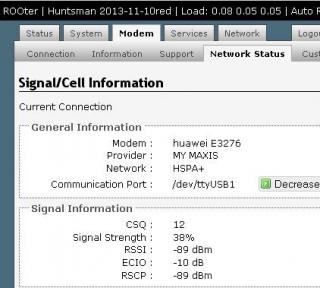
Thx
TSblacktubi
post Dec 14 2013, 09:03 PM

-
Group Icon
Elite
8,415 posts

Joined: Jul 2008

QUOTE(S_yah @ Dec 14 2013, 09:00 PM)
WTA. Hope you all can help...

1.  If I forward port 80 to my windows server 2012. In this case, what port is Luci using?

2. Windows server 2012 needed port:80 for remote web access and cctv needed port:80 for remote viewing. How should I configure Luci to handle this situation?

Thx
*
You can port forward external port 1234 to internal port 80 for your CCTV IP smile.gif
yonghong
post Dec 14 2013, 09:04 PM

On my way
****
Junior Member
551 posts

Joined: Jan 2011


QUOTE(blacktubi @ Dec 14 2013, 09:00 PM)
I am not admin

Flash your router not modem tongue.gif

Flash to ROOter custom firmware
*
yaya i mean router custom firmware, is red version 2013 23/11/2013?
chuahcs79
post Dec 14 2013, 09:17 PM

Look at all my stars!!
Group Icon
Elite
6,931 posts

Joined: Apr 2011
From: Bolehland for sure ^_^


QUOTE(azim61 @ Dec 14 2013, 03:00 PM)
okeh thx for the info
anyone has link for huntsman 2013-11-10 red for MR3420 V1?
*
whole huntsman pack for V2 only http://www.mediafire.com/download/w9cvd70r...i/tl-mr3420.zip

This post has been edited by chuahcs79: Dec 14 2013, 09:18 PM
S_yah
post Dec 14 2013, 11:48 PM

New Member
*
Junior Member
16 posts

Joined: Aug 2010
QUOTE(blacktubi @ Dec 14 2013, 09:03 PM)
You can port forward external port 1234 to internal port 80 for your CCTV IP smile.gif
*
Thank you for reply...


For TP-Link MR3420:

Luci=>Network=>Switch...

VLAN CPU Port1 Port2 Port3 Port4


Q? : Which one is WAN port? If Port1 is WAN port, then, which one represent the actual physical port-4 ?


Thx.

Proclaimer
post Dec 15 2013, 03:36 AM

Regular
******
Senior Member
1,150 posts

Joined: Aug 2005


Took 2 hours or so to figure out what was wrong that i couldnt connect E3276 with the router.

One stupid mistake was i forgot to set the pin sweat.gif

The part that made it successful was where in network status i had to decrease and increase the communication port till i found the port /dev/ttyUSB0 where the modem was connected.

For a newbie like me it was so easy to over look that part.

LTE connection is way way better than 3G in my area. rclxms.gif


philipcs
post Dec 15 2013, 04:46 AM

Look at all my stars!!
*******
Senior Member
2,581 posts

Joined: Jan 2003
Hi, Regarding the USB Extension cable with ferrite core, any recommended length I should get?
TSblacktubi
post Dec 15 2013, 11:44 AM

-
Group Icon
Elite
8,415 posts

Joined: Jul 2008

QUOTE(philipcs @ Dec 15 2013, 04:46 AM)
Hi, Regarding the USB Extension cable with ferrite core, any recommended length I should get?
*
1.5M try avoid exceeding 3M
azim61
post Dec 15 2013, 01:06 PM

Casual
***
Junior Member
480 posts

Joined: Jan 2007


QUOTE(chuahcs79 @ Dec 14 2013, 09:17 PM)
thx but i have V1 not V2
anyway thx ya
philipcs
post Dec 15 2013, 06:35 PM

Look at all my stars!!
*******
Senior Member
2,581 posts

Joined: Jan 2003
QUOTE(blacktubi @ Dec 15 2013, 11:44 AM)
1.5M try avoid exceeding 3M
*
Thanks bro!
bitcomet79
post Dec 16 2013, 01:47 AM

Casual
***
Junior Member
356 posts

Joined: Nov 2013
can someone help me....
i plug the e3276 into the tplink at step 2 but it can't detect my usb modem....can someone pls help...
thanks
Proclaimer
post Dec 16 2013, 02:47 AM

Regular
******
Senior Member
1,150 posts

Joined: Aug 2005


QUOTE(bitcomet79 @ Dec 16 2013, 01:47 AM)
can someone help me....
i plug the e3276 into the tplink at step 2 but it can't detect my usb modem....can someone pls help...
thanks
*
Can you see this in your router?

user posted image

This post has been edited by Proclaimer: Dec 16 2013, 03:24 AM
digilife
post Dec 16 2013, 03:00 AM

The MNP guy, its me yeah.
*******
Senior Member
8,025 posts

Joined: Feb 2005
From: Planet Boleland


E3276 on TP Link 710N

Attached Image
hoekeat
post Dec 16 2013, 05:14 PM

New Member
*
Junior Member
45 posts

Joined: Jan 2003
my nexus 7 LTE sometimes can get up to 50mbps at home with maxis line, if i get MR3420 + E398, should i expect better speed/stability? or is there any limitation on this combo. Assuming there is no capping on the line.
bitcomet79
post Dec 16 2013, 11:30 PM

Casual
***
Junior Member
356 posts

Joined: Nov 2013
QUOTE(Proclaimer @ Dec 16 2013, 02:47 AM)
Can you see this in your router?

user posted image
*
i finally manage to do it after changing the APN to maxisbb

all sifus, i got some questions.... icon_question.gif

what is the steps i need to if i want to upgrade the ROOter in the future?? sweat.gif

And why i can't detect the E3276 every first time i turn on the MR3420?? rclxub.gif ..... i need to turn off the MR3420 and turn it back on again, then only it can detect the E3276....can somebody please help...
chuahcs79
post Dec 16 2013, 11:46 PM

Look at all my stars!!
Group Icon
Elite
6,931 posts

Joined: Apr 2011
From: Bolehland for sure ^_^


QUOTE(bitcomet79 @ Dec 16 2013, 11:30 PM)
i finally manage to do it after changing the APN to maxisbb

all sifus, i got some questions.... icon_question.gif

what is the steps i need to if i want to upgrade the ROOter in the future?? sweat.gif

And why i can't detect the E3276 every first time i turn on the MR3420?? rclxub.gif ..... i  need to turn off the MR3420 and turn it back on again, then only it can detect the E3276....can somebody please help...
*
how to flash rooter : i personally use huntsman 2013-11-10red for my TL-MR3420 V2 + E3276

» Click to show Spoiler - click again to hide... «

bitcomet79
post Dec 17 2013, 12:23 AM

Casual
***
Junior Member
356 posts

Joined: Nov 2013
QUOTE(chuahcs79 @ Dec 16 2013, 11:46 PM)
how to flash rooter : i personally use huntsman 2013-11-10red for my TL-MR3420 V2 + E3276

» Click to show Spoiler - click again to hide... «

*
i'm also using huntsman 2013-11-10red but i can't find "firmware" under the "system" tab
i only have "Backup/Flash Firmware" under the "system" tab.....pls help

And why i can't detect the E3276 every FIRST time i turn on the MR3420?? .... every time i need to turn off the MR3420 and turn it back on again, then only it can detect the E3276....any solutions pls...
maxcheam
post Dec 17 2013, 02:21 PM

Casual
***
Junior Member
384 posts

Joined: Jan 2006
From: Penang


a new Huntsman release dated 2013-12-18.

Quoted dairyman on the release notes:
» Click to show Spoiler - click again to hide... «


http://www.ofmodemsandmen.com/downloads.html

A gentle reminder, try at your own risk as Huntsman is still in beta. whistling.gif

This post has been edited by maxcheam: Dec 17 2013, 02:27 PM
digilife
post Dec 17 2013, 02:32 PM

The MNP guy, its me yeah.
*******
Senior Member
8,025 posts

Joined: Feb 2005
From: Planet Boleland


QUOTE(maxcheam @ Dec 17 2013, 02:21 PM)
a new Huntsman release dated 2013-12-18.

Quoted dairyman on the release notes:
» Click to show Spoiler - click again to hide... «


http://www.ofmodemsandmen.com/downloads.html

A gentle reminder, try at your own risk as Huntsman is still in beta.  whistling.gif
*
How do we utilise this feature ?

And what is the purpose ?

Thanks

Attached Image
maxcheam
post Dec 17 2013, 02:37 PM

Casual
***
Junior Member
384 posts

Joined: Jan 2006
From: Penang


QUOTE(digilife @ Dec 17 2013, 02:32 PM)
How do we utilise this feature ?

And what is the purpose ?

Thanks

Attached Image
*
Default selection is On. This gives power to the USB port on your router
If Off is selected, no power are supplied to the USB port.

So, if you turn this OFF and Save. Then, ON and Save. This will be like taking your USB cable/modem out and plug it back in. I like this method as I'm lazy to do it physically as my routers are placed outside.
digilife
post Dec 17 2013, 03:02 PM

The MNP guy, its me yeah.
*******
Senior Member
8,025 posts

Joined: Feb 2005
From: Planet Boleland


QUOTE(maxcheam @ Dec 17 2013, 02:37 PM)
Default selection is On. This gives power to the USB port on your router
If Off is selected, no power are supplied to the USB port.

So, if you turn this OFF and Save. Then, ON and Save. This will be like taking your USB cable/modem out and plug it back in. I like this method as I'm lazy to do it physically as my routers are placed outside.
*
Thanks bro, its like reset the connection by pulling the modem out and re plug in again.

notworthy.gif notworthy.gif


lpc26
post Dec 17 2013, 03:07 PM

Getting Started
**
Junior Member
135 posts

Joined: Jan 2003
QUOTE(maxcheam @ Dec 17 2013, 02:21 PM)
a new Huntsman release dated 2013-12-18.

Quoted dairyman on the release notes:
» Click to show Spoiler - click again to hide... «


http://www.ofmodemsandmen.com/downloads.html

A gentle reminder, try at your own risk as Huntsman is still in beta.  whistling.gif
*
wow TP-Link WR1043ND V2 mean now all new model purchase at any shop will be no problem.

again "Try At Your Own Risk" router may BRICK laugh.gif
digilife
post Dec 17 2013, 03:12 PM

The MNP guy, its me yeah.
*******
Senior Member
8,025 posts

Joined: Feb 2005
From: Planet Boleland


QUOTE(lpc26 @ Dec 17 2013, 03:07 PM)
wow TP-Link WR1043ND V2 mean now all new model purchase at any shop will be no problem.

again "Try At Your Own Risk" router may BRICK  laugh.gif
*
That " Try Ay Your Risk " is a common warning ~ even Blacktubi advice us on his FW upgrade.

laugh.gif

Btw, why cannot log onto Luci now ?

Attached Image


noobandroid
post Dec 17 2013, 03:17 PM

Audiophile
********
All Stars
11,836 posts

Joined: Mar 2011
From: Kota Kinabalu, Sabah


QUOTE(digilife @ Dec 17 2013, 03:12 PM)
That " Try Ay Your Risk " is a common warning ~ even Blacktubi advice us on his FW upgrade.

laugh.gif

Btw, why cannot log onto Luci now ?

Attached Image
*
try putty>firstboot it, might be interface error, if not maybe a bad flash
maxcheam
post Dec 17 2013, 03:18 PM

Casual
***
Junior Member
384 posts

Joined: Jan 2006
From: Penang


QUOTE(digilife @ Dec 17 2013, 03:12 PM)
Btw, why cannot log onto Luci now ?
» Click to show Spoiler - click again to hide... «

*
Is this after patched and rebooted? If yes, you might want to power off and power it back on again. I don't have this issue with 3 of my routers that just patched to the latest red version.
digilife
post Dec 17 2013, 03:24 PM

The MNP guy, its me yeah.
*******
Senior Member
8,025 posts

Joined: Feb 2005
From: Planet Boleland


Just now I was using 710N , then I off the 710N and use another modem on the 1043ND and off the 710N, maybe later when i reboot it would be back to normal again.

Thanks for the advice.

notworthy.gif


noobandroid
post Dec 17 2013, 03:45 PM

Audiophile
********
All Stars
11,836 posts

Joined: Mar 2011
From: Kota Kinabalu, Sabah


so many people using huntsman, makes me wanna shift from AA to HM, but then i tried a lot of times, always has problems, including load up to 1.xx per core
nasaaie
post Dec 17 2013, 04:06 PM

New Member
*
Newbie
1 posts

Joined: Dec 2008
From: Kepong, KL


Hi.noob question.will tplink mr3040 support 2g mode after use this fw? Tq
hoekeat
post Dec 17 2013, 05:00 PM

New Member
*
Junior Member
45 posts

Joined: Jan 2003
QUOTE(hoekeat @ Dec 16 2013, 05:14 PM)
my nexus 7 LTE sometimes can get up to 50mbps at home with maxis line, if i get MR3420 + E398, should i expect better speed/stability? or is there any limitation on this combo. Assuming there is no capping on the line.
*
anyone?
digilife
post Dec 17 2013, 05:18 PM

The MNP guy, its me yeah.
*******
Senior Member
8,025 posts

Joined: Feb 2005
From: Planet Boleland


QUOTE(hoekeat @ Dec 17 2013, 05:00 PM)
anyone?
*
Just Do It

However some 3G router will limit you to a max of 25mbps, if you have the $$, go for B593 , 4G version , PM Blacktubi for best prices.

biggrin.gif
hoekeat
post Dec 17 2013, 05:32 PM

New Member
*
Junior Member
45 posts

Joined: Jan 2003
QUOTE(digilife @ Dec 17 2013, 05:18 PM)
Just Do It

However some 3G router will limit you to a max of 25mbps, if you have the $$, go for B593 , 4G version , PM Blacktubi for best prices.

biggrin.gif
*
I previously heard something about the 25mbps limit, which baffles me. That is why I wish to get some tips from tai kor here if the E398 + MR3420 combo suffers from this limit or not? If yes, which is the limiting factor? modem or router? Price of B593 is kind of out of reach leh
digilife
post Dec 17 2013, 05:42 PM

The MNP guy, its me yeah.
*******
Senior Member
8,025 posts

Joined: Feb 2005
From: Planet Boleland


QUOTE(hoekeat @ Dec 17 2013, 05:32 PM)
I previously heard something about the 25mbps limit, which baffles me. That is why I wish to get some tips from tai kor here if the E398 + MR3420 combo suffers from this limit or not? If yes, which is the limiting factor? modem or router? Price of B593 is kind of out of reach leh
*
The 25Mbps is a software limitation.

Maybe you can contribute some $$ to the OpenWRT project ah head so that they can help you to overcome that cap.

Btw, most of the time its Network fault as speed on fon and modem does varies.

Today lagi worst , see my DL and UP ~ btw, my account is not capped as I enjoy 75000/75000

user posted image

Attached Image
TSblacktubi
post Dec 17 2013, 06:49 PM

-
Group Icon
Elite
8,415 posts

Joined: Jul 2008

B593 is an expensive hardware, my modified 703N works very good

Will post something interesting tonight, just recover from food poisoning rclxub.gif

Every router if properly configured should work well, avoid MR3420 V2, I have bad experience with it. smile.gif
digilife
post Dec 17 2013, 06:57 PM

The MNP guy, its me yeah.
*******
Senior Member
8,025 posts

Joined: Feb 2005
From: Planet Boleland


QUOTE(blacktubi @ Dec 17 2013, 06:49 PM)
B593 is an expensive hardware, my modified 703N works very good

Will post something interesting tonight, just recover from food poisoning rclxub.gif

Every router if properly configured should work well, avoid MR3420 V2, I have bad experience with it. smile.gif
*
But do you think B593 can outsmart a WR710N + E3276 ( investment < rm400 )

My 710N also perform very good and less hassle compared to 3420/1043ND cause I just plug onto my mains kautim, no need wires
TSblacktubi
post Dec 17 2013, 07:03 PM

-
Group Icon
Elite
8,415 posts

Joined: Jul 2008

QUOTE(digilife @ Dec 17 2013, 06:57 PM)
But do you think B593 can outsmart a WR710N + E3276 ( investment < rm400 )

My 710N also perform very good and less hassle compared to 3420/1043ND cause I just plug onto my mains kautim, no need wires
*
I think WR710N is a 5V product so it should work better compare to those 12V due to their poor power regulator.

If you are curious, inside B593 is a LTE module plugged to the router

I know someone use B593 now, performance is on par with usual Cat4

Meanwhile I got R470T+ V3 tongue.gif
digilife
post Dec 17 2013, 07:09 PM

The MNP guy, its me yeah.
*******
Senior Member
8,025 posts

Joined: Feb 2005
From: Planet Boleland


QUOTE(blacktubi @ Dec 17 2013, 07:03 PM)
I think WR710N is a 5V product so it should work better compare to those 12V due to their poor power regulator.

If you are curious, inside B593 is a LTE module plugged to the router

I know someone use B593 now, performance is on par with usual Cat4

Meanwhile I got R470T+ V3 tongue.gif
*
I would say WR710N once flashed to ROOter is much better than a MR3240 cause its flash memory is 8MB , can fight with 1043ND but WiFi range is shorter, but you can compensate it using a LAN cable

Pls do a review on R470+ later tonite

biggrin.gif
TSblacktubi
post Dec 17 2013, 07:16 PM

-
Group Icon
Elite
8,415 posts

Joined: Jul 2008

QUOTE(digilife @ Dec 17 2013, 07:09 PM)
I would say WR710N once flashed to ROOter is much better than a MR3240 cause its flash memory is 8MB , can fight with 1043ND but WiFi range is shorter, but you can compensate it using a LAN cable

Pls do a review on R470+ later tonite

biggrin.gif
*
My modified 703N got 64MB RAM and 16MB flash, a lot powerful than MR3420 and 1043ND tongue.gif

I feel guilty because I didn't put it into good use sweat.gif
digilife
post Dec 17 2013, 07:18 PM

The MNP guy, its me yeah.
*******
Senior Member
8,025 posts

Joined: Feb 2005
From: Planet Boleland


QUOTE(blacktubi @ Dec 17 2013, 07:16 PM)
My modified 703N got 64MB RAM and 16MB flash, a lot powerful than MR3420 and 1043ND tongue.gif

I feel guilty because I didn't put it into good use sweat.gif
*
Where you bought this 703N ?
TSblacktubi
post Dec 17 2013, 07:24 PM

-
Group Icon
Elite
8,415 posts

Joined: Jul 2008

QUOTE(digilife @ Dec 17 2013, 07:18 PM)
Where you bought this 703N ?
*
I got it from China moders, maybe I should do a bulk whistling.gif

This is my speed currently, combination of 2 WAN, still slower than your single due to my location sad.gif

user posted image
digilife
post Dec 17 2013, 07:39 PM

The MNP guy, its me yeah.
*******
Senior Member
8,025 posts

Joined: Feb 2005
From: Planet Boleland


QUOTE(blacktubi @ Dec 17 2013, 07:24 PM)
I got it from China moders, maybe I should do a bulk whistling.gif

This is my speed currently, combination of 2 WAN, still slower than your single due to my location sad.gif

user posted image
*
Yes, do a bulk on it (703N)

My current speed now

user posted image

On LAN only and WiFi duno why disconnected on the 1043ND , any reason it got disconnected ?

rclxub.gif
TSblacktubi
post Dec 17 2013, 07:41 PM

-
Group Icon
Elite
8,415 posts

Joined: Jul 2008

QUOTE(digilife @ Dec 17 2013, 07:39 PM)
Yes, do a bulk on it (703N)

My current speed now

user posted image

On LAN only and WiFi duno why disconnected on the 1043ND , any reason it got disconnected ?

rclxub.gif
*
sad.gif LTE haven't reach me

Is the interface disabled, maybe you need to reflash already
lpc26
post Dec 17 2013, 07:44 PM

Getting Started
**
Junior Member
135 posts

Joined: Jan 2003
QUOTE(blacktubi @ Dec 17 2013, 07:24 PM)
I got it from China moders, maybe I should do a bulk whistling.gif

This is my speed currently, combination of 2 WAN, still slower than your single due to my location sad.gif

user posted image
*
how to combine the 2 wan?
TSblacktubi
post Dec 17 2013, 07:46 PM

-
Group Icon
Elite
8,415 posts

Joined: Jul 2008

QUOTE(lpc26 @ Dec 17 2013, 07:44 PM)
how to combine the 2 wan?
*
I won't detail too much, some guys will misuse it if you know what I mean smile.gif

PM me
digilife
post Dec 17 2013, 07:53 PM

The MNP guy, its me yeah.
*******
Senior Member
8,025 posts

Joined: Feb 2005
From: Planet Boleland


QUOTE(blacktubi @ Dec 17 2013, 07:41 PM)
sad.gif LTE haven't reach me

Is the interface disabled, maybe you need to reflash already
*
Only my laptop wifi is disconnected, my fone & tablet are still connected to the WiFi of 1043ND

funny huh

rclxub.gif
TSblacktubi
post Dec 17 2013, 07:54 PM

-
Group Icon
Elite
8,415 posts

Joined: Jul 2008

QUOTE(digilife @ Dec 17 2013, 07:53 PM)
Only my laptop wifi is disconnected, my fone & tablet are still connected to the WiFi of 1043ND

funny huh

rclxub.gif
*
Your laptop WiFi is broken?

Try change to different channel or different mode
digilife
post Dec 17 2013, 08:22 PM

The MNP guy, its me yeah.
*******
Senior Member
8,025 posts

Joined: Feb 2005
From: Planet Boleland


QUOTE(blacktubi @ Dec 17 2013, 07:54 PM)
Your laptop WiFi is broken?

Try change to different channel or different mode
*
No la, over heated kot.

Btw, when you gonna mod this ?

Attached Image
TSblacktubi
post Dec 17 2013, 08:25 PM

-
Group Icon
Elite
8,415 posts

Joined: Jul 2008

QUOTE(digilife @ Dec 17 2013, 08:22 PM)
No la, over heated kot.

Btw, when you gonna mod this ?

Attached Image
*
I don't mod external antenna since that's not my priority, anyway any powerbank works with 703N tongue.gif

My 703N looks a lot a lot nicer due to different chassic whistling.gif
digilife
post Dec 17 2013, 08:48 PM

The MNP guy, its me yeah.
*******
Senior Member
8,025 posts

Joined: Feb 2005
From: Planet Boleland


QUOTE(blacktubi @ Dec 17 2013, 08:25 PM)
I don't mod external antenna since that's not my priority, anyway any powerbank works with 703N tongue.gif

My 703N looks a lot a lot nicer due to different chassic whistling.gif
*
Which is bigger in size between 703N and MR3020 ?

Can post the comparison pic ?

Thanks
maxcheam
post Dec 17 2013, 08:53 PM

Casual
***
Junior Member
384 posts

Joined: Jan 2006
From: Penang


QUOTE(blacktubi @ Dec 17 2013, 07:24 PM)
This is my speed currently, combination of 2 WAN, still slower than your single due to my location sad.gif
user posted image
*
In case you haven't uncheck everything under Advanced > Load Balance > Configuration, you should try it. It should give you better combined speed test. I'm assuming that V2 and V3 have the same GUI.

Note that some HTTPS sites or application might not work properly as it will try to use all the WAN connections you have. If you have issues, can always tick back "Enable Application Optimized Routing".
TSblacktubi
post Dec 17 2013, 08:53 PM

-
Group Icon
Elite
8,415 posts

Joined: Jul 2008

QUOTE(digilife @ Dec 17 2013, 08:48 PM)
Which is bigger in size between 703N and MR3020 ?

Can post the comparison pic ?

Thanks
*


Attached thumbnail(s)
Attached Image
maxcheam
post Dec 17 2013, 08:54 PM

Casual
***
Junior Member
384 posts

Joined: Jan 2006
From: Penang


QUOTE(digilife @ Dec 17 2013, 08:48 PM)
Which is bigger in size between 703N and MR3020 ?

Can post the comparison pic ?

Thanks
*
703N is the smallest router you can find in TP-Link products
digilife
post Dec 17 2013, 08:55 PM

The MNP guy, its me yeah.
*******
Senior Member
8,025 posts

Joined: Feb 2005
From: Planet Boleland


QUOTE(blacktubi @ Dec 17 2013, 08:53 PM)

*
What is that on the right ?

tongue.gif
TSblacktubi
post Dec 17 2013, 08:59 PM

-
Group Icon
Elite
8,415 posts

Joined: Jul 2008

QUOTE(maxcheam @ Dec 17 2013, 08:53 PM)
In case you haven't uncheck everything under Advanced > Load Balance > Configuration, you should try it. It should give you better combined speed test. I'm assuming that V2 and V3 have the same GUI.

Note that some HTTPS sites or application might not work properly as it will try to use all the WAN connections you have. If you have issues, can always tick back "Enable Application Optimized Routing".
*
Already uncheked that else can't even reach this kind of combined speed, thanks for reminding notworthy.gif

They should be similar, my V3 is black color

Won't be ideal for gaming or secure stuff, will try to get OpenVPN working on every 703N to ensure all of them if I figured out how to get that work on ROOter

This post has been edited by blacktubi: Dec 17 2013, 09:00 PM
digilife
post Dec 17 2013, 09:11 PM

The MNP guy, its me yeah.
*******
Senior Member
8,025 posts

Joined: Feb 2005
From: Planet Boleland


QUOTE(blacktubi @ Dec 17 2013, 08:59 PM)
Already uncheked that else can't even reach this kind of combined speed, thanks for reminding notworthy.gif

They should be similar, my V3 is black color

Won't be ideal for gaming or secure stuff, will try to get OpenVPN working on every 703N to ensure all of them if I figured out how to get that work on ROOter
*
The main purpose of a LB is to have a stable connection as one IP can do one stuff and another IP do another stuff on another tab of your browser. If we can streamline all the LB's IP's into one, it would be great ~ like Connectify Switchboard. Can we do it actually ?

smile.gif
TSblacktubi
post Dec 17 2013, 09:20 PM

-
Group Icon
Elite
8,415 posts

Joined: Jul 2008

QUOTE(digilife @ Dec 17 2013, 09:11 PM)
The main purpose of a LB is to have a stable connection as one IP can do one stuff and another IP do another stuff on another tab of your browser. If we can streamline all the LB's IP's into one, it would be great ~ like Connectify Switchboard. Can we do it actually ?

smile.gif
*
Possible

Just run OpenVPN Client on each of my 703N and they will get the same IP. Other website will see you as one IP.

A lot of bandwidth is required if I want to do this for long term.
gastacopz
post Dec 17 2013, 10:09 PM

Newbie
*******
Senior Member
4,928 posts

Joined: Feb 2008
From: /K/opitiam Pak Hang Status: Permaban


Guys,

opinion pls...

https://forum.lowyat.net/index.php?showtopic=2129210&hl=

this usb cable good or not??as seller told me with ferrite core

or got any seller in klang valley selling cable with ferrite core?

wanna get LTE...coz lte just outside my house, outer most...damn!
bitcomet79
post Dec 18 2013, 12:01 AM

Casual
***
Junior Member
356 posts

Joined: Nov 2013
dear all sifus,

i'm using huntsman 2013-11-10red but facing problem to detect the E3276 every FIRST time i turn on the MR3420....
so, i would like to flash my router again....can you sifus pls help me how to flash my router again...what are the steps? icon_question.gif
i can't find the "firmware" under the "system" tab that chuahcs79 told me....my side only got Backup / Flash Firmware so i can't flash my router again rclxub.gif

Attached Image
chuahcs79
post Dec 18 2013, 12:09 AM

Look at all my stars!!
Group Icon
Elite
6,931 posts

Joined: Apr 2011
From: Bolehland for sure ^_^


QUOTE(gastacopz @ Dec 17 2013, 10:09 PM)
Guys,

opinion pls...

https://forum.lowyat.net/index.php?showtopic=2129210&hl=

this usb cable good or not??as seller told me with ferrite core

or got any seller in klang valley selling cable with ferrite core?

wanna get LTE...coz lte just outside my house, outer most...damn!
*
go for USB3.0 cable if u want good quality
chuahcs79
post Dec 18 2013, 12:09 AM

Look at all my stars!!
Group Icon
Elite
6,931 posts

Joined: Apr 2011
From: Bolehland for sure ^_^


QUOTE(bitcomet79 @ Dec 18 2013, 12:01 AM)
dear all sifus,

i'm using huntsman 2013-11-10red but facing problem to detect the E3276 every FIRST time i turn on the MR3420....
so, i would like to flash my router again....can you sifus pls help me how to flash my router again...what are the steps?  icon_question.gif
i can't find the "firmware" under the "system" tab that chuahcs79 told me....my side only got Backup / Flash Firmware so i can't flash my router again rclxub.gif

Attached Image
*
your screenshot showing that u are at the correct tab backup/firmware is the section where you can flash your router firmware
bitcomet79
post Dec 18 2013, 12:15 AM

Casual
***
Junior Member
356 posts

Joined: Nov 2013
QUOTE(chuahcs79 @ Dec 18 2013, 12:09 AM)
your screenshot showing that u are at the correct tab backup/firmware is the section where you can flash your router firmware
*
then which to choose so i can flash my router as per your instruction earlier??
is it "flash new firmware image"??
Attached Image
maxcheam
post Dec 18 2013, 11:07 AM

Casual
***
Junior Member
384 posts

Joined: Jan 2006
From: Penang


FYI, there is still one small problem to fix for 12-18 firmwares where you might occasionally see 3 unsaved changes for bandwidth monitor. Dairyman will release 12-20 firmware soon which fixes that.
maxcheam
post Dec 18 2013, 11:12 AM

Casual
***
Junior Member
384 posts

Joined: Jan 2006
From: Penang


QUOTE(bitcomet79 @ Dec 18 2013, 12:15 AM)
then which to choose so i can flash my router as per your instruction earlier??
is it "flash new firmware image"??
Attached Image
*
the instructions/descriptions in the GUI is pretty much straightforward and obvious. You won't be getting much response if you keep asking us to spoon feed you. whistling.gif
philipcs
post Dec 18 2013, 11:29 AM

Look at all my stars!!
*******
Senior Member
2,581 posts

Joined: Jan 2003
QUOTE(digilife @ Dec 17 2013, 07:39 PM)
Yes, do a bulk on it (703N)

My current speed now

user posted image

On LAN only and WiFi duno why disconnected on the 1043ND , any reason it got disconnected ?

rclxub.gif
*
Sorry, noob here. What so good about 703N?
noobandroid
post Dec 18 2013, 04:48 PM

Audiophile
********
All Stars
11,836 posts

Joined: Mar 2011
From: Kota Kinabalu, Sabah


QUOTE(philipcs @ Dec 18 2013, 11:29 AM)
Sorry, noob here. What so good about 703N?
*
erm.. combine multiple internet speed to one PC?
lpc26
post Dec 18 2013, 06:13 PM

Getting Started
**
Junior Member
135 posts

Joined: Jan 2003
why u all play 703N ? what so good about it?

blacktubidigilife
TSblacktubi
post Dec 18 2013, 06:20 PM

-
Group Icon
Elite
8,415 posts

Joined: Jul 2008

QUOTE(lpc26 @ Dec 18 2013, 06:13 PM)
why u all play 703N ? what so good about it?

blacktubidigilife
*
703N is my toy, nothing special with that smile.gif

I like it because it is small enough and work good with 3G USB modem
lpc26
post Dec 18 2013, 06:24 PM

Getting Started
**
Junior Member
135 posts

Joined: Jan 2003
QUOTE(blacktubi @ Dec 18 2013, 06:20 PM)
703N is my toy, nothing special with that smile.gif

I like it because it is small enough and work good with 3G USB modem
*
oh, easy to play troubleshoot/diagnostic problems with 3G usb modem.
digilife
post Dec 18 2013, 06:24 PM

The MNP guy, its me yeah.
*******
Senior Member
8,025 posts

Joined: Feb 2005
From: Planet Boleland


QUOTE(lpc26 @ Dec 18 2013, 06:13 PM)
why u all play 703N ? what so good about it?

blacktubidigilife
*
I like 3G Router and LTE modems, they are my Toys.

I have more than 10# 3G routers at home

biggrin.gif


lpc26
post Dec 18 2013, 06:26 PM

Getting Started
**
Junior Member
135 posts

Joined: Jan 2003
QUOTE(digilife @ Dec 18 2013, 06:24 PM)
I like 3G Router and LTE modems, they are my Toys.

I have more than 10# 3G routers at home

biggrin.gif
*
blacktubi This baru call Crazy 3G Router people ma... laugh.gif laugh.gif
TSblacktubi
post Dec 18 2013, 06:33 PM

-
Group Icon
Elite
8,415 posts

Joined: Jul 2008

QUOTE(lpc26 @ Dec 18 2013, 06:24 PM)
oh, easy to play troubleshoot/diagnostic problems with 3G usb modem.
*
It is a 5V device and never got those funny power issue like my V2

I got 3 of these lying around totally replace the MR3420
digilife
post Dec 18 2013, 06:37 PM

The MNP guy, its me yeah.
*******
Senior Member
8,025 posts

Joined: Feb 2005
From: Planet Boleland


QUOTE(lpc26 @ Dec 18 2013, 06:26 PM)
blacktubi This baru call Crazy 3G Router people ma...  laugh.gif  laugh.gif
*
HW550#2

710N#1
MR3020#1
MR3220#1
MR3420V1#3
MR3420V2#3

8968TD#1
1043ND#2

Asus BU12#1
Asus RT13U#1
Asus RT N16#1

All my MR3420 have different FW, some factory, AA and ROOter.


doh.gif doh.gif doh.gif

lpc26
post Dec 18 2013, 06:40 PM

Getting Started
**
Junior Member
135 posts

Joined: Jan 2003
QUOTE(blacktubi @ Dec 18 2013, 06:33 PM)
It is a 5V device and never got those funny power issue like my V2

I got 3 of these lying around totally replace the MR3420
*
Is TL-MR3020 and TL-WR702N able to do that also?
lpc26
post Dec 18 2013, 06:41 PM

Getting Started
**
Junior Member
135 posts

Joined: Jan 2003
QUOTE(digilife @ Dec 18 2013, 06:37 PM)
HW550#2

710N#1
MR3020#1
MR3220#1
MR3420V1#3
MR3420V2#3

8968TD#1
1043ND#2

Asus BU12#1
Asus RT13U#1
Asus RT N16#1

All my MR3420 have different FW, some factory, AA and ROOter.
doh.gif  doh.gif  doh.gif
*
wow u have almost all TPLINK home user router. laugh.gif
TSblacktubi
post Dec 18 2013, 06:59 PM

-
Group Icon
Elite
8,415 posts

Joined: Jul 2008

QUOTE(lpc26 @ Dec 18 2013, 06:40 PM)
Is TL-MR3020 and TL-WR702N able to do that also?
*
As far as I know MR3020, 702N are also 5V device.


digilife
post Dec 18 2013, 07:08 PM

The MNP guy, its me yeah.
*******
Senior Member
8,025 posts

Joined: Feb 2005
From: Planet Boleland


QUOTE(lpc26 @ Dec 18 2013, 06:41 PM)
wow u have almost all TPLINK home user router.  laugh.gif
*
Mostly acquired as used product from garage sale.

biggrin.gif


bitcomet79
post Dec 18 2013, 11:45 PM

Casual
***
Junior Member
356 posts

Joined: Nov 2013
QUOTE(maxcheam @ Dec 18 2013, 11:12 AM)
the instructions/descriptions in the GUI is pretty much straightforward and obvious. You won't be getting much response if you keep asking us to spoon feed you.  whistling.gif
*
sorry as i'm noob in all this and not tech savvy blush.gif ......that's why i ask so much
ok, i will try n error then....hope it'll be ok....
Proclaimer
post Dec 19 2013, 03:08 AM

Regular
******
Senior Member
1,150 posts

Joined: Aug 2005


Guys, how do i set up the QoS in rooter?

Source host should be computer IP and destination host should be the router IP?
Morning_Star
post Dec 19 2013, 10:36 AM

Casual
***
Junior Member
356 posts

Joined: Sep 2005


What do u think of this :

http://www.dslreports.com/forum/r28102272-...herous-Backdoor
TSblacktubi
post Dec 19 2013, 11:06 AM

-
Group Icon
Elite
8,415 posts

Joined: Jul 2008

QUOTE(Morning_Star @ Dec 19 2013, 10:36 AM)
A normal user shouldn't worry too much about this

Can't be attacked from the WAN.
digilife
post Dec 19 2013, 11:29 AM

The MNP guy, its me yeah.
*******
Senior Member
8,025 posts

Joined: Feb 2005
From: Planet Boleland


QUOTE(blacktubi @ Dec 19 2013, 11:06 AM)
A normal user shouldn't worry too much about this

Can't be attacked from the WAN.
*
Disable wifi and use only LAN ?


lpc26
post Dec 19 2013, 11:29 AM

Getting Started
**
Junior Member
135 posts

Joined: Jan 2003
QUOTE(Morning_Star @ Dec 19 2013, 10:36 AM)
Just Huntsman it, nothing should be afraid of. laugh.gif
TSblacktubi
post Dec 19 2013, 11:35 AM

-
Group Icon
Elite
8,415 posts

Joined: Jul 2008

QUOTE(digilife @ Dec 19 2013, 11:29 AM)
Disable wifi and use only LAN ?
*
Nothing to worry about, WiFi is LAN too.
xphr3ak
post Dec 19 2013, 08:10 PM

Regular
******
Senior Member
1,797 posts

Joined: Jan 2003
guys,
is it a good choice to get WR710N to hook with E398?
TQ.
gastacopz
post Dec 19 2013, 10:30 PM

Newbie
*******
Senior Member
4,928 posts

Joined: Feb 2008
From: /K/opitiam Pak Hang Status: Permaban


Today lagi worst , see my DL and UP ~ btw, my account is not capped as I enjoy 75000/75000

digilife

What you means by above statement?

As mine different.. Sometimes 7k/7k or 42k/42k or 75k/75k
TSblacktubi
post Dec 19 2013, 11:16 PM

-
Group Icon
Elite
8,415 posts

Joined: Jul 2008

QUOTE(gastacopz @ Dec 19 2013, 10:30 PM)
Today lagi worst , see my DL and UP ~ btw, my account is not capped as I enjoy 75000/75000

digilife

What you means by above statement?

As mine different.. Sometimes 7k/7k or 42k/42k or 75k/75k
*
7k/7k means you over your 4GB/30GB FUP
75k/75k means you are on LTE and haven't exceeded FUP
42k/8k means you are on 3G and haven't exceeded FUP

384/384 means welcome to the VVIP club laugh.gif
gastacopz
post Dec 19 2013, 11:27 PM

Newbie
*******
Senior Member
4,928 posts

Joined: Feb 2008
From: /K/opitiam Pak Hang Status: Permaban


QUOTE(blacktubi @ Dec 19 2013, 11:16 PM)
7k/7k means you over your 4GB/30GB FUP
75k/75k means you are on LTE and haven't exceeded FUP
42k/8k means you are on 3G and haven't exceeded FUP

384/384 means welcome to the VVIP club laugh.gif
*
oic,,,then how come u guys still 75k/75k?

mind pm detail pls...

and what u means by ON lte...is it currently using LTE or its LTE capable or how ya?

and what if on LTE and not yet exceeded FUP?

This post has been edited by gastacopz: Dec 19 2013, 11:30 PM
TSblacktubi
post Dec 19 2013, 11:29 PM

-
Group Icon
Elite
8,415 posts

Joined: Jul 2008

QUOTE(gastacopz @ Dec 19 2013, 11:27 PM)
oic,,,then how come u guys still 75k/75k?

mind pm detail pls...
*
Bro, 75K/75k is a VIP status only reserved for the Maxis legacy member who registered on 2008

There's no way to exploit it. wink.gif
gastacopz
post Dec 20 2013, 12:13 AM

Newbie
*******
Senior Member
4,928 posts

Joined: Feb 2008
From: /K/opitiam Pak Hang Status: Permaban


QUOTE(blacktubi @ Dec 19 2013, 11:29 PM)
Bro, 75K/75k is a VIP status only reserved for the Maxis legacy member who registered on 2008

There's no way to exploit it. wink.gif
*
Noted..btw,whats 75k stand for?


TSblacktubi
post Dec 20 2013, 12:22 AM

-
Group Icon
Elite
8,415 posts

Joined: Jul 2008

QUOTE(gastacopz @ Dec 20 2013, 12:13 AM)
Noted..btw,whats 75k stand for?
*
75000Kbit
gastacopz
post Dec 20 2013, 12:23 AM

Newbie
*******
Senior Member
4,928 posts

Joined: Feb 2008
From: /K/opitiam Pak Hang Status: Permaban


QUOTE(blacktubi @ Dec 20 2013, 12:22 AM)
75000Kbit
*
understood that one...indicate what?

max speed or data or what?

noob here smile.gif
archangel1989
post Dec 21 2013, 07:55 AM

Getting Started
**
Junior Member
163 posts

Joined: Mar 2010
From: Lembah Keramat,Wangsa Maju


can anyone help me..how to set load balancing TP Link TL-R470T+ with mobile router MR3040...?
digilife
post Dec 21 2013, 09:06 AM

The MNP guy, its me yeah.
*******
Senior Member
8,025 posts

Joined: Feb 2005
From: Planet Boleland


Anyone want to try UM LTE ?

This was recorded at the entance of Times Sq on Thu on my Lumia820.

UM LTE is on 2600MHz only currently and iPhone users have not been able to use UM LTE on their device yet, duno why doh.gif

Attached Image

Should bring my E3276+MR3020+Power bank there next time.

biggrin.gif


TSblacktubi
post Dec 21 2013, 11:30 AM

-
Group Icon
Elite
8,415 posts

Joined: Jul 2008

QUOTE(digilife @ Dec 21 2013, 09:06 AM)
Anyone want to try UM LTE ?

This was recorded at the entance of Times Sq on Thu on my Lumia820.

UM LTE is on 2600MHz only currently and iPhone users have not been able to use UM LTE on their device yet, duno why  doh.gif

Attached Image

Should bring my E3276+MR3020+Power bank there next time.

biggrin.gif
*
Shared infra with Maxis IMO tongue.gif


hoekeat
post Dec 23 2013, 11:09 AM

New Member
*
Junior Member
45 posts

Joined: Jan 2003
went shopping for TL-WR1043ND at lowyat yesterday. Found out ViewNet only have V1.1, the squarish looking thingy, dont have V2, the more advance space age looking one. That fellow told me all shops only have V1.1 dont have V2. Want to use this with E398. Should I buy this V1.1 or should i still search for V2? If any of you know where to get V2, mind to share the source? smile.gif
TSblacktubi
post Dec 23 2013, 11:42 AM

-
Group Icon
Elite
8,415 posts

Joined: Jul 2008

QUOTE(hoekeat @ Dec 23 2013, 11:09 AM)
went shopping for TL-WR1043ND at lowyat yesterday. Found out ViewNet only have V1.1, the squarish looking thingy, dont have V2, the more advance space age looking one. That fellow told me all shops only have V1.1 dont have V2. Want to use this with E398. Should I buy this V1.1 or should i still search for V2? If any of you know where to get V2, mind to share the source? smile.gif
*
Neither V1 or V2 is compatible with 3G modem.

Get V1, unless you willing to wait
hoekeat
post Dec 23 2013, 11:47 AM

New Member
*
Junior Member
45 posts

Joined: Jan 2003
QUOTE(blacktubi @ Dec 23 2013, 11:42 AM)
Neither V1 or V2 is compatible with 3G modem.

Get V1, unless you willing to wait
*
bro, u mean Either or Neither? I have no problem of trying to put OpenWRT into it smile.gif
TSblacktubi
post Dec 23 2013, 11:51 AM

-
Group Icon
Elite
8,415 posts

Joined: Jul 2008

QUOTE(hoekeat @ Dec 23 2013, 11:47 AM)
bro, u mean Either or Neither? I have no problem of trying to put OpenWRT into it smile.gif
*
I mean both of them cant support USB modem on stock. So it dont make a different.

Not sure is the V2 better in performance but V1 works well enough
lpc26
post Dec 23 2013, 11:55 AM

Getting Started
**
Junior Member
135 posts

Joined: Jan 2003
QUOTE(hoekeat @ Dec 23 2013, 11:47 AM)
bro, u mean Either or Neither? I have no problem of trying to put OpenWRT into it smile.gif
*
Info for you, new version no more RF shield.

» Click to show Spoiler - click again to hide... «

yonghong
post Dec 23 2013, 03:17 PM

On my way
****
Junior Member
551 posts

Joined: Jan 2011


QUOTE(chuahcs79 @ Nov 18 2013, 09:12 PM)
my rooter will DC itself no matter which version after connection running between 18 ~ 22 hour,.

so very weird  hmm.gif
*
hi sifu. wan ask for e3276 modem must use y dual usb cable?
digilife
post Dec 23 2013, 09:21 PM

The MNP guy, its me yeah.
*******
Senior Member
8,025 posts

Joined: Feb 2005
From: Planet Boleland


Latest ROOter can break the 25Mbps barrier

user posted image


Thank You Wahronga Farm and frens

notworthy.gif notworthy.gif


hoekeat
post Dec 24 2013, 03:42 AM

New Member
*
Junior Member
45 posts

Joined: Jan 2003
QUOTE(digilife @ Dec 23 2013, 09:21 PM)
Latest ROOter can break the 25Mbps barrier

user posted image
Thank You Wahronga Farm and frens

notworthy.gif  notworthy.gif
*
which router and modem u using?
wr6969
post Dec 24 2013, 11:33 AM

Casual
***
Junior Member
314 posts

Joined: Jan 2003


TP Link MR3220 v2 flashed with many versions of ROOTer to use with the Huawei E3276 is crap. Worked twice only. After that, keeps complaining no modem present, although all I did was power off the router; no changes to (previously working) configuration whatsoever was done. Avoid this piece of sh1t.

Bought WR710N and flashed it to the latest version of ROOTer. Worked better than the 3220. To get it working, every time you power on the router, do NOT plug in the E3276 modem. Leave the router on for about 5 minutes before plugging in the E3276 and you will get connected automatically, every time. It's a pain in the @ss to remove the modem every night, yeah, but the number of (cheap) routers that works with the E3276 is very few and far in between, for now.
maxcheam
post Dec 24 2013, 03:10 PM

Casual
***
Junior Member
384 posts

Joined: Jan 2006
From: Penang


QUOTE(wr6969 @ Dec 24 2013, 11:33 AM)
TP Link MR3220 v2 flashed with many versions of ROOTer to use with the Huawei E3276 is crap.  Worked twice only.  After that, keeps complaining no modem present, although all I did was power off the router; no changes to (previously working) configuration whatsoever was done.  Avoid this piece of sh1t.

Bought WR710N and flashed it to the latest version of ROOTer.  Worked better than the 3220.  To get it working, every time you power on the router, do NOT plug in the E3276 modem.  Leave the router on for about 5 minutes before plugging in the E3276 and you will get connected automatically, every time.  It's a pain in the @ss to remove the modem every night, yeah, but the number of (cheap) routers that works with the E3276 is very few and far in between, for now.
*
MR3020 works very well with my E3276. No need to do any manual work once you've set it up properly. icon_rolleyes.gif

can check with others on their success stories using certain ROOter routers as well.

This post has been edited by maxcheam: Dec 24 2013, 03:14 PM
TSblacktubi
post Dec 24 2013, 03:27 PM

-
Group Icon
Elite
8,415 posts

Joined: Jul 2008

Get any 5V router, WR710 WR703 MR3020.

TP-LINK mess up their 12V>5V regulator so can't power up E3276 properly doh.gif
lpc26
post Dec 24 2013, 03:38 PM

Getting Started
**
Junior Member
135 posts

Joined: Jan 2003
most problem come from the router didn't give max 500ma to E3276, and some drain lots of ma while booting up.

small type mobile router(WR710 WR703 MR3020) which have smaller board consume less ma so can easily feed the power hunger modem smile.gif

This post has been edited by lpc26: Dec 24 2013, 03:42 PM
chuahcs79
post Dec 24 2013, 06:55 PM

Look at all my stars!!
Group Icon
Elite
6,931 posts

Joined: Apr 2011
From: Bolehland for sure ^_^


so far my MR3420 V2 on 2013-11-10red rooter is working perfectly fine,. no such power issue at all icon_rolleyes.gif
TSblacktubi
post Dec 24 2013, 09:07 PM

-
Group Icon
Elite
8,415 posts

Joined: Jul 2008

QUOTE(chuahcs79 @ Dec 24 2013, 06:55 PM)
so far my MR3420 V2 on 2013-11-10red rooter is working perfectly fine,.  no such power issue at all icon_rolleyes.gif
*
Your is V2.?
digilife
post Dec 24 2013, 09:13 PM

The MNP guy, its me yeah.
*******
Senior Member
8,025 posts

Joined: Feb 2005
From: Planet Boleland


E398+1043ND [ latest ROOter ]

user posted image
chuahcs79
post Dec 24 2013, 09:37 PM

Look at all my stars!!
Group Icon
Elite
6,931 posts

Joined: Apr 2011
From: Bolehland for sure ^_^


QUOTE(blacktubi @ Dec 24 2013, 09:07 PM)
Your is V2.?
*
yeah mine is V2, just swap my power adapter to p1 modem type, and zero issue after that nod.gif

This post has been edited by chuahcs79: Dec 24 2013, 09:40 PM
lpc26
post Dec 24 2013, 09:58 PM

Getting Started
**
Junior Member
135 posts

Joined: Jan 2003
QUOTE(digilife @ Dec 24 2013, 09:13 PM)
E398+1043ND [ latest ROOter ]

user posted image
*
lastest huntsman stable ma?
wr6969
post Dec 25 2013, 02:57 PM

Casual
***
Junior Member
314 posts

Joined: Jan 2003


Flashed MR3020 to the latest ROOTer Huntsman Red, working good so far. No need to wait for a few minutes after boot up to insert the E3276 to make it work properly. Using the supplied power adapter with no modifications. So, WR710N and MR3020 is good, while the MR3220v2 is pure filth biggrin.gif
digilife
post Dec 25 2013, 05:09 PM

The MNP guy, its me yeah.
*******
Senior Member
8,025 posts

Joined: Feb 2005
From: Planet Boleland


QUOTE(lpc26 @ Dec 24 2013, 09:58 PM)
lastest huntsman stable ma?
*
So far so good

If the Maxis LTE cell dun kick down to DC HSPA+ cell, its fine. Here sometimes LTE is for early birds only, meaning if I on my router late and the LTE IP taken up by users here, I cannot log in to LTE and on DC HSPA+ only. This is my work place hence I dun keep my router on 24/7. But 3G sometimes can get 16~17Mbps too

Attached Image

user posted image
yonghong
post Dec 25 2013, 11:47 PM

On my way
****
Junior Member
551 posts

Joined: Jan 2011


QUOTE(chuahcs79 @ Dec 24 2013, 09:37 PM)
yeah mine is V2, just swap my power adapter to p1 modem type, and zero issue after that  nod.gif
*
if use its origin power adapter, got any issues? n where to buy p1 modem power adapter? notworthy.gif notworthy.gif
ck3135
post Dec 26 2013, 08:45 AM

Getting Started
**
Junior Member
107 posts

Joined: Sep 2005
dear all sifu,

im would like to update software on MR3420v1, which one is better huntsman (yellow / red)? im using the huawei e367.
tq
wc_how
post Dec 28 2013, 09:39 AM

Regular
******
Senior Member
1,187 posts

Joined: Oct 2009
Does R00ter support usb hub, together with 1 modem + 1 HDD as network sharing?
Anyone tried that?
yonghong
post Dec 28 2013, 07:16 PM

On my way
****
Junior Member
551 posts

Joined: Jan 2011


» Click to show Spoiler - click again to hide... «

sifu, need help here. i m ad connected my e3276 with mr3420 v2, with huntsman 11-20 red version follow the first page. it is successfull conected and can surf internet normally, bt the problem is once 20mins later, the internet speed will decrease to 0.1 mbps from 4mbps. after i restart the router, the speed back to 4mbps again.how can i solve this???other sifu suggestion also appreciated.
notworthy.gif notworthy.gif notworthy.gif notworthy.gif notworthy.gif
ikki_ahmad
post Dec 28 2013, 09:12 PM

New Member
*
Junior Member
32 posts

Joined: Jun 2012
From: JB


sifus, how to get to port forwarding menu with rooter? i search anywhere but cant find it. pls help me
-w@kau--
post Dec 29 2013, 01:17 PM

Getting Started
**
Junior Member
183 posts

Joined: Sep 2009
From: Klang Bukit Tinggi


Sifu , my zte K5006 can use this ?? please help , thanks
yonghong
post Dec 29 2013, 06:33 PM

On my way
****
Junior Member
551 posts

Joined: Jan 2011


after 5 hours connected, it will auto fail to surf internet ad, need to restart router only can suft, any solution for this? thank you again bro.
weiheng
post Dec 29 2013, 11:22 PM

I'm Lovin' it
******
Senior Member
1,513 posts

Joined: Jan 2003

hi guys I'm new to here..

I just bought MR3420 v2. I want to use it to connect 3G modem and I want it to connect to openvpn when it start.

Which firmware I should use? any guide? thanks notworthy.gif
yonghong
post Dec 30 2013, 10:05 AM

On my way
****
Junior Member
551 posts

Joined: Jan 2011


» Click to show Spoiler - click again to hide... «

bro, any recommended software to check how many usage downloaded data for the router? notworthy.gif notworthy.gif
noobandroid
post Dec 30 2013, 01:55 PM

Audiophile
********
All Stars
11,836 posts

Joined: Mar 2011
From: Kota Kinabalu, Sabah


QUOTE(-w@kau-- @ Dec 29 2013, 01:17 PM)
Sifu , my zte K5006 can use this  ?? please help , thanks
*
i think zte uses USB0, if cant try USB 1 or 2
hoekeat
post Dec 30 2013, 03:10 PM

New Member
*
Junior Member
45 posts

Joined: Jan 2003
i have TL-WR1043ND(running Huntsman 2013-12-20)+E398. Within 1/2 hour, the modem just feel quite hot. Is this normal?
TSblacktubi
post Dec 30 2013, 03:15 PM

-
Group Icon
Elite
8,415 posts

Joined: Jul 2008

QUOTE(hoekeat @ Dec 30 2013, 03:10 PM)
i have TL-WR1043ND(running Huntsman 2013-12-20)+E398. Within 1/2 hour, the modem just feel quite hot. Is this normal?
*
Nothing to worry about, it won't explode or etc
hoekeat
post Dec 30 2013, 03:51 PM

New Member
*
Junior Member
45 posts

Joined: Jan 2003
QUOTE(blacktubi @ Dec 30 2013, 03:15 PM)
Nothing to worry about, it won't explode or etc
*
lol, just worry if i did something wrong and in the long run might kill the E398 prematurely
noobandroid
post Dec 31 2013, 09:24 AM

Audiophile
********
All Stars
11,836 posts

Joined: Mar 2011
From: Kota Kinabalu, Sabah


QUOTE(hoekeat @ Dec 30 2013, 03:51 PM)
lol, just worry if i did something wrong and in the long run might kill the E398 prematurely
*
in the long run you will be changing devices again already laugh.gif so why worry that?
syahpian
post Dec 31 2013, 04:39 PM

Enthusiast
*****
Junior Member
813 posts

Joined: Jul 2008
From: Kota Kinabalu <-> Kuala Lumpur


just want to tell you all that latest rooter version (2013-12) is working with latest E398 firmware ( E398_Update_11.433.61.10.55) on MR3420.

also, is Maximum Qos : 7168 kbps Down 7168 kbps Up normal on rooter? hmm.gif hmm.gif
TSblacktubi
post Dec 31 2013, 04:44 PM

-
Group Icon
Elite
8,415 posts

Joined: Jul 2008

QUOTE(syahpian @ Dec 31 2013, 04:39 PM)
just want to tell you all that latest rooter version (2013-12) is working with latest E398 firmware ( E398_Update_11.433.61.10.55) on MR3420.

also, is Maximum Qos : 7168 kbps Down 7168 kbps Up normal on rooter?  hmm.gif  hmm.gif
*
Ignore the QoS reading on E398 it is incorrect

Edit : Correct if it is under 8640

This post has been edited by blacktubi: Dec 31 2013, 04:52 PM
chuahcs79
post Dec 31 2013, 04:44 PM

Look at all my stars!!
Group Icon
Elite
6,931 posts

Joined: Apr 2011
From: Bolehland for sure ^_^


QUOTE(syahpian @ Dec 31 2013, 04:39 PM)
just want to tell you all that latest rooter version (2013-12) is working with latest E398 firmware ( E398_Update_11.433.61.10.55) on MR3420.

also, is Maximum Qos : 7168 kbps Down 7168 kbps Up normal on rooter?  hmm.gif  hmm.gif
*
rooter QoS is correct, it is probably your ISP Maxis capping you
lpc26
post Dec 31 2013, 05:04 PM

Getting Started
**
Junior Member
135 posts

Joined: Jan 2003
QUOTE(syahpian @ Dec 31 2013, 04:39 PM)
just want to tell you all that latest rooter version (2013-12) is working with latest E398 firmware ( E398_Update_11.433.61.10.55) on MR3420.

also, is Maximum Qos : 7168 kbps Down 7168 kbps Up normal on rooter?  hmm.gif  hmm.gif
*
I'm using ROOter HM2013-11-10red with latest E398 firmware ( E398_Update_11.433.61.10.55) not working.
syahpian
post Dec 31 2013, 05:07 PM

Enthusiast
*****
Junior Member
813 posts

Joined: Jul 2008
From: Kota Kinabalu <-> Kuala Lumpur


QUOTE(lpc26 @ Dec 31 2013, 05:04 PM)
I'm using ROOter HM2013-11-10red with latest E398 firmware ( E398_Update_11.433.61.10.55) not working.
*
try using HM2013-12-20red
lpc26
post Dec 31 2013, 05:49 PM

Getting Started
**
Junior Member
135 posts

Joined: Jan 2003
QUOTE(syahpian @ Dec 31 2013, 05:07 PM)
try using HM2013-12-20red
*
ok tested, only HM2013-12-20red able to support the E398 latest firmware(E398_Update_11.433.61.10.55) by default AP CODE.

Advantage of the combo: PING is lower.

note to : blacktubi

This post has been edited by lpc26: Dec 31 2013, 05:54 PM
hoekeat
post Dec 31 2013, 10:03 PM

New Member
*
Junior Member
45 posts

Joined: Jan 2003
QUOTE(chuahcs79 @ Dec 31 2013, 04:44 PM)
rooter QoS is correct, it is probably your ISP Maxis capping you
*
where to read max qos?
lingling
post Jan 1 2014, 10:19 PM

On my way
****
Senior Member
535 posts

Joined: Jan 2003


i jus install the latest version rooter
with the help on the tutorial page , i finish set up the modem
but why is the wifi is not able to activate
i try to click the enable button and it still show disable , not able to detect anything

note: i not yet plug in the usb modem mf680, but supposingly the ssid is still able to show up right

This post has been edited by lingling: Jan 2 2014, 03:38 PM


Attached thumbnail(s)
Attached Image
yonghong
post Jan 1 2014, 10:33 PM

On my way
****
Junior Member
551 posts

Joined: Jan 2011


hi all sifu. how to force e3276 on router get 4g only?
BudgetUser
post Jan 2 2014, 10:57 AM

Getting Started
**
Junior Member
156 posts

Joined: Nov 2013
Hi all. TP Link ma260 not working on TL-MR3420. Please advice.
cfc
post Jan 2 2014, 02:16 PM

Casual
***
Junior Member
440 posts

Joined: Apr 2005
QUOTE(lingling @ Jan 1 2014, 10:19 PM)
i jus install the latest version rooter
with the help on the tutorial page , i finish set up the modem
but why is the wifi is not able to activate
i try to click the enable button and it still show disable , not able to detect anything

note: i not yet plug in the usb modem mf680, but supposingly the ssid is still able to show up right
are you setting your modem to 40MHZ
try following this guide and manual assign a channel

other sifus, correct me if i am wrong pls

Note that option 'htmode' should be set to either HT40+ (for channels 1-7) or HT40- (for channels 5-11). You have to use WPA2 encryption with AES.
gyuunyuu
post Jan 3 2014, 11:24 AM

Getting Started
**
Junior Member
98 posts

Joined: Apr 2009
Just update my MR3420 V2 with HM2013-12-20red.
May I know how to setup Modem Keep Alive function?
Follow the step on Post #2
But there's no option to enable this function:
user posted image

And under "Modem" > "Connection Monitoring" page, do I need to make any configuration on these three options?
user posted image

Lastly, how can I get 300Mbit/s? It only show 72.2Mbit/s under "Network" > "Wifi" page.
user posted image

Thanks in advance notworthy.gif
steventan85
post Jan 3 2014, 11:40 AM

Look at all my stars!!
*******
Senior Member
6,447 posts

Joined: Jan 2006
QUOTE(yonghong @ Dec 29 2013, 06:33 PM)
after 5 hours connected, it will auto fail to surf internet ad, need to restart router only can suft, any solution for this? thank you again bro.
*
same to me .... claim warranty @ TP link office Lowyat Lv4 , swapped another refurbished unit , and its still the same .... same to their wifi dongle as well, i need to unplug to get it work after >12hours...


MakNok
post Jan 3 2014, 06:08 PM

Look at all my stars!!
*******
Senior Member
5,713 posts

Joined: Jan 2003
QUOTE(steventan85 @ Jan 3 2014, 11:40 AM)
same to me .... claim warranty @ TP link office Lowyat Lv4 , swapped another refurbished unit , and its still the same .... same to their wifi dongle as well, i need to unplug to get it work after >12hours...
*
mayba try buying at less 2Amp 12VDC power supply.
TP-Link original power adaptor is hopeless

yonghong
post Jan 3 2014, 06:28 PM

On my way
****
Junior Member
551 posts

Joined: Jan 2011


QUOTE(steventan85 @ Jan 3 2014, 11:40 AM)
same to me .... claim warranty @ TP link office Lowyat Lv4 , swapped another refurbished unit , and its still the same .... same to their wifi dongle as well, i need to unplug to get it work after >12hours...
*
i found the solution ad. u cannot open rooter admin page n 'tuning' by moving router together. this will auto disconeect one. work for me bt don know work for u or not.
steventan85
post Jan 3 2014, 07:14 PM

Look at all my stars!!
*******
Senior Member
6,447 posts

Joined: Jan 2006
QUOTE(yonghong @ Jan 3 2014, 06:28 PM)
i found the solution ad. u cannot open rooter admin page n 'tuning' by moving router together. this will auto disconeect one. work for me bt don know work for u or not.
*
my problems pretty straight forward ..open router since 8am to 6pm , come back cannot use ...all device wifi cannot detect SSID ....need to restart router ...this happened for 1month+ ..... even claim warranty also same ...
vinn
post Jan 4 2014, 08:40 PM

Getting Started
**
Junior Member
148 posts

Joined: Jan 2007
Hi, is that anyway to lock cell ID by using Rooter firmware(3420v2)?
TSblacktubi
post Jan 4 2014, 09:36 PM

-
Group Icon
Elite
8,415 posts

Joined: Jul 2008

QUOTE(vinn @ Jan 4 2014, 08:40 PM)
Hi, is that anyway to lock cell ID by using Rooter firmware(3420v2)?
*
Possible on Huawei and Sierra USB modem, not easy to do it
zhiyuanchan
post Jan 5 2014, 12:24 AM

Casual
***
Junior Member
379 posts

Joined: Feb 2013


Anyone can tell me , is that TL-WDR4300 with rooter suport USB modem? doh.gif
steventan85
post Jan 5 2014, 12:29 AM

Look at all my stars!!
*******
Senior Member
6,447 posts

Joined: Jan 2006
QUOTE(blacktubi @ Jan 4 2014, 09:36 PM)
Possible on Huawei and Sierra USB modem, not easy to do it
*
Any guideline to do so ? brows.gif brows.gif brows.gif
lpc26
post Jan 5 2014, 11:24 AM

Getting Started
**
Junior Member
135 posts

Joined: Jan 2003
QUOTE(zhiyuanchan @ Jan 5 2014, 12:24 AM)
Anyone can tell me , is that TL-WDR4300 with rooter suport USB modem?  doh.gif
*
UPGRADE TO ROOter(Red Version Only) able to support 3G/4G modems.
alphaz
post Jan 5 2014, 11:34 AM

Casual
***
Junior Member
406 posts

Joined: Nov 2004


no support for huawei e372?
ejoybaik
post Jan 5 2014, 01:22 PM

New Member
*
Junior Member
17 posts

Joined: Jan 2009


QUOTE(alphaz @ Jan 5 2014, 11:34 AM)
no support for huawei e372?
*
both firmware (original + Rooter) support e372 flawless
ganick5461
post Jan 5 2014, 08:31 PM

Getting Started
**
Junior Member
245 posts

Joined: May 2009
When I connect MR3020 with ethernet cable, facebook, youtube and twitter cannot load.
What happen?

This post has been edited by ganick5461: Jan 5 2014, 08:36 PM
noobandroid
post Jan 6 2014, 11:14 AM

Audiophile
********
All Stars
11,836 posts

Joined: Mar 2011
From: Kota Kinabalu, Sabah


QUOTE(MakNok @ Jan 3 2014, 06:08 PM)
mayba try buying at less 2Amp 12VDC power supply.
TP-Link original power adaptor is hopeless
*
does a 2A power adapter really help? i'm not sure if it does
MakNok
post Jan 6 2014, 01:38 PM

Look at all my stars!!
*******
Senior Member
5,713 posts

Joined: Jan 2003
QUOTE(noobandroid @ Jan 6 2014, 11:14 AM)
does a 2A power adapter really help? i'm not sure if it does
*
if i am not mistaken,
chuah is using P1 power supply for his router.

so i am sure it helps as TP-Link power suuucks badly at 1amp
2amp i am sure will help a lot.

yonghong
post Jan 6 2014, 07:11 PM

On my way
****
Junior Member
551 posts

Joined: Jan 2011


QUOTE(MakNok @ Jan 6 2014, 01:38 PM)
if i am not mistaken,
chuah is using P1 power supply for his router.

so i am sure it helps as TP-Link power suuucks badly at 1amp
2amp i am sure will help a lot.
*
bt then where to buy p1 power adapter only? notworthy.gif notworthy.gif
TSblacktubi
post Jan 6 2014, 08:04 PM

-
Group Icon
Elite
8,415 posts

Joined: Jul 2008

Any 2A power adapter, not necessary P1:)
noobandroid
post Jan 6 2014, 09:13 PM

Audiophile
********
All Stars
11,836 posts

Joined: Mar 2011
From: Kota Kinabalu, Sabah


my router is working fine, maxis is connecting, but e353 not detected..
Attached Image
Attached Image
yonghong
post Jan 6 2014, 09:41 PM

On my way
****
Junior Member
551 posts

Joined: Jan 2011


QUOTE(blacktubi @ Jan 6 2014, 08:04 PM)
Any 2A power adapter, not necessary P1:)
*
if use laptop one will over high ampere or not?lol.
yonghong
post Jan 6 2014, 09:47 PM

On my way
****
Junior Member
551 posts

Joined: Jan 2011


QUOTE(steventan85 @ Jan 3 2014, 11:40 AM)
same to me .... claim warranty @ TP link office Lowyat Lv4 , swapped another refurbished unit , and its still the same .... same to their wifi dongle as well, i need to unplug to get it work after >12hours...
*
hi bro, is it ur router will be auto restart, n the speed of the modem will become very slow ad? mean u need to restart the modem at ur own to solve the speed problem? becoz currently i m facing the same problem also.with e3276 with mr3420.lol.
steventan85
post Jan 6 2014, 09:53 PM

Look at all my stars!!
*******
Senior Member
6,447 posts

Joined: Jan 2006
QUOTE(yonghong @ Jan 6 2014, 09:47 PM)
hi bro, is it ur router will be auto restart, n the speed of the modem will become very slow ad? mean u need to restart the modem at ur own to solve the speed problem? becoz currently i m facing the same problem also.with e3276 with mr3420.lol.
*
speed will slow after long hour use , modem auto restart once in a while , Wifi SSID undetectable after long hour.....etc

hopeless on this brand...any other brand to recommend ? bought this brand due to the price only ...LOL..RM80 ...cheap enuf

im using Sierra 320U , Huawei E353 ..both having the same problems
yonghong
post Jan 6 2014, 09:56 PM

On my way
****
Junior Member
551 posts

Joined: Jan 2011


QUOTE(steventan85 @ Jan 6 2014, 09:53 PM)
speed will slow after long hour use , modem auto restart once in a while , Wifi SSID undetectable after long hour.....etc

hopeless on this brand...any other brand to recommend ? bought this brand due to the price only ...LOL..RM80 ...cheap enuf

im using Sierra 320U , Huawei E353 ..both having the same problems
*
mine one still can detect wifi. bt the problem is the speed will reduce to only 1mbps only. after restart modem, back to 8mbps. around 5 hours lik tat.
ibnuasad
post Jan 6 2014, 11:09 PM

A screw is not a screw until you screw it!
****
Senior Member
558 posts

Joined: Jun 2006
From: Lowyat.Net


Anyone knows whether Huawei K5150 would work on MR3420 stock or openwrt? hmm.gif
MakNok
post Jan 7 2014, 06:37 AM

Look at all my stars!!
*******
Senior Member
5,713 posts

Joined: Jan 2003
QUOTE(steventan85 @ Jan 6 2014, 09:53 PM)
speed will slow after long hour use , modem auto restart once in a while , Wifi SSID undetectable after long hour.....etc

hopeless on this brand...any other brand to recommend ? bought this brand due to the price only ...LOL..RM80 ...cheap enuf

im using Sierra 320U , Huawei E353 ..both having the same problems
*
buy buy D-Link DWR-116

i am using it now...stock firmware..
work well.
icon_rolleyes.gif
rootlinux
post Jan 7 2014, 07:48 AM

Enthusiast
*****
Senior Member
898 posts

Joined: Jan 2003
From: ph/sbj/slgr
QUOTE(MakNok @ Jan 7 2014, 06:37 AM)
buy buy D-Link DWR-116

i am using it now...stock firmware..
work well.
icon_rolleyes.gif
*
What is the maximum download speed you can get on LTE/4G? Does it have the 25Mbps capped issue?

Thank you.

MakNok
post Jan 7 2014, 12:17 PM

Look at all my stars!!
*******
Senior Member
5,713 posts

Joined: Jan 2003
ok,

who want to buy my "original" UNrooted MR3420 v2?
Selling cheap cheap!

let say RM60 but need to come meet me at Sentul or Setapak for COD.
My unit hibernation since i failed to port forwarding to my favorite gaming online.

This post has been edited by MakNok: Jan 7 2014, 12:18 PM
alphaz
post Jan 7 2014, 02:02 PM

Casual
***
Junior Member
406 posts

Joined: Nov 2004


dang i already bought one...
rootlinux
post Jan 7 2014, 03:25 PM

Enthusiast
*****
Senior Member
898 posts

Joined: Jan 2003
From: ph/sbj/slgr
QUOTE(MakNok @ Jan 7 2014, 12:17 PM)
ok,

who want to buy my "original" UNrooted MR3420 v2?
Selling cheap cheap!

let say RM60 but need to come meet me at Sentul or Setapak for COD.
My unit hibernation since i failed to port forwarding to my favorite gaming online.
*
u can port forwarding if u own a vpn server.
ngeseng
post Jan 7 2014, 04:38 PM

мŗ. ŝęήġ(tm)
******
Senior Member
1,022 posts

Joined: Jan 2003


hi,
i am new to this thread,
owned 3420 since last 2 weeks when move in new house.
my area not support LTE,
so i match TP-Link MA180 to 3420.

i found the 3G speed very unstable, sometimes 3mbps++, sometimes 0.05Mbps only.
i didn't know what to do to it.

3420+MA180 i place on top of my server rack, which locate at my house, first floor near to plaster ceiling. i place on top of the rack, which rack fan is blowing to 3420+ MA180.
3420 wired CAT6 to my gigabits switch and share the internet to my house.

until now, i go to the 3420 page click restart, that's all i can do.

until now, i see this thread, so excited.

what can i do to MAX stable my speed?

buy a USB power adaptor? USB Y-Cable? ROOT 3420?

MakNok
post Jan 7 2014, 04:52 PM

Look at all my stars!!
*******
Senior Member
5,713 posts

Joined: Jan 2003
QUOTE(rootlinux @ Jan 7 2014, 03:25 PM)
u can port forwarding if u own a vpn server.
*
My NEW Dlink DWR-116 much better and smarter....
no need port forwarding..allow me to play online game without fuss.


MakNok
post Jan 7 2014, 04:57 PM

Look at all my stars!!
*******
Senior Member
5,713 posts

Joined: Jan 2003
QUOTE(ngeseng @ Jan 7 2014, 04:38 PM)
hi,
i am new to this thread,
owned 3420 since last 2 weeks when move in new house.
my area not support LTE,
so i match TP-Link MA180 to 3420.

i found the 3G speed very unstable, sometimes 3mbps++, sometimes 0.05Mbps only.
i didn't know what to do to it.
[SIZE=7]


3420+MA180 i place on top of my server rack, which locate at my house, first floor near to plaster ceiling. i place on top of the rack, which rack fan is blowing to 3420+ MA180.
3420 wired CAT6 to my gigabits switch and share the internet to my house.

until now, i go to the 3420 page click restart, that's all i can do.

until now, i see this thread, so excited.

what can i do to MAX stable my speed?

buy a USB power adaptor? USB Y-Cable? ROOT 3420?
*
See [COLOR=blue]BLUE reply:
if you using Green Grass with PutraJaya Prescint 7 plate, then 3G behaviour is like that.
BUt if you using Blue Ocean, try "connect/reconnect" to get the best speed.


ngeseng
post Jan 7 2014, 05:36 PM

мŗ. ŝęήġ(tm)
******
Senior Member
1,022 posts

Joined: Jan 2003


sorry, forgot to write out,
i am using the GREEN Grass no limit, my area support HPDA+
MakNok
post Jan 7 2014, 05:43 PM

Look at all my stars!!
*******
Senior Member
5,713 posts

Joined: Jan 2003
QUOTE(ngeseng @ Jan 7 2014, 05:36 PM)
sorry, forgot to write out,
i am using the GREEN Grass no limit, my area support HPDA+
*
my parent place at perak also got HSDPA signal.
Speed as what you described....Not stable.


then i suggest you "printscreen" your speedtest and email to Maxis.

lpc26
post Jan 7 2014, 05:46 PM

Getting Started
**
Junior Member
135 posts

Joined: Jan 2003
QUOTE(MakNok @ Jan 7 2014, 05:43 PM)
my parent place at perak also got HSDPA signal.
Speed as what you described....Not stable.
then i suggest you "printscreen" your speedtest and email to Maxis.
*
printscreen won't work one...they will said, your area low coverage, 3mbps is acceptable speed laugh.gif
ngeseng
post Jan 7 2014, 05:50 PM

мŗ. ŝęήġ(tm)
******
Senior Member
1,022 posts

Joined: Jan 2003


QUOTE(lpc26 @ Jan 7 2014, 05:46 PM)
printscreen won't work one...they will said, your area low coverage, 3mbps is acceptable speed  laugh.gif
*
sometime is 3mbps,

most of the time is 0.05mbps
haih.
i tot can improve with ROOT my 3420 and give more power to MA180 ?
noobandroid
post Jan 7 2014, 05:55 PM

Audiophile
********
All Stars
11,836 posts

Joined: Mar 2011
From: Kota Kinabalu, Sabah


QUOTE(noobandroid @ Jan 6 2014, 09:13 PM)
my router is working fine, maxis is connecting, but e353 not detected..
Attached Image
Attached Image
*
any ideas to fix?
lpc26
post Jan 7 2014, 05:58 PM

Getting Started
**
Junior Member
135 posts

Joined: Jan 2003
QUOTE(ngeseng @ Jan 7 2014, 05:50 PM)
sometime is 3mbps,

most of the time is 0.05mbps
haih.
i tot can improve with ROOT my 3420 and give more power to MA180 ?
*
MA180 too weak for some low coverage area.

you may consider higher level modem.
ngeseng
post Jan 7 2014, 06:05 PM

мŗ. ŝęήġ(tm)
******
Senior Member
1,022 posts

Joined: Jan 2003


what modem should i go for?
since here no LTE, so i just buy 3G modem or LTE modem?
lpc26
post Jan 7 2014, 06:06 PM

Getting Started
**
Junior Member
135 posts

Joined: Jan 2003
QUOTE(ngeseng @ Jan 7 2014, 06:05 PM)
what modem should i go for?
since here no LTE, so i just buy 3G modem or LTE modem?
*
look for blacktubi he will suggest u a better modem.
TSblacktubi
post Jan 7 2014, 06:27 PM

-
Group Icon
Elite
8,415 posts

Joined: Jul 2008

QUOTE(ngeseng @ Jan 7 2014, 04:38 PM)
hi,
i am new to this thread,
owned 3420 since last 2 weeks when move in new house.
my area not support LTE,
so i match TP-Link MA180 to 3420.

i found the 3G speed very unstable, sometimes 3mbps++, sometimes 0.05Mbps only.
i didn't know what to do to it.

3420+MA180 i place on top of my server rack, which locate at my house, first floor near to plaster ceiling. i place on top of the rack, which rack fan is blowing to 3420+ MA180.
3420 wired CAT6 to my gigabits switch and share the internet to my house.

until now, i go to the 3420 page click restart, that's all i can do.

until now, i see this thread, so excited.

what can i do to MAX stable my speed?

buy a USB power adaptor? USB Y-Cable? ROOT 3420?
*
Just get a better modem, MA180 is known for problematic
noobandroid
post Jan 7 2014, 06:55 PM

Audiophile
********
All Stars
11,836 posts

Joined: Mar 2011
From: Kota Kinabalu, Sabah


QUOTE(blacktubi @ Jan 7 2014, 06:27 PM)
Just get a better modem, MA180 is known for problematic
*
eh black, wonder why my huntsman cant detect my E353, usage is okay, but cant read info
TSblacktubi
post Jan 7 2014, 09:45 PM

-
Group Icon
Elite
8,415 posts

Joined: Jul 2008

QUOTE(noobandroid @ Jan 7 2014, 06:55 PM)
eh black, wonder why my huntsman cant detect my E353, usage is okay, but cant read info
*
Slowly find the correct port ttyUSB0, 1 or 2 or 3

Because Rooter don't always detect the correct port
noobandroid
post Jan 7 2014, 10:08 PM

Audiophile
********
All Stars
11,836 posts

Joined: Mar 2011
From: Kota Kinabalu, Sabah


QUOTE(blacktubi @ Jan 7 2014, 09:45 PM)
Slowly find the correct port ttyUSB0, 1 or 2 or 3

Because Rooter don't always detect the correct port
*
dies it show up instantly once correct port?
TSblacktubi
post Jan 7 2014, 10:11 PM

-
Group Icon
Elite
8,415 posts

Joined: Jul 2008

QUOTE(noobandroid @ Jan 7 2014, 10:08 PM)
dies it show up instantly once correct port?
*
Takes a while sometime
noobandroid
post Jan 7 2014, 10:37 PM

Audiophile
********
All Stars
11,836 posts

Joined: Mar 2011
From: Kota Kinabalu, Sabah


QUOTE(blacktubi @ Jan 7 2014, 10:11 PM)
Takes a while sometime
*
help me check which port to use
CODE
T: Bus=01 Lev=00 Prnt=00 Port=00 Cnt=00 Dev#= 1 Spd=480 MxCh= 1
B: Alloc= 1/800 us ( 0%), #Int= 1, #Iso= 0
D: Ver= 2.00 Cls=09(hub ) Sub=00 Prot=01 MxPS=64 #Cfgs= 1
P: Vendor=1d6b ProdID=0002 Rev= 3.10
S: Manufacturer=Linux 3.10.24 ehci_hcd
S: Product=EHCI Host Controller
C:* #Ifs= 1 Cfg#= 1 Atr=e0 MxPwr= 0mA
I:* If#= 0 Alt= 0 #EPs= 1 Cls=09(hub ) Sub=00 Prot=00 Driver=hub
E: Ad=81(I) Atr=03(Int.) MxPS= 4 Ivl=256ms
T: Bus=01 Lev=01 Prnt=01 Port=00 Cnt=01 Dev#= 3 Spd=480 MxCh= 0
D: Ver= 2.00 Cls=ef(misc ) Sub=02 Prot=01 MxPS=64 #Cfgs= 1
P: Vendor=12d1 ProdID=1506 Rev= 0.00
S: Manufacturer=Huawei Technologies
S: Product=HUAWEI Mobile
C:* #Ifs= 7 Cfg#= 1 Atr=c0 MxPwr=500mA
A: FirstIf#= 1 IfCount= 2 Cls=02(comm.) Sub=00 Prot=00
I:* If#= 0 Alt= 0 #EPs= 3 Cls=ff(vend.) Sub=01 Prot=01 Driver=option
E: Ad=81(I) Atr=03(Int.) MxPS= 64 Ivl=2ms
E: Ad=82(I) Atr=02(Bulk) MxPS= 512 Ivl=0ms
E: Ad=01(O) Atr=02(Bulk) MxPS= 512 Ivl=4ms
I:* If#= 1 Alt= 0 #EPs= 1 Cls=ff(vend.) Sub=01 Prot=09 Driver=qmi_wwan
E: Ad=83(I) Atr=03(Int.) MxPS= 64 Ivl=2ms
I:* If#= 2 Alt= 0 #EPs= 2 Cls=ff(vend.) Sub=01 Prot=08 Driver=qmi_wwan
E: Ad=84(I) Atr=02(Bulk) MxPS= 512 Ivl=0ms
E: Ad=02(O) Atr=02(Bulk) MxPS= 512 Ivl=4ms
I:* If#= 3 Alt= 0 #EPs= 2 Cls=ff(vend.) Sub=01 Prot=03 Driver=option
E: Ad=85(I) Atr=02(Bulk) MxPS= 512 Ivl=0ms
E: Ad=03(O) Atr=02(Bulk) MxPS= 512 Ivl=4ms
I:* If#= 4 Alt= 0 #EPs= 2 Cls=ff(vend.) Sub=01 Prot=02 Driver=option
E: Ad=86(I) Atr=02(Bulk) MxPS= 512 Ivl=0ms
E: Ad=04(O) Atr=02(Bulk) MxPS= 512 Ivl=4ms
I:* If#= 5 Alt= 0 #EPs= 2 Cls=08(stor.) Sub=06 Prot=50 Driver=(none)
E: Ad=87(I) Atr=02(Bulk) MxPS= 512 Ivl=0ms
E: Ad=05(O) Atr=02(Bulk) MxPS= 512 Ivl=0ms
I:* If#= 6 Alt= 0 #EPs= 2 Cls=08(stor.) Sub=06 Prot=50 Driver=(none)
E: Ad=06(O) Atr=02(Bulk) MxPS= 512 Ivl=0ms
E: Ad=88(I) Atr=02(Bulk) MxPS= 512 Ivl=0ms

noobandroid
post Jan 7 2014, 10:47 PM

Audiophile
********
All Stars
11,836 posts

Joined: Mar 2011
From: Kota Kinabalu, Sabah


finnaly detect on USB Port 2! that took me a long time to read the log and find the port, but QoS is --

This post has been edited by noobandroid: Jan 7 2014, 10:48 PM
e30
post Jan 8 2014, 11:48 AM

JFT 96
******
Senior Member
1,189 posts

Joined: Sep 2006


hi, can please recommend me which tp-link router to pair up with my Huawei E303 modem. I am just trying out a data simcard for now, so not looking to spend too much on the hardware.

Currently i see TP-Link fits in with my low budget, so just wanna which to get between MR3020, MR3040, MR3220, MR3420. It will be a home used unit so not really concerned on size/portability/battery life as it will be plugged to wall.

thanks
noobandroid
post Jan 8 2014, 11:51 AM

Audiophile
********
All Stars
11,836 posts

Joined: Mar 2011
From: Kota Kinabalu, Sabah


QUOTE(e30 @ Jan 8 2014, 11:48 AM)
hi, can please recommend me which tp-link router to pair up with my Huawei E303 modem. I am just trying out a data simcard for now, so not looking to spend too much on the hardware.

Currently i see TP-Link fits in with my low budget, so just wanna which to get between MR3020, MR3040, MR3220, MR3420. It will be a home used unit so not really concerned on size/portability/battery life as it will be plugged to wall.

thanks
*
the most common to go or is mr3420 + ROOTer firmware
lpc26
post Jan 8 2014, 12:03 PM

Getting Started
**
Junior Member
135 posts

Joined: Jan 2003
QUOTE(e30 @ Jan 8 2014, 11:48 AM)
hi, can please recommend me which tp-link router to pair up with my Huawei E303 modem. I am just trying out a data simcard for now, so not looking to spend too much on the hardware.

Currently i see TP-Link fits in with my low budget, so just wanna which to get between MR3020, MR3040, MR3220, MR3420. It will be a home used unit so not really concerned on size/portability/battery life as it will be plugged to wall.

thanks
*
Huawei E303 is able to support by using stock firmware of MR3420

http://www.tp-link.com/en/support/3g-comp-...0&location=2432

for home unit MR3420 is the best.


This post has been edited by lpc26: Jan 8 2014, 12:04 PM
e30
post Jan 8 2014, 12:53 PM

JFT 96
******
Senior Member
1,189 posts

Joined: Sep 2006


thanks guys! 3420 looks like the best option. anyone selling cheap used unit?
rootlinux
post Jan 8 2014, 04:26 PM

Enthusiast
*****
Senior Member
898 posts

Joined: Jan 2003
From: ph/sbj/slgr
QUOTE(e30 @ Jan 8 2014, 12:53 PM)
thanks guys! 3420 looks like the best option. anyone selling cheap used unit?
*
Look for MakNok, he wanted to sell MR3420 icon_rolleyes.gif
TSblacktubi
post Jan 8 2014, 05:03 PM

-
Group Icon
Elite
8,415 posts

Joined: Jul 2008

You need to convert your E303C to normal version in order to work properly smile.gif
e30
post Jan 8 2014, 05:39 PM

JFT 96
******
Senior Member
1,189 posts

Joined: Sep 2006


QUOTE(rootlinux @ Jan 8 2014, 04:26 PM)
Look for MakNok, he wanted to sell MR3420  icon_rolleyes.gif
*
ok thanks, will contact him/her
e30
post Jan 8 2014, 05:40 PM

JFT 96
******
Senior Member
1,189 posts

Joined: Sep 2006


QUOTE(blacktubi @ Jan 8 2014, 05:03 PM)
You need to convert your E303C to normal version in order to work properly smile.gif
*
hi, how to differentiate E303C and normal? mine is from digi and is just called E303? icon_question.gif
noobandroid
post Jan 8 2014, 05:52 PM

Audiophile
********
All Stars
11,836 posts

Joined: Mar 2011
From: Kota Kinabalu, Sabah


QUOTE(e30 @ Jan 8 2014, 05:40 PM)
hi, how to differentiate E303C and normal? mine is from digi and is just called E303?  icon_question.gif
*
is it locked to using digi sim only, if so, unlock it
noobandroid
post Jan 8 2014, 05:54 PM

Audiophile
********
All Stars
11,836 posts

Joined: Mar 2011
From: Kota Kinabalu, Sabah


QUOTE(MakNok @ Jan 7 2014, 12:17 PM)
ok,

who want to buy my "original" UNrooted MR3420 v2?
Selling cheap cheap!

let say RM60 but need to come meet me at Sentul or Setapak for COD.
My unit hibernation since i failed to port forwarding to my favorite gaming online.
*
i want the LTE ability but i have a V1 already laugh.gif
e30
post Jan 8 2014, 06:31 PM

JFT 96
******
Senior Member
1,189 posts

Joined: Sep 2006


QUOTE(noobandroid @ Jan 8 2014, 05:52 PM)
is it locked to using digi sim only, if so, unlock it
*
unlocked already
myteam
post Jan 8 2014, 08:34 PM

New Member
*
Newbie
1 posts

Joined: Nov 2008


Need help why my E3276 not detected. Thanks.

Modem E3276 firmware - 21.132.01.00.000
MR3020 ROOter firmware - Huntsman 2013-12-20 Red

» Click to show Spoiler - click again to hide... «

TSblacktubi
post Jan 8 2014, 08:41 PM

-
Group Icon
Elite
8,415 posts

Joined: Jul 2008

QUOTE(myteam @ Jan 8 2014, 08:34 PM)
Need help why my E3276 not detected. Thanks.

Modem E3276 firmware - 21.132.01.00.000
MR3020 ROOter firmware - Huntsman 2013-12-20 Red

» Click to show Spoiler - click again to hide... «

*
First page and read this section

QUOTE
Workaround for Huawei E3276 to work properly. - Only for firmware below 21.155. DONT do this if you are not

chuahcs79
post Jan 8 2014, 08:41 PM

Look at all my stars!!
Group Icon
Elite
6,931 posts

Joined: Apr 2011
From: Bolehland for sure ^_^


QUOTE(myteam @ Jan 8 2014, 08:34 PM)
Need help why my E3276 not detected. Thanks.

Modem E3276 firmware - 21.132.01.00.000
MR3020 ROOter firmware - Huntsman 2013-12-20 Red

» Click to show Spoiler - click again to hide... «

*
bet your E3276 is hilink chipset, that's why,.

for auto detect and everything, better get qualcomm chipset,..


myteam
post Jan 8 2014, 08:58 PM

New Member
*
Newbie
1 posts

Joined: Nov 2008


QUOTE(blacktubi @ Jan 8 2014, 08:41 PM)
First page and read this section
*
"Bad Gateway"
"The process did not produce any response"

cry.gif


QUOTE(chuahcs79 @ Jan 8 2014, 08:41 PM)
bet your E3276 is hilink chipset, that's why,.

for auto detect and everything, better get qualcomm chipset,..
*
I think mine is qualcomm because need to install modem driver and everything.
TSblacktubi
post Jan 8 2014, 09:01 PM

-
Group Icon
Elite
8,415 posts

Joined: Jul 2008

QUOTE(myteam @ Jan 8 2014, 08:58 PM)
"Bad Gateway"
"The process did not produce any response"

cry.gif
I think mine is qualcomm because need to install modem driver and everything.
*
Yours is HS based and running usual interface instead of HiLink

Try until it work, sometime takes a while for ROOter to process
chuahcs79
post Jan 8 2014, 09:08 PM

Look at all my stars!!
Group Icon
Elite
6,931 posts

Joined: Apr 2011
From: Bolehland for sure ^_^


QUOTE(myteam @ Jan 8 2014, 08:58 PM)
"Bad Gateway"
"The process did not produce any response"

cry.gif
I think mine is qualcomm because need to install modem driver and everything.
*
best if E398 or E392 or ZTE MF820D,.. or wait till qualcomm chipset launch more cat 4 LTE modem,..
myteam
post Jan 8 2014, 09:18 PM

New Member
*
Newbie
1 posts

Joined: Nov 2008


Still bad gateway no matter how many time I tried.

Hmm... maybe this problem happen because I installed OPENWRT firmware first then Huntsman on top? Should I flash official firmware back before install Huntsman?

Update: Make up my mind to flash Huntsman 2013-12-20 Yellow. Now my modem is detected! yey!

Update2: AT Command Execution now success without timeout. Connected to maxis LTE smile.gif Thank you.

This post has been edited by myteam: Jan 8 2014, 10:07 PM
e30
post Jan 9 2014, 02:52 PM

JFT 96
******
Senior Member
1,189 posts

Joined: Sep 2006


Anyways following up from my query yesterday, i have gotten a new mr3420 router from All IT rm80 today. And glad to know my unlocked huawei E303 modem works fine with it. Tq guys
ngeseng
post Jan 9 2014, 04:01 PM

мŗ. ŝęήġ(tm)
******
Senior Member
1,022 posts

Joined: Jan 2003


hi,

i just found out one thing,
my data ISP: GREEN, device:
A) unlimited with MA180
B) SKMM with galaxy tab 10.1
C) normal pospaid plan at note 2

all A,B,C are below quota, not reach quota yet.
run speedtest at the same time at the same place, at HPDA+ network.
**signal at least 3bar, (4bar full)

my area, most of the time really slow. 0.05Mbps.
MAX never over 3.5Mbps

what happen?
certain time maxis limit speed, some period is faster a bit?

This post has been edited by ngeseng: Jan 9 2014, 04:02 PM
steventan85
post Jan 9 2014, 04:31 PM

Look at all my stars!!
*******
Senior Member
6,447 posts

Joined: Jan 2006
QUOTE(ngeseng @ Jan 9 2014, 04:01 PM)
hi,

i just found out one thing,
my data ISP: GREEN, device:
A) unlimited with MA180
B) SKMM with galaxy tab 10.1
C) normal pospaid plan at note 2

all A,B,C are below quota, not reach quota yet.
run speedtest at the same time at the same place, at HPDA+ network.
**signal at least 3bar, (4bar full)

my area, most of the time really slow. 0.05Mbps.
MAX never over 3.5Mbps

what happen?
certain time maxis limit speed, some period is faster a bit?
*
MA180 is up to 7.2mbps for download...so if u get 3.5mbps , its max for the modem d... get a 42mbps and u will get higher speed ...
noobandroid
post Jan 9 2014, 05:21 PM

Audiophile
********
All Stars
11,836 posts

Joined: Mar 2011
From: Kota Kinabalu, Sabah


i just got myself a e372, so my e353 is going to let go, and a semi faulty MF680 (usable but will dc after couple days sometimes a day and need reconnect)
ngeseng
post Jan 9 2014, 05:54 PM

мŗ. ŝęήġ(tm)
******
Senior Member
1,022 posts

Joined: Jan 2003


QUOTE(steventan85 @ Jan 9 2014, 04:31 PM)
MA180 is up to 7.2mbps for download...so if u get 3.5mbps , its max for the modem d... get a 42mbps and u will get higher speed ...
*
understand the MAX speed,
but how come most of the time is very slow, 0.05mbps,
if say MA180 problem, but why 3 devices all same slow

thanks
steventan85
post Jan 9 2014, 06:06 PM

Look at all my stars!!
*******
Senior Member
6,447 posts

Joined: Jan 2006
QUOTE(ngeseng @ Jan 9 2014, 05:54 PM)
understand the MAX speed,
but how come most of the time is very slow, 0.05mbps,
if say MA180 problem, but why 3 devices all same slow

thanks
*
both 3 connected to a congested tower ? try use mdma to identify the tower id
ngeseng
post Jan 9 2014, 06:19 PM

мŗ. ŝęήġ(tm)
******
Senior Member
1,022 posts

Joined: Jan 2003


QUOTE(steventan85 @ Jan 9 2014, 06:06 PM)
both 3 connected to a congested tower ? try use mdma to identify the tower id
*
go playstore download MDMA ?
noobandroid
post Jan 9 2014, 06:29 PM

Audiophile
********
All Stars
11,836 posts

Joined: Mar 2011
From: Kota Kinabalu, Sabah


QUOTE(ngeseng @ Jan 9 2014, 06:19 PM)
go playstore download MDMA ?
*
mdma is a windows software
ngeseng
post Jan 9 2014, 06:31 PM

мŗ. ŝęήġ(tm)
******
Senior Member
1,022 posts

Joined: Jan 2003


then... how i check from my note2 and tab ?
chuahcs79
post Jan 9 2014, 07:49 PM

Look at all my stars!!
Group Icon
Elite
6,931 posts

Joined: Apr 2011
From: Bolehland for sure ^_^


QUOTE(ngeseng @ Jan 9 2014, 05:54 PM)
understand the MAX speed,
but how come most of the time is very slow, 0.05mbps,
if say MA180 problem, but why 3 devices all same slow

thanks
*
tplink usb modem is problematic device,. try to buy huawei, or ZTE or sierra
archangel1989
post Jan 9 2014, 10:29 PM

Getting Started
**
Junior Member
163 posts

Joined: Mar 2010
From: Lembah Keramat,Wangsa Maju


QUOTE(chuahcs79 @ Jan 9 2014, 07:49 PM)
tplink usb modem is problematic device,. try to buy huawei, or ZTE or sierra
*
my tp-link MA260 also seem like problem.. at box 21mbps..but what i get is 7-8mbps..other my modem can reach 16-20mbps...
ejoybaik
post Jan 10 2014, 09:28 AM

New Member
*
Junior Member
17 posts

Joined: Jan 2009


QUOTE(archangel1989 @ Jan 9 2014, 10:29 PM)
my tp-link MA260 also seem like problem.. at box 21mbps..but what i get is 7-8mbps..other my modem can reach 16-20mbps...
*
For 21mbps device... If can reach 7~8mbps is more than good....
noobandroid
post Jan 10 2014, 10:37 AM

Audiophile
********
All Stars
11,836 posts

Joined: Mar 2011
From: Kota Kinabalu, Sabah


QUOTE(archangel1989 @ Jan 9 2014, 10:29 PM)
my tp-link MA260 also seem like problem.. at box 21mbps..but what i get is 7-8mbps..other my modem can reach 16-20mbps...
*
thats the modem capability and not the network speed usable, there are multiple factors that cause a user to get not the rated speeds of the modem, like network congestions etc, not the modem fault
noobandroid
post Jan 10 2014, 10:39 AM

Audiophile
********
All Stars
11,836 posts

Joined: Mar 2011
From: Kota Kinabalu, Sabah


QUOTE(ngeseng @ Jan 9 2014, 06:31 PM)
then... how i check from my note2 and tab ?
*
direct from mobile phones i think can't reveal QoS and stuff, the only thing I am able to see is dBm, and that's after root + customization, stock cant do so
noobandroid
post Jan 11 2014, 08:23 AM

Audiophile
********
All Stars
11,836 posts

Joined: Mar 2011
From: Kota Kinabalu, Sabah


upgraded to e372, all info obtainable now, includes QoS, still on tty/USB 2 so i dont need configure anythng, yay

btw e353 now i going to sell off
chuahcs79
post Jan 11 2014, 02:44 PM

Look at all my stars!!
Group Icon
Elite
6,931 posts

Joined: Apr 2011
From: Bolehland for sure ^_^


QUOTE(noobandroid @ Jan 11 2014, 08:23 AM)
upgraded to e372, all info obtainable now, includes QoS, still on tty/USB 2 so i dont need configure anythng, yay

btw e353 now i going to sell off
*
u should try4G lte modem,.. brows.gif

E392 maxis set now is the cheapest price ever as cat3 lte modem , ( of course support 1800 & 2600 both lte band )
MakNok
post Jan 12 2014, 01:28 PM

Look at all my stars!!
*******
Senior Member
5,713 posts

Joined: Jan 2003
QUOTE(chuahcs79 @ Jan 11 2014, 02:44 PM)
u should try4G lte modem,..  brows.gif

E392 maxis set now is the cheapest price ever as cat3 lte modem , ( of course support 1800 & 2600 both lte band )
*
how much for the E392?

chuahcs79
post Jan 12 2014, 03:41 PM

Look at all my stars!!
Group Icon
Elite
6,931 posts

Joined: Apr 2011
From: Bolehland for sure ^_^


QUOTE(MakNok @ Jan 12 2014, 01:28 PM)
how much for the E392?
*
RM199 bro thumbup.gif
budakhops
post Jan 12 2014, 04:30 PM

Regular
******
Senior Member
1,519 posts

Joined: Aug 2007
From: Somewhere in the distant galaxy....


Hi guys..
i just update my mr3420 tu Huntsman 2013-12-20red. but the router just show this on the modem page page. is it normal? internet is connected.

user posted image
chuahcs79
post Jan 12 2014, 04:35 PM

Look at all my stars!!
Group Icon
Elite
6,931 posts

Joined: Apr 2011
From: Bolehland for sure ^_^


QUOTE(budakhops @ Jan 12 2014, 04:30 PM)
Hi guys..
i just update my mr3420 tu Huntsman 2013-12-20red. but the router just show this on the modem page page. is it normal? internet is connected.

user posted image
*
you need to manually press the decrease or increase port to find the correct port so the info will show,.

it is normal bug for rooter
maxcheam
post Jan 13 2014, 11:22 AM

Casual
***
Junior Member
384 posts

Joined: Jan 2006
From: Penang


new potentially good portable 3G router spotted - TP-Link WR720N. It has built-in power which supports USB output power at 5V/2A (can be used to charge your smart devices) as well as accepts input via micro-USB which will allows you to easily use it anywhere with a USB charger/powerbank
http://wiki.openwrt.org/toh/tp-link/tl-wr720n

The only drawback is it only has 4MB Flash. sad.gif
I guess it will be a good option for modders to upgrade the flash. thumbup.gif

Not to be confused with a similarly named router. Forgot to add that it's only available in China market for now. cry.gif


Anybody planning to do a bulk purchase, do let me know. This will be my ultimate travel companion. notworthy.gif

This post has been edited by maxcheam: Jan 13 2014, 11:42 AM
MakNok
post Jan 13 2014, 11:40 AM

Look at all my stars!!
*******
Senior Member
5,713 posts

Joined: Jan 2003
QUOTE(chuahcs79 @ Jan 12 2014, 04:35 PM)
you need to manually press the decrease or increase port to find the correct port so the info will show,.

it is normal bug for rooter
*
hahaha...now i only know what the increase & descrease for...kekeke
thumbup.gif

TSblacktubi
post Jan 13 2014, 01:30 PM

-
Group Icon
Elite
8,415 posts

Joined: Jul 2008

maxcheam I can get one even with modified hardware to high RAM/FLASH

The only drawback was it will come with US/China plug
digilife
post Jan 13 2014, 02:20 PM

The MNP guy, its me yeah.
*******
Senior Member
8,025 posts

Joined: Feb 2005
From: Planet Boleland


QUOTE(blacktubi @ Jan 13 2014, 01:30 PM)
maxcheam I can get one even with modified hardware to high RAM/FLASH

The only drawback was it will come with US/China plug
*
Lets do a bulk for that, I take 2#

Abt the US/China/Timbuktu Plug, no worries, just an International Adapter, rm10 only.

biggrin.gif
maxcheam
post Jan 13 2014, 02:31 PM

Casual
***
Junior Member
384 posts

Joined: Jan 2006
From: Penang


QUOTE(blacktubi @ Jan 13 2014, 01:30 PM)
maxcheam I can get one even with modified hardware to high RAM/FLASH

The only drawback was it will come with US/China plug
*
I'm okay with just 4MB flash and US/China plug. Getting a European plug will just make the device bigger and not that portable like WR710N, like digilife said a universal converter is more than enough. Let me know the total cost inclusive of shipping to my house. If it's reasonable, put me in the slot. wink.gif

This post has been edited by maxcheam: Jan 13 2014, 02:35 PM
ngeseng
post Jan 13 2014, 02:34 PM

мŗ. ŝęήġ(tm)
******
Senior Member
1,022 posts

Joined: Jan 2003


QUOTE(maxcheam @ Jan 13 2014, 02:31 PM)
I'm okay with just 4MB flash and US/China plug. Getting a European plug will just make the device bigger and not that portable like WR710N. Let me know the total cost inclusive of shipping to my house. If it's reasonable, put me in the slot. wink.gif
*
sorry i still new to this technology,
what can this 720 do? what is so special ?
maxcheam
post Jan 13 2014, 02:41 PM

Casual
***
Junior Member
384 posts

Joined: Jan 2006
From: Penang


QUOTE(ngeseng @ Jan 13 2014, 02:34 PM)
sorry i still new to this technology,
what can this 720 do? what is so special ?
*
let me try to list it out: whistling.gif
- 3G/LTE router (should work very well with power hungry modems with the 2A output)
- travel router (used in hotels with MAC Clone features)
- travel charger (USB output at 2A should be able to power any smart devices out in the market)
- Use anywhere without wall plug (just need to use a powerbank/laptop that has a charging USB port, like the new Huawei Ascend Mate2)
- comes with 1 x WAN/LAN port, 1 x LAN port and Wireless-N 150Mbps

what else? it's basically an all-in-one device. icon_rolleyes.gif

This post has been edited by maxcheam: Jan 13 2014, 03:18 PM
ngeseng
post Jan 13 2014, 03:23 PM

мŗ. ŝęήġ(tm)
******
Senior Member
1,022 posts

Joined: Jan 2003


QUOTE(maxcheam @ Jan 13 2014, 02:41 PM)
let me try to list it out:  whistling.gif
- 3G/LTE router (should work very well with power hungry modems with the 2A output)
- travel router (used in hotels with MAC Clone features)
- travel charger (USB output at 2A should be able to power any smart devices out in the market)
- Use anywhere without wall plug (just need to use a powerbank/laptop that has a charging USB port, like the new Huawei Ascend Mate2)
- comes with 1 x WAN/LAN port, 1 x LAN port and Wireless-N 150Mbps

what else? it's basically an all-in-one device.  icon_rolleyes.gif
*
great!!
notworthy.gif

learn so much today
icon_rolleyes.gif
TSblacktubi
post Jan 13 2014, 04:32 PM

-
Group Icon
Elite
8,415 posts

Joined: Jul 2008

Got some information about the device, for usual one price expected to be around RM60-70. Modified one will be around RM70-80. Should get better if bulk

I think this is an improved version of 710N.
It is a 5V router. Some diversity antenna inside and a 240V>5V transformer.

maxcheam Does your 710N have any problem like explode or etc.
ngeseng
post Jan 13 2014, 05:40 PM

мŗ. ŝęήġ(tm)
******
Senior Member
1,022 posts

Joined: Jan 2003


QUOTE(blacktubi @ Jan 13 2014, 04:32 PM)
Got some information about the device, for usual one price expected to be around RM60-70. Modified one will be around RM70-80. Should get better if bulk

I think this is an improved version of 710N.
It is a 5V router. Some diversity antenna inside and a 240V>5V transformer.

maxcheam Does your 710N have any problem like explode or etc.
*
i think if he had experience explode on 710,
he will never think to try the UPGRADED 720

This post has been edited by ngeseng: Jan 13 2014, 05:41 PM
ngeseng
post Jan 13 2014, 05:40 PM

мŗ. ŝęήġ(tm)
******
Senior Member
1,022 posts

Joined: Jan 2003


--mistake--

This post has been edited by ngeseng: Jan 13 2014, 05:41 PM
maxcheam
post Jan 13 2014, 09:04 PM

Casual
***
Junior Member
384 posts

Joined: Jan 2006
From: Penang


QUOTE(blacktubi @ Jan 13 2014, 04:32 PM)
Got some information about the device, for usual one price expected to be around RM60-70. Modified one will be around RM70-80. Should get better if bulk

I think this is an improved version of 710N.
It is a 5V router. Some diversity antenna inside and a 240V>5V transformer.

maxcheam Does your 710N have any problem like explode or etc.
*
that's great! if it is in that price range, 2 for me please. I'm prefer the original version just to avoid possible human error which might cause explosion and I'll be using it for travel so I don't need the extra flash to install stuff. biggrin.gif

As for my 710N, been using it 24x7 since day one. No issues so far. You'll definitely hear from me if anything happen. wink.gif
TSblacktubi
post Jan 13 2014, 09:52 PM

-
Group Icon
Elite
8,415 posts

Joined: Jul 2008

maxcheam : Sure will let you know soon tongue.gif

The transformer circuit looks really cap ayam, maybe I am overly paranoid on these laugh.gif
noobandroid
post Jan 13 2014, 10:18 PM

Audiophile
********
All Stars
11,836 posts

Joined: Mar 2011
From: Kota Kinabalu, Sabah


QUOTE(budakhops @ Jan 12 2014, 04:30 PM)
Hi guys..
i just update my mr3420 tu Huntsman 2013-12-20red. but the router just show this on the modem page page. is it normal? internet is connected.

user posted image
*
go to information tab and you will have these (my example):
CODE
T: Bus=01 Lev=00 Prnt=00 Port=00 Cnt=00 Dev#= 1 Spd=480 MxCh= 1
B: Alloc= 1/800 us ( 0%), #Int= 1, #Iso= 0
D: Ver= 2.00 Cls=09(hub ) Sub=00 Prot=01 MxPS=64 #Cfgs= 1
P: Vendor=1d6b ProdID=0002 Rev= 3.10
S: Manufacturer=Linux 3.10.24 ehci_hcd
S: Product=EHCI Host Controller
C:* #Ifs= 1 Cfg#= 1 Atr=e0 MxPwr= 0mA
I:* If#= 0 Alt= 0 #EPs= 1 Cls=09(hub ) Sub=00 Prot=00 Driver=hub
E: Ad=81(I) Atr=03(Int.) MxPS= 4 Ivl=256ms
T: Bus=01 Lev=01 Prnt=01 Port=00 Cnt=01 Dev#= 3 Spd=480 MxCh= 0
D: Ver= 2.00 Cls=ef(misc ) Sub=02 Prot=01 MxPS=64 #Cfgs= 1
P: Vendor=12d1 ProdID=1506 Rev= 0.00
S: Manufacturer=Huawei Technologies
S: Product=HUAWEI Mobile
C:* #Ifs= 7 Cfg#= 1 Atr=c0 MxPwr=500mA
A: FirstIf#= 1 IfCount= 2 Cls=02(comm.) Sub=00 Prot=00
I:* If#= 0 Alt= 0 #EPs= 3 Cls=ff(vend.) Sub=01 Prot=01 Driver=option
E: Ad=81(I) Atr=03(Int.) MxPS= 64 Ivl=2ms
E: Ad=82(I) Atr=02(Bulk) MxPS= 512 Ivl=0ms
E: Ad=01(O) Atr=02(Bulk) MxPS= 512 Ivl=4ms
I:* If#= 1 Alt= 0 #EPs= 1 Cls=ff(vend.) Sub=01 Prot=09 Driver=qmi_wwan
E: Ad=83(I) Atr=03(Int.) MxPS= 64 Ivl=2ms
I:* If#= 2 Alt= 0 #EPs= 2 Cls=ff(vend.) Sub=01 Prot=08 Driver=qmi_wwan
E: Ad=84(I) Atr=02(Bulk) MxPS= 512 Ivl=0ms
E: Ad=02(O) Atr=02(Bulk) MxPS= 512 Ivl=4ms
I:* If#= 3 Alt= 0 #EPs= 2 Cls=ff(vend.) Sub=01 Prot=03 Driver=option
E: Ad=85(I) Atr=02(Bulk) MxPS= 512 Ivl=0ms
E: Ad=03(O) Atr=02(Bulk) MxPS= 512 Ivl=4ms
I:* If#= 4 Alt= 0 #EPs= 2 Cls=ff(vend.) Sub=01 Prot=02 Driver=option
E: Ad=86(I) Atr=02(Bulk) MxPS= 512 Ivl=0ms
E: Ad=04(O) Atr=02(Bulk) MxPS= 512 Ivl=4ms
I:* If#= 5 Alt= 0 #EPs= 2 Cls=08(stor.) Sub=06 Prot=50 Driver=(none)
E: Ad=87(I) Atr=02(Bulk) MxPS= 512 Ivl=0ms
E: Ad=05(O) Atr=02(Bulk) MxPS= 512 Ivl=0ms
I:* If#= 6 Alt= 0 #EPs= 2 Cls=08(stor.) Sub=06 Prot=50 Driver=(none)
E: Ad=06(O) Atr=02(Bulk) MxPS= 512 Ivl=0ms
E: Ad=88(I) Atr=02(Bulk) MxPS= 512 Ivl=0ms

in this list, possible port will be
CODE
I:* If#= 1 Alt= 0 #EPs= 1 Cls=ff(vend.) Sub=01 Prot=09 Driver=qmi_wwan
E: Ad=83(I) Atr=03(Int.) MxPS= 64 Ivl=2ms
I:* If#= 2 Alt= 0 #EPs= 2 Cls=ff(vend.) Sub=01 Prot=08 Driver=qmi_wwan
E: Ad=84(I) Atr=02(Bulk) MxPS= 512 Ivl=0ms

So seek around the I:* IF#= that has Driver = qmi-wwan to seek faster, because drivers are loaded on that interface while others do not have it loaded are ignored

this might get to the first post tongue.gif my first contribution

This post has been edited by noobandroid: Jan 13 2014, 10:20 PM
syin16
post Jan 14 2014, 06:49 PM

On my way
****
Senior Member
665 posts

Joined: Mar 2010


blacktubi bro, are u doing bulk on modified wr703n or wr710n? mind count me in also, got a wr703n unmodified here and got to say, i just love this tiny thing, so powerful smile.gif
budakhops
post Jan 15 2014, 01:00 AM

Regular
******
Senior Member
1,519 posts

Joined: Aug 2007
From: Somewhere in the distant galaxy....


is it possible to configure mr3420 router to use vpn?
maxcheam
post Jan 15 2014, 10:29 AM

Casual
***
Junior Member
384 posts

Joined: Jan 2006
From: Penang


QUOTE(blacktubi @ Jan 13 2014, 09:52 PM)
maxcheam : Sure will let you know soon tongue.gif

The transformer circuit looks really cap ayam, maybe I am overly paranoid on these laugh.gif
*
I'm hearing rumors that TP-Link will release new range of products soon. WR820N is in the horizon. I guess we should hold on until the new products are announced. sweat.gif
noobandroid
post Jan 15 2014, 10:31 AM

Audiophile
********
All Stars
11,836 posts

Joined: Mar 2011
From: Kota Kinabalu, Sabah


QUOTE(budakhops @ Jan 15 2014, 01:00 AM)
is it possible to configure mr3420 router to use vpn?
*
as i remember, it is possible
budakhops
post Jan 18 2014, 05:59 PM

Regular
******
Senior Member
1,519 posts

Joined: Aug 2007
From: Somewhere in the distant galaxy....


I did google for this but only found howto to set up vpn server on openwrt..
I was thinking of making the router connects to a vpn server like bolehvpn or epahngi n share the connection to multiple pc in lan. Is it possible?
darrenliew96
post Jan 18 2014, 08:42 PM

Getting Started
**
Junior Member
115 posts

Joined: Nov 2011


where to get the best tplink 3g portable router? I can plug my own powerbank and run a harddisk on tplink portable with samba. Is there any tplink 3g portable router like this?
noobandroid
post Jan 19 2014, 09:39 AM

Audiophile
********
All Stars
11,836 posts

Joined: Mar 2011
From: Kota Kinabalu, Sabah


QUOTE(budakhops @ Jan 18 2014, 05:59 PM)
I did google for this but only found howto to set up vpn server on openwrt..
I was thinking of making the router connects to a vpn server like bolehvpn or epahngi n share the connection to multiple pc in lan. Is it possible?
*
i think is using PPTP, not on openvpn configurations
chuahcs79
post Jan 19 2014, 08:11 PM

Look at all my stars!!
Group Icon
Elite
6,931 posts

Joined: Apr 2011
From: Bolehland for sure ^_^


QUOTE(budakhops @ Jan 18 2014, 05:59 PM)
I did google for this but only found howto to set up vpn server on openwrt..
I was thinking of making the router connects to a vpn server like bolehvpn or epahngi n share the connection to multiple pc in lan. Is it possible?
*
Yes, is possible. But you have to make sure you getting 8mb flash memory router instead of mb. Otherwise you won't have enough space to install openvpn packages and save your config.
budakhops
post Jan 19 2014, 09:41 PM

Regular
******
Senior Member
1,519 posts

Joined: Aug 2007
From: Somewhere in the distant galaxy....


QUOTE(chuahcs79 @ Jan 19 2014, 08:11 PM)
Yes, is possible. But you have to make sure you getting 8mb flash memory router instead of mb. Otherwise you won't have enough space to install openvpn packages and save your config.
*
i already have mr3420 v2 n 4mb sweat.gif i think i'll pursue the pptp route for vpn... another thing... this router can support yes 4g go dongle?
budakhops
post Jan 19 2014, 09:41 PM

Regular
******
Senior Member
1,519 posts

Joined: Aug 2007
From: Somewhere in the distant galaxy....


double post.. sorry sweat.gif

This post has been edited by budakhops: Jan 19 2014, 09:42 PM
chuahcs79
post Jan 19 2014, 09:43 PM

Look at all my stars!!
Group Icon
Elite
6,931 posts

Joined: Apr 2011
From: Bolehland for sure ^_^


QUOTE(budakhops @ Jan 19 2014, 09:41 PM)
i already have mr3420 v2 n 4mb  sweat.gif i think i'll pursue the pptp route for vpn... another thing... this router can support yes 4g go dongle?
*
this router default stock rom dont support Yes Go dongle, due to different protocol of dialing,..

if u want default stock rom which support, try asus router,..


budakhops
post Jan 19 2014, 09:55 PM

Regular
******
Senior Member
1,519 posts

Joined: Aug 2007
From: Somewhere in the distant galaxy....


QUOTE(chuahcs79 @ Jan 19 2014, 09:43 PM)
this router default stock rom dont support Yes Go dongle, due to different protocol of dialing,..

if u want default stock rom which support, try asus router,..
*
I'm already on Huntsman 2013-12-20red. tongue.gif
chuahcs79
post Jan 19 2014, 09:57 PM

Look at all my stars!!
Group Icon
Elite
6,931 posts

Joined: Apr 2011
From: Bolehland for sure ^_^


QUOTE(budakhops @ Jan 19 2014, 09:55 PM)
I'm already on Huntsman 2013-12-20red.  tongue.gif
*
not much free space left after u install huntsman

This post has been edited by chuahcs79: Jan 19 2014, 09:58 PM
ming86
post Jan 19 2014, 10:34 PM

Casual
***
Junior Member
440 posts

Joined: Jan 2003
From: Perak


Anyone using Huntsman 2013-12-20red with Huawei E398?
Did the SMS feature worked?

Mine shows blank after update to Huntsman 2013-12-20red. TL-MR3020.

user posted image

This post has been edited by ming86: Jan 19 2014, 10:39 PM
noobandroid
post Jan 19 2014, 10:57 PM

Audiophile
********
All Stars
11,836 posts

Joined: Mar 2011
From: Kota Kinabalu, Sabah


QUOTE(ming86 @ Jan 19 2014, 10:34 PM)
Anyone using Huntsman 2013-12-20red with Huawei E398?
Did the SMS feature worked?

Mine shows blank after update to Huntsman 2013-12-20red. TL-MR3020.

user posted image
*
it doesnt work
budakhops
post Jan 20 2014, 02:06 AM

Regular
******
Senior Member
1,519 posts

Joined: Aug 2007
From: Somewhere in the distant galaxy....


yup.. the sms function didn't work when i tried..
chuahcs79
post Jan 20 2014, 02:08 AM

Look at all my stars!!
Group Icon
Elite
6,931 posts

Joined: Apr 2011
From: Bolehland for sure ^_^


QUOTE(noobandroid @ Jan 19 2014, 10:57 PM)
it doesnt work
*
older version of huntsman ( 2013-11-10red ) message is working fine,
morpheuzneo
post Jan 20 2014, 01:20 PM

Getting Started
**
Junior Member
238 posts

Joined: Jul 2008
sorry for asking noob question -

what 3rd party apps to use for sms with this router?

need this for top-up / reload transaction..

thanks for reply
ngeseng
post Jan 20 2014, 03:06 PM

мŗ. ŝęήġ(tm)
******
Senior Member
1,022 posts

Joined: Jan 2003


QUOTE(morpheuzneo @ Jan 20 2014, 01:20 PM)
sorry for asking noob question -

what 3rd party apps to use for sms with this router?

need this for top-up / reload transaction..

thanks for reply
*
u need to ROOT ur router.
follow the step at first post in this thread.

ROOter firmware: Huntsman
one of the features : SMS Messaging is supported

**i haven try the ROOT yet, but soon i will
mdzaboy
post Jan 20 2014, 04:02 PM

CuChee MunK KuK
*******
Senior Member
2,061 posts

Joined: Jan 2003
From: Jabaronie to Astaka Status: のあ..?


hi, soon to be new user here..hehe

WTA, about the modem dongle which one is the best? for instance all ISP can use that dongle..cos i went to TP Link website and make me confused which one to use..ohh im on tight budget. sad.gif

TQVM biggrin.gif
ngeseng
post Jan 20 2014, 04:12 PM

мŗ. ŝęήġ(tm)
******
Senior Member
1,022 posts

Joined: Jan 2003


QUOTE(mdzaboy @ Jan 20 2014, 04:02 PM)
hi, soon to be new user here..hehe

WTA, about the modem dongle which one is the best? for instance all ISP can use that dongle..cos i went to TP Link website and make me confused which one to use..ohh im on tight budget. sad.gif

TQVM biggrin.gif
*
I also tight budget, and i get a MA180 and now very not stable,
after sifus here intro, at last i get one E3276 from @blacktubi
might be more stable. (esok will receive this modem)

**MA260 tp-link engineer told me not stable
**MA180 cheap but not stable.
**sifus here said: GET A BETTER MODEM

thanks

This post has been edited by ngeseng: Jan 20 2014, 04:13 PM
mdzaboy
post Jan 20 2014, 04:22 PM

CuChee MunK KuK
*******
Senior Member
2,061 posts

Joined: Jan 2003
From: Jabaronie to Astaka Status: のあ..?


QUOTE(ngeseng @ Jan 20 2014, 04:12 PM)
I also tight budget, and i get a MA180 and now very not stable,
after sifus here intro, at last i get one E3276 from @blacktubi
might be more stable. (esok will receive this modem)

**MA260 tp-link engineer told me not stable
**MA180 cheap but not stable.
**sifus here said: GET A BETTER MODEM

thanks
*
wahh, looking at the E3276 make me sweat.gif , well actually i need 24/7 online just keep the device stay online..is there any stable device? well yeah u guys will ask me to apply registered land line like streamyx and ur info my area no streamyx/fiber like unifi so the best option for me is using 3G/4G line since my area have coverage..

ps - i might be buy the E3276 in the future..makan kangkong liao..lol
lpc26
post Jan 20 2014, 04:30 PM

Getting Started
**
Junior Member
135 posts

Joined: Jan 2003
QUOTE(mdzaboy @ Jan 20 2014, 04:22 PM)
wahh, looking at the E3276 make me sweat.gif , well actually i need 24/7 online just keep the device stay online..is there any stable device? well yeah u guys will ask me to apply registered land line like streamyx and ur info my area no streamyx/fiber like unifi so the best option for me is using 3G/4G line since my area have coverage..

ps - i might be buy the E3276 in the future..makan kangkong liao..lol
*
get E398 vodafone rebranded if can't afford E3276.
E398 still the best signal gain device.
ngeseng
post Jan 20 2014, 06:18 PM

мŗ. ŝęήġ(tm)
******
Senior Member
1,022 posts

Joined: Jan 2003


QUOTE(lpc26 @ Jan 20 2014, 04:30 PM)
get E398 vodafone rebranded if can't afford E3276.
E398 still the best signal gain device.
*
but just add more sikit money can get 3276 d tongue.gif

hmm.gif hard decision
chuahcs79
post Jan 20 2014, 07:06 PM

Look at all my stars!!
Group Icon
Elite
6,931 posts

Joined: Apr 2011
From: Bolehland for sure ^_^


QUOTE(ngeseng @ Jan 20 2014, 06:18 PM)
but just add more sikit money can get 3276 d  tongue.gif

hmm.gif  hard decision
*
or u can get huawei E392,. very cheap price,. especial those maxis set,.. can easily unlocked to use for all ISP

TSblacktubi
post Jan 20 2014, 07:07 PM

-
Group Icon
Elite
8,415 posts

Joined: Jul 2008

Got a Huawei AF23 today.

Short Review :
  • Really small, solid build.
  • Takes 70 seconds from cold boot with E3276.
  • E3276 works on first boot and I don't even do the initial setup.
  • There's a LAN port and 300M WiFi and the signal is surprisingly great, comparable to MR3420 while < 1043ND.
  • It's just < RM100

lpc26
post Jan 20 2014, 07:10 PM

Getting Started
**
Junior Member
135 posts

Joined: Jan 2003
QUOTE(blacktubi @ Jan 20 2014, 07:07 PM)
Got a Huawei AF23 today.

Short Review :


  • Really small, solid build.

  • Takes 70 seconds from cold boot with E3276.

  • E3276 works on first boot and I don't even do the initial setup.

  • There's a LAN port and 300M WiFi and the signal is surprisingly great, comparable to MR3420 while < 1043ND.

  • It's just < RM100


*
if compare to MR3020?

sure bo that price? <RM100???

This post has been edited by lpc26: Jan 20 2014, 07:14 PM
TSblacktubi
post Jan 20 2014, 07:15 PM

-
Group Icon
Elite
8,415 posts

Joined: Jul 2008

QUOTE(lpc26 @ Jan 20 2014, 07:10 PM)
if compare to MR3020?
*
I don't have a MR3020, I do have a 703N running on rooter which is 20 seconds slower on bootup.

AF23 is for the less techie and it just work painless.

TP-LINK stock firmware is hopeless and terrible and no updates to fix their issue.

My mistake, around RM120 to be exact

This post has been edited by blacktubi: Jan 20 2014, 07:19 PM
chuahcs79
post Jan 20 2014, 07:25 PM

Look at all my stars!!
Group Icon
Elite
6,931 posts

Joined: Apr 2011
From: Bolehland for sure ^_^


huawei AF23

user posted image
mdzaboy
post Jan 20 2014, 08:30 PM

CuChee MunK KuK
*******
Senior Member
2,061 posts

Joined: Jan 2003
From: Jabaronie to Astaka Status: のあ..?


QUOTE(chuahcs79 @ Jan 20 2014, 07:25 PM)
huawei AF23

user posted image
*
where can get it?
Augus7
post Jan 20 2014, 11:11 PM

Council
****
Senior Member
698 posts

Joined: Jul 2009
Is this problem happening to u guys? Facing my modem, I removed my right antenna, no signal lost, but when i remove the left antenna, my wifi signal total lost. Is this normal?
morpheuzneo
post Jan 21 2014, 10:01 AM

Getting Started
**
Junior Member
238 posts

Joined: Jul 2008
QUOTE(ngeseng @ Jan 20 2014, 03:06 PM)
u need to ROOT ur router.
follow the step at first post in this thread.

ROOter firmware: Huntsman
one of the features : SMS Messaging is supported

**i haven try the ROOT yet, but soon i will
*
thanks for the suggestion... will scroll back to find the link to huntsman..


QUOTE(mdzaboy @ Jan 20 2014, 04:02 PM)
hi, soon to be new user here..hehe

WTA, about the modem dongle which one is the best? for instance all ISP can use that dongle..cos i went to TP Link website and make me confused which one to use..ohh im on tight budget. sad.gif

TQVM biggrin.gif
*
for me - i just bought the maxis hotlink starter pack 88 ringgit.. got modem and pre-loaded some RM5 internet .. (50MB ).


QUOTE(mdzaboy @ Jan 20 2014, 04:22 PM)
wahh, looking at the E3276 make me sweat.gif , well actually i need 24/7 online just keep the device stay online..is there any stable device? well yeah u guys will ask me to apply registered land line like streamyx and ur info my area no streamyx/fiber like unifi so the best option for me is using 3G/4G line since my area have coverage..

ps - i might be buy the E3276 in the future..makan kangkong liao..lol
*
just for 24/7 connection.. don't need to be very fast? , same as my need .. just need a small connection to be alive - i got myself the hotlink prepaid.. the always on internet.. rm5 ringgit startup card.. activate it.. and now already past 2 week.. still alive.. smile.gif

that's why.. i need to check what's the balance.. and how much i need to minimally top up just to keep it alive for the next 6 month.. (you know this prepaid line.. always have some limited days alive... until you top up some amount to get it alive for the next 6 month or 1 year..
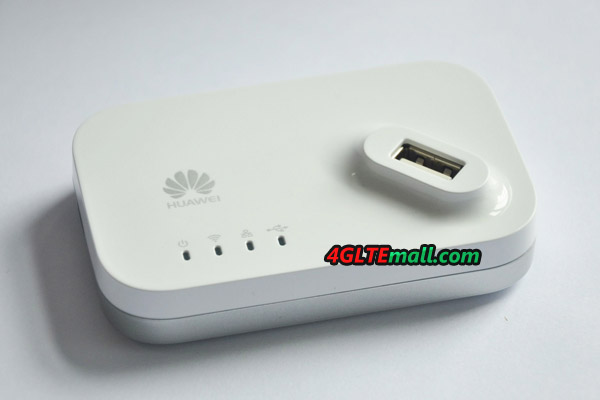
if you guys know any other cheaper alternative to hotlink prepaid broadband.. do share it here.. cheapest to stay alive.

** note : looks like Umobile just change their package to keep up with the competitor - with UMI28 - you get 1GB data for 30 days... , problem with u-mobile.. once past 30 days.. u need to reload immediately.. or line will be cut-off.. no internet..

read more : http://www.malaysianwireless.com/2014/01/u...-prepaid-plans/

wow! with share-able sim card.. means.. if you're on u mobile line, add another sim card for the 4g-usb device.. only pay rm10 per month.. additional. what do yo say? worth it?

This post has been edited by morpheuzneo: Jan 21 2014, 10:07 AM
digilife
post Jan 21 2014, 10:08 AM

The MNP guy, its me yeah.
*******
Senior Member
8,025 posts

Joined: Feb 2005
From: Planet Boleland


QUOTE(blacktubi @ Jan 20 2014, 07:07 PM)
Got a Huawei AF23 today.

Short Review :

  • Really small, solid build.
  • Takes 70 seconds from cold boot with E3276.
  • E3276 works on first boot and I don't even do the initial setup.
  • There's a LAN port and 300M WiFi and the signal is surprisingly great, comparable to MR3420 while < 1043ND.
  • It's just < RM100

*
Which version of E36276 its compatible with ?

Your first version E3276 ok bo ?

PM me the stock availability

Thanks

smile.gif
mdzaboy
post Jan 21 2014, 11:03 AM

CuChee MunK KuK
*******
Senior Member
2,061 posts

Joined: Jan 2003
From: Jabaronie to Astaka Status: のあ..?


QUOTE(morpheuzneo @ Jan 21 2014, 10:01 AM)
thanks for the suggestion... will scroll back to find the link to huntsman..
for me - i just bought the maxis hotlink starter pack 88 ringgit.. got modem and pre-loaded some RM5 internet .. (50MB ).
just for 24/7 connection.. don't need to be very fast? , same as my need .. just need a small connection to be alive - i got myself the hotlink prepaid.. the always on internet..  rm5 ringgit startup card..  activate it.. and now already past 2 week.. still alive.. smile.gif

that's why.. i need to check what's the balance.. and how much i need to minimally top up just to keep it alive for the next 6 month.. (you know this prepaid line.. always have some limited days alive... until you top up some amount to get it alive for the next 6 month or 1 year..

if you guys know any other cheaper alternative to hotlink prepaid broadband.. do share it here..  cheapest to stay alive.

** note : looks like Umobile just change their package to keep up with the competitor - with UMI28 - you get 1GB data for 30 days... , problem with u-mobile.. once past 30 days.. u need to reload immediately.. or line will be cut-off.. no internet..

read more : http://www.malaysianwireless.com/2014/01/u...-prepaid-plans/

wow! with share-able sim card.. means.. if you're on u mobile line, add another sim card for the 4g-usb device.. only pay rm10 per month.. additional. what do yo say? worth it?
*
buy the starter pack with dongle? the dongle itself comes with 3g rite? i might see their website first to study, lol
MakNok
post Jan 21 2014, 12:07 PM

Look at all my stars!!
*******
Senior Member
5,713 posts

Joined: Jan 2003
get a D-Link DWR116.

it work great on stock
much better than MR3420

testspeed can go up 50Mbps and 42Mbps

Augus7
post Jan 21 2014, 11:13 PM

Council
****
Senior Member
698 posts

Joined: Jul 2009
anyone have any idea what does the 2 antenna does ?
MakNok
post Jan 21 2014, 11:18 PM

Look at all my stars!!
*******
Senior Member
5,713 posts

Joined: Jan 2003
QUOTE(Augus7 @ Jan 21 2014, 11:13 PM)
anyone have any idea what does the 2 antenna does ?
*
goggle it why need antenna.
Obviously it is to improve signal strength.


chuahcs79
post Jan 22 2014, 01:28 AM

Look at all my stars!!
Group Icon
Elite
6,931 posts

Joined: Apr 2011
From: Bolehland for sure ^_^


QUOTE(Augus7 @ Jan 21 2014, 11:13 PM)
anyone have any idea what does the 2 antenna does ?
*
just try the router with antenna on and antenna remove , then u will know the answer laugh.gif
Augus7
post Jan 22 2014, 02:20 AM

Council
****
Senior Member
698 posts

Joined: Jul 2009
QUOTE(chuahcs79 @ Jan 22 2014, 01:28 AM)
just try the router with antenna on and antenna remove , then u will know the answer  laugh.gif
*
QUOTE(MakNok @ Jan 21 2014, 11:18 PM)
goggle it why need antenna.
Obviously it is to improve signal strength.
*
But why when i removed the right antenna (facing the modem) my wifi still there. when i remove left side, my wifi signal totally gone. do u guys having the same problem?
chuahcs79
post Jan 22 2014, 02:36 AM

Look at all my stars!!
Group Icon
Elite
6,931 posts

Joined: Apr 2011
From: Bolehland for sure ^_^


QUOTE(Augus7 @ Jan 22 2014, 02:20 AM)
But why when i removed the right antenna (facing the modem) my wifi still there. when i remove left side, my wifi signal totally gone. do u guys having the same problem?
*
nope, no such issue for me,. even both antenna remove , still able to detect signal here
budakhops
post Jan 22 2014, 05:51 PM

Regular
******
Senior Member
1,519 posts

Joined: Aug 2007
From: Somewhere in the distant galaxy....


guys.. wanna ask, my rooter mr3420 network setting change to dhcp everytime i unplug the modem from the router.. need to configure everything again after i replug the modem. and with e3276 (thanks blacktubi) the connection not stable.. constant dc.
chuahcs79
post Jan 22 2014, 06:05 PM

Look at all my stars!!
Group Icon
Elite
6,931 posts

Joined: Apr 2011
From: Bolehland for sure ^_^


QUOTE(budakhops @ Jan 22 2014, 05:51 PM)
guys.. wanna ask, my rooter mr3420 network setting change to dhcp everytime i unplug the modem from the router.. need to configure everything again after i replug the modem. and with e3276 (thanks blacktubi) the connection not stable.. constant dc.
*
u only can config what is on modem Tab,.. the rest u not able to as it is using different method of dialing and it is auto detct/auto dial/auto reconnect
budakhops
post Jan 22 2014, 06:29 PM

Regular
******
Senior Member
1,519 posts

Joined: Aug 2007
From: Somewhere in the distant galaxy....


QUOTE(chuahcs79 @ Jan 22 2014, 06:05 PM)
u only can config what is on modem Tab,.. the rest u not able to as it is using different method of dialing and it is auto detct/auto dial/auto reconnect
*
But if like that.. It wont connect. doh.gif

2 Pages  1 2 >Top
 

Change to:
| Lo-Fi Version
0.3945sec    0.65    6 queries    GZIP Disabled
Time is now: 14th December 2025 - 03:41 AM