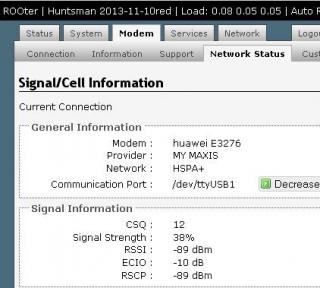
wow new de haha
Home Networking TP-Link 3G Routers Owner Club V3, MR3420
|
|
 Nov 18 2013, 09:04 PM Nov 18 2013, 09:04 PM
Return to original view | Post
#1
|
 
Junior Member
135 posts Joined: Jan 2003 
|
wow new de haha |
|
|
|
|
|
Nov 18 2013, 09:07 PM
Return to original view | Post
#2
|
|
Junior Member
135 posts Joined: Jan 2003
|
E3276:
AT^SETPORT? - show current mode AT^SETPORT=? - show available modes AT^SETPORT="A1,A2;1,2,3" - set "only modem" mode. MY AT COMMAND for E3276: AT^SETPORT="A1,A2;1,2,3,10,12,13,16,A1,A2" |
|
|
Nov 18 2013, 09:13 PM
Return to original view | Post
#3
|
|
Junior Member
135 posts Joined: Jan 2003
|
USB 4-Port Powered Desktop Hub
http://www.belkin.com/sg/IWCatProductPage....oduct_Id=534857 good for E3276+MR3420 v2.2 because E3276 need a lot of power. |
|
|
Nov 18 2013, 09:14 PM
Return to original view | Post
#4
|
|
Junior Member
135 posts Joined: Jan 2003
|
QUOTE(blacktubi @ Nov 18 2013, 09:13 PM) If you guys able to get this working then use this configuration, it work the best. 132 firmware fail on this tooOnly NCM(For the data) and PCUI (for the at commands aka diagnostics) AT^SETPORT=”A1,A2;12,16″ So far 132 firmware will give a ERROR for this. My E3276 is running 260.  AT^SETPORT="A1,A2;10,12,16,13,A1,A2" ERROR |
|
|
Nov 18 2013, 09:26 PM
Return to original view | Post
#5
|
|
Junior Member
135 posts Joined: Jan 2003
|
QUOTE(blacktubi @ Nov 18 2013, 09:22 PM) AT^SETPORT="A1,A2;10,12,16,13,A1,A2" AT^SETPORT="A1,A2;10,12,13,14,16,A1,A2"Hmm, this should work as I did it for many people already. For firmware 132, 13(DIAG) is compulsory. What is the least essential code that work for you, NCM and PCUI only this also won't work, tested anything that start from 10(which is start from 4g) will not run, will give ERROR. so I have to add in the 3g modem function(1,2,3) inorder to make it work. |
|
|
Nov 18 2013, 09:32 PM
Return to original view | Post
#6
|
|
Junior Member
135 posts Joined: Jan 2003
|
I think about the AT command, just remove the GPS of both 3g and 4g will be ok... as long as the modem is detectable.
My rooter able to bootup and connected within 1min.(which is faster than my E398u-15 connected) This post has been edited by lpc26: Nov 18 2013, 09:34 PM |
|
|
|
|
|
Nov 18 2013, 09:38 PM
Return to original view | Post
#7
|
|
Junior Member
135 posts Joined: Jan 2003
|
QUOTE(chuahcs79 @ Nov 18 2013, 09:35 PM) do you encounter Auto DC connection after 18~ 22 hour on your rooter ? sorry I can't test that, I only open for 12hrs. |
|
|
Nov 19 2013, 02:38 PM
Return to original view | Post
#8
|
|
Junior Member
135 posts Joined: Jan 2003
|
My signal strength keep up and down... dunno why
» Click to show Spoiler - click again to hide... « while E398 stay stable. » Click to show Spoiler - click again to hide... « This post has been edited by lpc26: Nov 19 2013, 02:40 PM |
|
|
Nov 19 2013, 02:49 PM
Return to original view | Post
#9
|
|
Junior Member
135 posts Joined: Jan 2003
|
QUOTE(blacktubi @ Nov 19 2013, 02:45 PM) Dont looks like a big deal to me, few dBm is usual the E3276 did jump to dunno what tower and become GPRS today...Off On then become normal.Lock the frequency if you want just to make sure it dont jump tower |
|
|
Nov 19 2013, 03:11 PM
Return to original view | Post
#10
|
|
Junior Member
135 posts Joined: Jan 2003
|
QUOTE(blacktubi @ Nov 19 2013, 02:54 PM) Then lock the frequency and Network mode using MDMA after use MDMA set 2100 then unable to connect  |
|
|
Nov 19 2013, 03:40 PM
Return to original view | Post
#11
|
|
Junior Member
135 posts Joined: Jan 2003
|
QUOTE(chuahcs79 @ Nov 19 2013, 03:38 PM) u can try doing that using AT COMMAND in rooter what AT command for 2100 only? LOL what a mess... » Click to show Spoiler - click again to hide... « This post has been edited by lpc26: Nov 19 2013, 03:49 PM |
|
|
Nov 19 2013, 04:04 PM
Return to original view | Post
#12
|
|
Junior Member
135 posts Joined: Jan 2003
|
QUOTE(blacktubi @ Nov 19 2013, 03:46 PM) You guys sure wanna mess with AT command on E3276? you tried lock the 2100 at MDMA, then can use at rooter? No reset option and impossible to reflash and no known way to backup for now Make sure =? And ? First before playing  ------------------------------------------------------------- weird after MDMA, my old AT command unable to use already become ERROR (AT^SETPORT="A1,A2;1,2,3,10,12,13,16,A1,A2") meanwhile AT^SETPORT="A1,A2;10,12,16,13,A1,A2" able to use already...kinda weird, and after MDMA change to 2100 was unable to connect...after that I choose back auto for all band... also unable to connect.. then I check my AT code, it changed into AT^SETPORT="A1,A2;12,10,16,A1,A2" .. I change to AT^SETPORT="A1,A2;10,12,16,A1,A2" and it WORKS. This post has been edited by lpc26: Nov 19 2013, 04:25 PM |
|
|
Nov 19 2013, 04:33 PM
Return to original view | Post
#13
|
|
Junior Member
135 posts Joined: Jan 2003
|
QUOTE(chuahcs79 @ Nov 19 2013, 04:28 PM) best is leave the E3276 original condition for now until futher solution on flash update,.. ya the E3276 is too high tech already...but the best is the modem is not HOT... e398 is damn HOT. |
|
|
|
|
|
Nov 21 2013, 12:41 PM
Return to original view | Post
#14
|
|
Junior Member
135 posts Joined: Jan 2003
|
QUOTE(blacktubi @ Nov 20 2013, 10:55 PM) 1 to 1, I don't think the seller will honor my warranty for this reason. Bro, get a powered USB hub, everything will going fine.Maybe I shall do some magic to this router to make it work "weirdly" |
|
|
Nov 21 2013, 02:55 PM
Return to original view | Post
#15
|
|
Junior Member
135 posts Joined: Jan 2003
|
ya as a conclusion.... E3276 is not really good for Rooter, use at laptop/pc maybe better.
btw, I tested at TL-WDR3600 v1.4 too, still not so stable... This post has been edited by lpc26: Nov 21 2013, 02:58 PM |
|
|
Nov 21 2013, 03:27 PM
Return to original view | Post
#16
|
|
Junior Member
135 posts Joined: Jan 2003
|
QUOTE(maxcheam @ Nov 21 2013, 03:17 PM) just notice that you've a lot of networking devices. I'm interested to know how R480T+ performs, mind sharing your experience/view on the product? R480T+ is a very powerful load balancer, for my experience, hmm able to handle nicely all job of load balance, very flexible, see which line you want to put in the bandwidth load(40%Line1 60%Line2), and able to do forward like port 80 to use Line1....able to makes network run at low latency, this product has served me for 5 years without give me problem. |
|
|
Nov 21 2013, 03:49 PM
Return to original view | Post
#17
|
|
Junior Member
135 posts Joined: Jan 2003
|
QUOTE(maxcheam @ Nov 21 2013, 03:30 PM) thanks for the quick review! you want to use it with your 3G? I'm very tempted to try the cheaper version R470T+. Currently using Connectify Dispatch as my load balancer. I guess I'll give it a try after hearing your review.  R470T+ i think is a good choice.. this router can run 4 wan, but lower hardware spec. |
|
|
Nov 21 2013, 03:56 PM
Return to original view | Post
#18
|
|
Junior Member
135 posts Joined: Jan 2003
|
QUOTE(rootlinux @ Nov 21 2013, 03:53 PM) seriously, we would like to know what you use R480T+ for 5 years. can share? use Dual Wan for my 2 Streamyx line... |
|
|
Nov 22 2013, 03:49 PM
Return to original view | Post
#19
|
|
Junior Member
135 posts Joined: Jan 2003
|
QUOTE(ejoybaik @ Nov 22 2013, 12:44 PM) can rooter firmware sedot other wifi ... mean log in another wifi router's AP bridge?if that then YES, rooter able to do that. This post has been edited by lpc26: Nov 22 2013, 03:54 PM |
|
|
Nov 22 2013, 04:50 PM
Return to original view | Post
#20
|
|
Junior Member
135 posts Joined: Jan 2003
|
QUOTE(ejoybaik @ Nov 22 2013, 04:23 PM) yeah... let say... i got oh combine speed.... Rooter don't have that function, you must get a Load Balancer.1 yes zoom 1 maxis bb so.. can combine the speed...? btw wifi not allow to load balance, all u have to use cable to connect to the device. I thought you want to do AP station. This post has been edited by lpc26: Nov 22 2013, 04:51 PM |
| Change to: |  0.0390sec 0.0390sec
 0.58 0.58
 7 queries 7 queries
 GZIP Disabled GZIP Disabled
Time is now: 13th December 2025 - 01:08 AM |
 Quote
Quote