

QUOTE(lpc26 @ Jan 20 2014, 04:30 PM)
get E398 vodafone rebranded if can't afford E3276.
E398 still the best signal gain device.

but just add more sikit money can get 3276 d E398 still the best signal gain device.

 hard decision
Home Networking TP-Link 3G Routers Owner Club V3, MR3420
|
|
 Jan 20 2014, 06:18 PM Jan 20 2014, 06:18 PM
|
 
Senior Member
1,022 posts Joined: Jan 2003    
|
QUOTE(lpc26 @ Jan 20 2014, 04:30 PM) get E398 vodafone rebranded if can't afford E3276. but just add more sikit money can get 3276 d E398 still the best signal gain device. hard decision |
|
|
|
|
|
Jan 20 2014, 07:06 PM
|
 
Elite
6,931 posts Joined: Apr 2011 From: Bolehland for sure ^_^
|
QUOTE(ngeseng @ Jan 20 2014, 06:18 PM) but just add more sikit money can get 3276 d or u can get huawei E392,. very cheap price,. especial those maxis set,.. can easily unlocked to use for all ISP hard decision |
|
|
Jan 20 2014, 07:07 PM
|

Elite
8,418 posts Joined: Jul 2008
|
Got a Huawei AF23 today.
Short Review :
|
|
|
Jan 20 2014, 07:10 PM
|

Junior Member
135 posts Joined: Jan 2003
|
QUOTE(blacktubi @ Jan 20 2014, 07:07 PM) Got a Huawei AF23 today. if compare to MR3020?Short Review :
sure bo that price? <RM100??? This post has been edited by lpc26: Jan 20 2014, 07:14 PM |
|
|
Jan 20 2014, 07:15 PM
|
|
Elite
8,418 posts Joined: Jul 2008
|
QUOTE(lpc26 @ Jan 20 2014, 07:10 PM) if compare to MR3020? I don't have a MR3020, I do have a 703N running on rooter which is 20 seconds slower on bootup.AF23 is for the less techie and it just work painless. TP-LINK stock firmware is hopeless and terrible and no updates to fix their issue. My mistake, around RM120 to be exact This post has been edited by blacktubi: Jan 20 2014, 07:19 PM |
|
|
Jan 20 2014, 07:25 PM
|
|
Elite
6,931 posts Joined: Apr 2011 From: Bolehland for sure ^_^
|
huawei AF23
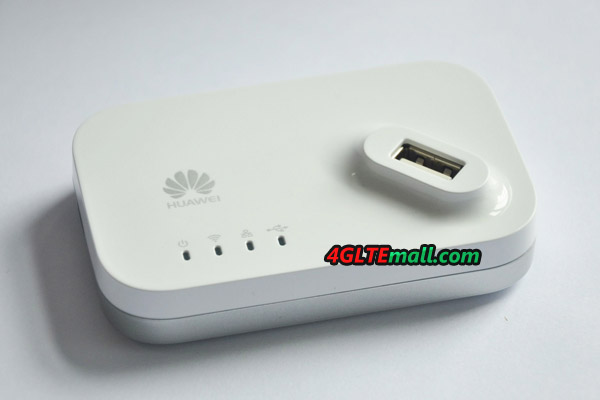 |
|
|
|
|
|
Jan 20 2014, 08:30 PM
|

Senior Member
2,061 posts Joined: Jan 2003 From: Jabaronie to Astaka Status: のあ..?
|
QUOTE(chuahcs79 @ Jan 20 2014, 07:25 PM) huawei AF23 where can get it? |
|
|
Jan 20 2014, 11:11 PM
|

Senior Member
698 posts Joined: Jul 2009
|
Is this problem happening to u guys? Facing my modem, I removed my right antenna, no signal lost, but when i remove the left antenna, my wifi signal total lost. Is this normal?
|
|
|
Jan 21 2014, 10:01 AM
|

Junior Member
238 posts Joined: Jul 2008
|
QUOTE(ngeseng @ Jan 20 2014, 03:06 PM) u need to ROOT ur router. thanks for the suggestion... will scroll back to find the link to huntsman.. follow the step at first post in this thread. ROOter firmware: Huntsman one of the features : SMS Messaging is supported **i haven try the ROOT yet, but soon i will QUOTE(mdzaboy @ Jan 20 2014, 04:02 PM) hi, soon to be new user here..hehe for me - i just bought the maxis hotlink starter pack 88 ringgit.. got modem and pre-loaded some RM5 internet .. (50MB ). WTA, about the modem dongle which one is the best? for instance all ISP can use that dongle..cos i went to TP Link website and make me confused which one to use..ohh im on tight budget.  TQVM  QUOTE(mdzaboy @ Jan 20 2014, 04:22 PM) wahh, looking at the E3276 make me just for 24/7 connection.. don't need to be very fast? , same as my need .. just need a small connection to be alive - i got myself the hotlink prepaid.. the always on internet.. rm5 ringgit startup card.. activate it.. and now already past 2 week.. still alive..  , well actually i need 24/7 online just keep the device stay online..is there any stable device? well yeah u guys will ask me to apply registered land line like streamyx and ur info my area no streamyx/fiber like unifi so the best option for me is using 3G/4G line since my area have coverage.. , well actually i need 24/7 online just keep the device stay online..is there any stable device? well yeah u guys will ask me to apply registered land line like streamyx and ur info my area no streamyx/fiber like unifi so the best option for me is using 3G/4G line since my area have coverage..ps - i might be buy the E3276 in the future..makan kangkong liao..lol  that's why.. i need to check what's the balance.. and how much i need to minimally top up just to keep it alive for the next 6 month.. (you know this prepaid line.. always have some limited days alive... until you top up some amount to get it alive for the next 6 month or 1 year.. if you guys know any other cheaper alternative to hotlink prepaid broadband.. do share it here.. cheapest to stay alive. ** note : looks like Umobile just change their package to keep up with the competitor - with UMI28 - you get 1GB data for 30 days... , problem with u-mobile.. once past 30 days.. u need to reload immediately.. or line will be cut-off.. no internet.. read more : http://www.malaysianwireless.com/2014/01/u...-prepaid-plans/ wow! with share-able sim card.. means.. if you're on u mobile line, add another sim card for the 4g-usb device.. only pay rm10 per month.. additional. what do yo say? worth it? This post has been edited by morpheuzneo: Jan 21 2014, 10:07 AM |
|
|
Jan 21 2014, 10:08 AM
|

Senior Member
8,025 posts Joined: Feb 2005 From: Planet Boleland
|
QUOTE(blacktubi @ Jan 20 2014, 07:07 PM) Got a Huawei AF23 today. Which version of E36276 its compatible with ?Short Review :
Your first version E3276 ok bo ? PM me the stock availability Thanks |
|
|
Jan 21 2014, 11:03 AM
|
|
Senior Member
2,061 posts Joined: Jan 2003 From: Jabaronie to Astaka Status: のあ..?
|
QUOTE(morpheuzneo @ Jan 21 2014, 10:01 AM) thanks for the suggestion... will scroll back to find the link to huntsman.. buy the starter pack with dongle? the dongle itself comes with 3g rite? i might see their website first to study, lolfor me - i just bought the maxis hotlink starter pack 88 ringgit.. got modem and pre-loaded some RM5 internet .. (50MB ). just for 24/7 connection.. don't need to be very fast? , same as my need .. just need a small connection to be alive - i got myself the hotlink prepaid.. the always on internet.. rm5 ringgit startup card.. activate it.. and now already past 2 week.. still alive.. that's why.. i need to check what's the balance.. and how much i need to minimally top up just to keep it alive for the next 6 month.. (you know this prepaid line.. always have some limited days alive... until you top up some amount to get it alive for the next 6 month or 1 year.. if you guys know any other cheaper alternative to hotlink prepaid broadband.. do share it here.. cheapest to stay alive. ** note : looks like Umobile just change their package to keep up with the competitor - with UMI28 - you get 1GB data for 30 days... , problem with u-mobile.. once past 30 days.. u need to reload immediately.. or line will be cut-off.. no internet.. read more : http://www.malaysianwireless.com/2014/01/u...-prepaid-plans/ wow! with share-able sim card.. means.. if you're on u mobile line, add another sim card for the 4g-usb device.. only pay rm10 per month.. additional. what do yo say? worth it? |
|
|
Jan 21 2014, 12:07 PM
|
|
Senior Member
5,713 posts Joined: Jan 2003
|
get a D-Link DWR116.
it work great on stock much better than MR3420 testspeed can go up 50Mbps and 42Mbps |
|
|
Jan 21 2014, 11:13 PM
|
|
Senior Member
698 posts Joined: Jul 2009
|
anyone have any idea what does the 2 antenna does ?
|
|
|
|
|
|
Jan 21 2014, 11:18 PM
|
|
Senior Member
5,713 posts Joined: Jan 2003
|
QUOTE(Augus7 @ Jan 21 2014, 11:13 PM) anyone have any idea what does the 2 antenna does ? goggle it why need antenna.Obviously it is to improve signal strength. |
|
|
Jan 22 2014, 01:28 AM
|
|
Elite
6,931 posts Joined: Apr 2011 From: Bolehland for sure ^_^
|
QUOTE(Augus7 @ Jan 21 2014, 11:13 PM) anyone have any idea what does the 2 antenna does ? just try the router with antenna on and antenna remove , then u will know the answer  |
|
|
Jan 22 2014, 02:20 AM
|
|
Senior Member
698 posts Joined: Jul 2009
|
QUOTE(chuahcs79 @ Jan 22 2014, 01:28 AM) just try the router with antenna on and antenna remove , then u will know the answer QUOTE(MakNok @ Jan 21 2014, 11:18 PM) goggle it why need antenna. But why when i removed the right antenna (facing the modem) my wifi still there. when i remove left side, my wifi signal totally gone. do u guys having the same problem?Obviously it is to improve signal strength. |
|
|
Jan 22 2014, 02:36 AM
|
|
Elite
6,931 posts Joined: Apr 2011 From: Bolehland for sure ^_^
|
QUOTE(Augus7 @ Jan 22 2014, 02:20 AM) But why when i removed the right antenna (facing the modem) my wifi still there. when i remove left side, my wifi signal totally gone. do u guys having the same problem? nope, no such issue for me,. even both antenna remove , still able to detect signal here |
|
|
Jan 22 2014, 05:51 PM
|

Senior Member
1,519 posts Joined: Aug 2007 From: Somewhere in the distant galaxy....
|
guys.. wanna ask, my rooter mr3420 network setting change to dhcp everytime i unplug the modem from the router.. need to configure everything again after i replug the modem. and with e3276 (thanks blacktubi) the connection not stable.. constant dc.
|
|
|
Jan 22 2014, 06:05 PM
|
|
Elite
6,931 posts Joined: Apr 2011 From: Bolehland for sure ^_^
|
QUOTE(budakhops @ Jan 22 2014, 05:51 PM) guys.. wanna ask, my rooter mr3420 network setting change to dhcp everytime i unplug the modem from the router.. need to configure everything again after i replug the modem. and with e3276 (thanks blacktubi) the connection not stable.. constant dc. u only can config what is on modem Tab,.. the rest u not able to as it is using different method of dialing and it is auto detct/auto dial/auto reconnect |
|
|
Jan 22 2014, 06:29 PM
|
|
Senior Member
1,519 posts Joined: Aug 2007 From: Somewhere in the distant galaxy....
|
QUOTE(chuahcs79 @ Jan 22 2014, 06:05 PM) u only can config what is on modem Tab,.. the rest u not able to as it is using different method of dialing and it is auto detct/auto dial/auto reconnect But if like that.. It wont connect.  |
| Change to: |  0.0274sec 0.0274sec
 0.59 0.59
 6 queries 6 queries
 GZIP Disabled GZIP Disabled
Time is now: 16th December 2025 - 01:22 PM |
 Quote
Quote