

QUOTE(Eoma @ Feb 25 2014, 05:28 AM)
No lah. For biz accounts, you need to apply for v6 at TMPoint.

Need to pay or not? Called a CSO several weeks ago regarding my biz20 and the bugger says ipv6 needs to pay to unlock. Sounds like bull to me!Unifi TMnet Streamyx/Unifi & IPv6, Now live!
|
|
 Feb 25 2014, 10:19 AM Feb 25 2014, 10:19 AM
|
 
Junior Member
176 posts Joined: Dec 2008  
|
QUOTE(Eoma @ Feb 25 2014, 05:28 AM) No lah. For biz accounts, you need to apply for v6 at TMPoint. Need to pay or not? Called a CSO several weeks ago regarding my biz20 and the bugger says ipv6 needs to pay to unlock. Sounds like bull to me! |
|
|
|
|
|
Feb 25 2014, 11:32 AM
|

Senior Member
537 posts Joined: Nov 2006
|
QUOTE(Eoma @ Feb 25 2014, 05:28 AM) No lah. For biz accounts, you need to apply for v6 at TMPoint. Dynamic IP BIZ account also need to apply? lol, i wonder how they allocate the address to us |
|
|
Feb 25 2014, 03:25 PM
|
 
Elite
195 posts Joined: Sep 2006 
|
QUOTE(warlove3 @ Feb 25 2014, 11:32 AM) Dynamic IP BIZ account also need to apply? lol, i wonder how they allocate the address to us It seems only biz accounts created after the IPv6 implementation have a v6 prefix assigned to them. Those on biz accounts created prior to that need to request for a v6 prefix.. non biz users get a dynamic lease based on the PPPoE session. |
|
|
Feb 26 2014, 12:39 PM
|
|
Senior Member
537 posts Joined: Nov 2006
|
anyone successfully have IPv6 on their BIZ account? it is better that way to distinguish if its a account problem or router problem
|
|
|
Feb 26 2014, 01:46 PM
|

Senior Member
1,472 posts Joined: Apr 2005 From: SumwHeRe In MaLaYsIa 
|
QUOTE(warlove3 @ Feb 26 2014, 12:39 PM) anyone successfully have IPv6 on their BIZ account? it is better that way to distinguish if its a account problem or router problem I got ipv6, with biz account ( dynamic 10mbps ) |
|
|
Feb 26 2014, 01:50 PM
|
|
Junior Member
176 posts Joined: Dec 2008
|
QUOTE(amirsubhi @ Feb 26 2014, 01:46 PM) I got ipv6, with biz account ( dynamic 10mbps ) Did you have to speak to TM to get it activated? |
|
|
|
|
|
Feb 26 2014, 02:51 PM
|
|
Senior Member
1,472 posts Joined: Apr 2005 From: SumwHeRe In MaLaYsIa
|
QUOTE(Orpheus1120 @ Feb 26 2014, 01:50 PM) Did you have to speak to TM to get it activated? Nope, when I change to TM D-Link DIR-615 router for temporary, I get the IPv6 dynamicallyOh btway, my house, Gombak area havent being enabled for IPv6 I guess even for home user. This post has been edited by amirsubhi: Feb 26 2014, 02:51 PM |
|
|
Feb 26 2014, 02:57 PM
|

Senior Member
1,725 posts Joined: Jan 2003
|
biz dynamic ip accounts arent the same as biz fixed ip accounts.
|
|
|
Feb 27 2014, 11:11 AM
|
|
Senior Member
537 posts Joined: Nov 2006
|
QUOTE(amirsubhi @ Feb 26 2014, 01:46 PM) I got ipv6, with biz account ( dynamic 10mbps ) Your area for BIZ account?Seri Petaling VIP (home) packages have IPv6 no problem , but BIZ (dynamic) not going through (having WAN address but not LAN address)... |
|
|
Mar 1 2014, 05:50 PM
Show posts by this member only | IPv6 | Post
#690
|

Junior Member
92 posts Joined: Apr 2011
|
got ipv6 up and running on streamyx 1mbps
 |
|
|
Mar 2 2014, 09:49 PM
Show posts by this member only | IPv6 | Post
#691
|

Junior Member
24 posts Joined: Jan 2003
|
so good. me too. old streamyx 1mbps user at Sabah
|
|
|
Mar 3 2014, 11:44 PM
|

Senior Member
2,400 posts Joined: Jul 2009 From: /dev/null
|
Before I upgrade streamyx package, I got IPv6, now I using 4Mbps, didn't get IPv6 properly, even do Direct connection, can't ping IPv6 addresses like www.v6.facebook.com
I change to new router, belkin n750 db. DHCPv6 or PPPoE over IPv6, both not working, not distribute IPv6 to other connected device 
|
|
|
Mar 5 2014, 12:00 AM
|
|
Senior Member
2,400 posts Joined: Jul 2009 From: /dev/null
|
I think Streamyx native IPv6 have problem... I can't do anything after I upgrade..

|
|
|
|
|
|
Mar 5 2014, 12:08 AM
|

Senior Member
3,176 posts Joined: May 2013 From: Petaling Jaya
|
iPv6 not working on RT-N12HP although I set it up using KL SEET'S settings. Default router works though. Not gonna use default router no matter what.
|
|
|
Mar 5 2014, 12:29 AM
|
|
Senior Member
2,400 posts Joined: Jul 2009 From: /dev/null
|
QUOTE(Anonymous34 @ Mar 5 2014, 12:08 AM) Default router works though. Not gonna use default router no matter what. You mean use their Modem Router that provided by TM?If yes, even Windows PPPoE can't get IPv6 properly... my router got 6to4 Tunnel, that works well.. 192.88.99.1? |
|
|
Mar 5 2014, 12:34 AM
|
|
Senior Member
3,176 posts Joined: May 2013 From: Petaling Jaya
|
QUOTE(Anime4000 @ Mar 5 2014, 12:29 AM) You mean use their Modem Router that provided by TM? default router sometimes ok, sometimes just dead without ip.If yes, even Windows PPPoE can't get IPv6 properly... my router got 6to4 Tunnel, that works well.. 192.88.99.1? u mean 6 to 4 tunnel can? My router has that also. |
|
|
Mar 5 2014, 12:45 AM
|
|
Senior Member
2,400 posts Joined: Jul 2009 From: /dev/null
|
QUOTE(Anonymous34 @ Mar 5 2014, 12:34 AM) default router sometimes ok, sometimes just dead without ip. using tunnel, likely not certified for P2P, but having IPv6 make 1 host deliver 2 stream IPv4 and IPv6,u mean 6 to 4 tunnel can? My router has that also. I now with native/PPPoE IPv6, TM likely having dead IPv6... call 100 would they check? |
|
|
Mar 5 2014, 12:46 AM
Show posts by this member only | IPv6 | Post
#698
|
 
VIP
6,008 posts Joined: Jan 2003
|
QUOTE(Anime4000 @ Mar 5 2014, 12:00 AM) I think Streamyx native IPv6 have problem... I can't do anything after I upgrade.. Start troubleshooting by pinging your router. It's the fe80::xxxx IP listed in "IPv6 Default Gateway" ... make sure you include the %38 at the end.
Did that work? If it did, run a tracert -6 google.com and paste the results here. |
|
|
Mar 5 2014, 01:12 AM
|
|
Senior Member
2,400 posts Joined: Jul 2009 From: /dev/null
|
QUOTE(wKkaY @ Mar 5 2014, 12:46 AM) Start troubleshooting by pinging your router. It's the fe80::xxxx IP listed in "IPv6 Default Gateway" ... make sure you include the %38 at the end. Did that work? If it did, run a tracert -6 google.com and paste the results here. 
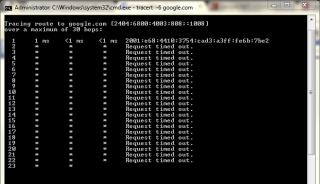
only router... can reach, going to outside, nope... |
|
|
Mar 5 2014, 09:49 AM
|
|
Senior Member
920 posts Joined: May 2010
|
QUOTE(Anime4000 @ Mar 5 2014, 01:12 AM)
only router... can reach, going to outside, nope... Your PC --> ? ---> ? I used to have the same problem, my network config was CODE PC --> Switch ---> Modem | | V WLAN Router Both WLAN and PC did not get iPv6 connectivity, so.. I tried removing the switch, as in Both WLAN and PC connected straight to Modem (TM Riger) and I got my Ipv6... kinda weird, but removing switch seems to restore back my ipv6 connection. This post has been edited by nymerine: Mar 5 2014, 09:49 AM |
| Change to: |  0.0244sec 0.0244sec
 0.46 0.46
 6 queries 6 queries
 GZIP Disabled GZIP Disabled
Time is now: 16th December 2025 - 02:41 PM |
 Quote
Quote