

QUOTE(prasys @ Apr 5 2014, 12:29 PM)
Anyone having issues with V6 ? Can't seem to get the IP

no problem on my streamyxUnifi TMnet Streamyx/Unifi & IPv6, Now live!
|
|
 Apr 5 2014, 04:01 PM Apr 5 2014, 04:01 PM
Show posts by this member only | IPv6 | Post
#721
|
 
Junior Member
92 posts Joined: Apr 2011 
|
QUOTE(prasys @ Apr 5 2014, 12:29 PM) Anyone having issues with V6 ? Can't seem to get the IP no problem on my streamyx |
|
|
|
|
|
Apr 7 2014, 08:43 PM
|
 
VIP
12,925 posts Joined: Mar 2005 From: Kuala Lumpur
|
Anyone else , today can't even get iPV6 Address
|
|
|
Apr 8 2014, 07:40 AM
|

Senior Member
2,399 posts Joined: Jul 2009 From: /dev/null 
|
QUOTE(prasys @ Apr 7 2014, 08:43 PM) Anyone else , today can't even get iPV6 Address 
I got address, but not for other. |
|
|
Apr 9 2014, 12:43 PM
Show posts by this member only | IPv6 | Post
#724
|

Senior Member
605 posts Joined: Jan 2003
|
hmm.. I managed to get ipv6 running with pfsense 2.1.1
I think there are still some bugs with pfsense ipv6 because of the weird problems that I've encountered. What I did was: 1. Use DHCP6 for the WAN interface with "Request a IPv6 prefix/information through the IPv4 connectivity link" checked. DHCPv6 Prefix Delegation size is 64. 2. Track interface at LAN & select the WAN interface to track. The weird problems that I've faced: Problem 1. I did the exact same thing previously but it didn't work. The default route of ipv6 was not set. I need to set it manually (but it resets everytime). Also, pfsense was also unable to get an IPV6 address on the LAN interface. Then what I did was did a clean install and setup the whole thing again. the LAN interface finally get an ipv6 address (2001:xxxx:blablalbaba). But the pcs are unable to get an address. After few reboots, miraculously the pcs did get an address. lol~ Problem 2: Initially I couldn't do anything with the global ipv6 address. ping to google ipv6 dns fails, test-ipv6.com fails etc. Then I looked at the firewall logs. Somehow it is blocked. This happens even though there's a rule that allows any traffic originating from the LAN. Then what I did was allow that blocked ping's traffic from my pc ip to the google dns (there's a shortcut). Then not surprisingly the ping goes through. Then I deleted that rule and reloaded the firewall. Amazingly, all ipv6 traffic is still going through. test-ipv6.com is successful. same goes to test-ipv6.com results from another pc. Explanations? I don't know why these problems happens. It baffles me. But then again, i'm not a pro with these stuffs. For the first problem, I really have no idea. For the second problem, maybe the added rule somehow woke up the pfsense firewall and made it correctly allow ipv6 traffic. I've spent countless hours trying to do this using pfsense 2.1 and 2.1.1 (just released recently). Hope this saves some forumers' time in trying to get ipv6 working with pfsense. And woot! ipv6 tag finally! hmm, it it just me or some ipv6 sites are obscenely slow? EDIT 1: upon restarting, the firewall is blocking ipv6 traffic again. lol. need to repeat step mentioned in problem 2 lol. EDIT 2: hmm after a few restarts, while my LAN interface is still able to get the ipv6 address, the pcs in my network couldn't. bummer. It seems like radvd is the problem. since i'm getting these CODE radvd[83114]: no auto-selected prefix on interface em0, disabling advertisements If i kill the radvd process and start it again. I can get the global ipv6 address again without the same error. hmm. facebook stil unaccessible with ipv6 though. No idea on what is wrong. MTU thingy didn't help. hmm This post has been edited by godhpf: Apr 11 2014, 12:20 AM |
|
|
Apr 11 2014, 03:43 AM
Show posts by this member only | IPv6 | Post
#725
|

Junior Member
75 posts Joined: Jun 2006
|
The default policy in PfSense is to deny all traffic in/out on all interfaces by default and the rules you explicitly allow will pass through. This could be one of the reasons why you face problems.
If you are familiar with PF, you could write your own rules that will be reloaded whenever the WAN link is ESTABLISHED. Normally I'd set this on the LAN interface: CODE pass on em0 all Assuming 'em0' is your LAN interface. This will allow all traffic/protocols on the LAN interface. And for outbound rule: CODE pass out all Try flushing your filter rules only on the LAN interface and add the 2 rules above. |
|
|
Apr 12 2014, 03:53 PM
|

Newbie
1 posts Joined: Aug 2012
|
i'm using unifi biz 5
can't make it ipv6  using dir-615 can someone tell me why.. |
|
|
|
|
|
Apr 13 2014, 04:48 PM
Show posts by this member only | IPv6 | Post
#727
|

Senior Member
4,154 posts Joined: Jan 2003 From: Cheras, KL
|
1mbps Streamyx user here.
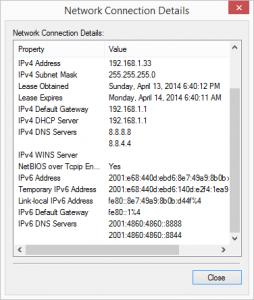
using D-Link DSL-2750E and got IPv6 support easily. Just tick IPv6 Enable in PPPoE setting, and use 2001:4860:4860::8888 for Static IPv6 DNS Servers in DHCPV6 CONFIGURATION |
|
|
Apr 13 2014, 06:52 PM
|

Junior Member
199 posts Joined: Mar 2006
|
QUOTE(BOTAK_WAI @ Apr 13 2014, 04:48 PM) 1mbps Streamyx user here. yurp very easyusing D-Link DSL-2750E and got IPv6 support easily. Just tick IPv6 Enable in PPPoE setting, and use 2001:4860:4860::8888 for Static IPv6 DNS Servers in DHCPV6 CONFIGURATION 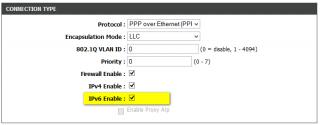

[attachmentid=3928930] 
[attachmentid=3928918] 
This post has been edited by aziz79: Apr 13 2014, 06:58 PM |
|
|
Apr 17 2014, 02:26 AM
|

Junior Member
67 posts Joined: Sep 2011
|
QUOTE(BOTAK_WAI @ Apr 13 2014, 04:48 PM) 1mbps Streamyx user here. hi..blh ajar tak step by step utk set ipv6 ni?...modem same model n 1mb streamyx..and apa function ipv6 ni erk?..tqusing D-Link DSL-2750E and got IPv6 support easily. Just tick IPv6 Enable in PPPoE setting, and use 2001:4860:4860::8888 for Static IPv6 DNS Servers in DHCPV6 CONFIGURATION |
|
|
Apr 18 2014, 01:41 PM
|
|
Senior Member
605 posts Joined: Jan 2003
|
btw, ontop of the radvd problem, vmware tools seems to interferes with pfsense LAN interface's ability to get IPv6 address (and subsequently other devices on the network).
anyone know whether tmnet will roll out static ipv6? Dynamic ipv6 sucks IMHO. |
|
|
Apr 19 2014, 01:49 AM
|

Junior Member
123 posts Joined: Jun 2005
|
Anyone here manage to configure TomatoUSB with Native IPv6 for Unifi?
I'm using RT-N16 with Shibby build 117. I couldn't get the Native IPv6 for my WAN interface no matter what I configured. I only could get 6to4 relay IPv6 for my WAN interface to work but the speed kinda suck. Please share me your tips if you can configure Native IPv6 for TomotoUSB. |
|
|
Apr 19 2014, 08:11 AM
Show posts by this member only | IPv6 | Post
#732
|
 
Staff
12,090 posts Joined: Dec 2004 From: Malaysia
|
QUOTE(Kanuki @ Apr 19 2014, 01:49 AM) Anyone here manage to configure TomatoUSB with Native IPv6 for Unifi? I had the same problem too when I tried out various Tomato builds. Native IPv6 doesn't seem to work (at least for me).I'm using RT-N16 with Shibby build 117. I couldn't get the Native IPv6 for my WAN interface no matter what I configured. I only could get 6to4 relay IPv6 for my WAN interface to work but the speed kinda suck. Please share me your tips if you can configure Native IPv6 for TomotoUSB. |
|
|
Apr 19 2014, 01:58 PM
|
|
Junior Member
123 posts Joined: Jun 2005
|
QUOTE(OKLY @ Apr 19 2014, 08:11 AM) I had the same problem too when I tried out various Tomato builds. Native IPv6 doesn't seem to work (at least for me). I managed to get Native IPv6 working. It took for a while to getthe WAN IPv6 address after connected to PPPOE and I had to disable and re-enable my NIC to get the Native IPv6 working properly. The worst part was... it's kinda very very slowwwwww...... My Firefox show that it's connected to the website (Facebook and etc) but it kept on waiting for reply. I also tried with Google IPv6 DNS but gave me same result. |
|
|
|
|
|
Apr 21 2014, 10:53 PM
Show posts by this member only | IPv6 | Post
#734
|
|
Senior Member
4,154 posts Joined: Jan 2003 From: Cheras, KL
|
QUOTE(Shahzz85 @ Apr 17 2014, 02:26 AM) hi..blh ajar tak step by step utk set ipv6 ni?...modem same model n 1mb streamyx..and apa function ipv6 ni erk?..tq Please refer aziz79's post. He had already made the screenshots. |
|
|
Apr 27 2014, 09:43 PM
|

Senior Member
1,473 posts Joined: Oct 2006 From: Jupiter
|
guys
im using TP-link W8968 v1 enabled ipv6 under wan settings, doesn't seem able to connect ipv6 it still stays connecting... if I use TM's riger modem, ipv6 works just fine... there's someone before posted here use the same modem with ipv6 working.. what config am I missing? 
edit: Thanks to blacktubi  now ipv6 works  edit: another question does anyone of you have slow connection on youtube when ipv6 enabled? the speed always stuck at 50kB/s the only way it goes back to normal max speed is disable ipv6  This post has been edited by squall0833: Apr 27 2014, 11:14 PM |
|
|
May 1 2014, 06:28 AM
|
|
Senior Member
1,473 posts Joined: Oct 2006 From: Jupiter
|
just fix youtube slow issue by changing default 1480 to 1492
now still got problems with some websites like facebook, Wikipedia, yahoo, etc they all are not reachable, I even tried lower but not lower than 1464 if too low, even lyn also not reachable im using just a normal tp-link w8968, is there anyway I can do ? I have read previous posts here all advance crazy stuff for microtik ddwrt, and tomato really make me :confuse: Is it if I don't have those router, I couldn't do anything with this problem? btw im using Streamyx 4Mbps |
|
|
May 1 2014, 11:41 AM
|
|
Senior Member
920 posts Joined: May 2010
|
QUOTE(squall0833 @ May 1 2014, 06:28 AM) just fix youtube slow issue by changing default 1480 to 1492 Disabling IPv6 seems to fix the slow youtube loading for me..now still got problems with some websites like facebook, Wikipedia, yahoo, etc they all are not reachable, I even tried lower but not lower than 1464 if too low, even lyn also not reachable im using just a normal tp-link w8968, is there anyway I can do ? I have read previous posts here all advance crazy stuff for microtik ddwrt, and tomato really make me :confuse: Is it if I don't have those router, I couldn't do anything with this problem? btw im using Streamyx 4Mbps |
|
|
May 4 2014, 02:29 PM
|
|
Junior Member
180 posts Joined: Nov 2010
|
how to disable ipv6 on innatech rg4332?
|
|
|
May 22 2014, 05:21 PM
Show posts by this member only | IPv6 | Post
#739
|

Junior Member
250 posts Joined: Dec 2013 
|
i have stock router from TM D-Link DIR 615 & ipv6 work fine on it
the only things that trouble me is ipv6 port forwarding... anyone get port forwarding worked on this router? |
|
|
May 22 2014, 07:34 PM
|

VIP
6,008 posts Joined: Jan 2003
|
QUOTE(#aten @ May 22 2014, 05:21 PM) i have stock router from TM D-Link DIR 615 & ipv6 work fine on it ???????the only things that trouble me is ipv6 port forwarding... anyone get port forwarding worked on this router? You don't need port forwarding. Every computer on your IPv6-enabled LAN will get a publically-routable IP address. |
| Change to: |  0.0286sec 0.0286sec
 0.53 0.53
 6 queries 6 queries
 GZIP Disabled GZIP Disabled
Time is now: 10th December 2025 - 01:47 AM |
 Quote
Quote