

Innacomm W7100N supports Ipv6.
Unifi TMnet Streamyx/Unifi & IPv6, Now live!
Unifi TMnet Streamyx/Unifi & IPv6, Now live!
|
|
 Oct 24 2013, 01:42 PM Oct 24 2013, 01:42 PM
Return to original view | IPv6 | Post
#1
|
 
Senior Member
920 posts Joined: May 2010  
|
Innacomm W7100N supports Ipv6.
|
|
|
|
|
|
Dec 9 2013, 12:06 AM
Return to original view | Post
#2
|
|
Senior Member
920 posts Joined: May 2010
|
Hmm, whenever I turned on my ipv6, my ipv6 traffic didnt go through my ipv6 enabled ssh tunneling, instead it just directly connected to any ipv6 enabled sites. Tried with my OpenVPN as well, only ipv4 traffic going through tunneling/VPN. Is there any way to fix this?
|
|
|
Dec 10 2013, 12:38 AM
Return to original view | IPv6 | Post
#3
|
|
Senior Member
920 posts Joined: May 2010
|
QUOTE(rogue @ Dec 9 2013, 11:32 AM) Hi, Sorry if my word confused you, even myself got confused reading it back. What I mean is.. let me do a simple diagram belowWhere does your IPv6 default route point to ? When you say: What do you mean ? If your IPv6 traffic comes from TM and you want it to go through your ssh/openvpn tunnel instead, this won't work unless you have source routing enabled. I don't see why you want to do this.. Please clarify..  Ipv4 traffic -----> ssh tunneling ------> tunneled connection to destination Ipv6 traffic ---------> not tunneled, straight to destination is what happening to me, what I want it to be Ipv4 + 6 -----> ssh tunneling ------> tunneled connected QUOTE(asellus @ Dec 9 2013, 01:11 PM) When you set the local port for the SSH port forwarding, you did use the 'Dynamic Auto' right? Else you won't get IPv6 SSH tunneling at all. Yup I did set dynamic auto and I did get Ipv6 connectivity.. but it doesn't use that, just ipv4 got tunneled through.. refer my simple diagram above.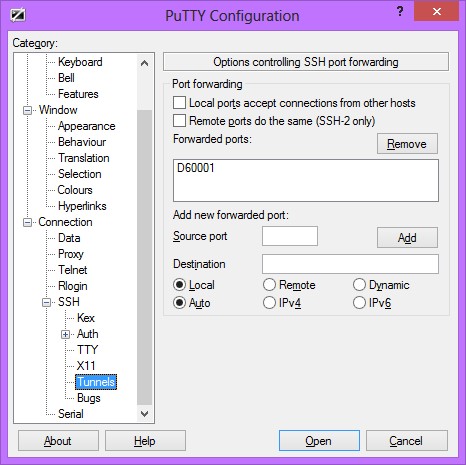 |
|
|
Mar 5 2014, 09:49 AM
Return to original view | Post
#4
|
|
Senior Member
920 posts Joined: May 2010
|
QUOTE(Anime4000 @ Mar 5 2014, 01:12 AM) [attachmentid=3878308] What is your network configuration as in[attachmentid=3878325] only router... can reach, going to outside, nope... Your PC --> ? ---> ? I used to have the same problem, my network config was CODE PC --> Switch ---> Modem | | V WLAN Router Both WLAN and PC did not get iPv6 connectivity, so.. I tried removing the switch, as in Both WLAN and PC connected straight to Modem (TM Riger) and I got my Ipv6... kinda weird, but removing switch seems to restore back my ipv6 connection. This post has been edited by nymerine: Mar 5 2014, 09:49 AM |
|
|
Mar 5 2014, 11:09 AM
Return to original view | Post
#5
|
|
Senior Member
920 posts Joined: May 2010
|
QUOTE(Anime4000 @ Mar 5 2014, 10:04 AM) First configuration... PPPoE Try hooking up default TM router & your PC. IIRC you're static IP user, right?IPv6 not working... 2nd configuration... Router IPv6 not working... basically TM IPv6 not allow me... |
|
|
Mar 6 2014, 08:51 AM
Return to original view | Post
#6
|
|
Senior Member
920 posts Joined: May 2010
|
QUOTE(Anime4000 @ Mar 5 2014, 03:59 PM) nope... not working,... Do you have any other device that supports Ipv6?[attachmentid=3878969] |
|
|
|
|
|
Mar 6 2014, 12:33 PM
Return to original view | Post
#7
|
|
Senior Member
920 posts Joined: May 2010
|
QUOTE(Anime4000 @ Mar 6 2014, 12:01 PM) got, even 6to4 tunnel also have... Yeah you can try, but your previous modem can ping6 out, your PC can't, suspecting its your PC problem?call 100 about this IPv6 ? Edit : Woops, misread your post about your modem can ping6 out. Edit 2 : Alright, telnet to your TM modem, and run this CODE ip6 ping 2404:6800:4001:803::1004 Just making sure it's not a problem with your network devices. This post has been edited by nymerine: Mar 6 2014, 12:49 PM |
|
|
Mar 7 2014, 06:12 PM
Return to original view | Post
#8
|
|
Senior Member
920 posts Joined: May 2010
|
QUOTE(Anime4000 @ Mar 7 2014, 05:28 PM) SLAAC (Autoconfig) didn't work Using 6to4 would beat the purpose though, call 100 for faster response (Monday-Friday)PPPoE got IP also didn't work, suspecting TM side problem I can use 6to4 tunnel... This post has been edited by nymerine: Mar 7 2014, 06:15 PM |
|
|
May 1 2014, 11:41 AM
Return to original view | Post
#9
|
|
Senior Member
920 posts Joined: May 2010
|
QUOTE(squall0833 @ May 1 2014, 06:28 AM) just fix youtube slow issue by changing default 1480 to 1492 Disabling IPv6 seems to fix the slow youtube loading for me..now still got problems with some websites like facebook, Wikipedia, yahoo, etc they all are not reachable, I even tried lower but not lower than 1464 if too low, even lyn also not reachable im using just a normal tp-link w8968, is there anyway I can do ? I have read previous posts here all advance crazy stuff for microtik ddwrt, and tomato really make me :confuse: Is it if I don't have those router, I couldn't do anything with this problem? btw im using Streamyx 4Mbps |
| Change to: |  0.0208sec 0.0208sec
 0.45 0.45
 7 queries 7 queries
 GZIP Disabled GZIP Disabled
Time is now: 10th December 2025 - 08:18 AM |
 Quote
Quote