

TM provide IPv6, nice...
some question:
before, only having single WAN IP (IPv4) on router side and private IP for LAN.
now with IPv6, every connected PC (LAN) also get unique WAN IPv6?
Unifi TMnet Streamyx/Unifi & IPv6, Now live!
Unifi TMnet Streamyx/Unifi & IPv6, Now live!
|
|
 Oct 1 2013, 08:20 PM Oct 1 2013, 08:20 PM
Return to original view | Post
#1
|
 
Senior Member
2,399 posts Joined: Jul 2009 From: /dev/null  
|
TM provide IPv6, nice...
some question: before, only having single WAN IP (IPv4) on router side and private IP for LAN. now with IPv6, every connected PC (LAN) also get unique WAN IPv6? |
|
|
|
|
|
Oct 15 2013, 09:50 PM
Return to original view | Post
#2
|
|
Senior Member
2,399 posts Joined: Jul 2009 From: /dev/null
|
This IPv6, all connected device get unique WAN IPv6 ? or still single WAN IPv6 on router?
|
|
|
Oct 16 2013, 02:11 AM
Return to original view | Post
#3
|
|
Senior Member
2,399 posts Joined: Jul 2009 From: /dev/null
|
QUOTE(asellus @ Oct 15 2013, 10:29 PM) One or two WAN IPv6 unique address(es) per device, depending on how the device is configured. basically, like this? 
What I see, there are no more "NAT" like IPv4, and have Two WAN IPv6, and One IPv6 Local... more like Device to Device -or- Computer to Computer directly... Soon in future game, no more UPNP or opening port? since every device have WAN IP... I try help my friend enable his IPv6, since my router can't have IPv6.... so this what I do. 
Enable... and Delegation 
This look like forward WAN IP to internal LAN prefix... 64bit? This post has been edited by Anime4000: Oct 16 2013, 02:23 AM |
|
|
Oct 16 2013, 03:28 AM
Return to original view | Post
#4
|
|
Senior Member
2,399 posts Joined: Jul 2009 From: /dev/null
|
QUOTE(tezro @ Oct 16 2013, 02:43 AM) Yes............. /64 is mean, Subnet mask is ffff:ffff:ffff:ffff:::::is like who in "2001:e68:4022:5136/64" like big LAN for country... IPv6 no more NAT... like this? 
Article: No NAT in IPv6? This post has been edited by Anime4000: Oct 16 2013, 03:50 AM |
|
|
Oct 16 2013, 05:09 PM
Return to original view | Post
#5
|
|
Senior Member
2,399 posts Joined: Jul 2009 From: /dev/null
|
my router DIR-605L seem don't have IPv6 support.. btw I tried this way:

But... can't pinging: 
This post has been edited by Anime4000: Oct 16 2013, 05:12 PM |
|
|
Oct 16 2013, 09:40 PM
Return to original view | Post
#6
|
|
Senior Member
2,399 posts Joined: Jul 2009 From: /dev/null
|
QUOTE(Alpha_Tay @ Oct 16 2013, 06:30 PM) the way of yr config work for me, dunno why it doesnt work for u, show us your router config. My router was DIR-605L. Dont have IPv6...
|
|
|
|
|
|
Mar 3 2014, 11:44 PM
Return to original view | Post
#7
|
|
Senior Member
2,399 posts Joined: Jul 2009 From: /dev/null
|
Before I upgrade streamyx package, I got IPv6, now I using 4Mbps, didn't get IPv6 properly, even do Direct connection, can't ping IPv6 addresses like www.v6.facebook.com
I change to new router, belkin n750 db. DHCPv6 or PPPoE over IPv6, both not working, not distribute IPv6 to other connected device 
|
|
|
Mar 5 2014, 12:00 AM
Return to original view | Post
#8
|
|
Senior Member
2,399 posts Joined: Jul 2009 From: /dev/null
|
I think Streamyx native IPv6 have problem... I can't do anything after I upgrade..

|
|
|
Mar 5 2014, 12:29 AM
Return to original view | Post
#9
|
|
Senior Member
2,399 posts Joined: Jul 2009 From: /dev/null
|
QUOTE(Anonymous34 @ Mar 5 2014, 12:08 AM) Default router works though. Not gonna use default router no matter what. You mean use their Modem Router that provided by TM?If yes, even Windows PPPoE can't get IPv6 properly... my router got 6to4 Tunnel, that works well.. 192.88.99.1? |
|
|
Mar 5 2014, 12:45 AM
Return to original view | Post
#10
|
|
Senior Member
2,399 posts Joined: Jul 2009 From: /dev/null
|
QUOTE(Anonymous34 @ Mar 5 2014, 12:34 AM) default router sometimes ok, sometimes just dead without ip. using tunnel, likely not certified for P2P, but having IPv6 make 1 host deliver 2 stream IPv4 and IPv6,u mean 6 to 4 tunnel can? My router has that also. I now with native/PPPoE IPv6, TM likely having dead IPv6... call 100 would they check? |
|
|
Mar 5 2014, 01:12 AM
Return to original view | Post
#11
|
|
Senior Member
2,399 posts Joined: Jul 2009 From: /dev/null
|
QUOTE(wKkaY @ Mar 5 2014, 12:46 AM) Start troubleshooting by pinging your router. It's the fe80::xxxx IP listed in "IPv6 Default Gateway" ... make sure you include the %38 at the end. Did that work? If it did, run a tracert -6 google.com and paste the results here. 
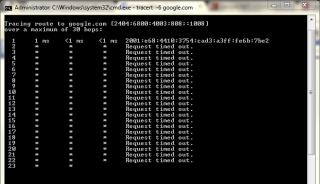
only router... can reach, going to outside, nope... |
|
|
Mar 5 2014, 10:04 AM
Return to original view | Post
#12
|
|
Senior Member
2,399 posts Joined: Jul 2009 From: /dev/null
|
QUOTE(nymerine @ Mar 5 2014, 09:49 AM) What is your network configuration as in First configuration... PPPoEYour PC --> ? ---> ? I used to have the same problem, my network config was CODE PC --> Switch ---> Modem | | V WLAN Router Both WLAN and PC did not get iPv6 connectivity, so.. I tried removing the switch, as in Both WLAN and PC connected straight to Modem (TM Riger) and I got my Ipv6... kinda weird, but removing switch seems to restore back my ipv6 connection. IPv6 not working... 2nd configuration... Router IPv6 not working... basically TM IPv6 not allow me... |
|
|
Mar 5 2014, 03:59 PM
Return to original view | Post
#13
|
|
Senior Member
2,399 posts Joined: Jul 2009 From: /dev/null
|
QUOTE(nymerine @ Mar 5 2014, 11:09 AM) Try hooking up default TM router & your PC. IIRC you're static IP user, right? nope... not working,...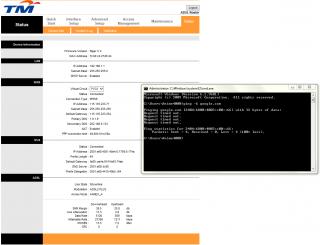
|
|
|
|
|
|
Mar 5 2014, 07:11 PM
Return to original view | Post
#14
|
|
Senior Member
2,399 posts Joined: Jul 2009 From: /dev/null
|
QUOTE(nymerine @ Mar 5 2014, 11:09 AM) Try hooking up default TM router & your PC. IIRC you're static IP user, right? do you think MTU cause the issue? if I use 6to4, it work well, but not nice. |
|
|
Mar 6 2014, 12:01 PM
Return to original view | Post
#15
|
|
Senior Member
2,399 posts Joined: Jul 2009 From: /dev/null
|
QUOTE(nymerine @ Mar 6 2014, 08:51 AM) Do you have any other device that supports Ipv6? got, even 6to4 tunnel also have...call 100 about this IPv6 ? |
|
|
Mar 6 2014, 02:46 PM
Return to original view | Post
#16
|
|
Senior Member
2,399 posts Joined: Jul 2009 From: /dev/null
|
QUOTE(nymerine @ Mar 6 2014, 12:33 PM) Yeah you can try, but your previous modem can ping6 out, your PC can't, suspecting its your PC problem? TM Riger modem can't pinging IPv6, dont have route table, so in D-Link showEdit : Woops, misread your post about your modem can ping6 out. Edit 2 : Alright, telnet to your TM modem, and run this CODE ip6 ping 2404:6800:4001:803::1004 Just making sure it's not a problem with your network devices. 
QUOTE(Raki @ Mar 6 2014, 12:51 PM) in cmd, type "ipconfig /all" how many ipv6 address are you assigned for your network adapter? also try "netsh interface ipv6 show subinterfaces" and see your MTU for your internet bound network interface try ping with this "ping google.com -6 -l 1432" CODE C:\Users\Anime4000>netsh interface ipv6 show subinterfaces >d:\mtu.txt MTU MediaSenseState Bytes In Bytes Out Interface ------ --------------- --------- --------- ------------- 4294967295 1 0 6321119 Loopback Pseudo-Interface 1 1280 5 0 0 isatap.imouto 1280 1 1828281290 807466729 Teredo Tunneling Pseudo-Interface 1492 1 915337 4312659 Local Area Connection 1500 5 0 152 VPN - VPN Client 1280 5 0 0 isatap.{6E8BEADE-2E81-4424-A6FF-FD587B5089D4} 1280 5 0 31680 isatap.{A3B894E5-72FD-4711-B00F-A9629574143F} 1280 5 0 0 isatap.{DFD0B9EB-90DD-41CB-84AC-096F5D0C51AF} 1280 5 0 0 isatap.{84E2790B-100F-4E66-A3D8-DFAEC4265651} 1430 5 0 248 LAN Bridger Connection 1500 1 0 185699 VMware Network Adapter VMnet1 1500 1 0 182717 VMware Network Adapter VMnet8 CODE Copyright (c) 2009 Microsoft Corporation. All rights reserved. C:\Users\Anime4000>ping -6 -l 1432 google.com Pinging google.com [2404:6800:4003:c00::8b] with 1432 bytes of data: Request timed out. Request timed out. Request timed out. Request timed out. Ping statistics for 2404:6800:4003:c00::8b: Packets: Sent = 4, Received = 0, Lost = 4 (100% loss), C:\Users\Anime4000>ping -6 -l 1280 google.com Pinging google.com [2404:6800:4003:c00::8b] with 1280 bytes of data: Request timed out. Request timed out. Request timed out. Request timed out. Ping statistics for 2404:6800:4003:c00::8b: Packets: Sent = 4, Received = 0, Lost = 4 (100% loss), C:\Users\Anime4000> EDIT: 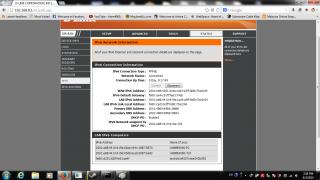
Pinging my desktop PC using WAN and Link-Local CODE Microsoft Windows [Version 6.1.7601] Copyright (c) 2009 Microsoft Corporation. All rights reserved. C:\Users\Anime4000>ping 2001:e68:4410:419e:60ae:c44c:1887:5870 Pinging 2001:e68:4410:419e:60ae:c44c:1887:5870 with 32 bytes of data: Reply from 2001:e68:4410:419e:60ae:c44c:1887:5870: time=6ms Reply from 2001:e68:4410:419e:60ae:c44c:1887:5870: time=3ms Reply from 2001:e68:4410:419e:60ae:c44c:1887:5870: time=2ms Reply from 2001:e68:4410:419e:60ae:c44c:1887:5870: time=2ms Ping statistics for 2001:e68:4410:419e:60ae:c44c:1887:5870: Packets: Sent = 4, Received = 4, Lost = 0 (0% loss), Approximate round trip times in milli-seconds: Minimum = 2ms, Maximum = 6ms, Average = 3ms C:\Users\Anime4000>ping anime4000-pc Pinging Anime4000-PC [fe80::44b9:711e:4893:fea3%48] with 32 bytes of data: Reply from fe80::44b9:711e:4893:fea3%48: time=1ms Reply from fe80::44b9:711e:4893:fea3%48: time=1ms Reply from fe80::44b9:711e:4893:fea3%48: time=1ms Reply from fe80::44b9:711e:4893:fea3%48: time=1ms Ping statistics for fe80::44b9:711e:4893:fea3%48: Packets: Sent = 4, Received = 4, Lost = 0 (0% loss), Approximate round trip times in milli-seconds: Minimum = 1ms, Maximum = 1ms, Average = 1ms C:\Users\Anime4000> This post has been edited by Anime4000: Mar 6 2014, 03:02 PM |
|
|
Mar 7 2014, 12:45 AM
Return to original view | Post
#17
|
|
Senior Member
2,399 posts Joined: Jul 2009 From: /dev/null
|
QUOTE(asellus @ Mar 6 2014, 03:20 PM) You should try resetting your TCP/IP stack. How?btw, I choose right option? 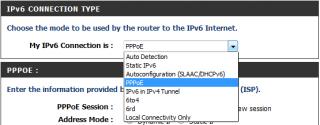
QUOTE(wKkaY @ Mar 6 2014, 03:22 PM) From what I see, I think it's a problem on TM's side. Try calling their hotline. Their customer support needs some practice resolving IPv6 problems after all I try contact TM, use "100" or email? This post has been edited by Anime4000: Mar 7 2014, 01:23 AM |
|
|
Mar 7 2014, 05:28 PM
Return to original view | Post
#18
|
|
Senior Member
2,399 posts Joined: Jul 2009 From: /dev/null
|
QUOTE(asellus @ Mar 7 2014, 07:41 AM) It can be done using the 'netsh' command via an elevated command prompt. SLAAC (Autoconfig) didn't workThe option is correct, you can also try SLAAC though. PPPoE got IP also didn't work, suspecting TM side problem I can use 6to4 tunnel... |
|
|
Mar 7 2014, 08:31 PM
Return to original view | Post
#19
|
|
Senior Member
2,399 posts Joined: Jul 2009 From: /dev/null
|
QUOTE(nymerine @ Mar 7 2014, 06:12 PM) Using 6to4 would beat the purpose though, call 100 for faster response (Monday-Friday) I'll try contact... |
|
|
Mar 7 2014, 09:15 PM
Return to original view | Post
#20
|
|
Senior Member
2,399 posts Joined: Jul 2009 From: /dev/null
|
QUOTE(nymerine @ Mar 7 2014, 06:12 PM) call 100 for faster response (Monday-Friday) I just called 100, she said IPv6 not yet launch officially, user may get IPv6 but no connection to TM Gateway.so? use 6to4 for temporary? |
| Change to: |  0.0500sec 0.0500sec
 0.36 0.36
 7 queries 7 queries
 GZIP Disabled GZIP Disabled
Time is now: 2nd December 2025 - 07:12 AM |
 Quote
Quote