Welcome Guest ( Log In | Register )

69 Pages « < 34 35 36 37 38 > » Bottom

Outline · [ Standard ] · Linear+

Unifi TMnet Streamyx/Unifi & IPv6, Now live!

views
     
Anime4000
post Mar 5 2014, 10:04 AM

Look at all my stars!!
*******
Senior Member
2,399 posts

Joined: Jul 2009
From: /dev/null


QUOTE(nymerine @ Mar 5 2014, 09:49 AM)
What is your network configuration as in
Your PC --> ? ---> ?

I used to have the same problem, my network config was
CODE

PC --> Switch ---> Modem
             |
             |
             V
       WLAN Router

Both WLAN and PC did not get iPv6 connectivity, so.. I tried removing the switch, as in Both WLAN and PC connected straight to Modem (TM Riger) and I got my Ipv6... kinda weird, but removing switch seems to restore back my ipv6 connection.
*
First configuration... PPPoE
IPv6 not working...

2nd configuration... Router
IPv6 not working...

basically TM IPv6 not allow me...
nymerine
post Mar 5 2014, 11:09 AM

Enthusiast
*****
Senior Member
920 posts

Joined: May 2010


QUOTE(Anime4000 @ Mar 5 2014, 10:04 AM)
First configuration... PPPoE
IPv6 not working...

2nd configuration... Router
IPv6 not working...

basically TM IPv6 not allow me...
*
Try hooking up default TM router & your PC. IIRC you're static IP user, right?
Anime4000
post Mar 5 2014, 03:59 PM

Look at all my stars!!
*******
Senior Member
2,399 posts

Joined: Jul 2009
From: /dev/null


QUOTE(nymerine @ Mar 5 2014, 11:09 AM)
Try hooking up default TM router & your PC. IIRC you're static IP user, right?
*
nope... not working,...
Attached Image
Psychosis
post Mar 5 2014, 06:49 PM

Getting Started
**
Junior Member
92 posts

Joined: Apr 2011
windows 8 pppoe works too

configured my modem in bridge mode and dial using windows 8 voila ipv6 rclxm9.gif
Anime4000
post Mar 5 2014, 07:11 PM

Look at all my stars!!
*******
Senior Member
2,399 posts

Joined: Jul 2009
From: /dev/null


QUOTE(nymerine @ Mar 5 2014, 11:09 AM)
Try hooking up default TM router & your PC. IIRC you're static IP user, right?
*
do you think MTU cause the issue? if I use 6to4, it work well, but not nice.
nymerine
post Mar 6 2014, 08:51 AM

Enthusiast
*****
Senior Member
920 posts

Joined: May 2010


QUOTE(Anime4000 @ Mar 5 2014, 03:59 PM)
nope... not working,...
Attached Image
*
Do you have any other device that supports Ipv6?
Anime4000
post Mar 6 2014, 12:01 PM

Look at all my stars!!
*******
Senior Member
2,399 posts

Joined: Jul 2009
From: /dev/null


QUOTE(nymerine @ Mar 6 2014, 08:51 AM)
Do you have any other device that supports Ipv6?
*
got, even 6to4 tunnel also have...
call 100 about this IPv6 ?
nymerine
post Mar 6 2014, 12:33 PM

Enthusiast
*****
Senior Member
920 posts

Joined: May 2010


QUOTE(Anime4000 @ Mar 6 2014, 12:01 PM)
got, even 6to4 tunnel also have...
call 100 about this IPv6 ?
*
Yeah you can try, but your previous modem can ping6 out, your PC can't, suspecting its your PC problem?

Edit : Woops, misread your post about your modem can ping6 out.
Edit 2 : Alright, telnet to your TM modem, and run this
CODE

ip6 ping 2404:6800:4001:803::1004

Just making sure it's not a problem with your network devices.

This post has been edited by nymerine: Mar 6 2014, 12:49 PM
Raki
post Mar 6 2014, 12:51 PM

Casual
***
Junior Member
311 posts

Joined: Jan 2009


in cmd, type "ipconfig /all"
how many ipv6 address are you assigned for your network adapter?

also try "netsh interface ipv6 show subinterfaces" and see your MTU for your internet bound network interface
try ping with this "ping google.com -6 -l 1432"


This post has been edited by Raki: Mar 6 2014, 12:59 PM
Anime4000
post Mar 6 2014, 02:46 PM

Look at all my stars!!
*******
Senior Member
2,399 posts

Joined: Jul 2009
From: /dev/null


QUOTE(nymerine @ Mar 6 2014, 12:33 PM)
Yeah you can try, but your previous modem can ping6 out, your PC can't, suspecting its your PC problem?

Edit : Woops, misread your post about your modem can ping6 out.
Edit 2 : Alright, telnet to your TM modem, and run this
CODE

ip6 ping 2404:6800:4001:803::1004

Just making sure it's not a problem with your network devices.
*
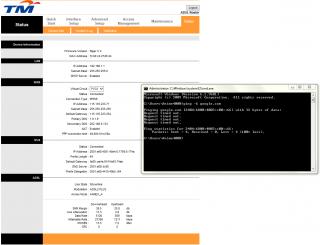
TM Riger modem can't pinging IPv6, dont have route table, so in D-Link show
Attached Image

QUOTE(Raki @ Mar 6 2014, 12:51 PM)
in cmd, type "ipconfig /all"
how many ipv6 address are you assigned for your network adapter?

also try "netsh interface ipv6 show subinterfaces" and see your MTU for your internet bound network interface
try ping with this "ping google.com -6 -l 1432"
*
CODE

C:\Users\Anime4000>netsh interface ipv6 show subinterfaces >d:\mtu.txt
  MTU  MediaSenseState   Bytes In  Bytes Out  Interface
------  ---------------  ---------  ---------  -------------
4294967295                1          0    6321119  Loopback Pseudo-Interface 1
 1280                5          0          0  isatap.imouto
 1280                1  1828281290  807466729  Teredo Tunneling Pseudo-Interface
 1492                1     915337    4312659  Local Area Connection
 1500                5          0        152  VPN - VPN Client
 1280                5          0          0  isatap.{6E8BEADE-2E81-4424-A6FF-FD587B5089D4}
 1280                5          0      31680  isatap.{A3B894E5-72FD-4711-B00F-A9629574143F}
 1280                5          0          0  isatap.{DFD0B9EB-90DD-41CB-84AC-096F5D0C51AF}
 1280                5          0          0  isatap.{84E2790B-100F-4E66-A3D8-DFAEC4265651}
 1430                5          0        248  LAN Bridger Connection
 1500                1          0     185699  VMware Network Adapter VMnet1
 1500                1          0     182717  VMware Network Adapter VMnet8


CODE
Copyright (c) 2009 Microsoft Corporation.  All rights reserved.

C:\Users\Anime4000>ping -6 -l 1432 google.com

Pinging google.com [2404:6800:4003:c00::8b] with 1432 bytes of data:
Request timed out.
Request timed out.
Request timed out.
Request timed out.

Ping statistics for 2404:6800:4003:c00::8b:
   Packets: Sent = 4, Received = 0, Lost = 4 (100% loss),

C:\Users\Anime4000>ping -6 -l 1280 google.com

Pinging google.com [2404:6800:4003:c00::8b] with 1280 bytes of data:
Request timed out.
Request timed out.
Request timed out.
Request timed out.

Ping statistics for 2404:6800:4003:c00::8b:
   Packets: Sent = 4, Received = 0, Lost = 4 (100% loss),

C:\Users\Anime4000>


EDIT:
Attached Image

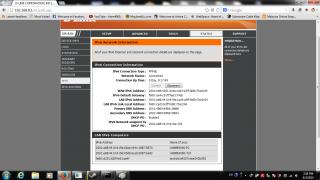
Pinging my desktop PC using WAN and Link-Local
CODE
Microsoft Windows [Version 6.1.7601]
Copyright (c) 2009 Microsoft Corporation.  All rights reserved.

C:\Users\Anime4000>ping 2001:e68:4410:419e:60ae:c44c:1887:5870

Pinging 2001:e68:4410:419e:60ae:c44c:1887:5870 with 32 bytes of data:
Reply from 2001:e68:4410:419e:60ae:c44c:1887:5870: time=6ms
Reply from 2001:e68:4410:419e:60ae:c44c:1887:5870: time=3ms
Reply from 2001:e68:4410:419e:60ae:c44c:1887:5870: time=2ms

Ping statistics for 2001:e68:4410:419e:60ae:c44c:1887:5870:
   Packets: Sent = 4, Received = 4, Lost = 0 (0% loss),
Approximate round trip times in milli-seconds:
   Minimum = 2ms, Maximum = 6ms, Average = 3ms

C:\Users\Anime4000>ping anime4000-pc

Pinging Anime4000-PC [fe80::44b9:711e:4893:fea3%48] with 32 bytes of data:
Reply from fe80::44b9:711e:4893:fea3%48: time=1ms

Ping statistics for fe80::44b9:711e:4893:fea3%48:
   Packets: Sent = 4, Received = 4, Lost = 0 (0% loss),
Approximate round trip times in milli-seconds:
   Minimum = 1ms, Maximum = 1ms, Average = 1ms

C:\Users\Anime4000>


This post has been edited by Anime4000: Mar 6 2014, 03:02 PM

asellus
post Mar 6 2014, 03:20 PM

#gompusas
Group Icon
Elite
4,541 posts

Joined: Jan 2003
From: BSRPPG51 Access Concentrator


You should try resetting your TCP/IP stack.
TSwKkaY
post Mar 6 2014, 03:22 PM

misutā supākoru
Group Icon
VIP
6,008 posts

Joined: Jan 2003
From what I see, I think it's a problem on TM's side. Try calling their hotline. Their customer support needs some practice resolving IPv6 problems after all brows.gif
Anime4000
post Mar 7 2014, 12:45 AM

Look at all my stars!!
*******
Senior Member
2,399 posts

Joined: Jul 2009
From: /dev/null


QUOTE(asellus @ Mar 6 2014, 03:20 PM)
You should try resetting your TCP/IP stack.
*
How?
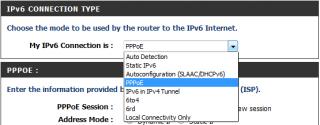
btw, I choose right option?
Attached Image

QUOTE(wKkaY @ Mar 6 2014, 03:22 PM)
From what I see, I think it's a problem on TM's side. Try calling their hotline. Their customer support needs some practice resolving IPv6 problems after all brows.gif
*
I try contact TM, use "100" or email?

This post has been edited by Anime4000: Mar 7 2014, 01:23 AM
asellus
post Mar 7 2014, 07:41 AM

#gompusas
Group Icon
Elite
4,541 posts

Joined: Jan 2003
From: BSRPPG51 Access Concentrator


QUOTE(Anime4000 @ Mar 7 2014, 12:45 AM)
How?
btw, I choose right option?
Attached Image

*
It can be done using the 'netsh' command via an elevated command prompt.

The option is correct, you can also try SLAAC though.
Anime4000
post Mar 7 2014, 05:28 PM

Look at all my stars!!
*******
Senior Member
2,399 posts

Joined: Jul 2009
From: /dev/null


QUOTE(asellus @ Mar 7 2014, 07:41 AM)
It can be done using the 'netsh' command via an elevated command prompt.

The option is correct, you can also try SLAAC though.
*
SLAAC (Autoconfig) didn't work
PPPoE got IP also didn't work, suspecting TM side problem
I can use 6to4 tunnel...
nymerine
post Mar 7 2014, 06:12 PM

Enthusiast
*****
Senior Member
920 posts

Joined: May 2010


QUOTE(Anime4000 @ Mar 7 2014, 05:28 PM)
SLAAC (Autoconfig) didn't work
PPPoE got IP also didn't work, suspecting TM side problem
I can use 6to4 tunnel...
*
Using 6to4 would beat the purpose though, call 100 for faster response (Monday-Friday)

This post has been edited by nymerine: Mar 7 2014, 06:15 PM
Anime4000
post Mar 7 2014, 08:31 PM

Look at all my stars!!
*******
Senior Member
2,399 posts

Joined: Jul 2009
From: /dev/null


QUOTE(nymerine @ Mar 7 2014, 06:12 PM)
Using 6to4 would beat the purpose though, call 100 for faster response (Monday-Friday)
*
I'll try contact...
Anime4000
post Mar 7 2014, 09:15 PM

Look at all my stars!!
*******
Senior Member
2,399 posts

Joined: Jul 2009
From: /dev/null


QUOTE(nymerine @ Mar 7 2014, 06:12 PM)
call 100 for faster response (Monday-Friday)
*
I just called 100, she said IPv6 not yet launch officially, user may get IPv6 but no connection to TM Gateway.
so? use 6to4 for temporary?
Anime4000
post Mar 9 2014, 01:54 PM

Look at all my stars!!
*******
Senior Member
2,399 posts

Joined: Jul 2009
From: /dev/null


QUOTE(nymerine @ Mar 9 2014, 08:56 AM)
Just use normal ipv4?
*
She said use IPv4, on TM-end see my connection only made IPv4, no connection IPv6, but I get IPv6 with no connectivity...
I had a problem 6to4 tunnel on D-Link DIR-820L, few minute each client WAN IPv6 get removed...
prasys
post Apr 5 2014, 12:29 PM

Heros Never Die
Group Icon
VIP
12,925 posts

Joined: Mar 2005
From: Kuala Lumpur
Anyone having issues with V6 ? Can't seem to get the IP

69 Pages « < 34 35 36 37 38 > » Top
 

Change to:
| Lo-Fi Version
0.0265sec    0.52    6 queries    GZIP Disabled
Time is now: 10th December 2025 - 01:49 AM