

I am an UNIFI subscriber, TM say it need set up IPV6 privately and TM no provides this service.
Unifi TMnet Streamyx/Unifi & IPv6, Now live!
Unifi TMnet Streamyx/Unifi & IPv6, Now live!
|
|
 Aug 16 2017, 01:27 AM Aug 16 2017, 01:27 AM
|
 
Senior Member
1,984 posts Joined: Apr 2011 
|
I am an UNIFI subscriber, TM say it need set up IPV6 privately and TM no provides this service.
|
|
|
|
|
|
Aug 16 2017, 02:26 AM
|

Junior Member
879 posts Joined: Jan 2007
|
QUOTE(Ckmwpy0370 @ Aug 14 2017, 03:19 PM) Did follow up some thread on Networking, did mentioned on ISP IPV6 not yet mature yet in Malaysia. Define mature? v4 or v6 they still riding on the same TCP/IP stack. Just the length is different. Furthermore we are running with dual stack, if ipv6 is not available, it will always fallback to ipv4.Y you guys need to setup IPV6?  |
|
|
Aug 16 2017, 08:59 AM
|

Senior Member
3,821 posts Joined: May 2016
|
QUOTE(neuromancerx @ Aug 16 2017, 02:26 AM) Define mature? v4 or v6 they still riding on the same TCP/IP stack. Just the length is different. Furthermore we are running with dual stack, if ipv6 is not available, it will always fallback to ipv4. V6 still not yet fully rolled out to all ISP which still in infant stage especially in MalNow V4 and V6 still running concurrent. |
|
|
Aug 17 2017, 10:57 PM
|
|
Junior Member
879 posts Joined: Jan 2007
|
Well, according to source, Malaysia is the leader in term of ipv6 adoption in ASEAN.
https://www.google.com/intl/en/ipv6/statist...y-ipv6-adoption See the green thing? Compare with the rest of the world. On a separate note, IPv6 adoption, implementation and support is slow, even from ISP and networking vendor (not only in MY but rest of the world). IPv6 is just for future readiness, as long as ipv4 exist, people will not rush to do it. This post has been edited by neuromancerx: Aug 17 2017, 10:59 PM |
|
|
Aug 18 2017, 10:28 AM
|
|
Senior Member
3,821 posts Joined: May 2016
|
preciously,
IPV6 adoption still less than 17% in Malaysia (consider still in infant stage)NOT event 20% why need to configure router into IPV6 which a lot of users encounter a lot of issue cannot browsing? |
|
|
Sep 25 2017, 10:40 PM
Show posts by this member only | IPv6 | Post
#1246
|

Junior Member
116 posts Joined: Apr 2009 
|
Hi Sifus,
Does anyone have a step by step guide to get IPV6 working on a Mikrotik RB3011? I've tried following the instructions from this thread but have not been able to get the router to assign my PC a ipv6 DNS  |
|
|
|
|
|
Sep 26 2017, 02:22 AM
|

All Stars
11,455 posts Joined: Oct 2007 From: KL
|
QUOTE(maxxsp @ Sep 25 2017, 10:40 PM) Hi Sifus, Mikrotik yeah! Post your config, remember to hide-sensitive. If you've followed the guide, which guide btw, you're probably already 99% there.Does anyone have a step by step guide to get IPV6 working on a Mikrotik RB3011? I've tried following the instructions from this thread but have not been able to get the router to assign my PC a ipv6 DNS |
|
|
Sep 26 2017, 10:51 AM
Show posts by this member only | IPv6 | Post
#1248
|
|
Junior Member
116 posts Joined: Apr 2009
|
QUOTE(soonwai @ Sep 26 2017, 02:22 AM) Mikrotik yeah! Post your config, remember to hide-sensitive. If you've followed the guide, which guide btw, you're probably already 99% there. Hi there soonwai,I used your guide to get Unifi working on my Mikrotik! Great job and hope you can do something similar for ipv6 one day  For ipv6 I tried following rizwanrp's instructions here https://forum.lowyat.net/index.php?showtopi...post&p=63945436 I also tried replicating the info I found here https://klseet.com/5-tm-unifi/unifi-general/258-unifi-ipv6 I can get the ipv6 prefix from DHCP Client but my devices can't seem to receive DNS addresses |
|
|
Sep 26 2017, 01:12 PM
|
|
Junior Member
116 posts Joined: Apr 2009
|
QUOTE(maxxsp @ Sep 26 2017, 10:51 AM) Hi there soonwai, UPDATE: Managed to get IPv6 working!I used your guide to get Unifi working on my Mikrotik! Great job and hope you can do something similar for ipv6 one day For ipv6 I tried following rizwanrp's instructions here https://forum.lowyat.net/index.php?showtopi...post&p=63945436 I also tried replicating the info I found here https://klseet.com/5-tm-unifi/unifi-general/258-unifi-ipv6 I can get the ipv6 prefix from DHCP Client but my devices can't seem to receive DNS addresses The setting I was missing is in PPP Profile > Default > DHCP-PD Pool. You have to add the previously created pool and click apply! |
|
|
Sep 26 2017, 11:35 PM
|
|
All Stars
11,455 posts Joined: Oct 2007 From: KL
|
QUOTE(maxxsp @ Sep 26 2017, 01:12 PM) UPDATE: Managed to get IPv6 working! See, I told you, you were already 99% there. The setting I was missing is in PPP Profile > Default > DHCP-PD Pool. You have to add the previously created pool and click apply!  Glad you got it working. |
|
|
Sep 27 2017, 07:08 AM
Show posts by this member only | IPv6 | Post
#1251
|

Junior Member
18 posts Joined: May 2011
|
Weird situation , set my router to google dns for over a year and not having any problem but recently experience slow down on all internet related service
Chrome won't load profile , origin apps can not connect to service despite able to login , once able to login , Battlefield 1 play at 300-600+ ping (unplayable) , Overwatch constant at 2XX ping But once i switch back to default dns , everything work just as normal , is it tm routing to google dns got problem? or they just targetting me and want to log my activity by wanting me to switch to default tm dns ? This post has been edited by maxwong85: Sep 27 2017, 07:09 AM |
|
|
Sep 27 2017, 11:16 AM
Show posts by this member only | IPv6 | Post
#1252
|

Senior Member
3,669 posts Joined: Apr 2006
|
QUOTE(maxwong85 @ Sep 27 2017, 07:08 AM) Weird situation , set my router to google dns for over a year and not having any problem but recently experience slow down on all internet related service For the bolded part....may I ask if the chrome keeps displaying "Downloading proxy script......" for around 30 seconds or so, then continue normally? Chrome won't load profile , origin apps can not connect to service despite able to login , once able to login , Battlefield 1 play at 300-600+ ping (unplayable) , Overwatch constant at 2XX ping But once i switch back to default dns , everything work just as normal , is it tm routing to google dns got problem? or they just targetting me and want to log my activity by wanting me to switch to default tm dns ?  If so...please open windows proxy setting and untick "Automatically detect settings" at LAN Settings. Verify if this fixes the issue. |
|
|
Sep 27 2017, 12:37 PM
Show posts by this member only | IPv6 | Post
#1253
|
|
Junior Member
18 posts Joined: May 2011
|
QUOTE(JohnLai @ Sep 27 2017, 12:16 PM) For the bolded part....may I ask if the chrome keeps displaying "Downloading proxy script......" for around 30 seconds or so, then continue normally? weirds , but this does fix the problem , and i have change back the router to google dns and everything works just like before , smooth as silk If so...please open windows proxy setting and untick "Automatically detect settings" at LAN Settings. Verify if this fixes the issue. |
|
|
|
|
|
Sep 27 2017, 02:00 PM
Show posts by this member only | IPv6 | Post
#1254
|
|
Senior Member
3,669 posts Joined: Apr 2006
|
QUOTE(maxwong85 @ Sep 27 2017, 12:37 PM) weirds , but this does fix the problem , and i have change back the router to google dns and everything works just like before , smooth as silk Hmm....time for a war....Tick back the "Automatically detect settings" at LAN Settings. Then run chrome and immediately paste and run chrome://net-internals/#proxy at chrome urlbar. Wait 60 seconds and screenshot back here. You must find out why default "Automatically detect settings" doesn't work. High probability you are infected with some sort* of malware/virus/trojan/rootkit that change your route via PAC script. This post has been edited by JohnLai: Sep 27 2017, 02:04 PM |
|
|
Sep 27 2017, 02:34 PM
Show posts by this member only | IPv6 | Post
#1255
|
|
Junior Member
18 posts Joined: May 2011
|
QUOTE(JohnLai @ Sep 27 2017, 03:00 PM) Hmm....time for a war.... https://imgur.com/a/vKqdGTick back the "Automatically detect settings" at LAN Settings. Then run chrome and immediately paste and run chrome://net-internals/#proxy at chrome urlbar. Wait 60 seconds and screenshot back here. You must find out why default "Automatically detect settings" doesn't work. High probability you are infected with some sort* of malware/virus/trojan/rootkit that change your route via PAC script. got this as result after 60sec , what is this? is it a problem? Attached thumbnail(s) 
|
|
|
Sep 27 2017, 02:35 PM
Show posts by this member only | IPv6 | Post
#1256
|
|
Junior Member
18 posts Joined: May 2011
|
turn the proxy things on and now my whole computer internet connection run like snail again
|
|
|
Sep 27 2017, 03:13 PM
Show posts by this member only | IPv6 | Post
#1257
|
|
Senior Member
3,669 posts Joined: Apr 2006
|
QUOTE(maxwong85 @ Sep 27 2017, 02:34 PM) Damn it, this is the 28th PC I encountered today experiencing the same issue since this morning.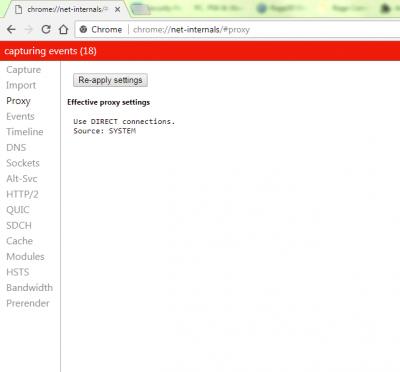
Supposely what we expect 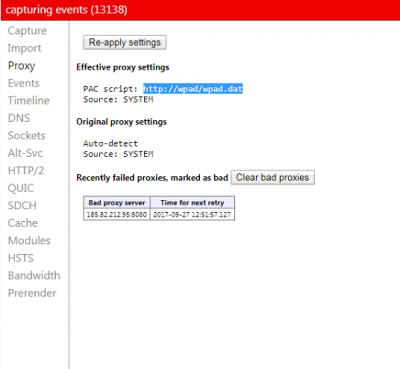
Now, you and the rest are experiencing this Hunting around revealed: function FindProxyForURL(url, host) { return 'PROXY 185.82.212.95:8080; DIRECT'; } Some file at wpad(2).dat at Internet Explorer cache shown above code. I have no idea what goes wrong. Let me guess, the slowdown happened yesterday? edit v4: -.-....Just a question.....apart from my 4 laptops (win7 fully updated), these 4 doesn't experience PAC issue. However....28 PCs....who experience this issue doesn't have its windows update turned on. Corporate PCs lor........... Does your system windows updates....is up-to-date? This post has been edited by JohnLai: Sep 27 2017, 03:20 PM |
|
|
Sep 27 2017, 03:51 PM
Show posts by this member only | IPv6 | Post
#1258
|
|
Junior Member
18 posts Joined: May 2011
|
QUOTE(JohnLai @ Sep 27 2017, 04:13 PM) Damn it, this is the 28th PC I encountered today experiencing the same issue since this morning. i have my windows update automatically , is there any others things to check?
Supposely what we expect
Now, you and the rest are experiencing this Hunting around revealed: function FindProxyForURL(url, host) { return 'PROXY 185.82.212.95:8080; DIRECT'; } Some file at wpad(2).dat at Internet Explorer cache shown above code. I have no idea what goes wrong. Let me guess, the slowdown happened yesterday? edit v4: -.-....Just a question.....apart from my 4 laptops (win7 fully updated), these 4 doesn't experience PAC issue. However....28 PCs....who experience this issue doesn't have its windows update turned on. Corporate PCs lor........... Does your system windows updates....is up-to-date? i am also running antivirus and deosn't install anything new lately , except for a new game from steam called gang beast |
|
|
Sep 27 2017, 09:46 PM
Show posts by this member only | IPv6 | Post
#1259
|
|
Senior Member
3,669 posts Joined: Apr 2006
|
QUOTE(maxwong85 @ Sep 27 2017, 03:51 PM) i have my windows update automatically , is there any others things to check? I have no idea, people keep asking me about this weird slowdown.i am also running antivirus and deosn't install anything new lately , except for a new game from steam called gang beast What with our same proxy IP address anyway? I tried a lot of stuff including resetting winsock, winhttp etc, still the same problem  |
|
|
Sep 28 2017, 09:11 AM
Show posts by this member only | IPv6 | Post
#1260
|
|
Junior Member
18 posts Joined: May 2011
|
QUOTE(JohnLai @ Sep 27 2017, 10:46 PM) I have no idea, people keep asking me about this weird slowdown. check my windows 10 pc , auto update and its run into the same problem alsoWhat with our same proxy IP address anyway? I tried a lot of stuff including resetting winsock, winhttp etc, still the same problem worst on windows 10 , spotify can't login , teamviewer also can't login , but when i went using my phone as hotspot and connect , everything works fine , must be the router problem This post has been edited by maxwong85: Sep 28 2017, 09:13 AM |
| Change to: |  0.0243sec 0.0243sec
 0.71 0.71
 6 queries 6 queries
 GZIP Disabled GZIP Disabled
Time is now: 1st December 2025 - 04:46 PM |
 Quote
Quote