Welcome Guest ( Log In | Register )

69 Pages « < 59 60 61 62 63 > » Bottom

Outline · [ Standard ] · Linear+

Unifi TMnet Streamyx/Unifi & IPv6, Now live!

views
     
asellus
post Apr 8 2017, 10:33 PM

#gompusas
Group Icon
Elite
4,541 posts

Joined: Jan 2003
From: BSRPPG51 Access Concentrator


QUOTE(marcus_bread @ Apr 7 2017, 05:46 PM)
Hi is anyone know whether i can use D'link DIR 815 as my streamyx 8mbps router (being a wifi router only). this is because my current modem router's wifi signal is very weak.
*
You usually set the D-Link to AP mode.
ming0000
post Apr 10 2017, 05:37 PM

Casual
***
Junior Member
450 posts

Joined: Mar 2007


TPlink TD-W8961ND have no IPv6 setting, anyone using TPlink streamyx modem?
ShinnKQ
post Apr 14 2017, 11:24 AM

I used to have a member title, until I took an arrow in the knee
******
Senior Member
1,242 posts

Joined: Nov 2010
From: PJ
How to set up Asus RT-N12D1 ipv6 for UniFi?
Any guide? lol
SUSraynman
post Apr 14 2017, 11:31 AM

Look at all my stars!!
*******
Senior Member
4,333 posts

Joined: Jan 2003


QUOTE(ShinnKQ @ Apr 14 2017, 11:24 AM)
How to set up Asus RT-N12D1 ipv6 for UniFi?
Any guide? lol
*
Here you go.... smile.gif

user posted image
ShinnKQ
post Apr 14 2017, 11:40 AM

I used to have a member title, until I took an arrow in the knee
******
Senior Member
1,242 posts

Joined: Nov 2010
From: PJ
QUOTE(raynman @ Apr 14 2017, 11:31 AM)
Here you go.... smile.gif

user posted image
*
Thanks!

I just done the set-up, got IPv6 address..

but no internet access confused.gif not sure why
SUSraynman
post Apr 14 2017, 11:42 AM

Look at all my stars!!
*******
Senior Member
4,333 posts

Joined: Jan 2003


QUOTE(ShinnKQ @ Apr 14 2017, 11:40 AM)
Thanks!

I just done the set-up, got IPv6 address..

but no internet access  confused.gif not sure why
*
You have to wait a few minutes for it to activate.

Be patient.

ShinnKQ
post Apr 14 2017, 12:07 PM

I used to have a member title, until I took an arrow in the knee
******
Senior Member
1,242 posts

Joined: Nov 2010
From: PJ
QUOTE(raynman @ Apr 14 2017, 11:42 AM)
You have to wait a few minutes for it to activate.

Be patient.
*
Works now, thank you smile.gif))))))))))))
lyt25_1234
post Apr 14 2017, 03:06 PM

Regular
******
Senior Member
1,152 posts

Joined: Jul 2011
Any particular reason to use ipv6 for Unifi?
jimmy.soo
post May 20 2017, 12:33 AM

Happy Go Lucky
******
Senior Member
1,050 posts

Joined: Feb 2006
From: KL


Using TP-Link C1200 with IPv6 but can't seems to get it work using google DNS, still having some page inaccessible.
*-a|i3n-*
post Jun 4 2017, 01:51 PM

I'm who i'm
****
Senior Member
681 posts

Joined: Nov 2006
From: Lowyat.net Malacca Status: Ultra Active


QUOTE(jimmy.soo @ May 20 2017, 12:33 AM)
Using TP-Link C1200 with IPv6 but can't seems to get it work using google DNS, still having some page inaccessible.
*
i tried alot times with google dns......... zzzzzzz
SUSraynman
post Jun 4 2017, 02:05 PM

Look at all my stars!!
*******
Senior Member
4,333 posts

Joined: Jan 2003


QUOTE(lyt25_1234 @ Apr 14 2017, 03:06 PM)
Any particular reason to use ipv6 for Unifi?
*
Unifi fully supports IPv6.

The question you should ask is "Any particular reason NOT to use IPv6 for Unifi"?

jimmy lai
post Jun 4 2017, 02:15 PM

Getting Started
**
Junior Member
57 posts

Joined: May 2015
Hi, may i know the STB is connected via LAN or WIFI or other cable? Because i plan to install my router & phone at 2 floor and my TV is at 1 floor.
AhManHD
post Jun 4 2017, 02:17 PM

Getting Started
**
Junior Member
157 posts

Joined: May 2011
QUOTE(jimmy lai @ Jun 4 2017, 03:15 PM)
Hi, may i know the STB is connected via LAN or WIFI or other cable? Because i plan to install my router & phone at 2 floor and my TV is at 1 floor.
*
Hi Jimmy,

You can refer to below link.

http://www.unifi.my/Files/ServiceGuide/201...0play__IPTV.PDF
biatche
post Jun 4 2017, 10:57 PM

Regular
******
Senior Member
1,649 posts

Joined: Jan 2003
does anybody know if unifi/home is able to provide anything better than /64 subnet? like /56 subnet or /48
jimmy.soo
post Jun 5 2017, 10:14 PM

Happy Go Lucky
******
Senior Member
1,050 posts

Joined: Feb 2006
From: KL


QUOTE(*-a|i3n-* @ Jun 4 2017, 01:51 PM)
i tried alot times with google dns......... zzzzzzz
*
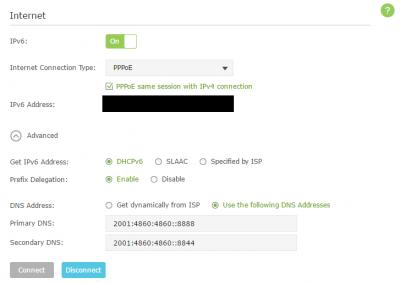
so did you manage to get it to work? I got it working now using the settings as per the screenshot rclxms.gif
Attached Image

This post has been edited by jimmy.soo: Jun 5 2017, 10:15 PM
nikrizal
post Jun 18 2017, 07:00 AM

Regular
******
Senior Member
1,230 posts

Joined: Oct 2005
TM provided me TP-Link Archer C1200 couple months ago. I jusy realised that IPV6 is not working. I've set to DHCPV6 or SLAAC without any success. Anyone using similar router can share the settings? Thanks
DM3
post Jun 18 2017, 07:10 AM

INSPIRATOR
*******
Senior Member
6,618 posts

Joined: Jun 2009
Very strange, suddenly no connection for hyptv, error code 108000
hOnGhOnG
post Jun 18 2017, 07:18 AM

Getting Started
**
Junior Member
203 posts

Joined: Feb 2005


hi guys, i have just installed unifi 30Mbps package (Vdsl with zte modem-router). rclxms.gif Everything is good except I cannot connect to Hypptv.

The installer bro has already configure the hypptv using direct LAN cable from router because they said the tvbox does not have any wifi connection but there is. Because that my TV and modem is far away so today i used an wireless extender with port (unifi -> extender receive -> extender output through port) but hypptv stuck at the "subscribe one of the package by pressing i key" thing. Then i tried directly using wifi to connect still cannot. The browser in the tv box is working for both case, there is connection but i simply cannot go pass the "subscribe" screen, even pressing i key does not work.

Then i run connection test: 1. network connection OK, 2. Obtaining IP address OK, 3. Gateway connectivity OK, 4. Central connectivity Failed, 5. NTP OK, 6. DNS OK, 7. Multicast Failed.. I have 2 homeplug laying around which I will go and buy cable to test later..

But any bro knows what happen? Thanks.

jimmy.soo
post Jun 18 2017, 11:14 PM

Happy Go Lucky
******
Senior Member
1,050 posts

Joined: Feb 2006
From: KL


QUOTE(jimmy.soo @ Jun 5 2017, 10:14 PM)
so did you manage to get it to work? I got it working now using the settings as per the screenshot rclxms.gif
Attached Image
*
QUOTE(nikrizal @ Jun 18 2017, 07:00 AM)
TM provided me TP-Link Archer C1200 couple months ago. I jusy realised that IPV6 is not working. I've set to DHCPV6 or SLAAC without any success. Anyone using similar router can share the settings? Thanks
*
you may try using the above settings, which is what I'm using right now, but not sure what happened today as those blocked sites no longer accessible.
nikrizal
post Jun 19 2017, 06:30 AM

Regular
******
Senior Member
1,230 posts

Joined: Oct 2005
QUOTE(jimmy.soo @ Jun 18 2017, 11:14 PM)
you may try using the above settings, which is what I'm using right now, but not sure what happened today as those blocked sites no longer accessible.
*
ok, will try. tq smile.gif

69 Pages « < 59 60 61 62 63 > » Top
 

Change to:
| Lo-Fi Version
0.0212sec    0.70    6 queries    GZIP Disabled
Time is now: 8th December 2025 - 07:56 PM