

Using TP-Link C1200 with IPv6 but can't seems to get it work using google DNS, still having some page inaccessible.
Unifi TMnet Streamyx/Unifi & IPv6, Now live!
Unifi TMnet Streamyx/Unifi & IPv6, Now live!
|
|
 May 20 2017, 12:33 AM May 20 2017, 12:33 AM
Return to original view | Post
#1
|
 
Senior Member
1,050 posts Joined: Feb 2006 From: KL  
|
Using TP-Link C1200 with IPv6 but can't seems to get it work using google DNS, still having some page inaccessible.
|
|
|
|
|
|
Jun 5 2017, 10:14 PM
Return to original view | IPv6 | Post
#2
|
|
Senior Member
1,050 posts Joined: Feb 2006 From: KL
|
QUOTE(*-a|i3n-* @ Jun 4 2017, 01:51 PM) i tried alot times with google dns......... zzzzzzz so did you manage to get it to work? I got it working now using the settings as per the screenshot   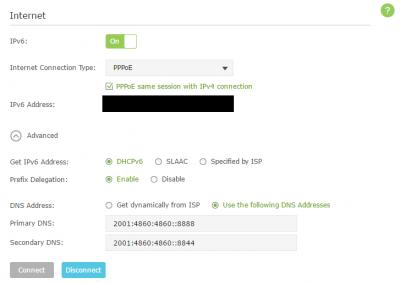
This post has been edited by jimmy.soo: Jun 5 2017, 10:15 PM |
|
|
Jun 18 2017, 11:14 PM
Return to original view | Post
#3
|
|
Senior Member
1,050 posts Joined: Feb 2006 From: KL
|
QUOTE(jimmy.soo @ Jun 5 2017, 10:14 PM) so did you manage to get it to work? I got it working now using the settings as per the screenshot
QUOTE(nikrizal @ Jun 18 2017, 07:00 AM) TM provided me TP-Link Archer C1200 couple months ago. I jusy realised that IPV6 is not working. I've set to DHCPV6 or SLAAC without any success. Anyone using similar router can share the settings? Thanks you may try using the above settings, which is what I'm using right now, but not sure what happened today as those blocked sites no longer accessible. |
|
|
Jun 20 2017, 08:42 PM
Return to original view | IPv6 | Post
#4
|
|
Senior Member
1,050 posts Joined: Feb 2006 From: KL
|
QUOTE(nikrizal @ Jun 20 2017, 04:16 PM) Finally it works with Archer C1200, I need to use SLAAC for getting the IPV6, and SLAAC + Stateless DHCP for LAN. so restricted sites can access without issue as well? |
|
|
Jun 20 2017, 11:56 PM
Return to original view | Post
#5
|
|
Senior Member
1,050 posts Joined: Feb 2006 From: KL
|
QUOTE(nikrizal @ Jun 20 2017, 11:01 PM) What do u mean by restricted sites? So far so good 😊 sites that blocked by TM via DNS such as http://www.sarawakreport.org or http://www.malaysia-chronicle.com, I tried your settings but still couldn't access to those blocked sites, ended up revert to IPv4 |
|
|
Jun 21 2017, 12:11 AM
Return to original view | Post
#6
|
|
Senior Member
1,050 posts Joined: Feb 2006 From: KL
|
QUOTE(calvinlaw510 @ Jun 21 2017, 12:08 AM) If you wanna use IPv6, you have to set dns for IPv6 too, not just only set on IPv4. I did and that worked for quite some time until yesterday, router rebooted itself and is no longer workingQUOTE(jimmy.soo @ Jun 5 2017, 10:14 PM) so did you manage to get it to work? I got it working now using the settings as per the screenshot I tried using his settings but unfortunately not working too
QUOTE(nikrizal @ Jun 20 2017, 04:16 PM) Finally it works with Archer C1200, I need to use SLAAC for getting the IPV6, and SLAAC + Stateless DHCP for LAN. |
| Change to: |  0.0399sec 0.0399sec
 0.39 0.39
 7 queries 7 queries
 GZIP Disabled GZIP Disabled
Time is now: 9th December 2025 - 04:19 AM |
 Quote
Quote