

 so mean msi gs 70 not supporting 1.5v or 1.65v XMP profile ram ? or all the 4th gen processor not support ?
MSI Gaming Notebook V.II, The Refreshed model yet more powerful!
|
|
 Sep 3 2013, 11:39 PM Sep 3 2013, 11:39 PM
|
 
Junior Member
142 posts Joined: May 2007 From: Subang Jaya / Melaka 
|
so mean msi gs 70 not supporting 1.5v or 1.65v XMP profile ram ? or all the 4th gen processor not support ? |
|
|
|
|
|
Sep 4 2013, 12:43 AM
|

Senior Member
7,037 posts Joined: Apr 2006 
|
QUOTE(horns @ Sep 3 2013, 08:21 PM) Yeah.. firmware is important to ssd's. sandforce has the advantage to reduce production costs (there is no need for ram in the products, and ram is expensive), thus making them more affordable. The damage caused by previous sandforce chips was kind of ireversible, especially to its reputation (and those brands that used it), even if the recent versions were reported to be much improved. Intel is the only one that implemented it right (it has the access to optimize the codes far better than others) Okay, I'd agree that firmware plays an big role, but in the case of the older SandFarce chips, no amount of tweaking on the software level could help the fact that the hardware itself had inherent design flaws, especially when it comes to the SATA reconnection issues. Not sure about the newer chips though. Afaik, the two common chips in use in most ssd's are still sandforce and marvell. Not all vertex are bad. Vertex 3 used sandforce, but vertex 4 uses rebranded marvell chip (and its not bad). plextor uses marvell. Sandisk switched to marvell too. Samsung uses its own chips. As for tlc vs. mlc, i prefer mlc also. However, tlc with appropriate technologies is getting better. It is likely to replace mlc in consumer grade ssd's in the future. As of now, imo it's better to get those with a marvel/samsung chip and mlc flash. So far, plextor and samsung drives never let me down (from msata to 2.5" form factors) For crucial m500, well, i feel safer when a manufacturer provides its own secure erase tool (some tried to use third party secure erase tools but that ended up rma of their m500). M500 lacks of certain features that allow proper secure erase.  As for the M500, Crucial doesn't have first party secure erase tools available for ALL their SSDs? Or is it just for the M500? From my readings the RMA issues stem with either bad batches of the drive or just some other one-off weird quirkiness. Parted Magic Secure Erase seems to work well for most with the M500 though. I've read nothing yet that suggests the M500 lacks "features" for proper secure erase, it's even advertised as part of the feature set. The lack of first party Disk Management software is slightly worrying though - I understand the feeling of security using first party tools to do something as "destructive" as a full wipe. I DO like Samsung SSDs, especially the fact that they're fast while remaining (very) energy-efficient. I just can't wrap my head around the (still) very low MTF numbers of TLC. After all, my SSD will be the primary drive, with a lot of caching and stuff being done on it. Relocating my caches and other write/read-intensive tasks to my HDD (to save cycles) would generally be counter-productive as I got an SSD for the speed (in writing AND reading) to begin with. Not being so big on "cutting-edge" myself, I'll probably just get a 240GB M4 - the M4 has good speeds, MLC AND good energy-efficiency in use. Plus the firmware should be mature and stable by now. @K.E: It's not that Haswell doesn't support 1.5 or 1.65v RAM. 1.35v is just... better. It gets up and running faster, and sucks less power doing so. For all it's worth I'm running mix of the stock 1.35v DDR3L (turns out the stock RAM really is lovol, wow MSI) and a cheapo 1.5v Kingston and it's not giving me much trouble - gaming and all. It's even running dual-channel with zero fuss. Maybe later after I finish SSD'ing the GE40 I'll start worrying about getting matched RAM for it. Maybe something fancy with heat spreaders or something lol. This post has been edited by Eiraku: Sep 4 2013, 12:48 AM |
|
|
Sep 4 2013, 12:44 AM
|

Senior Member
1,836 posts Joined: Dec 2007
|
QUOTE(K.E @ Sep 3 2013, 11:39 PM) so mean msi gs 70 not supporting 1.5v or 1.65v XMP profile ram ? or all the 4th gen processor not support ? |
|
|
Sep 4 2013, 12:47 AM
|
|
Senior Member
7,037 posts Joined: Apr 2006
|
QUOTE(dinraxxx @ Sep 4 2013, 12:44 AM) all 4th gen nowadays using only 1.35v ram. That's what I know upon my knowledge la. It CAN use 1.5v with zero issues, even mixed. It's 1.65v that's more of an unknown IINM. |
|
|
Sep 4 2013, 12:56 AM
|

Senior Member
3,038 posts Joined: Nov 2009
|
QUOTE(Eiraku @ Sep 4 2013, 12:43 AM) Okay, I'd agree that firmware plays an big role, but in the case of the older SandFarce chips, no amount of tweaking on the software level could help the fact that the hardware itself had inherent design flaws, especially when it comes to the SATA reconnection issues. Not sure about the newer chips though. well, most manufacturers have problems with the older sandforce chips As for the M500, Crucial doesn't have first party secure erase tools available for ALL their SSDs? Or is it just for the M500? From my readings the RMA issues stem with either bad batches of the drive or just some other one-off weird quirkiness. Parted Magic Secure Erase seems to work well for most with the M500 though. I've read nothing yet that suggests the M500 lacks "features" for proper secure erase, it's even advertised as part of the feature set. The lack of first party Disk Management software is slightly worrying though - I understand the feeling of security using first party tools to do something as "destructive" as a full wipe. I DO like Samsung SSDs, especially the fact that they're fast while remaining (very) energy-efficient. I just can't wrap my head around the (still) very low MTF numbers of TLC. After all, my SSD will be the primary drive, with a lot of caching and stuff being done on it. Relocating my caches and other write/read-intensive tasks to my HDD (to save cycles) would generally be counter-productive as I got an SSD for the speed (in writing AND reading) to begin with. Not being so big on "cutting-edge" myself, I'll probably just get a 240GB M4 - the M4 has good speeds, MLC AND good energy-efficiency in use. Plus the firmware should be mature and stable by now.  I read the issues of crucial m500 at http://forum.crucial.com/t5/Solid-State-Dr...her/td-p/132760 and http://rog.asus.com/forum/showthread.php?3...sd-crucial-m500 that's why I suggest the use of a 16gb ram disk for redirection of cache or temps. |
|
|
Sep 4 2013, 01:05 AM
|
|
Senior Member
1,836 posts Joined: Dec 2007
|
QUOTE(Eiraku @ Sep 4 2013, 12:47 AM) It CAN use 1.5v with zero issues, even mixed. It's 1.65v that's more of an unknown IINM. Sauce |
|
|
|
|
|
Sep 4 2013, 01:27 AM
|
|
Senior Member
7,037 posts Joined: Apr 2006
|
QUOTE(dinraxxx @ Sep 4 2013, 01:05 AM) I've read that too. But:Countersauce (From Intel's own dev conference): 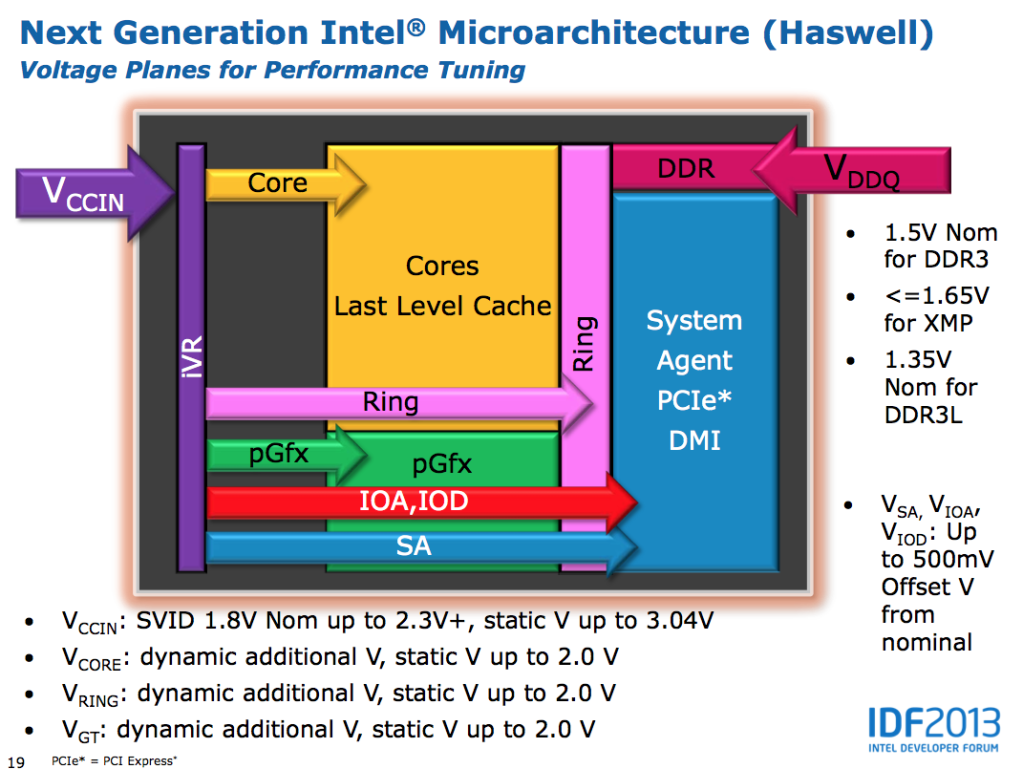 Note all 3 voltage profiles being supported on the upper right side of the slide. However, keep in mind this might simply apply to the Haswell architecture in general, the Desktop side included. More importantly, I've been hearing a lot of chatter that Haswell mobile ONLY pushes 1.35v to the RAM, which means that any 1.5/1.65v RAM stick used is simply "undervolted" down to 1.35v. This is MUCH more plausible (vs the the "it can ONLY use 1.35v or thar be dragons!" theory) and it sufficiently explains why only SOME 1.5/1.65v RAMs cause certain Haswell laptops to be unbootable, as NOT all 1.5/1.65v RAM sticks can handle running at 1.35v at default timings. In short, if the RAM used cannot run on 1.35v, the laptop will simply not boot. No matter what voltage RAM you stuff inside. The plus side is that no harm should come to the laptop in this case, because the motherboard isn't really supplying RAM voltage out-of-spec. It's simply a question of whether or not your RAM will run with the given voltage. In the worse case, the RAM sticks in question will simply not work (or die off) due to lack of power. Besides, there are ONLY 2 sites WARNING people of the dangers using anything over 1.35v with Haswell, on the ENTIRE Internet - and both of them forum posts. That has to count for something. If it'll really burn out stuff, you'd expect something like this to be ALL over the Internet, especially on "tech sites" like Anandtech and the like. But no, zero, nada, zilch. Even the senior members at NBR are running 1.5v RAM on Haswell with little issue (HTWingNut on his W230ST for example). Even with 2133Mhz RAM (which is running at 1866Mhz max on his W230ST). So it actually boils down to luck with any 1.5v (or even 1.65v) RAM sticks you plan to use. If it does 1.35v, you're fine. If not, well, tough luck. Hence the "recommendation" to use DDR3L, which are simply RAM that WILL work for sure at 1.35v. With that said, I'm fully planning to get another ADATA DDR3L stick anyway, or - like I said before - some fancy matched RAM set. It just feels better to run a matched pair in the end. But FIRST, I gotta get me some SSD love. @horns: Do you have to re-direct your cache and temps to the RAMdrive every time you cold boot? Because I don't run my laptop 24/7, and setting up startup batch commands for all that sounds like a real hassle. This post has been edited by Eiraku: Sep 4 2013, 09:43 AM |
|
|
Sep 4 2013, 02:16 AM
|

Senior Member
521 posts Joined: Aug 2006
|
why i cant update my ge40 graphic driver to 320.49?
|
|
|
Sep 4 2013, 03:16 AM
|
|
Senior Member
7,037 posts Joined: Apr 2006
|
QUOTE(wztech @ Sep 4 2013, 02:16 AM) why i cant update my ge40 graphic driver to 320.49? Because Nvidia doesn't really support the 76x series on laptops DIRECTLY (similar to a lot of their other laptop GPUs actually). They expect vendors (MSI/Clevo/Dell/Lenovo/Whoever) to come up with the drivers. You need to mod the Nvidia driver ".inf" file if you STILL want to update. If you can't, don't bother updating unless you have a serious issue with any of the games you have. I personally don't see THAT much improvement over stock 311 in the games I play anyway, at least not as much as actually optimising the settings for each game myself. This post has been edited by Eiraku: Sep 4 2013, 03:27 AM |
|
|
Sep 4 2013, 07:11 AM
|
|
Senior Member
3,038 posts Joined: Nov 2009
|
QUOTE(Eiraku @ Sep 4 2013, 01:27 AM) @horns: Do you have to re-direct your cache and temps to the RAMdrive every time you cold boot? Because I don't run my laptop 24/7, and setting up startup batch commands for all that sounds like a real hassle. |
|
|
Sep 4 2013, 08:49 AM
|
|
Senior Member
7,037 posts Joined: Apr 2006
|
QUOTE(horns @ Sep 4 2013, 07:11 AM) Uh? No. Its not that complicated anymore. There are many free ramdisk software now. Most of them are easy to set up, even for newbies. So you can set and forget? Meaning I take say 4GBs of RAM, turn it into disk for caching and temps, and the programs set everything up for me everytime I cold boot? Hmm, that's interesting indeed. |
|
|
Sep 4 2013, 09:13 AM
|
|
Senior Member
3,038 posts Joined: Nov 2009
|
QUOTE(Eiraku @ Sep 4 2013, 08:49 AM) So you can set and forget? Meaning I take say 4GBs of RAM, turn it into disk for caching and temps, and the programs set everything up for me everytime I cold boot? Hmm, that's interesting indeed. yes; you can set and forget that's what i do when i do a new install. try softperfect ramdisk; free, but it's one of the best; no limit on ramdisk size. 
i do my work in ram disk normally. i set the temporary folders, web cache (chrome, firefox, etc.) and download folder to the ramdisk (i am used to move things away from ram disk before shutdown). note that on every reboot, everything will be set up and start fresh, so you don't need to worry of any leftovers. it's good to be used in laptops because we have battery (acting as ups). the only drawback might be bsod's. well, i never met one yet. |
|
|
Sep 4 2013, 09:25 AM
|
|
Senior Member
7,037 posts Joined: Apr 2006
|
QUOTE(horns @ Sep 4 2013, 09:13 AM) yes; you can set and forget While surfing and other general stuff look really tempting with those speeds, I do a lot of writing and BSODs (however remote the chances) aren't exactly my cuppa tea - you might lose PAGES of work EVEN with autosave/autorecovery. Plus I'm running a mixed 1.35v/1.5v RAM combo AT 1.35v (IF the general net consensus regarding how Haswell treats memory is correct), so my RAM might not be the most BSOD-resistant, even if it hasn't given me any trouble YET.that's what i do when i do a new install. try softperfect ramdisk; free, but it's one of the best; no limits on ramdisk size.
i do my work in ram disk normally. i set the temporary folders, web cache (chrome, firefox, etc.) and download folder to the ramdisk (i am used to move things away from ram disk before shutdown). note that on every reboot, everything will be set up and start fresh, so you don't need to worry of any leftovers. it's good to be used in laptops because we have battery (acting as ups). the only drawback might be bsod's. well, i never met one yet. So I'll keep the RAMdisk as an interesting project to try out one day. For now, I'm gonna focus on getting a proper SSD first for the access speed boost - most possibly a Crucial M4 for the low power consumption or a Plex M5P. I'll have to get a 9.5mm ODD caddy as well and plan to start with a fresh Win8 install so this is gonna be one mighty fun project. A quick confirmation: Win8's CD-Key is built into the motherboard/BIOS/UEFI right? This post has been edited by Eiraku: Sep 4 2013, 09:58 AM |
|
|
|
|
|
Sep 4 2013, 10:32 AM
|
|
Senior Member
3,038 posts Joined: Nov 2009
|
QUOTE(Eiraku @ Sep 4 2013, 09:25 AM) While surfing and other general stuff look really tempting with those speeds, I do a lot of writing and BSODs (however remote the chances) aren't exactly my cuppa tea - you might lose PAGES of work EVEN with autosave/autorecovery. Plus I'm running a mixed 1.35v/1.5v RAM combo AT 1.35v (IF the general net consensus regarding how Haswell treats memory is correct), so my RAM might not be the most BSOD-resistant, even if it hasn't given me any trouble YET. well that's just my use case So I'll keep the RAMdisk as an interesting project to try out one day. For now, I'm gonna focus on getting a proper SSD first for the access speed boost - most possibly a Crucial M4 for the low power consumption or a Plex M5P. I'll have to get a 9.5mm ODD caddy as well and plan to start with a fresh Win8 install so this is gonna be one mighty fun project. A quick confirmation: Win8's CD-Key is built into the motherboard/BIOS/UEFI right? just do what you wanna to do.between m4 and plextor, i suggest m5p. m4 is old, while m5p has higher read/writes and iops; it has devslp too. of course, for common usage, in general any decent ssd will do |
|
|
Sep 4 2013, 10:49 AM
|
|
Senior Member
7,037 posts Joined: Apr 2006
|
QUOTE(horns @ Sep 4 2013, 10:32 AM) well that's just my use case M5P has devsleep? That's just the ticket, couldn't confirm it before this through my searches. just do what you wanna to do.between m4 and plextor, i suggest m5p. m4 is old, while m5p has higher read/writes and iops; it has devslp too. of course, for common usage, in general any decent ssd will do If that's so then the M5P it is. |
|
|
Sep 4 2013, 12:00 PM
|
|
Senior Member
3,038 posts Joined: Nov 2009
|
QUOTE(Eiraku @ Sep 4 2013, 10:49 AM) M5P has devsleep? That's just the ticket, couldn't confirm it before this through my searches. sorry i'm wrong. it's m5m that has the devslp. not m5p :/If that's so then the M5P it is. |
|
|
Sep 4 2013, 12:34 PM
|
|
Senior Member
1,836 posts Joined: Dec 2007
|
Guys, my GS70 touchpad can't be used. Restarted a few times but still havin problems. Can anyone help? Haven't use ot for a week :-(
|
|
|
Sep 4 2013, 01:04 PM
|

Senior Member
5,595 posts Joined: Jan 2003 From: Between Hell and Heaven
|
QUOTE(dinraxxx @ Sep 4 2013, 01:34 PM) Guys, my GS70 touchpad can't be used. Restarted a few times but still havin problems. Can anyone help? Haven't use ot for a week :-( it seem like got disabledyou try press down FN+F3 to enable it |
|
|
Sep 4 2013, 02:21 PM
|
|
Senior Member
7,037 posts Joined: Apr 2006
|
QUOTE(dinraxxx @ Sep 4 2013, 12:34 PM) Guys, my GS70 touchpad can't be used. Restarted a few times but still havin problems. Can anyone help? Haven't use ot for a week :-( Like Storm88 said, check if you turned the touchpad off first.If that fails, check the Elanpad settings under Control Panel -> Mouse (at the very end) and check if you have "Disable touchpad when USB pointing device is connected" turned ON. You want it OFF because it doesn't really work. @Horns: Dangit. Well I'll have to recheck reviews for power consumption figures and see if the vanilla M5P is comparable to the M4 in terms of power consumption. The Sammys are king in power consumption at the low end though, if only they had a well priced MLC based SSD. This post has been edited by Eiraku: Sep 4 2013, 02:23 PM |
|
|
Sep 4 2013, 02:35 PM
|
|
Senior Member
1,836 posts Joined: Dec 2007
|
Well,F3+Function button didn't work. @storm88
why does my F3 button didn't work? I tried entering F3 recovery and failed. Can anyone provide me with the software for this shortcut? |
|
Topic ClosedOptions
|
| Change to: |  0.0284sec 0.0284sec
 0.29 0.29
 6 queries 6 queries
 GZIP Disabled GZIP Disabled
Time is now: 3rd December 2025 - 08:51 PM |
 Quote
Quote